Objects, Interfaces, and Patterns
Overview
In Microsoft .NET, everything is an object. To truly master Visual Basic .NET programming, you need to understand these object internals. You also need to understand the patterns used in .NET code to copy, compare, dispose, and convert object types so that you can implement them in your own classes.
The first batch of recipes in this chapter (4.1 to 4.8) covers the ingredients you need to build complete, well-rounded objects. The later recipes in this chapter consider common techniques for building and using objects, with an emphasis on different approaches to serialization (recipes 4.9 to 4.12) and object-oriented programming (OOP) patterns that can help you solve common problems without reinventing the wheel (recipes 4.15 to 4.18).
The recipes in this chapter place the emphasis on doing OOP the right way, which means adopting the conventions of the .NET Framework. For example, when we create a custom Exception object (recipe 4.13), we'll implement the standard conventions needed to support serialization and inner exceptions. When we create a custom EventArgs object (recipe 4.14), we'll make it serializable so that it can be fired across application boundaries. And when we deal with objects that need support for cloning, comparing, conversion, and more, we'll use the canonical interfaces provided by the .NET Framework. Understanding these unwritten rules is the key to writing extensible, reusable .NET objects.
| Note |
Property procedures are an indispensable part of object-oriented programming, but they do lead to much lengthier code. For that reason, some of the examples in this chapter omit the property procedure code, especially if it duplicates an earlier example. In this case, a descriptive one-line comment is inserted in its place. This indicates that the property procedure code is quite straightforward and requires no special attention. If you would like to browse the full class code with all property procedures, refer to downloadable sample code for this chapter. |
Create a Value Type
Problem
You need to create an object that supports value type semantics.
Solution
Define the type as a structure. If you absolutely must use a class (for example, to use inheritance), override the Equals and the GetHashCode methods so that your class acts like a structure.
Discussion
In .NET, value types (such as DateTime, Int32, and so on) inherit from the System.ValueType class. Comparisons performed with value types act on the full contents of the object, not the object reference. Similarly, assignments performed with value types copy the entire contents of the object, not just the object reference. This behavior is best suited to simple classes that require only a small amount of memory to store their information. Because the memory for value types is allocated on the stack, not the managed heap, value types often perform better than reference types (although this won't be the case if you create large value types and use frequent assignment statements to copy the data).
The ValueType class is noninheritable, so you can't use it to create your own value types. However, you can use the Structure keyword in Visual Basic .NET. Here is a sample Person type implemented both as a structure and a class:
Public Structure PersonStructure

 Private _FirstName As String
 Private _LastName As String

 Public Property FirstName() As String
 Get
 Return _FirstName
 End Get
 Set(ByVal Value As String)
 _FirstName = Value
 End Set
 End Property

 Public Property LastName() As String
 Get
 Return _LastName
 End Get
 Set(ByVal Value As String)
 _LastName = Value
 End Set
 End Property

 Public Sub New(ByVal firstName As String, ByVal lastName As String)
 ' Note that the syntax is slightly different than in a class.
 ' You cannot assign directly to a property procedure
 ' in the structure code itself.
 Me._FirstName = firstName
 Me._LastName = lastName
 End Sub

End Structure

Public Class PersonClass

 Private _FirstName As String
 Private _LastName As String

 Public Property FirstName() As String
 Get
 Return _FirstName
 End Get
 Set(ByVal Value As String)
 _FirstName = Value
 End Set
 End Property

 Public Property LastName() As String
 Get
 Return _LastName
 End Get
 Set(ByVal Value As String)
 _LastName = Value
 End Set
 End Property

 Public Sub New(ByVal firstName As String, ByVal lastName As String)
 Me.FirstName = firstName
 Me.LastName = lastName
 End Sub

End Class
The following code tests the difference between a value type and reference type operation.
Dim StructureA As New PersonStructure("John", "Davenport")
Dim StructureB As New PersonStructure("John", "Davenport")

Dim ClassA As New PersonClass("John", "Davenport")
Dim ClassB As New PersonClass("John", "Davenport")

If StructureA.Equals(StructureB) Then
 ' This always happens.
 Console.WriteLine("Structures contain the same content.")
End If

If ClassA.Equals(ClassB) Then
 ' This never happens.
 Console.WriteLine("Classes point to the same instance.")
End If

Console.WriteLine("Assigning classes and structures...")
StructureA = StructureB
ClassA = ClassB

If CType(StructureA, Object) Is CType(StructureB, Object) Then
 ' This never happens.
 Console.WriteLine("Both variables point to the same structure.")
End If

If ClassA Is ClassB Then
 ' This always happens.
 Console.WriteLine("Both variables point to the same class.")
End If
It's important to understand how structures work if they contain objects. When you call Equals on a structure, the Equals method is called on every contained variable. If a structure contains a reference type, .NET will perform a reference comparison for that variable. Similarly, when you assign one structure to another, .NET will copy the contents of all contained value types, but only the reference of any contained reference types.
Structures don't support all the features of classes. For example, structures always include a default no-argument constructor. Structures also don't support inheritance. If you need to create a class that has value type behavior, you can override the Equals method, as shown here:
Public Overloads Overrides Function Equals(ByVal obj As Object) As Boolean
 If Not TypeOf obj Is PersonClass Then Return False

 Dim Compare As PersonClass = CType(obj, PersonClass)
 Return (Me.FirstName = Compare.FirstName And _
 Me.LastName = Compare.LastName)
End Function

Public Overloads Shared Function Equals(ByVal objA As Object, _
 ByVal objB As Object) As Boolean
 If Not (TypeOf objA Is PersonClass) Or _
 Not (TypeOf objB Is PersonClass) Then Return False

 Dim PersonA As PersonClass = CType(objA, PersonClass)
 Dim PersonB As PersonClass = CType(objB, PersonClass)
 Return (PersonA.FirstName = PersonB.FirstName And _
 PersonA.LastName = PersonB.LastName)
End Function
When creating a class that acts like a value type, you should also override the GetHashCode method so that identical objects return identical hash codes. By convention, .NET hash codes are always numeric and often use an XOR to combine multiple values, as shown in the following code:
Public Overloads Function GetHashCode() As Integer
 Return Me.FirstName.GetHashCode() Xor Me.LastName.GetHashCode()
End Function
Even after taking this step, you won't be able to easily copy the contents of a class—for that, you'll need to implement the ICloneable interface, as discussed in recipe 4.2.
| Note |
No matter what approach you take to create a value type (overriding the Equals method or using a structure), you won't be able to use your custom type in a comparison statement with the equal sign (=). This is because Visual Basic .NET does not support operator overloading, and there is thus no way for you to define the meaning of the equal sign. Instead, you must use the Equals method to test value type equality. |
Create a Cloneable Object
Problem
You want to create a straightforward way for developers to create copies of an object you create.
Solution
Implement the ICloneable interface, and use the MemberwiseClone method.
Discussion
Many .NET objects provide a Clone method that allows the contents of an object to be duplicated in a new object. The correct way to use this pattern with your own objects is by implementing the ICloneable interface.
The ICloneable interface defines a single Clone method. This method can make use of a protected method that all classes inherit from the base System.Object type: MemberwiseClone. This method performs a shallow copy of all the data in the object. Here's a simple implementation with the Person class introduced in recipe 4.1.
Public Class Person
 Implements ICloneable

 Private _FirstName As String
 Private _LastName As String

 ' (Property procedure and constructor code omitted.)

 Public Function Clone() As Object Implements System.ICloneable.Clone
 Return Me.MemberwiseClone()
 End Function

End Class
Here's how you clone the Person object:
Dim OriginalPerson As New Person("Lisa", "Xi")
Dim ClonedPerson As Person = CType(OriginalPerson.Clone(), Person)
This approach works perfectly well if your object contains only value types. However, if your class contains a reference type, its contents won't be copied. Instead, only the object reference will be duplicated. For example, in the MarriedCouple class that follows, the Clone method simply creates a new MarriedCouple that references the same Person objects (PartnerA and PartnerB).
Public Class MarriedCouple
 Implements ICloneable

 Private _PartnerA As Person
 Private _PartnerB As Person

 ' (Property procedure and constructor code omitted.)

 Public Function Clone() As Object Implements System.ICloneable.Clone
 Return Me.MemberwiseClone()
 End Function

End Class
The solution is to explicitly duplicate all reference types in your cloning code. If these types expose a Clone method, this step is easy:
Public Class MarriedCouple
 Implements ICloneable

 Private _PartnerA As Person
 Private _PartnerB As Person

 ' (Property procedure and constructor code omitted.)

 Public Function Clone() As Object Implements System.ICloneable.Clone
 Dim NewCouple As MarriedCouple
 NewCouple = CType(Me.MemberwiseClone(), MarriedCouple)
 NewCouple.PartnerA = CType(NewCouple.PartnerA.Clone(), Person)
 NewCouple.PartnerB = CType(NewCouple.PartnerB.Clone(), Person)
 Return NewCouple
 End Function

End Class
Here's the code you'll need to test the deep cloning approach with the MarriedCouple object:
Dim PersonA As New Person("Lisa", "Xi")
Dim PersonB As New Person("Andrew", "Sempf")
Dim Couple As New MarriedCouple(PersonA, PersonB)

Dim ClonedCouple As MarriedCouple = CType(Couple.Clone(), MarriedCouple)

If Couple Is ClonedCouple Then
 ' This never happens.
 Console.WriteLine("The references are the same. The cloning failed.")
Else
 Console.WriteLine("There are two distinct MarriedCouple objects.")
End If

If (Couple.PartnerA Is ClonedCouple.PartnerA) Or _
 (Couple.PartnerB Is ClonedCouple.PartnerB) Then
 ' This never happens.
 Console.WriteLine("A shallow clone was performed. " & _
 Part of the data is shared.")
Else
 Console.WriteLine("Each MarriedCouple has a distinct pair " & _
 "of Person objects.")
End If
Create a Type Safe Clone Method
Problem
You want to create a Clone method that returns an object of the correct type. However, the ICloneable.Clone method always returns a generic object.
Solution
Make the method that implements ICloneable.Clone private, and add another, strongly typed Clone method.
Discussion
The ICloneable interface always returns a generic System.Object reference, which means that the client must use casting code to convert the object to the appropriate type. However, you can remove this extra step by adding a strongly typed Clone method, as shown here.
Public Class Person
 Implements ICloneable

 Private _FirstName As String
 Private _LastName As String

 ' (Property procedure and constructor code omitted.)

 Private Function CloneMe() As Object Implements System.ICloneable.Clone
 Return Me.MemberwiseClone()
 End Function

 Public Function Clone() As Person
 Return CType(Me.CloneMe(), Person)
 End Function

End Class
Now, if the client clones the object using the ICloneable interface, the Person.CloneMe method will be used and a weakly typed object will be returned. However, if the client uses the method named Clone from the Person class, a strongly typed Person object will be returned.
Create a Comparable Object
Problem
You need to provide a mechanism that allows two custom objects to be compared.
Solution
Determine what data you want to use for the basis of your comparison, and implement the IComparable interface.
Discussion
The IComparable interface defines a single CompareTo method that accepts an object for comparison and returns an integer. The integer can take one of the following three values:
- Zero, which means the objects are equal.
- Less than zero (typically -1), which means that the current object is less than the object that was supplied as a parameter.
- Greater than zero (typically 1), which means that the current object is greater than the object that was supplied as a parameter.
You can evaluate the object contents on your own and decide which value to return. However, you can often use the CompareTo method of one of the contained data types to make the comparison. For example, in the code that follows, the Person object performs an alphabetical comparison (based on the last name, then the first name) on two Person instances using the String.CompareTo implementation.
Public Class Person
 Implements IComparable

 Private _FirstName As String
 Private _LastName As String

 ' (Property procedure and constructor code omitted.)

 Public Function CompareTo(ByVal obj As Object) As Integer _
 Implements System.IComparable.CompareTo

 If Not TypeOf obj Is Person Then
 Throw New ArgumentException("Object is not a Person")
 End If

 Dim Compare As Person = CType(obj, Person)

 ' Compare last names
 Dim result As Integer = Me.LastName.CompareTo(Compare.LastName)

 ' If last names are equal, compare first names
 If result = 0 Then
 result = Me.FirstName.CompareTo(Compare.FirstName)
 End If

 Return result
 End Function

End Class
Here's a simple test of a comparable object:
Dim PersonA As New Person("Andrew", "Sempf")
Dim PersonB As New Person("Andrew", "Sempf")

If PersonA Is PersonB Then
 ' This never happens.
 Console.WriteLine("These Person objects point to the same data " & _
 "in memory.")
End If

If PersonA.CompareTo(PersonB) = 0 Then
 ' This always happens.
 Console.WriteLine("These Person objects represent the same person.")
End If
Once you implement CompareTo, you can sort arrays or ArrayList objects that contain your object, as described in recipe 3.8. If you need to create an object that can be sorted in several different ways, you will need to create separate IComparer instances, as described in recipe 3.9.
| Note |
Implementing IComparable does not give you the ability to use the greater than (>) and less than (<) operators to compare your objects because Visual Basic .NET does not support operator overloading. Instead, you must call CompareTo explicitly. |
Create a Disposable Object
Problem
You need to create an object that frees unmanaged resources deterministically.
Solution
Implement the IDisposable pattern. Clients will call the Dispose method to release the object's resources.
Discussion
The IDisposable interface defines a single method, called Dispose. In this method, the class will release all its unmanaged resources. For best performance, when implementing IDisposable you should follow these best practices:
- Suppress garbage collector finalization for the object, provided it has no managed resources to release.
- Implement a finalizer that calls your Dispose method when the object is garbage collected. That way, if your object is released without Dispose being called (a common error), the resources will still be freed eventually.
- Call Dispose on any contained objects, provided the Dispose method is triggered directly and not called by the garbage collector (in which case a contained object could still be in use).
Be aware that it's of no use to implement Dispose with managed resources, because even if you set the variables to Nothing, the garbage collector still needs to run to reclaim the memory.
Here's how you would apply the disposable pattern in a custom class:
Public Class MyDisposableClass
 Implements IDisposable

 ' Implement IDisposable.
 ' This is the method the client calls to dispose the object.
 Public Overloads Sub Dispose() Implements System.IDisposable.Dispose
 Dispose(True)
 GC.SuppressFinalize(Me)
 End Sub

 ' This method is only called if the object is garbage
 ' collected without being properly disposed.
 Protected Overrides Sub Finalize()
 Dispose(False)
 End Sub

 ' The custom code for releasing resources goes here.
 Protected Overridable Overloads Sub Dispose(ByVal disposing As Boolean)
 If disposing Then
 ' Disposal was triggered manually by the client.
 ' Call Dispose() on any contained classes.
 End If

 ' Release unmanaged resources.
 ' Set large member variables to Nothing (null).
 End Sub

End Class
Notice that there's no way to force a client to call Dispose. Using a finalizer instead of a Dispose method won't help because the unmanaged resources won't be released until the garbage collector is activated or the application ends. On a system where memory is plentiful, this can take a long time!
You can also implement IDisposable indirectly by implementing System.ComponentModel.IComponent, which extends IDisposable, or inheriting from System.ComponentModel.Component, as described in recipe 4.6.
| Note |
To see a disposable object in action, run the sample code for this recipe. It uses a disposable object that displays Console messages to indicate its state. You'll be able to contrast a properly disposed object (which releases its resources immediately) with one that is just abandoned by setting the object reference to Nothing (which typically won't release its resources until the application ends). |
Create an Object That Can Appear in the Component Tray
Problem
You want to create a class that has basic design-time support and can be added to a form's component at design-time.
Solution
Derive your class from System.ComponentModel.Component.
Discussion
The .NET class library includes many classes that can be added to a form, Web page, or another type of component at design time. For example, as shown in Figure 4-1, you can add the System.Windows.Forms.Timer object class directly to the component tray of a form, even though it has no visual representation. This allows the programmer to configure properties and connect event handlers at design time.
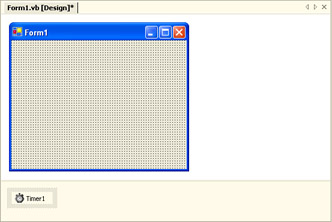
Figure 4-1: A component object in the component tray.
To create a class that supports design-time creation, you must implement the IComponent interface. You can do this directly, or indirectly by deriving from System.ComponentModel.Component or System.ComponentModel.MarshalByValueComponent. The former is used for classes that may be remoted (accessed from another application domain through a proxy), whereas the latter is for objects that may be copied into new application domains. Typically, classes that provide a service derive from Component, while classes that primarily contain data (such as the DataSet) derive from MarshalByValueComponent.
Once you derive from the component class, you need to add a small amount of boilerplate code to support the disposable pattern because the IComponent interface extends the IDisposable interface. For more information about the IDisposable interface, see recipe 4.5.
Here's a bare-bones example of a component class:
Public Class MyComponent
 Inherits System.ComponentModel.Component

 Protected Overloads Overrides Sub Dispose(disposing As Boolean)
 If disposing Then
 ' Disposal was triggered manually by the client.
 ' Call Dispose() on any contained classes.
 End If

 ' Release unmanaged resources.
 ' Set large member variables to Nothing (null).

 ' Call Dispose on the base class.
 MyBase.Dispose(disposing)
 End Sub

End Class
You should create component classes in a dedicated class library assembly. Once you have compiled the assembly, you can add the component classes to the Toolbox. Simply right-click the Toolbox, choose Add/Remove Items, and select the appropriate assembly. All component classes in the assembly will appear in the Toolbox and can now be dragged and dropped into the component tray (at which point a reference will be added to the assembly in your project). Figure 4-2 shows an example that includes two new components from an assembly.
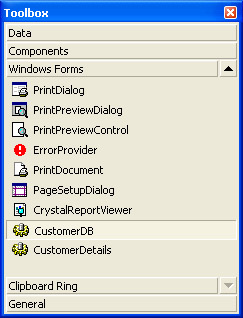
Figure 4-2: Component objects in the Toolbox.
| Note |
The System.ComponentModel namespace includes many attributes you can use to decorate the properties of a component class and influence how they will appear in the Properties window. For example, you can use DescriptionAttribute to add a text description that will appear in the window, DefaultValueAttribute to specify the initial value, DefaultPropertyAttribute to configure which property will be initially selected when the control receives focus at design-time, and so on. |
Create a Convertible Object
Problem
You want to create a class that can be converted to common data types such as Int32 and String.
Solution
Implement the IConvertible interface. Add conversion code for the supported data types, and throw an InvalidCastException for all unsupported data types.
Discussion
The IConvertible interface defines 17 methods for converting an object into basic .NET types. The first method, GetTypeCode, simply returns a value from the System.TypeCode enumeration identifying the type, which will always be TypeCode.Object for your custom classes, as shown here:
Public Function GetTypeCode() As TypeCode _
 Implements IConvertible.GetTypeCode
 Return TypeCode.Object
End Function
The other 16 methods perform the actual conversions and begin with the word To, as in ToBoolean, ToByte, ToString, and so on. If a method doesn't apply to your object, simply throw an InvalidCastException in the method.
Here's a partial example with a complex number class:
Public Class ComplexNumber
 Implements IConvertible

 Private _Real As Double
 Private _Imaginary As Double

 Public Property Real() As Double
 Get
 Return _Real
 End Get
 Set(ByVal Value As Double)
 _Real = Value
 End Set
 End Property

 Public Property Imaginary() As Double
 Get
 Return _Imaginary
 End Get
 Set(ByVal Value As Double)
 _Imaginary = Value
 End Set
 End Property

 Public Function GetModulus() As Double
 Return Math.Sqrt(Me.Real ^ 2 + Me.Imaginary ^ 2)
 End Function

 Public Function ToBoolean(ByVal provider As System.IFormatProvider) _
 As Boolean Implements System.IConvertible.ToBoolean
 Throw New InvalidCastException
 End Function

 Public Function ToDateTime(ByVal provider As System.IFormatProvider) _
 As Date Implements System.IConvertible.ToDateTime
 Throw New InvalidCastException
 End Function

 Public Function ToDecimal(ByVal provider As System.IFormatProvider) _
 As Decimal Implements System.IConvertible.ToDecimal
 Return CType(GetModulus(), Decimal)
 End Function

 Public Function ToDouble(ByVal provider As System.IFormatProvider) _
 As Double Implements System.IConvertible.ToDouble
 Return GetModulus()
 End Function

 ' (Other conversion methods omitted.)

End Class
To perform a conversion, a client can call a conversion method directly or use the System.Convert class, which works with any IConvertible object.
Dim MyDouble As Double = Convert.ToDouble(MyComplexNumber)
In addition, IConvertible allows your object to work with some batch conversions. For example, you can use the ArrayList.ToArray method to create a strongly typed array if your ArrayList contains the same type of object, and this type of object implements IConvertible. Recipe 3.7 demonstrates this technique.
Create a Serializable Object
Problem
You need to create an object that can be serialized (converted to a stream of bytes).
Solution
Add the Serializable attribute to your class.
Discussion
Serializable objects can be converted into a stream of bytes and recreated at a later point in time. You can use serialization to save an object to disk (as explained in recipe 4.9) or to send an object between application domains with .NET Remoting (in which case, the .NET runtime manages the serialization and deserialization transparently).
In order for serialization to work, your object must meet all the following criteria:
- The object must have a Serializable attribute preceding the class declaration.
- All the public and private variables of the class must be serializable.
- If the class derives from another class, all parent classes must also be serializable.
Here's a serializable Person class:
 _
Public Class Person

 Private _FirstName As String
 Private _LastName As String

 Public Property FirstName() As String
 Get
 Return _FirstName
 End Get
 Set(ByVal Value As String)
 _FirstName = Value
 End Set
 End Property

 Public Property LastName() As String
 Get
 Return _LastName
 End Get
 Set(ByVal Value As String)
 _LastName = Value
 End Set
 End Property

 ' (Constructor code omitted.)

End Class
In addition, a class might contain data that shouldn't be serialized; perhaps because it's large and can easily be recreated, it won't have the same meaning when the object is deserialized (like an unmanaged file handle), or it could compromise security. In these cases, you can add a NonSerialized attribute before the appropriate variables, as in the following code:
 _
Public Class Person

 Private _FirstName As String
 Private _LastName As String
  Private _Password As String

 ' (Property procedure and constructor code omitted.)

End Class
Serialize an Object to Disk
Problem
You need to persist a serializable object to a file and recreate it later.
Solution
Use .NET serialization with the help of BinaryFormatter or SoapFormatter.
Discussion
All serializable objects can be converted into a stream of bytes, and vice versa. To serialize an object manually, you need to use a class that supports IFormatter. The .NET Framework includes two: BinaryFormatter, which serializes an object to a compact binary representation, and SoapFormatter, which uses the SOAP XML format, and results in a longer text-based message. The BinaryFormatter class is found in the System.Runtime.Serialization.Formatters.Binary namespace, while SoapFormatter is found in the System.Runtime.Serialization.Formatters.Soap namespace. In order to use SoapFormatter, you must add a reference to the assembly System.Runtime.Serialization.Formatters.Soap. Both methods serialize all the private and public data in a class, along with the assembly and type information needed to ensure the object can be deserialized exactly.
The following example shows a Console application that serializes an object to a binary file, displays the information the file contains, and then restores it. In this case, we use SoapFormatter in conjunction with the serializable Person class shown in recipe 4.8. In order to use the code as written, you must import the System.IO namespace and the System.Runtime.Serialization.Formatters.Soap namespace.
Public Module SerializationTest

 Public Sub Main()
 Dim Person As New Person("John", "Davenport")

 ' Construct a formatter.
 Dim Formatter As New SoapFormatter

 ' Serialize the object to a file.
 Dim fs As New FileStream("person.dat", FileMode.Create)
 Formatter.Serialize(fs, Person)
 fs.Close()

 ' Open the file and display its contents.
 fs = New FileStream("person.dat", FileMode.Open)
 Dim r As New StreamReader(fs)
 Console.WriteLine(r.ReadToEnd())

 ' Deserialize the object.
 fs.Position = 0
 Person = CType(Formatter.Deserialize(fs), Person)
 Console.WriteLine(Person.FirstName & " " & Person.LastName)

 Console.ReadLine()
 End Sub

End Module
Here is the output for this program, which shows the serialized data and assembly information:
 <_FirstName >John
 <_LastName >Davenport


John Davenport
Note that the serialization process works on all the private member variables. Thus, the XML uses the names_FirstName and LastName for its elements, not the property names FirstName and LastName.
The serialization process serializes every referenced object and fails if it finds any unserializable type (unless it is preceded by the NonSerialized attribute). This means that if your object references other objects, which reference yet more objects, all these objects will be serialized into the same stream, which will have implications for the size of the file.
Both BinaryFormatter and SoapFormatter also implement IRemotingFormatter, which means they can be used to serialize objects that are being transmitted to another application domain. This process takes place transparently when you use .NET Remoting.
| Note |
Not all objects are serializable. You will know if an object is serializable by examining its class declaration, which is shown in the MSDN reference. If the class declaration is preceded by the Serializable attribute, the class can be serialized. If an object isn't serializable, you will need to use another technique to store the information, such as manually retrieving values and storing them, or using the XmlSerializer class, as described in recipe 4.11. |
Clone a Serializable Object
Problem
You want to create an exact copy of a serializable object. This is useful if the object doesn't expose a dedicate Clone method.
Solution
Serialize the object to a memory stream, and then deserialize the memory stream.
Discussion
Serialization provides a quick and convenient way to clone an object, provided it's serializable. You can use any formatter to perform this magic, but BinaryFormatter makes the most sense (because it requires the least amount of memory). You use the MemoryStream class as an intermediary.
The following example clones the serializable Person object from recipe 4.8. In order to use it as written, you'll need to import the System.Runtime.Serialization.Formatters.Binary namespace.
Public Module CloningWithSerialization

 Public Sub Main()
 Dim OriginalPerson As New Person("John", "Davenport")

 ' Construct a formatter.
 Dim Formatter As New BinaryFormatter

 ' Serialize the object to memory.
 Dim ms As New System.IO.MemoryStream()
 Formatter.Serialize(ms, OriginalPerson)

 ' Deserialize the object.
 ms.Position = 0
 Dim ClonedPerson As Person = CType(Formatter.Deserialize(ms), Person)

 Console.ReadLine()
 End Sub

End Module
Formatters serialize an entire object graph. Thus, if you serialize an object that references another object, when you deserialize the memory stream you will actually create two new objects. This means that the serialization approach to cloning always creates a deep copy. For that reason, it's sometimes useful to use this type of logic in your own objects when implementing ICloneable. For example, the following code rewrites the cloneable MarriedCouple class from recipe 4.2 with a version that uses serialization instead of the protected MemberwiseClone method. Remember that in order for this to work, both MarriedCouple and Person must be serializable.
 _
Public Class MarriedCouple
 Implements ICloneable

 Private _PartnerA As Person
 Private _PartnerB As Person

 ' (Property procedure and constructor code omitted.)

 Public Function Clone() As Object Implements System.ICloneable.Clone
 Dim Formatter As New BinaryFormatter

 ' Serialize the object to memory.
 Dim ms As New System.IO.MemoryStream()
 Formatter.Serialize(ms, Me)

 ' Deserialize the cloned object.
 ms.Position = 0
 Return Formatter.Deserialize(ms)
 End Function

End Class
Serialize Public Members of a Nonserializable Object
Problem
You want to serialize an object that isn't marked with the Serializable attribute.
Solution
Use the System.Xml.Serialization.XmlSerializer class, which provides a more limited form of serialization.
Discussion
The XmlSerializer class allows you to serialize an object that isn't explicitly marked as serializable. This is especially convenient if you need to store state for an object and you aren't able to modify the class code to make it serializable (perhaps because you don't have access to the source code).
The XmlSerializer class works much like the binary and SOAP formatters described in recipe 4.9, but with several limitations. First of all, it doesn't store any type information about the object, which could lead to unexpected errors if you try to deserialize information that was serialized by an earlier version of the same class. More important, XmlSerializer can only store information from public fields and property procedures. Any private variables will be reset to their default values when the object is recreated.
The XmlSerializer class also has two other requirements due to the way that it works:
- The class you want to serialize must include a default zero-argument constructor. The XmlSerializer class uses this constructor when creating the new object during deserialization.
- All class properties must be readable and writable. This is because XmlSerializer uses property get procedures to retrieve information and property set procedures to restore the data after deserialization. As a result, you won't be able to deserialize an object successfully if properties must be set in a specific order because you have no control over the order XmlSerializer uses.
Finally, XmlSerializer always serializes data to XML, which means a serialized object will never be as small as it would be with BinaryFormatter.
Following is a code sample that duplicates a nonserializable Person object using XmlSerializer. In order to use this example as written, you'll need to import the Sysetm.IO namespace. Remember, when you create XmlSerializer you must supply a Type object that indicates the class you want to serialize or deserialize. This is because no type information is stored in the serialization format itself.
Public Module SerializationTest

 Public Sub Main()
 Dim Person As New Person("John", "Davenport")

 ' Construct the serializer.
 Dim Serializer As New _
 System.Xml.Serialization.XmlSerializer(GetType(Person))

 ' Serialize the object to a file.
 Dim fs As New FileStream("person.dat", FileMode.Create)
 Serializer.Serialize(fs, Person)
 fs.Close()

 ' Open the file and display its contents.
 fs = New FileStream("person.dat", FileMode.Open)
 Dim r As New StreamReader(fs)
 Console.WriteLine(r.ReadToEnd())

 ' Deserialize the object.
 fs.Position = 0
 Person = CType(Serializer.Deserialize(fs), Person)
 Console.WriteLine(Person.FirstName & " " & Person.LastName)

 Console.ReadLine()
 End Sub

End Module
The output for this test shows the serialization data:
 John
 Davenport


John Davenport
| Note |
The XmlSerializer class is used transparently to transmit data to and from a Web service. The System.Xml.Serialization namespace also includes attributes you can use to configure the serialization of a class. For example, you can apply attributes to configure the name used for the element in an XML file (XmlElementAttribute) or to instruct the serializer to ignore a property or public variable (XmlIgnoreAttribute). |
Perform Selective Serialization with the Memento Pattern
Problem
You want to serialize only part of an object or an object that inherits from another nonserializable object.
Solution
Create a dedicated, serializable object to hold the information that must be persisted.
Discussion
The memento pattern allows you to handle object serialization in a more flexible manner. Some of the reasons you might use the memento pattern include the following:
- You want to serialize an object that wouldn't otherwise be serializable (perhaps because it derives from a nonserializable object).
- You want to serialize a portion of an object. The NonSerialized attribute can also help in this case, but you can't use it to prevent the serialization of the information in a class that your code derives from.
- You want to allow an object to be serialized in different ways. For example, sometimes you might want to only persist a subset of the total available data, while other times you might need to serialize more information.
With the memento pattern, the basic technique is to create a dedicated serializable object that holds the data you want to persist. This object is called a memento.
For example, consider the custom ColoredMenuItem class shown in the following code, which stores information about the text and colors of a custom menu entry. It inherits from MenuItem and adds two properties. For a full description of the ColoredMenuItem and how you can create custom menus, refer to recipe 12.20.
Public Class ColoredMenuItem
 Inherits MenuItem

 Private _ForeColor As Color
 Private _BackColor As Color

 Public Property ForeColor() As Color
 Get
 Return _ForeColor
 End Get
 Set(ByVal Value As Color)
 _ForeColor = Value
 End Set
 End Property

 Public Property BackColor() As Color
 Get
 Return _BackColor
 End Get
 Set(ByVal Value As Color)
 _BackColor = Value
 End Set
 End Property

 ' (Painting code omitted.)

End Class
You can't serialize the ColoredMenuItem class even if you apply the Serializable attribute because the base MenuItem class isn't serializable. Thus, the best approach is to create a memento that holds the data you want to persist:
 _
Public MustInherit Class Memento
End Class

 _
Public Class ColoredMenuItemMemento
 Inherits Memento

 Private _ForeColor As Color
 Private _BackColor As Color
 Private _Text As String

 Public Property ForeColor() As Color
 Get
 Return _ForeColor
 End Get
 Set(ByVal Value As Color)
 _ForeColor = Value
 End Set
 End Property

 Public Property BackColor() As Color
 Get
 Return _BackColor
 End Get
 Set(ByVal Value As Color)
 _BackColor = Value
 End Set
 End Property

 Public Property Text() As String
 Get
 Return _Text
 End Get
 Set(ByVal Value As String)
 _Text = Value
 End Set
 End Property

 Public Sub New(ByVal text As String, ByVal foreColor As Color, _
 ByVal backColor As Color)
 Me.Text = text
 Me.ForeColor = foreColor
 Me.BackColor = backColor
 End Sub

End Class
The next step is to add methods to the ColoredMenuItem that allow data to be transferred to and from the memento. In this case, it helps to define a generic interface:
Public Interface IMemento

 Function GetMemento() As Memento
 Sub SetMemento(memento As Memento)

End Interface
Now the ColoredMenuItem must implement the IMemento interface and add the following code:
Public Function GetMemento() As Memento Implements IMemento.GetMemento
 Return New ColoredMenuItemMemento(Text, ForeColor, BackColor)
End Function

Public Sub SetMemento(ByVal memento As Memento) Implements IMemento.SetMemento
 Dim ColoredMemento As ColoredMenuItemMemento
 ColoredMemento = CType(memento, ColoredMenuItemMemento)
 ForeColor = ColoredMemento.ForeColor
 BackColor = ColoredMemento.BackColor
 Text = ColoredMemento.Text
End Sub
In addition, you can add a constructor that creates a new ColoredMenuItem based on the information in the memento:
Public Sub New(ByVal memento As ColoredMenuItemMemento)
 Me.New(memento.Text, memento.ForeColor, memento.BackColor)
End Sub
The sample code for this recipe provides a simple Windows test application. It creates a menu with several ColoredMenuItem instances (see Figure 4-3) and allows you to serialize this collection to a file and then restore it. The serialization code shows another trick: serializing multiple objects into a single stream.

Figure 4-3: Testing memento serialization
Below is the code that reads the menu and serializes all the contained items. It then clears the menu.
Private Sub cmdSerialize_Click(ByVal sender As System.Object, _
 ByVal e As System.EventArgs) Handles cmdSerialize.Click

 ' Construct a formatter.
 Dim Formatter As New BinaryFormatter()

 ' Serialize the menu mementos to a file.
 Dim fs As New FileStream("MyMenuItem.dat", FileMode.Create)

 ' Start by writing the number of objects that will be serialized.
 fs.WriteByte(CType(mnuColors.MenuItems.Count, Byte))

 ' Serialize all the menu items to the same file.
 Dim Item As ColoredMenuItem
 For Each Item In mnuColors.MenuItems
 Dim Memento As ColoredMenuItemMemento
 Memento = CType(Item.GetMemento(), ColoredMenuItemMemento)
 Formatter.Serialize(fs, Memento)
 Next
 fs.Close()

 ' Clear the menu.
 mnuColors.MenuItems.Clear()

End Sub
And here's the code that reads the file and restores the menu items:
Private Sub cmdDeserialize_Click(ByVal sender As System.Object, _
 ByVal e As System.EventArgs) Handles cmdDeserialize.Click

 mnuColors.MenuItems.Clear()

 ' Construct a formatter.
 Dim Formatter As New BinaryFormatter()

 ' Read the number of menu items in the file.
 Dim fs As New FileStream("MyMenuItem.dat", FileMode.Open)
 Dim ItemCount As Integer = fs.ReadByte()

 ' Deserialize each memento and apply it.
 Dim i As Integer
 For i = 1 To ItemCount
 Dim Memento As ColoredMenuItemMemento
 Memento = CType(Formatter.Deserialize(fs), ColoredMenuItemMemento)
 mnuColors.MenuItems.Add(New ColoredMenuItem(Memento))
 Next
 fs.Close()

End Sub
Throw a Custom Exception
Problem
You need to indicate an application-specific error condition to the caller of your code.
Solution
Derive a custom exception object from the System.ApplicationException class, and add the recommended constructors. Use the Throw statement to throw the exception.
Discussion
.NET Framework guidelines suggest that you always use exception objects to indicate error conditions (not return values or another mechanism). If you need to indicate a generic error condition, use one of the existing framework exceptions (such as InvalidCastException, SecurityException, DivideByZeroException, or ArgumentException) with a custom description. If, however, you need to indicate an application-specific error, you should create a custom exception object. This custom exception object should derive from ApplicationException, not the base Exception class, and end with the word Exception.
Every exception should have the three basic constructors shown here:
Public Sub New()
 ' (Creates an uninitialized exception.)
 MyBase.New()
End Sub

Public Sub New(ByVal message As String)
 ' Creates an exception with a text message.
 MyBase.New(message)
End Sub

Public Sub New(ByVal message As String, ByVal inner As Exception)
 ' Creates an exception with a text message and a nested (inner)
 ' exception object.
 MyBase.New(message, inner)
End Sub
Notice that these constructors simply call the base class implementation, which performs the work.
In addition, you need to add a deserialization constructor to the Exception object if you want to make it serializable, along with the Serializable attribute. The Serializable attribute is not enough on its own because the base Exception class implements ISerializable to perform custom serialization. If your exception does not include any data, this constructor can simply call the base class implementation:
Public Sub New(ByVal info As SerializationInfo, _
 ByVal context As StreamingContext)
 MyBase.New(info, context)
End Sub
Life becomes slightly more complicated if your exception adds its own properties. In this case, you must implement additional constructors to accept information for these properties. You must also implement GetObjectData to store the new information on serialization and configure the deserialization constructor so that it reads the new information. As an example, consider the custom exception shown here.
 _
Public Class CustomException
 Inherits ApplicationException

 ' The custom data.
 Private _CustomValue As Integer

 Public ReadOnly Property CustomValue() As Integer
 Get
 Return _CustomValue
 End Get
 End Property

 Public Sub New()
 MyBase.New()
 End Sub

 Public Sub New(ByVal message As String)
 MyBase.New(message)
 End Sub

 Public Sub New(ByVal message As String, ByVal inner As Exception)
 MyBase.New(message, inner)
 End Sub

 ' This constructor takes the added value.
 Public Sub New(ByVal message As String, ByVal value As Integer)
 MyBase.New(message)
 Me._CustomValue = value
 End Sub

 ' Store data during serialization.
 Public Overrides Sub GetObjectData(ByVal info As SerializationInfo, _
 ByVal context As StreamingContext)
 MyBase.GetObjectData(info, context)
 info.AddValue("Value", Me._CustomValue)
 End Sub

 ' Retrieve data during deserialization.
 Public Sub New(ByVal info As SerializationInfo, _
 ByVal context As StreamingContext)
 MyBase.New(info, context)
 Me._CustomValue = info.GetInt32("Value")
 End Sub

End Class
You can also override the Message property to give a better textual representation of your exception by incorporating the custom data with the message.
As with any other type of exception, you can throw the custom exception using the Throw keyword:
Throw New CustomException("Error", 100)
Raise a Custom Event
Problem
You need to send data with a custom event.
Solution
Derive a custom event argument object from the System.EventArgs class, add the information you need, and declare the event. Use RaiseEvent to fire the event.
Discussion
.NET events follow a common syntax. The first argument is the sender of the event (as a weakly typed System.Object instance). The second argument is an object derived from System.EventArgs that contains any additional information. The custom EventArgs class should always be named in the form EventNameEventArgs.
Here's an event declaration that follows these conventions and can be added to the declaration of any class:
Public Event TaskCompleted(sender As Object, e As TaskCompletedEventArgs)
The custom EventArgs object simply needs to add informational properties and constructors as needed. You should also make it serializable if there's a possibility that the event might need to cross application domain boundaries. For example, if your custom object is a remotable class, all its events should use serializable event arguments.
Public Class TaskCompletedEventArgs
 Inherits EventArgs

 ' The custom data.
 Private _CustomValue As Integer

 Public ReadOnly Property CustomValue() As Integer
 Get
 Return _CustomValue
 End Get
 End Property

 Public Sub New(customValue As Integer)
 MyBase.New()
 Me._CustomValue = customValue
 End Sub

End Class
You raise events using the RaiseEvent statement, indicating the name of the event and passing the defined event arguments:
RaiseEvent TaskComplete(Me, New TaskCompletedEventArgs(100))
It's recommended that you use a dedicated protected method (named OnEventName) that raises the event, particularly if your class is inheritable. This allows inheritors to override the event and provide extended functionality. In the following code, the TaskProcess class shows this pattern.
Public Class TaskProcess

 Public Event TaskCompleted(sender As Object, e As TaskCompletedEventArgs)

 Public Sub DoTask()
 ' (Task processing code goes here.)
 OnTaskComplete(New TaskCompletedEventArgs(100))
 End Sub

 Public Sub OnTaskComplete(e As TaskCompletedEventArgs)
 RaiseEvent TaskCompleted(Me, e)
 End Sub

End Class
Use the Singleton Pattern
Problem
You want to ensure that only one copy of a class can be instantiated at once and provide global access to this instance.
Solution
Add a private constructor to the class and a shared variable that holds the singleton instance.
Discussion
The syntax for creating a singleton in languages that target .NET is quite a bit simpler than in many other languages, due to the way the common language runtime operates. The basic pattern is to add a shared variable that returns an instance of the singleton class, as shown here:
Public Class MySingleton

 Private Sub New()
 ' A private constructor ensures this class can't be created directly,
 ' except by code in this class.
 End Sub

 ' This shared member is available even without an instance of the class.
 Public ReadOnly Shared Instance As New MySingleton()

 ' This is a sample instance member.
 Public Sub DoSomething()
 End Sub

End Class
The code accesses the global instance of the singleton through the Instance property, like this:
' Call the Singleton's DoSomething method.
MySingleton.Instance.DoSomething()
It's important to realize that .NET uses lazy loading to minimize memory consumption. That means that an instance of MySingleton isn't created when the application first starts. Instead, an instance is created the first time your code accesses the Instance variable (or any other shared member of the class). After this point, your code will always receive the same singleton instance from the Instance variable.
It's not necessary to use locking code with this example because the CLR automatically guarantees thread-safety for all shared members. That means there's no possibility for two instances of the singleton to be created if two threads try to access the Instance property at the same time. However, if you use any global instance data and your program uses multithreading, you will need to add locks to ensure that this data is updated properly, as described in Chapter 7.
| Note |
The Microsoft Visual Studio .NET migration wizard uses a variant of the singleton pattern when migrating Visual Basic 6 forms. This ensures that a single instance of a form can be accessed globally, without needing to create it explicitly (which matches the behavior of Visual Basic 6 code). |
Use the Factory Pattern
Problem
You want the ability to create classes generically, without knowing their specific types.
Solution
Create a dedicated factory class that can construct the type of class you need.
Discussion
The factory pattern is one of the best-known creational patterns. It provides an abstracted mechanism for creating classes.
In the factory pattern, as shown in Figure 4-4, every class has its own corresponding factory class. In order for the factory pattern to work, all of these classes must derive from two abstract base classes.
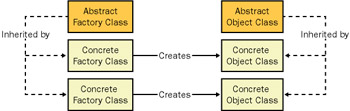
Figure 4-4: The abstract factory pattern
For example, imagine you want to create a generic component that queries a database. This component might need to use different classes to connect to the database, depending on the database type. However, you want to create this class without needing to know all the classes it might support in the future. In this case, the abstract factory pattern suits perfectly.
The first step is to define the base classes:
Public MustInherit Class DatabaseConnection
 Public MustOverride Function ExecuteQuery(ByVal SQL As String) _
 As DataSet
End Class

Public MustInherit Class DatabaseConnectionFactory
 Public MustOverride Function GetConnection( _
 ByVal connectionString As String) As DatabaseConnection
End Class
In this case, the abstract classes are as simple as possible. The DatabaseConnection class provides only one method, and DatabaseConnectionFactory only requires one piece of information (which it will pass to the DatabaseConnection constructor).
Next, you can define multiple sets of concrete classes for individual databases. Here is an example for an Oracle database:
Public Class OracleConnection
 Inherits DatabaseConnection

 Public Overrides Function ExecuteQuery(ByVal SQL As String) _
 As System.Data.DataSet
 ' (Code to perform an Oracle query goes here.)
 End Function

 Public Sub New(ByVal connectionString As String)
 ' (Initialize the connection here.)
 End Sub

End Class

Public Class OracleConnectionFactory
 Inherits DatabaseConnectionFactory

 Public Overrides Function GetConnection( _
 ByVal connectionString As String) As DatabaseConnection
 Return New OracleConnection(connectionString)
 End Function

End Class
It's now possible to create a generic object that can create a connection and perform a query, but only needs to use the abstract classes:
Public Class Query

 Public Function GetUserRecords( _
 ByVal factory As DatabaseConnectionFactory, _
 ByVal connectionString As String) As DataSet
 ' Use the appropriate concrete object to get the records.
 ' You could even perform multiple tasks here, like aggregating
 ' the results from several queries.
 Dim Con As DatabaseConnection
 Con = factory.GetConnection(connectionString)

 Dim SQL As String = "SELECT * FROM Users"
 Return Con.ExecuteQuery(SQL)
 End Function

End Class
Thus, you can add new concrete classes for different databases, and use them with the GetUserRecords method without needing to change any of the code in the GetUserRecords method itself.
These sample classes show the complete underpinnings of the abstract factory pattern. However, it's unlikely that you would use the abstract factory pattern in exactly the way shown because the .NET Framework already includes various database connection classes and a generic interface as a part of Microsoft ADO.NET. However, ADO.NET doesn't include a database connection factory. The downloadable code for this chapter shows a practical example of how you might combine ADO.NET and your own abstract factory class to help make database code more generic.
| Note |
You can use a variation of the abstract factory pattern that uses interfaces instead of abstract classes. This is often called the builder pattern. |
Use the Registry Pattern
Problem
You need a convenient way to track objects and retrieve them by name from multiple places in your code.
Solution
Use the registry pattern, which centralizes access to a set of objects through one registry object.
Discussion
A registry object acts as a repository for a collection of items that you need to identify and retrieve later. For example, you might use a registry to track all the currently loaded forms in a Microsoft Windows application. The .NET Framework does not provide any built-in method to offer this functionality.
First of all, you need to create your registry object. Clients register and unregister elements in the registry, giving them convenient names for later retrieval. The registry object shown here tracks form instances by name:
Public Class OpenFormsRegistry
 Private Shared Forms As New Hashtable

 Public Shared Sub RegisterForm(ByVal form As Form, _
 ByVal name As String)
 Forms(name) = form
 End Sub

 Public Shared Sub UnregisterForm(ByVal name As String)
 Forms.Remove(name)
 End Sub

 Public Shared Function GetForm(ByVal name As String) As Form
 Return CType(Forms(name), Form)
 End Function

 Public Shared Function GetForms() As ICollection
 Return Forms.Values
 End Function

End Class
Depending on your needs, you might want to add additional methods such as GetAllForms, which might be useful if you need to perform some sort of check across all windows in an application before exiting. In this example, the registry is a class that consists of shared members. Alternatively, you could use a module (which compiles to the same intermediate language (IL) code as a class with shared members), or a singleton as described in recipe 4.15.
The name you use to register form instances also depends on your application. For example, if you only allow one instance of a form to be loaded at once, you could use the class name of the form. Here's an example that uses this approach to register a form on startup:
Private Sub Form1_Load(ByVal sender As System.Object, _
 ByVal e As System.EventArgs) Handles MyBase.Load
 OpenFormsRegistry.RegisterForm(Me, Me.Name)
End Sub
Use the Lazy Initialization Pattern
Problem
You have an object that contains data that's expensive to create and might not be required.
Solution
Use the lazy initialization pattern to create or to retrieve the information "just in time."
Discussion
The lazy initialization pattern is often used with stateful objects that need to retrieve data from a database, but it can be applied to any object that's expensive to create. The basic approach is to use a Boolean private member variable IsInitialized to track whether the object data has been retrieved yet. Here's a basic skeleton that illustrates the concept by setting a string variable:
Public Class MyObject

 Private IsInitialized As Boolean = False
 Private _Data As String

 Public ReadOnly Property Data() As String
 Get
 If Not IsInitialized Then Initialize()
 Return _Data
 End Get
 End Property

 Private Sub Initialize()
 ' Fetch data from data source.
 Me._Data = "Data Value"
 Me.IsInitialized = True
 End Sub

End Class
| Note |
The Visual Studio .NET debugger can exhibit some unusual behavior with lazy initialization. If you display a lazy-initialized property in the debugger (using a watch window or the Command window, or even just moving the mouse over the property name to use IntelliSense), Visual Studio .NET will run the initialization code automatically. However, if the initialization code is triggered this way while in break mode, any breakpoints in the initialization code will be ignored. |
A related model is the "IsDirty" pattern, which uses a Boolean IsDirty variable that tracks whether any changes have been made to the object. Then, when the object is asked to persist changes (perhaps by calling a dedicated Save method), it only performs the time consuming update if the IsDirty flag is True, meaning that at least one value has been changed.
Public Class MyObject

 Private _Data As String
 Private IsDirty As Boolean

 Public ReadOnly Property Data() As String
 Get
 Return _Data
 End Get
 Set(ByVal Value As String)
 IsDirty = True
 _Data = Value
 End Set
 End Property

 Public Sub Save()
 If IsDirty
 ' (Add code to persist change.)
 End If
 End Sub

End Class
Introduction
- Strings and Regular Expressions
- Numbers, Dates, and Other Data Types
- Arrays and Collections
- Objects, Interfaces, and Patterns
- Files and Directories
- XML
- Multithreading
- Network Programming
- Reflection
- Windows Programming
- Windows Controls
- Printing and Drawing with GDI+
- Windows Services
- ADO.NET
- ASP.NET Web Applications
- Web Services
- Remoting and Enterprise Services
- Security and Cryptography
- Useful COM Interop

EAN: 2147483647
Pages: 376
