Numbers, Dates, and Other Data Types
Overview
Programming is, to a large extent, the science of dealing with data. In the previous chapter, you saw how to use .NET strings and regular expressions to manipulate text. In this chapter, we consider the rest of the core types in the Microsoft .NET Framework, including numbers, dates, and specialty types such as GUIDs and enumerations.
Some of the recipes in this chapter focus on fundamentals for dealing with data types. For example, you'll learn how to validate dates, format numeric values, access trigonometric functions, and convert binary and hexadecimal values. Other recipes present more advanced techniques that might require custom classes. Recipes 2.5, 2.6, 2.7 show you how to deal with complex numbers, vectors, and matrixes—all of which are types of data that have no core support in the .NET Framework. Fortunately, .NET makes it easy to write a custom class that encapsulates all the functionality you need.
| Note |
This chapter includes lengthy examples that work with Fraction, ComplexNumber, and Vector classes. To simplify the code, these classes use public member variables for their constituent values rather than full property procedures. Of course, full property procedures represent the best style for object-oriented programming, and you'll find that the online examples for this chapter use them instead of public variables. |
This chapter also presents recipes that demonstrate how to convert basic data types to binary and back, and how to pull off a few more enigmatic tricks, such as evaluating a mathematical expression contained in a string (recipe 2.9), determining the day of a week for a specific date (recipe 2.12), and converting the name of an enumeration into the corresponding enumerated value (recipe 2.20).
Perform Mathematical and Trigonometric Operations
Problem
You need to perform a mathematical operation such as taking the sine, logarithm, absolute value, and so on.
Solution
Use the System.Math class, which provides a collection of helper utilities for this task.
Discussion
Microsoft Visual Basic .NET provides operators for common tasks such as addition and subtraction (+, -), multiplication and division (*, /), exponentiation (^), integer division (), and finding the remainder (Mod). For all other operations, you can use the methods exposed by the Math class. Here are three examples:
' Get a sin of an angle measured in radians.
x = Math.Sin(y)

' Round a number to two decimal places.
x = Math.Round(y, 2)

' Get the absolute value of a number.
x = Math.Abs(y)
Useful Math class members include:
- Constants PI and E (the natural logarithmic base).
- Trigonometric functions Sin, Cos, Tan, Asin, Acos, Atan, and hyperbolic Sinh, Cosh, and Tanh.
- Logarithmic function Log and Log10.
- Power functions Exp (returns e raised to a specified power), Pow (which raises a number to an indicated power), and Sqrt.
- Comparative functions Max and Min, which return the higher or lower of two numbers, respectively.
- Boundary functions Floor (returns the largest whole number less than or equal to the supplied number, effectively truncating it), and Ceiling (returns the smallest whole number greater than or equal to the specified number).
- Sign-related functions Abs (which removes the sign).
- Round, which rounds a number to a specified number of decimal places.
Convert a Number into a Formatted String
Problem
You want to convert a numeric type (Decimal, Int32, Double, and so on) into a formatted string.
Solution
Use the overloaded version of the ToString method that accepts a format string.
Discussion
There are two types of numeric format strings: standard and custom. Standard format strings use a preset format according to the current culture and are identified by a single letter. You use that letter, in conjunction with a number that indicates the precision, when converting a number to a string. Here are a few common examples:
Dim Number As Decimal = 12345.6D

' The format specifier for currency is "C"
Dim MoneyString As String = Number.ToString("C")
' MoneyString is now "12,345.60"

' The format specifier for scientific notation is "E"
' The code also specifies 2 decimal places.
Dim ScientificString As String = Number.ToString("E2")
' ScientificString is now "1.23E+004"

' The format specifier for ordinary numbers is "N"
Dim NormalString As String = Number.ToString("N")
' NormalString is now "12,345.60"
Table 2-1 presents a full list of standard numeric format specifiers.
|
String |
Name |
Description |
|---|---|---|
|
C or c |
Currency |
The number is converted to a string that represents a currency amount (such as "$12,345.68"). |
|
D or d |
Decimal |
The number is padded with zeros on the left side according the precision. For example, D8 would format the number 12345 to "00012345". This is only supported for integer types. |
|
E or e |
Scientific |
The number is converted to a string in exponential form with one digit preceding the decimal point. The precision specifier indicates the desired number of digits after the decimal point (the default is six). For example, 12345.6789 will be formatted as "1.234568E+004" with the default precision. |
|
F or f |
Fixed-point |
The number is converted to a string with a number of decimal places equal to the precision specifier (the default is two). Rounding is performed as needed. For example, the number 12345.6789 would format to "12345.68". |
|
G or g |
General |
The number is converted to the most compact decimal form, using fixed or scientific notation. The precision specifier determines the number of significant digits in the resulting string. If the precision specifier is omitted, the number of significant digits is determined by the type of number being converted (5 for an Int16, 10 for an Int32, 19 for an Int64, 7 for a Single, 15 for a Double, and 29 for a Decimal). |
|
N or n |
Number |
The number is converted to a string with comma separators between each group of three digits to the left of the decimal point. The precision specifier indicates the desired number of decimal places (the default is two). Rounding is performed as needed. For example, 12345.6789 formats to "12,345.68". |
|
P or p |
Percent |
The number is converted to a string that represents a percent. The converted number is multiplied by 100, and a percent sign (%) is appended. For example, 0.126 formats to "12.60 %". |
|
R or r |
Round-trip |
The round-trip format guarantees that a floating-point number can be converted to a string and back to the number (using the Double.Parse or Single.Parse method) without losing any information. This specifier uses the general format, with 15 spaces of precision for a Double and 7 spaces of precision for a Single. If this is insufficient, a full 17 digits of precision will be used for a Double, and 9 digits of precision for a Single. |
|
X or x |
Hexadecimal |
The number is converted to a string of hexadecimal digits, so 123456789 formats to "75bcd15". The case of the format specifier indicates whether to use uppercase or lowercase characters for alphabetic digits. The precision specifier indicates the minimum number of digits desired in the resulting string, and the number will be padded with zeros accordingly. This is only supported for integer types. |
You can also create your own custom format strings and pass them to the ToString method. This is rarely necessary, but you can consult the MSDN help for more information.
Generate a Random Number
Problem
You want to create a statistically random number quickly.
Solution
Create an instance of the System.Random class, and call the Next or NextDouble method.
Discussion
The Random class uses a pseudorandom number generator, which means that it uses an algorithm to generate numbers that are statistically random when viewed in sequence.
To use the Random class, you simply create an instance and call either Next or NextDouble. NextDouble returns a double-precision floating-point number greater than or equal to 0.0, and less than 1.0. Next generates an integer within the maximum and minimum range you specify.
Dim RandomGenerator As New Random()

' Retrieve a random fraction number from 0.0 to 1.0.
Dim RandomDouble As Double = RandomGenerator.NextDouble()

' Retrieve a random integer number from 1 to 6.
Dim RandomInt As Integer = RandomGenerator.Next(1, 7)

' Retrieve another random integer from 1 to 6.
RandomInt = RandomGenerator.Next(1, 7)
Notice that the maximum bound for the Next method is always one higher than the maximum integer in your range.
The Random class is ideal when you need to generate a quick random value for a game, simulation, or test. However, it's not suitable for use with cryptography, because an attacker can guess the "random" number you will generate by examining previous random values and determining how you are seeding the random generator. If you need cryptographically secure random numbers, you can use the System.Security.Cryptography.RNGCryptoServiceProvider class, which is described in Chapter 18 (see recipe 18.15). However, this class is much slower than Random, which will become noticeable if you need to generate thousands of random numbers rapidly.
| Note |
By default, the Random class is seeded using the current date and time when you create it. After that, it continues down a "list" of random values. However, if you create two instances of the Random class at exactly the same millisecond (which is quite possible on fast computers), they will be both positioned at the same location in the list, and they will generate the same sequence of "random" numbers! To avoid this problem, only use one Random number generator and retain it for the life of your application. Always avoid code that creates more than one Random object in close succession, like this: ' Because this loop executes so quickly, it's easy to create two ' Random objects with the same seed and end up with ' short sequences of identical numbers (like 8888333322). Dim i As Integer For i = 0 To 10 Dim RandomGenerator As New Random() Console.WriteLine(RandomGenerator.Next(1, 7)) Next |
Work with Non Base 10 Number Systems
Problem
You want to convert a base 10 number to a hexadecimal, octal, or binary number (or vice versa).
Solution
Use the overloaded Convert.ToString and Convert.ToInt32 shared methods that accept a number indicating the base.
Discussion
Although you can't work directly with non–base 10 numbers in Visual Basic .NET, you can easily convert base 10 values into a string representation that uses a base 2 (binary), base 8 (octal), base 10, or base 16 (hexadecimal). To do so, you use the overloaded Convert.ToString method that accepts two parameters: the base 10 number and the base that should be used for the converted number (which must be 2, 8, 10, or 16).
Dim Number As Integer = 3023
Console.WriteLine("Binary: " & Convert.ToString(Number, 2))
Console.WriteLine("Octal: " & Convert.ToString(Number, 8))
Console.WriteLine("Hexadecimal: " & Convert.ToString(Number, 16))
The output for this code is:
Binary: 101111001111
Octal: 5717
Hexadecimal: bcf
You can also use the shared Convert.ToInt32, Convert.ToInt16, or Convert.ToInt64 methods to convert a non–base 10 number from a string into an integer type:
Dim Binary As String = "01"
Dim Number As Integer = Convert.ToInt32(Binary, 2)

' Double the number.
Number *= 2

' Convert it back to binary.
Binary = Convert.ToString(Number, 2)
' Binary is now "10".
If you need to perform calculations with non–base 10 numbers, you have two choices. You could use the ToInt32 number to convert your numbers to decimal, perform the calculation, and then use ToString to convert the number back into its native representation, as shown above. Alternatively, you could create a custom class that represents the number and provides dedicated methods such as Add, Subtract, Multiply, and so on, which perform native calculations. Recipes 2.5 and 2.6 show similar techniques with classes that represent complex numbers and vectors.
Work with Complex Numbers
Problem
You need to perform calculations with complex numbers (numbers that involve i, the square root of –1).
Solution
Create your own complex number class.
Discussion
The .NET Framework does not include any built-in support for complex number calculations. However, it's quite easy to create a class to represent complex numbers. This class will include methods such as Add, Subtract, Multiply, and DivideBy, and a few complex-number helper functions such as GetModulus and GetConjugate. In addition, the class will support cloning and comparing (useful for sorting arrays of complex numbers), and it will override the Equals method to perform value equality testing and ToString to provide an appropriate string representation. Chapter 4 provides recipes that allow you to implement these refinements in your own custom classes.
The full code for the ComplexNumber class is shown here:
Public Class ComplexNumber
 Implements ICloneable, IComparable

 ' The real and imaginary component.
 Public Real As Double
 Public Imaginary As Double

 ' Create a new complex number.
 Public Sub New(ByVal real As Double, ByVal imaginary As Double)
 Me.Real = real
 Me.Imaginary = imaginary
 End Sub

 ' Add a complex number to the current one.
 Public Function Add(ByVal complexNumber As ComplexNumber) As ComplexNumber
 Return New ComplexNumber(Me.Real + complexNumber.Real, _
 Me.Imaginary + complexNumber.Imaginary)
 End Function

 ' Add a real number to the current complex number.
 Public Function Add(ByVal real As Double) As ComplexNumber
 Return New ComplexNumber(Me.Real + real, Me.Imaginary)
 End Function

 ' Subtract a complex number from the current one.
 Public Function Subtract(ByVal complexNumber As ComplexNumber) _
 As ComplexNumber
 Return New ComplexNumber(Me.Real - complexNumber.Real, _
 Me.Imaginary - complexNumber.Imaginary)
 End Function

 ' Subtract a real number from the current complex number.
 Public Function Subtract(ByVal real As Double) As ComplexNumber
 Return New ComplexNumber(Me.Real - real, Me.Imaginary)
 End Function

 ' Multiply a complex number by the current one.
 Public Function Multiply(ByVal complexNumber As ComplexNumber) _
 As ComplexNumber
 Dim x, y, u, v As Double
 x = Me.Real : y = Me.Imaginary
 u = complexNumber.Real : v = complexNumber.Imaginary
 Return New ComplexNumber(x * u - y * v, x * v + y * u)
 End Function

 ' Multiply the current number by a real number.
 Public Function Multiply(ByVal real As Double) As ComplexNumber
 Return New ComplexNumber(Me.Real * real, Me.Imaginary * real)
 End Function

 ' Divide the current number by another complex number.
 Public Function DivideBy(ByVal complexNumber As ComplexNumber) _
 As ComplexNumber
 Dim x, y, u, v As Double
 x = Me.Real : y = Me.Imaginary
 u = complexNumber.Real : v = complexNumber.Imaginary
 Dim Sum As Double = u * u + v * v
 Return New ComplexNumber((x * u + y * v) / Sum, (y * u - x * v) / Sum)
 End Function

 ' Divide the current number by a real number.
 Public Function DivideBy(ByVal real As Double) As ComplexNumber
 Return New ComplexNumber(Me.Real / real, Me.Imaginary / real)
 End Function

 ' Test for value equality between the number and another complex number.
 Public Overloads Overrides Function Equals(ByVal obj As Object) As Boolean
 If Not TypeOf obj Is ComplexNumber Then Return False

 Dim Compare As ComplexNumber = CType(obj, ComplexNumber)
 Return (Me.Real = Compare.Real And Me.Imaginary = Compare.Imaginary)
 End Function

 ' Test for value equality between two complex numbers.
 Public Overloads Shared Function Equals(ByVal objA As Object, _
 ByVal objB As Object) As Boolean
 If Not (TypeOf objA Is ComplexNumber) Or _
 Not (TypeOf objB Is ComplexNumber) Then Return False

 Dim ComplexA As ComplexNumber = CType(objA, ComplexNumber)
 Dim ComplexB As ComplexNumber = CType(objB, ComplexNumber)
 Return (ComplexA.Real = ComplexB.Real _
 And ComplexA.Imaginary = ComplexB.Imaginary)
 End Function

 ' Define some helper methods.
 Public Function GetModulus() As Double
 Return Math.Sqrt(Me.Real ^ 2 + Me.Imaginary ^ 2)
 End Function

 Public Function GetModulusSquared() As Double
 Return Me.Real ^ 2 + Me.Imaginary ^ 2
 End Function

 Public Function GetArgument() As Double
 Return Math.Atan2(Me.Imaginary, Me.Real)
 End Function

 Public Function GetConjugate() As ComplexNumber
 Return New ComplexNumber(Me.Real, -Me.Imaginary)
 End Function

 ' Return a string representation of a complex number
 Public Overrides Function ToString() As String
 Return Me.Real.ToString() & ", " & Me.Imaginary.ToString() & "i"
 End Function

 ' Copy a complex number.
 Public Function Clone() As Object Implements System.ICloneable.Clone
 Return New ComplexNumber(Me.Real, Me.Imaginary)
 End Function

 ' Compare two complex numbers (allows array sorting).
 Public Function CompareTo(ByVal obj As Object) As Integer _
 Implements System.IComparable.CompareTo
 If Not (TypeOf obj Is ComplexNumber) Then Return 0

 Dim Compare As ComplexNumber = CType(obj, ComplexNumber)
 Return Me.GetModulus().CompareTo(Compare.GetModulus())
 End Function

End Class
Notice that Visual Basic .NET does not support operator overloading, so you must use methods to perform operations on complex numbers (Add, Subtract, and so on) rather than predefined operators (such as + and -). This is only a minor inconvenience.
A simple complex number test is shown below.
Dim c1 As New ComplexNumber(3, 3)
Dim c2 As New ComplexNumber(1, -4)
Dim c3 As New ComplexNumber(3, 3)

If c1.Equals(c3)
 ' This will succeed, as c1 = c3.
 Console.WriteLine("Passed value equality test.")
End If

c1 = c1.Multiply(c2)
c1 = c1.Add(c3)

' This displays "18, -6i"
Console.WriteLine(c1.ToString())
Work with Vectors
Problem
You need to perform calculations with three-dimensional vectors.
Solution
Create your own simple vector class.
Discussion
The .NET Framework does not include any built-in support for vector calculations. However, it's quite easy to create a class to represent vectors. This class will include methods such as Add, Subtract, Multiply, and DivideBy, and well as a few vector-specific functions such as GetCrossProduct and GetDotProduct. In addition, the class will support cloning and comparing (useful for sorting arrays of vectors), and it will override the Equals method to perform value equality testing and ToString to provide an appropriate string representation. Chapter 4 provides recipes that allow you to implement these refinements in your own custom classes.
The full code for the Vector class is shown here:
Public Class Vector
 Implements ICloneable, IComparable

 ' The coordinates.
 Public x, y, z As Double

 ' Create a new vector.
 Public Sub New(ByVal x As Double, ByVal y As Double, ByVal z As Double)
 Me.x = x
 Me.y = y
 Me.z = z
 End Sub

 ' Add a vector to the current vector.
 Public Function Add(ByVal vector As Vector) As Vector
 Return New Vector(Me.x + vector.x, Me.y + vector.y, Me.z + vector.z)
 End Function

 ' Subtract a vector from the current vector.
 Public Function Subtract(ByVal vector As Vector) As Vector
 Return New Vector(Me.x - vector.x, Me.y - vector.y, Me.z - vector.z)
 End Function

 ' Multiply the current vector by a scalar.
 Public Function Multiply(ByVal n As Double) As Vector
 Return New Vector(Me.x * n, Me.y * n, Me.z * n)
 End Function

 ' Divide the current vector by a scalar.
 Public Function DivideBy(ByVal n As Double) As Vector
 Return New Vector(Me.x / n, Me.y / n, Me.z / n)
 End Function

 ' Define some helper methods.
 Public Function GetCrossProduct(ByVal vector As Vector) As Vector
 Return New Vector(Me.y * vector.z - Me.z * vector.y, _
 -Me.x * vector.z + Me.z * vector.x, _
 Me.x * vector.y - Me.y * vector.x)
 End Function

 Public Function GetDotProduct(ByVal vector As Vector) As Double
 Return (Me.x * vector.x + Me.y * vector.y + Me.z * vector.z)
 End Function

 Public Function Length() As Double
 Return Math.Sqrt(Me.x * Me.x + Me.y * Me.y + Me.z * Me.z)
 End Function

 Public Function Normalize() As Vector
 Dim nLength As Double
 nLength = Length()
 If nLength = 0 Then Throw New DivideByZeroException()
 Return New Vector(Me.x / nLength, Me.y / nLength, Me.z / nLength)
 End Function

 ' Test for value equality between the current vector and another.
 Public Overloads Function Equals(ByVal obj As Object) As Boolean
 If Not (TypeOf obj Is Vector) Then Return False

 Dim Compare As Vector = CType(obj, Vector)
 Return (Me.x = Compare.x And Me.y = Compare.y And Me.z = Compare.z)
 End Function

 ' Test for value equality between two vectors.
 Public Overloads Shared Function Equals(ByVal objA As Object, _
 ByVal objB As Object) As Boolean
 If Not (TypeOf objA Is Vector) Or _
 Not (TypeOf objB Is Vector) Then Return False

 Dim VectorA As Vector = CType(objA, Vector)
 Dim VectorB As Vector = CType(objB, Vector)

 Return (VectorA.x = VectorB.x And VectorA.y = VectorB.y _
 And VectorA.z = VectorB.z)
 End Function

 Public Overrides Function ToString() As String
 Return "(" & Me.x.ToString() & ", " & _
 Me.y.ToString() & ", " & Me.z.ToString() & ")"
 End Function

 ' Copy a vector.
 Public Function Clone() As Object Implements System.ICloneable.Clone
 Return New Vector(Me.x, Me.y, Me.z)
 End Function

 ' Compare two vectors (allows array sorting).
 Public Function CompareTo(ByVal obj As Object) As Integer _
 Implements System.IComparable.CompareTo
 If Not (TypeOf obj Is Vector) Then Return 0

 Dim Compare As Vector = CType(obj, Vector)
 Return Me.Length().CompareTo(Compare.Length())
 End Function

End Class
Remember that Visual Basic .NET does not support operator overloading, so you must use methods to perform operations on vectors (Add, Subtract, and so on) rather than predefined operators (such as + and -). This is only a minor inconvenience.
The following code shows a simple vector test:
Dim v1 As New Vector(10, 2, -3)
Dim v2 As New Vector(1, -2, -4)
Dim v3 As New Vector(10, 2, -3)

If v1.Equals(v3) Then
 ' This will succeed, as c1 = c3.
 Console.WriteLine("Passed value equality test.")
End If

v1 = v1.GetCrossProduct(v2)

' This displays "(-14, 37, -22)"
Console.WriteLine(v1.ToString())
Work with Matrixes
Problem
You want to use matrix calculations (matrix multiplications, additions, normalizations, and so on).
Solution
Download a free component, such as Lutz Roeder's Mapack.
Discussion
The .NET Framework does not include any built-in support for matrix manipulation, aside from a Matrix class in the System.Drawing.Drawing2D namespace, which is intended for graphical operations and only supports a 3-by-3 matrix. Writing your own matrix code from scratch would be quite a chore, but fortunately there are prebuilt matrix components available for free, like Mapack. (See http://www.aisto.com/ roeder or the Web site for this book.) Mapack is a fully featured library for matrix manipulation, with complete C# source code. You can use it to inspire your own matrix classes, or you can use it as is in any application (in which case it is provided without any warranty or support).
Once you add a reference to the Mapack.dll library, you can create matrixes of any size, set their values individually, and call methods to perform tasks such as multiplying, transposing, and inverting. Here's an example:
' Create a 1x2 matrix and set values.
Dim MatrixA As New Mapack.Matrix(1, 2)
MatrixA(0, 0) = 5 : MatrixA(0, 1) = 2

' Create a 2x1 matrix and set values.
Dim MatrixB As New Mapack.Matrix(2, 1)
MatrixB(0, 0) = 5 : MatrixB(1, 0) = 2

' Multiply the matrixes and display the result.
Dim Result As Mapack.Matrix = _
 CType(MatrixA.Multiply(MatrixB), Mapack.Matrix)
Console.WriteLine(Result.ToString())
' Displays 29.
Work with Fractions Without Using Decimals
Problem
You want to perform mathematical operations with fractions without converting to decimal notation (and possibly introducing rounding errors).
Solution
Create your own simple fraction class.
Discussion
The .NET Framework does not include any built-in support for fraction calculations. However, it's quite easy to create a class to represent vectors. This class will include methods such as Add, Subtract, Multiply, and DivideBy. It will also include a Normalize function that will reduce a fraction to lowest terms using Euclid's algorithm and adjust its sign. In addition, the class will support cloning and comparing (useful for sorting arrays of fractions), and it will override the Equals method to perform value equality testing and ToString to provide an appropriate string representation. Chapter 4 provides recipes that allow you to implement these refinements in your own custom classes.
The full code for the Fraction class is shown here:
Public Class Fraction
 Implements ICloneable, IComparable

 ' The two components of any fraction.
 Public Denominator As Integer
 Public Numerator As Integer

 ' Create a new fraction.
 Public Sub New(ByVal numerator As Integer, ByVal denominator As Integer)
 Me.Numerator = numerator
 Me.Denominator = denominator
 End Sub

 ' Add fraction to current fraction.
 Public Function Add(ByVal fraction As Fraction) As Fraction
 Return New Fraction(Me.Numerator * fraction.Denominator + _
 fraction.Numerator * Me.Denominator, _
 Me.Denominator * fraction.Denominator).Normalize()
 End Function

 ' Subtract a fraction from current fraction.
 Public Function Subtract(ByVal fraction As Fraction) As Fraction
 Return New Fraction(Me.Numerator * fraction.Denominator - _
 fraction.Numerator * Me.Denominator, _
 Me.Denominator * fraction.Denominator).Normalize()
 End Function

 ' Multiply a fraction by the indicated fraction.
 Public Function Multiply(ByVal fraction As Fraction) As Fraction
 Return New Fraction(Me.Numerator * fraction.Numerator, _
 Me.Denominator * fraction.Denominator).Normalize()
 End Function

 ' Divide a fraction by the indicated fraction.
 Public Function DivideBy(ByVal fraction As Fraction) As Fraction
 Return New Fraction(Me.Numerator * fraction.Denominator, _
 Me.Denominator * fraction.Numerator).Normalize()
 End Function

 ' Reduces a fraction and adjusts its sign
 Public Function Normalize() As Fraction
 Dim NormalizedFraction As Fraction = CType(Me.Clone(), Fraction)

 If (NormalizedFraction.Numerator <> 0) And _
 (NormalizedFraction.Denominator <> 0) Then
 ' Fix signs
 If NormalizedFraction.Denominator < 0 Then
 NormalizedFraction.Denominator *= -1
 NormalizedFraction.Numerator *= -1
 End If

 Dim divisor As Integer = GCD(NormalizedFraction.Numerator, _
 NormalizedFraction.Denominator)

 NormalizedFraction.Numerator = divisor
 NormalizedFraction.Denominator = divisor
 End If

 Return NormalizedFraction
 End Function

 ' Returns the greatest common divisor using Euclid's algorithm
 Private Function GCD(ByVal x As Integer, ByVal y As Integer) As Integer
 Dim temp As Integer

 x = Math.Abs(x)
 y = Math.Abs(y)

 Do While (y <> 0)
 temp = x Mod y
 x = y
 y = temp
 Loop

 Return x
 End Function

 ' Convert the fraction to decimal notation.
 Public Function GetDouble() As Double
 Dim Reduced As Fraction = CType(Me.Clone(), Fraction).Normalize()
 Return CType(Reduced.Numerator, Double) / _
 CType(Reduced.Denominator, Double)
 End Function

 ' Test for value equality between the current fraction and another.
 Public Overloads Function Equals(ByVal obj As Object) As Boolean
 If Not (TypeOf obj Is Fraction) Then Return False

 Dim Compare As Fraction = CType(obj, Fraction)
 Return (Me.GetDouble() = Compare.GetDouble())
 End Function

 ' Test for value equality between two fractions.
 Public Overloads Shared Function Equals(ByVal objA As Object, _
 ByVal objB As Object) As Boolean
 If Not (TypeOf objA Is Fraction) Or _
 Not (TypeOf objB Is Fraction) Then Return False

 Dim FractionA As Fraction = CType(objA, Fraction)
 Dim FractionB As Fraction = CType(objB, Fraction)

 Return (FractionA.GetDouble() = FractionB.GetDouble())
 End Function

 ' Get a string representation of the fraction.
 Public Overrides Function ToString() As String
 Return Me.Numerator.ToString & "/" & Me.Denominator.ToString
 End Function

 ' Copy a fraction.
 Public Function Clone() As Object Implements System.ICloneable.Clone
 Return New Fraction(Me.Numerator, Me.Denominator)
 End Function

 ' Compare two fractions (allows array sorting).
 Public Function CompareTo(ByVal obj As Object) As Integer _
 Implements System.IComparable.CompareTo
 If Not (TypeOf obj Is Fraction) Then Return 0

 Dim Compare As Fraction = CType(obj, Fraction)
 Return Me.GetDouble().CompareTo(Compare.GetDouble())
 End Function

End Class
Currently, the methods such as Add, Multiply, and so on only support other fractions. If you want to be able to multiply using an integer data type without converting it to a fraction, you could add overloads of these methods. Because Visual Basic .NET does not support operator overloading, you must use the methods (Add, Subtract, and so on) rather than the predefined operators (such as + and -).
A simple fraction test is shown here:
Dim f1 As New Fraction(2, 3)
Dim f2 As New Fraction(1, 2)
Dim f3 As New Fraction(2, 3)

If f1.Equals(f3) Then
 ' This will succeed, as f1 = f3.
 Console.WriteLine("Passed value equality test.")
End If

f1 = f1.Add(f2) 'Fraction is now 7/6
f1 = f1.DivideBy(f2) 'Fraction is now 7/3

' This displays "7/3"
Console.WriteLine(f1.ToString())
Evaluate a String Expression
Problem
You want to evaluate a mathematical expression that is specified as a string (as in "2 + 3").
Solution
Create a component that wraps the expression evaluator provided with Microsoft JScript, and consume this component from any application that needs this functionality. Or, use the Microsoft Script Control COM component.
Discussion
The JScript .NET engine provides an expression evaluator that can evaluate a mathematical expression or any JScript code (including functions) in a string. Multiple lines can be separated with line-break characters. However, you can't access this functionality directly from another language. Instead, you need to make a simple JScript wrapper to expose this functionality:
package JScriptUtil
{
 class ExpressionEvaluator
 {
 public function Evaluate(expr : String) : String
 {
 return eval(expr);
 }
 }
}
Save this in a .js text file, and compile it using the JScript compiler (jsc.exe) using the following command line:
jsc.exe /t:library JScriptUtil.js
Finally, add a reference to the compiled assembly to your Visual Basic .NET application, and a reference to the Microsoft.JScript assembly. You can then create instances of your custom ExpressionEvaluator class and call the Evaluate method with a string. You might need to refer to the MSDN reference to determine what operators are used in the JScript language, although the standard mathematical ones are obvious.
The following example shows a Console application that puts the JScript expression evaluator to work with a mathematical calculation:
Imports JScriptUtil

Public Module ExpressionTest

 Public Sub Main()
 Dim Expression As String = "2 * (5 + 1) / 3"
 Dim Eval As New JScriptUtil.ExpressionEvaluator()
 Dim Result As String = Eval.Evaluate(expression)

 Console.WriteLine(Expression & " = " & Result)
 ' Displays "2 * (5 + 1) / 3 = 4"

 Console.ReadLine()
 End Sub

End Module
Although extremely powerful, the dynamic expression evaluation provided by JScript .NET is unsuitable for some situations. Because it has the ability to execute any JScript code in the context of the caller, it could create a security risk for applications. For that reason, you might want to consider creating a custom expression evaluator written in C# or Visual Basic .NET code. One example, written using regular expressions, is provided in Programming Microsoft Visual Basic .NET (Core Reference), by Francesco Balena, and is included with the samples for this chapter. It can be used as a starting point to developing your own expression evaluator.
| Note |
There is yet another option—use the Microsoft Script Control. You can add a reference to this COM component from any .NET application (which creates a new reference named Interop.MSScriptControl), and use code like this:
Dim sc As New MSScriptControl.ScriptControl()

' Specify the language.
sc.Language = "VBScript"

Dim Result As String = CType(sc.Eval("2 * (5 + 1) / 3"), String)
However, you will need to ensure that this component is installed on registered on any computer that will run your application. This limitation won't apply with the JScript expression evaluator, because it is a core part of the .NET Framework. |
Get the System Date and Time
Problem
You need to retrieve the current date and time.
Solution
Use the DateTime.Now shared property.
Discussion
DateTime.Now retrieves the current date and time as a DateTime structure. You can then retrieve specific date information from its properties, such as Month, Day, Date, Hour, Millisecond, and even DayOfWeek.
Dim Now As DateTime = DateTime.Now

Console.WriteLine("The current date is: " & Now.ToString())
Console.WriteLine("It's a " & Now.DayOfWeek.ToString())
The output for this code is as follows:
The current date is: 2002-10-31 5:24:14 PM
It's a Thursday
If you want to retrieve only the date portion of the current day, you can use the DateTime.Today shared method. The time portion will be set to 12:00 AM (00:00:00).
Add and Subtract Dates and Times
Problem
You need to perform calculations with dates and times.
Solution
Use the TimeSpan and DateTime structures, both of which provide Add and Subtract methods.
Discussion
The .NET Framework provides two structures for manipulating date and time information. The DateTime structure stores a reference to a single date and time (such as January 20, 2004 at 12:00 AM). The TimeSpan structure stores an interval of time (such as three hours). TimeSpan is ultimately measured in ticks (a unit of time equal to 100 nanoseconds), and DateTime is stored as the number of ticks since 12:00:00 midnight, January 1, 0001 C.E. The greater a DateTime is, the later the date. The greater a TimeSpan is, the larger the interval of time.
There are several ways to use DateTime and TimeSpan to perform calculations. All of the following are valid options:
- Use the DateTime.Add or DateTime.Subtract method with a TimeSpan value (which returns a new DateTime).
- Use DateTime.Subtract with a DateTime value (which returns a TimeSpan representing the difference).
- Combine two TimeSpan values using the TimeSpan.Add or TimeSpan.Subtract method (both of which return a new TimeSpan).
- Use a higher-level DateTime method such as AddDays, AddHours, AddMinutes, and so on. These methods return a new DateTime and can accept negative numbers.
For example, here is how you might check the current time against a fixed expiration date:
If DateTime.Now > (ExpirationDate.AddDays(30))
 ' More than thirty days have elapsed since expiration date.
End If
Here's how you can benchmark code:
Dim InitialTime As Date = DateTime.Now
' (Insert the code to benchmark here, or make the appropriate function calls.)

Dim ElapsedTime As TimeSpan = DateTime.Now.Subtract(InitialTime)
Console.WriteLine("Total time: " & ElapsedTime.TotalSeconds.ToString())
Here's one way you could delay code in a loop for a specified interval of time (although using Thread.Sleep is a more efficient approach).
Dim InitialTime As DateTime = DateTime.Now
Dim WaitSpan As TimeSpan = TimeSpan.FromSeconds(10)
Dim LoopTime As TimeSpan

' Wait for 10 seconds.
Do
 LoopTime = DateTime.Now.Subtract(InitialTime)
Loop Until TimeSpan.Compare(LoopTime, WaitSpan) = 1
Note that you can't use the comparison operators (< and >) with dates. However, you can retrieve a number that represents the TimeSpan interval, using properties such as TotalHours, TotalMinutes, TotalMilliseconds, or Ticks. The code below rewrites the time delay loop with a more readable equivalent using the TimeSpan.Ticks property.
' Wait for 10 seconds.
Do
 LoopTime = DateTime.Now.Subtract(InitialTime)
Loop Until LoopTime.Ticks > WaitSpan.Ticks
Determine Days of the Week, Leap Years, and More
Problem
You want to determine date information, such as what day of the week a given date falls on, whether a year is a leap year, and how many days are in a month.
Solution
Use a Calendar-derived class from the System.Globalization namespace, such as GregorianCalendar, or use the properties of a DateTime object.
Discussion
The System.Globalization namespace includes classes that contain culture-related calendar information. These classes derive from the base class Calendar and include GregorianCalendar (the Western standard), HebrewCalendar, JulianCalendar, JapaneseCalendar, and so on.
The Calendar classes define a number of basic methods, including:
- GetDaysInMonth returns the number of days in a given month.
- GetDaysInYear returns the number of days in a given year.
- IsLeapYear returns True if the specified year is a leap year.
- Methods that require you to supply a DateTime instance, such as GetDayOfWeek, GetDayOfYear, and so on. This functionality is also available through DateTime properties.
Dim Calendar As New System.Globalization.GregorianCalendar()

Console.WriteLine("Days in December 2000: " & _
 Calendar.GetDaysInMonth(2000, 12, _
 Calendar.CurrentEra).ToString())
Console.WriteLine("Is 2004 a leap year? " & _
 Calendar.IsLeapYear(2004))
Console.WriteLine("Days in 2004: " & _
 Calendar.GetDaysInYear(2004))
Console.WriteLine("Today is a " & _
 Calendar.GetDayOfWeek(DateTime.Now).ToString())
The output is as follows:
Days in December 2000: 31
Is 2004 a leap year? True
Days in 2004: 366
Today is a Friday
Get Day and Month Names in Other Languages
Problem
You want to retrieve the name of a day or month in another language.
Solution
Create a CultureInfo object for the appropriate culture, and use the GetDayName or GetMonthName methods.
Discussion
The System.Globalization namespace defines a DateTimeFormatInfo type that contains culture-specific date information. You can retrieve the DateTimeFormatInfo object for a culture from the CultureInfo.DateTimeFormat property. However, you need to create the CultureInfo object yourself, using a valid culture name, such as "en-US". (The full list of culture names is provided in the MSDN reference.)
' Create a CultureInfo object representing French - France.
Dim Culture As New System.Globalization.CultureInfo("fr-FR")

' Get the corresponding DateTimeFormatInfo object.
Dim FormatInfo As System.Globalization.DateTimeFormatInfo
FormatInfo = Culture.DateTimeFormat

Console.WriteLine(FormatInfo.GetDayName(DayOfWeek.Monday))
' Displays "lundi"

Console.WriteLine(FormatInfo.GetMonthName(1))
' Displays "janvier"
Format a Date
Problem
You want to convert a date or time into a formatted string.
Solution
Create a DateTime instance to represent the date, and then use the overloaded ToString method that accepts a format specifier.
Discussion
There are two types of date format strings: standard and custom. Standard format strings use a preset format according to the current culture and are identified by a single letter. They might retrieve part of the DateTime information (just a time, or just a date), and they might format it in a different order or using a different short form. Here are a few common examples:
Dim Now As DateTime = DateTime.Now

' Get just the long time, using the specifier "T"
Dim LongTime As String = Now.ToString("T")
' LongTime is now "3:51:24 PM"

' Get just the short date, using the specifier "d"
Dim ShortDate As String = Now.ToString("d")
' ShortDate is now "4/10/2003"

' Get just the long date, using the specifier "D"
Dim LongDate As String = Now.ToString("D")
' LongDate is now "Tuesday, April 10, 2003"
Table 2-2 lists the standard date format specifiers and their results (assuming the computer is running under the en-US culture).
|
String |
Name |
Description |
|---|---|---|
|
d |
Short date pattern |
4/10/2003 |
|
D |
Long date pattern |
Tuesday, April 10, 2003 |
|
t |
Short time pattern |
3:51 PM |
|
T |
Long time pattern |
3:51:24 PM |
|
f |
Full date/time pattern (short time) |
Tuesday, April 10, 2003 3:51 PM |
|
F |
Full date/time pattern (long time) |
Tuesday, April 10, 2003 3:51:24 PM |
|
g |
General date/time pattern |
4/10/2003 3:51 PM |
|
G |
General date/time pattern |
4/10/2003 3:51:24 PM |
|
M or m |
Month day pattern |
April 10 |
|
R or r |
RFC1123 pattern |
Tue, 10 Apr 2003 15:51:24 GMT |
|
s |
Sortable date/time pattern; conforms to ISO 8601 |
2003-04-10T15:51:24 |
|
u |
Universal sortable date/time pattern |
2003-04-10 15:51:24Z |
|
U |
Full date/time pattern (long time). This is the same as F, except that it uses universal (GMT) time. |
Tuesday, April 10, 2003 3:51:24 PM |
|
Y or y |
Year month pattern |
April, 2003 |
If you need to precisely control the format of a date, you must use a custom format string. The custom format string is made up of characters that represent the position for various date and time characters, along with any literal values you need. Table 2-3 shows the full list of custom date format specifiers. Notice that where you have the choice of a single or double character ("d" or "dd"), the only difference is how the number will be padded if it's one digit. For example, "d" represents the date number. A date on the ninth day of a month will be converted to "9" with the "d" specifier, or "09" with the "dd" specifier.
Dim Now As DateTime = DateTime.Now

' Get a custom formatted string.
Dim Custom As String = Now.ToString("hh:mm, GMT zzz")
' Custom is now "05:13 GMT -09:00"

Custom = Now.ToString("dddd MMMM yy gg")
' Custom is now "Thursday April 03 A.D."
|
Character |
Description |
|---|---|
|
d or dd |
Displays the current day of the month as a number between 1 and 31. |
|
ddd |
Displays the abbreviated name of the day. |
|
dddd |
Displays the full name of the day. |
|
f, ff, fff, ffff, fffff, ffffff, or fffffff |
Displays seconds fractions represented in 1, 2, 3, 4, 5, 6, or 7 digits, respectively. |
|
g or gg |
Displays the era (A.D., for example) |
|
h or hh |
Displays the hour in the range 1–12. |
|
H or HH |
Displays the hour in the range 0–23. |
|
m or mm |
Displays the minute in the range 0–59. |
|
M or MM |
Displays the current month as a number between 1 and 12. |
|
MMM |
Displays the abbreviated name of the month. |
|
MMMM |
Displays the full name of the month. |
|
s or ss |
Displays the seconds in the range 0–59. |
|
t |
Displays the first character of the AM/PM designator. |
|
tt |
Displays the AM/PM designator. |
|
y or yy |
Displays the year as a maximum two-digit number. The first two digits of the year are omitted. |
|
yyyy |
Displays the four-digit year. If the year is less than four digits in length, preceding zeros are appended as necessary to make the displayed year four digits long. |
|
z or zz |
Displays the time zone offset for the system's current time zone relative to Greenwich mean time, in whole hours only. |
|
zzz |
Displays the time zone offset for the system's current time zone relative to Greenwich mean time, in hours and minutes. |
|
: |
Time separator. |
|
/ |
Date separator. |
|
' |
Displays the literal value of any string between two single quotation marks ('). This is only required for special characters, such as the slash (/); other literals can be inserted directly. |
Generate a Culture Invariant Date String
Problem
You want to convert a date or time into a formatted string that has the same representation, regardless of the globalization settings of the current computer.
Solution
Use the overloaded DateTime.ToString method that accepts an IFormatProvider instance, and supply the DateTimeFormatInfo.InvariantInfo object.
Discussion
In some cases, you want dates to be formatted identically regardless of the settings on the computer running the code. This might be the case if the string value of the date is being inserted into a legacy database. Using a custom format string will offer some protection (if you are careful to only use numeric date information), but to be completely reassured you should specify the culture settings when you create the string.
In order to do this, you must use an overloaded version of the DateTime.ToString method that accepts an IFormatProvider instance. Rather than construct your own IFormatProvider, you can retrieve one that is guaranteed to be invariant over all computers from the System.Globalization.DateTimeFormatInfo object. You should still specify a format provider to indicate the format you want, as described in recipe 2.14.
Dim Now As DateTime = DateTime.Now

Dim DateString As String
DateString = Now.ToString("G", _
 System.Globalization.DateTimeFormatInfo.InvariantInfo)
' This string will always be in the form "10/31/2002 18:17:14",
' on any computer.
You'll notice that the defaults applied by the invariant IFormatProvider match the default U.S. culture settings, as described in Table 2-2.
Validate a User Supplied Date
Problem
You want to convert a user-supplied string containing date information into a DateTime instance without introducing the possibility for error.
Solution
Use the DateTime.ParseExact method with a custom format string.
Discussion
The DateTime structure includes a Parse method that creates a DateTime instance from a string. However, this method is aggressive and prone to error. It tries everything possible to avoid throwing a FormatException, even ignoring unrecognized characters or filling in assumed dates. If this isn't acceptable in your application, you can use the ParseExact method, which allows you to define the format you expect for the string. If the format does not match exactly, or there is any discrepancy in the string, an exception is thrown.
ParseExact requires three parameters: the string with the date, a standard or custom format specifier describing the format of the string (see recipe 2.13), and a CultureInfo object. You can omit the CultureInfo parameter to use the machine-specific default, or use the technique shown in recipe 2.14 to use an invariant CultureInfo.
Dim DateString As String = "03/17/1977"

' Note that you must use apostrophes to escape the /,
' which is a special character.
Dim d2 As DateTime = DateTime.ParseExact(DateString, "MM'/'dd'/'yyyy", _
 Nothing)

Console.WriteLine("The date parsed as: " & d2.ToString())
' Displays "The date parsed as: 1977-03-17 12:00:00 AM"
' Note that all DateTime instances have an associated time,
' which defaults to 12:00:00 AM.
When accepting dates from users, it's far better to prevent invalid input rather than deal with it after the fact. Controls such as DateTimePicker (for Microsoft Windows applications) and Calendar (for Microsoft ASP.NET Web applications) can remove the possibility for error by removing the necessity for a string conversion step.
Generate a GUID
Problem
You want to create a new Globally Unique Identifier (GUID).
Solution
Use the shared System.Guid.NewGuid method.
Discussion
A GUID is a 128-bit integer. GUID values are tremendously useful in programming because they're statistically unique. In other words, you can create GUID values continuously with little chance of every creating a duplicate. For that reason, GUIDs are commonly used to uniquely identify queued tasks, user sessions, and other dynamic information. They also have the advantage over random numbers or sequence numbers in the fact that they can't easily be guessed. For example, if you write an XML Web service that assigns a new GUID to each user session, a malicious user won't be able to determine what GUID a user will receive based on what GUIDs other users received earlier.
The .NET Framework provides a Guid structure that represents a single GUID value. To create a new GUID, simply call the static Guid.NewGuid method, which creates a new GUID with a random value. You can then convert this value to a string by calling the ToString method.
Dim NewGuid As Guid = Guid.NewGuid()

Console.WriteLine(NewGuid.ToString)
' This writes a value like ""382c74c3-721d-4f34-80e5-57657b6cbc27"
GUID strings are by convention represented in string form as series of lower-case hexadecimal digits in groups of 8, 4, 4, 4, and 12 digits and separated by hyphens (xxxxxxxx-xxxx-xxxx-xxxx-xxxxxxxxxxxx). This is the representation you will receive when you call the ToString method, although you can use the "N" format specifier and call ToString("N") to retrieve a formatted string with the dashes omitted.
| Note |
The random GUID values that the Guid class creates are not guaranteed to be cryptographically secure. That means that an attacker who understands the pseudo-random algorithm used to create GUID values might be able to predict a "random" GUID your application generates. If this is a concern, you can create a cryptographically secure GUID using the recipe for secure randomness in Chapter 18 (see recipe 18.16). |
Convert Basic Types to Binary
Problem
You need to convert basic data types to a binary representation, possibly before encrypting them or writing them to a stream.
Solution
Use the BitConverter.GetBytes method to convert integers, individual characters, and floating point numbers to binary. Use the System.IO.BinaryWriter class to convert decimals and strings, or if you need to combine the binary output of multiple values.
Discussion
The .NET Framework includes the built-in intelligence to convert most basic types into binary representation. If you need to convert an individual value into a byte array, you can use the overloaded GetBytes method of the BitConverter class. Here's an example:
Dim MyInt As Integer = 100
Dim Bytes() As Byte
Bytes = BitConverter.GetBytes(MyInt)

Console.WriteLine("An integer requires: " & _
 Bytes.Length.ToString() & " bytes.")
If you want to combine the binary output for multiple values into one array, it's easiest to use the MemoryStream class in concert with the BinaryWriter class (both of which are found in the System.IO namespace). You'll also use the BinaryWriter class to convert a single decimal value or string into binary representation, because the BitConverter class doesn't support these types.
To use the BinaryWriter class, call the overloaded BinaryWriter.Write method with any simple data type. Then, when all values are written, you can convert the entire stream into a single byte array by calling MemoryStream.ToArray. The code below demonstrates this technique. It assumes you have imported the System.IO namespace.
' Create a buffer in memory.
Dim ms As New MemoryStream

' Create a BinaryWriter that allows you to place binary data in that buffer.
Dim w As New BinaryWriter(ms)

' Write the values.
Dim MyInt As Integer = 100
Dim MyString As String = "Sample Text"
w.Write(MyInt)
w.Write(MyString)

' Convert the stream to a byte array.
Dim Bytes() As Byte
Bytes = ms.ToArray()
To retrieve the information, you can use the BinaryReader class. First, you'll have to re-create the MemoryStream by using one of the overloaded constructors that accepts a byte array:
' Recreate the memory stream.
Dim ms As New MemoryStream(Bytes)
Dim r As New BinaryReader(ms)

' Read the values.
Dim MyInt As Integer
Dim MyString As String
MyInt = r.ReadInt32()
MyString = r.ReadString()
Reading information with BinaryReader is easy. It also saves a good deal of painstaking array copying and offset counting that would be needed if you were using the BitConverter class without streams. However, you must read values in the same order that you wrote them, and you must use the method that corresponds to the appropriate type of data.
Of course, if you are writing binary data directly to a file, you won't need to use methods such as ToArray. Instead, you would simply substitute a FileStream object in place of the MemoryStream.
' Create a new file.
Dim fs As New FileStream("C:	est.bin", FileMode.Create)
' Create a BinaryWriter that allows you to place binary data in that file.
Dim w As New BinaryWriter(fs)

' Write the values.
Dim MyInt As Integer = 100
Dim MyString As String = "Sample Text"
w.Write(MyInt)
w.Write(MyString)

' Close the file.
w.Close()
fs.Close()
| Note |
You can also convert complex objects into a stream of bytes or byte array, provided they're serializable. For more information on this technique, refer to recipes 4.8 and 4.9 in Chapter 4. |
Test Byte Arrays for Equality
Problem
You want to compare the bytes in two byte arrays to see if they have the same information.
Solution
Iterate over the array and compare each byte, or use the BitConverter.ToString method to create a string representation of the entire array.
Discussion
There is no way to directly test to arrays for equal content. You can use the Is operator, but this will only return True if both variables point to the same array. It will fail if the arrays are duplicate copies of identical data.
If Array1 Is Array2 Then
 ' This is a reference comparison, which only tests whether
 ' the variables reference the same array object.
End If
A shortcut is to use the BitConverter.ToString method to put both byte arrays into a standard string format. You can then compare the two strings:
If BitConverter.ToString(Array1) = BitConverter.ToString(Array2) Then
 ' Compare the string representations.
End If
This approach is not recommended for extremely large byte arrays, because memory will be wasted creating the strings. A better (and faster) approach is simply to create a helper function that iterates through bytes arrays and verifies their equality.
Private Function CompareByteArrays(arrayA() As Byte, arrayB() As Byte) _
 As Boolean

 If Not (arrayA.Length = arrayB.Length) Then
 Throw New ArgumentException("Arrays must be same length")
 End If

 Dim i As Integer
 For i = 0 To arrayA.Length - 1
 If Not (arrayA(i) = arrayB(i)) Then
 Return False
 End If
 Next

 Return True

End Function
Now you can use this helper function to compare binary arrays:
Dim BytesA() As Byte = {32, 22, 10}
Dim BytesB() As Byte = {32, 12, 10}

Console.WriteLine("Math: " & CompareByteArrays(BytesA, BytesB).ToString())
Convert the Name of an Enumerated Value into the Value
Problem
You want to set an enumeration using the string name of a value, not the integer value, or you want to retrieve all the names used for constants in an enumeration.
Solution
Use the Enum.GetNames method to get an array of all enumeration names and the Enum.Parse method to convert a string into the corresponding value from an enumeration.
Discussion
An enumeration is a group of integer constants with descriptive names. Usually, you'll use enumeration values by name. Sometimes, however, it's necessary to convert enumeration values into strings, and vice versa. One reason might be to provide a user with a list of enumerated values and give them the chance to choose one.
As an example, consider the System.Drawing.KnownColor enumeration, which lists known system colors. You could use the Enum.GetNames method to retrieve a string array with all the color names, and add them to a listbox.
' Get the names of all enumerated values.
Dim ColorNames() As String
ColorNames = System.Enum.GetNames(GetType(KnownColor))

' Add the contents of the entire array to the list box.
lstColors.Items.AddRange(ColorNames)
To demonstrate the reverse task, you can handle the ListBox.SelectionChanged event, so that every time an entry is clicked in the list, a new color is set in a label. To perform this task, the listbox text must be converted to a KnownColor value and then used with the Color.FromKnownColor helper method, which creates a Color object based on the value.
Private Sub lstColors_SelectedIndexChanged(ByVal sender As System.Object, _
 ByVal e As System.EventArgs) Handles lstColors.SelectedIndexChanged

 ' Find the enumerated value that corresponds to the selected text.
 Dim ColorEnum As Object
 ColorEnum = System.Enum.Parse(GetType(KnownColor), lstColors.Text)

 Dim SelectedColor As KnownColor
 SelectedColor = CType(ColorEnum, KnownColor)

 ' Use the enumerated value to set the background color of the label.
 lbl.BackColor = System.Drawing.Color.FromKnownColor(SelectedColor)

End Sub
Figure 2-1 shows this sample program in action. Accomplishing the same result without using the enumeration would involve quite a bit of code—you would have to add each color value manually.
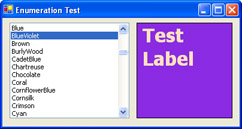
Figure 2-1: Converting enumerated values to strings and back.
Introduction
- Strings and Regular Expressions
- Numbers, Dates, and Other Data Types
- Arrays and Collections
- Objects, Interfaces, and Patterns
- Files and Directories
- XML
- Multithreading
- Network Programming
- Reflection
- Windows Programming
- Windows Controls
- Printing and Drawing with GDI+
- Windows Services
- ADO.NET
- ASP.NET Web Applications
- Web Services
- Remoting and Enterprise Services
- Security and Cryptography
- Useful COM Interop

EAN: 2147483647
Pages: 376
