Strings and Regular Expressions
Overview
Strings are a fundamental ingredient in almost every application. You'll use string processing to validate user-supplied input, search a block of text for specific words or recurring patterns, and format numbers, dates, and times.
In the Microsoft .NET Framework, strings are based on the String class. The String class is far more than a simple array of characters—it also comes equipped with a full complement of methods for searching, replacing, and parsing text. The early recipes in this chapter (1.1 to 1.10) show how you can use this built-in functionality to accomplish common string manipulation tasks. Later recipes consider some slightly more involved techniques, including the StringBuilder class, which greatly increases the performance of repetitive string operations, and regular expressions, which provide a platform-independent syntax for specifying patterns in text. Regular expressions can be a daunting subject, and crafting your own expressions isn't always easy. To get a quick start, you can use recipe 1.17, which includes an indispensable set of premade regular expressions that you can use to validate common types of data such as passwords, phone numbers, and e-mail addresses.
Finally, the last four recipes demonstrate how you can deal with specialized forms of string data, such as file system paths and Uniform Resource Identifiers (URIs). Using the techniques in these recipes can save pages of custom code and remove potential security holes from your applications.
Before you begin using the recipes in this chapter, you should understand a few essential facts about strings:
- Strings are immutable, which means they can't be changed. Operations that appear to modify a string actually create a new string. For that reason, if you need to perform several repetitive string manipulations in a row, it's almost always faster to use the StringBuilder class, which is described in recipe 1.14.
- A string is a reference type that behaves like a value type. For example, when you compare two strings, you are comparing the content contained in the string, not the object reference. This allows strings to be allocated efficiently in memory, while ensuring that they still work the way programmers expect them to work.
- All string methods use zero-based counting. This means that the first character is located at position 0. This is in contrast to the Microsoft Visual Basic 6 string processing functions, which use one-based counting.
Note Visual Basic .NET also supports legacy Visual Basic string manipulation functions such as Len, InStr, Left, Right, and so on. However, using these methods is discouraged. The String class methods enable you to write code that can work in any .NET language (including C#) with very little modification. Using these methods also ensures better consistency. If you mingle Visual Basic language functions and .NET Framework class library functions, you might introduce unexpected bugs, because the Visual Basic functions use one-based counting with strings, while the class library functions use zero-based counting.
Combine Strings
Problem
You need to join two strings or insert a string into another string.
Solution
Use the & operator to add one string to the end of another. Use the String.Insert method to insert a string in the middle of another string.
Discussion
You can join strings together using the & or + operator.
Dim FirstName As String = "Bill"
Dim LastName As String = "Jones"
Dim FullName As String

FullName = FirstName & " " & LastName
' FullName is now "Bill Jones"
| Note |
Although the + operator can be used to join strings in the same way as the & operator, it's not recommended. If you use the + operator for concatenation and one of the values in your expression isn't a string, Visual Basic .NET will attempt to convert both values to a Double and perform numeric addition. However, if you use the & operator, Visual Basic .NET will attempt to convert any nonstring value in the expression to a string and perform concatenation. Thus, the & operator is preferred for concatenation because it's unambiguous—it always does string concatenation, regardless of the data types you use. |
Strings also provide an Insert method that enables you to place a substring in the middle of another string. It requires a startIndex integer parameter that specifies where the string should be inserted.
Dim FullName As String = "Bill Jones"
Dim MiddleName As String = "Neuhaus "

' Insert MiddleName at position 5 in FullName.
FullName = FullName.Insert(5, MiddleName)
' FullName is now "Bill Neuhaus Jones"
Incidentally, you can also use the complementary Remove method, which enables you to delete a specified number of characters in the middle of a string:
FullName = FullName.Remove(5, MiddleName.Length)
' FullName is now "Bill Jones"
Retrieve a Portion of a String
Problem
You need to retrieve a portion of a string based on its position and length.
Solution
Use the String.Substring method.
Discussion
The String.Substring method requires two integer parameters, a startIndex and a length. As with all string indexes, startIndex is zero-based (in other words, the first character in the string is designated as character 0).
Dim FullName As String = "Bill Jones"
Dim FirstName As String

' Retrieve the 4-character substring starting at 0.
FirstName = FullName.Substring(0, 4)
' FirstName is now "Bill"
Optionally, you can omit the length parameter to take a substring that continues to the end of the string:
Dim FullName As String = "Bill Jones"
Dim LastName As String

' Retrieve the substring starting at 5, and continuing to the
' end of the string.
LastName = FullName.Substring(5)
' LastName is now "Jones"
Visual Basic .NET includes the legacy Left and Right functions, but they're not recommended. Instead, you can use the Substring method in conjunction with the Length property to provide the same functionality. The code snippet below outlines this approach.
' Retrieve x characters from the left of a string.
' This is equivalent to Left(MyString, x) in VB 6.
NewString = MyString.SubString(0, x)

' Retrieve x characters from the right of a string.
' This is equivalent to Right(MyString, x) in VB 6.
NewString = MyString.SubString(MyString.Length - x, x)
Create a String Consisting of a Repeated Character
Problem
You need to quickly create a string that consists of a single character repeated multiple times (for example, "------------").
Solution
Use the overloaded String constructor that accepts a single character and a repetition number.
Discussion
The following code creates a string made up of 100 dash characters. Note that in order to use the nondefault String constructor, you must use the New keyword when you declare the string.
Dim Dashes As New String("-"c, 100)
When specifying the character to repeat, you can append the letter c after the string to signal that the quoted text represents a Char, as required by this constructor, not a String. This is required if you have Option Strict enabled, which disables implicit conversions between Char and String instances.
You could also perform the same task by using string concatenation in a loop. However, that approach would be much slower.
Change the Case of All Characters in a String
Problem
You want to capitalize or de-capitalize all letters in a string.
Solution
Use the ToUpper or ToLower method of the String class.
Discussion
ToUpper method returns a new string that is all uppercase. The ToLower method returns a new string that is all lowercase.
Dim MixedCase, UpperCase, LowerCase As String
MixedCase = "hELLo"

UpperCase = MixedCase.ToUpper()
' UpperCase is now "HELLO"

LowerCase = MixedCase.ToLower()
' LowerCase is now "hello"
If you want to operate on only part of a string, split the string as described in recipe 1.2, call ToUpper or ToLower on the appropriate substring, and then join the strings back together.
Perform Case Insensitive String Comparisons
Problem
You need to compare two strings to see if they match, even if the capitalization differs.
Solution
Use the overloaded version of the shared String.Compare method that accepts the ignoreCase Boolean parameter, and set ignoreCase to True.
Discussion
The String.Compare method accepts two strings and returns 0 if the strings are equal, -1 if the first string is less than the second (StringA < StringB), or 1 if the first string is greater than the second (StringA > StringB). Optionally, the Compare method can also accept a Boolean parameter called ignoreCase. Set the ignoreCase parameter to True to perform a case-insensitive comparison.
If String.Compare(StringA, StringB, true) = 0 Then
 ' Strings match (regardless of case).
End If
Alternatively, you can just put the strings into a canonical form (either both upper case or both lower case) before you perform the comparison:
If StringA.ToUpper() = StringB.ToUpper() Then
 ' Strings match (regardless of case).
End If
Iterate Over All the Characters in a String
Problem
You want to examine each character in a string individually.
Solution
Use a For…Next loop that counts to the end of string, and examine the String.Chars property in each pass, or use For Each…Next syntax to walk through the string one character at a time.
Discussion
Iterating over the characters in a string is fairly straightforward, although there is more than one approach. One option is to use a For…Next loop that continues until the end of the string. You begin at position 0 and end on the last character, where the position equals String.Length -1. In each pass through the loop, you retrieve the corresponding character from the String.Chars indexed property.
Dim i As Integer
For i = 0 To MyString.Length - 1
 Console.WriteLine("Processing char: " & MyString.Chars(i))
Next
Alternatively, you can use For Each…Next syntax to iterate through the string one character at a time.
Dim Letter As Char
For Each Letter in MyString
 Console.WriteLine("Processing char: " & Letter)
Next
Performance testing indicates that this approach is actually slower.
| Note |
With either technique, changing the individually retrieved characters won't modify the string because they are copies of the original characters. Instead, you must either use a StringBuilder (see recipe 1.14) or build up a new string and copy characters to it one by one. |
When you retrieve a character from a string using these techniques, you aren't retrieving a full String object—you are retrieving a Char. A Char is a simple value type that contains a single letter. You can convert a Char to an integer to retrieve the representative Unicode character value, or you can use some of the following useful Char shared methods to retrieve more information about a character:
- IsDigit returns True if the character is a number from 0–9.
- IsNumber returns True if the character is a valid hexadecimal number from 0–F.
- IsLetter returns True if the character is a letter from A–Z.
- IsLetterOrDigit returns True for any alphanumeric characters (A–Z or 0–9).
- IsLower and IsUpper return True depending on the case of the character.
- IsPunctuation returns True if the character is classified as Unicode punctuation.
- IsSymbol returns True if the character is classified as a Unicode symbol.
- IsWhiteSpace returns True if the character is classified as Unicode whitespace (typically a space, tab, line break, etc.).
As an example, the next function iterates through a string and returns the number of alphanumeric characters using the Char.IsLetterOrDigit method.
Private Function CountAlphanumericCharacters( _
 ByVal stringToCount As String) As Integer

 Dim CharCount As Integer = 0

 Dim Letter As Char
 For Each Letter In stringToCount
 If Char.IsLetterOrDigit(Letter) Then CharCount += 1
 Next

 Return CharCount

End Function
Parse a String Into Words
Problem
You want to analyze a string and retrieve a list of all the words it contains.
Solution
Use the String.Split method. Depending on the complexity of the task, you might need to take additional steps to remove unwanted words.
Discussion
The String class includes a Split method that accepts an array of delimiter characters. The Split method divides the string every time one of these delimiters is found, and it returns the result as an array of strings. You can use this method with the space character to retrieve a list of words from a sentence.
Dim Sentence As String = "The quick brown fox jumps over the lazy dog."
Dim Separators() As Char = {" "c}
Dim Words() As String

' Split the sentence.
Words = Sentence.Split(Separators)

' Display the divided words.
Dim Word As String
For Each Word In Words
 Console.WriteLine("Word: " & Word)
Next
The output from this code is as follows:
Word: The
Word: quick
Word: brown
Word: fox
Word: jumps
Word: over
Word: the
Word: lazy
Word: dog.
Unfortunately, the Split method has a number of quirks that make it less practical in certain scenarios. One problem is that it can't collapse delimiters. For example, if you use a space character as a delimiter and attempt to split a string that contains multiple adjacent spaces (such as "This is a test") you will end up with several empty strings. A similar problem occurs if you are trying to handle different types of punctuation (like commas, periods, and so on) that are usually followed by a space character.
You have several options in this case. The simplest approach is to ignore any strings that consist of a delimiter character. You can implement this approach with a custom function that will wrap the String.Split method, as shown on the following page.
Private Function EnhancedSplit(ByVal stringToSplit As String, _
 ByVal delimiters() As Char) As String()

 ' Split the list of words into an array.
 Dim Words() As String
 Words = stringToSplit.Split(delimiters)

 ' Add each valid word into an ArrayList.
 Dim FilteredWords As New ArrayList()
 Dim Word As String
 For Each Word In Words
 ' The string must not be blank.
 If Word <> String.Empty Then
 FilteredWords.Add(Word)
 End If
 Next

 ' Convert the ArrayList into a normal string array.
 Return CType(FilteredWords.ToArray(GetType(String)), String())

End Function
This code eliminates the problem of extra strings. For example, you can test it with the following code:
Dim Sentence As String
Sentence = "However, the quick brown fox jumps over the lazy dog."

Dim Separator() As Char = {" "c, "."c, ","c}
Dim Words() As String = EnhancedSplit(Sentence, Separator)

Dim Word As String
For Each Word In Words
 Console.WriteLine("Word: " & Word)
Next
The output correctly removes the comma, spaces, and period:
Word: However
Word: the
Word: quick
Word: brown
Word: fox
Word: jumps
Word: over
Word: the
Word: lazy
Word: dog
Alternatively, you can use a lower-level approach, such as iterating through all the characters of the string searching for delimiter characters. This is more common if you are performing multiple string operations at the same time (such as splitting a string into words and stripping out special characters). Recipe 1.6 explains how to iterate through characters in a string. If you want to use multi-character delimiters, you can also use regular expressions and the Regex.Split method. See recipe 1.17 for more information about regular expressions.
Find All Occurrences of Specific Text in a String
Problem
You want to count how many times a certain word or sequence of characters occurs in a string.
Solution
Call the String.IndexOf method multiple times in a loop, until you reach the end of the string.
Discussion
The String class provides an IndexOf method that returns the location of the first match in a string. Fortunately, there is an overloaded version of IndexOf that enables you to specify a starting position for the search. By stepping through the string in a loop, specifying greater and greater start positions after each match, you can retrieve a list of all matches. (Another overload enables you to limit the number of characters the search will examine.)
Here's a function that simply counts the number of matches:
Private Function CountMatches(ByVal stringToSearch As String, _
 ByVal searchFor As String) As Integer

 Dim Position As Integer = 0
 Dim Matches As Integer = 0

 ' This loop exits when Position = -1,
 ' which means no match was found.
 Do
 Position = stringToSearch.IndexOf(searchFor, Position)
 If Position <> -1 Then
 ' A match was found. Increment the match count.
 Matches += 1
 ' Move forward in the string by an amount equal to
 ' the length of the search term.
 ' Otherwise, the search will keep finding the same word.
 Position += searchFor.Length
 End If
 Loop Until Position = -1

 Return Matches

End Function
Here's how you might use this function:
Dim Text As String = "The quick brown fox jumps over the lazy dog. " & _
 "The quick brown fox jumps over the lazy dog. " & _
 "The quick brown fox jumps over the lazy dog. "

Console.WriteLine(CountMatches(Text, "brown"))
' Displays the number 3.
If needed, you could enhance this function so that it returns an array with the index position of each match:
Private Function GetMatches(ByVal stringToSearch As String, _
 ByVal searchFor As String) As Integer()

 Dim Position As Integer = 0
 Dim Matches As New ArrayList()

 ' This loop exits when Position = -1,
 ' which means no match was found.
 Do
 Position = stringToSearch.IndexOf(searchFor, Position)
 If Position <> -1 Then
 ' A match was found. Store the position.
 Matches.Add(Position)

 Position += searchFor.Length
 End If
 Loop Until Position = -1

 ' Convert the ArrayList into a normal integer array.
 Return CType(Matches.ToArray(GetType(Integer)), Integer())

End Function
Notice that this technique is fundamentally limited—it can only find exact matches. If you want to search for a pattern that might contain some characters that vary, you will need to use regular expressions, as discussed in recipe 1.19.
Replace All Occurrences of Specific Text in a String
Problem
You want to replace a certain word or sequence of characters each time it occurs in a string.
Solution
Use the String.Replace method.
Discussion
The String class provides a Replace method that replaces all occurrences of text inside a string, and returns a new string:
Dim Text As String = "The quick brown fox jumps over the lazy dog. " & _
 "The quick brown fox jumps over the lazy dog. " & _
 "The quick brown fox jumps over the lazy dog. "

Dim ReplacedText As String = Text.Replace("brown", "blue")
' ReplacedText is now "The quick blue fox jumps over the lazy dog."
' repeated identically three times.
If you want to replace the occurrence of a pattern in just a portion of the string, you will need to write additional code to divide the string into substrings. You then call Replace on only one of the substrings. Here's a function that automates this task based on a supplied stopAtIndex parameter:
Private Function ReplacePartial(ByVal stringToReplace As String, _
 ByVal searchFor As String, ByVal replaceWith As String, _
 ByVal stopAtIndex As Integer) As String

 ' Split the string.
 Dim FirstPart, SecondPart As String
 FirstPart = stringToReplace.Substring(0, stopAtIndex + 1)
 SecondPart = stringToReplace.Substring(stopAtIndex + 1)

 ' Replace the text.
 FirstPart = FirstPart.Replace(searchFor, replaceWith)

 ' Join the strings back together.
 Return FirstPart & SecondPart

End Function
For more flexible options replacing text, you're encouraged to use regular expressions, as discussed in recipe 1.20.
Pad a String for Fixed Width Display
Problem
You need to align multiple columns of fixed-width text, perhaps in a Console window or for a printout.
Solution
Pad the text with spaces using PadLeft or PadRight, according to the largest string in the column.
Discussion
The String.PadLeft method adds spaces to the left of a string, whereas String.PadRight adds spaces to the right. Thus, PadLeft right-aligns a string, and PadRight left-aligns it. Both methods accept an integer representing the total length and add a number of spaces equal to the total padded length minus the length of the string.
Dim MyString As String = "Test"
Dim NewString As String

' Add two spaces to the left of the string.
NewString = MyString.PadLeft(6)

' You can also pad with other characters.
' This adds two dashes to the left of the string.
NewString = MyString.PadLeft(6, "-"c)
String padding is only useful when you are using a fixed-width font (often named Courier, Monotype, or Typewriter), where each character occupies the same display width. One common example is the Console window.
If you attempt to align text in a Console window using tabs, any text that stretches past the required tab stop won't be lined up properly. Instead, you must use padding to make sure each string is the same length. In this case, it's often useful to create a custom function that determines the maximum required string width and pads all string accordingly. Here's an example that uses strings in an array:
Private Sub PadStrings(ByVal stringsToPad() As String, _
 ByVal padLeft As Boolean)

 ' Find the largest length.
 Dim MaxLength As Integer = 0
 Dim Item As String
 For Each Item In stringsToPad
 If Item.Length > MaxLength Then MaxLength = Item.Length
 Next

 ' Pad all strings.
 ' You can't use For Each…Next enumeration here, because you must
 ' be able to modify the strings, and enumeration is read-only.
 Dim i As Integer
 For i = 0 To stringsToPad.Length - 1
 If padLeft Then
 stringsToPad(i) = stringsToPad(i).PadLeft(MaxLength)
 Else
 stringsToPad(i) = stringsToPad(i).PadRight(MaxLength)
 End If
 Next

End Sub
To test this function, you can use the following example. First, try displaying two columns of data without padding and only using a tab:
Dim Fruits() As String = _
 {"apple", "mango", "banana", "raspberry", "tangerine"}
Dim Colors() As String = {"red", "yellow", "yellow", "red", "orange"}

Dim i As Integer
For i = 0 To Fruits.Length - 1
 Console.WriteLine(Fruits(i) & vbTab & Colors(i))
Next
The output looks like this:
apple red
mango yellow
banana yellow
raspberry red
tangerine orange
If you use the custom PadStrings function, however, the situation improves.
Dim Fruits() As String = _
 {"apple", "mango", "banana", "raspberry", "tangerine"}
Dim Colors() As String = {"red", "yellow", "yellow", "red", "orange"}

PadStrings(Fruits, True)
PadStrings(Colors, False)

Dim i As Integer
For i = 0 To Fruits.Length - 1
 Console.WriteLine(Fruits(i) & " " & Colors(i))
Next
Here's the new output:
 apple red
 mango yellow
 banana yellow
raspberry red
tangerine orange
Keep in mind that Microsoft Windows applications rarely use fixed-width fonts, and when printing it's usually more convenient to explicitly set coordinates to line up text.
Reverse a String
Problem
You need to reverse the order of letters in a string.
Solution
Convert the string to an array of characters and use the Array.Reverse method, or use the legacy StrReverse Visual Basic 6 function.
Discussion
The functionality for reversing a string isn't built into the String class, although it's available in the Array class. Thus, one basic strategy for string reversal is to convert the string into an array of Char objects using the String.ToCharArray method. Then, you can reverse the array using the Array.Reverse shared method. Finally, you can create a new string using a special constructor that accepts a character array.
Dim Text As String = "The quick brown fox jumps over the lazy dog."

Dim Chars() As Char = Text.ToCharArray()
Array.Reverse(Chars)

Dim Reversed As New String(Chars, 0, Chars.Length)
' Reversed is now ".god yzal eht revo spmuj xof nworb kciuq ehT"
If you aren't concerned about creating generic .NET code, you can use a somewhat undocumented shortcut: the StrReverse legacy function from Visual Basic 6, which is included in Visual Basic .NET for backward compatibility:
Reversed = StrReverse(Text)
Insert a New Line in a String
Problem
You need to insert a line break or tab character in a string, typically for display purposes.
Solution
Use the NewLine property of the System.Environment class, or use the global vbTab and vbNewLine constants.
Discussion
Visual Basic .NET provides three equivalent approaches for inserting line breaks. It's most common to use the System.Environment class, which provides a NewLine property that returns the new line character for the current platform:
Dim MyText As String
MyText = "This is the first line."
MyText &= Environment.NewLine
MyText &= "This is the second line."
However, the System.Environment class doesn't provide a property for tabs. Instead, you can use the traditional Visual Basic-named constants vbNewLine and vbTab, which also results in slightly more compact code. Here's an example that formats Console output using tabs:
Console.WriteLine("Column 1" & vbTab & "Column 2")
Console.WriteLine("Value 1" & vbTab & "Value 2")
Of course, this code isn't guaranteed to properly align information, because the text varies in size, and some values might stretch beyond a tab position while others don't. To improve on this situation in tabbed output with fixed-width formatting, you need to use padding, as explained in recipe 1.10.
Finally, another equivalent approach is to use the ControlChars enumeration, which includes NewLine and Tab constants.
Dim MyText As String
MyText = "Description:" & ControlChars.Tab & "This is the first line."
MyText &= ControlChars.NewLine
MyText &= "Description:" & ControlChars.Tab
MyText &= "This is the second line."
Some other languages, such as C#, include fixed string literals that can be used to represent special characters such as a tab. Visual Basic .NET doesn't use this convention.
Insert a Special Character in a String
Problem
You need to use an extended character that can't be entered using the keyboard.
Solution
Determine the character code for the special character (possibly using the Character Map utility [charmap.exe]), and convert the number into the special character using the ToChar shared method of the System.Convert class.
Discussion
To insert a special character, you must first determine its Unicode character number. One useful tool that helps is Character Map, which is included with all versions of Windows. Using Character Map, you can select a font, browse to a specific character in its character set, and determine the character code. Figure 1-1 shows an example with the copyright symbol selected.
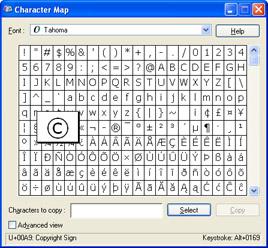
Figure 1-1: Using Character Map to view character codes.
The number at the bottom left (00A9) is the hexadecimal code using the Unicode standard. The number at the bottom right (0169) is the equivalent decimal code.
You can now use this character in any type of application. Windows applications fully support Unicode characters, and all Windows fonts (which means you can use special characters from fonts such as Symbol, Wingdings, and Webdings, if they are installed). Console applications might not display special characters, depending on the display font you have configured.
Here's an example that displays a special character in a label by converting the character's Unicode decimal value to a Char.
Dim CharCode As Integer = 169
Dim SpecialChar As Char = Convert.ToChar(CharCode)
Label1.Text = SpecialChar.ToString()
The result is the copyright symbol shown in Figure 1-2.
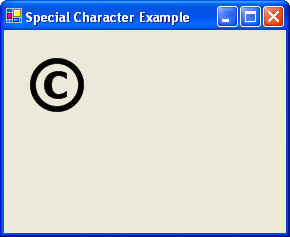
Figure 1-2: Displaying a special character.
| Note |
You must use the System.Convert class. You can't convert a number to a Char directly using the CType function. |
If you want to use a hexadecimal Unicode value, you must add the characters &H before the value to indicate that it is hexadecimal. Here's an example that uses the hexadecimal value for the copyright symbol:
Dim SpecialChar As Char = Convert.ToChar(&HA3)
Manipulate Strings Quickly with StringBuilder
Problem
You need to perform a repeated string manipulation, and you want to optimize performance.
Solution
Use the System.Text.StringBuilder class to perform your string operations, and convert the final result into a string by calling ToString.
Discussion
Ordinary .NET strings are immutable. Changing just a single character causes the whole string to be thrown away and a new string to be created.
The StringBuilder class represents a buffer of characters that can be directly modified. These direct modifications are faster than repeatedly generating a new String object. However, using the StringBuilder might introduce a small overhead because you need to copy the string into the StringBuilder before performing any work, and copy it out when you are finished. In general, if you need to perform more than two string manipulation tasks in a row, the StringBuilder approach will be faster.
To start using a StringBuilder, you must first create an instance and supply the string you want to use:
' Copy MyString into a StringBuilder named Builder.
Dim Builder As New System.Text.StringBuilder(MyString)
You can then use various StringBuilder methods to modify the buffer, including:
- Append, which adds a string to the end of the buffer. You cannot use the & operator to add a string to a StringBuilder buffer.
- Insert, which works like the String.Insert method described in recipe 1.1.
- Remove, which works like the String.Remove method described in recipe 1.1.
- Replace, which works like the String.Replace method described in recipe 1.9.
Unlike the String object, you can also modify an individual Char through the Chars property, as shown here:
' Replace every even character with a dash.
Dim i As Integer
For i = 0 To Builder.Length
 If (i + 1) Mod 2 = 0 Then
 Builder.Chars(i) = "-"c
 End If
Next
When you have finished all your manipulation, call ToString to retrieve the string representation.
MyString = Builder.ToString()
It's important to understand that the StringBuilder initially reserves a certain amount of size for the buffer. If you supply a string of less than 16 characters, the StringBuilder initially reserves 16 characters in the buffer. If the string is larger than 16 characters, StringBuilder tries to double the capacity (in this case, to 32). If that's still too small, it tries the next highest capacity—64, 128, and so on. If your modifications cause the string in the buffer to grow beyond its allocated capacity, the buffer will be automatically relocated in memory and the data will be copied. This operation is completely transparent, but it hurts performance. Thus, you should always ensure that you use a maximum capacity that has room for the finished string so that no copy operations will be required.
You can also specify the number of characters to allocate for the buffer in the StringBuilder constructor. In this case, if the string content in the StringBuilder exceeds this buffer, the buffer will be doubled. In other words, if you exceed a 50-character buffer, a new 100-character buffer will be created.
' Reserve 50 spaces in the buffer.
Dim Builder As New System.Text.StringBuilder(MyString, 50)
Here's a sample StringBuilder interaction from start to finish:
Dim MyString As String = "The"
Dim Builder As New System.Text.StringBuilder(MyString, 44)

' Modify the buffer.
Builder.Append(" quick brown fox")
Builder.Append(" jumps over")
Builder.Append(" the lazy dog.")

MyString = Builder.ToString()
Convert a String into a Byte Array
Problem
You need to convert a string into a series of bytes, possibly before writing it to a stream or applying encryption.
Solution
Call the GetBytes method on one of the encoding objects from the System.Text namespace.
Discussion
There is more than one way to represent a string in binary form, depending on the encoding you use. The most common encodings include:
- ASCIIEncodes each character in a string using 7 bits. ASCII encoded data can't contain extended Unicode characters. When using ASCII encoding in .NET, the bits will be padded and the resulting byte array will have one byte for each character.
- Full Unicode (or UTF-16)Represents each character in a string using 16 bits. The resulting byte array will have two bytes for each character.
- UTF-7 UnicodeUses 7 bits for ordinary ASCII characters and multiple 7-bit pairs for extended characters. This encoding is primarily for use with 7-bit protocols like mail, and it isn't regularly used.
- UTF-8 UnicodeUses 8 bits for ordinary ASCII characters and multiple 8-bit pairs for extended characters. The resulting byte array will have one byte for each character (provided there are no extended characters).
.NET provides a class for each type of encoding in the System.Text namespace. To encode a string into a byte array, you simply create the appropriate encoding object, and call the GetBytes method. Here's an example with UTF-8 encoding:
Dim MyString As String = "Sample text."

Dim Encoding As New System.Text.UTF8Encoding()
Dim Bytes() As Byte

Bytes = Encoding.GetBytes(MyString)
Console.WriteLine("Number of encoded bytes: " & Bytes.Length.ToString())
' The byte array will contain 12 bytes.
You can also access a pre-instantiated encoding object through the shared properties of the base System.Text.Encoding class, as shown here:
Dim Bytes() As Byte
Bytes = System.Text.Encoding.UTF8.GetBytes(MyString)
You can retrieve the original string from the byte array by using the GetString method of the encoding class.
| Note |
In .NET, UTF-8 is the preferred standard. Not only does it support the full range of Unicode characters, it uses an adaptive format that reduces the size of the binary data if you aren't using extended characters. When encoding ordinary ASCII characters, UTF-8 encoding is identical to ASCII encoding. |
By default, higher-level .NET classes such as StreamReader and StreamWriter use UTF-8 encoding when reading or writing from a stream. For example, consider the following code snippet, which encodes a string into a byte array and then writes it to a file.
' Encode the string manually.
Dim Encoding As New System.Text.UTF8Encoding()
Dim Bytes() As Byte = Encoding.GetBytes(MyString)

' The only way to write directly to a file stream is to use a byte array.
Dim fs As New System.IO.FileStream("test1.txt", IO.FileMode.Create)
fs.Write(Bytes, 0, Bytes.Length)
fs.Close()
The following code shows an identical approach that writes the same string data using the same encoding, except now it relies on the StreamWriter class.
' Encode the string using a StreamWriter.
Dim fs As New System.IO.FileStream("test2.txt", IO.FileMode.Create)
Dim w As New System.IO.StreamWriter(fs)

' You can write strings directly to a file stream using a StreamWriter.
w.Write(MyString)
w.Flush()
fs.Close()
Chapter 5 presents more recipes that work with files.
Get a String Representation of a Byte Array
Problem
You need to convert a byte array into a string representation.
Solution
If you are creating a string representation of arbitrary binary data, use BitConverter.ToString or Convert.ToBase64String. If you are restoring text stored in binary format, call the GetString method of the appropriate encoding object in the System.Text namespace.
Discussion
There are several solutions to this time-honored problem, depending on the task you need to accomplish. The quickest approach is to use the System.BitConverter class, which provides shared methods for converting basic data types into byte arrays and vice versa. In this case, you simply need to use the overloaded ToString method that accepts a byte array.
Dim Bytes() As Byte = {0, 120, 1, 111, 55, 255, 2}
Dim StringRepresentation As String

StringRepresentation = BitConverter.ToString(Bytes)
' StringRepresentation now contains "00-78-01-6F-37-FF-02"
In this case, the string contains each value of the byte array in hexadecimal format, separated by a dash. There is no automatic way to reverse the conversion and determine the original byte array using the string.
Another approach is to use Base64 encoding through the ToBase64String and FromBase64String methods of the System.Convert class. In Base64 encoding, each sequence of three bytes is converted to a sequence of four bytes. Each Base64 encoded character has one of the 64 possible values in the range {A-Z, a-z, 0-9, +, /, =}.
Dim Bytes() As Byte = {0, 120, 1, 111, 55, 255, 2}
Dim StringRepresentation As String

StringRepresentation = Convert.ToBase64String(Bytes)
' StringRepresentation is now "AHgBbzf/Ag=="

' Convert the string back to the original byte array.
Bytes = Convert.FromBase64String(StringRepresentation)
Both of these approaches are useful for creating arbitrary representations of binary data, which is sometimes necessary if binary data isn't allowed. For example, XML files usually use Base64 encoding to include binary data. Using one of the text encodings in recipe 1.15 wouldn't be appropriate, because you aren't dealing with text data. Furthermore, these encodings will use special extended characters that aren't displayable and can't be safely included in an XML file.
However, if you are working with a byte array that contains real text information, you'll need to use the correct encoding class to retrieve the original string. For example, if UTF-8 encoding was used to encode the string into binary, you need to use UTF-8 encoding to retrieve the original string:
Dim Bytes() As Byte = {72, 101, 108, 108, 111, 33}
Dim Encoding As New System.Text.UTF8Encoding()
Dim MyString As String

MyString = Encoding.GetString(Bytes)
' MyString is now "Hello!"
For more information about different character encodings, see recipe 1.15.
Use Common Regular Expressions
Problem
You need to create a regular expression to use with validation, text searching, or text replacement (see recipes 1.18 to 1.20).
Solution
Use the regular expression engine provided in .NET through the types in the System.Text.RegularExpressions namespace.
Discussion
Regular expressions are a platform-independent syntax for describing patterns in text. What makes regular expressions particularly useful are their rich set of wildcards. For example, you can use ordinary String methods to find a series of specific characters (such as the word "hello") in a string. Using a regular expression, however, you can find any word in a string that is five letters long and begins with an "h".
All regular expressions are made up of two kinds of characters: literals and metacharacters. Literals represent a specific defined character. Metacharacters are wildcards that can represent a range of values. For example, s represents any whitespace character (such as a space or tab). w represents any "word" (alphanumeric) character. d represents any digit. Thus, the regular expression below represents four groups of digits, separated by dashes (as in 412-333-9026).
ddd-ddd-dddd
You can simplify this expression using a multiplier. With a multiplier, you specify a fixed number of repetitions of character using curly braces. d{3} means three repetitions of a digit, and d{3,1} means one to three repetitions of the digit. You'll notice that the multiplier always works on the character that immediately precedes it. Here's how you can simplify the phone number expression shown above:
d{3}-d{3}-d{4}
Other multipliers can represent a variable number of characters, like + (one or more matches) and * (zero or more matches). Like the curly braces, these metacharacters always apply to the character that immediately precedes them. For example 0+2 means "any number of 0 characters, followed by a single 2." The number 02 would match, as would 0000002. You can also use parentheses to group together a subexpression. For example, (01)+2 would find match any string that starts with one or more sequences of 01 and ends with 2. Matches includes 012, 01012, 0101012, and so on.
Finally, you can delimit your own range of characters using square brackets. [a-c] would match any single character from a to c (lowercase only). The expression shown below would match any word that starts with a letter from a to c, continues with one or more characters from a to z, and ends with ing. Possible matches to the expression below include acting and counting.
[a-c][a-z]+ing
Range expressions are quite flexible. You can combine multiple allowed ranges, as in [A-Za-z] or you can even specify all allowed values, in which case you won't use a dash, as in [ABCD]. Table 1-1 presents a comprehensive list of regular expression metacharacters.
| Note |
Regular expressions also support using named groups as placeholders. This is primarily useful if you want to retrieve a piece of variable data in between two patterns. Two named group examples are shown in this chapter, one in recipe 1.19 and one in recipe 1.20. |
Keeping in mind these rules, you can construct regular expressions for validating simple types of data. However, more complex strings might require daunting regular expressions that are difficult to code properly. In fact, there are entire books written about regular expression processing, including the excellent Mastering Regular Expressions (O'Reilly, 2002) by Jeffrey and Friedl. As a shortcut, instead of writing your own regular expressions you can consider using or modifying a prebuilt regular expression. Many sources are available on the Internet, including http:// regexlib.com, which includes regular expression you might use for specific regional types of data (postal codes, and so on). In addition, Table 1-2 presents some common regular expression examples.
|
Character |
Rule |
|---|---|
|
{m} |
Requires m repetitions of the preceding character. For example, 7{3} matches 777. |
|
{m, n} |
Requires m to n repetitions of the preceding character. For example, 7{2,3} matches 77 and 777 but not 7777. |
|
* |
Zero or more occurrences of the previous character or subexpression. For example, 7*8 matches 7778 or just 8. |
|
+ |
One or more occurrences of the previous character or subexpression. For example, 7+8 matches 7778 or 78 but not just 8. |
|
? |
One or zero occurrences of the previous character or subexpression. For example, 7?8 matches 78 and 8 but not 778. |
|
( ) |
Groups a subexpression that will be treated as a single element. |
|
| |
Either of two matches. |
|
[ ] |
Matches one character in a range of valid characters. |
|
[^ ] |
Matches a character that isn't in the given range. |
|
. |
Any character except newline. |
|
s |
Any whitespace character (such as a tab or space). |
|
S |
Any non-whitespace character. |
|
d |
Any digit character. |
|
D |
Any non-digit character. |
|
w |
Any "word" character (letter, number, or underscore). |
|
W |
Any non-word character. |
|
Use to search for a special character. |
|
|
^ |
Represents the start of the string. |
|
$ |
Represents the end of the string. |
|
Type of Data |
Expression |
Rules Imposed |
|---|---|---|
|
Host name |
([w-]+.)+ |
Must consist of only word characters (alphanumeric characters and the underscore), and must end with a period and an extension of two or three characters (such as www.contoso.com). |
|
Internet URL |
((http)|(https)| |
Similar to host name, but must begin with the prefix http:// or https:// or ftp:// and allows a full path portion (such as http:// www.contoso.com /page.htm). |
|
E-mail address |
([w-]+.)*[w- ]+ |
Must consist only of word characters, must include an at sign (@), and must end with a period and an extension of two or three characters (such as someone@somewhere.com). |
|
IP address |
[1- 2]?d{1,2}.[1-2] |
There are four sets of digits separated by periods. If any of these digit sets is three characters long, it must start with a 1 or 2 (such as 128.0.0.1). |
|
Time (in 24-hour |
([0|1|2]{1}d): |
Must begin with a 0, 1, or 2 followed by a second digit and a colon. The minute portion must begin with a 1, 2, 3, 4, 5 (e.g. 14:34). |
|
Date (mm/dd/yy) |
[012]?d/[0123] |
Month values can begin with a 0, 1, or 2 if they're two digits long. Day values can begin with a 0, 1, 2, or 3 if they're two digits long (such as 12/24/02). |
|
Date (dd-MMM-yyyy) |
[0-3]d-(JAN|FEB| |
Matches dates that use one of the proscribed month short forms (such as 29-JAN-2002) |
|
Phone number |
d{3}-d{3}-d{4} |
Digits must be separated by hyphens (e.g., 416-777-9344). You can use a similar approach for Social Security numbers. |
|
Specific length |
w{4,10} |
A password that must be at least four characters long, but no longer than ten characters (such as "hello"). |
|
Advanced |
[a-zA-Z]w{3,9} |
A password that will allow four to ten total characters, but must start with a letter. |
|
Another advanced password |
[a-zA-Z]w*d+w* |
A password that starts with a letter character, followed by zero or more word characters, a digit, and then zero or more word characters. In short, it forces a password to contain a number somewhere inside it (such as hell4o). |
Keep in mind that different regular expressions impose different degrees of rules. For example, an e-mail regular expression might require an at sign and restrict all non-word characters. Another e-mail address expression might require an at sign and a period, restrict all non-word characters, and force the final extension to be exactly two or three characters long. Both expressions can be used to validate e-mail addresses, but the second one is more restrictive (and therefore preferable). In Table 1-2, several Internet-related regular expressions limit domain name extensions to three characters (as in .com or .org). They need to be tweaked if you want to support longer domain name extensions such as .info, which are being introduced gradually.
Similarly, some of the date expressions in Table 1-2 reject obvious invalid values (a date on the thirteenth month), but are unable to reject trickier nonexistent dates such as February 30th. To improve upon this situation, you might want to leverage additional .NET Framework classes or custom code.
| Note |
Sometimes, you can avoid writing a complex regular expression by using validation provided by .NET Framework classes. For example, you can validate URLs and file paths using .NET classes (see recipes 1.21 and 1.22). You can also verify dates and times with the DateTime type (as described in recipe 2.16). |
Validate Input with a Regular Expression
Problem
You want to validate a common user-submitted value contained in a string, such as an e-mail address, date, or user name.
Solution
Create the System.Text.RegularExpressions.Regex class with the appropriate regular expression, and call the IsMatch method with the value you want to test. Make sure to include the $ and ^ characters in your expression so that you match the entire string.
Discussion
Although creating a regular expression can be difficult, applying one is not. You simply need to create a Regex instance, supply the regular expression in the constructor, and then test for a match. The following code example verifies an e-mail address using a regular expression from Table 1-2. In order for it work, you must have imported the System.Text.RegularExpressions namespace.
Dim Expression _
 As New Regex("^([w-]+.)*[w-]+@([w-]+.)+([w-]{2,3})$")

' Test for a single match.
If Expression.IsMatch("me@somewhere.com")
 ' This succeeds.
End If

' Test for a single match.
If Expression.IsMatch("@somewhere.com")
 ' This fails.
End If
Notice that the regular expression in the previous code has two slight modifications from the version in Table 1-2. It starts with the ^ character (indicating the beginning of the string) and ends with the $ character (indicating the end of the string). Thus, there will only be a match if the full string matches the full regular expression. Without the addition of these two characters, a match could be found inside the string you supply (in other words, "my address is me@somewhere.com" would match because it contains a valid e-mail address).
| Note |
ASP.NET includes a special Web control called the RegularExpressionValidator that can be used to validate text input. When using this control, you don't need to specify the ^ and $ positional metacharacters. |
Find All Occurrences of a Pattern in a String
Problem
You want to find every time a certain pattern occurs in a string and retrieve the corresponding text.
Solution
Use the Regex.Matches method to retrieve a collection with all the matches in a string.
Discussion
The System.Text.RegularExpressions namespace defines two classes that are used with matches. The Match class represents a single match and contains information such as the position in the string where the match was found, the length, and the text of the match. The MatchCollection class is a collection of Match instances. You can retrieve a MatchCollection that contains all the matches for a specific regular expression by calling Regex.Matches and supplying the search text.
The following example puts these classes into practice with a phone number regular expression. It finds all the phone numbers in a given string and stores them in a MatchCollection. Then, the code iterates through the MatchCollection, displaying information about each match. In order for this code to work, you must have imported the System.Text.RegularExpressions namespace.
Dim Expression As New Regex("d{3}-d{3}-d{4}")

Dim Text As String
Text = "Marcy (416-777-2222) phoned John at 010-999-2222 yesterday."

' Retrieve all matches.
Dim Matches As MatchCollection
Matches = Expression.Matches(Text)

Console.WriteLine("Found " & Matches.Count.ToString() & " matches.")

' Display all the matches.
Dim Match As Match
For Each Match In Matches
 Console.WriteLine("Found: " & Match.Value & " at " _
 & Match.Index.ToString())
Next
The output for this example displays both phone numbers:
Found 2 matches.
Found: 416-777-2222 at 7
Found: 010-999-2222 at 36
Sometimes you want to extract a subset of data from a larger pattern. In this case, you can use a named group, which will act as a placeholder for the subset of data. You can then retrieve matches by group name. A named group takes this form:
(?exp)
where match is the name you have assigned to the group, and exp specifies the type of characters that can match. For example, consider this regular expression, which creates a named group for the area code part of a telephone number:
(?d{3})-d{3}-d{4}
The example below shows how to use this regular expression to match all phone numbers, but only retrieve the area code:
Dim Expression As New Regex("(?d{3})-d{3}-d{4}")

Dim Text As String
Text = "Marcy (416-777-2222) phoned John at 010-999-2222 yesterday."

' Retrieve all matches.
Dim Matches As MatchCollection
Matches = Expression.Matches(Text)

' Display all the matches.
Dim Match As Match
For Each Match In Matches
 Console.WriteLine("Full match: " & Match.Value)
 Console.WriteLine("Area code: " & Match.Groups("AreaCode").Value)
Next
The output is as follows:
Full match: 416-777-2222
Area code: 416
Full match: 010-999-2222
Area code: 010
Replace All Occurrences of a Pattern in a String
Problem
You want to find every time a certain pattern occurs in a string and alter the corresponding text.
Solution
Use the Regex.Replace method. You can supply either a string literal or a replacement expression for the new text.
Discussion
The Regex.Replace method has several overloads and allows a great deal of flexibility. The simplest technique is to simply replace values with a fixed string literal. For example, imagine you have a string that could contain a credit card number in a specific format. You could replace all occurrences of any credit card number, without needing to know the specific number itself, by using a regular expression.
Here's an example that obscures phone numbers:
Dim Expression As New Regex("d{3}-d{3}-d{4}")

Dim Text As String
Text = "Marcy (555-777-2222) phoned John at 555-999-2222 yesterday."

' Replace all phone numbers with "XXX-XXX-XXXX"
Text = Expression.Replace(Text, "XXX-XXX-XXXX")
Console.WriteLine(Text)
This produces the following output:
Marcy (XXX-XXX-XXXX) phoned John at XXX-XXX-XXXX yesterday.
Notice that the Replace method doesn't change the string you supply. Instead, it returns a new string with the modified values.
You can also perform regular expression replacements that transform the text in a match using a replacement pattern. In this case, you need to use named groups as placeholders. A description of named groups is provided in recipe 1.19. As a basic example, the regular expression below matches a phone number and places the first three digits into a named group called AreaCode:
(?d{3})-d{3}-d{4}
The trick is that with the Regex.Replace method, you can use the named group in your replacement expression. In the replacement expression, the same group is entered using curly braces and the $ operator, as in:
${AreaCode}
A full discussion of this topic is beyond the scope of this book, but the following example provides a quick demonstration. It replaces all dates in a block of text, changing mm/dd/yy formatting to dd-mm-yy form.
Dim Expression As New Regex( _
 "(?d{1,2})/(?d{1,2})/(?d{2,4})")

Dim Text As String
Text = "Today's date is 12/30/03 and yesterday's was 12/29/03."

Console.WriteLine("Before: " & Text)
Text = Expression.Replace(Text, "${day}-${month}-${year}")
Console.WriteLine("After: " & Text)
The program generates this output:
Before: Today's date is 12/30/03 and yesterday's was 12/29/03.
After: Today's date is 30-12-03 and yesterday's was 29-12-03.
Manipulate a Filename
Problem
You want to retrieve a portion of a path or verify that a file path is in a normal (standardized) form.
Solution
Process the path using the System.IO.Path class.
Discussion
File paths are often difficult to work with in code because there are an unlimited number of ways to represent the same directory. For example, you might use an absolute path (c: emp), a UNC path (\myserver\myshare emp), or one of many possible relative paths (c: empmyfiles.. or c: empmyfiles.... emp). This is especially the case if you want the user to supply a file or path value. In this case, the user could specify a relative path that points to an operating system file. If your code doesn't detect the problem, sensitive information could be returned or damaged, because all of the .NET file I/O classes support relative paths.
The solution is to use the shared methods of the Path class to make sure you have the information you expect. For example, here's how you take a filename that might include a qualified path and extract just the filename:
Filename = System.IO.Path.GetFileName(Filename)
And here's how you might append the filename to a directory path using the Path.Combine method:
Dim Filename As String = "....myfile.txt"
Dim Path As String = "c:	emp"

Filename = System.IO.Path.GetFileName(Filename)
Path = System.IO.Path.Combine(Path, Filename)
' Path is now "c:	empmyfile.txt"
The advantage of this approach is that a trailing backslash () is automatically added to the path name if required. The Path class also provides the following useful methods for manipulating path information:
- ChangeExtension modifies the current extension of the file in a string. If no extension is specified, the current extension will be removed.
- GetDirectoryName returns all the directory information, which is the text between the first and last directory separators ().
- GetFileNameWithoutExtension is similar to GetFileName, but it omits the extension.
- GetFullPath has no effect on an absolute path, and it changes a relative path into an absolute path using the current directory. For example, if c: emp is the current directory, calling GetFullPath on a file name such as test.txt returns c: emp test.txt.
- GetPathRoot retrieves a string with the root (for example, "c:"), provided that information is in the string. For a relative path, it returns a null reference (Nothing).
- HasExtension returns True if the path ends with an extension.
- IsPathRooted returns True if the path is an absolute path, and False if it's a relative path.
| Note |
In most cases, an exception will be thrown if you try to supply an invalid path to one of these methods (for example, paths that include spaces or other illegal characters). |
Manipulate a URI
Problem
You want to retrieve a portion of a URI (such as the prefix, directory, page, or query string arguments).
Solution
Process the URI using the System.Uri class.
Discussion
As with file path information, URIs can be written in several different forms, and represent several types of information, including Web requests (http:// and https://), FTP requests (ftp://), files (file://), news (news://), e-mail (mailto://), and so on. The Uri class provides a generic way to represent and manipulate URIs. You create a Uri instance by supplying a string that contains an absolute URI.
Dim MyUri As New Uri("http://search.yahoo.com/bin/search?p=dog")
The Uri class converts the supplied string into a standard form by taking the following steps, if needed:
- Converting the URI scheme to lower case (for example, HTTP to http).
- Converts the host name to lower case.
- Removes default and empty port numbers.
The Uri class can only store absolute URIs. If you want to use a relative URI string, you must also supply the base URI in the constructor:
Dim BaseUri As New Uri("http://search.yahoo.com")
Dim MyUri As New Uri(BaseUri, "bin/search?p=dog")
You can then use the Uri properties to retrieve various separate pieces of information about the URI, such as the scheme, host name, and so on. In the case of HTTP request, a URI might also include a bookmark and query string arguments.
Dim MyUri As New Uri("http://search.yahoo.com/bin/search?p=dog")
Console.WriteLine("Scheme: " & MyUri.Scheme)
Console.WriteLine("Host: " & MyUri.Host)
Console.WriteLine("Path: " & MyUri.AbsolutePath)
Console.WriteLine("Query: " & MyUri.Query)
Console.WriteLine("Type: " & MyUri.HostNameType.ToString())
Console.WriteLine("Port: " & MyUri.Port)
The output for this example is:
Scheme: http
Host: search.yahoo.com
Path: /bin/search
Query: ?p=dog
Type: Dns
Port: 80
Incidentally, you can retrieve the final portion of the path or Web page by using the System.Uri and System.IO.Path class in conjunction. This works because the Path class recognizes the slash (/) in addition to the backslash () as an alternate path separator.
Dim MyUri As New Uri("http://search.yahoo.com/bin/search?p=dog")
Dim Page As String
Page = System.IO.Path.GetFileName(MyUri.AbsolutePath)
' Page is now "search"
You can also call ToString to retrieve the full URI in string format, and use CheckHostName and CheckSchemeName to verify that the URI is well-formed (although this won't indicate whether the URI points to a valid resource).
Validate a Credit Card with Luhn s Algorithm
Problem
You want to verify that a supplied credit card number is valid.
Solution
Manually compute and verify the checksum using Luhn's algorithm, which all credit card numbers must satisfy.
Discussion
Luhn's algorithm is a formula that combines the digits of a credit card (doubling alternate digits) and verifies that the final sum is divisible by 10. If it is, the credit card number is valid and could be used for an account.
Here's a helper function that you can use to test Luhn's algorithm:
Private Function ValidateLuhn(ByVal value As String) As Boolean

 Dim CheckSum As Integer = 0
 Dim DoubleFlag As Boolean = (value.Length Mod 2 = 0)

 Dim Digit As Char
 Dim DigitValue As Integer
 For Each Digit In value
 DigitValue = Integer.Parse(Digit)
 If DoubleFlag Then
 DigitValue *= 2
 If DigitValue > 9 Then
 DigitValue -= 9
 End If
 End If
 CheckSum += DigitValue
 DoubleFlag = Not DoubleFlag
 Next

 Return (CheckSum Mod 10 = 0)

End Function
You can test the function as follows:
If ValidateLuhn("5191701142626689") Then
 ' This is a valid credit card number.
End If
Be aware that this method assumes any dashes and special characters have been stripped out of the string. If you can't be certain that this step has been taken, you might want to add code to verify that each character is a digit by iterating through the characters in the string and calling the Char.IsDigit method on each character. Recipe 1.6 demonstrates this technique.
You can also use additional checks to determine the credit card issuer by examining the credit card number prefix. (See the article "Checking Credit Card Numbers" at http://perl.about.com/library/weekly/aa073000b.htm.) Determining that a credit card is valid doesn't determine that it's connected to an actual account. For this task, you need to run the number through a credit card server. However, Luhn's algorithm provides a quick way to identify and refuse invalid input.
Validate an ISBN
Problem
You want to verify that a supplied ISBN number is valid.
Solution
Manually compute and verify the check digit using Mod 11 arithmetic.
Discussion
Verifying an ISBN number is similar to validating a credit card. In this case, you multiply each digit by its position (except for the last number), add together the numbers, and verify that the remainder of the sum divided by 11 matches the final check digit.
Here's a helper function that you can use to test an ISBN:
Private Function ValidateISBN(ByVal value As String) As Boolean

 Dim CheckSum As Integer = 0

 Dim i As Integer
 For i = 0 To value.Length - 2
 CheckSum += Integer.Parse(value.Chars(i)) * (i + 1)
 Next

 Dim CheckDigit As Integer
 CheckDigit = Integer.Parse(value.Chars(value.Length - 1))

 Return (CheckSum Mod 11 = CheckDigit)

End Function
You can test the function as follows:
If ValidateISBN("1861007353") Then
 ' This is a valid ISBN.
End If
Remember that this method assumes all dashes have been stripped out of the string. If you can't be certain that this step has been taken, you might want to add code to remove or ignore the dash character.
Perform a SoundEx String Comparison
Problem
You want to compare two strings based on their sound.
Solution
Implement a text-matching algorithm such as SoundEx.
Discussion
The SoundEx algorithm is one of the best-known algorithms for "fuzzy" text matching. It's designed to convert a word into a code based on one possible phonetic representation. Similar sounding words map to the same codes, enabling you to identify which words sound the same.
There are several SoundEx variants, all of which provide slightly different implementations of the same core rules:
- SimplifiedThe original SoundEx from late 1800s.
- MiracodeThe modified SoundEx from 1910.
- KnuthEd2The SoundEx algorithm from The Art of Computer Programming, Volume 3: Sorting and Searching, Second Edition (Addison-Wesley, 1998).
- SQLServerSQL Server's variant of SoundEx.
SoundEx codes are four characters long. They begin with the first letter of the word and have three numeric digits to indicate the following phonetic sounds. For example, the SoundEx code for the name Jackson is J250.
The following class encodes words using SoundEx.
Public Class SoundexComparison

 Public Shared Function GetSoundexCode(ByVal word As String) As String
 word = word.ToUpper()

 ' Keep the first character of the word.
 Dim SoundexCode As String = word.Substring(0, 1)

 Dim i As Integer
 For i = 1 To word.Length - 1

 ' Transform a single character.
 Dim Character As String = Transform(word.Substring(i, 1))

 ' Decide whether to append this character code,
 ' depending on the previous sound.
 Select Case word.Substring(i - 1, 1)
 Case "H", "W"
 ' Ignore
 Case "A", "E", "I", "O", "U"
 ' Characters separated by a vowel represent distinct
 ' sounds, and should be encoded.
 SoundexCode &= Character
 Case Else
 If SoundexCode.Length = 1 Then
 ' We only have the first character, which is never
 ' encoded. However, we need to check whether it is
 ' the same phonetically as the next character.
 If Transform(word.Substring(0, 1)) <> Character Then
 SoundexCode &= Character
 End If
 Else
 ' Only add if it does not represent a duplicated
 ' sound.
 If Transform(word.Substring(i - 1, 1)) <> _
 Character Then
 SoundexCode &= Character
 End If
 End If
 End Select

 Next

 ' A SoundEx code must be exactly 4 characters long.
 ' Pad it with zeroes in case the code is too short.
 SoundexCode = SoundexCode.PadRight(4, "0"c)

 ' Truncate the code if it is too long.
 Return SoundexCode.Substring(0, 4)
 End Function

 Private Shared Function Transform(ByVal character As String) As String
 ' Map the character to a SoundEx code.
 Select Case character
 Case "B", "F", "P", "V"
 Return "1"
 Case "C", "G", "J", "K", "Q", "S", "X", "Z"
 Return "2"
 Case "D", "T"
 Return "3"
 Case "L"
 Return "4"
 Case "M", "N"
 Return "5"
 Case "R"
 Return "6"
 Case Else
 ' All other characters are ignored.
 Return String.Empty
 End Select
 End Function

End Class
The following Console application creates a SoundEx code for two different strings and compares them.
Public Module SoundexTest

 Public Sub Main()
 Console.Write("Enter first word: ")
 Dim WordA As String = Console.ReadLine()
 Console.Write("Enter second word: ")
 Dim WordB As String = Console.ReadLine()

 Dim CodeA, CodeB As String
 CodeA = SoundexComparison.GetSoundexCode(WordA)
 CodeB = SoundexComparison.GetSoundexCode(WordB)

 Console.WriteLine(WordA & " = " & CodeA)
 Console.WriteLine(WordB & " = " & CodeB)

 If CodeA = CodeB Then
 Console.WriteLine("These words match a SoundEx comparison.")
 End If

 Console.ReadLine()
 End Sub

End Module
Here's a sample output:
Enter first word: police
Enter second word: poeleeze
police = P420
poeleeze = P420
These words match a SoundEx comparison.
A SoundEx comparison is only one way to compare strings based on sounds. It was originally developed to match surnames in census surveys, and it has several well-known limitations. More advanced algorithms will treat groups of characters or entire phonetic syllables as single units (allowing "tion" and "shun" to match, for example). For more information about SoundEx, you can refer to the U.S. NARA (National Archives and Records Administration) Web site at http:// www.archives.gov/research_room/genealogy/census/soundex.html.
Introduction
- Strings and Regular Expressions
- Numbers, Dates, and Other Data Types
- Arrays and Collections
- Objects, Interfaces, and Patterns
- Files and Directories
- XML
- Multithreading
- Network Programming
- Reflection
- Windows Programming
- Windows Controls
- Printing and Drawing with GDI+
- Windows Services
- ADO.NET
- ASP.NET Web Applications
- Web Services
- Remoting and Enterprise Services
- Security and Cryptography
- Useful COM Interop

EAN: 2147483647
Pages: 376
