Use Cases for a Simple Library System
 |
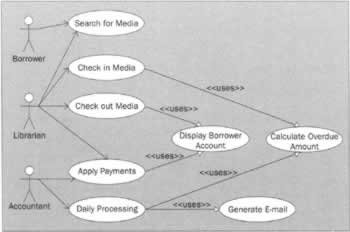
Now that we have defined our business object and data-access base classes, we're ready to look at the use case diagrams we will use to derive our application-specific business objects. In a normal project lifecycle, use cases are created before we begin object modeling. In this chapter, we haven't created any application-specific business objects - just our base classes, so we're still playing by the rules. Use cases are an extremely important aspect of UML modeling. They allow developers to understand software systems from the user's perspective, and cause the whole system architecture to be driven by what the user wishes to do with the system - which, unfortunately, doesn't often happen! The use cases in our example describe a simple software application for a library. This example is a variation along the classic theme of use case examples and works well because it's simple enough to model in a chapter this size, but has enough meat on its bones to demonstrate many aspects of the UML. In our simple library system, media is borrowed and returned. Late fees are assessed as follows: Three dollars per day for overdue DVDs, two dollars per day for magazines, and one dollar per day for overdue books. A borrower is not allowed to check out media if they have any overdue media, if they already have five items checked out, or if they have accrued more than fifty dollars in fines. The following image contains a high-level overview use case diagram containing most of the main use cases in this application: As you can see in this diagram, there are three actors - the Borrower, Librarian, and Accountant. The Borrower (as you might imagine) represents people who borrow media from the library. In our application, media consists of books, magazines, and DVDs. As with most library systems, the only action the Borrower can perform is to search for media. The Librarian searches for media, but also performs a few additional actions. A Librarian checks in media, checks out media, and applies payments for fines to a Borrower's account. The Accountant performs two main actions. They apply payments to a Borrower's account, as well as run daily processing. This daily processing procedure is run each evening to generate e-mails warning borrowers of unreturned media and overdue fines. Notice our use case diagram identifies three "uses" relationships, indicating places where application functionality is reused from multiple use cases. Both the Check in Media and Daily Processing use the Calculate Overdue Amount use case. Check Out Media and Apply Payments use the Display Borrower Account use case. We won't perform object modeling on all these use cases, but we'll pick a few key use cases so you get a feel for how it's done.
| ||||||||||||||||||||||||||||||||||


EAN: N/A
Pages: 85