4.14 How WMI scripters are affected by the Microsoft security push
4.14 How WMI scripters are affected by the Microsoft security push
In early 2002, Microsoft took a huge security initiative to make the Windows platform more secure. This initiative requested all Microsoft developers to review their code for any type of potential problems that could lead to a security breach into the existing Operating Systems. This initiative implied that all new developments were put on hold for awhile until the security review of existing source codes was completed. Of course, Windows Server 2003 inherits the benefit of this security initiative, since some of its existing structures have been updated based on the discoveries. As far as WMI under Windows Server 2003 is concerned, Microsoft made some changes or enhancements at the WMI COM/DCOM level. Of course, most of these changes concern WMI C++ programmers dealing with the WMI COM low-level interfaces. However, some of these changes impact the WMI scripting as well:
-
One of the WMI COM/DCOM modifications impacts the WMI asynchronous scripting. Actually, Microsoft added one new feature under Windows Server 2003 to enforce security of the WMI asynchronous calls.
-
The security descriptor set on a CIM repository namespace can't be set to NULL.
-
The ADSI WMI Extension is removed under Windows Server 2003.
-
A new built-in group, called the Windows Authorizations Access Group (WAAG), has been added.
4.14.1 Asynchronous scripting
To understand the impact of the security initiative on the asynchronous scripting, it is necessary to look at some of the mechanisms involved at the COM/DCOM level when WMI asynchronous operations or events are involved. However, we will not delve into the details of the COM/DCOM interfaces to explain this. Instead, we will give a high-level overview of the mechanism and how a script making use of an asynchronous call can be affected.
Generally speaking, when a WMI client application performs asynchronous operations or events, it first connects to the WMI process WinMgmt.Exe (see Figure 4.36, arrow 1). During this first step, the WMI client passes a sink to WinMgmt.Exe to allow WinMgmt.Exe to call the sink routine implemented by the client later on.
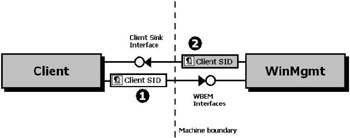
Figure 4.36: A WMI client application performing an asynchronous operation.
When working at the COM/DCOM level, the WMI client application has control of the authentication level for the WinMgmt.Exe outgoing calls (see the first book, Understanding WMI Scripting, Chapter 4, sections 4.3.3, "The security settings of the moniker," and 4.4.1, "Establishing the WMI connection"). In such a case, WinMgmt.Exe retrieves the WMI client security settings when called, and always attempts to call back the client sink routine with the same authentications level (see Figure 4.36, arrow 2). For obvious security reasons, it is always recommended that clients perform a security access check when the sink routine is invoked. However, when the WMI client is a WMI script or cannot control the security settings of the process or when the environment is pre-Windows 2000 (using NTLM), the machine LocalSystem does not have a network identity and it is impossible to control the security level of the callback. In such a case another action takes place, which utilizes UnSecApp.Exe (see Figure 4.37). Note that this slightly different action is also applicable for other applications, such as MMC snap-ins.
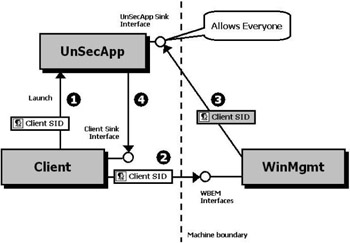
Figure 4.37: A WMI client application performing an asynchronous operation where UnSecApp.Exe is involved.
When a WMI script invokes an asynchronous operation, the WMI COM underlying mechanism starts UnSecApp.Exe in a separate process on the client (see Figure 4.37, arrow 1). Once started, UnSecApp.Exe passes its own sink to the client. Next, when the WMI script initiates the asynchronous call to WinMgmt.Exe, it passes the UnSecApp.Exe sink along with the call (see Figure 4.37, arrow 2). Therefore, during the WinMgmt.Exe callback, the sink utilized is the UnSecApp.Exe sink (see Figure 4.37, arrow 3). Because the WMI script can't enforce the callback security as a COM/DCOM WMI client (as shown in Figure 4.36), to get this callback working the UnSecApp.Exe accepts callbacks from everyone. Once the callback is accepted by UnSecApp.Exe, it returns the asynchronous call information back to the WMI script (see Figure 4.37, arrow 4). It is important to note that UnSecApp.Exe is only involved during the asynchronous operations. Therefore, synchronous and semisynchronous operations do not use the same mechanism.
When using asynchronous operations or event notifications in this implementation (Windows NT 4.0, Windows 2000, and Windows XP), it is recommended you take some precautions:
-
If you can implement a logic that does not use asynchronous calls for your scripts, consider this option as the best option from a security standpoint. Therefore, you should always try to consider a synchronous or semisynchronous scripting technique when possible.
-
If you must absolutely use an asynchronous scripting technique, make sure that the script does not perform some critical operations in the event sink (i.e., system shutdown) in a too powerful security context (i.e., administrative security context). If you implement an asynchronous scripting technique, it is a good idea to implement access checks in the client code as well. Obviously, as a preventive approach, it is best that you don't let scripts execute in the security context of an administrator whenever possible.
-
Despite the previous recommendations, if you must perform some critical operations in the event sink in an administrative security context, as we will discuss in the next section, under Windows Server 2003 you can activate a lockdown mechanism, which Microsoft implements to secure the WinMgmt.Exe callbacks. Note that at writing time, there is no plan to implement a similar mechanism for the previous Operating System versions.
4.14.1.1 How the lockdown mechanism of Windows Server 2003 works
Under Windows Server 2003, Microsoft created a wrapper for UnSecApp.Exe. This wrapper plays the role of a security broker between the WMI client and the WinMgmt.Exe to validate the callbacks executed on the UnSecApp.Exe sink.
However, by default, this wrapper is disabled to ensure a backward compatibility with the WMI asynchronous applications previously developed. If the environment requires a stronger security, it is possible to enable the wrapper in two ways:
-
By programming: This is only possible for the WMI COM/DCOM applications. In such case, the wrapper behavior can be determined by application, which means that one WMI client application could require authenticating the callbacks, while another will run with the default settings (Everyone).
-
By changing a registry key: This is the technique to use for the WMI scripts, because there is no way from the scripting environment to determine the wrapper behavior. It is important to note that if the registry key is modified to enable the wrapper to only accept the authenticated calls, the setting is global for all applications (see Figure 4.38). There is no granularity available.
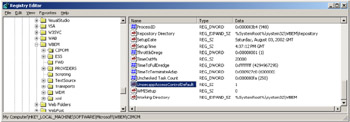
Figure 4.38: The registry activating the new lockdown mechanism of Windows Server 2003.
The registry key to change is located in the registry hive HKLM\SOFTWARE\Microsoft\WBEM\CIMOM, where the UnsecappAccessControlDefault value must be changed as follows:
-
To allow anonymous calls (default), the UnsecappAccessControlDefault value must be set to 0.
-
To allow authenticated calls (global setting), the UnsecappAccessControlDefault value must be set to 1. Althought the default registry key value is set to 0, it is recommended to set it to 1 if you plan to use asynchronous calls in your applications or scripts.
Once enabled, the wrapper intercepts every callback to UnSecApp.Exe in order to verify the identity of the component performing the callback, which should normally be WinMgmt.Exe (see Figure 4.39). Actually, the wrapper extracts the SID of the client application from the security token when the initial call of the client application is executed (see Figure 4.39, arrow 1). When the callback to UnSecApp.Exe is performed (see Figure 4.39, arrow 3), the wrapper intercepts the callback as well to extract the SID of the caller. The extraction of the SID implies a call against Active Directory, which validates the SID existence of the caller. Next, the SID of the caller is compared with the SID of the client (see Figure 4.39, arrow 4) and if they match, UnSecApp.Exe executes the callback to the client application (see Figure 4.39, arrow 6).
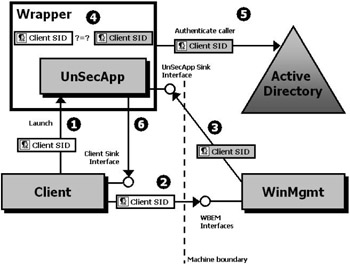
Figure 4.39: A WMI client application performing an asynchronous operation where UnSecApp.Exe is involved and when the Windows Server 2003 lockdown mechanism is activated.
As long as the script runs in an authenticated security context, the activation doesn't affect the operation. However, if the callback is delivered under a different identity, the callback will not be returned to the sink routine, and UnSecApp.Exe will place an entry into the event log. However, the activation of the registry key setting could only affect applications in pre-Windows 2000 environments due to the lack of LocalSystem identity.
| Note | LocalSystem in a Kerberos environment has an identity in an Active Directory environment like any other users. For instance, this allows the Windows services to run in the machine security context rather than a specific domain user. In NTLM environments, LocalSystem has local credentials only and cannot be resolved in a domain, which therefore doesn't provide a network identity. |
4.14.2 Setting the security descriptor of a CIM repository namespace
When creating a namespace in the CIM repository, the only element of information required is the name of the namespace, since the name of the namespace is used as a key property of the instance representing the namespace. However, every namespace is protected by a security descriptor, which is inherited from the parent namespace at creation time. Since the security of a namespace could be different from the one set on the parent, it is possible to set a different security descriptor (i.e., by using the SetSD method exposed by the __SystemSecurity system class). Since the security initiative, it is now impossible to set a security descriptor to null.
If by any chance the security descriptor is set to null on a namespace, the namespace will inherit the security of the parent namespace, since the "non-inheritance" option is not set. However, by eliminating the ability to set a null security descriptor, Microsoft wants to prevent anyone from deliberately removing the namespace security descriptor. Therefore, this initiative is purely preventive.
4.14.3 The ADSI WMI Extension
In Chapter 5 of the first book, Understanding WMI Scripting, we see how the ADSI WMI Extension can be used from scripts. This extension is available under Windows NT 4.0 (if ADSI and WMI are installed), Windows 2000, and Windows XP. Under Windows Server 2003 with the security push initiative, this extension has been removed from the Operating System. At writing time, the availability of this extension as a separate download is still under discussion at Microsoft. Actually, Microsoft decided to remove this extension from the Operating System for two reasons:
-
One of the drivers during the security push was to leave only enabled components that are intensively used. Since the ADSI WMI Extension was not heavily used, Microsoft decided to remove it from the Operating System to reduce the potential surface of attacks.
-
Although the ADSI WMI Extension is not subject to any particular security thread, Microsoft decided to remove it, since it requires high-level privileges to run.
4.14.4 The Windows Authorizations Access Group (WAAG)
The Windows Authorizations Access Group (WAAG) is a new built-in security group introduced in Windows Server 2003. The members of this group are allowed to look up group membership for a particular user. For example, the idea is that user "Alain Lissoir" should not be able to look up other users in the Active Directory and find out that they are members of some selected group of people created by someone else. Therefore, under Windows Server 2003, looking up group membership for another user has to be explicitly granted to users by adding them to the WAAG group in the domain. How is this group related to WMI? Actually, when someone creates a subscription (i.e., for a permanent event consumer), WMI needs to verify if the user who creates the subscriptions has the rights to do that. This verification process enumerates all group membership for the users and therefore the account under which this enumeration is done must be included in WAAG built-in group.

EAN: 2147483647
Pages: 82
- Chapter IV How Consumers Think About Interactive Aspects of Web Advertising
- Chapter VIII Personalization Systems and Their Deployment as Web Site Interface Design Decisions
- Chapter IX Extrinsic Plus Intrinsic Human Factors Influencing the Web Usage
- Chapter X Converting Browsers to Buyers: Key Considerations in Designing Business-to-Consumer Web Sites
- Chapter XVII Internet Markets and E-Loyalty