Editable Text Controls: TextBoxBase
Editable Text Controls TextBoxBase
In addition to all of the controls that have a run-of-the-mill Text property, there are several controls whose sole purpose is to display editable text. The Label control displays text, but is read-only.
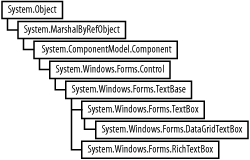
The TextBoxBase class provides a base class for three controls that allow the read-write display of text:
TextBox
Displays text with no formatting other than the current Font of the control. Has a 64K character capacity limit.
DataGridTextBox
A text box hosted in a DataGridTextBoxColumn control. Derives from TextBox.
RichTextBox
Displays text with formatting.
Figure 12-1 shows the class hierarchy of the TextBoxBase class.
Figure 12-1. TextBoxBase class hierarchy
12.2.1 Properties and Methods
The TextBoxBase class has many properties and methods in addition to those inherited from Control. Many of the properties are listed in Table 12-1 and the methods in Table 12-4. Many of the most commonly used properties and methods are demonstrated in the examples that follow.
|
Property |
Value type |
Description |
|---|---|---|
|
AcceptsTab |
Boolean |
Read/write. Applies to multiline TextBoxes and RichTextBoxes. If true, the Tab key is accepted as part of the text string, otherwise it moves the focus to the next control in the tab order. The default is false. |
|
AutoSize |
Boolean |
Read/write. If true (the default), the size of control is automatically adjusted when the font changes. |
|
BackColor |
Color |
Read/write. The background color of the text box. If set the same as the ForeColor property, the text will not be visible. Overrides the Control base class. |
|
BorderStyle |
BorderStyle |
Read/write. Border style for the label. Values are members of the BorderStyle enumeration listed in Table 12-2. The default value is BorderStyle.Fixed3D. |
|
CanUndo |
Boolean |
Read-only. If false (set by ClearUndo method), the user cannot undo the previous operation. If true, the Undo method can be used. |
|
ForeColor |
Color |
Read/write. The foreground color of the text boxthe color of the text Overrides the Control base class. If set the same as the BackColor property, the text will not be visible. |
|
HideSelection |
Boolean |
Read/write. If true (the default), selected text will cease to be highlighted when the text box loses focus. |
|
Lines |
String array |
Read/write. An array that contains the text contained in the text box. Each array element corresponds to a line of text. |
|
MaxLength |
Integer |
Read/write. The maximum number of characters that can be typed into a control. |
|
Modified |
Boolean |
Read/write. If false (the default), the contents of the text box have not been modified by either the user or the program. Typically used to trigger a save or validation operation. |
|
Multiline |
Boolean |
Read/write. If true, the text box will display multiple lines of text, interpreting the Enter key as a newline character. If false, the Enter key is disallowed. The default is false for TextBox and DataGridTextBox, and true for RichTextBox. |
|
PreferredHeight |
Integer |
Read-only. The preferred height of a single-line text box using the current font, in pixels. |
|
ReadOnly |
Boolean |
Read/write. If false (the default), the Text property can be changed at runtime by the user. If true, the Text property can not be changed by the user, but can still be changed programmatically. The contents of the Text property can be copied by the user despite this value. |
|
ScrollBars |
ScrollBars |
Read/write. Indicates what type of scrollbar, if any, the text box will have. Valid values must be members of the ScrollBars enumeration, listed in Table 12-3. The default is ScrollBars.None. |
|
SelectedText |
String |
Read/write. The currently selected text in the text box. |
|
SelectionLength |
Integer |
Read/write. The length of the SelectedText property. |
|
SelectionStart |
Integer |
Read/write. The zero-based starting index of the text selected in the text box, if any. If no text is selected, then it is the insertion point for new text. If all the text is selected or if the insertion point is at the beginning of the text box, it returns a value of zero. |
|
Text |
String |
Read/write. The text displayed by the text box. Overrides the Control base class. |
|
WordWrap |
Boolean |
Read/write. Applies only when the MultiLine property is true. If true (the default), the contents of the text box will wrap words if the length of a string exceeds the width of the control. If false, the text box will scroll horizontally as the text is entered to display the right end of the text. |
|
Value |
Description |
|---|---|
|
Fixed3D |
3-D border |
|
FixedSingle |
Single-line border |
|
None |
No border |
|
Value |
Description |
|---|---|
|
Both |
Both horizontal and vertical scrollbars are present. A horizontal scrollbar is present only if the WordWrap property is set to false. |
|
Horizontal |
Only a horizontal scrollbar is present, and then only if the WordWrap property is set to false. |
|
None |
No scrollbars are present. |
|
Vertical |
Only a vertical scrollbar is present. |
|
Method |
Description |
|---|---|
|
AppendText |
Appends text string contained in the argument to the Text property of the text box. Functionally equivalent to using the concatenation operator, although it is actually implemented by setting the selection to the end of the text and then replacing the selection with the text to be appended. |
|
Clear |
Empties the Text property of the text box. Equivalent to setting the Text property to an empty string. Cannot be undone by calling the Undo method. |
|
ClearUndo |
Removes the information about the most recent operation from the undo buffer so that the undo operation cannot be repeated. Sets the read-only property CanUndo property to false. |
|
Copy |
Copies the currently selected text in the text box control to the Clipboard. Default functionality provided by Ctrl-C. |
|
Cut |
Moves the currently selected text from the text box control to the Clipboard. Default functionality provided by Ctrl-X. |
|
Paste |
Replaces the text currently selected in the text box with text currently stored in the Clipboard. Default functionality provided by Ctrl-V. |
|
ScrollToCaret |
Scrolls the contents of the text box until the caret (the current text entry point) is visible in the control. If the caret is currently below the visible region, the contents will be scrolled until the caret is at the bottom of the control. If the caret is currently above the visible region, the contents will be scrolled until the caret is at the top of the control. If the caret is currently visible or if the control does not have focus, the method will be have no effect. |
|
Select |
Overloaded method for selecting text within a text box control. Takes two integer arguments representing the starting character (zero-based) and the number of characters to be selected. |
|
SelectAll |
Selects the entire Text property of a text box control. Default functionality provided by Ctrl-A. |
|
Undo |
Undoes the last clipboard or text change operation performed on the contents of the text box control if the CanUndo property is true. Default functionality provided by Ctrl-Z. |
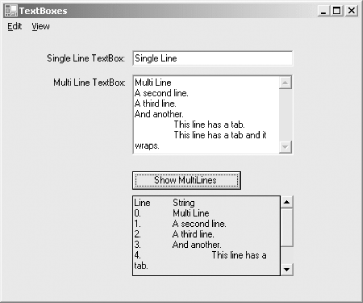
The program shown in Example 12-1 (in C#) and Example 12-2 (in VB.NET) demonstrates many of the properties and methods of the TextBoxBase class. These examples have two TextBox controls for entering textone single line and one multiline. A button can display, in another text box, the contents of the Lines array from the multiline text box. A simple menu allows various typical text manipulations, such as copy, cut, paste, and clear all. An analysis of the program follows.
|

When the program is compiled and run and some text is entered into the multiline text box, it looks like Figure 12-2.
Figure 12-2. TextBoxes
Example 12-1. TextBox control properties and in C# (TextBoxes.cs) methods

using System;
using System.Drawing;
using System.Windows.Forms;
using System.Text;

namespace ProgrammingWinApps
{
 public class TextBoxes : Form
 {

 int yDelta;
 int yPos = 20;
 TextBox txtSingle;
 TextBox txtMulti;
 TextBox txtDisplay;
 Button btn;
 TextBox[ ] txtBoxes = new TextBox[2];

 public TextBoxes( )
 {
 Text = "TextBoxes";
 Size = new Size(450,375);

 Label lblSingle = new Label( );
 lblSingle.Parent = this;
 lblSingle.Text = "Single Line TextBox:";
 lblSingle.Location = new Point(10,yPos);
 lblSingle.Size = new Size(150,20);
 lblSingle.TextAlign = ContentAlignment.MiddleRight;
 yDelta = lblSingle.Height + 10;

 txtSingle = new TextBox( );
 txtSingle.Parent = this;
 txtSingle.Text = "Single Line";
 txtSingle.Size = new Size(200, txtSingle.PreferredHeight);
 txtSingle.Location = new Point(lblSingle.Left +
 lblSingle.Size.Width, yPos);
 txtSingle.Multiline = false;
 txtSingle.BorderStyle = BorderStyle.Fixed3D;

 Label lblMulti = new Label( );
 lblMulti.Parent = this;
 lblMulti.Text = "Multi Line TextBox:";
 lblMulti.Location = new Point(10, yPos + yDelta);
 lblMulti.Size = new Size(150,20);
 lblMulti.TextAlign = ContentAlignment.MiddleRight;

 txtMulti = new TextBox( );
 txtMulti.Parent = this;
 txtMulti.Text = "Multi Line";
 txtMulti.Size = new Size(200,100);
 txtMulti.Location = new Point(lblMulti.Left +
 lblMulti.Size.Width,
 yPos + yDelta);
 txtMulti.AcceptsTab = true;
 txtMulti.Multiline = true;
 txtMulti.BorderStyle = BorderStyle.Fixed3D;
 txtMulti.ScrollBars = ScrollBars.Vertical;

 btn = new Button( );
 btn.Parent = this;
 btn.Text = "Show MultiLines";
 btn.Location = new Point(lblMulti.Left + lblMulti.Size.Width,
 yPos + (5 * yDelta));
 btn.Click += new System.EventHandler(btn_Click);
 int xSize = ((int)(Font.Height * .75) * btn.Text.Length);
 int ySize = Font.Height + 10;
 btn.Size = new Size(xSize, ySize);

 txtDisplay = new TextBox( );
 txtDisplay.Parent = this;
 txtDisplay.Text = "";
 txtDisplay.Size = new Size(200,100);
 txtDisplay.Location = new Point(lblMulti.Left +
 lblMulti.Size.Width,
 yPos + (6 * yDelta));
 txtDisplay.Multiline = true;
 txtDisplay.BorderStyle = BorderStyle.FixedSingle;
 txtDisplay.ScrollBars = ScrollBars.Vertical;
 txtDisplay.ReadOnly = true;

 // Fill the array of TextBoxes
 txtBoxes[0] = txtSingle;
 txtBoxes[1] = txtMulti;

 // Menus
 // Edit menu items
 MenuItem mnuDash1 = new MenuItem("-");
 MenuItem mnuDash2 = new MenuItem("-");
 MenuItem mnuUndo = new MenuItem("&Undo",
 new EventHandler(mnuUndo_Click),
 Shortcut.CtrlZ);
 MenuItem mnuCut = new MenuItem("Cu&t",
 new EventHandler(mnuCut_Click),
 Shortcut.CtrlX);
 MenuItem mnuCopy = new MenuItem("&Copy",
 new EventHandler(mnuCopy_Click),
 Shortcut.CtrlC);
 MenuItem mnuPaste = new MenuItem("&Paste",
 new EventHandler(mnuPaste_Click),
 Shortcut.CtrlV);
 MenuItem mnuDelete = new MenuItem("&Delete",
 new EventHandler(mnuDelete_Click));
 MenuItem mnuSelectAll = new MenuItem("Select &All",
 new EventHandler(mnuSelectAll_Click),
 Shortcut.CtrlA);
 MenuItem mnuSelect5 = new MenuItem("Select First &5",
 new EventHandler(mnuSelect5_Click),
 Shortcut.Ctrl5);
 MenuItem mnuClear = new MenuItem("Clea&r",
 new EventHandler(mnuClear_Click));
 MenuItem mnuEdit = new MenuItem("&Edit",
 new MenuItem[ ] {mnuUndo, mnuDash1, mnuCut,
 mnuCopy, mnuPaste, mnuDelete, mnuDash2,
 mnuSelectAll, mnuSelect5, mnuClear});

 // View Menu items
 MenuItem mnuScrollToCaret = new MenuItem("&Scroll to Caret",
 new EventHandler(mnuScrollToCaret_Click));
 MenuItem mnuShowSelectionStart = new MenuItem(
 "S&how SelectionStart",
 new EventHandler(mnuShowSelectionStart_Click));
 MenuItem mnuView = new MenuItem("&View",
 new MenuItem[ ] {mnuScrollToCaret,
 mnuShowSelectionStart});

 // Main menu
 Menu = new MainMenu(new MenuItem[ ] {mnuEdit, mnuView});
 } // close for constructor

 static void Main( )
 {
 Application.Run(new TextBoxes( ));
 }

 private void mnuUndo_Click(object sender, EventArgs e)
 {
 for (int i = 0; i < txtBoxes.Length; i++)
 {
 if (txtBoxes[i].Focused)
 {
 TextBox txt = txtBoxes[i];
 if (txt.CanUndo = = true)
 {
 txt.Undo( );
 txt.ClearUndo( );
 }
 }
 }
 }

 private void mnuCut_Click(object sender, EventArgs e)
 {
 for (int i = 0; i < txtBoxes.Length; i++)
 {
 if (txtBoxes[i].Focused)
 {
 TextBox txt = txtBoxes[i];
 if (txt.SelectedText != "")
 txt.Cut( );
 }
 }
 }

 private void mnuCopy_Click(object sender, EventArgs e)
 {
 for (int i = 0; i < txtBoxes.Length; i++)
 {
 if (txtBoxes[i].Focused)
 {
 TextBox txt = txtBoxes[i];
 if (txt.SelectionLength > 0)
 txt.Copy( );
 }
 }
 }

 private void mnuPaste_Click(object sender, EventArgs e)
 {
 if (Clipboard.GetDataObject( ).GetDataPresent(DataFormats.Text)
 = = true)
 {
 for (int i = 0; i < txtBoxes.Length; i++)
 {
 if (txtBoxes[i].Focused)
 {
 TextBox txt = txtBoxes[i];
 if (txt.SelectionLength > 0)
 {
 if (MessageBox.Show(
 "Do you want to overwrite the currently " +
 "selected text?",
 "Cut & Paste", MessageBoxButtons.YesNo) = =
 DialogResult.No)
 txt.SelectionStart =
 txt.SelectionStart + txt.SelectionLength;
 }
 txt.Paste( );
 }
 }
 }
 }

 private void mnuDelete_Click(object sender, EventArgs e)
 {
 for (int i = 0; i < txtBoxes.Length; i++)
 {
 if (txtBoxes[i].Focused)
 {
 TextBox txt = txtBoxes[i];
 if (txt.SelectionLength > 0)
 txt.SelectedText = "";
 }
 }
 }

 private void mnuClear_Click(object sender, EventArgs e)
 {
 for (int i = 0; i < txtBoxes.Length; i++)
 {
 if (txtBoxes[i].Focused)
 {
 TextBox txt = txtBoxes[i];
 txt.Clear( );
 }
 }
 }

 private void mnuSelect5_Click(object sender, EventArgs e)
 {
 for (int i = 0; i < txtBoxes.Length; i++)
 {
 if (txtBoxes[i].Focused)
 {
 TextBox txt = txtBoxes[i];
 if (txt.Text.Length >= 5)
 {
 txt.Select(0,5);
 }
 else
 {
 txt.Select(0,txt.Text.Length);
 }
 }
 }
 }

 private void mnuSelectAll_Click(object sender, EventArgs e)
 {
 for (int i = 0; i < txtBoxes.Length; i++)
 {
 if (txtBoxes[i].Focused)
 {
 TextBox txt = txtBoxes[i];
 txt.SelectAll( );
 }
 }
 }

 private void mnuScrollToCaret_Click(object sender, EventArgs e)
 {
 for (int i = 0; i < txtBoxes.Length; i++)
 {
 if (txtBoxes[i].Focused)
 {
 TextBox txt = txtBoxes[i];
 txt.ScrollToCaret( );
 }
 }
 }

 private void mnuShowSelectionStart_Click(object sender, EventArgs e)
 {
 MessageBox.Show("SelectionStart: " +
 txtSingle.SelectionStart.ToString( ));
 }

 private void btn_Click(object sender, EventArgs e)
 {
 // Create a string array to hold the Lines property.
 string[ ] arLines = new string [txtMulti.Lines.Length];
 arLines = txtMulti.Lines;

 // Use stringBuilder for efficiency.
 string str = "Line	String
";
 StringBuilder sb = new StringBuilder( );
 sb.Append(str);

 // Iterate through the array & display each line.
 for (int i=0; i < arLines.Length; i++)
 {
 str = i.ToString( ) + ".	" + arLines[i] + "
";
 sb.Append(str);
 }

 txtDisplay.Text = sb.ToString( );
 }

 } // close for form class
} // close form namespace
Example 12-2. TextBox control properties and in VB.NET (TextBoxes.vb) methods

Option Strict On
imports System
imports System.Drawing
imports System.Windows.Forms
imports System.Text

namespace ProgrammingWinApps
 public class TextBoxes : inherits Form

 dim yDelta as integer
 dim yPos as integer = 20
 dim txtSingle as TextBox
 dim txtMulti as TextBox
 dim txtDisplay as TextBox
 dim btn as Button
 dim txtBoxes(1) as TextBox

 public sub New( )
 Text = "TextBoxes"
 Size = new Size(450,375)

 dim lblSingle as new Label( )
 lblSingle.Parent = me
 lblSingle.Text = "Single Line TextBox:"
 lblSingle.Location = new Point(10,yPos)
 lblSingle.Size = new Size(150,20)
 lblSingle.TextAlign = ContentAlignment.MiddleRight
 yDelta = lblSingle.Height + 10

 txtSingle = new TextBox( )
 txtSingle.Parent = me
 txtSingle.Text = "Single Line"
 txtSingle.Size = new Size(200, txtSingle.PreferredHeight)
 txtSingle.Location = new Point(lblSingle.Left + _
 lblSingle.Size.Width, yPos)
 txtSingle.Multiline = false
 txtSingle.BorderStyle = BorderStyle.Fixed3D

 dim lblMulti as new Label( )
 lblMulti.Parent = me
 lblMulti.Text = "Multi Line TextBox:"
 lblMulti.Location = new Point(10, yPos + yDelta)
 lblMulti.Size = new Size(150,20)
 lblMulti.TextAlign = ContentAlignment.MiddleRight

 txtMulti = new TextBox( )
 txtMulti.Parent = me
 txtMulti.Text = "Multi Line"
 txtMulti.Size = new Size(200,100)
 txtMulti.Location = new Point(lblMulti.Left + _
 lblMulti.Size.Width, yPos + yDelta)
 txtMulti.AcceptsTab = true
 txtMulti.Multiline = true
 txtMulti.BorderStyle = BorderStyle.Fixed3D
 txtMulti.ScrollBars = ScrollBars.Vertical

 btn = new Button( )
 btn.Parent = me
 btn.Text = "Show MultiLines"
 btn.Location = new Point(lblMulti.Left + _
 lblMulti.Size.Width, yPos + (5 * yDelta))
 AddHandler btn.Click, AddressOf btn_Click
 dim xSize as integer = CType((Font.Height * .75) * _
 btn.Text.Length, integer)
 dim ySize as integer = Font.Height + 10
 btn.Size = new Size(xSize, ySize)

 txtDisplay = new TextBox( )
 txtDisplay.Parent = me
 txtDisplay.Text = ""
 txtDisplay.Size = new Size(200,100)
 txtDisplay.Location = new Point(lblMulti.Left + _
 lblMulti.Size.Width, yPos + (6 * yDelta))
 txtDisplay.Multiline = true
 txtDisplay.BorderStyle = BorderStyle.FixedSingle
 txtDisplay.ScrollBars = ScrollBars.Vertical
 txtDisplay.ReadOnly = true

 ' Fill the array of TextBoxes
 txtBoxes(0) = txtSingle
 txtBoxes(1) = txtMulti

 ' Menus
 ' Edit menu items
 dim mnuDash1 as new MenuItem("-")
 dim mnuDash2 as new MenuItem("-")
 dim mnuUndo as new MenuItem("&Undo", _
 new EventHandler(AddressOf mnuUndo_Click), _
 Shortcut.CtrlZ)
 dim mnuCut as new MenuItem("Cu&t", _
 new EventHandler(AddressOf mnuCut_Click), _
 Shortcut.CtrlX)
 dim mnuCopy as new MenuItem("&Copy", _
 new EventHandler(AddressOf mnuCopy_Click), _
 Shortcut.CtrlC)
 dim mnuPaste as new MenuItem("&Paste", _
 new EventHandler(AddressOf mnuPaste_Click), _
 Shortcut.CtrlV)
 dim mnuDelete as new MenuItem("&Delete", _
 new EventHandler(AddressOf mnuDelete_Click))
 dim mnuSelectAll as new MenuItem("Select &All", _
 new EventHandler(AddressOf mnuSelectAll_Click), _
 Shortcut.CtrlA)
 dim mnuSelect5 as new MenuItem("Select First &5", _
 new EventHandler(AddressOf mnuSelect5_Click), _
 Shortcut.Ctrl5)
 dim mnuClear as new MenuItem("Clea&r", _
 new EventHandler(AddressOf mnuClear_Click))
 dim mnuEdit as new MenuItem("&Edit", _
 new MenuItem( ) {mnuUndo, mnuDash1, _
 mnuCut, mnuCopy, mnuPaste, mnuDelete, mnuDash2, _
 mnuSelectAll, mnuSelect5, mnuClear})

 ' View Menu items
 dim mnuScrollToCaret as new MenuItem("&Scroll to Caret", _
 new EventHandler(AddressOf mnuScrollToCaret_Click))
 dim mnuShowSelectionStart as new MenuItem( _
 "&S&how SelectionStart", _
 new EventHandler(AddressOf mnuShowSelectionStart_Click))
 dim mnuView as new MenuItem("&View", _
 new MenuItem( ) {mnuScrollToCaret, _
 mnuShowSelectionStart})

 ' Main menu
 Menu = new MainMenu(new MenuItem( ) {mnuEdit, mnuView})

 end sub ' close for constructor

 public shared sub Main( )
 Application.Run(new TextBoxes( ))
 end sub

 private sub mnuUndo_Click(ByVal sender As Object, _
 ByVal e As EventArgs)
 dim i as integer
 for i = 0 to txtBoxes.Length - 1
 if txtBoxes(i).Focused then
 dim txt as TextBox = txtBoxes(i)
 if txt.CanUndo = true then
 txt.Undo( )
 txt.ClearUndo( )
 end if
 end if
 next
 end sub

 private sub mnuCut_Click(ByVal sender As Object, _
 ByVal e As EventArgs)
 dim i as integer
 for i = 0 to txtBoxes.Length - 1
 if txtBoxes(i).Focused then
 dim txt as TextBox = txtBoxes(i)
 if txt.SelectedText <> "" then
 txt.Cut( )
 end if
 end if
 next
 end sub

 private sub mnuCopy_Click(ByVal sender As Object, _
 ByVal e As EventArgs)
 dim i as integer
 for i = 0 to txtBoxes.Length - 1
 if txtBoxes(i).Focused then
 dim txt as TextBox = txtBoxes(i)
 if txt.SelectionLength > 0 then
 txt.Copy( )
 end if
 end if
 next
 end sub

 private sub mnuPaste_Click(ByVal sender As Object, _
 ByVal e As EventArgs)
 if Clipboard.GetDataObject( ).GetDataPresent(DataFormats.Text) = _
 true then
 dim i as integer
 for i = 0 to txtBoxes.Length - 1
 if txtBoxes(i).Focused then
 dim txt as TextBox = txtBoxes(i)
 if txt.SelectionLength > 0 then
 if MessageBox.Show( _
 "Do you want to overwrite the currently " + _
 "selected text?", _
 "Cut & Paste", MessageBoxButtons.YesNo) = _
 DialogResult.No then
 txt.SelectionStart = txt.SelectionStart + _
 txt.SelectionLength
 end if
 end if
 txt.Paste( )
 end if
 next
 end if
 end sub

 private sub mnuDelete_Click(ByVal sender As Object, _
 ByVal e As EventArgs)
 dim i as integer
 for i = 0 to txtBoxes.Length - 1
 if txtBoxes(i).Focused then
 dim txt as TextBox = txtBoxes(i)
 if txt.SelectionLength > 0 then
 txt.SelectedText = ""
 end if
 end if
 next
 end sub

 private sub mnuClear_Click(ByVal sender As Object, _
 ByVal e As EventArgs)
 dim i as integer
 for i = 0 to txtBoxes.Length - 1
 if txtBoxes(i).Focused then
 dim txt as TextBox = txtBoxes(i)
 txt.Clear( )
 end if
 next
 end sub

 private sub mnuSelect5_Click(ByVal sender As Object, _
 ByVal e As EventArgs)
 dim i as integer
 for i = 0 to txtBoxes.Length - 1
 if txtBoxes(i).Focused then
 dim txt as TextBox = txtBoxes(i)
 if txt.Text.Length >= 5 then
 txt.Select(0,5)
 else
 txt.Select(0,txt.Text.Length)
 end if
 end if
 next
 end sub

 private sub mnuSelectAll_Click(ByVal sender As Object, _
 ByVal e As EventArgs)
 dim i as integer
 for i = 0 to txtBoxes.Length - 1
 if txtBoxes(i).Focused then
 dim txt as TextBox = txtBoxes(i)
 txt.SelectAll( )
 end if
 next
 end sub

 private sub mnuScrollToCaret_Click(ByVal sender As Object, _
 ByVal e As EventArgs)
 dim i as integer
 for i = 0 to txtBoxes.Length - 1
 if txtBoxes(i).Focused then
 dim txt as TextBox = txtBoxes(i)
 txt.ScrollToCaret( )
 end if
 next
 end sub

 private sub mnuShowSelectionStart_Click(ByVal sender As Object, _
 ByVal e As EventArgs)
 MessageBox.Show("SelectionStart: " + _
 txtSingle.SelectionStart.ToString( ))
 end sub

 private sub btn_Click(ByVal sender as object, _
 ByVal e as EventArgs)
 ' Create a string array to hold the Lines property.
 dim arLines(txtMulti.Lines.Length - 1) as string
 arLines = txtMulti.Lines

 ' Use stringBuilder for efficiency.
 dim str as string = "Line" + vbTab + "String" + vbCrLf
 dim sb as new StringBuilder( )
 sb.Append(str)

 ' Iterate through the array & display each line.
 dim i as integer
 for i = 0 to arLines.Length - 1
 str = i.ToString( ) + "." + vbTab + arLines(i) + vbCrLf
 sb.Append(str)
 next

 txtDisplay.Text = sb.ToString( )
 end sub

 end class
end namespace
The program defines a Form class called TextBoxes, with member variables representing two integers used for calculating the Location property of all the controls, three text boxes, a button, and an array of TextBoxes.
This array of TextBoxes will be used by most menu event handlers when determining which text box should be the target of the pending action. The array declaration looks like this:
TextBox[ ] txtBoxes = new TextBox[2];
dim txtBoxes(1) as TextBox
|

Inside the constructor, each control is instantiated and specified with several properties. Labels used for captioning purposes are declared and instantiated here. They are not defined as member variables since they are never referenced outside the constructor. (Had this code been written in Visual Studio .NET, all the controls would be member variables.)
The first TextBox control, txtSingle, is a single line text box: its Multiline property is set to false. The BorderStyle property is set to BorderStyle.Fixed3D to give it a chiseled look.
The second TextBox control, txtMulti, is a multiline text box, since its Multiline property is set to true. In addition to the same BorderStyle setting as the previous control, txtMulti has the AcceptTab property set to true and the ScrollBars property set to ScrollBars.Vertical (see Tables Table 12-2 and Table 12-3).
The AcceptTab property causes the Tab key to be entered as a tab character in the text rather than shifting focus to the next control in the tab order. The ScrollBars property displays a vertical scrollbar in the text box. If there is insufficient text to warrant scrolling, the scrollbars are disabled (visible but grayed), otherwise they are enabled.
The button control is straightforward, with it's size based dynamically on the current font and the length of the Text property and an event handler for the Click event.
The final TextBox control, txtDisplay, displays the formatted contents of the Lines array from txtMulti. Since it is for display only, its ReadOnly property is set to true. Setting the ReadOnly property to true also makes the background color light gray without the need to explicitly set the BackColor property. Also, to distinguish the read-only text box visually, the BorderStyle is set to BorderStyle.FixedSingle.
The next two lines of code populate the array of TextBoxes previously declared as a member variable:
txtBoxes[0] = txtSingle;
txtBoxes[1] = txtMulti;
txtBoxes(0) = txtSingle
txtBoxes(1) = txtMulti
The next block of code in the constructor creates the menu system. A menu consists of MenuItem objects, which are assembled into higher level MenuItem objects, which are themselves assembled into a main menu. In this example, the main menu consists of two menu items: Edit and View. The Edit menu item has the following menu items: Undo, Cut, Copy, Paste, Delete, Select All, Select First 5, and Clear, along with two separators. The View menu has two menu items: View to Caret and Show SelectionStart.
|
All the menu items can have an accelerator key, an underlined character that can be pressed in conjunction with the Alt key to effectuate that menu item. Many menu items also have a shortcut key, a single key or key combination listed to the right of the menu item, which will effectuate the command.
Menu are typically built backwardsthe menu items deepest in the hierarchy are created first, and then they are added to the next level up in the hierarchy. These items are then added to their parent items, and so on up the main menu.
|
Different menu item constructors are used. All the menu items that actually do something have a specified event handler that will be invoked if that menu item is clicked. For example, the Undo menu item is defined in the following code snippet:
MenuItem mnuUndo = new MenuItem("&Undo",
 new EventHandler(mnuUndo_Click),
 Shortcut.CtrlZ);
dim mnuUndo as new MenuItem("&Undo", _
 new EventHandler(AddressOf mnuUndo_Click), _
 Shortcut.CtrlZ)
The ampersand before the U in Undo causes that letter to appear underlined and indicates that U is an accelerator key. The event handler for this menu item is mnuUndo_Click, and the shortcut key is Ctrl-Z.
Most commands under the Edit menu item have standard Windows shortcut keys: Ctrl-Z for Undo, Ctrl-X for Cut, Ctrl-V for Paste, and so on. Since these are standard shortcuts, they will still work even if they are not explicitly declared when the menu item is created. Explicitly declaring them makes them visible when the menu is displayed, reminding the user that they exist.
There is another, more subtle reason for explicitly declaring the shortcut. The code used here does not exactly duplicate the standard Windows behavior for all operationsfor example, Paste asks for user confirmation, while standard Windows Paste just pastes. If the shortcut were not explicitly declared, the user would see standard Windows behavior when using the shortcut and customized behavior when using the menu. Explicitly declaring the shortcut forces both techniques to use your code.
Similarly, in this example the Delete menu item has no declared shortcut key, yet the Delete key works as you would expect. On the other hand, the Select First 5 menu item, which selects the first five characters of the text box, is not a standard Windows command and does not have a standard shortcut. If the shortcut key Ctrl-5 were not explicitly declared in its menu item declaration, there would be no shortcut key.
All menu item event handlers follow the same pattern. The event handler is invoked in response to a menu click; it does not inherently know which text box is the target. Therefore, each method must determine which text box to apply the action to, and whether that action is to undo, cut, copy, or paste. It determines the target text box by iterating through the array of TextBoxes, txtBoxes, testing each one to see if it has focus. If it does, then it applies whatever code is relevant for that event handler. It has the following design pattern:
for (int i = 0; i < txtBoxes.Length; i++)
{
 if (txtBoxes[i].Focused)
 {
 // Instantiate variable for the target TextBox
 TextBox txt = txtBoxes[i];

 // Take the action here

 }
}
dim i as integer
for i = 0 to txtBoxes.Length - 1
 if txtBoxes(i).Focused then
 ' Instantiate variable for the target TextBox
 dim txt as TextBox = txtBoxes(i)
 ' Take the action here

 end if
next
The highlighted line assigns a reference to the array element that reference is assigned, and the code can then take the appropriate action, typically by calling a TextBoxBase instance method or by setting a TextBoxBase property (treating the TextBox polymorphically).
The Undo menu item event handler, mnuUndo_Click, uses the following lines of code to implement its action:
if (txt.CanUndo = = true)
{
 txt.Undo( );
 txt.ClearUndo( );
}
if txt.CanUndo = true then
 txt.Undo( )
 txt.ClearUndo( )
end if
First test the CanUndo property to determine if there is anything to undo. If so, the Undo method is called, followed by the ClearUndo method to reset CanUndo to false.
The Cut menu item event handler, mnuCut_Click, uses the following lines of code to implement its action:
if (txt.SelectedText != "")
 txt.Cut( );
if txt.SelectedText <> "" then
 txt.Cut( )
end if
This method tests to see whether the SelectedText property is an empty string. If not, then there must be selected text, and the Cut method is called to remove that selection from the text box and place it in the Clipboard.
The Copy menu item event handler, mnuCopy_Click, uses the following lines of code to implement its action:
if (txt.SelectionLength > 0)
 txt.Copy( );
if txt.SelectionLength > 0 then
 txt.Copy( )
end if
This method is slightly different from the Cut implementation, testing whether the SelectionLength property is greater than zero. If so, there is some selected text, and the Copy method is called to copy that selection into the Clipboard.
|
The Paste menu item event handler, mnuPaste_Click, differs from the standard design pattern in that it wraps the entire thing inside an if statement to test for text data in the Clipboard (see Sidebar 12-1 for an explanation of this):
if (Clipboard.GetDataObject( ).GetDataPresent(DataFormats.Text) = = true)
{
if Clipboard.GetDataObject( ).GetDataPresent(DataFormats.Text) _
 = true then
If there is text data in the Clipboard, then the Paste operation can proceed, using the same design pattern as the other methods. After iterating through the array of TextBoxes, finding the text box with focus, and getting a reference to that control, the method then implements a slightly more cautious behavior than the standard Windows paste operation. If you currently have text selected, the typical Windows paste operation simply overwrites that selection with the contents of the Clipboard. Here it asks first whether you want to overwrite. If the answer is No, then it uses the current SelectionStart and SelectionLength properties to calculate a new value for SelectionStart before calling the TextBoxBase method Paste. This action pastes the contents of the Clipboard at the end of the currently selected text, rather than replacing the currently selected text:
if (txt.SelectionLength > 0)
{
 if (MessageBox.Show(
 "Do you want to overwrite the currently selected text?",
 "Cut & Paste", MessageBoxButtons.YesNo) = =
 DialogResult.No)
 txt.SelectionStart = txt.SelectionStart +
 txt.SelectionLength;
}
txt.Paste( );
if txt.SelectionLength > 0 then
 if MessageBox.Show( _
 "Do you want to overwrite the currently selected text?", _
 "Cut & Paste", MessageBoxButtons.YesNo) = _
 DialogResult.No then
 txt.SelectionStart = txt.SelectionStart + _
 txt.SelectionLength
 end if
end if
txt.Paste( )
|
Format |
Description |
|---|---|
|
Bitmap |
Windows bitmap. |
|
CommaSeparatedValue |
Comma-separated value (CSV) format used by spreadsheets. |
|
Dib |
Windows Device Independent Bitmap (DIB). |
|
Dif |
Windows Data Interchange Format (DIF). Not used directly by Windows Forms. |
|
EnhancedMetafile |
Windows enhanced metafile format. |
|
FileDrop |
Windows file drop format. Not used directly by Windows Forms. |
|
Html |
Text consisting of HTML data. |
|
Locale |
Windows culture format. Not used directly by Windows Forms. |
|
MetafilePict |
Windows metafile format. Not used directly by Windows Forms. |
|
OemText |
Windows original equipment manufacturer (OEM) text format. |
|
Palette |
Windows palette format. |
|
PenData |
Windows pen data format for handwriting software. Not used by Windows Forms. |
|
Riff |
Resource Interchange File Format (RIFF) audio format. Not used directly by Windows Forms. |
|
Rtf |
Rich Text Format (RTF). |
|
Serializable |
A format that encapsulates any type of object. |
|
StringFormat |
Windows Forms string object. |
|
SymbolicLink |
Windows symbolic link format. Not used directly by Windows Forms. |
|
Text |
Standard ANSI text. |
|
Tiff |
Tagged Image File Format (TIFF) image. Not used directly by Windows Forms. |
|
UnicodeText |
Windows Unicode text format. |
|
WaveAudio |
Wave audio format. Not used directly by Windows Forms. |
The Delete menu item event handler, mnuDelete_Click, uses the following lines of code to implement its action:
if (txt.SelectionLength > 0)
 txt.SelectedText = "";
if txt.SelectionLength > 0 then
 txt.SelectedText = ""
end if
It uses the SelectionLength property to see if anything has been selected. If so, it deletes it by setting the SelectedText property to an empty string.
The Clear menu item event handler, mnuClear_, is very simple. It calls the Clear method to empty the Text property of the text box (the same in both languages except for the trailing semicolon):
txt.Clear( );
The Select First 5 menu item selects the first five characters of the text box. If there are fewer than five characters in the text box, it selects them all:
if (txt.Text.Length >= 5)
{
 txt.Select(0,5);
}
else
{
 txt.Select(0,txt.Text.Length);
}
if txt.Text.Length >= 5 then
 txt.Select(0,5)
else
 txt.Select(0,txt.Text.Length)
end if
In either case, it uses the Select method, which takes two integer arguments. The first integer is the zero-based index of the first character to be selected, and the second integer is the number of characters to be selected.
The Select All menu item is implemented using the SelectAll method, which selects the entire contents of the text box.
The Scroll to Caret menu item under the View menu is implemented in the mnuScrollToCaret method, invoking the ScrollToCaret method. To see this item in operation, enter enough lines of text in the multiline text box so that the scrollbar is operative. Then leaving the caret i.e., the text cursor near either the top or bottom of the text box, use the scrollbar to scroll away so that the caret is no longer visible. Select the Scroll to Caret menu item. Depending on where the caret was positioned relative to the visible text, the text will be scrolled so that the caret is either the first line in the text box or the last.
The final event handler method implements the Show SelectionStart menu item under the View menu. This menu item displays the current value of the SelectionStart property for the single line text box, txtSingle.
The Click event handler for the button control demonstrates the use of the Lines property of a text box. This is an array of strings whose elements each contain one line of text from the Text property of the text box. This array can be iterated and the lines processed one by one.
In this example, a string array is declared to contain all the elements of the Lines array, and then the Lines array is assigned to that array:
string[ ] arLines = new string [txtMulti.Lines.Length];
arLines = txtMulti.Lines;
dim arLines(txtMulti.Lines.Length - 1) as string
arLines = txtMulti.Lines
The StringBuilder class efficiently builds up the string that will be displayed in the display text box, txtDisplay. To use the StringBuilder class, reference the System.Text namespace at the beginning of the program:
using System.Text;
imports System.Text
A string variable is declared and instantiated with a string containing a header row. Escape characters are used in C#, while the equivalent VB.NET constants are used in VB.NET. Then the StringBuilder object is instantiated and the string is appended to the StringBuilder:
string str = "Line	String
";
StringBuilder sb = new StringBuilder( );
sb.Append(str);
dim str as string = "Line" + vbTab + "String" + vbCrLf
dim sb as new StringBuilder( )
sb.Append(str)
Then the array of strings is iterated, and a string is created with information about each line of text, consisting of the index number and the contents of each array element. Each string is appended to the StringBuilder:
for (int i=0; i < arLines.Length; i++)
{
 str = i.ToString( ) + ".	" + arLines[i] + "
";
 sb.Append(str);
}
dim i as integer
for i = 0 to arLines.Length - 1
 str = i.ToString( ) + "." + vbTab + arLines(i) + vbCrLf
 sb.Append(str)
next
Finally, the completed StringBuilder object is converted back to a string and displayed in the Text property of the display text box.
txtDisplay.Text = sb.ToString( )
Strictly speaking, it was not necessary to declare and instantiate the intermediate string array, arLines, in this example. That step could have been eliminated by rewriting the iteration, as follows:
for (int i=0; i < txtMulti.Lines.Length; i++)
{
 str = i.ToString( ) + ".	" + txtMulti.Lines[i] + "
";
 sb.Append(str);
}
for i = 0 to txtMulti.Lines.Length - 1
 str = i.ToString( ) + "." + vbTab + txtMulti.Lines(i) + vbCrLf
 sb.Append(str)
next
The intermediate string array was created in this example to demonstrate other ways of manipulating the Lines property.
12.2.2 Events
The TextBoxBase class contains a large number of events that are either inherited from Control, or like the Click event, are not inherited but behave as if they were. Some of the most commonly used events are listed in Table 12-6.
|
Event |
Event argument |
Description |
|---|---|---|
|
Click |
EventArgs |
Raised when the control is clicked. Not inherited from Control. |
|
DoubleClick |
EventArgs |
Raised when the control is double-clicked. Inherited from Control. |
|
TextChanged |
EventArgs |
Raised when the Text property is changed. Inherited from Control. |
|
Validated |
EventArgs |
Raised when the control is done validating. Inherited from Control. |
|
Validating |
CancelEventArgs |
Raised while the control is validating. Inherited from Control. |
Events are covered thoroughly in Chapter 4. That chapter devotes an entire section to the events common to all controls, including text boxes. It also includes an example that uses the Validating event to validate the contents of a text box.
In Example 12-3, a form contains a text box and a button captioned Save. Clicking the Save button causes the contents of the text box to be saved only if the contents have been changed since the last time the Save button was clicked. (In this example, nothing is actually saved. There is some code that simulates the save operation.) The Modified property is tested to see whether the save operation needs to be performed. The TextChanged event resets the Modified property to false if the changes bring the Text property back to the same value it had the last time it was saved.
The programs listed in Example 12-3 and Example 12-4 use some of the techniques described in Chapter 7 to dynamically size and position the text box and button controls on the form. No matter how the form is resized by the user, the text box fills the entire client area, leaving space for the centered button at the bottom.
Example 12-3. TextBoxBase Modified property C# and TextChanged event in C# (TextBoxTextChanged.cs)
using System;
using System.Drawing;
using System.Windows.Forms;

namespace ProgrammingWinApps
{
 public class TextBoxTextChanged : Form
 {
 TextBox txt;
 Button btn;
 string strOriginal;

 public TextBoxTextChanged( )
 {
 Text = "TextBox Modified and TextChanged";
 Size = new Size(300, 375);

 txt = new TextBox( );
 txt.Parent = this;
 txt.Text = "Enter text here.";
 txt.Size = new Size(ClientSize.Width - 20,
 ClientSize.Height - 100);
 txt.Location = new Point(10,10);
 txt.TextChanged += new System.EventHandler(txt_TextChanged);
 txt.Multiline = true;
 txt.BorderStyle = BorderStyle.Fixed3D;
 txt.ScrollBars = ScrollBars.Vertical;
 txt.Anchor = AnchorStyles.Left | AnchorStyles.Right |
 AnchorStyles.Top | AnchorStyles.Bottom;
 strOriginal = txt.Text;

 btn = new Button( );
 btn.Parent = this;
 btn.Text = "Save";
 btn.Location = new Point((ClientSize.Width / 2) -
 (btn.Width / 2),
 ClientSize.Height - (btn.Height * 2));
 btn.Click += new System.EventHandler(btn_Click);
 btn.Anchor = AnchorStyles.Bottom;
 } // close for constructor

 static void Main( )
 {
 Application.Run(new TextBoxTextChanged( ));
 }

 private void txt_TextChanged(object sender, EventArgs e)
 {
 if (strOriginal = = txt.Text)
 txt.Modified = false;
 else
 txt.Modified = true;
 }

 private void btn_Click(object sender, EventArgs e)
 {
 if (txt.Modified)
 {
 MessageBox.Show(
 "The contents of the TextBox have been modified.

" +
 "This simulates saving the contents.");
 strOriginal = txt.Text;
 txt.Modified = false;
 }
 else
 MessageBox.Show(
 "The contents of the TextBox have not been modified.

" +
 "It is not being saved.");
 }

 } // close for form class
} // close form namespace
Example 12-4. TextBoxBase Modified property TextChanged event and in VB.NET (TextBoxTextChanged.vb) methods
Option Strict On
imports System
imports System.Drawing
imports System.Windows.Forms

namespace ProgrammingWinApps
 public class TextBoxTextChanged : inherits Form

 dim txt as TextBox
 dim btn as Button
 dim strOriginal as string

 public sub New( )
 Text = "TextBox Modified and TextChanged"
 Size = new Size(300, 375)

 txt = new TextBox( )
 txt.Parent = me
 txt.Text = "Enter text here."
 txt.Size = new Size(ClientSize.Width - 20, _
 ClientSize.Height - 100)
 txt.Location = new Point(10,10)
 AddHandler txt.TextChanged, AddressOf txt_TextChanged
 txt.Multiline = true
 txt.BorderStyle = BorderStyle.Fixed3D
 txt.ScrollBars = ScrollBars.Vertical
 txt.Anchor = AnchorStyles.Left or AnchorStyles.Right or _
 AnchorStyles.Top or AnchorStyles.Bottom
 strOriginal = txt.Text

 btn = new Button( )
 btn.Parent = me
 btn.Text = "Save"
 btn.Location = new Point( _
 CInt((ClientSize.Width / 2)) - CInt((btn.Width / 2)), _
 ClientSize.Height - (btn.Height * 2))
 AddHandler btn.Click, AddressOf btn_Click
 btn.Anchor = AnchorStyles.Bottom
 end sub ' close for constructor

 public shared sub Main( )
 Application.Run(new TextBoxTextChanged( ))
 end sub

 private sub txt_TextChanged(ByVal sender as object, _
 ByVal e as EventArgs)
 if strOriginal = txt.Text then
 txt.Modified = false
 else
 txt.Modified = true
 end if
 end sub

 private sub btn_Click(ByVal sender as object, _
 ByVal e as EventArgs)
 if txt.Modified then
 MessageBox.Show( _
 "The contents of the TextBox have been modified." + _
 vbNewLine + vbNewLine + _
 "This simulates saving the contents.")
 strOriginal = txt.Text
 txt.Modified = false
 else
 MessageBox.Show( _
 "The contents of the TextBox have not been modified." + _
 vbNewLine + vbNewLine + _
 "It is not being saved.")
 end if
 end sub

 end class
end namespace
The text box Size property is calculated from the size of the form's client area. The width is equal to the width of the client area minus 20 pixels (to allow a 10 pixel margin on either side), and the height is 100 pixels less than the client height, to allow room for the button.
txt.Size = new Size(ClientSize.Width - 20, ClientSize.Height - 100);
The text box Location property is hard coded to 10,10. The real work in dynamically positioning the controls is accomplished by setting the Anchor properties of both controls. The text box is anchored to all four sides by OR'ing together the appropriate AnchorStyles values:
txt.Anchor = AnchorStyles.Left | AnchorStyles.Right |
 AnchorStyles.Top | AnchorStyles.Bottom;
txt.Anchor = AnchorStyles.Left or AnchorStyles.Right or _
 AnchorStyles.Top or AnchorStyles.Bottom
The button Location is also calculated from the client area size and the size of the button itself.
btn.Location = new Point((ClientSize.Width / 2) - (btn.Width / 2),
 ClientSize.Height - (btn.Height * 2));
The button control is anchored only to the bottom of the form.
btn.Anchor = AnchorStyles.Bottom;
Both controls have event handlers registered with them. The button handles the ubiquitous Click event, while the text box handles the TextChanged event.
txt.TextChanged += new System.EventHandler(txt_TextChanged);
AddHandler txt.TextChanged, AddressOf txt_TextChanged
The TextChanged event handler method tests to see if the current contents of the text box differ from the contents the last time the Save button was clicked (or when the form was initialized). The original contents are saved in a string variable called strOriginal, which is originally set in the constructor, and then reset every time the contents are saved.
The Modified property is automatically set to true and the TextChanged event is raised by the CLR as soon as the contents of the text box are changed by the user. Your code, however, is free to set the value to whatever is required to achieve the goals of the program.
Windows Forms and the .NET Framework
Getting Started
Visual Studio .NET
- Overview
- Start Page
- Projects and Solutions
- The Integrated Development Environment (IDE)
- Building and Running
Events
Windows Forms
- Windows Forms
- Web Applications Versus Windows Applications
- The Forms Namespace
- Form Properties
- Forms Inheritance
- User Interface Design
Dialog Boxes
- Dialog Boxes
- Modal Versus Modeless
- Form Properties
- DialogResult
- Termination Buttons
- Apply Button
- CommonDialog Classes
Controls: The Base Class
Mouse Interaction
Text and Fonts
Drawing and GDI+
Labels and Buttons
Text Controls
Other Basic Controls
TreeView and ListView
List Controls
Date and Time Controls
Custom Controls
- Custom Controls
- Specializing an Existing Control
- Creating a User Control
- Creating Custom Controls from Scratch
Menus and Bars
ADO.NET
- ADO.NET
- Bug Database: A Windows Application
- The ADO.NET Object Model
- Getting Started with ADO.NET
- Managed Providers
- Binding Data
- Data Reader
- Creating a DataGrid
Updating ADO.NET
- Updating ADO.NET
- Updating with SQL
- Updating Data with Transactions
- Updating Data Using DataSets
- Multiuser Updates
- Command Builder
Exceptions and Debugging
- Exceptions and Debugging
- Bugs Versus Exceptions
- Exceptions
- Throwing and Catching Exceptions
- Bugs
- Debugging in Visual Studio .NET
- Assert Yourself
Configuration and Deployment

EAN: 2147483647
Pages: 148
- Article 314 Outlet, Device, Pull, and Junction Boxes; Conduit Bodies; Fittings; and Handhole Enclosures
- Article 344 Rigid Metal Conduit Type RMC
- Article 352 Rigid Nonmetallic Conduit Type RNC
- Example No. D2(c) Optional Calculation for One-Family Dwelling with Heat Pump(Single-Phase, 240/120-Volt Service) (See 220.82)
- Example No. D12 Park Trailer (See 552.47)
