Configuring and Verifying L2TPv3 Pseudowires
Comparing, Designing, and Deploying VPHs
Authors: Lewis M.
Published year: 2007
Pages: 20/124
Buy this book on amazon.com >>

Configuring and Verifying L2TPv3 Pseudowires

As previously mentioned, you configure L2TPv3-based pseudowires in two ways:

  • Using dynamic L2TPv3 session setup

  • Using static L2TPv3 session setup

As described earlier in this chapter, dynamic L2TPv3 session setup requires the exchange of control channel messages, whereas static L2TPv3 session setup does not require the exchange of any control channel messages.

The advantages and disadvantages of dynamic and static L2TPv3 session configuration are as follows :

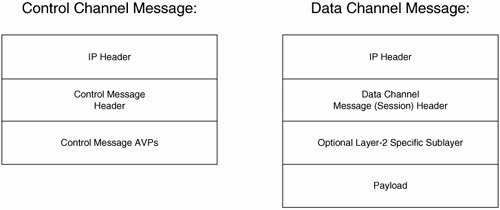
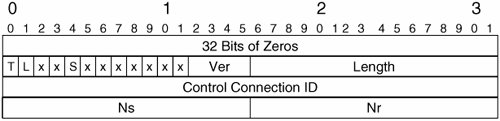
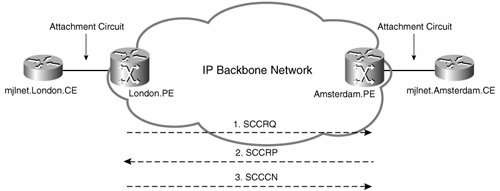
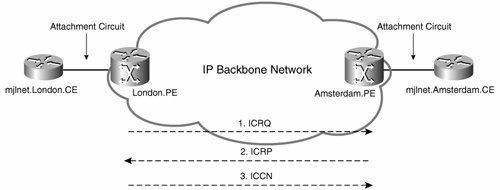
  • Dynamic sessions require a control channel (setup consisting of three messages [see Figure 2-6]), as well as the exchange of three additional control channel messages per session (see Figure 2-8).

    With static sessions, there is no session or (potentially) control channel setup traffic overhead (no ICRQ, ICRP, ICCN, and potentially no SCCRQ, SCCRP, and SCCN messages).

    Note, however, that the bandwidth overhead on the network for control connection and session setup messages is generally relatively negligible even with a large number of sessions.

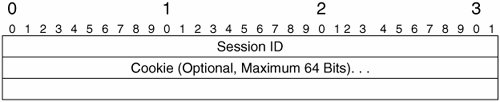
  • Session IDs and (any) cookies are negotiated during dynamic session establishment. Cookie values assigned during dynamic session establishment are randomly chosen .

    If you configure static L2TPv3 sessions, you must manually provision local and remote session IDs and cookies.

    Manual allocation of cookies may be undesirable because random cookie values can help prevent blind-insertion attacks (where an attacker attempts to inject malicious packets into an L2TPv3 session packet stream).

    Random cookie values (particularly 64-bit cookie values) help to prevent blind-insertion attacks because an attacker will typically have more trouble guessing a randomly generated cookie value than guessing a nonrandom cookie value allocated to a session by an administrator.

  • Configuration and management of more than a small number of static L2TPv3 sessions may be impractical .

  • Path maximum transmission unit (MTU) Discovery (PMTUD) for L2TPv3 pseudowires is not supported for static sessions.

Now that you understand some of the advantages and disadvantages of dynamic and static L2TPv3 sessions, it is time to move on to configuration.

Deploying L2TPv3 Pseudowires with Dynamic Session Setup

This section covers the configuration of dynamic L2TPv3 session setup.

Figure 2-12 shows a reference network used throughout this section.

Figure 2-12. Reference Network


Configuration of L2TPv3 pseudowires with dynamic session establishment consists of the following steps:

Step 1.

Configure Cisco Express Forwarding (CEF).

Step 2.

Configure a loopback interface to use as the pseudowire endpoint.

Step 3.

Configure an L2TP class (optional).

Step 4.

Configure a pseudowire class.

Step 5.

Bind attachment circuits to pseudowires.

These steps must be specified on both LACs between which pseudowires are configured.

Step 1: Configure CEF

The first step when deploying L2TPv3 pseudowires is to configure CEF. CEF can be configured using the global configuration mode ip cef or ip cef distributed commands.

If you do not configure CEF, L2TPv3 pseudowires will not function.

Step 2: Configure a Loopback Interface to Use as the Pseudowire Endpoint

You should now configure a loopback interface to use as the endpoint of L2TPv3 pseudowires. Configuring a loopback interface for this purpose is a good idea because loopback interfaces do not go down (unlike physical interfaces).

Example 2-6 shows the configuration of a loopback interface to use as the pseudowire endpoint.

Example 2-6. Configuration of a Loopback Interface to Use as the Pseudowire Endpoint
!

interface Loopback0


ip address 172.16.1.1 255.255.255.255

!

Be sure that the IP address that you configure on the loopback interface that you use as the pseudowire endpoint is reachable from the peer LAC (by advertising it in the backbone network interior gateway protocol [IGP] or via other means, as appropriate).

If the IP address on the loopback interface is not reachable from the peer LAC, L2TPv3 pseudowires will not function.

Step 3: Configure an L2TPv3 Class (Optional)

Although it is optional, recommended practice advises that you should configure an L2TPv3 class. The L2TPv3 class enables you to configure a number of control channel parameters such as authentication, keepalive (Hello) intervals, receive window size , retransmission parameters, and timeouts.

In early specifications of the L2TPv3 protocol, a Challenge Handshake Authentication Protocol (CHAP)-like mechanism was used for L2TPv3 control channel authentication. This authentication mechanism is borrowed from L2TPv2 (RFC2661).

Example 2-7 shows the configuration of an L2TPv3 class with CHAP-like authentication.

Example 2-7. Configuration of an L2TPv3 Class with CHAP-Like Authentication
!

l2tp-class mjlnet.Class.To.Amsterdam


authentication


password 7 02050D480809

!

The l2tp-class l2tp-class- name command configures the L2TPv3 class name (in Example 2-7, mjlnet.Class.To.Amsterdam ).

The authentication command then enables L2TPv3 control channel authentication.

Finally, the password [ 7 ] password command is used to configure the shared password. This password must be configured identically on peer LCCEs or control channel setup will fail.

In RFC 3931 (L2TPv3), a new authentication mechanism was introduced (it makes use of different AVPs than CHAP-like authentication). This new mechanism can be referred to as digest secret authentication .

Example 2-8 shows the configuration of digest secret authentication.

Example 2-8. Configuration of Digest Secret Authentication
!

l2tp-class mjlnet.PW.To.Amsterdam


digest secret mjlnet hash sha

!

The digest [ secret [ 7 ] password ] [ hash { md5 sha }] command is used in Example 2-8 to configure digest secret authentication, configure a password, and specify the hash algorithm (Message Digest 5 [MD5] or Secret Hash Algorithm [SHA-1]). The password and hash algorithm must be consistent between peer LCCEs or again control channel establishment will fail.

You might be wondering which type of authentication you should configure, the CHAP-like authentication shown in Example 2-7 or the digest secret authentication shown in Example 2-8. The answer is, it depends (of course!).

Digest secret authentication was first introduced in Cisco IOS Software Release 12.0(29)S, and so if one or both of your LCCEs are running a version prior to 12.0(29)S, you will have to stick with the older CHAP-like authentication. If both the LCCEs are running 12.0(29), you can use digest secret authentication. Digest secret authentication is more secure than the older CHAP-like authentication.

Before finishing this section, it is worth mentioning the digest check command, which is used to configure integrity checking for control channel messages. This command was also introduced in Cisco IOS Software Release 12.0(29)S. You can configure this command only if digest secret authentication is also enabled.

Step 4: Configure a Pseudowire Class

A pseudowire class is used to configure the pseudowire encapsulation and pseudowire endpoint address (the loopback interface configured in Step 2).

Example 2-9 shows the configuration of a pseudowire class.

Example 2-9. Configuration of a Pseudowire Class
!

pseudowire-class mjlnet.PW.To.Amsterdam


encapsulation l2tpv3


protocol l2tpv3 mjlnet.Class.To.Amsterdam


ip local interface Loopback0

!

The pseudowire-class [ pw-class-name ] command is used to configure the pseudowire class name. Next , the encapsulation l2tpv3 command is used to specify the pseudowire encapsulation type. The control channel protocol is configured, and the L2TPv3 class (configured in Step 3) is linked to the pseudowire class using the protocol { l2tpv3 none } [ l2tpv3-class-name ] command. Then the ip local interface interface-name command is used to specify the interface to be used as the pseudowire endpoint (see Step 2). Another (optional) command that can be configured within the pseudowire class is sequencing . This command is used to specify that sequencing should be used on the pseudowire (see Figure 2-5).

Step 5: Bind Attachment Circuits to Pseudowires

The xconnect command is used to bind attachment circuits to L2TPv3 pseudowires.

As discussed earlier in this chapter, Cisco routers support the following L2TPv3 pseudowires (at the time of this writing):

  • Ethernet port

  • Ethernet VLAN (802.1Q)

  • HDLC

  • PPP

  • Frame Relay (DLCI-to-DLCI and trunks)

  • ATM (AAL5 and cell relay)

  • IP Layer 2 transport

The following sections discuss binding attachment circuits to each of these pseudowire types (with the exception of IP Layer 2 transport), as well as design and deployment considerations for each pseudowire type. IP Layer 2 transport is covered toward the end of the chapter.

Transporting Ethernet Traffic over L2TPv3 Pseudowires

One of the most popular types of traffic over L2TPv3 pseudowires is Ethernet. Ethernet traffic can be transported over L2TPv3 in two forms:

  • Ethernet port (raw Ethernet frames )

  • Ethernet VLAN (tagged Ethernet [802.1Q] frames)

The following two sections describe the operation, configuration, and verification of Ethernet traffic transport over L2TPv3 pseudowires.

It is worth noting that when transporting Ethernet traffic in point-to-point (VPWS) Ethernet port or Ethernet VLAN mode, the peer LCCEs are completely transparent to Ethernet hosts at either end of the pseudowire and do not maintain a MAC address table.

Ethernet Port Transport with L2TPv3 Pseudowires

When using Ethernet port transport, raw Ethernet frames are transported over the point-to-point L2TPv3 pseudowire between LCCEs. Before examining the transport of Ethernet frames over an L2TPv3 pseudowire, however, it is a good idea to first take a look at Ethernet frames themselves .

Figure 2-13 depicts the two commonly used Ethernet frames formats, Ethernet II and IEEE 802.3. The lengths of the various Ethernet frame fields, in bytes, are shown in brackets in the figure.

Figure 2-13. Ethernet II And IEEE 8023 Frame Formats


The fields of the Ethernet II/802.3 frames have the following functions:

  • Preamble (including the Start-of-Frame [SOF] delimiter ) This is an 8-byte pattern of alternating 1s and 0s, with the two final bits set to 1. This preamble and SOF is used to inform hosts on an Ethernet segment that a frame is on the way.

  • Destination Address This is the 6-byte destination MAC address.

  • Source Address The 6-byte source MAC address.

  • Type (Ethernet II) This is a 2-byte field that specifies the higher-layer protocol. 802.3 replaces the Type field with a Length field, which indicates the length of the Data field.

  • Data (including any padding) This is a variable-length field that contains data to be sent to a higher-layer protocol.

  • Frame Check Sequence (FCS) A 2-byte cyclic redundancy check (CRC) that is used for error detection.

In an 802.3 frame, an 802.2 Logical Link Control (LLC) header usually follows the Length field. The fields of the 802.2 header are as follows:

  • Destination Service Access Point (DSAP) A 1-byte field that indicates a service access point (SAP [memory buffer]) on the receiving host.

  • Source Service Access Point (SSAP) A 1-byte field that indicates a SAP on the sending host.

  • Control (CTRL) A 1-byte field that contains command, response, and sequence number information.

The Subnetwork Access Point (SNAP) header enables proprietary protocols to be carried in the 802.2 LLC frame. If you are using SNAP, the 802.2 DSAP and SSAP are set to 0xAA, and the Control field is set to 0x03. The SNAP header has two additional fields:

  • Organizational Unique Identifier (OUI) This 3-byte field is a vendor code.

  • Ether Type This 2-byte field indicates the Ether Type.

When an ingress PE receives an Ethernet frame on an attachment circuit, it removes the preamble and FCS, inserts the frame into an L2TPv3 packet, and transmits it to the egress LCCE.

Figure 2-14 shows the transmission of an Ethernet frame over an L2TPv3 pseudowire.

Figure 2-14. Transmission of an Ethernet Frame over an L2TPv3 Pseudowire


Example 2-10 shows the configuration of Ethernet port transport over an L2TPv3 pseudowire.

Example 2-10. Configuration of Ethernet Port Transport over an L2TPv3 Pseudowire
!

! On London.PE (line 1)

!

l2tp-class mjlnet.Class.To.Amsterdam


digest secret mjlnet hash sha

!

pseudowire-class mjlnet.PW.To.Amsterdam


encapsulation l2tpv3


protocol l2tpv3 mjlnet.Class.To.Amsterdam


ip local interface Loopback0

!

interface FastEthernet0/0


xconnect 172.16.1.3 1001 pw-class mjlnet.PW.To.Amsterdam (line 2)


!

!

! On Amsterdam.PE (line 3)

!

l2tp-class mjlnet.Class.To.London


digest secret mjlnet hash sha

!

pseudowire-class mjlnet.PW.To.London


encapsulation l2tpv3


protocol l2tpv3 mjlnet.Class.To.London


ip local interface Loopback0

!
!

interface FastEthernet0/0


xconnect 172.16.1.1 1001 pw-class mjlnet.PW.To.London (line 4)


Configuration of London.PE is shown beginning in highlighted line 1, and configuration of Amsterdam.PE is shown beginning in highlighted line 3. As you can see, excluding the configuration of the L2TPv3 class and pseudowire class, the only command to configure is xconnect peer-ip-address vcid pw-class name .

The xconnect command is configured directly under the Ethernet interface (highlighted lines 2 and 4) and is used to bind the interface to an L2TPv3 pseudowire to the specified peer (IP address), with the specified VC ID, and using the configured pseudowire class. The VC ID must be identical on peer LCCEs for a particular pseudowire; otherwise , pseudowire setup will fail.

An Ethernet port L2TPv3 pseudowire can be verified using the show l2tun session command, as shown in Example 2-11.

Example 2-11. Verifying an Ethernet Port L2TPv3 Pseudowire Using the show l2tun session Command
London.PE#

show l2tun session all

Session Information Total tunnels 1 sessions 1
 Tunnel control packets dropped due to failed digest 0

Session id 63438 is up, tunnel id 52193
Call serial number is 1812600007
Remote tunnel name is Amsterdam.PE
  Internet address is 172.16.1.3

Session is L2TP signaled (line 1)

Session state is established, time since change 00:00:45
    0 Packets sent, 0 received
    0 Bytes sent, 0 received
    Receive packets dropped:
      out-of-order:            0
      total:                   0
    Send packets dropped:
      exceeded session MTU:    0
      total:                   0
  Session vcid is 1002

Session Layer 2 circuit, type is Ethernet, name is FastEthernet0/0 (line 2)


Circuit state is UP (line 3)

Remote session id is 18582, remote tunnel id 33034
  DF bit off, ToS reflect disabled, ToS value 0, TTL value 255
  No session cookie information available
  FS cached header information:
    encap size = 24 bytes
    00000000 00000000 00000000 00000000
    00000000 00000000
  Sequencing is off

Highlighted line 1 shows that the session (pseudowire) is L2TPv3 signaled, and highlighted lines 2 and 3 show that the pseudowire type is Ethernet port ( Ethernet ) and that the pseudowire state is UP (active).

Ethernet VLAN Transport with L2TPv3 Pseudowires

The second method of transporting Ethernet traffic over an L2TPv3 pseudowire is to use Ethernet VLAN transport. When using Ethernet VLAN transport, attachment circuits use an 802.1Q encapsulation, and 802.1Q frames are transported over the L2TPv3 pseudowire.

Figure 2-15 shows the IEEE 802.1Q frame format. Lengths of frame fields, in bytes, are shown in brackets.

Figure 2-15. IEEE 8021Q Frame Formats


All of the fields in Figure 2-15 have already been described with the exception of the Tag Protocol ID (TPID) and Tag Control Information (TCI) fields:

  • TPID This 2-byte field has a fixed value of 0x8100. The purpose of this field is to inform a device that this frame is a tagged (802.1Q) frame.

  • TCI This 2-byte field breaks down into three subfields:

    - User Priority A 3-bit field that indicates the priority (QoS) setting for the frame. The operation of this field is defined by IEEE 802.1p.

    - Canonical Format Indicator (CFI) A 1-bit field that when set to 0 indicates that information in the frame is carried in a canonical (Ethernet) format. If set to 1, information is carried in a noncanonical (Token Ring) format.

    - VLAN ID A 12-bit field used to indicate the VLAN.

It is possible for an egress PE router to rewrite the VLAN ID field of 802.1Q frames that it receives over the pseudowire from the ingress PE router. So, for example, frames with a VLAN ID of 100 might be transported over the pseudowire from the ingress PE router, and the egress PE router might be configured to rewrite the VLAN ID to 200 before forwarding them on its local attachment circuit.

Example 2-12 shows the configuration of Ethernet VLAN transport over an L2TPv3 pseudowire.

Example 2-12. Configuration of Ethernet VLAN Transport over an L2TPv3 Pseudowire
!

! On London.PE (line 1)

!

l2tp-class mjlnet.Class.To.Amsterdam


digest secret mjlnet hash sha

!

pseudowire-class mjlnet.PW.To.Amsterdam


encapsulation l2tpv3


protocol l2tpv3 mjlnet.Class.To.Amsterdam


ip local interface Loopback0

!
!
!
!

interface FastEthernet0/0


no ip address


no ip directed-broadcast

!


interface FastEthernet0/0.1 (line 2)


encapsulation dot1Q 200 (line 3)


xconnect 172.16.1.3 1002 pw-class mjlnet.PW.To.Amsterdam (line 4)


!
!

!

! On Amsterdam.PE (line 5)

!

l2tp-class mjlnet.Class.To.London


digest secret mjlnet hash sha

!
!

pseudowire-class mjlnet.PW.To.London


encapsulation l2tpv3


protocol l2tpv3 mjlnet.Class.To.London


ip local interface Loopback0

!
!
!

interface FastEthernet0/0


no ip address


no ip directed-broadcast

!


interface FastEthernet0/0.1 (line 6)


encapsulation dot1Q 200 (line 7)


xconnect 172.16.1.1 1002 pw-class mjlnet.PW.To.London (line 8)


!

Highlighted lines 2 to 4 show the relevant configuration for Ethernet VLAN transport on London.PE.

In highlighted line 2, interface Fast Ethernet 0/0.1 is created, and in highlighted line 3, IEEE 802.1Q encapsulation is enabled for VLAN 200 using the encapsulation dot1Q vlan-id command.

Next, in highlighted line 4, the xconnect peer-ip-address vcid pw-class name command is used to bind the interface to a pseudowire to the specified peer (172.16.1.3, Amsterdam.PE), with the specified VC ID (1002), and using the specified pseudowire class (mjlnet.PW.To. Amsterdam).

Highlighted lines 6 to 8 show the corresponding configuration for Amsterdam.PE. In highlighted line 6, interface Fast Ethernet 0/0.1 is created. Then in highlighted lines 7 and 8, IEEE 802.1Q encapsulation for VLAN 200 is configured, and the xconnect command is used to bind the interface to a pseudowire to London.PE (172.16.1.1), with VC ID 1002, and using pseudowire class mjlnet.PW.To.London.

Notice that the VLAN ID specified using the encapsulation dot1q vlan-id command is the same at both ends of the pseudowire (VLAN ID 200, see highlighted lines 3 and 7), and so no VLAN ID rewrite by the egress LCCE is necessary in this example.

As shown in Example 2-13, verification of an Ethernet VLAN pseudowire is again achieved via the show l2tun session command.

Example 2-13. Verification of an Ethernet VLAN Pseudowire Using the show l2tun session Command
London.PE#

show l2tun session all

Session Information Total tunnels 1 sessions 1
 Tunnel control packets dropped due to failed digest 0

Session id 20476 is up, tunnel id 22418
Call serial number is 3243000000
Remote tunnel name is Amsterdam.PE
  Internet address is 172.16.1.3

Session is L2TP signaled (line 1)

Session state is established, time since change 00:02:26
    0 Packets sent, 0 received
    0 Bytes sent, 0 received
    Receive packets dropped:
      out-of-order:            0
      total:                   0
    Send packets dropped:
      exceeded session MTU:    0
      total:                   0
  Session vcid is 1002

Session Layer 2 circuit, type is Ethernet Vlan, name is FastEthernet0/0.1:200 (line 2)


Circuit state is UP (line 3)

Remote session id is 31207, remote tunnel id 28218
  DF bit off, ToS reflect disabled, ToS value 0, TTL value 255
  No session cookie information available
  FS cached header information:
    encap size = 24 bytes
    00000000 00000000 00000000 00000000
    00000000 00000000
  Sequencing is off

As you can see in highlighted line 1, the pseudowire is L2TPv3 signaled. Highlighted line 2 and 3 show that the pseudowire type is Ethernet VLAN, and that the pseudowire is in an UP state.

Transporting HDLC, PPP, and X.25 over L2TPv3 Pseudowires

Another encapsulation type that is supported for transport over L2TPv3 pseudowires is HDLC, including HDLC-like protocols such as the PPP and X.25).

HDLC Traffic Transport over L2TPv3

Figure 2-16 shows a Cisco HDLC frame. Note that field lengths (in bytes) are shown in brackets in Figure 2-16.

Figure 2-16. Cisco HDLC Frame


The fields of the Cisco HDLC frame are as follows:

  • Flag This 1-byte field contains a value of 0x7E and indicates the start of the HDLC frame.

  • Address This 1-byte field can contain the following values:

    - Unicast frame, 0x0F

    - Broadcast frame, 0x80

    - Padded frame, 0x40

    - Compressed frame, 0x20

  • Control (CTRL) This 1-byte field has a value of 0 and is not checked on reception .

  • Ethertype This 2-byte field contains a standard Ethernet protocol type. This field is not contained within the standard (ISO/IEC 13239) HDLC frame.

  • Data (Information) This variable-length field carries higher-layer protocol information.

  • Frame Check Sequence (FCS) This 2- or 4-byte field carries error checking information.

  • Flags This 1-byte field carries a value of 0x7E, and indicates the end of the HDLC frame.

As illustrated in Figure 2-17, when an ingress LCCE receives an HDLC frame on an attachment circuit, it encapsulates the frame in an L2TPv3 packet and transmits that packet to the egress LCCE.

Figure 2-17. Ingress LCCE Encapsulates Each HDLC Frame in a Separate L2TPv3 Packet and Transmits It to the Egress LCCE


Although the ingress LCCE encapsulates each HDLC frame in an L2TPv3 packet, certain parts of the HDLC frame are not sent. The Flags fields, together with the FCS (see Figure 2-16) are discarded by the ingress LCCE, and any bit stuffing is undone prior to the encapsulation of an HDLC frame in L2TPv3.

The egress LCCE removes each HDLC frame from the L2TPv3 packets received from the ingress LCCE and reconstitutes the Flags fields and FCS before sending each HDLC frame on the attachment circuit.

Example 2-14 shows the configuration of HDLC (or HDLC-like) traffic transport over an L2TPv3 pseudowire.

Example 2-14. Configuration of HDLC Traffic Transport over an L2TPv3 Pseudowire
!

! On London.PE (line 1)

!

l2tp-class mjlnet.Class.To.Amsterdam


digest secret mjlnet hash sha

!

pseudowire-class mjlnet.PW.To.Amsterdam


encapsulation l2tpv3


protocol l2tpv3 mjlnet.Class.To.Amsterdam


ip local interface Loopback0

!

interface Serial4/0


no ip address


no ip directed-broadcast


no cdp enable


xconnect 172.16.1.3 1001 pw-class mjlnet.PW.To.Amsterdam (line 2)


!

!

! On Amsterdam.PE (line 3)

!

l2tp-class mjlnet.Class.To.London


digest secret mjlnet hash sha

!
!

pseudowire-class mjlnet.PW.To.London


encapsulation l2tpv3


protocol l2tpv3 mjlnet.Class.To.London


ip local interface Loopback0

!
!

interface Serial4/1


no ip address


no ip directed-broadcast


no cdp enable


xconnect 172.16.1.1 1001 pw-class mjlnet.PW.To.London (line 4)


!

The configuration for HDLC traffic transport is simple.

The relevant configuration for London.PE is shown in highlighted line 2, and the relevant configuration for Amsterdam.PE is shown in highlighted line 4.

As you can see, the only required command (apart from the standard L2TP class and pseudowire class configuration) is xconnect peer-ip-address vcid pw-class name . This command binds the serial interface to an L2TPv3 pseudowire with the specified VC ID, to the specified peer, using the specified pseudowire class.

As shown in Example 2-15, you can use the show l2tun session command to verify HDLC L2TPv3 pseudowires.

Example 2-15. Verifying HDLC L2TPv3 Pseudowires Using the show l2tun session Command
London.PE#

show l2tun session all

Session Information Total tunnels 1 sessions 1
 Tunnel control packets dropped due to failed digest 0

Session id 9303 is up, tunnel id 56029
Call serial number is 3616600000
Remote tunnel name is Amsterdam.PE
  Internet address is 172.16.1.3

Session is L2TP signaled (line 1)

Session state is established, time since change 03:20:04
    1396 Packets sent, 1401 received
    95030 Bytes sent, 86705 received
    Receive packets dropped:
      out-of-order:             0
      total:                    0
    Send packets dropped:
      exceeded session MTU:     0
      total:                    0
  Session vcid is 1001

Session Layer 2 circuit, type is HDLC, name is Serial4/0 (line 2)


Circuit state is UP (line 3)

Remote session id is 8661, remote tunnel id 21530
  DF bit off, ToS reflect disabled, ToS value 0, TTL value 255
  No session cookie information available
  FS cached header information:
    encap size = 24 bytes
    00000000 00000000 00000000 00000000
    00000000 00000000
  Sequencing is off

Highlighted line 1 shows that the session (pseudowire) is L2TPv3 signaled, and highlighted line 2 and 3 show that the pseudowire type is HDLC and the pseudowire is in an UP (active) state.

PPP Traffic Transport over L2TPv3

Figure 2-18 shows a PPP frame (PPP in HDLC-like framing). You may like to compare the PPP frame in Figures 2-18 with the Cisco HDLC frame in Figure 2-16.

Figure 2-18. PPP Frame (PPP in HDLC-Like Framing)


PPP in HDLC-like framing can be described as follows:

  • Flag Has a value of 0x7E and indicates the start of the frame.

  • Address This 1-byte field contains the All- Stations address (0xFF).

  • Control (CTRL) This 1-byte field contains the value 0x03 (Unnumbered Information with Poll/Final bit set to 0).

  • Protocol A 1- or 2-byte field that identifies the datagram/protocol (such as the Link Control Protocol [LCP], CHAP) contained in the Information field.

  • Information This variable-length field (0 or more) contains the datagram for the protocol identified in the Protocol field.

  • Padding An optional field that is used to pad the Information field up to the Maximum Receive Unit (MRU).

  • Frame Check Sequence (FCS) A 2-byte field containing a checksum used for error detection.

  • Flag This 1-byte field contains the value 0x7E. This field is used to indicate the end of the frame.

One important fact to understand about PPP transport over L2TPv3 pseudowires is that the LCCEs do not participate in PPP negotiation. Instead, CE devices at the either end of the attachment circuits negotiate PPP between themselves.

Figure 2-19 illustrates PPP negotiation when transporting PPP over an L2TPv3 pseudowire. In Figure 2-19, PPP negotiation takes place between mjlnet.London.CE and mjlnet. Amsterdam.CE. London.PE and Amsterdam.PE do not participate in PPP negotiation.

Figure 2-19. PPP Negotiation When Transporting PPP over an L2TPv3 Pseudowire


Encapsulation of PPP frames by the ingress LCCE and decapsulation by the egress LCCE are as described in the section "HDLC Traffic Transport over L2TPv3" on page 53 (see also Figure 2-17).

The configuration and verification of PPP traffic transport over L2TPv3 are exactly as described for HDLC traffic transport in the section titled "HDLC Traffic Transport over L2TPv3" on page 53.

Note

Configuring a PPP pseudowire (rather than an HDLC pseudowire) to transport PPP traffic is also a possibility.

The configuration of a PPP pseudowire is as shown in Example 2-14, with the one exception that the encapsulation ppp command must be configured on the attachment circuits (interfaces serial 4/0 and 4/1 on London.PE and Amsterdam.PE respectively in Example 2-14).


Example 2-16 shows PPP negotiation between peers over the HDLC L2TPv3 pseudowire.

Example 2-16. PPP Negotiation Between Peers over the HDLC L2TPv3 Pseudowire

[View full width]

mjlnet.London.CE#

debug ppp negotiation

PPP protocol negotiation debugging is on
mjlnet.London.CE#

00:18:12: %LINK-3-UPDOWN: Interface Serial0, changed state to up (line 1)

00:18:12: Se0 PPP: Treating connection as a dedicated line

00:18:12: Se0 PPP: Phase is ESTABLISHING, Active Open (line 2)

00:18:12: Se0 LCP: O CONFREQ [Closed] id 32 len 15
00:18:12: Se0 LCP:    AuthProto CHAP (0x0305C22305)
00:18:12: Se0 LCP:    MagicNumber 0x001CE60C (0x0506001CE60C)
00:18:12: Se0 LCP: I CONFREQ [REQsent] id 52 len 15
00:18:12: Se0 LCP:    AuthProto CHAP (0x0305C22305)
00:18:12: Se0 LCP:    MagicNumber 0x078A1107 (0x0506078A1107)
00:18:12: Se0 LCP: O CONFACK [REQsent] id 52 len 15
00:18:12: Se0 LCP:    AuthProto CHAP (0x0305C22305)
00:18:12: Se0 LCP:    MagicNumber 0x078A1107 (0x0506078A1107)
00:18:12: Se0 LCP: I CONFACK [ACKsent] id 32 len 15
00:18:12: Se0 LCP:    AuthProto CHAP (0x0305C22305)
00:18:12: Se0 LCP:    MagicNumber 0x001CE60C (0x0506001CE60C)
00:18:12: Se0 LCP: State is Open

00:18:12: Se0 PPP: Phase is AUTHENTICATING, by both (line 3)


00:18:12: Se0 CHAP: O CHALLENGE id 18 len 39 from "mjlnet.London.CE" (line 4)


00:18:12: Se0 CHAP: I CHALLENGE id 7 len 36 from "mjlnet.Amsterdam.CE" (line 5)


00:18:12: Se0 CHAP: O RESPONSE id 7 len 39 from "mjlnet.London.CE" (line 6)


00:18:12: Se0 CHAP: I RESPONSE id 18 len 36 from "mjlnet.Amsterdam.CE" (line 7)


00:18:12: Se0 CHAP: O SUCCESS id 18 len 4 (line 8)


00:18:12: Se0 CHAP: I SUCCESS id 7 len 4 (line 9)


00:18:12: Se0 PPP: Phase is UP (line 10)

00:18:12: Se0 IPCP: O CONFREQ [Closed] id 5 len 10
00:18:12: Se0 IPCP:    Address 10.1.1.1 (0x0306C0A80101)
00:18:12: Se0 CDPCP: O CONFREQ [Closed] id 5 len 4
00:18:12: Se0 IPCP: I CONFREQ [REQsent] id 5 len 10
00:18:12: Se0 IPCP:    Address 10.1.1.2 (0x0306C0A80102)
00:18:12: Se0 IPCP: O CONFACK [REQsent] id 5 len 10
00:18:12: Se0 IPCP:    Address 10.1.1.2 (0x0306C0A80102)
00:18:12: Se0 CDPCP: I CONFREQ [REQsent] id 5 len 4
00:18:12: Se0 CDPCP: O CONFACK [REQsent] id 5 len 4
00:18:12: Se0 IPCP: I CONFACK [ACKsent] id 5 len 10
00:18:12: Se0 IPCP:    Address 10.1.1.1 (0x0306C0A80101)
00:18:12: Se0 IPCP: State is Open
00:18:12: Se0 CDPCP: I CONFACK [ACKsent] id 5 len 4
00:18:12: Se0 CDPCP: State is Open
00:18:12: Se0 IPCP: Install route to 10.1.1.2

00:18:13: %LINEPROTO-5-UPDOWN: Line protocol on Interface Serial0, changed state to up (

line 11)

mjlnet.London.CE#

In highlighted line 1, interface serial 0 changes state to UP on mjlnet.London.CE. The PPP phase changes to ESTABLISHING in highlighted line 2. LCP negotiation then takes place; and in highlighted line 3, the PPP phase changes to AUTHENTICATINGPPP authentication is about to begin. CHAP authentication now takes place (see highlighted lines 4 to 9).

Normally, PPP authentication is not required for (virtual) leased lines, but in Example 2-16, the CHAP CHALLENGE and RESPONSE messages clearly show that PPP negotiation takes place between mjlnet.London.CE and mjlnet.Amsterdam.CE (and does not involve the LCCEs). In highlighted line 10, the PPP phase changes to UP, and Network Control Protocol (NCP) negotiation (including IP Control Protocol [IPCP] negotiation) begins. When NCP negotiation is complete, the line protocol on interface serial 0 changes state to UP (highlighted line 11).

X.25 Traffic Transport over L2TPv3

If you are familiar with X.25, you will probably not be surprised to learn that an HDLC L2TPv3 pseudowire can also be used to transport X.25 traffic.

X.25 is an ITU standard and operates at Layers 1, 2, and 3 of the OSI model, with X.21, X.21bis, EIA/TIA-232/449/530, or G.703 commonly used at Layer 1, Link Access Procedure Balanced (LAPB) used at Layer 2, and the Packet Layer Protocol (PLP) used at Layer 3.

X.25 has, to a great extent, been replaced by Frame Relay and other packet/cell-switched technologies. But if you do have an island or two of X.25 remaining in your network, you can transport it over your IP backbone using L2TPv3 pseudowires.

HDLC L2TPv3 pseudowires can be used to transport LAPB frames, and this frame format is illustrated in Figure 2-20.

Figure 2-20. LAPB Frame


As a side note, if you compare the LAPB frame shown in Figure 2-20 with the Cisco HDLC frame shown in Figure 2-16, it should be pretty evident that the LAPB frame format is a variant of the HDLC frame format.

The LAPB frame fields can be described as follows:

  • Flag A 1-byte field contains the value 0x7E. This field indicates the start of the frame.

  • Address This 1-byte field indicates DTE/DCE Command/Response.

  • Control This 1- or 2-byte field indicates one of three LAPB frame types (Unnumbered, Supervisory, or Information).

  • Information This variable-length field contains the PLP packet.

  • Frame Check Sequence (FCS) A 2-byte checksum.

  • Flag This 1-byte field contains the value 0x7E. It indicates the end of the frame.

It is worth noting that the LCCEs do not participate in X.25they are neither X.25 (LAPB) DCEs nor DTEs but simply forward LAPB frames over the pseudowire between attachment circuits.

Configuration and verification of X.25 traffic transport over L2TPv3 is again exactly as described in the section, "HDLC Traffic Transport over L2TPv3."

Example 2-17 shows the output of the debug x25 all command when ping (ICMP Echo [Echo/Echo Reply]) is sent over the L2TPv3 pseudowire.

Example 2-17. Output of the debug x25 all Command When ping Is Sent over the L2TPv3 Pseudowire
mjlnet.London.CE#

debug x25 all

X.25 packet debugging is on

mjlnet.London.CE#

ping 10.1.1.2

Type escape sequence to abort.
Sending 5, 100-byte ICMP Echos to 10.1.1.2, timeout is 2 seconds:
!!!!!
Success rate is 100 percent (5/5), round-trip min/avg/max = 140/146/168 ms
mjlnet.London.CE#

00:16:23: Serial0: X.25 O D1 Data (103) 8 lci 1024 PS 2 PR 2 (line 1)


00:16:23: Serial0: X.25 I D1 RR (3) 8 lci 1024 PR 3 (line 2)


00:16:23: Serial0: X.25 I D1 Data (103) 8 lci 1024 PS 2 PR 3 (line 3)

00:16:23: Serial0: X.25 O D1 Data (103) 8 lci 1024 PS 3 PR 3
00:16:23: Serial0: X.25 I D1 Data (103) 8 lci 1024 PS 3 PR 4
00:16:23: Serial0: X.25 O D1 Data (103) 8 lci 1024 PS 4 PR 4
00:16:24: Serial0: X.25 I D1 Data (103) 8 lci 1024 PS 4 PR 5
00:16:24: Serial0: X.25 O D1 Data (103) 8 lci 1024 PS 5 PR 5
00:16:24: Serial0: X.25 I D1 Data (103) 8 lci 1024 PS 5 PR 6
00:16:24: Serial0: X.25 O D1 Data (103) 8 lci 1024 PS 6 PR 6
00:16:24: Serial0: X.25 I D1 Data (103) 8 lci 1024 PS 6 PR 7
mjlnet.London.CE#

Highlighted line 1 shows an outbound ( O ) data packet. The modulo of the VC is shown ( 8 ), together with the Logical Channel Identifier (LCI [the VC number], 1024 ). This packet contains an ICMP Echo. The packet send (PS) and packet receive (PR) sequence numbers are also shown (2 and 2, respectively).

In highlighted line 2, you can see an inbound ( I ) Receiver Ready ( RR ) message. This serves as an acknowledgment of a frame, and indicates that the peer is ready to receive the next frame in the sequence.

Finally, in highlighted line 3, you can see an inbound data packet. This contains an ICMP Echo Reply.

Deploying Frame-Relay L2TPv3 Pseudowires

So, now to Frame Relay. Frame Relay can be transported over L2TPv3 in two ways:

  • Using Frame Relay DLCI-to-DLCI permanent virtual circuit (PVC) pseudowires When you are using this method, LCCEs participate in the Local Management Interface (LMI) and perform Frame Relay switching.

  • Using Frame Relay PVC trunk connections When you are using this method, LCCEs do not participate in LMI and transparently forward Frame Relay frames.

Before discussing these two methods of transporting Frame Relay over L2TPv3 pseudowires, it is a good idea to take a brief look at the basics of Frame Relay operation and frame formats.

Frame Relay Operation and Frame Formats

Frame Relay is a packet-switching technology that provides Layer 2 connectivity over a WAN.

As illustrated in Figure 2-21, the Frame Relay frame can range from 2 to 4 bytes in length.

Figure 2-21. Frame Relay Frame


At the top of Figure 2-21, you can see the Frame Relay frame format, comprising five fields:

  • Flag This 1-byte has a fixed value of 0x7E and indicates the beginning of the Frame Relay frame.

  • Address This can be 2, 3, or 4 bytes in length (ITU Q.922), depending on whether extended addressing is used.

  • Information This variable-length field carries higher-layer protocol information.

  • FCS This 2-byte frame check sequence is used for error control.

  • Flag This 1-byte flag indicates the end of the Frame Relay frame. Its value is fixed (0x7E).

As mentioned, the Address field can be 2, 3, or 4 bytes, and L2TPv3 pseudowires support the transport of Frame Relay frames with Address fields of 2 or 4 bytes in length (per Frame Relay Forum [FRF] specifications).

The formats of the 2- and 4-byte Address fields are also shown in Figure 2-21. The Address field comprises the following:

  • Data Link Connection Identifier (DLCI) This uniquely identifies the Frame Relay connection on the local link.

  • Command/Response (C/R) This may be used by higher-layer protocols or services.

  • Forward Explicit Congestion Notification (FECN) When set to 1, this bit is used to indicate to the receiver that congestion was experienced in the network.

  • Backward Explicit Congestion Notification (BECN) When set to 1, this bit is used to indicate to the sender that congestion was experienced in the network.

  • Discard Eligibility (DE) When set to 1, this bit indicates that if congestion is experienced in the network, this frame is eligible to be dropped.

  • Extended Address (EA) If set to 1, this bit setting allows extended addressing to be used (the Address field can be extended to 2, 3, or 4 bytes).

  • Data/Control (D/C) Indicates the existence of the DLCI or DL- core data or control field.

Now on to the main theme of this sectionhow to transport Frame Relay traffic over L2TPv3 pseudowires. As previously mentioned, there are two ways to transport Frame Relay over L2TPv3:

  • Using DLCI-to-DLCI switching

  • Using Frame Relay trunks

The sections that follow examine these methods in more detail.

Frame Relay Traffic Transport over L2TPv3 Using DLCI-to-DLCI Switching

Figure 2-22 illustrates Frame Relay transport over L2TPv3 using DLCI-to-DLCI connections. In Figure 2-22, the ingress LCCE receives Frame Relay frames on the attachment circuit, and places each of those frames in the payload of a separate L2TPv3 packet before forwarding them to the egress LCCE. The egress LCCE performs the same process in reverseit removes each Frame Relay frame from the payload of the L2TPv3 packet and forwards it on its attachment circuit.

Figure 2-22. Frame Relay Transport over L2TPv3 Using DLCI-to-DLCI Switching


It is important to note that before the ingress LCCE places a Frame Relay frame into an L2TPv3 packet, it removes the Flags fields and the FCS (see Figure 2-21), as well as undoing any bit stuffing.

Another important thing to note about the encapsulation of a Frame Relay frame in L2TPv3 is the default sublayer. There is no service-specific sublayer for Frame Relay, and the default sublayer is only used if sequencing is configured. If sequencing is not configured, no sublayer is sent with the L2TPv3 packet.

The rest of the encapsulation is standard and consists of the IP header specified protocol 115 (L2TPv3), the L2TPv3 session header, and the payload containing the Frame Relay frame itself.

If you are transporting Frame Relay traffic using a DLCI-to-DLCI connection with L2TPv3, the Local Management Interface (LMI) is terminated on the local LCCE, as illustrated in Figure 2-23.

Figure 2-23. LMI Is Terminated on the Local LCCE


As shown in Figure 2-23, the LMI functions between London.CE and London.LCCE, as well as Amsterdam.CE and Amsterdam.LCCE.

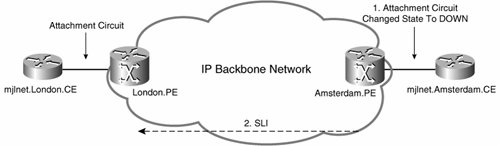
Before finishing this section, it is important to discuss circuit status signaling. When a Frame Relay PVC is created (and the circuit becomes active) on an LCCE, an ICRQ message is sent to the peer LCCE signaling creation of a corresponding L2TPv3 session (pseudowire). The peer LCCE responds with an ICRP ( assuming that its local attachment circuit Frame Relay PVC is also active). When the L2TPv3 session is established, an LCCE can signal a circuit status change using a SLI message.

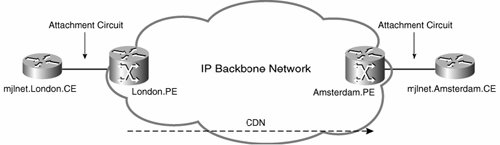
Finally, an LCCE can tear down a Frame Relay pseudowire (L2TPv3 session) using a CDN message (see Figure 2-9) if a PVC is permanently deleted or has been inactive for an extended period of time.

Example 2-18 shows the configuration of Frame Relay traffic transport over L2TPv3 using DLCI-to-DLCI connections.

Example 2-18. Configuration of Frame Relay Traffic Transport over L2TPv3 Using DLCI-to-DLCI Connections
!

! On London.PE (line 1)

!


frame-relay switching (line 2)


!

l2tp-class mjlnet.Class.To.Amsterdam


digest secret mjlnet hash sha

!

pseudowire-class mjlnet.PW.To.Amsterdam


encapsulation l2tpv3


protocol l2tpv3 mjlnet.Class.To.Amsterdam


ip local interface Loopback0

!
!

interface Serial4/2


encapsulation frame-relay (line 3)


frame-relay intf-type dce (line 4)


!
!


connect Amsterdam.PVC Serial4/2 100 l2transport (line 5)


xconnect 172.16.1.3 2001 pw-class mjlnet.PW.To.Amsterdam (line 6)


!
!

!
!

On Amsterdam.PE (line 7)

!


frame-relay switching (line 8)


!

l2tp-class mjlnet.Class.To.London


digest secret mjlnet hash sha

!

pseudowire-class mjlnet.PW.To.London


encapsulation l2tpv3


protocol l2tpv3 mjlnet.Class.To.London


ip local interface Loopback0

!
!

interface Serial3/2


encapsulation frame-relay (line 9)


frame-relay intf-type dce (line 10)


!


connect London.PVC Serial3/2 200 l2transport (line 11)


xconnect 172.16.1.1 2001 pw-class mjlnet.PW.To.London (line 12)


!
!

Highlighted lines 1 to 6 show the configuration of a Frame Relay DLCI-to-DLCI switching L2TPv3 pseudowire on London.PE. In highlighted line 2, the frame-relay switching command is used to configure the switching of Frame Relay PVCs. The encapsulation frame-relay command in highlighted line 3 is then used to configure Frame Relay encapsulation on interface serial 4/2 (the local attachment circuit). Next, the frame-relay interface-type [ dce dte nni ] command is used to configure the Frame Relay interface type, which in this example is DCE.

Highlighted line 5 shows the connection name serial interface-number dlci l2transport command. This command is used to configure a connection name for the Frame Relay DLCI-to-DLCI switching L2TPv3 pseudowire and specify the corresponding serial interface number and DLCI.

The xconnect peer-ip-address vcid pw-class name command is then used to bind the serial interface and DLCI to an L2TPv3 pseudowire with the specified VC ID, to the specified peer, using the specified pseudowire class.

Highlighted lines 7 to 12 show the configuration of the other end of the Frame Relay DLCI-to-DLCI switching L2TPv3 pseudowire on Amsterdam.PE.

You can verify Frame Relay DLCI-to-DLCI switching L2TPv3 pseudowires using the show l2tun session command (see Example 2-19).

Example 2-19. Verifying Frame Relay DLCI-to-DLCI Switching L2TPv3 Pseudowires Using the show l2tun session Command
London.PE#

show l2tun session all

Session Information Total tunnels 1 sessions 1
 Tunnel control packets dropped due to failed digest 0

Session id 9305 is up, tunnel id 7047
Call serial number is 2591400001
Remote tunnel name is Amsterdam.PE
  Internet address is 172.16.1.3

Session is L2TP signaled (line 1)

Session state is established, time since change 02:46:42
    8 Packets sent, 5 received
    2552 Bytes sent, 150 received
    Receive packets dropped:
      out-of-order:             0
      total:                    0
    Send packets dropped:
      exceeded session MTU:     0
      total:                    0
  Session vcid is 2001

Session Layer 2 circuit, type is Frame Relay, name is Serial4/2:100 (line 2)


Circuit state is UP (line 3)

Remote session id is 35698, remote tunnel id 30881
  DF bit off, ToS reflect disabled, ToS value 0, TTL value 255
  No session cookie information available
  FS cached header information:
    encap size = 24 bytes
    00000000 00000000 00000000 00000000
    00000000 00000000
  Sequencing is off

Highlighted line 1 shows that the pseudowire is L2TPv3 signaled. In highlighted line 2, you can see that the pseudowire is a Frame Relay DLCI-to-DLCI switching pseudowire and that interface serial 4/2 and DLCI 100 is bound to this pseudowire. Highlighted line 3 shows that the pseudowire is in an UP (active) state.

Frame Relay Traffic Transport over L2TPv3 Using Frame Relay Trunks

The second method of transporting Frame Relay traffic over L2TPv3 is to use a Frame Relay trunk. In this case, the LMI is not terminated at the local LCCE but is instead active between the CE devices connected to each LCCE (see Figure 2-24).

Figure 2-24. LMI Is Not Terminated at the Local LCCE


The configuration of a Frame Relay trunk does not involve any special configuration. In fact, the configuration is identical to that for an HDLC pseudowire (see Example 2-14 on page 54).

If you are wondering why an HDLC pseudowire can be used for the transport of Frame Relay traffic, you might remember that an HDLC pseudowire can transport HDLC and HDLC-like framesFrame Relay frames fall into the "HDLC-like" category.

Implementing ATM Pseudowires

ATM is a widely deployed method of provisioning WAN connectivity. Service providers can use L2TPv3 pseudowires to converge their legacy ATM networks with their IP networks.

Before discussing the transport of ATM traffic over an L2TPv3 pseudowire, it is a good idea to take a brief look at how ATM operates.

ATM Operation, Cell, PDU, and SDU Formats

The basic operation of ATM is best understood by first examining the ATM reference model shown in Figure 2-25.

Figure 2-25. ATM Protocol Reference Model


As you can see from looking at Figure 2-25, ATM operates at the physical (PHY) layer, the ATM layer, the ATM Adaption Layer (AAL), and higher layers.

The physical layer is split into two sublayers :

  • The Physical Medium Dependent (PMD) sublayer

  • The Transmission Convergence (TC) sublayer.

The PMD sublayer describes how ATM cells will be transmitted and received over a particular physical transmission medium.

The TC sublayer is responsible for breaking ATM cells into a bit stream for transmission by the PMD sublayer, as well as receiving a bit stream from the PMD sublayer and forming this bit stream back into ATM cells. The TC sublayer is also responsible for generation and verification of the Header Error Control (HEC) field in the ATM cell header (described later in this section), in addition to mapping ATM cells into an appropriate physical layer frame format.

The layer above the PHY layer in the ATM protocol reference model is the ATM layer. This layer performs a plethora of functions, including the following:

  • Construction of ATM cells

  • Generic Flow Control (GFC)

  • ATM cell switching using the Virtual Path Identifier (VPI) and Virtual Channel Identifier (VCI) fields in the ATM cell header

  • Distinguishing between different ATM cell types based on the Payload Type (PT) field of the ATM cell header

  • Processing ATM cells appropriately based on the Cell Loss Priority (CLP) bit in the ATM cell header

  • Supporting ATM quality of service (QoS)

Figure 2-26 illustrates the ATM cell and header formats.

Figure 2-26. ATM Cell and Header Formats


Figure 2-26 shows that the ATM cell consists of a 5-byte header and a 48-byte payloada total size of 53 bytes.

Below the ATM cell, you can see the User-to-Network Interface (UNI) ATM cell header, and the Network-to-Network Interface (NNI) ATM cell header. The length of each field of the UNI and NNI cell headers in bits is shown in brackets in Figure 2-26.

The UNI defines an interface between user equipment, such as a router with an ATM interface, and an ATM network. The NNI, on the other hand, defines an interface between ATM switches in an ATM network.

The UNI ATM cell header consists of six fields:

  • Generic Flow Control (GFC) This field provides functions such as multiplexing (allowing multiple stations to share an interface).

  • Virtual Path Identifier (VPI) This field identifies a specific ATM virtual path on a physical circuit.

  • Virtual Channel Identifier (VCI) This field identifies a particular ATM virtual channel on a physical circuit.

  • Payload Type (PT) This field specifies whether the ATM cell carries user data; operation, administration, and maintenance (OAM) information; or resource management (RM) information.

The PT field can also be used to indicate that the cell experienced congestion (Explicit Forward Congestion Indication [EFCI]) as it passed through a network, as well as indicate the final cell in an AAL5 Protocol Data Unit (PDU) (AAL indicate=1).

The precise PT bit settings are as follows:

000 user data cell; EFCI=0; AAL indicate=0

001 user data cell; EFCI=0; AAL indicate=1

010 user data cell; EFCI=1; AAL indicate=0

011 user data cell; EFCI=1; AAL indicate=1

100 OAM F5 segment cell

101 OAM F5 end-to-end cell

110 Resource Management (RM) cell

111 (Reserved for future use)

  • Cell Loss Priority (CLP) This bit indicates the cell's discard priority. When the network is congested , cells with this bit set to 1 are discarded first.

  • Header Error Control (HEC) This field contains a cyclic redundancy check (CRC) of the fields in the ATM cell header.

In Figure 2-25, you can see that above the ATM layer is the ATM AAL. The AAL layer passes data between services and protocols at higher layers and the ATM layer. There are five AALs named, appropriately enough, AAL1, AAL2, AAL3/4, and AAL5. L2TPv3 can support the transport of AAL5 CPCS-SDUs. The AAL layer can be broken into two sublayers:

  • The Segmentation And Reassembly (SAR) sublayer

  • The Convergence Sublayer (CS)

The SAR sublayer is responsible for reassembling AAL SAR PDUs (which are contained in the payload of ATM cells) into CPCS-PDUs. The CS can itself is subdivided into two further sublayers: the Common Part Convergence Sublayer (CPCS) and the Service Specific Convergence Sublayer (SSCS). The CPCS is responsible for extracting the payload of CPCS-PDUs (which contain AAL Service Data Units [AAL SDUs]).

The optional SSCS performs services specific to certain protocols or functions (such as Frame Relay network interworking) residing at higher layers. If required by higher-layer protocols or functions, the payload of the CPCS-PDUs is passed to the SSCS by the CPCS, and the SSCS extracts AAL SDUs. If the SSCS is not required by higher-layer protocols or functions, the CPCS passes AAL SDUs directly to higher layers.

Figure 2-27 illustrates the relationships between ATM cells, SAR PDUs, AAL5 CPCS-PDUs, and AAL5 SDUs. It also illustrates that SAR PDUs are extracted from the payloads of ATM cells. SAR PDUs are then reconstructed into a CPCS-PDU. An AAL5 SDU is then extracted from the payload of a CPCS-PDU.

Figure 2-27. ATM Cells, SAR-PDUs, AAL5 CPCS-PDU, and AAL5 SDU


As shown in Figure 2-27, the AAL5 CPCS PDU is composed of the following fields:

  • CPCS Payload This field contains the AAL5 SDU.

  • PAD This variable-length field ensures that the overall length CPCS-PDU is a multiple of 48 bytes. Because the CPCS-PDU is a multiple of 48 bytes, it can be segmented exactly into ATM cell payloads (which are 48 bytes long).

  • CPCS UU The CPCS User-to-User field is used to pass information between AAL users.

  • Common Part Indicator (CPI) This field ensures that the CPCS-PDU trailer aligns with a 64-bit boundary.

  • Length This specifies the overall length of the CPCS-PDU.

  • CRC The CRC field contains a checksum value, and allows the receiver of a CPCS-PDU to detect errors.

Operations, Administration, and Management (OAM)

OAM ATM cells are used to support monitoring and diagnostic functions in an ATM network.

Figure 2-28 shows the format of OAM cells.

Figure 2-28. Format of OAM Cells


There are two types of ATM OAM cells: F4 OAM cells and F5 OAM cells. F4 OAM cells are used in conjunction with ATM virtual path (VP) flows, and F5 OAM cells are used in conjunction with VC flows. Both F4 and F5 OAM cell flows may be either end-to-end (between ATM endpoints such as routers) or limited to a particular segment.

The overall OAM cell format is identical for both F4 and F5 OAM cells (see Figure 2-28). The method of identifying a particular ATM cell as an OAM cell differs , however, depending on whether the OAM cell is an F4 or F5 OAM cell.

If an OAM cell is an F4 OAM cell, it is identified as such by specifying the values 3 or 4 in the VCI field of the ATM cell header. Remember that because F4 OAM cells are used in conjunction with VPs, the VCI field is not used to switch cells in this case.

The value 3 in the VCI field of the ATM cell header is used to specify that this is an F4 OAM cell limited to a particular segment.

The value 4 in the VCI field of the ATM cell header, on the other hand, is used to identify an end-to-end F4 OAM cell.

F5 OAM cells are identified in a different manner to F4 OAM cells because F5 OAM cells are used in conjunction with VCs. Remember that for VCs, both the VPI and VCI are used to switch cells, and so the VCI cannot be used to identify F5 OAM cells. Instead of using the VCI field, therefore, certain values of the PT field in the ATM cell header identify F5 OAM cells limited to a particular segment and F5 OAM cells used between ATM endpoints.

The PT field values used to identify F5 OAM cells are as follows:

  • 100 F5 OAM cells limited to a particular segment

  • 101 End-to-end F5 OAM cells

The specific fields of the OAM cell (see Figure 2-28) are as follows:

  • OAM Cell Type This describes the function of the OAM cell, which can be one of the following:

    - Fault management

    - Performance management

    - Activation and deactivation

    - System management

  • OAM Function Type This field describes the specific function of the OAM cell, as follows:

    - Fault management Alarm Indication Signal (AIS), Remote Defect Indication (RDI), continuity check, and loopback testing

    - Performance management Forward monitoring and backward reporting

    - Activation and deactivation Performance monitoring and continuity check

    - System management Not yet defined

  • Function Specific fields Information regarding the OAM cell function can be contained within these fields.

  • Reserved This field is reserved for future use.

  • CRC This a cyclic redundancy check on the OAM cell.

As previously mentioned, the two options for the transport of ATM over L2TPv3 are ATM cell relay and AAL5 CPCS-SDU.

When you are using cell relay, OAM cells are transparently forwarded over the pseudowire. When you are using AAL5 CPCS-SDU transport, on the other hand, there are two methods of handling OAM cells: either the cells can be transparently forwarded over the pseudowire, or OAM can be locally terminated on the PE routers. When OAM is locally terminated, a PE router can signal defects to its peer PE router using SLI messages.

If you want to configure transparent forwarding of OAM cells with AAL5 CPCS-SDU transport, the attachment circuit VPI/VCIs at both ends of the pseudowire must match. If they do not match, you must locally terminate OAM on the PE routers. In addition, local termination is also necessary if the PE routers in use do not support transparent forwarding of OAM cells with AAL5 CPCS-SDU transport.

The two commands that are relevant if you want to configure OAM local termination (OAM local emulation) are as follows:

  • oam-ac emulation-enable [ ais-rate ] Enables F5 OAM local termination, and enables you to specify a rate at which AIS cells are sent (the default is one every second).

  • oam-pvc manage [ frequency ] Optionally used to generate loopback cells on the attachment circuit to verify connectivity on the VC. The optional frequency parameter can be used to specify the interval between loopback cells (the default is one every 10 seconds).

Both the oam-ac emulation-enable and the oam-pvc manage commands can be configured in either ATM VC configuration mode or VC class configuration mode. If the oam-ac emulation-enable command is configured on one PE router, it must also be configured on the peer PE router (for the same pseudowire)if it is not, the pseudowire will not become active.

Transporting ATM Traffic over L2TPv3

Now that you know the basics of the operation of ATM, it is time to examine how ATM traffic is transported over L2TPv3 pseudowires.

L2TPv3 can now support two basic options with regard to the transport of ATM traffic:

  • ATM cell relay

  • AAL5 CPCS-SDU

The encapsulation shown in Figure 2-29 is used when transporting ATM traffic over L2TPv3 pseudowires.

Figure 2-29. Encapsulation When Transporting ATM Traffic over L2TPv3


In Figure 2-29, you can see that the first element of the L2TPv3 pseudowire packet used to transport ATM traffic is the IP header. As previously discussed, this IP header specifies IP protocol 115 (L2TPv3). Next comes the L2TPv3 session header, as described earlier in this chapter (see Figure 2-4). Following the L2TPv3 session header is the ATM-specific sublayer.

The ATM service payload contains an ATM cell or cells (if ATM cell relay is being used), or an AAL5 CPCS-PDU (if AAL5 CPCS-SDU transport is being used). The ATM-specific sublayer shown in Figure 2-29 is detailed in Figure 2-30.

Figure 2-30. ATM-Specific Sublayer


The ATM-specific sublayer is optional when using ATM cell relay mode and mandatory for AAL5 SDU mode.

The S bit is set to 1 when there is a valid sequence number (a non-0 value) contained in the Sequence Number field.

The B and E bits can collectively be set to a non-0 value if an AAL5 SDU received on the attachment circuit needs to be fragmented for it to be sent over the L2TPv3 pseudowire. Specific B and E bit settings are defined as follows:

  • 00 The complete unfragmented payload is carried in this L2TPv3 packet.

  • 01 This L2TPv3 packet carries the first fragment.

  • 10 This L2TPv3 packet carries the last fragment.

  • 11 This L2TPv3 packet carries an intermediate fragment.

The Transport Type (T) bit is used to indicate whether the ATM service payload contains an ATM admin cell or an AAL5 payload. If the T bit is set to 1, the ATM service payload contains an ATM admin cell (carried as described in the section "Configuring ATM VCC Cell Relay L2TPv3 Pseudowires" on page 79); and if the T bit is set to 0, the ATM service payload contains an AAL5 payload.

Next is the G bit. This bit is set to 1 by the ingress LCCE when the EFCI bit of either the final cell comprising an incoming AAL5 CPCS-PDU or a single cell to be transported is set to 1 (see Figure 2-26 on page 68). The egress LCCE sets the EFCI bit on all cells corresponding to an AAL5 CPCS-PDU to the value specified in the G bit (either 1 or 0) as it transmits them on the egress ATM attachment circuit.

The ingress LCCE sets the C bit to 1 if the CLP bit of any of the cells (see Figure 2-26 on page 68) corresponding to an AAL5 CPCS-PDU has their CLP bit set to 1, or if, when transporting single ATM cells, the CLP bit of a single cell is set to 1. The egress LCCE sets the CLP bit of all cells that correspond to AAL5 CPCS-PDU to the value contained in the C bit of the ATM-specific sublayer.

The final bit in the ATM-specific sublayer is the U bit. This bit is the Command/Response (C/R) bit and is set by the ingress LCCE when transporting FRF 8.1 Frame Relay/ATM PVC service interworking traffic to value of the least significant bit of the AAL5 CPCS User-to-User Indication (UU) bit (see Figure 2-27 on page 71), which may contain the Frame Relay C/R bit. The egress LCCE copies the U bit to the least significant bit of the UU field of the AAL5 CPCS-PDU before transmitting it on the attachment circuit.

As already mentioned, there are two ways to transport ATM traffic over an L2TPv3 pseudowireATM cell relay and AAL5 SDU transport. These two methods of ATM traffic transport are examined in the following two sections.

ATM Cell Relay (Cell Mode) The first method of forwarding ATM traffic over an L2TPv3 pseudowire is to use cell relay. In this case, the ingress LCCE/PE encapsulates one or more ATM cells in L2TPv3 before forwarding the L2TPv3 packet to the egress LCCE/PE.

ATM cell relay can be preformed in three ways:

  • ATM Virtual Channel Connection (VCC) mode cell relay In VCC mode, one or more VCCs is mapped to an L2TPv3 pseudowire. Normally, only one VCC is mapped to a single L2TPv3 pseudowirethis ensures that QoS or other requirements are met.

  • ATM Virtual Path Connection (VPC) mode cell relay In this mode, one or more VPCs are mapped to an L2TPv3 pseudowire. Usually, a single VPC is mapped to a L2TPv3 pseudowire.

  • ATM port mode cell relay In this case, a port is mapped to an L2TPv3 pseudowire. The ingress LCCE sends all ATM cells received on this port over the pseudowire, with the exception of idle or unassigned ATM cells, which the ingress LCCE discards.

When performing cell relay, an LCCE can either encapsulate and transmit a single ATM cell per L2TPv3 packet or encapsulate and transmit more than one ATM cell per L2TPv3 packet. The encapsulation and transmission of a single ATM cell per L2TPv3 packet is referred to in this chapter as single cell relay , and the encapsulation and transmission of more than one ATM cell per L2TPv3 is called cell concatenation or cell packing .

Single ATM Cell Relay As previously described, the encapsulation and transmission of a single ATM cell per L2TPv3 packet can be referred to as single ATM cell relay .

In Figure 2-31, the ingress LCCE receives a single ATM cell on an attachment circuit and then encapsulates that single ATM cell in an L2TPv3 packet and transmits it to the egress LCCE.

Figure 2-31. Single ATM Cell Relay


It is worth noting the complete ATM cell received on the attachment circuit is not encapsulated and transmitted in an L2TPv3 packetmore on this later.

The egress LCCE performs the process shown in Figure 2-31, just in reverseit receives the L2TPv3 packet containing the ATM cell, decapsulates it, reconstructs the complete ATM cell, and transmits it on the attachment circuit.

Figure 2-32 shows encapsulation of a single ATM cell in an L2TPv3 packet. The IP header and L2TPv3 session header have previously been described. The ATM-specific sublayer has also been previously described, but it is worth emphasizing that it is optional when using ATM cell relay.

Figure 2-32. Encapsulation of a Single ATM Cell in an L2TPv3 Packet (over IP)


Following the ATM-specific sublayer are the VPI, VCI, PTI, and C (CLP) fields. These fields are copied directly from the ATM cell header of the ATM cell received by the ingress LCCE on the attachment circuit (see Figure 2-26 on page 68).

The ATM cell Payload field contains the payload of the ATM cell received by the ingress LCCE.

You'll notice that HEC field is not carried in L2TPv3 packets sent by the ingress LCCE. This field is reconstructed by the egress LCCE before transmitting the cells on its attachment circuit.

The advantage of single ATM cell relay is that each ATM cell is transmitted on the L2TPv3 pseudowire as soon as it is received on the attachment circuitno delay occurs between the reception of each ATM cell and its transmission on the pseudowire (with the exception of the time required for the encapsulation of the cell in L2TPv3).

The disadvantage of single ATM cell relay is the packet (and bandwidth) overhead required for encapsulation of each and every ATM cell in a separate L2TPv3 packet.

ATM Cell Relay with Cell Packing The alternative to single ATM cell relay is ATM cell relay with cell packing. In this case, the ingress LCCE packs a configured number of ATM cells into each L2TPv3 packet before transmission to the egress LCCE.

Figure 2-33 illustrates ATM cell relay with cell packing.

Figure 2-33. ATM Cell Relay with Cell Packing


The egress LCCE again performs the process shown in Figure 2-31 in reverseit receives the L2TPv3 packet containing the packed ATM cells, decapsulates them, reconstructs the complete ATM cells, and transmits them on the attachment circuit.

Figure 2-34 illustrates the L2TPv3 encapsulation for ATM cell relay with cell packing.

Figure 2-34. L2TPv3 Encapsulation for ATM Cell Relay with Cell Packing


All the fields of the L2TPv3 encapsulation shown in Figure 2-34 have been previously described. The only difference between Figure 2-34 and Figure 2-32 is, of course, the number of ATM cells carried in the L2TPv3 packet payload.

An LCCE can signal the maximum number of ATM cells packed into a single L2TPv3 packet that it can support using an ICRQ or ICRP message during L2TPv3 session setup or using an SLI message after session setup if it wants to signal a change in the maximum number of ATM cells it can support. In effect, an LCCE tells its peer LCCE, "Don't send me any more than x ATM cells in an L2TPv3 packet, because x is the maximum that I can support."

The advantage of ATM cell relay with cell packing is that the packet (and bandwidth) overhead required is less than that required on a per cell basis than single ATM cell relay.

The disadvantage of ATM cell relay with cell packing is that there is a delay while the ingress LCCE buffers the configured number ATM cells (or waits for a configured timeout) before packing them into an L2TPv3 packet and transmitting it to the egress LCCE.

Deploying L2TPv3 Pseudowires for ATM Cell Relay Now it is time to put the theory into practice. As previously described, ATM cell relay can operate in three different modes with L2TPv3:

  • ATM VCC mode cell relay

  • ATM VPC mode cell relay

  • ATM port mode cell relay

The configuration of these three modes is described in the following sections.

Configuring ATM VCC Cell Relay L2TPv3 Pseudowires Example 2-20 shows the configuration of an ATM VCC mode single cell relay L2TPv3 pseudowire.

Example 2-20. Configuration of ATM VCC Mode Single Cell Relay with L2TPv3
!

! On London.PE (line 1)

!

l2tp-class mjlnet.Class.To.Amsterdam


digest secret mjlnet hash sha

!

pseudowire-class mjlnet.PW.To.Amsterdam


encapsulation l2tpv3


protocol l2tpv3 mjlnet.Class.To.Amsterdam


ip local interface Loopback0

!
!

interface ATM1/0


no atm enable-ilmi-trap


no atm ilmi-keepalive


pvc 6/100 l2transport (line 2)


encapsulation aal0 (line 3)


xconnect 172.16.1.3 1003 pw-class mjlnet.PW.To.London (line 4)


!
!

!

! On Amsterdam.PE (line 5)

!

l2tp-class mjlnet.Class.To.London


digest secret mjlnet hash sha

!

pseudowire-class mjlnet.PW.To.London


encapsulation l2tpv3


protocol l2tpv3 mjlnet.Class.To.London


ip local interface Loopback0

!
!

interface ATM1/0


no atm enable-ilmi-trap


no atm ilmi-keepalive


pvc 6/100 l2transport (line 6)


encapsulation aal0 (line 7)


xconnect 172.16.1.1 1003 pw-class mjlnet.PW.To.London (line 8)


!

Highlighted lines 2 to 4 show the configuration of an ATM VCC cell relay pseudowire on London.PE. In highlighted line 2, the pvc vpi/vci l2transport command configures the VPI and VCI for a PVC and identifies the PVC as being switched (to a pseudowire [L2TPv3 session]). The encapsulation aal0 command, shown in highlighted line 3, is then used to specify ATM Adaption Layer 0 encapsulation (cell relay).

Finally, the xconnect peer-ip-address vcid pw-class pseudowire-class command (highlighted line 4) is used to specify that the PVC should be switched to the pseudowire with VC ID 1003, to peer LCCE/PE 172.16.1.3 (Amsterdam.PE), using pseudowire class mjlnet.PW.To.Amsterdam.

The corresponding configuration on Amsterdam.PE is similar (see highlighted lines 6 to 8). The only difference between the configuration of London.PE and Amsterdam.PE is the peer IP address and pseudowire class name configured using the xconnect command in highlighted line 8. The peer IP address (172.16.1.1) is London.PE, and the pseudowire class name corresponds to a locally configured pseudowire class (mjlnet.PW.To.London).

After the L2TPv3 pseudowire has been configured, you can verify the status of the corresponding L2TPv3 session using the show l2tun session command (see Example 2-21).

Example 2-21. Verifying Session Status for the ATM VCC Cell Relay Mode L2TPv3 Pseudowire Using the show l2tun session Command
London.PE#

show l2tun session all

Session Information Total tunnels 1 sessions 1
 Tunnel control packets dropped due to failed digest 0

Session id 5155 is up, tunnel id 33080 (line 1)

Call serial number is 135100001
Remote tunnel name is Amsterdam.PE
  Internet address is 172.16.1.3

Session is L2TP signaled (line 2)

Session state is established, time since change 00:02:04
    15 Packets sent, 15 received
    780 Bytes sent, 780 received
    Receive packets dropped:
      out-of-order:             0
      total:                    0
    Send packets dropped:
      exceeded session MTU:     0
      total:                    0

Session vcid is 1003 (line 3)


Session Layer 2 circuit, type is ATM VCC CELL, name is ATM1/0:6/100 (line 4)

Circuit state is UP
    Remote session id is 13915, remote tunnel id 10630
  DF bit off, ToS reflect disabled, ToS value 0, TTL value 255
  No session cookie information available
  FS cached header information:
    encap size = 24 bytes
    00000000 00000000 00000000 00000000
    00000000 00000000
  Sequencing is off
London.PE#

If you take a look at highlighted line 1, you can see that the session (pseudowire) is in an up (active) state, and in highlighted line 2 you can see that session is L2TPv3 signaled.

The session VC ID is shown in highlighted line 3 (1003), and the session type (ATM VCC cell relay) is shown in highlighted line 4.

Configuring ATM VPC Cell Relay L2TPv3 Pseudowires The configuration of ATM VPC cell relay L2TPv3 pseudowires is similar to that for VCC cell relay L2TPv3 pseudowiresthere are just one or two relatively minor differences.

Example 2-22 shows the configuration of an ATM VPC single cell relay L2TPv3 pseudowire.

Example 2-22. Configuration of an ATM VPC Mode Single Cell Relay L2TPv3 Pseudowire
!

! On London.PE (line 1)

!

l2tp-class mjlnet.Class.To.Amsterdam


digest secret mjlnet hash sha

!

pseudowire-class mjlnet.PW.To.Amsterdam


encapsulation l2tpv3


protocol l2tpv3 mjlnet.Class.To.Amsterdam


ip local interface Loopback0

!
!

interface ATM1/0


no ip address


no ip directed-broadcast


atm pvp 6 l2transport (line 2)


xconnect 172.16.1.3 1013 pw-class mjlnet.PW.To.Amsterdam (line 3)


no atm enable-ilmi-trap


no atm ilmi-keepalive

!

! On Amsterdam.PE (line 4)

!

l2tp-class mjlnet.Class.To.London


digest secret mjlnet hash sha

!

pseudowire-class mjlnet.PW.To.London


encapsulation l2tpv3


protocol l2tpv3 mjlnet.Class.To.London


ip local interface Loopback0

!
!

interface ATM1/0


no ip address


no ip directed-broadcast


atm pvp 6 l2transport (line 5)


xconnect 172.16.1.1 1013 pw-class mjlnet.PW.To.London (line 6)


no atm enable-ilmi-trap


no atm ilmi-keepalive

!

If you examine the configuration shown in Example 2-22 and compare it with the configuration for ATM VCC cell relay shown in Example 2-20, you'll see that the configurations are remarkably similar.

The significant difference between the two configurations is the replacement of the pvc vpi/vci l2transport and encapsulation aal0 commands (highlighted lines 2, 3, 6, and 7 in Example 2-20) with the atm pvp pvi l2transport command (highlighted lines 2 and 5 in Example 2-22).

The atm pvp vpi l2transport command is used to bind a PVP to a pseudowire.

The xconnect peer-ip-address vcid pw-class pseudowire-class command (highlighted lines 3 and 6) configures the VC so that it is switched to the pseudowire with the specified VC ID (1013), to the specified peer LCCE (172.16.1.3 [Amsterdam.PE] and 172.16.1.1 [London.PE]), with the specified pseudowire class (mjlnet.PW.To.Amsterdam and mjlnet.PW.To.London).

So, a pretty straightforward configuration. As shown in Example 2-23, you can verify an ATM PVP using the show atm vp vpi Command.

Example 2-23. Verifying an ATM PVP Using the show atm vp vpi Command
Amsterdam.PE#

show atm vp 6


ATM1/0 VPI: 6, Cell Relay, PeakRate: 149760, CesRate: 0, DataVCs: 0, CesVCs: 0, (line 1)


Status: ACTIVE (line 2)

VCD     VCI Type      InPkts   OutPkts  AAL/Encap      Status
    2       3 PVC            0         0  F4 OAM         ACTIVE
    3       4 PVC            0         0  F4 OAM         ACTIVE
TotalInPkts: 0, TotalOutPkts: 0, TotalInFast: 0, TotalOutFast: 0, TotalBroadcast
s: 0
Amsterdam.PE#

The first highlighted line in Example 2-23 shows that the PVP with VPI 6 is bound to an ATM PVP cell relay pseudowire, and the second highlighted line shows that the PVP is active.

If you look below that, you can see a couple of active VCs. If you are a particularly inquisitive type then you might be interested to notice the VCIs and cell types (see the VCI and AAL/Encap columns )the VCIs are 3 and 4, and the AAL/Encap is F4 OAM. Remember that F4 OAM uses these two VCIs (segment and end-to-end F4 OAM).

You can also verify the ATM VPC cell relay L2TPv3 pseudowire using the show l2tun session command (see Example 2-24).

Example 2-24. Verifying the ATM VPC Cell Relay L2TPv3 Pseudowire Using the show l2tun session Command
London.PE#

show l2tun session all


Session Information Total tunnels 1 sessions 1 (line 1)

Tunnel control packets dropped due to failed digest 0

Session id 23709 is up, tunnel id 52241
Call serial number is 3217100029
Remote tunnel name is Amsterdam.PE
  Internet address is 172.16.1.3

Session is L2TP signaled (line 2)

Session state is established, time since change 00:04:28
    0 Packets sent, 0 received
    0 Bytes sent, 0 received
    Receive packets dropped:
      out-of-order:            0
      total:                   0
    Send packets dropped:
      exceeded session MTU:    0
      total:                   0
  Session vcid is 1003

Session Layer 2 circuit, type is ATM VPC CELL, name is ATM1/0:6 (line 3)


Circuit state is UP (line 4)

Remote session id is 48356, remote tunnel id 59240
  DF bit off, ToS reflect disabled, ToS value 0, TTL value 255
  No session cookie information available
  FS cached header information:
    encap size = 24 bytes
    00000000 00000000 00000000 00000000
    00000000 00000000
  Sequencing is off
London.PE#

Highlighted lines 1 and 2 show that 1 tunnel (control connection) and 1 session are active, and that the pseudowire is L2TPv3 signaled.

Then, in highlighted line 3 and 4, you can see this is an ATM VPC cell relay L2TPv3 pseudowire, and the pseudowire is in an UP (active) state.

Configuring ATM Port Mode Cell Relay L2TPv3 Pseudowires The final ATM cell relay pseudowire mode is port mode cell relay. In this mode, all ATM cells received on an interface are forwarded over the L2TPv3 pseudowire, with the exception of unassigned or idle cells.

Example 2-25 shows the configuration of an ATM port mode cell relay L2TPv3 pseudowire.

Example 2-25. Configuration of ATM Port Mode Cell Relay L2TPv3 Pseudowire
!

! On London.PE (line 1)

!

l2tp-class mjlnet.To.Amsterdam


digest secret mjlnet hash sha

!

pseudowire-class mjlnet.PW.To.Amsterdam


encapsulation l2tpv3


protocol l2tpv3 mjlnet.Class.To.Amsterdam


ip local interface Loopback0

!
!

interface ATM1/0


no ip address


no ip directed-broadcast


atm mcpt-timers 300 600 900


no atm enable-ilmi-trap


no atm ilmi-keepalive


xconnect 172.16.1.3 1003 pw-class mjlnet.PW.To.Amsterdam (line 2)


!

!

! On Amsterdam.PE (line 3)

!
!

l2tp-class mjlnet.Class.To.London


digest secret mjlnet hash sha

!

pseudowire-class mjlnet.PW.To.London


encapsulation l2tpv3


protocol l2tpv3 mjlnet.Class.To.London


ip local interface Loopback0

!
!

interface ATM1/0


no ip address


no ip directed-broadcast


no atm enable-ilmi-trap


no atm ilmi-keepalive


xconnect 172.16.1.1 1003 pw-class PW.01.mjlnet.To.London (line 4)


!

The first thing that you'll notice about the configuration of ATM port mode cell relay is its relative simplicity. There is no need to configure the pvc vpi/vci l2transport or atm pvp pvi l2transport commands. In fact, the only command that you need to configure on the ATM interface is xconnect peer-ip-address vcid pw-class pseudowire-class , as shown in highlighted lines 2 and 4.

Once again, you can verify the pseudowire using the show l2tun session command (see Example 2-26).

Example 2-26. Verifying the ATM Port Mode Cell Relay L2TPv3 Pseudowire Using the show l2tun session Command
London.PE#

show l2tun session all

Session Information Total tunnels 1 sessions 1
 Tunnel control packets dropped due to failed digest 0

Session id 23720 is up, tunnel id 52241
Call serial number is 3217100035
Remote tunnel name is Amsterdam.PE
  Internet address is 172.16.1.3

Session is L2TP signaled (line 1)

Session state is established, time since change 00:01:21
    0 Packets sent, 0 received
    0 Bytes sent, 0 received
    Receive packets dropped:
      out-of-order:            0
      total:                   0
    Send packets dropped:
      exceeded session MTU:    0
      total:                   0

Session vcid is 1003 (line 2)


Session Layer 2 circuit, type is ATM CELL, name is ATM1/0: (line 3)

Circuit state is UP
    Remote session id is 48367, remote tunnel id 59240
  DF bit off, ToS reflect disabled, ToS value 0, TTL value 255
  No session cookie information available
  FS cached header information:
    encap size = 24 bytes
    00000000 00000000 00000000 00000000
    00000000 00000000
  Sequencing is off
London.PE#

Highlighted lines 1 and 2 shows that the pseudowire is L2TPv3 signaled, and that the VC ID associated with the pseudowire is 1003. Finally, highlighted line 3 shows that the pseudowire is ATM port mode cell relay ( ATM CELL ).

Configuring ATM VCC or VPC Cell Relay with Cell Packing Earlier in chapter, cell packing (cell concatenation) was discussed. You will recall that when using cell packing, the ingress LCCE packs more than one cell into each L2TPv3 packet before forwarding them to the egress LCCE.

Example 2-27 shows the configuration of an ATM VCC cell relay L2TPv3 pseudowire with cell packing. You might like to compare this with the configuration of a single cell ATM VCC cell relay L2TPv3 pseudowire shown in Example 2-20 on page 79.

Example 2-27. Configuration of Cell Packing with an L2TPv3 Pseudowire
!

! On London.PE (line 1)

!

l2tp-class mjlnet.Class.To.Amsterdam


digest secret mjlnet hash sha

!

pseudowire-class mjlnet.PW.To.Amsterdam


encapsulation l2tpv3


protocol l2tpv3 mjlnet.PW.To.Amsterdam


ip local interface Loopback0

!
!

interface ATM1/0


no ip address


no ip directed-broadcast


atm mcpt-timers 30 60 90 (line 2)


no atm enable-ilmi-trap


no atm ilmi-keepalive


pvc 6/100 l2transport (line 3)


encapsulation aal0


cell-packing 15 mcpt-timer 2 (line 4)


xconnect 172.16.1.3 1003 pw-class mjlnet.PW.To.Amsterdam

!
!

!

! On Amsterdam.PE (line 5)

!

l2tp-class mjlnet.Class.To.London


digest secret mjlnet hash sha

!

pseudowire-class mjlnet.PW.To.London


encapsulation l2tpv3


protocol l2tpv3 mjlnet.Class.To.London


ip local interface Loopback0

!
!

interface ATM1/0


no ip address


no ip directed-broadcast


atm mcpt-timers 30 60 90 (line 6)


no atm enable-ilmi-trap


no atm ilmi-keepalive


pvc 6/100 l2transport (line 7)


encapsulation aal0


cell-packing 15 mcpt-timer 2 (line 8)


xconnect 172.16.1.1 1003 pw-class mjlnet.PW.To.London

!
!

Highlighted lines 2, 4, 6, and 8 show the relevant cell-packing configuration on London.PE and Amsterdam.PE. When cell packing is used, the ingress LCCE packs a configured maximum number of ATM cells into an L2TPv3 packet as long as that maximum number of cells is received before a maximum cell packing timeout has expired . If the timeout expires before the maximum number of cells is received by the ingress LCCE, the cells that have been received are packed into an L2TPv3 packet and sent to the egress LCCE.

The atm mcpt-timers [ timeout-value-1 timeout-value-2 timeout-value-3 ] command enables you to specify three maximum cell-packing timeouts. In Example 2-27, highlighted lines 2 and 6, timeouts of 30, 60, and 90 microseconds are configured on London.PE and Amsterdam.PE.

In highlighted lines 4 and 8, the cell-packing [ cells ] [ mcpt-timer timer ] command is used to enable cell packing. The cells parameter is used to specify the maximum number of cells that can be packed into a single packet. The timer parameter is used to specify one of the three timeouts configured using the atm mcpt-timers command. In this example, a maximum of 15 cells is specified, together with a timeout of 60 microseconds (the second of the timeouts configured using the atm mcpt-timers command).

The number of cells that you can configure using the cell-packing command can range between 2 and the MTU on the ingress LCCE divided by 52. The default number of cells, if you do not specify one, is the outgoing interface MTU divided by 52.

After cell-packing has been configured, you can check the status of cell packing using the show atm cell-packing command (see Example 2-28).

Example 2-28. Checking the Status of Cell Packing Using the show atm cell-packing Command
London.PE#

show atm cell-packing

average               average
         circuit          local  nbr of cells     peer nbr of cells     MCPT
         type             MNCP   rcvd in one pkt  MNCP sent in one pkt  (us)

ATM1/0    vc   6/100       15       3            15       1           60 (line 1)

London.PE#

Example 2-28 shows that cell packing is configured for an ATM VCC cell relay pseudowire with the associated local attachment circuit VPI/VCI of 6/100 (circuit type).

The output also shows the maximum number of cells packed on the local and remote LCCEs ( local MNCP and peer MNCP , respectively), the average number of cells that the local LCCE has received and sent in one L2TPv3 packet, and the maximum cell packing timeout. So that is the configuration of an ATM VCC cell relay L2TPv3 pseudowire with cell packing.

The configuration of an ATM VPC cell relay L2TPv3 pseudowire with cell packing is almost identical, as shown in Example 2-29. You might also like to compare the configuration shown in Example 2-29 with the configuration of a single cell ATM VPC cell relay L2TPv3 pseudowire in Example 2-22 on page 81.

Example 2-29. Configuration of Cell Packing with an L2TPv3 Pseudowire
!

! On London.PE (line 1)

!

l2tp-class mjlnet.To.Amsterdam


digest secret mjlnet hash sha

!

pseudowire-class mjlnet.PW.To.Amsterdam


encapsulation l2tpv3


protocol l2tpv3 mjlnet.Class.To.Amsterdam


ip local interface Loopback0

!
!

interface ATM1/0


no ip address


no ip directed-broadcast


atm mcpt-timers 30 60 90 (line 2)


no atm enable-ilmi-trap


no atm ilmi-keepalive


atm pvp 6 l2transport (line 3)


cell-packing 15 mcpt-timer 2 (line 4)


xconnect 172.16.1.3 1003 pw-class mjlnet.PW.To.Amsterdam

!
!

!

! On Amsterdam.PE (line 5)

!

l2tp-class mjlnet.Class.To.London


digest secret mjlnet hash sha

!

pseudowire-class mjlnet.PW.To.London


encapsulation l2tpv3


protocol l2tpv3 mjlnet.Class.To.London


ip local interface Loopback0

!
!

interface ATM1/0


no ip address


no ip directed-broadcast


atm mcpt-timers 30 60 90 (line 6)


no atm enable-ilmi-trap


no atm ilmi-keepalive


atm pvp 6 l2transport (line 7)


cell-packing 15 mcpt-timer 2 (line 8)


xconnect 172.16.1.1 1003 pw-class mjlnet.PW.To.London

!
!

Implementing AAL5 SDU Mode L2TPv3 Pseudowires As discussed, a second method of transporting ATM traffic can be used with AAL5 traffic. It is possible to map an AAL5 VC to an L2TPv3 session.

In AAL5 SDU mode, the ingress LCCE reassembles AAL5 SDUs, and then inserts those AAL5 SDUs into L2TPv3 packets, as shown in Figure 2-35. Note that the AAL5 trailer and padding bytes are not sent.

Figure 2-35. AAL5 SDU Mode


The egress LCCE performs the process shown in Figure 2-35 in reverseit receives the L2TPv3 packets, decapsulates the AAL5 SDUs, reconstructs the AAL5 CPCS-PDUs, then disassembles the AAL5 CPCS-PDUs into ATM cells, and transmits them on the attachment circuit.

Figure 2-36 illustrates the encapsulation of AAL5 SDUs in L2TPv3 packets.

Figure 2-36. L2TPv3 Encapsulation for AAL5 SDUs


The L2TPv3 packet shown in Figure 2-36 begins with the standard IP and L2TPv3 session headers. After the IP and L2TPv3 session headers comes the ATM-specific sublayer. The use of the ATM-specific sublayer is mandatory with AAL5 SDU mode.

When the ingress LCCE reassembles the AAL5 SDU, it discards the CPCS-PDU trailer consisting of the CPCS UU, CPI, Length, and CRC, as well as any padding (the PAD field)see the section titled "ATM Operation, Cell, PDU, and SDU Formats," on page 67 for more information on these fields.

The T bit in the ATM-specific sublayer is set to 0 to indicate that this L2TPv3 packet carries a CPCS-SDU. A bit setting of 1 indicates that the packet carries an ATM admin cell.

As previously mentioned, however, the EFCI, CLP, and, if present, C/R (from the CPCS UU field) bit settings of the AAL5 CPCS-PDU are carried in the G, C, and U bit settings, respectively, of the ATM-specific sublayer in the L2TPv3 packet. The CPCS-SDU is extracted from the CPCS-PDU payload and placed in the AAL5 CPCS-SDU field of the L2TPv3 packet.

If the CPCS-SDU (contained in the CPCS-PDU payload) is greater than the L2TPv3 session MTU, the CPCS-SDU can be fragmented and carried in a number of L2TPv3 packets. The L2TPv3 packets carrying the first, intermediate, and final fragments of the CPCS-SDU are indicated using the B and E bits of the ATM-specific sublayer (see the explanation of Figure 2-30 earlier in this chapter), so that the egress LCCE can reassemble the CPCS-SDU (and then AAL5 CPCS-PDU).

As you will see by comparing Example 2-30 and Example 2-20, configuration of an AAL5 SDU mode L2TPv3 pseudowire is remarkably similar to that for an ATM VCC cell relay pseudowire (spot the difference!).

Example 2-30. Configuration of an AAL5 SDU Mode L2TPv3 Pseudowire
!

! On London.PE (line 1)

!

l2tp-class mjlnet.Class.To.Amsterdam


digest secret mjlnet hash sha

!

pseudowire-class mjlnet.PW.To.Amsterdam


encapsulation l2tpv3


protocol l2tpv3 mjlnet.Class.To.Amsterdam


ip local interface Loopback0

!
!

interface ATM1/0


no ip address


no ip directed-broadcast


no atm enable-ilmi-trap


no atm ilmi-keepalive


pvc 6/100 l2transport (line 2)


encapsulation aal5 (line 3)


xconnect 172.16.1.3 1003 pw-class mjlnet.PW.To.Amsterdam (line 4)


!
!

!

! On Amsterdam.PE (line 5)

!

l2tp-class mjlnet.Class.To.London


digest secret mjlnet hash sha

!

pseudowire-class mjlnet.Class.To.London


encapsulation l2tpv3


protocol l2tpv3 mjlnet.Class.To.London


ip local interface Loopback0

!
!

interface ATM1/0


no ip address


no ip directed-broadcast


no atm enable-ilmi-trap


no atm ilmi-keepalive


pvc 6/100 l2transport (line 6)


encapsulation aal5 (line 7)


xconnect 172.16.1.1 1003 pw-class mjlnet.PW.To.London (line 8)


!
!

The configuration for AAL5 SDU mode L2TPv3 pseudowire on London.PE and Amsterdam.PE is shown from highlighted lines 1 to 4 and 5 to 8, respectively.

The pvc vpi / vci l2transport command (highlighted line 2) configures the VPI/VCI for a PVC, and specifies that this PVC to be switched to a (L2TPv3) pseudowire. The encapsulation aal5 command (highlighted line 3) then configures ATM AAL5 encapsulation. This command is the only difference with the configuration for an ATM VCC cell relay shown in Example 2-20.

And finally, the xconnect peer-ip-address vcid pw-class pseudowire-class command in highlighted line 4 then specifies that the PVC will be bound to the pseudowire with VC ID 1003, to peer LCCE/PE 172.16.1.3 (Amsterdam.PE), using pseudowire class mjlnet.Class.To.Amsterdam.

The configuration on Amsterdam.PE is identical (highlighted lines 5 to 8), with the exception of the peer IP address (172.16.1.1, London.PE) and pseudowire class name (mjlnet.Class.To.London) configured using the xconnect command.

As shown in Example 2-31, you can verify the AAL5 SDU mode pseudowire using the show atm vc command.

Example 2-31. Verifying the AAL5 SDU Mode Pseudowire Using the show atm vc command
Amsterdam.PE#

show atm vc

VCD /                                  Peak Avg/Min Burst
Interface      Name        VPI   VCI Type    Encaps   Kbps    Kbps Cells Sts

1/0            1             6   100 PVC     AAL5   149760     N/A       UP

Amsterdam.PE#

The output of the show atm vc command confirms the VPI/VCI of the attachment circuit bound to the pseudowire (6/100), the encapsulation type (AAL5), and the circuit status (UP).

The other command that is useful for verifying AAL5 SDU mode L2TPv3 pseudowires is the old perennial, show l2tun session (see Example 2-32).

Example 2-32. Verifying AAL5 SDU Mode L2TPv3 Pseudowires Using the show l2tun session Command
London.PE#

show l2tun session all

Session Information Total tunnels 1 sessions 1
 Tunnel control packets dropped due to failed digest 0

Session id 5164 is up, tunnel id 33080
Call serial number is 135100005
Remote tunnel name is Amsterdam.PE
  Internet address is 172.16.1.3

Session is L2TP signaled (line 1)

Session state is established, time since change 00:01:53
    1 Packets sent, 0 received
    52 Bytes sent, 0 received
    Receive packets dropped:
      out-of-order:             0
      total:                    0
    Send packets dropped:
      exceeded session MTU:     0
      total:                    0
  Session vcid is 1003

Session Layer 2 circuit, type is ATM AAL5, name is ATM1/0:6/100 (line 2)

Circuit state is UP
    Remote session id is 13924, remote tunnel id 10630
  DF bit off, ToS reflect disabled, ToS value 0, TTL value 255
  No session cookie information available
  FS cached header information:
    encap size = 28 bytes
    00000000 00000000 00000000 00000000
    00000000 00000000 00000000
  Sequencing is off
London.PE#

Highlighted lines 1 and 2 contain the most pertinent informationhighlighted line 1 shows that the pseudowire is L2TPv3 signaled, and highlighted line 2 shows that pseudowire type is AAL5 SDU mode.

Implementing L2TPv3 Pseudowire-Based L2VPNs Using Static Session Configuration

A second method of deploying L2TPv3 pseudowire-based L2VPNs is to use static session configuration. In this case, there is no dynamic session setup.

You can deploy static L2TPv3 sessions in a network in two ways:

  • Static L2TPv3 sessions without a control connection

  • Static L2TPv3 sessions with a control connection

These methods of deploying static L2TPv3 sessions are discussed in the following two sections.

Static L2TPv3 Sessions Without a Control Connection

The first method of deploying static L2TPv3 sessions is to configure them without a control connection.

Configuration consists of the following steps:

Step 1.

Configure CEF.

Step 2.

Configure a loopback interface to use as the pseudowire endpoint.

Step 3.

Configure a pseudowire class.

Step 4.

Bind attachment circuits to pseudowires.

These steps must be specified on both LACs between which pseudowires are configured.

The configuration for static L2TPv3 sessions without a control connection is almost identical to the configuration for dynamic L2TPv3 sessions, with the main difference being that you do not configure an L2TPv3 class.

Apart from the fact that you do not configure an L2TPv3 class, the only other difference is the method of binding attachment circuits to pseudowires (Step 4). This difference is discussed in detail in this section. See the section titled "Deploying L2TPv3 Pseudowires with Dynamic Session Setup" on page 42 for more information on configuration Steps 1 to 3.

Figure 2-37 shows a sample deployment of a static L2TPv3 session without a control connection.

Figure 2-37. Sample Deployment of Static L2TPv3 Sessions Without a Control Connection


Example 2-33 shows the configuration corresponding to the deployment shown in Figure 2-37.

Example 2-33. Deploying Static L2TPv3 Session Without a Control Connection
!


hostname London.PE (line 1)


!


pseudowire-class l2tpv3.static.pw.class (line 2)


encapsulation l2tpv3


protocol none (line 3)


ip local interface Loopback0

!

interface FastEthernet1/0

!

interface FastEthernet1/0.100


encapsulation dot1Q 100


xconnect 172.16.1.3 2001 encapsulation l2tpv3 manual pw-class


l2tpv3.static.pw.class (line 4)


l2tp id 2001 1002 (line 5)


l2tp cookie local 4 88888 (line 6)


l2tp cookie remote 4 77777 (line 7)


!
!

!


hostname Amsterdam.PE (line 8)


!


pseudowire-class l2tpv3.static.pw.class (line 9)


encapsulation l2tpv3


protocol none (line 10)


ip local interface Loopback0

!

interface FastEthernet2/0

!

interface FastEthernet2/0.100


encapsulation dot1Q 100


xconnect 172.16.1.1 2001 encapsulation l2tpv3 manual pw-class


l2tpv3.static.pw.class (line 11)


l2tp id 1002 2001 (line 12)


l2tp cookie local 4 77777 (line 13)


l2tp cookie remote 4 88888 (line 14)


!
!

Highlighted lines 1 to 7 show the configuration for London.PE.

In highlighted line 3, the protocol none command is configured within a pseudowire class called l2tpc3.static.pw.class. This command is crucialit is the command that configures the PE router not to use dynamic session setup.

The xconnect peer-pe-ip-address vcid encapsulation l2tpv3 manual pw-class pw-class-name command is then used to bind interface Fast Ethernet 1/0.100 to a pseudowire with VC ID 2001 in highlighted line 4. The pseudowire class configured in highlighted line 2 (l2tpv3.static.pw.class) is specified with the pw-class parameter.

The encapsulation l2tpv3 manual keywords in the middle of the xconnect command syntax are used to specify that this is a static L2TPv3 session and allow the configuration of the commands shown in highlighted lines 5 to 7.

You might remember that when configuring dynamic L2TPv3 session setup the VC ID specified using the xconnect command must be consistent between PE routers for the same pseudowire. When you configure static L2TPv3 sessions, however, it is possible to configure different VC IDs because the VC ID is only used during dynamic session setup. Having said that, for the sake of consistency, it is certainly a good idea to configure consistent VC ID on PE routers for the same pseudowire.

Next, the l2tp id local-session-id remote-session-id command (highlighted line 5) is used to specify the local and remote L2TPv3 session IDs. These must be mirror images on peer PE routers for the same pseudowire.

The l2tp cookie local size low-value [ high-value ] and l2tp cookie remote size low-value [ high-value ] commands are configured in highlighted lines 6 and 7. These commands are used to specify local and remote cookie sizes (4 or 8 bytes in length), as well as local and remote cookie values. The low-value and high-value parameters are used to configure low-order and high-order 4 bytes of the cookie value. You only need to configure the high-order 4 bytes using the high-value parameter if you have specified an 8-byte cookie size.

The local and remote cookie sizes and values (both low order and high order) must mirror each other on peer PE routers for the same pseudowire.

The configuration of Amsterdam.PE (highlighted lines 8 to 14) is similar to that for London.PE, but there are one or two crucial differencesthe session IDs and cookies specified in highlighted lines 12 to 14 are mirror images of those configured on London.PE in highlighted lines 5 to 7. As previously mentioned, these session IDs and cookie values must be mirror images on peer PE routers for the same pseudowire; otherwise, the pseudowire will not come up.

As with dynamic session establishment, you can use the show l2tun session command to examine the status of a manually configured L2TPv3 session.

Static L2TPv3 Sessions with a Control Connection

You might be looking at the title of this section and wondering what the point of configuring static L2TPv3 sessions with a control connection is. Well, the advantage of configuring a control connection with static L2TPv3 sessions is that you can still take advantage of the keepalive and authentication capabilities afforded by the control connection.

As far as configuration is concerned , it is the same as that discussed in the previous section, but with the exception that you must configure an L2TPv3 class.

Figure 2-38 illustrates a sample deployment of a static L2TPv3 session with a control connection.

Figure 2-38. Sample Deployment of Static L2TPv3 Sessions with a Control Connection


Example 2-34 shows the configuration of a static L2TPv3 session with a control connection (corresponding to the deployment in Figure 2-38).

Example 2-34. Configuration of a Static L2TPv3 Session with a Control Connection
!


hostname London.PE (line 1)


!


l2tp-class l2tpv3.static.class (line 2)


hello 45 (line 3)


digest secret mjlnet hash sha (line 4)


!

pseudowire-class l2tpv3.static.pw.class


encapsulation l2tpv3


protocol none


ip local interface Loopback0

!

interface FastEthernet1/0

!

interface FastEthernet1/0.100


encapsulation dot1Q 100


xconnect 172.16.1.3 2001 encapsulation l2tpv3 manual pw-class


l2tpv3.static.pw.class


l2tp id 2001 1002


l2tp cookie local 4 88888


l2tp cookie remote 4 77777


l2tp hello l2tpv3.static.class (line 5)


!

!


hostname Amsterdam.PE (line 6)


!


l2tp-class l2tpv3.static.class (line 7)


hello 45 (line 8)


digest secret mjlnet hash sha (line 9)


!

pseudowire-class l2tpv3.static.pw.class


encapsulation l2tpv3


protocol none


ip local interface Loopback0

!

interface FastEthernet2/0

!

interface FastEthernet2/0.100


encapsulation dot1Q 100


xconnect 172.16.1.1 2001 encapsulation l2tpv3 manual pw-class


l2tpv3.static.pw.class


l2tp id 1002 2001


l2tp cookie local 4 77777


l2tp cookie remote 4 88888


l2tp hello l2tpv3.static.class (line 10)


!

The first thing you might notice about the configurations of London.PE and Amsterdam.PE in Example 2-34 is that they are almost identical to those in Example 2-33.

So, what are the differences? Those of you with a keen eye may already have detected the addition of an L2TPv3 class to each configuration (the highlighting may be a bit of a giveaway)! An L2TPv3 class called l2tpv3.static.class is configured on London.PE in highlighted lines 2 to 4.

The hello seconds command is configured within the L2TPv3 class in highlighted line 3. This command configures the interval at which the PE router sends L2TPv3 Hello messages in the absence of any L2TPv3 data or control channel messages from its peer. If no acknowledgment is received from the peer, the control channel and session (pseudowire) are torn down.

Note

The default interval for L2TPv3 Hello messages is 60 seconds.


Highlighted line 4 shows the digest secret password [ hash { md5 sha }] command. This command is used to configure authentication for the control channel using the specified password and hash algorithm.

The configuration of authentication is optional. Note that if authentication fails for the control channel then neither the control channel nor the L2TPv3 session(s) associated with it will come up. Make sure that the authentication password and hash algorithm are consistent between peer PE routers.

In highlighted line 5, the l2tp hello l2tp-class-name static session command is used to reference the L2TPv3 class that was configured in highlighted lines 2 to 4 (l2tpv3.static.class). An identical L2TPv3 class is configured on Amsterdam.PE in highlighted lines 7 to 9. This L2TPv3 class is then referenced for the static session in highlighted line 10.

You can again check the status of the L2TPv3 control connection and the static L2TPv3 session(s) using the show l2tun session command.

L2VPN Interworking with L2TPv3

By now, you know that it is possible to deploy L2TPv3 pseudowires with like attachment circuits. If you want to deploy pseudowires that connect attachment circuits of different types, however, you can use a feature called L2VPN interworking .

L2VPN interworking can be useful if, for example, a traditional L2VPN such as a Frame Relay VPN has been migrated to a service provider's IP backbone, and now a customer wants to take advantage of newer attachment circuit types such as Ethernet to connect new or existing sites to the VPN.

Figure 2-39 depicts L2VPN interworking.

Figure 2-39. L2VPN Interworking


L2VPN interworking can be implemented in two ways:

  • Using Ethernet mode (pseudowire type 0x0005 [see Table 2-1])

  • Using IP mode (pseudowire type 0x000B)

Ethernet mode and IP mode L2VPN interworking are discussed in the following two sections.

Ethernet Mode L2VPN Interworking with L2TPv3

In Ethernet mode interworking, the Ethernet attachment circuit is extended across the pseudowire between the PE routers. In this model, the interworking function (IWF) need only be performed on one PE router.

Note

Ethernet mode interworking can also be referred to as bridged mode interworking. The pseudowire type used with Ethernet mode is 0x0005 (Ethernet, see Table 2-1 on page 35).


Some of the main advantages and disadvantages of Ethernet mode interworking are as follows:

  • It can be used to transport both IP and non-IP protocols (IPv4, IPv6, IPX, AppleTalk, and so on).

  • Configuration for routing protocols such as Open Shortest Path First (OSPF) and Intermediate System-to-Intermediate System (IS-IS) is relatively simple with Ethernet mode.

  • CE routers must be configured with Integrated Routing and Bridging (IRB) or Route Bridge Encapsulation (RBE) if the native service and the local attachment circuit type are different.

If you are using Ethernet mode L2VPN interworking, Ethernet frames that a PE router receives from a CE device are encapsulated in L2TPv3 and sent over the pseudowire to its peer PE router. A PE router receiving Ethernet frames over the pseudowire either just forwards these frames over the local attachment circuit to a CE device if the attachment circuit type is Ethernet, or encapsulates the Ethernet frames using the local attachment circuit encapsulation type if it is not Ethernet.

Figure 2-40 illustrates the operation of Ethernet mode L2VPN interworking.

Figure 2-40. Ethernet Mode L2VPN Interworking


In Figure 2-40, mjlnet.London.CE transmits an Ethernet frame over the Ethernet attachment circuit to London.PE.

London.PE encapsulates the Ethernet frame received from mjlnet.London.CE in an L2TPv3 packet and transmits it to Amsterdam.PE.

Amsterdam.PE now has to forward the Ethernet frame over the attachment circuit to mjlnet.Amsterdam.CE, but the attachment circuit, in this example, uses a Frame Relay encapsulation. Amsterdam.PE performs an IWF and encapsulates the frame that it received over the L2TPv3 pseudowire from Beijing.PE in Frame Relay and sends it to mjlnet.Amsterdam.CE.

Note

RFC 2427 describes the encapsulation (bridging) of 802.3/Ethernet over Frame Relay.


So far so good. But how does mjlnet.Amsterdam.CE handle the Ethernet over Frame Relay frames that it receives from Amsterdam.PE? To process these frames correctly, either a Bridge Virtual Interface (BVI) or RBE must be configured on mjlnet.Amsterdam.CE.

Note

A BVI is used in conjunction with IRB. It is a virtual interface that that is associated with one of more physical (or logical) interfaces that are performing bridging via a bridge group .

RBE allows IEEE 802.3 or Ethernet II frames to be processed on a point-to-point routed interface. The point-to-point interface itself can be configured with an encapsulation such as PPP, Frame Relay, or ATM.


Traffic forwarding between mjlnet.Amsterdam.CE and mjlnet.London.CE occurs in the same way, but obviously in the opposite direction.

To understand L2VPN interworking, it is important to distinguish between the encapsulation used end-to-end between CE devices, and the encapsulation types used on the attachment circuits. The encapsulation used end to end between CE devices is sometimes referred to as the native service .

In Figure 2-40, the native service and attachment circuit encapsulation are the same on the link between mljnet.London.CE and London.PE (both Ethernet) but are different on the link between Amsterdam.PE and mjlnet.Amsterdam.CE (Ethernet and Frame Relay, respectively). The native service in Figure 2-40 is Ethernet.

At the time of this writing, you can use Ethernet mode L2VPN interworking with the following combinations of attachment circuits:

  • Frame Relay to Ethernet

  • Frame Relay to VLAN (802.1Q)

  • Ethernet to VLAN (802.1Q)

Example 2-35 shows the configuration of Ethernet mode L2VPN interworking with Ethernet and VLAN attachment circuits (see Figure 2-40).

Example 2-35. Configuration of Ethernet Mode Interworking with Frame Relay and Ethernet Attachment Circuits
!


hostname London.PE (line 1)


!

l2tp-class l2tpv3.iw.class


digest secret mjlnet hash sha

!

pseudowire-class l2tpv3.iw.pw.class


encapsulation l2tpv3


interworking ethernet (line 2)


protocol l2tpv3 l2tpv3.iw.class


ip local interface Loopback0

!
!


interface FastEthernet0/0 (line 3)


xconnect 172.16.1.3 2001 pw-class l2tpv3.iw.pw.class

!

!


hostname Amsterdam.PE (line 4)


!

l2tp-class l2tpv3.iw.class


digest secret mjlnet hash sha

!

pseudowire-class l2tpv3.iw.pw.class


encapsulation l2tpv3


interworking ethernet (line 5)


protocol l2tpv3 l2tpv3.iw.class


ip local interface Loopback0

!
!

interface FastEthernet2/0

!


interface FastEthernet2/0.100 (line 6)


encapsulation dot1Q 100 (line 7)


xconnect 172.16.1.1 2001 pw-class l2tpv3.iw.pw.class

!

The first thing you will notice about the configurations in Example 2-35 is that for the most part they resemble the configurations for like-to-like attachment circuits.

The significant difference in the configuration is the interworking ethernet command within the pseudowire class on London.PE (highlighted line 2) and Amsterdam.PE (highlighted line 5). This command is used to configure Ethernet mode interworking.

Note

The L2VPN interworking mode (Ethernet or IP) must match between peer PE routers; otherwise, interworking will not function.


IP Mode L2VPN Interworking with L2TPv3

In IP mode L2VPN interworking, both attachment circuits are locally terminated on their connected PE router, and the IWF is performed on both PE routers.

Note

IP mode interworking can also be called routed mode interworking . The pseudowire type used with IP mode interworking is 0x000B (IP Layer2 Transport, see Table 2-1).


Some of the main advantages and disadvantages of IP mode L2VPN interworking are as follows:

  • There is less packet overhead (it is more bandwidth efficient) than Ethernet mode because Layer 2 headers are not carried over the pseudowire.

  • Non-IP traffic cannot be carried.

  • Routing protocol (OSPF) configuration may be more complicated than when using Ethernet mode L2VPN interworking.

  • PE router configuration may be more complicated, particularly with respect to Address Resolution Protocol (ARP) mediation. ARP mediation is the process of discovering Layer 2 addresses when different address-resolution protocols are used on the attachment circuits (for example, ARP on one attachment circuit, and inverse ARP on the other attachment circuit).

When using IP mode interworking, a PE router extracts IP packets from frames received from the local CE device on the attachment circuit. The PE router then encapsulates these IP packets in L2TPv3 and sends them over the pseudowire to its peer PE router.

A PE router receiving IP packets from its peer PE router now encapsulates them using the local attachment circuit encapsulation type, and transmits them to its local CE device.

Figure 2-41 illustrates IP mode L2VPN interworking.

Figure 2-41. IP Mode L2VPN Interworking


In Figure 2-41, mjlnet.London.CE forwards IPv4 packets in Ethernet frames over the attachment circuit to London.PE. London.PE extracts the IPv4 packets from the Ethernet frames, and forwards them over the pseudowire to Amsterdam.PE. Amsterdam.PE then encapsulates the IPv4 packets received over the pseudowire from London.PE in Frame Relay frames and sends them over the attachment circuit to mjlnet.Amsterdam.CE.

Traffic forwarding from mjlnet.Amsterdam.PE to mjlnet.London.PE occurs in the same manner, just in the opposite direction.

If you are wondering how non-IPv4 packets are forwarded between CE devices in IP mode L2VPN interworking, the simple answer is that they are notnon-IPv4 packets are not forwarded over the pseudowire but are instead dropped by PE routers. So, if you want to forward non-IPv4 packets over the pseudowire, do not use IP mode interworking; use Ethernet mode instead.

One other important consideration when using IP mode L2VPN interworking is that Layer 2 address resolution (ARP, inverse ARP, and so on) does not occur end to end between CE devices because the address-resolution protocols on the attachment circuits differ . Instead, if address resolution occurs at all, it occurs between a CE device and its local PE device.

The process of resolving Layer 2 addresses when address-resolution protocols used on attachment circuits are different is, as previously mentioned, called ARP mediation .

Configuring and Verifying IP Mode L2VPN Interworking with L2TPv3

You can use IP mode L2VPN interworking with L2TPv3 with the following combinations of attachment circuits (at the time of this writing):

  • Frame Relay to Ethernet

  • Frame Relay to VLAN (802.1Q)

  • Frame Relay to PPP

  • Ethernet to VLAN (802.1Q)

The configuration of IP mode L2VPN interworking with these different combinations of attachment circuits is discussed in the following sections.

IP Mode L2VPN Interworking Between Frame Relay and Ethernet or VLAN (802.1Q) Attachment Circuits

Example 2-36 shows the configuration of IP mode L2VPN interworking with Frame Relay and Ethernet attachment circuits.

Example 2-36. Configuration of IP Mode Interworking with Frame Relay and Ethernet Attachment Circuits
!

hostname London.PE

!


pseudowire-class L2VPN.IW.02.mjlnet.To.Amsterdam (line 1)


encapsulation l2tpv3


interworking ip (line 2)


ip local interface Loopback1

!

interface FastEthernet0/0


xconnect 172.16.1.3 2002 pw-class L2VPN.IW.02.mjlnet.To.Amsterdam (line 3)


!

!

hostname Amsterdam.PE

!


frame-relay switching (line 4)


!


pseudowire-class L2VPN.IW.02.mjlnet.To.London (line 5)


encapsulation l2tpv3


interworking ip (line 6)


ip local interface Loopback1

!

interface Serial4/3


no ip address


encapsulation frame-relay


frame-relay interface-dlci 300 switched (line 7)


frame-relay intf-type dce

!


connect L2.IW.London Serial4/3 300 l2transport (line 8)


xconnect 172.16.1.1 2002 pw-class L2VPN.IW.02.mjlnet.To.London (line 9)


!
!

Highlighted lines 1 to 3 in Example 2-36 show the configuration of IP mode L2VPN interworking on London.LCCE.

For the most part, the configuration is the same as regular Ethernet pseudowire configuration (compare with Example 2-10 on page 48). The difference is the addition of the interworking ip command within the pseudowire class.

Highlighted lines 4 to 9 show the configuration of IP mode interworking on Amsterdam.PE.

Again, for the most part, the configuration is the same as a regular DLCI-to-DLCI pseudowire configuration (see Example 2-18). But take a close look at highlighted line 3the interworking ip command is used within the pseudowire class to specify that the pseudowire type is IP mode interworking.

If you examine highlighted lines 6 and 9, you can see that the xconnect command on London.PE specifies a VC ID of 2002 and points to Amsterdam.PE (172.16.1.3). The xconnect command on Amsterdam.PE specifies a VC ID of 2002 and points to London.PE (172.16.1.1).

Example 2-37 shows the configuration of mjlnet.Amsterdam.CE and mjlnet.London.CE.

Example 2-37. Configuration of mjlnet.London.CE and mjlnet.Amsterdam.CE
!

hostname mjlnet.London.CE

!


interface Ethernet 0 (line 1)


description Connected to Amsterdam.PE


ip address 10.1.1.1 255.255.255.0

!

!

hostname mjlnet.Amsterdam.CE

!

interface serial 0


encapsulation frame-relay (line 2)


!


interface serial 0.1 point-to-point (line 3)


description Connected to London.PE


ip address 10.1.1.2 255.255.255.0


frame-relay interface-dlci 300

!

Highlighted line 1 shows that an Ethernet interface is configured on mjlnet.London.CE for connectivity to London.PE. Note that a Frame Relay point-to-point subinterface is configured on mjlnet.Amsterdam.CE (see highlighted lines 2 and 3) for connectivity to Amsterdam.PE.

When configuring the Frame Relay encapsulation type on the CE device, you can choose either IETF or Cisco encapsulation ( encapsulation frame-relay [ cisco ietf ]).

As previously described, when using IP mode L2VPN interworking, address resolution (ARP, inverse ARP, and so on) does not occur end to end between CE devices. Instead, because attachment circuits are terminated on PE routers, the PE routers perform address resolution with local CE devices.

In Example 2-37, a Frame Relay point-to-point subinterface is used on mjlnet.Amsterdam.CE, and so the inverse ARP (RFC2390) is not used on the attachment circuit between mjlnet.Amsterdam.CE and Amsterdam.PE. If you want to use a multipoint interface then you can specify the remote CE device's IP address using the frame-relay map ip remote-ce-ip-address dlci [ broadcast ].

ARP (RFC826) is, however, used on the Ethernet attachment circuit between mjlnet.London.CE and London.PE.

In the case of Ethernet attachment circuits, the fact that address resolution does not occur end to end between CE devices (mjlnet.Amsterdam.CE and mjlnet.London.CE, in this example) means that PE routers (London.PE, here) must perform proxy ARP for remote CE devices. That is, PE routers must respond with their own MAC address when the local CE device sends an ARP Request message for the remote CE device's IP address.

Figure 2-42 illustrates proxy ARP on PE routers.

Figure 2-42. Proxy ARP on PE Routers


As shown in Figure 2-42, when London.PE receives an ARP Request for mjlnet. Amsterdam.CE's IP address, it responds with its own MAC address.

London.PE can learn mjlnet.London.CE's address via ARP, or by learning it from multicast/broadcast packets sent by mjlnet.London.CE. You can also optionally speed up the learning process by configuring the CE device to respond to ICMP Router Discovery Protocol (IRDP, RFC1256) Solicitation messages from London.PE.

If the CE device on the Ethernet attachment circuit is not configured for IRDP, it will not reply to the IRDP Router Solicitation messages from the PE router, and PE router will not learn the address of the connected CE device. If the PE router does not learn the address of connected CE device via IRDP, it drops traffic sent over the pseudowire to the connected CE device, until it can learn the addresses (which will only happen when the connected CE device starts sending traffic). So, configuring IRDP on the CE device ensures that there is not the (typically) temporary condition of the PE router dropping traffic destined for the connected CE device on the Ethernet attachment circuit.

Configuration of IRDP on CE devices on Ethernet attachment circuits can prove especially useful if a dynamic routing protocol such as OSPF is not configured on the CE devices. In this case, there will be no routing protocol transmissions from which the PE router can learn the CE device's address.

Figure 2-43 shows messages (IRDP Router Solicitation and IRDP Router Advertisement) sent between Amsterdam.PE and mjlnet.Amsterdam.CE when IRDP is configured.

Figure 2-43. IRDP Messages Sent Between Amsterdam.PE and mjlnet.Amsterdam.CE


Example 2-38 shows the configuration of IRDP on mjlnet.London.CE.

Example 2-38. Configuration of IRDP on mjlnet.London.CE

interface e0


ip address 10.1.1.1 255.255.255.0


ip irdp (line 1)


ip irdp maxadvertinterval 0 (line 2)


!

The ip irdp command in highlighted line 1 is used to enable IDRP on the interface connected to Amsterdam.PE.

In highlighted line 2, the ip irdp maxadvertinterval seconds command is used to specify the maximum interval to send ICMP Router Advertisement messages. Because a maximum interval of 0 seconds is specified, advertisements are only sent in response to ICMP Router Solicitation messages from Amsterdam.PE.

Before finishing this particular section, it is important to discuss configuration differences when using Frame Relay and VLAN (802.1Q) attachment circuits.

Much of the configuration shown in Example 2-37 remains the same, with the only difference being the configuration of the attachment circuit on London.PE.

Example 2-39 shows the configuration of a VLAN attachment circuit on London.PE.

Example 2-39. Configuration of a VLAN (8021Q) Attachment Circuit on London.PE
!


interface FastEthernet0/0.1 (line 1)


encapsulation dot1Q 100 (line 2)


xconnect 172.16.1.3 2001 pw-class L2VPN.IW.02.mjlnet.To.Amsterdam

!

In highlighted lines 1 and 2, 802.1Q encapsulation is configured on interface Fast Ethernet 0/0.1 for VLAN 100.

With the exception of the slight modification of the configuration of the attachment circuit on London.PE shown in Example 2-39, all other considerations discussed in the section (address resolution and so on) remain the same as for Ethernet attachment circuits.

IP Mode L2VPN Interworking Between Frame Relay and PPP Attachment Circuits

Example 2-40 shows the configuration of IP mode interworking between Frame Relay and PPP attachment circuits.

Example 2-40. Configuration of IP Mode Interworking Between Frame Relay and PPP Attachment Circuits
!

hostname London.PE

!

pseudowire-class L2VPN.IW.02.mjlnet.To.Amsterdam


encapsulation l2tpv3


interworking ip (line 1)


ip local interface Loopback0

!
!

interface Serial2/0


no ip address


encapsulation ppp (line 3)


xconnect 172.16.1.3 2002 pw-class L2VPN.IW.02.mjlnet.To.Amsterdam


ppp ipcp address proxy 10.1.1.2 (line 3)


!

!

hostname Amsterdam.PE

!


frame-relay switching (line 4)


!

pseudowire-class L2VPN.IW.02.mjlnet.To.Amsterdam


encapsulation l2tpv3


interworking ip (line 5)


ip local interface Loopback0

!
!

interface Serial1/0


no ip address


encapsulation frame-relay (line 6)


frame-relay intf-type dce

!
!

connect frame.to.ppp Serial1/0 50 l2transport


xconnect 172.16.1.1 2002 pw-class L2VPN.IW.02.mjlnet.To.Amsterdam

!

You'll notice that again the main difference between the configurations shown in Example 2-40 and basic pseudowire configurations is the addition of the interworking ip command in the pseudowire class (see highlighted lines 1 and 5). One other important difference is the addition of the ppp ipcp address proxy ip-address command on London.PE.

The ppp ipcp address proxy ip-address command is used to configure the remote CE device's IP address (mjlnet.Amsterdam.CE, in this example), and it can be used because the LCP and, importantly, IP IPCP are negotiated between the CE device and the connected PE router (mjlnet.London.CE and London.PE respectively in this example), rather than end to end between the two CE devices. The PE router (London.PE) will supply the remote CE device's (mjlnet.Amsterdam.CE) IP address to the connected (local) CE router using an IPCP Address option during IPCP negotiation.

The Address option is an IPCP message component that can be used to communicate the IP address of a local system to a remote system. As already stated, if the ppp ipcp address proxy command is configured on the PE router, the PE router (London.PE) pretends to be the remote CE device (mjlnet.Amsterdam.CE) and supplies the remote CE's IP address during IPCP negotiation with the local CE device (mjlnet.London.CE). If the ppp ipcp address proxy command is not configured on the PE router, the Address option sent by the PE router during IPCP negotiation is empty (0.0.0.0)this may or may not cause problems depending on the particular CE device type and vendor. Cisco CE routers take this empty Address option as a hint to supply an IP address from a pool, fail to find a configured address pool but then continue to forward traffic anyway. But, irrespective, it is probably a good idea to configure ip ipcp address proxy command on the PE routerit is better to be safe.

Figure 2-44 shows LCP and IPCP negotiation between the CE device and the connected PE router. You might like to contrast this regular PPP interworking where LCP and IPCP are negotiated between the CE devices at either end of the pseudowire (see Figure 2-19 on page 57).

Figure 2-44. LCP and IPCP Are Negotiated Between the CE Device and the Connected PE Router


Example 2-41 shows the configuration of mjlnet.London.CE and mjlnet.Amsterdam.CE.

Example 2-41. Configuration of mjlnet.London.CE and mjlnet.Amsterdam.CE
!


hostname mjlnet.London.CE (line 1)


!


interface serial 0/0 (line 2)


description Connected to London.PE


encapsulation ppp (line 3)


ip address 10.1.1.1 255.255.255.0

!

!


hostname mjlnet.Amsterdam.CE (line 4)


!

interface serial 1/0


encapsulation frame-relay (line 4)


!


interface serial 1/0.1 point-to-point (line 6)


description Connected to Amsterdam.PE


ip address 10.1.1.2 255.255.255.0


frame-relay interface-dlci 300

!

The configurations of mjlnet.London.CE and mjlnet.Amsterdam.CE are standard. The only thing to note is that a Frame Relay point-to-point subinterface is again configured on mjlnet.Amsterdam.CE (see highlighted line 6), thus ensuring that inverse ARP is not used.

If you want to use a multipoint interface, you can again specify the remote CE device's IP address using the frame-relay map ip remote-ce-ip-address dlci [ broadcast ].

Note

If you configure Frame Relay to PPP interworking, it is important to note that only a single PPP connection is supported for interworking with a single Frame Relay PVCmultipoint interworking is not supported.


IP Mode L2VPN Interworking with Ethernet and VLAN (802.1Q) Attachment Circuits

The configuration of IP mode L2VPN interworking with Ethernet and VLAN (802.1Q) attachments circuits is shown in Example 2-42.

Example 2-42. Configuration of IP Mode L2VPN Interworking with Ethernet and VLAN (8021Q) Attachment Circuits
!


hostname London.PE (line 1)


!


pseudowire-class L2VPN.IW.02.mjlnet.To.Amsterdam (line 2)


encapsulation l2tpv3


interworking ip (line 3)


ip local interface Loopback1

!

interface FastEthernet0/0

!


interface FastEthernet1/0.1 (line 4)


encapsulation dot1Q 100 (line 5)


xconnect 172.16.1.3 2002 pw-class L2VPN.IW.02.mjlnet.To.Amsterdam (line 6)


!

!


hostname Amsterdam.PE (line 7)


!


pseudowire-class L2VPN.IW.02.mjlnet.To.London (line 8)


encapsulation l2tpv3


interworking ip (line 9)


ip local interface Loopback1

!

interface FastEthernet3/0


xconnect 172.16.1.1 2002 pw-class L2VPN.IW.02.mjlnet.To.London (line 10)


!

Highlighted lines 1 to 6 show the configuration of London.PE.

The interworking ip command in highlighted line 3 enables IP mode interworking (within pseudowire class L2VPN.IW.02.mjlnet.To.Amsterdam), and the commands in highlighted lines 4 and 5 are used to configure 802.1Q encapsulation on interface Fast Ethernet 1/0.1, and associated VLAN 500 with this interface.

In highlighted line 6, the xconnect command is used to bind interface Fast Ethernet 0/0.1 to the pseudowire with VC ID 2002, to Amsterdam.PE (172.16.1.3), using pseudowire class L2VPN.IW.02.mjlnet.To.Amsterdam. In highlighted lines 7 to 10, you can see the configuration of Amsterdam.PE.

Highlighted line 9 shows the interworking ip command, which again enables IP mode interworking (within pseudowire class L2VPN.IW.02.mjlnet.To.London), and in highlighted line 10, the xconnect command is used to bind interface Fast Ethernet 3/0 to a pseudowire with VC ID 2002 to London.PE, using pseudowire class L2VPN.IW.02.mjlnet.To.London.

As always, the attachment circuits are terminated on the PE routers, and ARP mediation is required to ensure that CE devices can perform address resolution for each other's address.

PE routers perform proxy ARP for the remote CE device's IP address. To speed up the PE routers' learning of their attached CE device's address, you can optionally configure IRDP on the CE devices.

Note that the configuration of IRDP is equally applicable to CE devices connected to PE routers via VLAN (802.1Q) attachment circuits.

Resolving MTU Issues with L2VPN Interworking

One important consideration when configuring L2VPN interworking is MTU sizes for the attachment circuits. You must ensure that the same MTU size is configured on the attachment circuits; otherwise, the pseudowire between the PE routers might not be established.

RFC3931 (L2TPv3) does not include a method of communicating attachment circuit MTUs between PE routers, but an Interface MTU AVP that can be used for this purpose has recently been added to L2TPv3. If PE routers do not support this AVP, and attachment circuit MTUs are not identical, the pseudowire can still be established. If PE routers support this AVP, and the attachment circuit MTUs are not identical, the pseudowire will not be established.

Irrespective of whether the PE routers support the Interface MTU AVP, it is a good idea to specify the lower of the two default attachment circuit MTUs as the MTU for the attachment circuit with the higher-default MTU. For example, when configuring interworking between Ethernet (default MTU 1500 bytes) and ATM (default MTU 4470 bytes) attachment circuits, you could configure the ATM attachment circuit with an MTU of 1500 bytes on both the PE router and the connected CE device. If attachment circuit MTUs are not the same, and the pseudowire is established, a certain proportion of traffic will be lost (traffic received by a CE device that has a packet size greater than the configured MTU).

If more than one circuit terminates on the same physical interface on a PE router, make sure that you only modify the MTU of the appropriate attachment circuitfor example, if you want to modify the MTU of a specific Frame Relay PVC rather than all the PVCs on a particular interface.

Note

It is worth noting that the mtu bytes differs from the ip mtu bytes command in that if you use the mtu command, the MTU size for all protocols is modified. If you configure the ip mtu command, on the other hand, only the MTU for IP is modified on the interface.


Routing Protocol Considerations with L2VPN Interworking

When deploying L2VPN interworking, it is important to carefully consider the configuration for certain routing protocols, including OSPF and IS-IS.

If you intend to configure IS-IS between CE routers when deploying L2VPN, it is important to bear in mind that IS-IS PDUs are not transported over IP. At the time of this writing, therefore, you cannot use IS-IS directly over a pseudowire between CE devices when using IP mode interworking. It can, however, be used with Ethernet mode interworking.

When configuring OSPF with IP mode interworking, it is important to ensure a consistent OSPF network type on CE devices; otherwise, an OSPF adjacency might not be established, and routing information might not be exchanged.

Note

It is important to note that, as with all forms of L2VPN (with the exception of PE routers that are performing simultaneous IPv6 protocol demultiplexing and IPv4 routing), PE routers do not participate in customer routing (they do not establish routing adjacencies, nor exchange routing information with CE devices).


For example, if you are using IP mode interworking with Frame Relay and Ethernet attachment circuits, the default OSPF network types on the CE devices will be different. The default OSPF network type on a Frame Relay multipoint interface will be nonbroadcast ( multiaccess ), and on a Frame Relay point-to-point subinterface it will be point to point . The default OSPF network type on an Ethernet interface is, however, broadcast.

One way around the issue of OSPF network type mismatches with IP mode L2VPN interworking is to configure a point-to-point OSPF network type on both CE devices. This OSPF network type is the default on Frame Relay point-to-point and PPP interfaces, but it must be manually specified on Ethernet, VLAN (802.1Q), and Frame Relay multipoint interfaces using the ip ospf network point-to-point command.

Figure 2-45 illustrates default OSPF network types on CE devices with Frame Relay and Ethernet attachment circuits.

Figure 2-45. Default OSPF Network Types on CE Devices with IP Mode Interworking Using Frame Relay and Ethernet Attachment Circuits


Transporting IPv6 over an IPv4 Backbone Using IPv6 Protocol Demultiplexing

With the growth in the deployment of IPv6, one important additional capability of L2TPv3 is its capability to transparently connect islands of IPv6 over an intervening IPv4 network. This capability is called IPv6 protocol demultiplexing , and its usage is illustrated in Figure 2-46. Note that only the IP addresses relevant to this example are shown.

Figure 2-46. IPv6 Protocol Demultiplexing


As illustrated in Figure 2-46, an L2TPv3 pseudowire provides IPv6 transport between routers mjlnet.London.01 and mjlnet. Paris .01 over an intervening IPv4 network.

When IPv4 traffic arrives at mjlnet.London.02 from mjlnet.London.01, it is not forwarded over the pseudowire, but is instead routed normally. When IPv6 traffic arrives at mjlnet.London.02 from mjlnet.London.01, on the other hand, it is forwarded over the pseudowire via mjlnet.Paris.02 to mjlnet.Paris.01.

The interface on mjlnet.London.02 that is connected to mjlnet.London.01, as well as the interface on mjlnet.Paris.02 that is connected to mjlnet.Paris.01, are configured with IPv4 addresses but not with IPv6 addresses. So, although mjlnet.London.01 and mjlnet.Paris.01 are not on the same IPv4 subnet, they are on the same IPv6 subnet (2003:410:210:1::/64), and the pseudowire provides transparent IPv6 transport.

Example 2-43 shows the relevant configuration on mjlnet.London.02 and mjlnet.Paris.02.

Example 2-43. Configuration on mjlnet.London.01 and mjlnet.Paris.02
!


hostname mjlnet.London.02 (line 1)


!

pseudowire-class l2tpv3.iw.pw.class


encapsulation l2tpv3


protocol l2tpv3 l2tpv3.iw.class


ip local interface Loopback0

!

interface Serial3/0


no ip address


no ip directed-broadcast


encapsulation frame-relay


frame-relay intf-type dce

!

interface Serial3/0.1 multipoint


ip address 192.168.10.2 255.255.255.0 (line 2)


no ip directed-broadcast


frame-relay map ip 192.168.10.1 200 broadcast


frame-relay interface-dlci 200 (line 3)


xconnect 172.16.1.3 2001 pw-class l2tpv3.iw.pw.class (line 4)


match protocol ipv6 (line 5)


!

!


hostname mjlnet.Paris.02 (line 6)


!

pseudowire-class l2tpv3.iw.pw.class


encapsulation l2tpv3


protocol l2tpv3 l2tpv3.iw.class


ip local interface Loopback0

!

interface Serial4/3


no ip address


no ip directed-broadcast


encapsulation frame-relay


frame-relay intf-type dce

!

interface Serial4/3.1 multipoint


ip address 192.168.50.2 255.255.255.0 (line 7)


no ip directed-broadcast


frame-relay map ip 192.168.50.1 300 broadcast


frame-relay interface-dlci 300 (line 8)


xconnect 172.16.1.1 2001 pw-class l2tpv3.iw.pw.class (line 9)


match protocol ipv6 (line 10)


!

Highlighted lines 2 to 4 show the relevant configuration on mjlnet.London.02. In highlighted line 2, an IPv4 address (192.168.10.2) is applied to interface serial 3/0.1, which is connected to mjlnet.London.01. Next, in highlighted line 3, the frame-relay interface-dlci dlci command is used to assign a DLCI (200) to the subinterface.

The xconnect command is then used to configure a pseudowire to 172.16.1.3 (mjlnet.Paris.02), with VC ID 2001, using L2TP pseudowire class l2tp.iw.pw.class.

Finally, the match protocol ipv6 command configures IPv6 protocol demultiplexing on the interface. Any IPv6 ( not IPv4) packets sent by mjlnet.London.01 toward mjlnet.London.02 will now be transparently forwarded over the pseudowire to 172.16.1.3 (mjlnet.Paris.02) and from there on to mjlnet.Paris.01. IPv4 packets will continue to be processed and routed regularly on mjlnet.London.02. The configuration on mljnet.Paris.02 (see highlighted lines 6 to 9) is almost identical.

The IPv4 address 192.168.50.2 is configured on interface serial 4/3.1 (the interface connected to mjlnet.Paris.01) in highlighted line 6. Notice that this IPv4 address is on a different subnet to that configured on interface serial 3/0.1 on mjlnet.London.02 (192.168.10.0/24, see highlighted line 2).

In highlighted line 7, DLCI 300 is then assigned to the interface. An L2TPv3 pseudowire to 172.16.1.1 (mjlnet.London.02) with VC ID 2001, using L2TP pseudowire class l2tpv3.iw.pw.class is configured in highlighted line 8.

The match protocol ipv6 command is next used to configure IPv6 protocol demultiplexing on the interface (highlighted line 9). This command ensures that IPv6 packets received from mjlnet.Paris.01 are transparently forwarded over the pseudowire to mjlnet.London.02 (and onward to mjlnet.London.01). IPv4 packets received from mjlnet.Paris.01 are processed and routed normally and are not forwarded over the pseudowire.

So far so good. But what about the configuration of the routers connected to mjlnet.London.02 and mjlnet.Paris.02 (mjlnet.London.01 and mjlnet.Paris.01, respectively)? The configuration is unsurprisingly standardno special configuration is required (see Example 2-44).

Example 2-44. Configuration of mjlnet.London.01 and mjlnet.Paris.01
!


hostname mjlnet.London.01 (line 1)


!

interface Serial4/3


ip address 192.168.10.1 255.255.255.0 (line 2)


encapsulation frame-relay


ipv6 address 2003:410:210:1::/64 eui-64 (line 3)


frame-relay map ipv6 2003:410:210:1:2D0:63FF:FE54:7000 200 broadcast


frame-relay map ip 192.168.10.2 200 broadcast

!

!


hostname mjlnet.Paris.01 (line 4)


!

interface Serial2/0


ip address 192.168.50.1 255.255.255.0 (line 5)


encapsulation frame-relay


ipv6 address 2003:410:210:1::/64 eui-64 (line 6)


frame-relay map ipv6 2003:410:210:1:230:71FF:FE8D:B400 300 broadcast


frame-relay map ip 192.168.50.2 200 broadcast

!

The key points to notice in Example 2-44 are the IPv4 addresses (highlighted line 2 and 5) and the IPv6 addresses (highlighted lines 3 and 6) on mjlnet.London.01 and mjlnet.Paris.01.

The IPv4 addresses configured on mjlnet.London.01 and mjlnet.Paris.01 are obviously on different subnets (192.168.10.0/24 and 192.168.50.0/24, respectively). mjlnet.London.01 is on the same IPv4 subnet as mjlnet.London.02, and mjlnet.Paris.01 is on the same IPv4 subnet as mjlnet.Paris.02.

A quick comparison of the IPv6 addresses on mjlnet.London.01 and mjlnet.Paris.01, however, shows they are on the same subnet (2003:410:210:1::/64).

The functionality of the configuration shown in Example 2-43 is best illustrated by performing IPv4 and IPv6 traceroutes from mjlnet.London.01 to mjlnet.Paris.01, as demonstrated in Example 2-45.

Example 2-45. IPv4 and IPv6 Traceroutes from mjlnet.London.01 and mjlnet.Paris.01
mjlnet.London.01#

mjlnet.London.01#

traceroute 192.168.50.1

(line 1)

Type escape sequence to abort.
Tracing the route to 192.168.50.1

1 192.168.10.2 0 msec 0 msec 0 msec (line 2)


2 192.168.20.2 20 msec 16 msec 20 msec (line 3)


3 192.168.30.2 16 msec 16 msec 16 msec (line 4)


4 192.168.50.1 28 msec 28 msec * (line 5)

mjlnet.London.01#

mjlnet.London.01#

traceroute ipv6 2003:410:210:1:2D0:63FF:FE54:7000

(line 6)

Type escape sequence to abort.
Tracing the route to 2003:410:210:1:2D0:63FF:FE54:7000

1 2003:410:210:1:2D0:63FF:FE54:7000 52 msec 52 msec 52 msec (line 7)

mjlnet.London.01#

In highlighted line 1, the IPv4 traceroute command is entered with destination mjlnet.Paris.01 (192.168.50.1).

The results of the traceroute are shown in highlighted lines 2 to 5, and as you can see the traceroute goes from mjlnet.London.01 via mjlnet.London.02 (192.168.10.2), mjlnet.Amsterdam.01 (192.168.20.2), and mjlnet.Paris.01 (192.168.30.2), to mjlnet.Paris.02 (192.168.50.1).

A similar IPv6 traceroute command ( traceroute ipv6 destination-address ) is shown in highlighted line 6.

Highlighted line 7 shows the result of the IPv6 traceroute, and it is quite revealingas you can see, no intermediate IPv6 hops exist on the path from mjlnet.London.01 to mjlnet.Paris.01 (2003:410:210:1:2D0:63FF:FE54:7000).

The difference in the output of the IPv4 and IPv6 traceroutes is, of course, due to the fact that mjlnet.London.02 and mjlnet.Paris.02 are configured to route IPv4 normally, while transparently forwarding IPv6 over the pseudowire.

Note

At the time of this writing, you can use IPv6 protocol demultiplexing only with Frame Relay (DLCI-to-DLCI) and Ethernet attachment circuits.


Provisioning Quality of Service for L2TPv3 Pseudowires

When designing and deploying L2TPv3 pseudowire based VPNs, it is important to take into account any QoS requirements.

For example, if you deploy Frame Relay transport over L2TPv3, you may want to make sure that Frame Relay traffic received on an attachment circuit with the DE bit set to 1 (see Figure 2-21 on page 61) is encapsulated in L2TPv3 packets with a less preferential type of service (ToS) marking in the IP packet headers than traffic received on an attachment circuit with the DE bit not set (0). After the ToS bytes in the IP headers of L2TPv3 packets are marked , routers in forwarding path between PE routers can handle these packets according to the marking contained within the ToS byte.

Figure 2-47 depicts the ToS byte in the IP packet header. As shown, the usage of the ToS byte has changed substantially since its original definition.

Figure 2-47. ToS Byte in the IP Packet Header


The ToS byte, as defined in RFC1349, can be described as follows:

  • Precedence field This 3-bit field indicates the priority of the packet.

  • ToS field This 4-bit field indicates how the network should handle the packet in relation to delay, throughput, reliability, and monetary cost considerations.

  • MBZ field This is a 1-bit field, and yes, you've guessed it, this field "must be 0."

The usage of the ToS byte as described in RFC1349 is now considered obsolete (although it is still used in some networks).

The ToS byte (Differentiated Services [DS] field), as described in RFC 2474 and RFC 3168, is as follows:

  • DSCP The Differentiated Service Code Point field (6 bits) indicates the per-hop behavior (PHB)that is, the forwarding behavior (queuing, dropping, and so on) that should be accorded to the packet at each network hop.

  • ECN field The Explicit Congestion Notification field (2 bits) is, as the name suggests, used to indicate that congestion has been experienced in the network.

QoS configuration can consist of processes and mechanisms such as the following:

  • Traffic classification Differentiating between different traffic types. This usually takes place at the network edge.

  • Traffic marking This consists of indicating a desired QoS treatment by marking packets using fields such as the IP Precedence and DSCP fields in the IP packet header. Other fields used for marking include the 802.1p field in the VLAN (802.1Q) tag, as well as the Experimental (EXP) field in an MPLS label. Traffic is also usually marked at the network edge.

  • Traffic shaping and policing Shaping involves the buffering of traffic during periods of congestion before transmitting that traffic after congestion has abated. Policing, on the other hand, involves dropping, remarking, or simply transmitting excess traffic (traffic that exceeds a certain limit or rate). Shaping and policing usually take place at the edge of a network.

  • Traffic queuing Queuing provides the capability to prioritize and re-order traffic. Queuing can take place on any device in a QoS-enabled network.

  • Congestion avoidance This consists of the (selective) dropping of traffic when queues are becoming full. This selective dropping of traffic may cause (typically, TCP) senders to slow down the rate at which they send traffic over the network, which in turn will reduce congestion. You can configure congestion-avoidance mechanisms on any device in a QoS-enabled network.

Note

You can find more information about general QoS configuration in books such as IP Quality of Service from Cisco Press.


A QoS policy for L2TPv3 pseudowires can, for example, consist of the following:

  • QoS policy on PE routers This configuration may consist of classifying, marking, policing/shaping, queuing, and congestion avoidance.

  • QoS policy on P routers This configuration often consists of queuing, congestion avoidance, and so on.

Figure 2-48 illustrates an example QoS policy for L2TPv3 pseudowires.

Figure 2-48. Example QoS Policy for L2TPv3 Pseudowires


The example QoS policy in Figure 2-48 involves classification, marking, and policing on inbound traffic on attachment circuit interfaces of PE routers. In addition, the example policy includes classification, marking, and policing outbound on attachment circuits of PE routers. P routers (and the backbone- facing interfaces of PE routers) are configured to queue and selectively drop traffic based on the DCSP or IP precedence marking in the IP headers of L2TPv3 packets.

The following sections discuss the configuration of QoS policies for L2TPv3 pseudowires on PE routers.

Configuring an Input QoS Policy on (Ingress) PE Router Attachment Circuits

Input QoS policies on PE router attachment circuits can be used to map attachment circuit QoS policies to QoS policies used within the backbone network between PE routers, and involve the marking of the ToS byte in the IP headers of L2TPv3 packets.

There are three basic ways to mark the ToS byte of the IP headers of L2TPv3 packets:

  • Use the ip tos value value command within the pseudowire class to ensure that the specified ToS value is carried in the ToS byte of the IP headers of L2TPv3 packets.

  • Use the ip tos reflect within the pseudowire class to ensure the ToS byte value in IP packets received on an attachment circuit is copied to the ToS byte in the IP headers of L2TPv3 packets.

  • Configure L2TPv3 tunnel marking via the Cisco Modular QoS CLI (MQC), using the set ip dscp tunnel value and set ip precedence tunnel value commands. The configured DSCP or IP precedence value is copied to the IP headers of L2TPv3 packets.

If all three methods of marking the ToS byte in the IP headers of L2TPv3 packets are configured, the order of precedence is as follows: set ip dscp tunnel value and set ip precedence tunnel value , ip tos reflect , and ip tos value value .

So, if either the set ip dscp tunnel value or set ip precedence tunnel value command is configured, its configuration will be imposed over any configuration of the ip tos reflect or ip tos value value commands. Similarly, if the ip tos reflect command is configured (but the set ip dscp tunnel value and set ip precedence tunnel value commands are not), its configuration will be imposed over any configuration of the ip tos value value command.

The following sections describe the use and configuration of the three methods of marking the IP header of L2TPv3 packets.

Using the ip tos value value and ip tos reflect Commands

Example 2-46 shows the configuration of the ip tos value value command within a pseudowire class.

Example 2-46. Configuration of the ip tos value value Command

pseudowire-class l2tpv3.pw.class


ip tos value 160


In Example 2-46, the ip tos value value command is used to specify a value of 160 for the ToS byte of all L2TPv3 packets sent over pseudowires whose configuration is associated with the pseudowire class called l2tpv3.pw.class.

Figure 2-49 illustrates the effect of the configuration shown in Example 2-43.

Figure 2-49. Effect of the Configuration Shown in Example 2-46


As shown in Figure 2-49, the value 160 is carried in the ToS byte of IP headers of L2TPv3 packets (this example value corresponds to an IP Precedence of 5 and a DSCP of 40 [see Figure 2-47]).

As described earlier in this chapter, a variation of the ip tos value value command is ip tos reflect . Example 2-47 shows its configuration.

Example 2-47. Configuration of the ip tos reflect Command

pseudowire-class l2tpv3.pw.class


ip tos reflect


Figure 2-50 shows how the configuration in Example 2-47 affects the marking of the IP headers of L2TPv3 packets sent over the pseudowire.

Figure 2-50. Effect of the Configuration Shown in Example 2-47


In the example in Figure 2-50, the value 160 is carried in the ToS byte of an IP header of a packet received on the attachment circuit. This value is copied into the IP header of the L2TPv3 packet because the ip tos reflect command is configured in the pseudowire class.

Configuring QoS for L2TPv3 Using L2TPv3 Tunnel Marking

A preferred method of marking the IP headers of L2TPv3 packets is to configure L2TPv3 tunnel marking.

The configuration of L2TPv3 tunnel marking consists of the following three steps:

Step 1.

Configure a class map.

Step 2.

Configure a policy map.

Step 3.

Apply the policy map to an interface or VC.

These steps are detailed in the following sections.

Step 1: Configure a Class Map

A class map is used to specify how the traffic that you want to apply QoS tools to will be distinguished from all other traffic.

In the case of L2TPv3 pseudowires, you can match on a number of fields in the headers of frames or cells received on attachment circuits. Some of the fields that you can match on are as follows:

  • The DE bit in Frame Relay headers (see Figure 2-21 on page 61) You can match the DE bit using the match fr-de command within a class map.

  • The Cell Loss Priority (CLP) bit in ATM cell headers (see Figure 2-26 on page 68) Match the CLP bit using match atm clp command within a class map.

  • The 802.1p field (User Priority) in VLAN (802.1Q) headers (see Figure 2-15 on page 50) Use the match cos cos-value [ cos-value cos-value cos-value ] command to match up to four values in the 802.1p field of 802.1Q frames within a class map.

Example 2-48 shows the configuration of the match not fr-de command within a sample class map.

Example 2-48. Configuration of the match not fr-de Command Within a Class Map
!

class-map match-all l2tpv3.fr.de


match not fr-de

!

The class-map [ match-all match-any ] class-map-name command in Example 2-48 configures a class map called l2tpv3.fr.de. The match-all parameter is used to specify that in order for frames to match the class map all match conditions within the class map must be matched (there is only one match condition in this case).

Also in Example 2-48, the match not fr-de value command specifies that the DE field in Frame Relay headers must not be set (to 1) to fulfill this match condition.

Step 2: Configure a Policy Map

After you have configured the class map, you move on to the configuration of the policy map. The function of the policy map is to reference the class map and set values of the DSCP field or ToS byte in the IP headers of L2TPv3 packets.

Example 2-49 shows the configuration of a sample policy map.

Example 2-49. Configuration of a Policy Map
!

policy-map l2tpv3.policy


class l2tpv3.fr.de


set ip dscp tunnel 46

!

In Example 2-49, the policy-map policy-map-name command configures a sample policy map called l2tpv3.policy. The class { class-map-name class-default } command references the class map condition(s) specified (in this example, class map l2tpv3.fr.de).

Finally, the set ip dscp tunnel value command is used to set the value of DSCP field in the IP headers of L2TPv3 packets if the conditions described in the class map, l2tpv3.fr.de, are matched.

As previously described, you can configure the set ip precedence tunnel value command instead of the set ip dscp tunnel dscp-value command if you want to set IP Precedence values rather than DSCP values in the IP header of L2TPv3 packets.

Step 3: Apply the Policy Map to an Interface or Virtual Circuit

The next step is to apply the policy map configured in Step 2 to the attachment circuit interface or VC (see Example 2-50).

Example 2-50. Applying the Policy Map to an Attachment Circuit Interface
!

interface Serial3/0


service-policy input l2tpv3.policy

!

Example 2-50 uses the service-policy input policy-map-name command to apply the service policy configured in Step 2 to an interface.

It is important to note that a service policy that is used to configure the marking of IP headers of L2TPv3 packets can only be applied in an inbound direction (using the service-policy input command).

Configuring L2TPv3 Tunnel Marking Using Policing

Another way of marking the IP headers of L2TPv3 packets is in conjunction with the police { cir cir } [ bc conform-burst ] { pir pir } [ be peak-burst ] [ conform-action action [ exceed-action action [ violate -action action ]]] command. In this case, you can use set-dscp-tunnel-transmit value and set-prec-tunnel-transmit value as the action parameters in the police command syntax. These two action parameters can be used to set the DSCP and IP Precedence values in the IP headers of L2TPv3 packets respectively.

Example 2-51 shows an example marking of the IP header of L2TPv3 packets using the police command.

Example 2-51. Marking of the IP Header of L2TPv3 Packets Using the police Command
!


policy-map l2tpv3.policy (line 1)


class class-default (line 2)


police cir 32000 pir 64000 conform-action set-dscp-tunnel-transmit 46 exceed-action (line 3)


set-dscp-tunnel-transmit 0 violate-action drop (line 4)


!

interface serial 3/0


service-policy input l2tpv3.policy (line 5)


!

In Example 2-51, a policy map called l2tpv3.policy is configured (highlighted line 1). Then, in highlighted line 2, the class class-default command specifies a default traffic class that can be used for all traffic that does not match a configured class map.

The police command is configured in highlighted line 3, and it is used to specify a Committed Information Rate (CIR) of 32 kbps and a Peak Information Rate (PIR) of 64 kbps.

If traffic conforms to the CIR specified by the police command in Example 2-48 ( conform-action ), the IP header of the L2TPv3 packet is marked with a DSCP of 46; if traffic exceeds the CIR, the IP header is marked with a DSCP of 0 ( exceed-action ), and if traffic exceeds the PIR, the traffic is dropped ( violate-action ).

In highlighted line 5, the policy l2tpv3.policy is applied to attachment circuit interface in an inbound direction ( service-policy input ).

Configuring an Output QoS Policy on (Egress) PE Router Attachment Circuits

If you configure input QoS policies on the attachment circuits of PE routers, you will probably want to configure corresponding output policies on attachment circuits. These output policies will enable you to map backbone network QoS policies (represented by markings in the ToS byte of IP headers of L2TPv3 packets) to QoS policies and configurations on attachment circuits.

By configuring an output policy, you could, for example, ensure that the DSCP or IP Precedence carried in the IP headers of L2TPv3 packets is mapped back to a Frame Relay DE bit setting or an ATM CLP bit setting, as appropriate. You may also want to configure policing or shaping.

Figure 2-51 illustrates a sample output policy.

Figure 2-51. Sample Output Policy


Example 2-52 shows an output policy on an attachment circuit (corresponding to Figure 2-51).

Example 2-52. Sample Output Policy on an Attachment Circuit
!


class-map match-all l2tpv3.dscp (line 1)


match ip dcsp 0 (line 2)


!


policy-map l2tpv3.set.qgroup (line 3)


class l2tpv3.dscp (line 4)


set qos-group 1 (line 5)


!

interface Serial1/0


description backbone interface


service-policy input l2tpv3.set.qgroup (line 6)


!
!


class-map match-all qgroup1 (line 7)


match qos-group 1 (line 8)


!
!


policy-map l2tpv3.output.policy (line 9)


class qgroup1 (line 10)


set fr-de (line 11)


!

interface Serial3/0


service-policy output l2tpv3.output.policy (line 12)


!

In highlighted line 1 and 2, a class map called l2tpv3.dscp is configured, and this class map matches (L2TPv3) packets that have a value of 0 in their DSCP field.

Lines 3 to 5 are used to configure a policy map called l2tpv3.set.group that references the class map l2tpv3.dscp, and sets the QoS group ID to 1 (for frames that are extracted from L2TPv3 packets). The QoS group ID can be used to help map certain QoS markings (a DSCP value of 0, in this example) on an input interface to corresponding QoS markings on an output interface.

The policy l2tpv3.set.qgroup is then applied in an inbound direction on interface serial 1/0 in highlighted line 6. Interface serial 1/0 is a backbone network interface and so is the interface on which this PE router receives L2TPv3 packets from its peer PE routers (via any P routers).

Lines 7 to 8 show the configuration of a second class map called qgroup1. This class map matches on Frame Relay frames (extracted from the L2TPv3 packets) that have a QoS group ID of 1. You will remember that frames extracted from L2TPv3 packets received on interface serial 1/0 with a DSCP value of 0 in their IP headers are marked with a QoS group ID of 1 (see highlighted lines 1 to 6).

A policy map called l2tpv3.output.policy is configured in highlighted lines 9 to 11. The policy references class map qgroup1 and specifies that any frames matching the conditions in that class map (the QoS group ID must be set to 1) will have the DE bit set when they are transmitted on an interface.

Finally, the policy map l2tpv3.output.policy is applied in an outbound direction to attachment circuit interface serial 3/0.

So, the effect of the configuration shown in Example 2-49 is as follows:

  1. Frames contained within L2TPv3 packets received on backbone network interface serial 1/0 that have the DSCP field in their IP headers set to a value of 0 are marked with a QoS group ID of 1.

  2. Frames extracted from the L2TPv3 packets that have a QoS group ID of 1 (those which were encapsulated in L2TPv3 packets with a value of 0 in the DCSP field of the IP header) have the DE bit set to 1 before being transmitted on attachment circuit interface serial 3/0.

You can use the show policy-map and show policy-map interface commands to check the configuration of the policy map and the effect of the policy map, respectively.

Avoiding Packet Fragmentation and Packet Drops with L2TPv3 Pseudowires

When you configure L2TPv3 pseudowires between PE routers across a backbone network, you must take account of the packet overhead that L2TPv3 adds to the frames, cells, and SDUs that it tunnels; otherwise, L2TPv3 session packets may be fragmented or even dropped by routers in the network path.

L2TPv3 session packets transport attachment circuit frames/cells/SDUs, and so the total size of L2TPv3 session packets is as follows:

  • L2TPv3 session packet overhead is 36 bytes (maximum)

  • The size of the attachment circuit frame/cell/SDU (carried in the L2TPv3 packet payload)

The L2TPv3 session packet overhead consists of the following:

  • The outer IP header is 20 bytes.

  • The L2TPv3 session header can be a variable size, depending on the presence and size of the cookie. Its maximum size is 12 bytes (with an 8-byte [64-bit] cookie).

  • The (optional) Layer 2specific sublayer, if present, is 4 bytes.

So assuming session data messages are carried directly over IP (protocol 115), the maximum L2TPv3 overhead is 36 bytes (20 + 12 + 4).

The L2TPv3 packet payload (carrying the attachment circuit frame, SDU, and so on) typically can be a maximum of the following size:

  • The attachment circuit transport header, plus

  • The attachment circuit MTU

Note

If you have configured ATM cell-relay, then the size of the L2TPv3 packet payload is 52 (the ATM cell size, minus the HEC) multiplied by the number of cell being concatenated (packed).

If you have configured an ATM cell relay pseudowire that can transport a maximum of 5 concatenated cells in each L2TPv3 session packet, the size of the payload is 52 * 5 = 260 bytes.


Figure 2-2 on page 31 illustrates the L2TPv3 session packet (data channel message).

So, if you want to transport an HDLC frame over the L2TPv3 pseudowire, the resulting L2TPv3 session packet size would be as follows:

  • L2TPv3 session overhead: 36 bytes (maximum).

    In the case of HDLC, the session overhead might be as little as 24 bytes if no cookie is used and sequencing is not configured (the [default] Layer 2specific sublayer is only needed for HDLC if sequencing is configured).

  • The size of the attachment circuit frame: 1504 bytes, consisting of the HDLC header (4 bytes), plus the attachment circuit MTU (1500 bytes).

The maximum size of L2TPv3 session packets carrying HDLC frames is 1540 bytes(36 + 1504). When you are transporting HDLC over L2TPv3 pseudowires, therefore, you must ensure that the MTU on all the backbone network links between PE routers can accommodate up to 1540 bytes if you do not want fragmentation or possible packet drops.

You might be wondering how L2TPv3 session packets can be fragmented or dropped. This can happen if the MTU of any of the links in the backbone network is less than the size of L2TPv3 session packets.

Fragmentation of L2TPv3 session packets occurs if both of the following conditions are met:

  • An L2TPv3 session packet is larger than the outgoing interface MTU of a router in the path between PE routers.

  • The Don't Fragment (DF) bit in the outer IP header is not set to 1.

Figure 2-52 illustrates fragmentation of an L2TPv3 session packet.

Figure 2-52. Fragmentation of an L2TPv3 Session Packet


In Figure 2-52, London.PE sends a 1560-byte L2TPv3 packet with the DF bit not set (DF-bit=0) over the link to London.P. The MTU of outgoing interface is 1580 bytes; and because this MTU is greater than 1560 bytes, no fragmentation is necessary.

London.P forwards the packet over the link to Amsterdam.P. Again, no fragmentation is necessary because the outgoing interface (1580 bytes) is greater than the packet size (1560 bytes).

Amsterdam.P receives the packet, and because the packet (1560 bytes) is greater than the outgoing interface MTU (1500 bytes [to Amsterdam.PE]), it has to fragment the packet as follows:

  • A 1500-byte packet (including the original IP packet header)

  • An 80-byte packet (60 bytes, plus a new 20-byte IP header)

Amsterdam.P is able to fragment the packet because the DF bit is not set (DF-bit=0) in the IP packet header.

Amsterdam.P now forwards the two fragments to Amsterdam.PE, which has to reassemble them into the original 1580-byte packet.

So, what is the problem with the fragmentation of L2TPv3 session packets? The problem is that fragmented L2TPv3 session packets are reassembled on the receiving PE router. This packet reassembly may cause significant CPU overhead and reduce throughput.

If you want to avoid L2TPv3 session packet fragmentation, you can do the following:

  • Configure the PE routers to set the DF bit to 1 in the outer IP header of L2TPv3 session packets.

  • Enable Path MTU Discovery (PMTUD, RFC1191) for the L2TPv3 pseudowires on PE routers.

If the DF bit is set in the outer IP header of L2TPv3 session packets, routers in the path between PE routers will not be able to fragment the packets.

Setting the DF bit in the outer IP header sounds like a good idea; but if you don't also configure PMTUD for L2TPv3 pseudowires, some or, in the worst case, all L2TPv3 session packets may be dropped in the backbone networknot good.

The reason that some or even all packets may be dropped is that when a router in the path between PE routers receives an L2TPv3 session packet that is larger than the MTU of the outgoing interface, it should do two things:

  • Drop the packet.

  • Send an ICMP unreachable message (ICMP message type 3, code 4) back to the PE router that sent the L2TPv3 session packet. This ICMP unreachable message informs the sending PE router that is should reduce the size of the packets that it sends.

If the sending PE router receives the ICMP unreachable message, it should reduce the size of packets that it sends.

Figure 2-53 shows PMTUD for L2TPv3 pseudowires.

Figure 2-53. PMTUD for L2TPv3 Pseudowires


In Figure 2-53, London.PE sends a 1560-byte L2TPv3 packet with the DF bit in the IP header set to 1 (DF-bit=1). London.P forwards the packet because the outgoing interface MTU is greater than the packet size (1580 bytes > 1560 bytes).

Amsterdam.P receives the packet, and because the packet size is greater than the outgoing interface size (1560 bytes > 1500 bytes), it needs to fragment the packet. Unfortunately, the DF bit is set to 1 in the IP header, and so it drops the packet and sends an ICMP unreachable (type 3, code 4) message to London.PE.

London.PE receives the ICMP unreachable message and reduces the size of L2TPv3 packets that it sends to 1500 bytes. London.P and Amsterdam.P are both now able to forward these packets because the packet size is less than or equal to the outgoing interface sizes (1500 bytes < 1580 bytes, and 1500 bytes = 1500 bytes). Amsterdam.PE receives the unfragmented 1500-byte L2TPv3 packets.

Example 2-53 shows a configuration that sets the DF bit in the outer IP header of L2TPv3 session packets and enables PMTUD.

Example 2-53. Setting the DF Bit in the Outer IP Header of L2TPv3 Session Packets and Enabling PMTUD

pseudowire-class l2tpv3.Class.To.Amsterdam


ip pmtu


ip dfbit set


The ip pmtu command in Example 2-53 enables PMTUD, and the ip dfbit set command ensures that the DF bit is set in the outer IP header of L2TPv3 session packets. Note that these commands are configured within a pseudowire class (called, in this example, l2tpv3.Class.To.Amsterdam).

Note

It is not possible to enable PMTUD for statically configured L2TP sessions.


It seems that configuring the DF bit on L2TPv3 session packets and enabling PMTUD may solve all your problems as far as fragmentation and packet drops are concerned. But there are one or two problems with this solution:

  • Routers in the path between PE routers that drop L2TPv3 session packets because they are too large must send ICMP unreachable (type 3, code 4) messages to the sending PE router. If they do not, PMTUD fails.

    Note, however, that most, if not all, routers will sent ICMP unreachables in this situation, unless they are explicitly configured not to do so.

  • Any firewalls or other devices in the path between PE routers must permit ICMP unreachables (type 3, code 4); otherwise, PMTUD will fail.

Figure 2-54 illustrates PMTUD failure for L2TPv3 pseudowires. In Figure 2-54, London.PE sends a 1560-byte L2TPv3 session packet across the backbone network toward Amsterdam.PE. The DF bit is set in the IP header of this packet.

Figure 2-54. PMTUD Failure for L2TPv3 Pseudowires


The packet sent by London.PE successfully crosses the link between London.PE and London.FW because the MTU on this link is 1580 bytes. London.FW then forwards the packet over the link to Amsterdam.P (the MTU on link is again 1580 bytes).

Amsterdam.P now drops the packet, however, because the packet (1560 bytes) is larger than the MTU of the interface connected to Amsterdam.PE (this interface has an MTU of 1500 bytes), and the DF bit is set to 1 in the outer IP header of the packet (Amsterdam.P cannot fragment the packet).

At this point, Amsterdam.P sends an ICMP unreachable message back toward London.PE. When the ICMP unreachable message arrives at London.FW, London.FW drops it because it has been configured to deny ICMP unreachable messages.

London.PE will now continue to send L2TPv3 session packets that may be too big to cross the backbone network to Amsterdam.PE, until that is, London.FW is reconfigured to permit ICMP unreachables. After London.FW has been reconfigured, London.PE will receive the ICMP unreachable messages and will therefore reduce the size of L2TPv3 session packets such they can cross the link between Amsterdam.P and Amsterdam.PE.

In conclusion, when you configure DF bit setting for L2TPv3 session packets in conjunction with enabling PMUTD (see Example 2-50), make sure that all routers in the path send ICMP unreachables (this should be the default) and that there are no firewalls or other devices between the PE routers that are blocking ICMP unreachable messages.


Comparing, Designing, and Deploying VPHs
Authors: Lewis M.
Published year: 2007
Pages: 20/124
Buy this book on amazon.com >>

Similar books on Amazon