Road Mapping (a.k.a. Development)
| I think of the development phase as assembling all the road maps you need before you begin production script, storyboards, shot lists, and so on. (The actual production process shooting and editing, for the most part will be covered in Chapter 4, "Shooting and Editing Tips for Great Video.") Much of what I think of as the development process depends on the purpose of the disc you're making. A project for family and friends requires one kind of road map: I would map out something polished enough to impress them while only taking a few hours of my time to complete. If the project is for the soccer team I coach, it's a completely different road map. For them, I would do nothing fancy: No editing, no titles, not much time spent; just what the team needs, which is footage of plays worth watching.
If it's for a client or for a business pitch, it's another road map entirely. I know I need to end up with a product that is polished, professional, and offers good production values. This road map would be a full-blown production in itself script, budget, daily breakdowns, screenings for the client, and so on. Finally, discs I do just for me are another case entirely their maps can cover almost anything, including all of the above.
So let's say, just for giggles, that you have a crystal-clear conception of your audience, purpose, places, times, and reason. Now it's time to dig in and "develop" the project. ScriptMost projects require a script. Put another way, if anybody on-screen is supposed to say anything, somebody has to write those words for them. And if there's narration, someone has to write that, too. In a looser sense of the word, just about anything you intend to capture on video ought to be "scripted." Which is why, in some cases, you won't bother with a script and will make do with just a shot list. Shot listIf you're planning to use video and not use a script, at least make a shot list. It's just what it sounds like: a list of all the shots you need to complete your video (and, by extension, your DVD). I call shooting this way "documentary-style," and it often results in great video. But I find this style works better if I give some thought to the shots I need to tell the story, before I pick up the camera. I try to always plan the shots I'm going to need before I head off to shoot something. Even a short list helps. At worst, make a list in your head at the last minute. For example, my daughter and a friend were washing my car in the driveway one day. They looked really cute doing it, so I asked them if they wanted to be in a car wash movie. Of course they were thrilled. I very quickly cranked out a shot list, set up a boom-box playing some funky dance music, turned on the camera, and said to the girls, "Dance, sing, be outrageous, and have fun." Here's the shot list I wrote in the 2 minutes between deciding to make this video and picking up the camera:
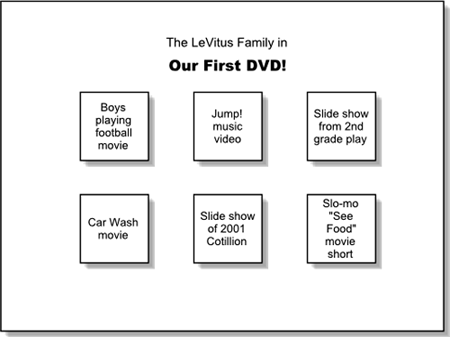
I shot about 10 minutes of raw footage and ended up with a very cute 3-minute ersatz MTV video of the girls, which everyone said was "adorable." The more complex (and longer) your project, the more important it is to think about what video coverage you're going to need and what scripting needs to be done before you shoot. StoryboardA storyboard is a sequence of drawings that represent what you're supposed to see on-screen. Think of the storyboard (and script and shot list) as the road map of what the viewer will see and hear. For a television commercial or feature film, there might be dozens or hundreds of professional drawings showing point-of-view, camera angle, and composition for all (or most) of the shots in the work. For a casual video/DVD, it might just be brief text descriptions of each shot. Storyboarding is a separate step from the script and the shot list for a reason. Regardless of what you choose to do with either the script or shot list, you need at least two storyboards for a DVD project one for (each) video sequence and another for the DVD menus and control interface. Here's a quick and dirty interface storyboard I whipped up for one of my famous family DVDs:
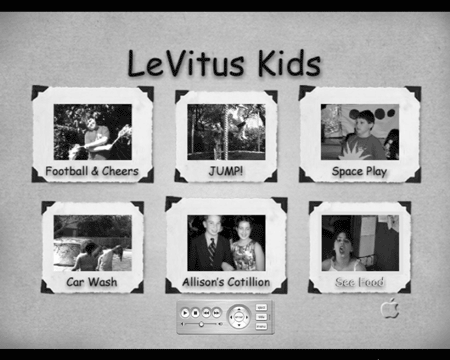
And here's how it turned out:
If a video sequence is going to have more than a few scenes in it, you need to think about what will be on the screen at any given moment. The storyboard, shot list, and script can help you figure that out before it's too late. And if your interface is going to go beyond Apple's template (or even if it's not), you need a storyboard for your menus and interface. ScheduleA schedule is another road map worth developing, particularly if you have time or money riding on the project. The bigger the project, the more important it is to create a workable schedule before you start. How many days will it take to write a script, storyboard, and shot list? How many days of shooting? How many hours or days of editing? How much time will it take to finish the project in iDVD?
BudgetFinally, if you need to buy or rent equipment, rent locations, hire personnel, contract talent, clear music rights, or spend any out-of-pocket cash on a project, you should create a budget. Even if this DVD is only for yourself, little things can cost you during production extra sets of batteries, the cable you had to have express delivered, the discs you had to throw away because you burned before you should have, and so on. If you're concerned, itemize the costs before you "green-light" the project. Just make the darned road mapsYou can do your road mapping the old-fashioned way with pen(cil) and paper, or use any of the myriad programs for Mac OS X such as FinalDraft for scripts (www.finaldraft.com); Adobe Photoshop, Photoshop Elements, or GraphicConverter for graphics (www.adobe.com and www.graphicconverter.net); OmniGraffle for diagrams and storyboards (www.omnigroup.com); and Microsoft Office v.X for outlines, scripts, presentations, spreadsheets, storyboards, contact database, and calendar. The whole point is: Every project needs a road map. If you start without one, you're likely to become lost. If you have a good set of road maps before you set out, you know where you're going and why you're going there, as well as the result you desire. I promise that if you plan your journey well, you won't waste too much time getting there. |




- Chapter I e-Search: A Conceptual Framework of Online Consumer Behavior
- Chapter IV How Consumers Think About Interactive Aspects of Web Advertising
- Chapter VIII Personalization Systems and Their Deployment as Web Site Interface Design Decisions
- Chapter XV Customer Trust in Online Commerce
- Chapter XVII Internet Markets and E-Loyalty