Flylib.com

Books Software


A Short Pictorial

A Short Pictorial

Since the parts of this book that aren't about how to make a DVD are about how to use iDVD, in this section I'll give you an overview of what iDVD looks like and what some of its parts do. This time I'll do it using pictures, which I hope are worth several thousand words each.

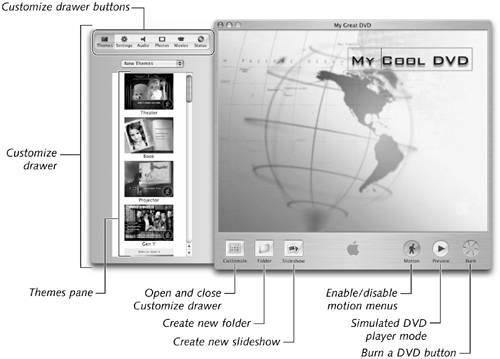
Figure 1.2 is a big picture of the Big Picture.

Figure 1.2. This, my friends , is iDVD.

graphics/01fig02.jpg

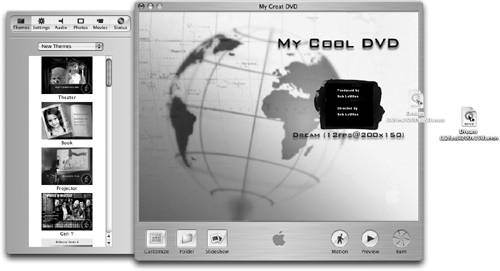
One of the first things you'll do when you begin working with iDVD is import video and other elements into your project. This being a Macintosh and all, while there is an Import item in the File menu, it's even easier to just drag your media files onto iDVD, as shown in Figure 1.3 .

Figure 1.3. Getting movies into iDVD is as easy as dragging and dropping.

graphics/01fig03.jpg

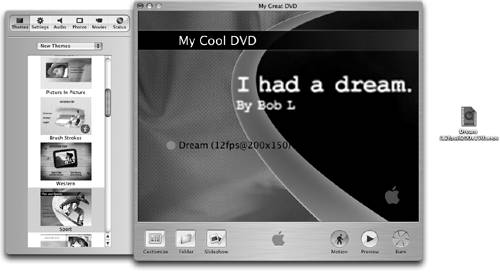
One of iDVD's greatest strengths is the ease of changing the look and feel of your DVD project by selecting a different theme in the Themes pane, as shown in Figure 1.4 .

Figure 1.4. The joy of themes—one click gets you a whole new look.

graphics/01fig04.jpg

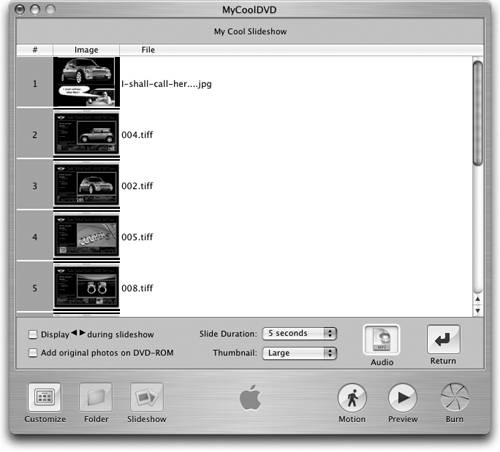
Another simple pleasure is that iDVD lets you make a slideshow out of digital still photos, as shown in Figure 1.5 .

Figure 1.5. Making a slideshow part of your DVD is a cinch.

graphics/01fig05.jpg

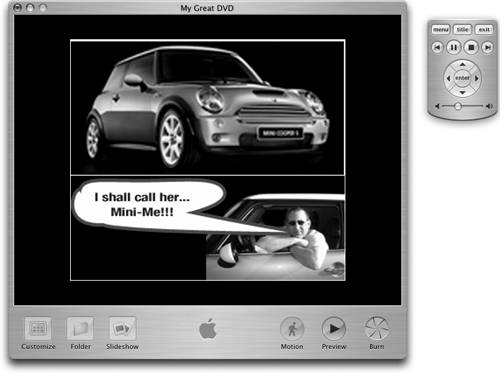
Before you commit to burning a $3 disc, use iDVD's preview mode (complete with a cute little remote control) to check your work, as shown in Figure 1.6 .

Figure 1.6. Clever how they simulate a remote control on the screen, don't you think?

graphics/01fig06.jpg

OK. That'll be about enough of that. We're going to get back to this fun stuff shortly, but first there are things you need to know before you even think about burning a DVD. Which happens to be the title of Chapter 2.

Chapter 2. Before You Even Think About Burning a DVD

Before you burn a single disc—heck, before you even launch iMovie or iDVD again, read this chapter. It is my attempt to cover every single thing, small and large, you'll need to consider before you start any DVD project.

Don't get me wrong. I know that every DVD project is different and that some projects require extensive planning and pre-production while others turn out fantastic, even though created "on the fly" with little or no forethought.

Whether your project is big, small, or in-between, when you set out to create a DVD from scratch, there's a lot to consider—and perhaps reject—before you shoot an inch of footage, spend a single penny, or expend one ounce of additional effort on it.

I'm not going to tell you that you have to do every single thing this chapter suggests before every single project. But I am going to suggest that you need to at least know about all the things in this chapter. You see, I firmly believe that when you plan a project, if you choose to ignore any of these suggestions, it should be because you choose to ignore them, not because you forgot or didn't know.

graphics/note_icon.gif

Much of the information in this chapter will be expanded upon in upcoming parts of the book. And for your convenience, I've included a handy preproduction checklist at the end of this chapter.


Planning to Start Planning

In Chapter 1, I said that planning might be the most important part of the whole process. You'll hear me say that a lot. But I also understand the human need to just roll up your sleeves and do it.

So, even if you choose to devote only a few minutes to planning your DVD project, this chapter will help you use those few minutes wisely.

I've found that the time I spend planning a project is almost always repaid with interest when I finish on time (or early), on budget (or under), and without having a lot of "do-overs" (if any) because of poor planning.

graphics/note_icon.gif

You may notice that much of this book isn't actually about iDVD itself. That's entirely by design. Frankly, iDVD is so easy to use that even if I were at my most verbose, if all I did was explain how to use iDVD, this book would have to be titled The Extremely Short iDVD Book. So though the title is The Little iDVD Book, it probably should have been called, "How to Make Good DVDs with iDVD," which, by the way, requires a lot more than just a copy of iDVD and a SuperDrive.


One last thing : I'm going to cover items in the order I consider them when I'm working on my own projects. Your style may be different, so feel free to combine steps, change the order, or even omit them. It's your project; this chapter is just food for thought before you fall too much in love with your project to think clearly.