WMI Security
Overview
Windows Management Instrumentation (WMI), like any power tool, is a doubleedged sword. To system administrators, WMI is an indispensable part of the system management arsenal that allows them to oversee and alter all aspects of the entire management domain from a single, centralized management console. However, if misconfigured, such a system may just as easily enable a malicious hacker not only to sniff out the valuable and sensitive system configuration and operational data, but also severely disrupt the operations of the entire enterprise, and even damage or destroy some of its components. The ability to rename and delete files, start and stop services, manage processes, and reboot computers from a centralized remote location is the dream of any system manager, and although WMI certainly turns this dream into a reality, there is a clear and present danger if all this power falls into the wrong hands.
Thus, it should be clear to anyone that for a system such as WMI, strong security capabilities are not just a luxury, but an essential measure of success. In fact, a few otherwise very powerful and flexible management systems have been receiving bad press for years, solely due to their lack of sufficient security protection. For instance, many industry professionals attribute the slow adaptation of the Simple Network Management Protocol (SNMP) to its less then robust security features; in fact, some organizations and individuals consider using the SNMP-based management tools a potential security risk.
Therefore, it will not surprise you to discover that extensive support for securing access to the enterprise is built into the very core of WMI. Unlike other management solutions, WMI is not equipped with a standalone security framework; instead it relies on the security features of the Windows operating system and the Distributed Component Object Model (DCOM) security mechanism. Such an approach to securing the management operations via tight integration with Windows and DCOM security frameworks is well justified. In addition to easing the configuration and management of the system's security attributes by sharing APIs and configuration utilities, both Windows and DCOM security models are well reputed and are considered to be among the most reliable security frameworks around.
Unfortunately, flexibility and robustness often come at a price—high complexity—which is definitely the case with Windows and DCOM security. DCOM, for instance, has more security features than any other system known to man; however, it is often misunderstood and even more often misconfigured, thus creating security holes that naturally defeat its very purpose. But lowering the complexity is not an acceptable option either, since ensuring the proper degree of protection in a distributed environment is, by definition, very complex and cannot be achieved by simple means. In fact, industry experience shows that simplistic distributed security systems are either far too restrictive and inflexible, or are plainly unreliable and risky. Hence Windows and DCOM security.
Ignoring the security implications that result from using WMI as an enterprise-wide management solution is not a smart choice. Also, attempting to configure the system blindfolded without understanding its security features is not really a choice at all—it simply will not work. Thus, any system administrator searching for a successful management solution must be somewhat familiar with Windows and DCOM security and WMI's integration with these security models.
The purpose of this chapter is to expose you to the most important security features of WMI and to help you build a foundation on which to develop secure management applications. Although I will provide a basic overview of the Windows and DCOM security topics relevant to WMI, it is not my intention to turn this chapter into a tutorial on distributed security. As I already mentioned, this subject is very complex and delving into its intricacies could easily add a thousand pages to this book. Remember, the primary focus of this chapter is building secure management clients with .NET, and therefore, some WMI security issues, especially those related to provider development, will not be addressed. Fortunately, WMI and Platform SDK documentation seem to contain enough information on the most obscure aspects of WMI security that you can dig into to satisfy your curiosity.
WMI Security Fundamentals
As just mentioned, the Windows security model is the foundation of WMI security. As is true for most security frameworks in existence today, Windows security revolves around user IDs or names, and the associated passwords. Simply put, the operating system associates every object within the enterprise with a list of users authorized to access it. Every user request is checked against this list before access to the object is granted. WMI employs a similar strategy: it maintains a list of authorized users for each namespace.
In addition to controlling access to WMI namespaces, the system has to be able to verify the user's identity before allowing the client application to connect to WMI services. The process of confirming the identity of the user who is running the management client application is referred to as authentication. In order to authenticate the client requests for services, WMI relies on the Component Object Model (COM) authentication mechanism. The COM authentication scheme is password-based and it provides for not only verifying the identity of the requestor, but also protecting the communications between the client and the server by encrypting the network packets.
WMI is designed for remote administration, which means that management requests from a remote management client are carried out by the WMI service that is running on the local machine. Since the WMI service operates on behalf of the remote user, there has to be a way to ensure that the user possesses adequate permissions to complete certain management actions. This essentially means that each client's request has to be carried out by the WMI service under the security context of the client and perhaps by using the client's identity. This is achieved by using the COM impersonation mechanism, which allows the client to grant certain authority to the WMI service so that the latter may perform the requested operations on the client's behalf.
Securing WMI Namespaces
On Windows NT, 2000, and XP platforms, each user and group is given unique security identifiers (SIDs). A SID is a variable length value that is assigned to a user or group account when such an account is created. SIDs are always unique within the scope of the account to which they belong. Thus, a SID for a local account is always unique within the computer system to which the account belongs, and a SID for a domain account is unique within that domain. SIDs are also unique in time, meaning that the system does not reuse the SID values under any circumstances. Therefore, if an account is deleted and then recreated, it is assigned a brand new SID despite the fact that the account name stays the same.
SIDs are used extensively by the Windows security framework. For instance, each access token—an object that described the security context of a process or a thread—has an embedded SID, which represents a user or a group associated with the token. Another security structure—the security descriptor (SD), which contains all relevant security information for a securable object—also contains SIDs that identify the owner of the associated object and the primary group of the owner. Finally, access control entries (ACEs), which govern access to a particular securable object, house SIDs that identify the users and groups to whom access is granted or denied.
A SD is, perhaps, the most notable structure within the Windows security model. As its name implies, it describes the security-related traits of a given object, such as its ownership and access restrictions. A Security Descriptor structure (SECURITY_DESCRIPTOR), consists of the following elements:
- SID of the object's owner
- SID of the group to which the object's owner belongs
- Discretionary access control list (DACL) that specifies the levels of access that particular users or groups may have to the object
- System access control list (SACL) that controls the generation of the audit messages, logging the attempts to access the object
- Security descriptor control information, packaged into the SECURITY_DESCRIPTOR_CONTROL structure. This is a set of bit flags that qualify the semantics of the individual components of the security descriptor.
An access control list (ACL) is a list of zero or more access control entries (ACEs) that are used as a basis for determining the access control and audit rights for a particular security principal. Each ACE contains the following information:
- A SID that uniquely identifies a security principal (user or group) to which the ACE applies.
- An access mask—a 32-bit value that specifies the rights that are denied or allowed by the ACE.
- A flag that indicates the type of the ACE: access-denied ACE, accessallowed ACE, or system-audit ACE.
- Bit flags that specify whether the child objects are allowed to inherit the ACE from the primary object to which the ACE applies.
The access rights, specified by the access mask field, can be divided into four categories: generic, standard, SACL access, and Directory Services (DS) access rights. Table 8-1 lists all access rights by category.
|
CATEGORY |
ACCESS RIGHT |
DESCRIPTION |
|---|---|---|
|
Generic |
GENERIC_ALL |
Read, write, and execute access. |
|
Generic |
GENERIC_READ |
Read access. |
|
Generic |
GENERIC_WRITE |
Write access. |
|
Generic |
GENERIC_EXECUTE |
Execute access. |
|
Standard |
DELETE |
Right to delete an object. |
|
Standard |
READ_CONTROL |
Right to read the security descriptor associated with the object, excluding the SACL. |
|
Standard |
SYNCHRONIZE |
Right to use the object for thread synchronization. |
|
Standard |
WRITE_DAC |
Right to modify the object's DACL in its security descriptor. |
|
Standard |
WRITE_OWNER |
Right to change the owner of the object. |
|
SACL Access |
ACCESS_SYSTEM_SECURITY |
Right to read and modify the SACL in the object's security descriptor. |
|
Directory Services Access |
ACTRL_DS_OPEN |
Right to open a DS object. |
|
Directory Services Access |
ACTRL_DS_CREATE_CHILD |
Right to create a child DS object. |
|
Directory Services Access |
ACTRL_DS_DELETE_CHILD |
Right to delete a child DS object. |
|
Directory Services Access |
ACTRL_DS_LIST |
Right to enumerate DS objects. |
|
Directory Services Access |
ACTRL_DS_READ_PROP |
Right to read the properties of a DS object. |
|
Directory Services Access |
ACTRL_DS_WRITE_PROP |
Right to modify the properties of a DS object. |
|
Directory Services Access |
ACTRL_DS_SELF |
Access is allowed only after the validated rights checks supported by the object are passed. |
|
Directory Services Access |
ACTRL_DS_DELETE_TREE |
Right to delete a tree of DS objects. |
|
Directory Services Access |
ACTRL_DS_LIST_OBJECT |
Right to list a tree of DS objects. |
|
Directory Services Access |
ACTRL_DS_CONTROL_ACCESS |
Access is allowed only after the extended rights checks supported by the object are passed. |
A combination of access rights is packaged into a 32-bit field so that the loworder 16 bits of the access mask reflect the object-specific rights, the next 7 bits are reserved for the standard rights, bit 23 represents the right to access the SACL, and finally, the 4 high-order bits are used for the generic access rights.
Another structure that plays a very important role within the Windows security infrastructure is the access token. An access token is assigned to a user whenever a user logs into the system. When a logon session is initiated, the system authenticates the user's password against the security database and issues an access token, which subsequently gets attached to every process executed on behalf of the user. Then, the system uses the access token to establish the user's identity and level of access every time the user issues a request to access a securable object. An access token contains the following information:
- A SID of the user's account.
- A collection of SIDs for each group to which the user belongs.
- A logon SID that uniquely identifies the logon session.
- A list of privileges granted to a user or the user's groups.
- An owner SID.
- A SID of the primary group.
- The source of the access token.
- The flag that indicates whether it is a primary or impersonation token. The primary token is created by the Windows executive layer and typically represents the default security settings for the process. The impersonation token is created to capture the security settings of an arbitrary process, thus allowing the current process to "impersonate" the latter.
- A list of restricting SIDs. The restricting SIDs are used when a process is running under a restricted security context. In such cases, the system checks not only the primary SID but also the restricted SIDs before it grants access to a securable object.
- Current impersonation levels.
- Miscellaneous statistics.
Besides carrying the user's identity, an access token also includes all privileges granted to a user or the user's groups. A privilege is a right granted to a security principal that enables the latter to perform certain administrative functions on a local computer. Such administrative functions may include shutting down the system, modifying the system's date and time settings, and loading and unloading the device drivers. As opposed to access rights, which control access to securable objects, privileges govern access to system resources and tasks.
Each user and group account is associated with a set of privileges that is stored in Windows security database. Whenever a user logs into a system, the privileges are incorporated into the user's access token. Note that such privileges will only apply to a local computer system, since domain accounts may have different sets of privileges on different machines. When a user attempts to perform an operation that is marked as privileged, the system checks the privileges embedded into the user's access token. If the appropriate privileges are granted and enabled, the system allows the operation; otherwise the operation fails. Interestingly, the privileges, even if granted, are disabled by default so that the user has to explicitly enable them prior to requesting a privileged operation. A privilege can be enabled using the AdjustTokenPrivileges function of the Win32 API.
To summarize, every access check carried out by the system essentially boils down to matching the user's security information, which is encoded into the access token, against the SD of a securable object. Thus, in order to secure an arbitrary resource, the resource has to be assigned an appropriate SD that incorporates the necessary ACEs. Securing the WMI namespaces is no exception. In fact, each namespace is associated with an SD that carries all the security information needed to ensure the proper access checks.
The SD of a namespace can be manipulated using the WMI MMC snap-in, as shown in Figure 8-1.
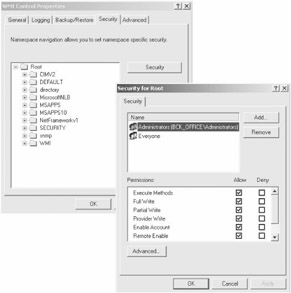
Figure 8-1: Securing WMI namespaces
Using the security configuration page of the snap-in is as trivial as using the Properties dialog when securing files. All you need to do is select a namespace to secure and modify the associated user's or group's permissions.
In the true spirit of WMI, the SD for a namespace can also be retrieved and manipulated programmatically. A system class called __SystemSecurity provides such programmatic access to namespace security settings. This class has the following definition:
class __SystemSecurity {
 [Static] uint32 GetSD([out] uint8 SD[]);
 [Static] uint32 Get9XUserList([out] __ntlmuser9x ul[]);
 [Static] uint32 SetSD([in] uint8 SD[]);
 [Static] uint32 Set9XUserList([in] __ntlmuser9x ul[]);
 [Static] uint32 GetCallerAccessRights([out] sint32 rights);
};
This class is fairly unusual because it does not contain any properties. Rather than exposing all of the SD or its individual parts as properties of an object, the designers of WMI turned the __SystemSecurity class into a singleton and equipped it with a number of static methods for reading the security descriptor and writing the modified version of it back to the CIM Repository. As you can see in the definition above, the class has the following methods:
- GetSD: Used to get an SD associated with a namespace to which the user is currently connected. The SD is returned as an array of unsigned bytes and it has to be cast into an appropriate structure to be manipulated. This method is only available on Windows NT, Windows 2000, and Windows XP platforms.
- Get9XUserList: Used to retrieve a list of users who are allowed to access the namespace. This method is only available on Windows 9X platforms, and it returns an array of instances of the __Win9XUser class. This is done to simulate the functionality of SDs on Windows 9X systems.
- SetSD: Writes the modified SD for a namespace back to the CIM Repository. The SD is represented by an array of unsigned bytes. This method is only available on Windows NT, Windows 2000, and Windows XP platforms.
- Set9XUserList: Writes the list of users who are allowed to access the namespace back to the CIM Repository. This method is only available on Windows 9X platforms.
- GetCallerAccessRights: Retrieves the access masks for a client process. The mask is a 32-bit value where each bit represents an individual access right. This method is available on all Windows platforms.
Unfortunately, the methods of the __SystemSecurity class can only be used to retrieve or save an SD, but they cannot be utilized for SD manipulation. Also, it is not recommended to manipulate the SD byte array directly. Instead, the functions of the Win32 API should be used to extract or set the individual values within an SD. For instance, to convert a binary SD into a human-consumable form (an SDDL string representation), you may use the ConvertSecurityDescriptorToStringSecurityDescriptor function (that is, if you manage to spell the name of the function correctly).
By default, the security settings for a namespace are inherited by all its children namespaces. This means that by setting the permissions for the oot namespace, you may have these permissions propagated to each WMI namespace. You can also change the default behavior and turn the inheritance off by setting the CONTAINER_INHERIT_ACE (0x2) flag in the ACEs that are associated with a security descriptor for a namespace. It is also possible to determine whether a particular ACE is inherited by checking for the INHERITED_ACE (0x10) flag within the ACE for a namespace.
WMI and COM Security
All client applications access WMI services via COM interfaces. It is true that WMI Scripting API or .NET System Management Framework may shield the developers from the complexities of COM. However, regardless of the development platform, at run time, all service requests issued by a management application are routed to WMI via an arbitrary COM interface. Thus, from the prospective of a client application, WMI security is synonymous with COM security.
COM security revolves around the concepts of authentication and impersonation. The former is a process that verifies the authenticity of the client's identity, while the latter is the ability of a thread to execute in a security context different from that of the process that owns the thread. Since different processes may require different levels of security, the authentication and impersonation requirements may vary from application to application. Therefore, COM clients are given the ability to control the security levels, or levels of authentication and impersonation, for their processes.
The default security levels for a process are set via the CoInitializeSecurity function. Among a few other parameters, this function accepts two DWORD values that specify the default authentication and impersonation levels. The first of these values controls the degree of protection applied to the communications between the COM client and the server. Currently, COM defines seven different authentication levels, listed in Table 8-2.
|
AUTHENTICATION LEVEL CONSTANT |
DESCRIPTION |
|---|---|
|
RPC_C_AUTH_LEVEL_DEFAULT |
Under Windows NT 4.0, this value defaults to RPC_C_AUTH_LEVEL_CONNECT. Under Windows 2000 and later, this value instructs COM to select an appropriate authentication level using its normal security blanket negotiation algorithm. |
|
RPC_C_AUTH_LEVEL_NONE |
Instructs COM not to perform any authentication. |
|
RPC_C_AUTH_LEVEL_CONNECT |
Causes COM to authenticate the credentials of the client only when the client establishes a session with the server. |
|
RPC_C_AUTH_LEVEL_CALL |
Instructs COM to authenticate the client at the beginning of each remote procedure call (RPC) when the server receives the request. |
|
RPC_C_AUTH_LEVEL_PKT |
Instructs COM to ensure that the data is received from the authenticated client. |
|
RPC_C_AUTH_LEVEL_PKT_INTEGRITY |
Causes COM to ensure the integrity of the data received from the client. |
|
RPC_C_AUTH_LEVEL_PKT_PRIVACY |
Instructs COM to perform all the types of authentication referred to in this table and encrypt all RPC arguments. |
Again, CoInitializeSecurity sets the default authentication level for the process so that all subsequently arriving COM requests with lower authentication levels will fail.
The impersonation level specifies the amount of authority granted to the server when it performs tasks on behalf of the client. Table 8-3 lists all available impersonation levels.
|
IMPERSONATION LEVEL CONSTANT |
DESCRIPTION |
|---|---|
|
RPC_C_IMP_LEVEL_DEFAULT |
This value can be used with Windows 2000 and later. It instructs COM to select an appropriate impersonation level using its normal security blanket negotiation algorithm. |
|
RPC_C_IMT_LEVEL_ANONYMOUS |
The client remains anonymous to the server. The impersonation is possible, but since the server's impersonation token will not contain any client security information, the server will not be able to perform any tasks under the security context of the client. |
|
RPC_C_IMP_LEVEL_IDENTITY |
The server's impersonation token will include the client's identity, which implies that the server will be able to impersonate the client during ACL checking. However, the server will not be able to access the system objects on behalf of the client. |
|
RPC_C_IMP_LEVEL_IMPERSONATE |
The server may impersonate the client's security context, but only while it accesses the resources on local machines on behalf of the client. In other words, the impersonation token cannot be used across the machines' boundaries. |
|
RPC_C_IMP_LEVEL_DELEGATE |
The server may impersonate the client's security context while accessing the resources on local or remote machines on behalf of the client. The impersonation token can be passed across the machines' boundaries. This impersonation level is available under Windows 2000 and later. |
Calling CoInitializeSecurity is optional. If a client application chooses not to invoke this function, COM will automatically initialize and manage the security settings for a process. In such cases, in order to establish the default security settings for a process, COM uses a set of default values, stored in the system registry. Thus, the default authentication level is set based on the registry value HKLMSOFTWAREMICROSOFTOLELegacyAuthenticationLevel. Similarly, the default impersonation level is chosen based on the value of HKLMSOFTWAREMICROSOFTOLELegacyImpersonationLevel. If these values are not found in the registry, COM will use RPC_C_AUTH_LEVEL_CONNECT and RPC_C_IMP_LEVEL_IDENTITY for the default authentication and impersonation levels respectively.
As you may remember, once connected to WMI, a client application receives an out-of-process pointer to the IWbemServices interface, which can subsequently be used to engage various WMI services. This pointer has the identity of a client process rather than the WMI IWbemServices process. Thus, if the client attempts to use the pointer to invoke the services of WMI it may receive an access-denied error, since the access check will be carried out with the client's identity. To avoid such errors, the WMI client applications must call the CoSetProxyBlanket function in order to set the identity of a newly obtained pointer. Once the pointer identity is set, it can be used to call into WMI.
Finally, whenever a client attempts to perform an operation marked as privileged, such as a system reboot, it must enable its privileges. This is achieved via the AdjustTokenPrivileges function. This function takes the access token of the client process as a parameter and, depending on the type of the request, enables or disables the privileges associated with the token. Note that before a particular privilege can be enabled, an administrator should explicitly grant it to the user or group.
WMI Security and System Management
The designers of the System.Management namespace took a somewhat simplistic approach to enveloping the security-related capabilities of WMI. They primarily focused on exposing the functionality for managing the security settings of client processes. As a result, the System.Management security model is easy to use, but it definitely lacks support for low-level manipulation of the security settings.
Establishing WMI Connections
Throughout all of the code examples, shown earlier in this book, I consistently and consciously neglected most of the issues related to WMI security, crudely assuming that these examples are being executed by a user with administrative privileges. Moreover, when I described the process of connecting to WMI, I barely scratched the surface and chose to rely on the ability of System.Management types to automatically establish a connection on an as-needed basis. Thus, all of the code examples used something similar to the following boilerplate code to bind to a WMI class or object:
ManagementObject mo = new ManagementObject(@"\.
ootCIMV2:Win32_Process=100");
Console.WriteLine(mo["__CLASS"]);
...
This code looks deceivingly simple and you may not realize what is really going on behind the scenes.
Before the newly constructed object can be used, a valid connection to WMI must be established and the instance of the ManagementObject type must be bound to the underlying WMI object. However, the code does not seem to be doing either of these things—instead, it simply instantiates the object and prints out its properties. Such simplicity and ease of use is afforded by the ability of the System.Management ManagementObject type to initialize itself and establish the appropriate connections in a lazy fashion. In fact, none of the type constructors issue any COM API calls, and therefore, they do not even attempt to contact WMI. Instead, when an instance of a type is first accessed, it undergoes the initialization stage. The initialization code typically checks whether the instance is already connected to WMI, and if necessary, it invokes the initialization sequence. As part of the initialization, the object of type ManagementScope is created and then its initialization code is invoked. The ManagementScope's InitializeGuts method, briefly discussed in Chapter 2, obtains a pointer to IWbemLocator object and calls its ConnectServer method to retrieve the IWbemServices interface pointer. The IWbemLocator::ConnectServer method has the following signature:
HRESULT IWbemLocator::ConnectServer(
 const BSTR strNetworkResource,
 const BSTR strUser,
 const BSTR strPassword,
 const BSTR strLocale,
 LONG lSecurityFlags,
 const BSTR strAuthority,
 IWbemContext* pCtx,
 IWbemServices** ppNamespace
);
where
- strNetworkResource: A pointer to a valid BSTR that contains a WMI path to the target object.
- strUser: A pointer to a valid BSTR that contains the name of the security principal to be used to establish the connection to WMI. If this parameter is set to NULL, ConnectServer will use the name of the currently logged on user. When using the user name from a domain other than the current domain, the name should be prefixed with the domain name and a double backslash separator—i.e., \.
- strPassword: A pointer to a valid BSTR that contains a password to be used to establish the connection to WMI. If this parameter is set to NULL, ConnectServer will use the password of the currently logged on user. An empty string is considered to be a valid password of zero length.
- strLocale: A pointer to a valid BSTR that specifies the locale (i.e., MS_xxx) to be used to retrieve the information from WMI. If this parameter is set to NULL, the current locale is used.
- lSecurityFlags: Reserved for future use. Must be set to zero.
- strAuthority: A pointer to a valid BSTR that contains a designation of the authentication method to be used for establishing the connection, as well as the name of the domain in which to obtain the user information for authentication. If this parameter begins with string "Kerberos:", Kerberos authentication is used and the remainder of the string must contain a valid Kerberos principal name. If the parameter begins with "NTLMDOMAIN:", then Windows NT Challenge/Response authentication protocol (also known as Windows NT LAN Manager or NTLM protocol) is used and the remainder of the string must contain a valid NTLM domain name. If the parameter is set to NULL, ConnectServer uses NTLM authentication and the NTLM domain of the currently logged on user. Note that the name of the domain cannot be specified simultaneously in two places (i.e., strUser and strAuthority parameters); doing so will cause ConnectServer to fail.
- pCtx: A pointer to the IWbemContext object used to provide additional information to certain WMI providers. This parameter is typically set to NULL.
- ppNamespace: An output parameter used to receive the pointer to a valid IWbemServices object.
As you can deduce from the method signature, it is possible to control many aspects of the connection establishment process, such as the name of the connecting user and domain as well as the authentication method. Unfortunately, the lazy initialization sequence of the ManagementObject type constructs a default instance of the ManagementScope type so that the IWbemLocator::ConnectServer method is called with most of its parameters set to NULL values. Obviously, this causes WMI to use the NTLM authentication along with the name and domain of the currently logged on user. While adequate for some of the management scenarios, this may result in access-denied errors when the current user is not granted full administrative access to the target WMI resources.
The good news is that you can override the default behavior by explicitly constructing an instance of the ManagementScope type and associating it with the ManagementObject. Take a look at the following code snippet:
ManagementScope ms = new ManagementScope();
ms.Path = new ManagementPath(@"\BCK_OFFICE
ootCIMV2");
ms.Options.Username = "Administrator";
ms.Options.Password = "password";
ManagementObject mo = new ManagementObject(@" Win32_Process=100");
mo.Scope = ms;
Console.WriteLine(mo["__CLASS"]);
Here, the Path property of the newly created ManagementScope object is assigned to the instance of the ManagementPath type, which specifies the remote WMI namespace to connect to. Then, the Username and Password properties of the ConnectionOptions object, pointed to by the Options property of the ManagementScope object, are initialized to the name of the user and the password to be used for establishing a connection. Finally, the new instance of the ManagementObject type is created and associated with the ManagementScope object by setting its Scope property. When the ManagementObject instance is accessed by the WriteLine method, rather than constructing a default ManagementScope object, the initialization code of the ManagementObject type uses the ManagementScope instance associated with the object. Interestingly, in this case, all information that pertains to the WMI connection—not only the user name and the password, but also the namespace path—is always extracted from the associated ManagementScope object. Thus, the following code is incorrect and will generate an error:
ManagementScope ms = new ManagementScope();
ms.Options.Username = "Administrator";
ms.Options.Password = "password";
ManagementObject mo = new ManagementObject(
 @"\BCK_OFFICE
ootCIMV2:Win32_Process=100");
mo.Scope = ms;
Console.WriteLine(mo["__CLASS"]);
Here, rather than setting the Path property of the ManagementScope object, we supply a full namespace and an object path to the constructor of the ManagementObject type. Therefore, the resulting ManagementScope object contains a default namespace path \. ootCIMV2. Upon setting the Scope property of the ManagementObject instance, the namespace path of ManagementObject essentially is overridden by the namespace path of the associated ManagementScope object. Asa result, rather than binding to the remote namespace \BCK_OFFICE ootCIMV2, the initialization code of the ManagementObject type binds to the local \. ootCIMV2 namespace. For security reasons, it is not allowed to change the user credentials when it connects to a local namespace; therefore, the preceding code throws a ManagementException, complaining that user credentials cannot be used for local connections.
The coding pattern just discussed is not the only way to create a ManagementScope object and associate it with an appropriate System.Management type. One of the constructors of the ManagementObject type, for instance, accepts the instance of ManagementScope as a parameter:
ManagementScope ms = new ManagementScope();
ms.Path = new ManagementPath(@"\BCK_OFFICE
ootCIMV2");
ms.Options.Username = "Administrator";
ms.Options.Password = "password";
ManagementPath mp = new ManagementPath("Win32_Process=100");
ManagementObject mo = new ManagementObject(ms, mp, null);
Console.WriteLine(mo["__CLASS"]);
Here, the ManagementScope object is the first parameter of the ManagementObject type constructor. The second parameter is an object of type ManagementPath, which points to an appropriate WMI Win32_Process object to bind to. Finally, the last parameter is an instance of ObjectGetOptions type, which, for the purposes of this discussion, may simply be ignored, hence it is set to null. Note that this code behaves similarly to the code snippet, shown earlier—in other words, the namespace path of the ManagementScope instance overrides the namespace path of the ManagementPath object. Thus, if you forget to initialize the Path property of the ManagementScope object, the code will generate an error.
Since the default ManagementScope object is constructed during the initialization of the ManagementObject unless the ManagementScope parameter is supplied to the type constructor, it is entirely possible to use the default object rather than constructing a brand new one:
ManagementObject mo = new ManagementObject(
 @"\BCK_OFFICE
ootCIMV2:Win32_Process=100");
mo.Scope.Options.Username = "Administrator";
mo.Scope.Options.Password = "password";
Console.WriteLine(mo["__CLASS"]);
This code is certainly more concise and, perhaps, a bit more efficient than my first example because it alleviates the need for allocating a new instance of the ManagementScope type.
Finally, you do not need to rely on the initialization code of the ManagementObject type to implicitly establish a connection to WMI. With the ManagementScope, you can request a connection explicitly:
ManagementScope ms = new ManagementScope();
ms.Path = new ManagementPath(@"\BCK_OFFICE
ootCIMV2");
ms.Options.Username = "Administrator";
ms.Options.Password = "password";
ms.Connect();
ManagementObject mo = new ManagementObject(@" Win32_Process=100");
mo.Scope = ms;
Console.WriteLine(mo["__CLASS"]);
As I already mentioned, the initialization sequence of the ManagementObject type first checks if there is a valid WMI connection and then attempts to use it if such a connection exists. Here, since the ManagementScope object is already connected to WMI by the time the ManagementObject initialization code is invoked, the entire connection establishment process is bypassed and the ManagementScope's connection is used instead. The apparent benefit of such an approach is that you can reuse a single connected ManagementScope object with multiple instances of the ManagementObject, thus achieving a marginal performance gain.
The ManagementObject type is not the only System.Management type designed to work in conjunction with ManagementScope. In fact, all System.Management types that represent WMI entities, such as ManagementClass, ManagementEventWatcher, and ManagementObjectSearcher, offer the same functionality. Thus, each of these types is equipped with a constructor that takes the ManagementScope object as a parameter and the Scope property, which exposes the associated instance of the ManagementScope type.
Securing WMI Connections
At the beginning of this chapter, I mentioned that in order to establish the proper security settings for a WMI session, the client process should call several security API functions such as CoInitializeSecurity and CoSetProxyBlanket. Fortunately, it is not something that a developer of the management applications has to do manually. Here again, the initialization logic of the ManagementScope type kindly takes care of setting the appropriate authentication and impersonation levels for the process. A developer however, is afforded the luxury of controlling both the authentication and the impersonation settings through the instance of the ConnectionOptions type, associated with the ManagementScope object. This type, briefly mentioned above, has the following properties:
- Authentication: Gets or sets the COM authentication level to be used for the WMI connection
- Impersonation: Gets or sets the COM impersonation level to be used for the WMI connection
- Authority: Gets or sets the authority value to be used for the WMI connection
- Locale: Gets or sets the locale value to be used for the WMI connection
- Username: Gets or sets the name of the security principal to be used for theWMI connection
- Password: Gets or sets the password to be used for the WMI connection
- EnablePrivileges: Gets or sets a Boolean flag that indicates whether the privileges are to be enabled for the WMI connection
As you can see, all of these properties, with the exception of the EnablePrivileges, which is discussed later in this chapter, map directly to the parameters of the IWbemLocator::ConnectServer method. However, these properties are also used by the private Secure method of the ManagementScope type, which, during the initialization phase, sets the appropriate authentication and impersonation levels for the process and "blesses" the retrieved IWbemServices interface pointer.
The Username, Password, Locale, and Authority properties of the ConnectionOptions type are governed by the same rules as the respective parameters of the IWbemLocator::ConnectServer method. The Impersonation and Authentication properties, however, are of enumeration types ImpersonationLevel and AuthenticationLevel respectively, which means that you must use a member of the appropriate enumeration when initializing these properties. It should come as no surprise that the members of these enumeration types map one-to-one to the respective COM authentication and impersonation level constants listed in Tables 8-2 and 8-3. The members of the AuthenticationLevel enumeration type are shown in Table 8-4.
|
MEMBER |
COM CONSTANT |
DESCRIPTION |
|---|---|---|
|
Default |
RPC_C_AUTH_LEVEL_DEFAULT |
Under Windows NT 4.0, this value defaults to RPC_C_AUTH_LEVEL_CONNECT. Under Windows 2000 and later, this value instructs COM to select an appropriate authentication level using its normal security blanket negotiation algorithm. |
|
None |
RPC_C_AUTH_LEVEL_NONE |
Instructs COM not to perform any authentication. |
|
Connect |
RPC_C_AUTH_LEVEL_CONNECT |
Causes COM to authenticate the credentials of the client only when the client establishes a session with the server. |
|
Call |
RPC_C_AUTH_LEVEL_CALL |
Instructs COM to authenticate the client at the beginning of each RPC when the server receives the request. |
|
Packet |
RPC_C_AUTH_LEVEL_PKT |
Instructs COM to ensure that the data is received from the authenticated client. |
|
PacketIntegrity |
RPC_C_AUTH_LEVEL_PKT_INTEGRITY |
Causes COM to ensure the integrity of the data received from the client. |
|
PacketPrivacy |
RPC_C_AUTH_LEVEL_PKT_PRIVACY |
Instructs COM to perform all types of authentication referred to in this table and encrypt all RPC arguments. |
|
Unchanged |
The authentication level remains unchanged. |
The members of the ImpersonationLevel enumeration type are shown in Table 8-5.
|
MEMBER |
COM CONSTANT |
DESCRIPTION |
|---|---|---|
|
Default |
RPC_C_IMP_LEVEL_DEFAULT |
This value can be used with Windows 2000 and later. It instructs COM to select an appropriate impersonation level using its normal security blanket negotiation algorithm. |
|
Anonymous |
RPC_C_IMT_LEVEL_ANONYMOUS |
The client remains anonymous to the server. The impersonation is possible, but since the server's impersonation token will not contain any client security information, the server will not be able to perform any tasks under the security context of the client. |
|
Identity |
RPC_C_IMP_LEVEL_IDENTITY |
The server's impersonation token will include the client's identity, which implies that the server will be able to impersonate the client for ACL checking. However, the server will not be able to access the system objects on behalf of the client. |
|
Impersonate |
RPC_C_IMP_LEVEL_IMPERSONATE |
The server may impersonate the client's security context, but only while it is accessing the resources on the local machine on behalf of the client. In other words, the impersonation token cannot be used across the machines' boundaries. |
|
Delegate |
RPC_C_IMP_LEVEL_DELEGATE |
The server may impersonate the client's security context while accessing the resources on local or remote machines on behalf of the client. The impersonation token can be passed across the machines' boundaries. This impersonation level is available under Windows 2000 and later. |
By constructing an instance of the ConnectionOptions type and associating it with the management scope, you may effectively control the security settings for a WMI client process:
ConnectionOptions co = new ConnectionOptions();
co.Username = "Administrator";
co.Password = "password";
co.Authentication = AuthenticationLevel.PacketPrivacy;
co.Impersonation = ImpersonationLevel.Impersonate;
ManagementScope ms = new ManagementScope(@"\BCK_OFFICE
ootCIMV2", co);
ManagementObject mo = new ManagementObject(@" Win32_Process=100");
mo.Scope = ms;
Console.WriteLine(mo["__CLASS"]);
Unless the ConnectionOptions object is explicitly associated with an instance of the ManagementScope, the latter constructs a default ConnectionOptions instance during its initialization. Therefore, you can use the default object to control the security settings of the process:
ManagementScope ms = new ManagementScope();
ms.Path = new ManagementPath(@"\BCK_OFFICE
ootCIMV2");
ms.Options.Username = "Administrator";
ms.Options.Password = "password";
ms.Options.Authentication = AuthenticationLevel.PacketPrivacy;
ms.Options.Impersonation = ImpersonationLevel.Impersonate;
ManagementObject mo = new ManagementObject(@" Win32_Process=100");
mo.Scope = ms;
Console.WriteLine(mo["__CLASS"]);
Finally, the ConnectionOptions type is equipped with a convenient constructor method that allows you to set all of the object properties at once. This constructor has the following signature:
public ConnectionOptions (
 string locale,
 string username,
 string password,
 string authority,
 ImpersonationLevel impersonation,
 AuthenticationLevel authentication,
 bool enablePrivileges,
 ManagementNamedValueCollection context,
 TimeSpan timeout
);
where
- locale: A string that specifies the locale (i.e., MS_xxx) to be used for the WMI connection
- username: A string that specifies the name of the user to be used for the WMI connection
- password: A string that specifies the password to be used for the WMI connection
- authority: A string that specifies the authority to be used for the WMI connection
- impersonation: A member of the ImpersonationLevel enumeration that indicates the impersonation level to be used for the WMI connection.
- authentication: A member of the AuthenticationLevel enumeration that indicates the authentication level to be used for the WMI connection
- enablePrivileges: A Boolean flag that indicates whether the privileges are to be enabled for the WMI connection
- context: A ManagementNamedValueCollection that contains providerspecific context values
- timeout: A TimeSpan object that sets the timeout value for the connection operation
Using this constructor, the earlier code may be changed as follows:
ConnectionOptions co = new ConnectionOptions(
 null, "Administrator", "password", null, ImpersonationLevel.Impersonate,
 AuthenticationLevel.PacketPrivacy, false, null, new TimeSpan());
ManagementScope ms = new ManagementScope(@"\BCK_OFFICE
ootCIMV2", co);
ManagementObject mo = new ManagementObject(@" Win32_Process=100");
mo.Scope = ms;
Console.WriteLine(mo["__CLASS"]);
Although using this constructor may save you a bit of typing, it certainly does not promote code readability and lacks in clarity when compared to setting the properties of the ConnectionOptions object explicitly.
Enabling Privileges
Some operations that can be carried out through WMI may require the user to hold certain system privileges. For instance, the ability to reboot a computer is dependent on SeShutdownPrivilege or SeRemoteShutdownPrivilege, which must not only be granted to the user, but must also be enabled for the process that is attempting the reboot. The privileges can be granted using the local security policy editor, shown in Figure 8-2.
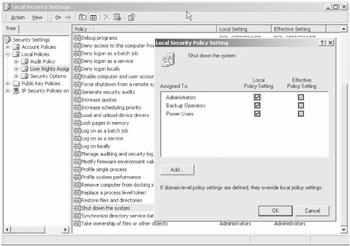
Figure 8-2: Granting privileges
Once the privileges are granted, they have to be explicitly enabled by the process attempting the privileged operation. Thus, in order to reboot a remote computer you may write code similar to the following:
ManagementClass mc = new ManagementClass(
 @"\BCK_OFFICE
ootCIMV2:Win32_OperatingSystem");
foreach(ManagementObject mo in mc.GetInstances()) {
 mo.Scope.Options.Username = "username";
 mo.Scope.Options.Password = "password";
 mo.Scope.Options.EnablePrivileges = true;
 mo.InvokeMethod("Reboot", new Object [] {0});
}
This code binds to the Win32_OperatingSystem WMI class, enumerates its instances, and invokes the Reboot method for each operating system. Of course in most cases, there would be a single instance of the Win32_OperatingSystem class and it is probably easier to just locate such an instance directly based on its key. Unfortunately, the key of this class is the name of the OS, which is often very long and easy to mistype, therefore, I chose to use the enumeration approach. The thing you should notice here is the line of code that sets the EnablePrivileges property of the ConnectionOptions object to true. Unlike the AdjustTokenPrivileges function, which allows you to enable and disable individual privileges, setting the EnablePrivileges property to true enables all privileges granted to a given user or group. In effect, assigning this property to true is equivalent to obtaining the set of privileges associated with the access token via the GetTokenInformation function; iterating through the returned array of token privileges to set the enabled attribute for each of them; and then invoking AdjustTokenPrivileges. Here again the designers of the System.Management namespace chose to trade flexibility for simplicity by disallowing access to individual user and group privileges.
Lastly, there is still the question of figuring out which WMI operations are privileged and exactly what privileges are required to perform such operations. Although it is always possible to get the answer by digging through the mess of WMI security documentation, there is an easier way. It turns out that all WMI methods that require certain privileges are marked as such using the Privileges qualifier. For instance, take a look at the partial MOF definition for the Win32_OperatingSystem class:
class Win32_OperatingSystem : CIM_OperatingSystem {
 ...
 [Privileges{"SeShutdownPrivilege"}: ToSubClass]
 uint32 Reboot();
 [Privileges{"SeShutdownPrivilege"}: ToSubClass]
 uint32 Shutdown();
 [Privileges{"SeShutdownPrivilege"}: ToSubClass]
 uint32 Win32Shutdown(sint32 Flags, sint32 Reserved = 0);
};
Here the Privileges qualifier is parameterized with the string value of the required privilege. In reality, the qualifier value is really an array of strings, so it is possible to account for methods that require multiple privileges to be enabled. Therefore, by examining the qualifiers associated with a given method, you can determine whether it is necessary to enable the privileges before attempting to execute the method. Note that it is not even necessary to check the qualifier value (since individual privileges cannot be controlled via the System.Management types anyway)—the mere presence of the Privileges qualifier is indicative of a privileged operation.
Summary
This chapter, although fairly short, provided a comprehensive overview of the security issues pertinent to building management applications with .NET System.Management types. Having read the material presented here, you should now be able to
- Understand the fundamentals of WMI security.
- Configure WMI namespace security.
- Use the ManagementScope type to establish WMI connections.
- Alter the security settings of the client process.
- Manipulate the privileges necessary to execute the privileged operations through WMI.
Although the information covered in this chapter is sufficient for building just about any management application, WMI, COM and Windows security are extremely complex topics, which really warrant a separate book. There are a few decent Windows security books on the market, however, none of them seem to completely alleviate the need for delving into the Microsoft documentation every once in a while. Thus, the tried and true MSDN still remains the best source of information on the most obscure and confusing security issues.

EAN: 2147483647
Pages: 79
