Handling WMI Events
Overview
Webster's Collegiate Dictionary defines an event as "a noteworthy happening." This general definition, in addition to conveying the meaning of the word in its social sense, is also remarkably precise when it comes to describing the fairly abstract concept referred to as an event in computer parlance. For software developers an event means exactly this: a "noteworthy happening" within the realm of a particular software system. Event-driven programming is a very popular type of software development model that is widely employed throughout the industry.
As a result, nearly every GUI development toolkit in existence today is structured around some kind of an event loop, where custom event handling code is invoked automatically by the toolkit in response to some external actions, such as mouse movements or keystrokes. Although, GUI-based systems are the most natural candidates for applying event-driven programming techniques due to the highly irregular patterns of human interaction with computers, the event-driven model is highly beneficial even when it comes to building noninteractive, batch-mode software.
Consider, for instance, a messaging system. A conventional message-processing program would have to continuously monitor the input queue, checking for newly received messages. An event-driven program, on the other hand, would install a message handling callback and rely on the messaging infrastructure to raise an event upon the arrival of a new message. Clearly, an event-driven approach is far superior because it relieves the developer from the duty of writing often convoluted polling code, and it also increases runtime efficiency and potentially lessens resource utilization.
In the arena of system management, event-enabled architecture is often a critical success factor. While old-fashioned monitoring techniques that are based on periodic polling may be adequate for a standalone, simple computer system, today's enterprise installations rarely fit such a profile. Instead, a typical modern system may easily include dozens of geographically distributed computing nodes and hundreds of individually managed elements, thus rendering conventional monitoring methods completely impractical. Therefore, an ability to disseminate the management information via events is no longer a luxury; it is now a requirement for a robust management system.
Because it is the leading enterprise management framework, WMI features extensive support for event-driven programming. As you can imagine, the WMI eventing mechanism is fairly complex and requires an extensive infrastructure to function in a reliable and efficient fashion. Fortunately, the event-related types of the System.Management namespace hide a great deal of complexities associated with handling management events in a distributed environment. This chapter is dedicated to explaining the basic principles of WMI eventing and illustrating the most fundamental techniques for building powerful event-driven monitoring tools with System.Management types.
WMI Event Basics
Just like anything else in WMI, an event is represented by an instance of a WMI class. Unlike other WMI objects, instances of event classes are transient—they are created dynamically by an event provider or the WMI itself and only exist while they are being consumed by a client application. Ultimately, all event classes are derived from a single root—a system class called __Event. This is an abstract class, intended to serve as a basis for defining more specific event types, and as such, it does not have any nonsystem properties. All event classes derived from __Event are categorized as either intrinsic, extrinsic, or timer events.
Intrinsic Events
Intrinsic events are the most interesting and generic category of events that are supported by WMI. The idea behind intrinsic events is simple, yet elegant and powerful; it revolves around the assumption that WMI object instances depict the current state of the associated managed elements. An event, therefore, can be viewed as a change of state that is undergone by a particular WMI object. For instance, creation of an operating system process can be modeled as creation of an instance of the Win32_Process class, while the death of the process can be represented by the deletion of a corresponding Win32_Process object.
Besides the intrinsic events that represent the changes of state of an arbitrary WMI object, there are events that reflect the changes that are undergone by the CIM Repository, such as the addition and deletion of classes or namespaces. Thus, to model the intrinsic events, __Event class has three subclasses: __InstanceOperationEvent, __ClassOperationEvent, and __NamespaceOperationEvent. These subclasses are designed to represent state transitions for WMI instances, classes, and namespaces respectively.
The __InstanceOperationEvent class encompasses all kinds of state changes that a single instance of a WMI class may go through, such as creation, modification, and deletion. It has a single nonsystem property, TargetInstance, which refers to a WMI object that is affected by the event. Thus, whenever a new instance is created, TargetInstance points to a newly created object; when an object is changed, this property is set to the new, modified version of the object; and finally, when an instance is deleted, TargetInstance refers to the deleted object.
The __ClassOperationEvent class is an umbrella for all class-related operations. Just like its instance counterpart, it has a single property called TargetClass, which identifies a WMI class that is affected by the event. This property points to a newly created class, a modified class, or a deleted class for the creation, modification, and deletion of events correspondingly.
Finally, __NamespaceOperationEvent is a class that embodies all events that affect WMI namespaces. Again, it has a single, nonsystem property, TargetNamespace, which, depending on the event, refers to a newly created, modified, or deleted namespace. Note that this property does not just contain the name of the affected namespace, but a namespace object. As you may remember, WMI namespaces are modeled as instances of the WMI class __Namespace, thus, the data type of the TargetNamespace property is __Namespace.
Although more specific than their __Event superclass, __InstanceOperationEvent, __ClassOperationEvent and __NamespaceOperationEvent are much too general to be effective. These classes simply do not convey enough information to unambiguously differentiate between specific types of events, such as creation, deletion, or modification. Such design is intentional because none of these three classes are intended to have instances—in fact, all of them are just superclasses for more specialized event classes that zero in on the particulars of the operation that triggers the event. Table 4-1 presents a complete list of the intrinsic events that are supported by WMI.
|
EVENT NAME |
EVENT CLASS NAME |
BASE CLASS |
DESCRIPTION |
|---|---|---|---|
|
Class Creation |
__ClassCreationEvent |
__ClassOperationEvent |
Raised whenever a new WMI class definition is added to the CIM Repository. |
|
Class Deletion |
__ClassDeletionEvent |
__ClassOperationEvent |
Raised whenever a WMI class definition is deleted from the CIM Repository. |
|
Class Modification |
__ClassModificationEvent |
__ClassOperationEvent |
Raised whenever an existing WMI class definition is changed. |
|
Instance Creation |
__InstanceCreationEvent |
__InstanceOperationEvent |
Raised whenever a new WMI instance is created. |
|
Instance Deletion |
__InstanceDeletionEvent |
__InstanceOperationEvent |
Raised whenever an existing WMI instance is deleted. |
|
Instance Modification |
__InstanceModificationEvent |
__InstanceOperationEvent |
Raised whenever an existing WMI instance is changed. |
|
Namespace Creation |
__NamespaceCreationEvent |
__NamespaceOperationEvent |
Raised whenever a new WMI namespace is added to the CIM Repository. |
|
Namespace Deletion |
__NamespaceDeletionEvent |
__NamespaceOperationEvent |
Raised whenever a namespace is deleted. |
|
Namespace Modification |
__NamespaceModificationEvent |
__NamespaceOperationEvent |
Raised whenever a WMI namespace is modified. |
The first three classes listed in Table 4-1—__ClassCreationEvent, __ClassDeletionEvent and __ClassModificationEvent—are used to communicate to the consumer the details of an operation that affect an arbitrary WMI class definition. __ClassCreationEvent and __ClassDeletionEvent are exact copies of their superclass, __ClassOperationEvent, and they do not define any additional nonsystem properties. __ClassModificationEvent, on the other hand, adds a property, called PreviousClass, which refers to the copy of the class definition prior to the modification. Thus, a consumer application that handles __ClassModificationEvent can compare the new and the original class definitions that are pointed to by the TargetClass and PreviousClass properties and determine the exact nature of the modification.
Similarly, __InstanceCreationEvent and __InstanceDeletionEvent do not have any additional nonsystem properties, with the exception of TargetInstance, which is inherited from their superclass __InstanceOperationEvent. __InstanceModificationEvent defines an additional property, called PreviousInstance, which refers to a copy of WMI object that reflects its state prior to the modification operation. The original and the modified instances pointed to by PreviousInstance and TargetInstance properties respectively, can be compared to obtain the details of the modification.
Subclasses of __NamespaceOperationEvent also follow the same pattern so that only __NamespaceModificationEvent defines a new property, PreviousNamespace, in addition to TargetNamespace, which it inherited from the superclass. The PreviousNamespace property points to a copy of the namespace object prior to its modification.
Since the __Namespace WMI class has a single nonsystem property, Name, you may assume that __NamespaceModificationEvent is generated whenever a namespace is renamed—every time its Name property is modified. However, this is not actually the case because the Name property is a key and, therefore, it is immutable. In fact, the only way to rename a namespace is to delete the original namespace and create a new one; this will trigger __NamespaceDeletionEvent followed by __NamespaceCreationEvent, rather than a single __NamespaceModificationEvent. You may also expect __NamespaceModificationEvent to be raised whenever any of the namespace contents are changed in some way. After all, a namespace is a container for WMI classes and objects; therefore, a change of state that is undergone by a WMI instance or a class definition constitutes a modification to a namespace that houses such an instance or a class. But this does not happen either; instead, changes to the WMI entities within a namespace are reflected by the appropriate subclasses of __ClassOperationEvent or __InstanceOperationEvent. Thus, __NamespaceModificationEvent may seem rather useless until you recall that a WMI class may have numerous class and property qualifiers. Thus, __NamespaceModificationEvent will be triggered every time a qualifier is added, deleted, or modified.
Furthermore, since WMI namespaces are represented by instances of the __Namespace class, adding or deleting a namespace is, in fact, equivalent to adding or deleting a WMI instance. Thus, in theory, adding or deleting a namespace should trigger __InstanceCreationEvent or __InstanceDeletionEvent respectively. This, however, does not happen, and __NamespaceCreationEvent or __NamespaceDeletionEvent is raised instead.
As with most WMI system classes, the intrinsic event classes that are listed in Table 4-1 cannot be extended. Thus, an event provider that wishes to support an intrinsic event must use predefined classes.
Extrinsic Events
Certain management events do not easily lend themselves to being modeled as changes of state that are undergone by arbitrary WMI objects. An example of such an event is a power shutdown. You may argue that such an event can also be represented by deleting some hypothetical WMI object that embodies a running computer system, but such an approach seems a bit awkward. Moreover, there are cases when an event corresponds to some actions taking place outside of the managed environment that render the intrinsic event mechanism unusable. Finally, WMI extension developers may find intrinsic events too rigid and not flexible enough for accomplishing their goals.
To provide a flexible and generic solution for the potential problems mentioned above, WMI offers an alternative approach to modeling events. Another category of events, referred to as extrinsic events, exists for the sole purpose of building user-defined event classes that may represent just about any kind of action that occurs within, or outside of, the boundaries of the managed environment. The basis for deriving all user-defined event classes is an abstract class __ExtrinsicEvent, which is also a subclass of __Event. By default, only a few subclasses of __ExtrinsicEvent are loaded into CIM Repository during WMI installation. One of these subclasses is another abstract class, called __SystemEvent, which encompasses several events that are raised by WMI itself. These events, modeled using __EventDroppedEvent class and its subclasses __EventQueueOverflowEvent and __EventConsumerFailureEvent, have to do with WMI failing to deliver some other event to an event consumer.
Yet another subclass of __ExtrinsicEvent is Win32_PowerManagementEvent, which represents power management events that result from power state changes. Such state changes are associated with either the Advanced Power Management (APM) protocol or the Advanced Configuration and Power Interface (ACPI) protocol. This class has two properties that detail the specifics of the power management event: EventType and OEMEventCode. EventType describes the type of the power state change, and it may take values such as "Entering Suspend," "Resume Suspend," "OEM Event," and so on. Whenever the EventType property is set to "OEM Event," the OEMEventCode fields contains the original equipment manufacturer event code.
WMI distribution comes with a number of event providers that are capable of raising other extrinsic events, although these providers may not be installed by default. One such example is registry event provider that triggers various events associated with changes to the system registry. Installing this provider is trivial: you just compile and load the regevent.mof file—which contains the definitions for registry-extrinsic events as well as provider registration classes—and register the provider DLL stdprov.dll. Both the MOF file and the DLL can be found in the %SystemRoot%WBEM directory.
Once installed, the registry event provider offers three extrinsic event classes that are derived from __ExtrinsicEvent: RegistryKeyChangeEvent, RegistryTreeChangeEvent, and RegistryValueChangeEvent. These classes let you monitor the changes to a hierarchy of registry keys, a single key, or a single value respectively. All three of these classes have the Hive property, which specifies the hierarchy of keys to be monitored, such as HKEY_LOCAL_MACHINE. The KeyPath property of RegistryKeyChangeEvent, the RootPath property of RegistryTreeChangeEvent, as well as the KeyPath and ValueName properties of RegistryValueChangeEvent all identify the specific registry key, tree, or value to be monitored.
Extrinsic events afford unlimited flexibility to extensions developers, and while you are exploring WMI, you will certainly come across many useful extrinsic event providers, or perhaps, even try to roll your own. One thing you should keep in mind is that there are some restrictions when it comes to defining the extrinsic event classes.
Naturally, in your attempt to follow the best practices of object-oriented design, you may wish to organize your event classes into a hierarchy similar to that of the registry event provider. Although it is possible to derive an extrinsic event class via multilevel inheritance, only the lowest level classes—classes with no subclasses—are allowed to have instances. For example, the base class of all registry event classes, RegistryEvent, is abstract and cannot be instantiated directly in order to be delivered to the consumer. Instead, one of its subclasses (RegistryKeyChangeEvent, RegistryTreeChangeEvent, or RegistryValueChangeEvent) must be provided. Furthermore, once a provider is registered for an extrinsic event class, this class may not be used as a superclass. Thus, you cannot derive you own event class from, say, RegistryKeyChangeEvent.
Timer Events
Timer events are simply notifications that are generated as a result of a timer interrupt. These events are very straightforward and are modeled via a single class __TimerEvent that descends directly from __Event class. __TimerEvent has two properties: TimerId and NumFirings. TimerId is simply a string that uniquely identifies an instance of the __TimerInstruction subclass that caused the timer to fire. NumFirings is a counter that indicates how many times a timer interrupt took place before the notification was delivered to the consumer. Normally NumFirings is always set to 1, however, if a notification cannot be delivered to the consumer for some time, WMI will automatically merge multiple timer events into one and increment NumFirings to reflect that. This may happen if, for instance, a timer interval is small, which causes the timer to fire at the rate that cannot be sustained by the consumer, or when a consumer is down and unreachable for a period of time.
For timer events to be useful, there has to be a way to set off the timer. This is achieved by creating an instance of the __TimerInstruction subclass. __TimerInstruction is an abstract superclass used as a base for specifying how the timer interrupts should be generated. The class has two properties: TimerId and SkipIfPassed. TimerId is a string that uniquely identifies an instance of __TimerInstruction subclass. SkipIfPassed is a Boolean flag that indicates if a timer interrupt should be suppressed in case WMI is unable to generate it at the appropriate time or if a consumer is unreachable. The default setting is FALSE, which causes the WMI to buffer the timer events, if it is unable to deliver them, until the delivery is possible. The TRUE setting will result in the event being suppressed.
Conceptually, there can be two types of timer interrupts: those that occur once at a predefined time during the day, and those that take place repeatedly at certain fixed intervals. Both types can be set up using the __AbsoluteTimerInstruction or __IntervalTimerInstruction subclasses of __TimerInstruction. The former defines one property, called EventDateTime, in addition to the properties inherited from __TimerInstruction. EventDateTime is a string that specifies an absolute time when the event should fire. As is true for all dates and times in WMI, this string must adhere to the Distributed Management Task Force (DMTF) date-time format: [1]
yyyymmddHHMMSS.mmmmmmsUUU
where
- yyyy is a four-digit year (0000 through 9999)
- mm is a two-digit month (01 through 12)
- dd is a two-digit day (01 through 31)
- HH is a two-digit hour using a military clock (00 through 23)
- MM is a two-digit minute in the hour (00 through 59)
- SS is a two-digit second in the minute (00 through 59)
- mmmmmm is a six-digit number of microseconds in the second (000000 through 999999)
- s is a plus (+) or minus (–) sign that indicates a positive or negative offset from Universal Time Coordinates (UTC)
- UUU is a three-digit offset in minutes of an originating time zone from UTC
In order to generate an absolute timer event, a client application must create an instance of the __AbsoluteTimerInstruction class and set its EventDateTime property appropriately. The event will be generated once when the indicated time of day is reached.
__IntervalTimerInstruction is another subclass of __TimerInstruction; it is used to generate periodic timer events based on a predefined time interval. In addition to properties inherited from __TimerInstruction, this class defines the IntervalBetweenEvents property, which is the number of milliseconds between individual timer interrupts. To set up an interval timer, a client application must create an instance of the __IntervalTimerInstruction class and set its IntervalBetweenEvents property accordingly. One thing to keep in mind when you are creating interval timers is that the interval setting should be sufficiently large. On some platforms, WMI may not be able to generate interval timer events if an interval is too small. Additionally, although the timer interval can be controlled with millisecond precision, there is no guarantee that WMI will be able to deliver timer events to consumers at the exact intervals specified by the IntervalBetweenEvents property. Due to some platform's limitations, system load, and other conditions, event delivery may be delayed.
Lastly, just like most of the system classes, neither the __TimerEvent nor the subclasses of the __TimerInstruction can be extended. However, this is not a severe restriction because the timer classes provide enough flexibility and do not really warrant extension under any circumstances.
[1]The latest version of FCL distributed with .NET Framework and Visual Studio .NET code named "Everett" includes the ManagementDateTimeConverter type, which allows for converting between DMTF-formatted time strings and .NET date and time types.
Event Delivery Mechanism
In order to start receiving event notifications, a client application must initiate an event subscription, or, in other words, it must register with WMI as an event consumer. An event subscription is essentially a contract between WMI and an event consumer that specifies two things: in what types of events a consumer is interested, and what actions WMI is being requested to perform on behalf of the client when an event of interest takes place. When initiating an event subscription, it is the responsibility of the event consumer to supply the filtering criteria for events as well as the code, to be executed by WMI upon the arrival of an event.
You can specify the event filtering criteria with a WQL query, which unambiguously identifies types and even specific properties of those events that a client application intends to handle. In fact, all that you need is a familiar WQL SELECT statement, which may occasionally utilize one or two clauses designed specifically to facilitate event filtering. The details of how WQL is used for event filtering will be covered later in this chapter.
Instructing WMI which actions to take when the event of interest arrives is a bit more involved. Conventionally, event-handling applications can register the address of a custom event handler routine, or callback, with a server so that the server can invoke that callback whenever an event of interest is triggered. This is certainly possible with WMI. Client applications that wish to receive asynchronous event notifications may simply implement the IWbemObjectSink interface and then pass the interface pointer to WMI while registering for event processing. Then, whenever an event of interest is triggered, WMI calls the IWbemObjectSink::Indicate method, thus executing the custom event handling code.
The apparent downside of such approach is that management events are only being processed while the consumer application is active. Although this may be satisfactory under certain circumstances, in those environments where round-the-clock monitoring is required, constantly running a consumer program may impose an unnecessarily heavy load on the managed computer systems. Additionally, it is an issue of reliability since the consumer may simply crash and not be restarted fast enough, which could cause some events to be dropped.
An ideal solution would involve relying on WMI itself to correctly take appropriate actions when certain events arrive, regardless of whether a consumer application is active or not. This is exactly what is achieved via the WMI permanent event consumer framework. Essentially, this framework makes it possible to configure WMI to carry out certain predefined actions, such as sending an email, or executing an application program when some event of interest occurs. While an out-of-the-box WMI installation is equipped with only a handful of such predefined actions referred to as event consumer providers, the framework can easily be extended. Thus, if you are familiar with the fundamentals of COM programming, you can build custom event consumer providers that are capable of doing just about anything. Although WMI permanent event consumer architecture has little to do with the primary focus of this book, for the sake of completeness, I will provide more details on this subject later in this chapter.
Consuming events is just one piece of the puzzle. Events have to originate somewhere; in other words, something has to act as an event source. Normally, this role is reserved for event providers. In the spirit of extensibility, WMI event providers are simply COM servers that are responsible for monitoring the underlying managed environment, detecting changes to the managed entities, and providing event notifications to WMI correspondingly. Besides implementing the provider-standard IWbemProviderInit initialization interface, such providers must implement the IWbemEventProvider interface with its single method ProvideEvents.
When the provider initialization is complete, WMI calls the ProvideEvents method to request that a provider starts providing event notifications. One of the arguments of this method is a pointer to the IWbemObjectSink interface that is used by the provider to forward its events to a consumer. In essence, WMI registers its event handling code (represented by the IWbemObjectSink pointer) with a provider, so that the provider calls the IWbemObjectSink::Indicate method each time an event is triggered. Note that when sending its event notifications to WMI, the provider does not perform any filtering; in fact, all events are forwarded to WMI regardless of whether there is an interested event consumer. Thus, it is the responsibility of WMI to analyze its outstanding event subscriptions and forward appropriate events to registered consumers.
Despite its simplicity, such an approach is often inefficient due to a potentially large number of unneeded event notifications generated by the provider. Thus, to reduce the traffic of event notifications and increase the overall performance, event providers have the option of implementing an additional interface, IWbemEventProviderQuerySink. Using this interface, WMI can notify a provider of all active event filters so that a provider can generate its notifications selectively—only if an interested event consumer is available.
Event providers are the primary, but not the only source of management events. Depending on the type of event and the availability of an event provider, WMI may assume the responsibility of generating event notifications. One, perhaps the most obvious example of WMI acting as an event source is when it generates timer events. Once an instance of the __TimerInstruction subclass is created and saved into CIM Repository, it is the responsibility of WMI to monitor the system clock and trigger the appropriate event notification. Timer events are not an exception and, as a matter of fact, it is WMI that raises events based on changes to any kind of static data stored in CIM Repository. For instance, all namespace operation events represented by subclasses of __NamespaceOperationEvent are monitored for and triggered by WMI since each WMI namespace is represented by a static copy of the __Namespace object stored in CIM Repository. The same is true for most of the class operation events, as long as the class definitions are static, and even certain instance operation events, given that instances are stored in the CIM Repository as opposite to being generated dynamically by an instance provider. One notable exception is extrinsic events. These events are, essentially, user-defined, and as such, they are undetectable by WMI. Therefore, all extrinsic events must be backed by an event provider.
Even the intrinsic instance operation events for dynamic WMI class instances may originate from WMI rather than from an event provider. Whenever an event provider for intrinsic events is not available, WMI employs a polling mechanism to detect changes to managed elements and to raise appropriate events. Polling assumes that the dynamic classes or instances are periodically enumerated and their current state is compared to previously saved state information in order to sense changes that warrant triggering events. Apparently, polling may be prohibitively expensive and, therefore, it is not initiated by WMI automatically in response to an event subscription request. Instead, an event consumer must request polling explicitly using a special WQL syntax, which will be covered later in this chapter. Despite its versatility, polling can amount to a performance nightmare, especially in a widely distributed environment that is interconnected by a slow or congested network. Therefore, it is a good idea to stay away from polling altogether, or at least exhibit caution when you are forced to resort to it.
Temporary Event Consumers
One approach you can use to monitor management events is build a custom consumer application that would initiate a subscription for certain events of interest on startup and remain listening to event notifications until shutdown. Such an event consumer, which only handles events as long as it is active, is referred to as a temporary event consumer. A typical example of a temporary consumer would be a graphical application that is only interested in receiving WMI events as long as there is a user interacting with the program.
Temporary event consumers may register to receive events in either a synchronous or asynchronous fashion. Synchronous event notification is, perhaps, the simplest event-processing technique offered by WMI. Event consumers register for synchronous event delivery by calling the IWbemServices::ExecNotificationQuery method, which, among other parameters, takes a WQL query string and returns a pointer to the IWbemEnumClassObject interface. This interface is an enumerator, used to iterate through the events of interest. Contrary to what you may assume, ExecNotificationQuery does not block until an appropriate event notification arrives. Instead, this method returns immediately, letting the consumer poll for events via the pointer to the returned IWbemEnumClassObject interface. Thus, whenever a consumer attempts to invoke the Next method of IWbemEnumClassObject, the call may block, waiting for events to become available. Releasing the IWbemEnumClassObject interface pointer cancels the query and deregisters the event consumer.
As simple as it is, synchronous event notification has its share of problems, the most significant of which is the performance penalty incurred as a result of the polling for notification status. As a result, it is better if event consumers use the asynchronous event delivery mechanism, which eliminates the need to continuously poll WMI for events through the Next method of IWbemEnumClassObject interface. Asynchronous event notification is initiated by calling IWbemServices::ExecNotificationQueryAsync. Similar to its synchronous counterpart, this method takes a WQL query string parameter that specifies the event filtering criteria. However, rather than returning an enumerator, the method also takes an additional input parameter—the IWbemObjectSink interface pointer. This interface, which must be implemented by an event consumer in order to engage in asynchronous event processing, allows WMI to forward event notifications to the client as they arrive. IWbemObjectSink has two methods: SetStatus, which informs the client on the progress of asynchronous method call and signals its completion; and Indicate, which provides the actual event notifications to the consumer.
Since asynchronous event subscriptions are endless —they do not terminate until explicitly cancelled—WMI never calls SetStatus while delivering events. Thus, the Indicate method is the main workhorse of asynchronous event processing; WMI calls it each time an event of interest is raised. This method takes two arguments: an array of IWbemClassObject interface pointers, and a count that reflects the number of elements in the array. Normally the array would contain just one element, a single event, returned by WMI; however, there is a provision for delivering multiple notifications in a single invocation of the Indicate method. An asynchronous event subscription remains active until it is explicitly cancelled via the IWbemServices::CancelAsyncCall method call.
In addition to providing a relatively simple implementation, temporary event consumers offer you nearly unlimited flexibility. After all, it is completely up to you to implement whatever event-handling logic you think you need. However, you pay a price because such consumers are only capable of listening to event notifications while they are active. Thus, if you need to monitor events round-the-clock, you may find that using temporary event consumers is not an adequate solution.
Permanent Event Consumers
Every once in a while, you may want certain management events handled continuously, regardless of whether a specific management application is active. You can accomplish this using the WMI permanent event consumer framework. Unlike temporary consumer registrations, where the event subscription information is stored in memory, permanent consumer registrations are persisted in CIM Repository, and therefore, they survive system reboots.
The centerpiece of WMI permanent consumer architecture is a component called the event consumer provider. This is a regular COM server that implements a standard provider initialization interface, IWbemProviderInit, as well as two other interfaces specific to event consumer providers: IWbemConsumerProvider and IWbemUnboundObjectSink. The former is used by WMI to locate an appropriate consumer for a given event and to retrieve a pointer to its IWbemUnboundObjectSink interface. Once a consumer is identified, WMI invokes its IWbemUnboundObjectSink::IndicateToConsumer method every time an event of interest is raised.
Although you can develop a custom event consumer provider, WMI SDK ships with a number of useful consumer provider components, which typically satisfy most of your event monitoring requirements. One such ready-to-use component is the Event Viewer consumer provider, which is implemented as the COM EXE server—wbemeventviewer.exe. As its name implies, the Event Viewer provider is designed to display management events using a graphical interface. The program can be started manually via the WMI Event Viewer shortcut in the WMI SDK program group, although it is not necessary—once event subscription is set up, WMI will automatically launch Event Viewer when qualifying events arrive. The Event Viewer graphical interface is shown in Figure 4-1.
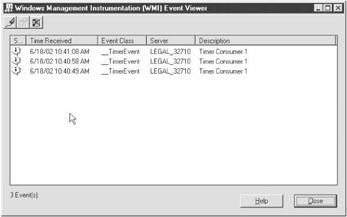
Figure 4-1: Event Viewer graphical interface
Another example of a permanent event consumer provided as part of WMI SDK is the Active Script Event Consumer that is implemented as the COM EXE server scrcons.exe. This component lets you invoke a custom script when an arbitrary event arrives. A script can be written in any scripting language that can be consumed by the Microsoft Scripting Engine, including VBScript and JavaScript. The scripting code has access to the instance of the respective event class through the environment variable TargetEvent.
Yet another example of a permanent consumer is smtpcons.dll. The SMTP event consumer provider is capable of generating and sending out email messages when the event notifications are received from WMI. This component is fairly flexible because it lets you assemble an email message using standard string templates. The templates utilize a notation, similar to one used for specifying Windows environment variables, to refer to the properties of an event. Thus, for handling process creation events, for instance, the body of the email message may include a string %TargetInstance.ExecutablePath%. Since the TargetInstance property of the __InstanceCreationEvent object always points to a newly created WMI object, this string template will be expanded to the actual path of the process executable.
A few more standard consumer providers are available, such as the Command Line Event Consumer, which launches an arbitrary process upon the arrival of an event; or the NT Log Event Consumer, which writes an entry into Windows NT Event Log as the result of a management event. In general, there is rarely a need to create a new consumer provider, since most of the event-handling functionality is already embedded in the standard consumer providers.
Although the purpose of event consumer providers should be fairly obvious at this point, one thing may still remain unclear. How does WMI locate an appropriate consumer for a given event? Just like all other COM components, consumer providers are registered in the system registry; however, such registration has little relevance as far as WMI is concerned. It turns out that all event consumer providers are registered as such in the CIM Repository. You can register an event consumer provider by creating instances of two system classes: __Win32Provider and __EventConsumerProviderRegistration. You will need the __Win32Provider object to register any kind of WMI provider; it contains mainly the basic information, such as the provider identification and CLSID. The __EventConsumerProviderRegistration, on the other hand, is specific to event consumer providers and it is used to link the physical provider that is implemented by the COM server with the logical event registration. This class has two properties: Provider, which points to an instance of the __Win32Provider class; and ConsumerClassNames, which is an array of logical consumer class names supported by the provider. A consumer class is a derivative of the system class __EventConsumer that is specific to an individual event consumer provider and, as a result, may contain properties that facilitate arbitrary event handling activities. For instance, the SMTP Event Consumer Provider comes with the SMTPEventConsumer class, which is defined as follows:
class SMTPEventConsumer : __EventConsumer {
 [key, Description(
 "A unique name identifying this instance of the SMTPEventConsumer.")]
 string Name;
 [Description("Local SMTP Server")]
 string SMTPServer;
 [Description("The subject of the email message.")]
 string Subject;
 [Template, Description("From line for the email message. "
 "If NULL, a from line will be constructed"
 "of the form WinMgmt@MachineName")]
 string FromLine;
 [Template, Description("Reply-To line for the email message. "
 "If NULL, no Reply-To field will be used.") ]
 string ReplyToLine;
 [Template, Description("The body of the email message.")]
 string Message;
 [Template, Description("The email addresses of those persons to be "
 "included on the TO: line. Addresses must be "
 "separated by commas or semicolons.")]
 string ToLine;
 [Template, Description("The email addresses of those persons to be "
 "included on the CC: line.")]
 string CcLine;
 [Template, Description("The email addresses of those persons to be "
 "included on the BCC: line.")]
 string BccLine;
 [Description("The header fields will be inserted into the "
 "SMTP email header without interpretation.")]
 string HeaderFields[];
 };
As you can see, the individual properties of this class correspond to the elements that constitute a typical email message. Note that most of these properties are marked with the Template qualifier indicating that their contents may contain standard string templates to be expanded by the event processor.
Each instance of such a consumer class, often referred to as a logical consumer, represents an individual event subscription, or, more precisely, describes a particular action to be taken when an event arrives. Although logical consumers provide enough information to handle an event, there is one more piece of information that WMI requires in order to dispatch the notifications to appropriate consumers. More specifically, there has to be a specification as to what types of events are handled by a given consumer, or, in other words, there has to be an event filter. Such a specification is provided by instances of the __EventFilter system class. This class has three properties: Name, which is nothing more than just a unique instance identifier; Query, which is an event query string; and QueryLanguage, which, as its name implies, identifies the query language. At the time of this writing, WQL is the only query language available, so the Query property should always contain a valid WQL event query.
These two pieces of information—the logical consumer and the event filter—are all you need to route and handle any event. However, you may still be unclear on how they are linked. Let me try to clarify this. In the true spirit of CIM object modeling, the logical consumer and event filter classes are connected via an association class, __FilterToConsumerBinding. Two properties of this class, Filter and Consumer, refer to the __EventFilter object and a derivative of the __EventConsumer classes respectively. An instance of __FilterToConsumerBinding, which binds two valid instances of __EventFilter and a subclass of __EventConsumer, constitutes a valid and complete event subscription. Events will be delivered to a consumer as long as such instance exists and the only way to deactivate the subscription is to physically delete the instance.
You can create a permanent event registration in a few different ways. The most straightforward technique requires you to build a MOF file, which defines all necessary classes and instances. You should then compile the file using mofcomp.exe, and load it into the CIM Repository, thus creating the required event registration. Yet, another way to create a permanent event registration is to build the instances of the required classes programmatically using one of the WMI APIs. Both these techniques, although effective, are a bit tedious and error-prone. Fortunately, you can accomplish the task without writing a single line of code; just use the WMI SDK Event Registration Tool. Figure 4-2 shows its graphical interface.
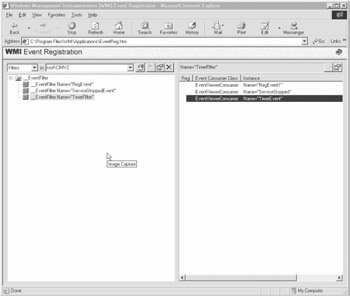
Figure 4-2: Event Registration graphical interface
This tool is extremely easy to use because it lets you create the necessary instances of event filters and consumer classes with just a few key stokes and mouse clicks. These instances can subsequently be linked together to create a __FilterToConsumerBinding object, thus completing the event subscription.
Forwarding WMI Events
While the event monitoring mechanism nearly tops the list of the most exciting features of WMI, you may not fully appreciate its versatility until you start managing a large-scale distributed system. Just imagine an environment with dozens of computing nodes that need to be monitored on a regular basis. Setting up event consumers locally on each of the computers is a tedious and thankless job, which gets worse and worse as the environment grows larger. An ideal management system should allow you to intercept the events taking place on remote computing nodes and carry out the appropriate actions in a somewhat centralized fashion.
Generally, you can handle management events, which occur on remote computer systems, in a few different ways. For instance, temporary event consumers may explicitly initiate subscriptions to events that are fired on a particular remote machine. This is the easiest approach, although it requires a consumer to manage multiple concurrent event registrations—one per each remote computer of interest.
Listening to remote events is also possible with permanent event consumers. The definition for the system class __EventConsumer, which all permanent consumers are based upon, has the following form:
class __EventConsumer : __IndicationRelated {
 string MachineName;
 uint32 MaximumQueueSize;
 uint8 CreatorSID[];
 };
The first thing to notice here is the MachineName property, which is usually set to blank for locally handled events. However, it is possible to route the event notifications to a remote computer by setting the MachineName property to the name of a machine designated for handling events. After all, an event consumer provider is just a COM server that can be activated remotely using nothing but the conventional DCOM infrastructure. There are essentially two things, required for remote activation: the CLSID of the object to be created, and the name of the machine on which to instantiate the object. As you may remember, the CLSID of a consumer COM server is specified by the CLSID property of the instance of the __Win32Provider class, which describes the event consumer provider. Thus, by combining the value of the CLSID property of the __Win32Provider object with the value of the MachineName property of the instance of the __EventConsumer class, WMI is capable of connecting to an appropriate event consumer on a designated remote machine and forwarding the event notifications there.
Although such a setup is fairly straightforward, it lacks some flexibility. First, you must be able to configure the appropriate permanent event consumer registrations on all monitored machines, which may be quite a nuisance, especially in a sufficiently large managed environment. Second, forwarding event notifications to multiple remote computers at the same time significantly complicates the configuration. As you just saw, with an individual instance of __EventConsumer you can send events to a single remote computer. Thus, in order to enable WMI to route events to more than one machine, you must create multiple __EventConsumer objects—one for each receiving computer. Finally, event forwarding is achieved at the consumer provider level. In other words, WMI's ability to route notifications to remote computers depends on the availability of the appropriate event consumer providers on those machines. Moreover, if you ever need to change the way events are handled (by switching from Event Viewer consumer to Active Script consumer, for example), you have to reconfigure each monitored machine.
Fortunately, WMI provides a better way to set up permanent event forwarding. The solution lies in the forwarding event consumer provider, which intercepts the events, raised locally, and routes them to the remote computer, where they are raised again. Just like with any other event consumer, you will need a valid event registration for the forwarding consumer to work correctly. Therefore, you still need to carry out certain configuration tasks on each of the machines you want monitored. The configuration, though, is cleaner, since it has built-in provisions for routing the notifications to multiple remote computers simultaneously and does not enforce a particular event-handling technique.
To better understand how the forwarding consumer operates, consider this simple example. The following MOF definition shows the elements that make up a registration for a forwarding consumer that sends process creation event notifications to several remote machines:
instance of __EventFilter as $procfilter {
 Name = "Process Filter";
 Query = "SELECT * FROM __InstanceCreationEvent WITHIN 10
 WHERE TargetInstance ISA 'Win32_Process'";
 QueryLanguage = "WQL";
 EventNamespace = "root\CIMV2";
 };
instance of MSFT_ForwardingConsumer as $procconsumer {
 Name = "Forwarding process consumer";
 Authenticate = TRUE;
 Targets = { "MACHINE1", "MACHINE2", "MACHINE3" };
};
instance of __FilterToConsumerBinding {
 Consumer = $procconsumer;
 Filter = $procfilter;
};
The instances of the __EventFilter and __FilterToConsumerBinding classes, which are only shown here for completeness, are identical to those you would set up for local event registrations. The logical consumer definition, however, is quite different from that of a local consumer. An instance of the MSFT_ForwardingConsumer class is used by a physical forwarding consumer provider to route the notifications to appropriate remote computers.
Similar to the rest of the consumer classes, MSFT_ForwardingConsumer is a derivative of the __EventConsumer system class and, as such, it has MachineName property. However, this property does not have to be set in order to enable the event forwarding. Instead, this class defines a new property, Targets, which is an array of machine names or addresses that receive the event notifications. Thus, in the preceding example, all process creation events will be forwarded to MACHINE1, MACHINE2, and MACHINE3.
As I mentioned earlier, such an event registration has to be created on each of the machines that are to forward events, which may be a bit tedious. However, once created, these registrations should rarely change, since, as you will see in a moment, the particulars of event handling can be controlled from the monitoring machines that are receiving the events.
What really sets the forwarding consumer apart from the rest of the consumer providers is its ability to reraise the events on a remote machine so that the event can be handled just like any other WMI event that is local to that machine. The only catch is that the event will be represented via an instance of a special MSFT_ForwardedEvent class rather than a regular intrinsic or extrinsic event class. MSFT_ForwardedEvent has the following definition:
class MSFT_ForwardedEvent : MSFT_ForwardedMessageEvent {
 uint8 Account[];
 boolean Authenticated;
 string Consumer;
 __Event Event;
 string Machine;
 string Namespace;
 datetime Time;
};
where
- Account: Account used by the forwarding consumer that sent the event notification
- Authenticated: Boolean that indicates whether the event notification is authenticated
- Consumer: Name of the forwarding consumer that sent the event notification
- Event: Original event that caused the forwarding consumer to send the notification
- Machine: Name of the machine from which the event originates
- Namespace: Namespace of a forwarding consumer that sent the event notification
- Time: Time that the event notification was sent by the forwarding consumer
Although all properties of MSFT_ForwardedEvent provide a wealth of useful information regarding the origins of a forwarded event, its Event property is the most interesting. Event points to an embedded event object that corresponds to an original WMI event intercepted by the forwarding consumer. Therefore, if the consumer is set up to forward all process creation events, the Event property of the MSFT_ForwardedEvent object will contain an __InstanceCreationEvent with its TargetInstance property set to an instance of Win32_Process. By registering for MSFT_ForwardedEvent notifications and filtering based on the properties of the associated event objects, a remote consumer may carry out just about any monitoring task.
Event forwarding is a very powerful feature, much superior to all other remote notification techniques. Unfortunately, the forwarding consumer provider is only available under Windows XP and later, so users of older systems may have to resort to other event forwarding solutions.
WQL for Event Queries
The WMI event filtering mechanism is based on WQL queries. Queries are used by both parties engaged in event processing: event consumers and event providers. Event providers utilize WQL queries to publish their capabilities; in other words, they use them to specify what types of events they supported. Thus, the EventQueryList property of the __EventProviderRegistration class, which is used to define event providers in WMI, houses an array of WQL queries that are supported by the provider. Event consumers, on the other hand, use WQL queries to initiate an event subscription and to indicate to WMI in which types of events they are interested. There is no difference in the syntax of WQL queries used by providers and consumers, although there is a conceptual distinction, since such queries are used for different purposes. Since provider development has little to do with .NET and System.Management, the remainder of this chapter will look at WQL event queries from the prospective of an event consumer.
Rather than inventing a brand new syntax specifically for the purpose of handling event queries, WQL offers a specialized form of the SELECT statement. (For a formal definition of WQL SELECT, refer to Listing 3-1 in the last chapter.) The simplest form of the WQL SELECT query is as follows:
SELECT * FROM
As you can see, the only thing that sets this query above apart from a regular data query is the class name in the FROM clause. A data query that specifies an event class name in its FROM clause is meaningless because instances of event classes are transient and only exist while the corresponding event is being delivered to a consumer. Thus, a query that uses an event class name in its FROM clause is automatically recognized as an event query.
Let us look at a very simple example:
SELECT * FROM __TimerEvent
This is certainly an event query, since it features a name of an event class, __TimerEvent, in the FROM clause. In fact, this query can be used to initiate a subscription to timer events, generated by any timer, that exist in CIM Repository.
Just like the data queries, event queries do not have to use the * placeholder; it is perfectly valid to specify a property list instead:
SELECT TimerId FROM __TimerEvent
Interestingly, in respect to returning system properties, this query behaves similarly to the way that a comparable data query would. If the '*' placeholder is used as a property list in a SELECT statement, each event object received by the event consumer will have most of its system properties properly populated, with the exception of __RELPATH and __PATH. The latter two properties are always set to NULL due to the inherently transient nature of event objects. However, if a SELECT statement contains a list of nonsystem properties like the query above, the only system properties populated by WMI for each output event are __CLASS, __DERIVATION, __GENUS, and __PROPERTY_COUNT. Note that __PROPERTY_COUNT will reflect the actual number of properties selected rather than total number of properties in the class definition.
The previous query is not very useful. This is because it is very likely that there is more then just one outstanding timer instruction active at any given time, which means that timer events may come from several different sources simultaneously. Since the query does not have selection criteria, it will pick up all timer interrupts, regardless of their source. You can easily solve this problem by rewriting the query as follows:
SELECT * FROM __TimerEvent WHERE TimerId = 'Timer1'
Here, the WHERE clause will ensure that only events that originate from the timer instruction, identified by TimerId of 'Timer1', are received by the consumer. In fact, using the WHERE clause to limit the scope of event subscriptions is strongly recommended because it greatly reduces the number of unneeded event notifications that are forwarded to event consumers. The syntax of the WHERE clause for event queries is exactly the same as that of the regular WQL SELECT queries and the same restrictions apply.
Subscribing to events other than timer events is very similar, although there are a few special considerations. Receiving extrinsic events is almost as trivial as getting the timer event notification. For example, the following query can be used to initiate a subscription to RegistryValueChangeEvent that is raised by the registry event provider every time a certain registry value is changed:
SELECT * FROM RegistryValueChangeEvent WHERE Hive = 'HKEY_LOCAL_MACHINE' AND
KeyPath = 'SOFTWARE\MICROSOFT\WBEM\CIMOM' AND
ValueName = 'Backup Interval Threshold'
Note that in the case of the registry event provider, the WHERE clause is mandatory rather than optional. Thus, the provider will reject the following query with an error code of WBEMESS_E_REGISTRATION_TOO_BROAD (0x 80042001):
SELECT * FROM RegistryValueChangeEvent
In fact, even if there is a WHERE clause, but its search criteria do not reference all of the event class properties, the query would still be rejected:
SELECT * FROM RegistryValueChangeEvent WHERE Hive = 'HKEY_LOCAL_MACHINE' AND
KeyPath = 'SOFTWARE\MICROSOFT\WBEM\CIMOM'
If a value for a given event class property is not explicitly supplied, the provider cannot deduce the finite set of registry entries to be monitored, and therefore, it rejects the query. Thus, when subscribing to an arbitrary registry event, the query should provide search arguments for each of the event class properties. Although this may seem like a rather severe restriction, there is an easy work around. The registry event provider offers a choice of three events: RegistryTreeChangeEvent, RegistryKeyChangeEvent, and RegistryValueChangeEvent. Therefore, the preceding query, which essentially attempts to monitor changes to a particular key rather than to the value, can be rewritten using RegistryKeyChangeEvent as follows:
SELECT * FROM RegistryKeyChangeEvent WHERE Hive = 'HKEY_LOCAL_MACHINE' AND
KeyPath = 'SOFTWARE\MICROSOFT\WBEM\CIMOM'
This query will result in a subscription for all events generated as a result of a change to any of the values under the HKEY_LOCAL_MACHINESOFTWAREMICROSOFTWBEMCIMOM key. The only downside is that the RegistryKeyChangeEvent class does not have the ValueName property, thus, the event objects received by the consumer cannot be used to identify a value that was changed to trigger the event. Assuming that you can identify a finite set of values to be monitored, you can easily solve this problem:
SELECT * FROM RegistryValueChangeEvent WHERE Hive = 'HKEY_LOCAL_MACHINE' AND
KeyPath = 'SOFTWARE\MICROSOFT\WBEM\CIMOM' AND
( ValueName = 'Backup Interval Threshold' OR ValueName = 'Logging' )
Using the same technique of combining multiple search criteria, you can also monitor changes to registry values that reside under different keys or hives.
Subscribing to intrinsic events is a bit trickier. Although the same WQL SELECT statement is used, there are a couple of things you should watch out for. Generally, if an event of interest is backed up by an event provider, the event query remains essentially the same as the one used to register for extrinsic or timer events. Take a look at the intrinsic events supplied by Windows Event Log provider. This provider, when it is acting in the capacity of an event provider, triggers intrinsic instance operation events whenever changes that affect the Windows Event Log take place. An arbitrary Windows Event Log event is represented by an instance of the Win32_NTLogEvent class, shown here:
class Win32_NTLogEvent {
 [key] uint32 RecordNumber;
 [key] string Logfile;
 uint32 EventIdentifier;
 uint16 EventCode;
 string SourceName;
 [ValueMap{"1", "2", "4", "8", "16"}] string Type;
 uint16 Category;
 string CategoryString;
 datetime TimeGenerated;
 datetime TimeWritten;
 string ComputerName;
 string User;
 string Message;
 string InsertionStrings[];
 Uint8 Data[];
};
Note that this class represents a Windows event that is recorded into the system event log and it is not associated in any way with WMI event classes. Instead, a management event, raised as a consequence of a Windows event, is modeled as a subclass of the __InstanceOperationEvent system class. For instance, whenever an event record is written into the Windows Event Log, the Event Log provider raises __InstanceCreationEvent so that the TargetInstance property of an event object refers to an associated instance of the Win32_NTLogEvent class. Thus, all you need to register to receive such events is a SELECT query that features __InstanceCreationEvent in its FROM clause and has a WHERE criteria that narrows the scope of the registration down to Windows Event Log events. The latter can be achieved by examining the TargetInstance property of the __InstanceCreationEvent class. Theoretically, the following query should do the job:
SELECT * FROM __InstanceCreationEvent WHERE TargetInstance = 'Win32_NTLogEvent'
In fact, that query is almost correct, but not quite. Since the idea here is to limit the scope of the query based on the class of the embedded object that is pointed to the TargetInstance property, the = operator will not work. Instead, the ISA operator, which is specifically designed for dealing with embedded objects, should be used:
SELECT * FROM __InstanceCreationEvent WHERE TargetInstance ISA 'Win32_NTLogEvent'
Although this query is absolutely syntactically correct, an attempt to execute it will most likely result in WMI rejecting the query with the error code of WBEM_E_ACCESS_DENIED (0x80041003). Such behavior is puzzling at best, but there is a perfectly logical explanation. Using a query such as this one, a consumer essentially requests to be notified whenever any event is recorded into any of the Windows Event Logs, including System, Application, and Security logs. The Security log is protected and any user wishing to access it must enable SeSecurityPrivilege (which gives the user the right to manage audit and security log). In fact, this privilege should first be granted to a user and then enabled on a per-process basis. Later in this chapter I will demonstrate how to ensure that a privilege is enabled; meanwhile, there is a simple workaround. If you are only interested in Application events, the scope of the query can be narrowed down even further:
SELECT * FROM __InstanceCreationEvent WHERE TargetInstance ISA 'Win32_NTLogEvent'
AND TargetInstance.Logfile = 'Application'
Since this query only requests the events from the Windows Application Log, access control is no longer an issue, so no special privileges need to be enabled.
To summarize, there is nothing special about handling the intrinsic events backed up by event providers, except for the few possible idiosyncrasies that a given provider may exhibit. Thus, you should study the documentation that comes with the provider before you attempt to set up event registrations.
Events that are generated by WMI and are based on the changes to static data that resides in CIM Repository are also fairly straightforward. This typically applies to all namespace operation events as well as class operation events, unless the class definitions are dynamic. For instance, the following query may be used to subscribe to any modification to a namespace, called 'default':
SELECT * FROM __NamespaceModificationEvent WHERE TargetNamespace.Name = 'default'
Handling changes to a WMI class definition is no different. The following query will allow you to monitor all changes to a definition of the WMI class Win32_Process:
SELECT * FROM __ClassModificationEvent WHERE TargetClass ISA 'Win32_Process'
The situation is a bit more complicated when it comes to handling the instance operation events for dynamic objects, which are not backed up by event providers. For instance, consider an instance creation event for a Win32_Process object. First, it is a dynamic object, so it is not stored in CIM Repository. Second, there is no event provider capable of raising the instance creation event whenever a process is launched. It sounds as if subscribing to such an event is not even possible, but luckily, WMI comes to the rescue. As I already mentioned, WMI is capable of periodically polling the instance providers to detect changes and to raise the appropriate intrinsic events. Polling is an expensive procedure and therefore, is not done automatically. In fact, WMI has to be explicitly instructed to poll instance providers at certain time intervals. You can do this by including a WITHIN clause in the event query, so that the SELECT statement will take the following form:
SELECT * FROM WITHIN WHERE
The WITHIN clause must be placed immediately before the WHERE clause and has to specify an appropriate value for the polling interval. The polling interval is specified in units of seconds, although it is a floating point rather than an integer number, so it is possible to give it a value of fractions of a second. Due to theextremely resource-intensive nature of polling, make sure that you use sufficiently large polling intervals. In fact, if the interval value is too small, WMI may reject the query as invalid.
For example, the following query initiates a subscription to instance creation events for objects of the Win32_Process class and instructs WMI to poll the instance provider at 10-second intervals:
SELECT * FROM __InstanceCreationEvent WITHIN 10
WHERE TargetInstance ISA 'Win32_Process'
It is not always clear which events are backed up by providers and which are not. As a result, to determine whether you need a WITHIN clause in your query is an empirical process. WMI can provide assistance in this mater—if a query does not contain a WITHIN clause where it is required, WMI will reject it with the WBEMESS_E_REGISTRATION_TOO_PRECISE (0x80042002) error code. Such an error code has a corresponding error message that reads "A WITHIN clause was not used in this query". However, if WITHIN clause is specified where it is not required, the query will work just fine. Therefore, it is a good idea to always attempt to execute event queries without WITHIN clause first, and then only add it if necessary.
Sometimes it helps to be able to monitor all three instance operation events—__InstanceCreationEvent, __InstanceModificationEvent, and __InstanceDeletionEvent—using a single event query. This can easily be achieved by substituting the superclass __InstanceOperationEvent for the name of a specific subclass in the FROM clause:
SELECT * FROM __InstanceOperationEvent WITHIN 10
WHERE TargetInstance ISA 'Win32_Process'
Of course, the events, returned by such a query would belong to one of the three subclasses of __InstanceCreationEvent, because the latter is an abstract class, and therefore, it cannot have instances. The actual class of these events can easily be determined by examining the __CLASS system property of each received event object. Interestingly, if there is an event provider for intrinsic events, such a generalized query may not work. For instance, the following legitimate looking query fails:
SELECT * FROM __InstanceOperationEvent WHERE TargetInstance ISA 'Win32_NTLogEvent'
The reason for the failure is simple: the Event Log Event provider only supports __InstanceCreationEvent, not __InstanceModificationEvent or __InstanceDeletionEvent. This becomes obvious if you look at the instance of the __EventProviderRegistration class for Event Log Event provider:
Instance of __Win32Provider as $EventProv {
 Name = "MS_NT_EVENTLOG_EVENT_PROVIDER";
 ClsId = "{F55C5B4C-517D-11d1-AB57-00C04FD9159E}";
};

Instance of __EventProviderRegistration {
 Provider = $EventProv;
 EventQueryList = {"select * from __InstanceCreationEvent
 where TargetInstance isa " Win32_NTLogEvent""};
};
Here, the EventQueryList property of the provider registration object clearly shows the supported query types.
This seems like a rather severe limitation because __InstanceDeletionEvent for Windows log events is quite useful in detecting when the event log is cleared. This is where WMI comes to the rescue again. The error code, returned by the query above is the already-familiar error WBEMESS_E_REGISTRATION_TOO_PRECISE (0x80042002), which implies that adding a WITHIN clause to the query may solve the problem:
SELECT * FROM __InstanceOperationEvent WITHIN 10
WHERE TargetInstance ISA 'Win32_NTLogEvent'
Indeed, this query works perfectly now. In this case, WMI and the event provider work together so that __InstanceCreationEvent is supplied by the provider, while the two remaining events are generated by WMI using the polling technique.
Specifying the polling interval is not the only use for the WITHIN clause. It also works in concert with the GROUP BY clause to indicate the grouping interval. The idea behind the GROUP BY clause revolves around WMI's ability to generate a single notification that represents a group of events. In its simplest form, the GROUP BY clause can be used as follows:
SELECT * FROM __InstanceCreationEvent WITHIN 10
WHERE TargetInstance ISA 'Win32_Process'
GROUP WITHIN 10
This particular query instructs WMI to batch together all process-creation events that occur within 10-second intervals that start as soon as the first event is triggered. Note that there are two WITHIN clauses, contained in this query: one that requests polling at 10-second intervals, and the other that specifies the event grouping within 10-second intervals. These clauses and their respective interval values are completely independent.
The GROUP clause can be used together with an optional BY clause; this allows for finer control over the grouping of event notifications. For instance, the following query batches events together based on the value of the ExecutablePath property of the Win32_Process object that is associated with the __InstanceCreationEvent object:
SELECT * FROM __InstanceCreationEvent WITHIN 10
WHERE TargetInstance ISA 'Win32_Process'
GROUP WITHIN 10 BY TargetInstance.ExecutablePath
Thus, no matter how many actual process creation events take place within a 10-second interval, the number of event notifications that is sent to the consumer will always be equal to the number of distinct executables that are used to launch processes within that interval.
Finally, an optional HAVING clause offers even more control over the process of event delivery. To better understand the mechanics of the HAVING clause, first look at how the aggregated events are delivered to consumers. Contrary to what you may think, the preceding query, or any query that features the GROUP BY clause, will not result in __InstanceCreationEvent objects being forwarded to the client. Instead, WMI will assemble an instance of the __AggregateEvent class that is representative of all instance creation events that took place within the grouping interval. The __AggregateEvent class has the following definition:
class __AggregateEvent : __IndicationRelated {
 uint32 NumberOfEvents;
 object Representative;
 };
The NumberOfEvents property contains a total number of underlying intrinsic or extrinsic events that are combined to produce a given __AggregateEvent object. Representative is a property that refers to an embedded event object that is a copy of one of the underlying events used in the aggregation. Thus, for the query just listed, the Representative property will contain one of the __InstanceCreationEvent objects, which contributed to the resulting __AggregateEvent object. Note that there is no guarantee that a particular underlying event object will be linked to the aggregate event. For instance, given the following query, it is not possible to predict whether the Representative property of __AggregateEvent will contain the __InstanceCreationEvent, __InstanceModificationEvent, or __InstanceDeletionEvent object:
SELECT * FROM __InstanceOperationEvent
WITHIN 10 WHERE TargetInstance ISA 'Win32_Process'
GROUP WITHIN 10
All of these query examples, even those that result in event aggregation, use the WHERE clause to specify search criteria for the underlying event objects. The query above, for example, references the TargetInstance property of the __InstanceOperationEvent class, even though the event consumer receives __AggregateEvent objects rather than instance operation events. It is, however, possible to supply a search condition, based on the properties of the resulting __AggregateEvent object, and this is where the HAVING clause comes in handy. Consider the following query example:
SELECT * FROM __InstanceCreationEvent WHERE TargetInstance ISA 'Win32_NTLogEvent'
GROUP WITHIN 10 HAVING NumberOfEvents > 5
This query requests only those __AggregateEvent objects that are composed of more than five underlying instance creation events. In other words, an aggregate event will only be delivered to the consumer if more than five Windows log events take place within a 10-second time interval.
Handling Events with System Management
The majority of event monitoring scenarios can easily be covered using the WMI permanent event consumer framework. This approach is clearly superior under many circumstances because it alleviates many concerns typically associated with a custom monitoring tool. It is simple from both the conceptual and the implementation prospective. It is also reliable because instead of relying on an application program, the monitoring task is done by WMI. Finally, it is extremely cost-effective because no, or very little, development effort is required. Although you may argue that a custom event consumer provider may have to be developed to satisfy certain monitoring needs, standard consumer providers, which are distributed as part of the WMI SDK, are usually adequate. Thus, building an event-handling utility is rarely required because there are very few compelling reasons to engage into such activity.
Nevertheless, the System.Management namespace comes well equipped for handling management events. The functionality afforded by System.Management event-handling types, however, is intended to support temporary, rather than permanent event consumers. Although it is theoretically possible to implement an event consumer provider using FCL and the .NET languages, System.Management does not include any facilities that are specifically designed to address consumer provider development. Therefore, the rest of this chapter will concentrate on explaining the mechanics of event handling from the prospective of temporary event consumers.
ManagementEventWatcher Type
The entire event-handling mechanism is packaged as a single System.Management type called ManagementEventWatcher. This type is solely responsible for handling all types of WMI events in both synchronous and asynchronous fashion. Just like most of the FCL types, ManagementEventWatcher is fairly straightforward and selfexplanatory.
Perhaps, the simplest thing that can be achieved with ManagementEventWatcher is handling management events in synchronous mode. For example, the following code snippet initiates the subscription for all process creation events and then polls for notification in a synchronous fashion:
ManagementEventWatcher ew = new ManagementEventWatcher(
 @" SELECT * FROM __InstanceCreationEvent WITHIN 10
 WHERE TargetInstance ISA 'Win32_Process'");
while( true ) {
 ManagementBaseObject mo = ew.WaitForNextEvent();
 Console.WriteLine("Event arrived: {0}", mo["__CLASS"]);
 mo = (ManagementBaseObject)mo["TargetInstance"];
 Console.WriteLine("Process handle: {0}. Executable path: {1}",
 mo["Handle"], mo["ExecutablePath"]);
}
Here, the instance of ManagementEventWatcher is created using a constructor that takes a single query string parameter. The code than enters an endless loop and starts polling for events using the WaitForNextEvent method. This method is built around the IWbemServices::ExecNotificationQuery method, which is what WMI uses to initiate synchronous event subscriptions. If you remember the discussion of synchronous query processing, you may assume that WaitForNextEvent essentially mimics the functionality of IWbemServices::ExecNotificationQuery by returning an instance of ManagementObjectCollection immediately after it is invoked. If this were true, the consumer would iterate through the collection so that each request for the next collection element would block until an event notification arrives. This, however, is not the case. Instead, WaitForNextEvent blocks until an appropriate event is triggered, and then it returns a single instance of the ManagementBaseObject type, which represents the delivered event. Such an approach, while certainly simpler, lacks some flexibility because events are always delivered one by one. The COM API IWbemServices::ExecNotificationQuery method, on the other hand, leaves enough room for delivering events in blocks, which may contribute to some performance gains.
Be careful when you are examining the delivered event. For the code above, the returned ManagementBaseObject embodies an instance of __InstanceCreationEvent. As you may remember, the TargetInstance property of the event object refers to an embedded object that triggers the event—in this case, an instance of the Win32_Process class. This instance can be retrieved by accessing the TargetInstance property through the ManagementBaseObject indexer or its Properties collection and casting the result back to ManagementBaseObject.
If you bother to compile and run the code above, it may produce an output similar to the following, assuming you launch a notepad.exe process:
Event arrived: __InstanceCreationEvent
Process handle: 160. Executable path: C:WINNTSystem32
otepad.exe
The preceding code example sets up the event registration for those events that occur on a local computer. It is, however, entirely possible to initiate a subscription to events that takes place on a remote machine. All that you need to do to listen to remote events is set up an instance of ManagementEventWatcher that is bound to a remote computer. This can be achieved by using an alternative version of its constructor, which, in addition to the query strings, takes a scope string that identifies the target machine and namespace:
ManagementEventWatcher ew = new ManagementEventWatcher(
 @"\BCK_OFFICE
ootCIMV2",
 @" SELECT * FROM __InstanceCreationEvent WITHIN 10
 WHERE TargetInstance ISA 'Win32_Process'");
while( true ) {
 ManagementBaseObject mo = ew.WaitForNextEvent();
 Console.WriteLine("Event arrived: {0}", mo["__CLASS"]);
 mo = (ManagementBaseObject)mo["TargetInstance"];
 Console.WriteLine("Process handle: {0}. Executable path: {1}",
 mo["Handle"], mo["ExecutablePath"]);
 Console.WriteLine("Originating Machine: {0}", mo["__SERVER"]);
}
The code above registers for receiving the events that take place on a remote machine BCK_OFFICE. Note that the origins of an event can be traced by interrogating the __SERVER system property of the received event object.
As I mentioned earlier, there are certain security implications involved when you subscribe for specific categories of management events. For instance, in order to receive Windows log events, SeSecurityPrivilege must be granted and enabled. Granting the privilege is a task that should be carried out using an appropriate user management tool. Enabling the privileges, however, should be done on a per process basis, and therefore, your management code should include enough provisions to get the security issues out of the way.
Assuming that all the right privileges are granted, clearing WMI security is remarkably easy. Thus, the following code snippet successfully sets up a subscription for Windows log events, assuming that a user is granted SeSecurityPrivilege:
ManagementEventWatcher ew = new ManagementEventWatcher(
 @" SELECT * FROM __InstanceCreationEvent
 WHERE TargetInstance ISA 'Win32_NTLogEvent'");
ew.Scope.Options.Impersonation = ImpersonationLevel.Impersonate;
ew.Scope.Options.EnablePrivileges = true;
while(true) {
 ManagementBaseObject mo = ew.WaitForNextEvent();
 Console.WriteLine("Event arrived: {0}", mo["__CLASS"]);
}
The only difference here is the two lines of code that follow the construction of the ManagementEventWatcher object. It turns out that all security-related settings are packaged into an instance of the ConnectionOptions class. The ConnectionOptions object, which controls the security context of the WMI connection, is contained in the instance of the ManagementScope class, which is associated with ManagementEventWatcher object. The code above simply sets two of the properties of ConnectionOptions object—Impersonation and EnablePrivileges—which control the COM impersonation level and security privileges respectively. Once these two properties are set correctly, the code is granted the required access level. Although the detailed overview of WMI security will not be presented until Chapter 8, the technique just demonstrated, should allow you to get around most of the security-related issues that you may encounter.
Although synchronous mode is definitely the simplest event-processing option available to the developers of management applications, it is not very flexible and not all that efficient. Its main drawback is that it needs to continuously poll WMI using the WaitForNextEvent method. A much better approach would be to register for events once and then handle the notifications as they arrive. This is where the asynchronous mode proves to be very helpful, although setting up an asynchronous event subscription may require just a bit more coding.
The following code snippet duplicates the functionality of the previous example, but this time in asynchronous mode:
class Monitor {
 bool stopped = true;
 public bool IsStopped {
 get { return stopped; }
 set { stopped = value; }
 }
 public void OnEventArrived(object sender, EventArrivedEventArgs e) {
 ManagementBaseObject mo = e.NewEvent;
 Console.WriteLine("Event arrived: {0}", mo["__CLASS"]);
 mo = (ManagementBaseObject)mo["TargetInstance"];
 Console.WriteLine("Process handle: {0}. Executable path: {1}",
 mo["Handle"], mo["ExecutablePath"]);
}
 public void OnStopped(object sender, StoppedEventArgs e) {
 stopped = true;
 }
 public static void Main(string[] args) {
 Monitor mon = new Monitor();
 ManagementEventWatcher ew = new ManagementEventWatcher(
 @" SELECT * FROM __InstanceCreationEvent WITHIN 10
 WHERE TargetInstance ISA 'Win32_Process'");
 ew.EventArrived += new EventArrivedEventHandler(mon.OnEventArrived);
 ew.Stopped += new StoppedEventHandler(mon.OnStopped);
 ew.Start();
 mon.IsStopped = false;
 while( true ) {
 // do something useful..
 System.Threading.Thread.Sleep(10000);
 }
 }
}
This code is fairly straightforward and should remind you of the techniques used to perform asynchronous operations with the ManagementOperationObserver type. Essentially, the ManagementEventWatcher type exposes two events: EventArrived is raised whenever a management event notification is received from WMI, and Stopped is triggered when a given instance of ManagementEventWatcher stops listening for management events. Thus, setting up an asynchronous event subscription comes down to hooking up an event handler for at least the EventArrived event. The EventArrivedEventArgs object, passed as an argument to the event handler method, has one property, NewEvent, which points to an instance of the ManagementBaseObject class that represents the management event.
An asynchronous event subscription is initiated by calling the Start method of the ManagementEventWatcher type. This is the method that internally invokes IWbemServices::ExecNotificationQueryAsync, which registers a consumer for asynchronous event delivery. Once started, ManagementEventWatcher continues listening for management events until stopped, either explicitly or implicitly. To explicitly terminate an event registration, consumers may call the Stop method, which internally invokes the IWbemServices::CancelAsyncCall method. Implicit termination may occur for a variety of reasons. Perhaps, the most obvious one is that the ManagementEventWatcher variable goes out of scope. This may happen as a result of a premature program termination or a function return, or simply because a programmer forgot to explicitly call Stop. Another reason is any kind of error condition detected by WMI, such as an invalid event query or some internal error. In order to cleanly shut down any outstanding event subscriptions, ManagementEventWatcher is equipped with a destructor method, Finalize, which is invoked automatically by .NET runtime. Although destructors are not very popular when it comes to garbage-collecting architectures, in this particular case, having one is a necessity. After all, leaving dangling event registrations around is not a very good idea.
For obvious reasons Finalize invokes the same old Stop method, which in turn, fires the Stopped event. Thus, it is pretty much a guarantee that a Stopped event will be raised regardless of whether the subscription is terminated explicitly or implicitly. The event carries enough useful information to be able to diagnose a problem, if there is any. The StoppedEventArgs object, passed as a parameter to the handler for the Stopped event, has a single property, Status, of type ManagementStatus. This is an enumeration that contains all currently defined WMI error codes. To illustrate how it works, I will change the event handler for the Stopped event so that it will print out the value of Status property:
public void OnStopped(object sender, StoppedEventArgs e) {
 Console.WriteLine("Stopped with status {0}", e.Status.ToString());
 stopped = true;
}
Assuming that the ManagementEventWatcher object is created with an event query that references a nonexisting event class in its FROM clause, the code will produce the following output:
Stopped with status NotFound
The string "NotFound" is a textual description associated with the ManagementStatus.NotFound enumeration member, which in turn, corresponds to the WBEM_E_NOT_FOUND (0x80041002) WMI error code. In this case a ManagementException will be thrown as soon as the Start method is invoked, but the Stopped event is still triggered.
Just as it is the case with synchronous event processing, asynchronous events are always delivered one-by-one. This is a bit less efficient than the native IWbemServices::ExecNotificationQueryAsync model, which allows several events to be received at once. Curiously, there is a separate type, called EventWatcherOptions, which, like all other options types, is designed to control various aspects of event processing. Besides the Context and Timeout properties inherited from its superclass ManagementOptions, EventWatcherOptions has the BlockSize property, which seems to be designed for batching the events together. However, this property is not used by any code in the System.Management namespace and it appears to have no effect on event handling. Moreover, the design of the ManagementEventWatcher type does not really support receiving multiple events at once, thus making the BlockSize option fairly useless.
EventQuery Type
An event query does not have to be represented by a plain string. There is a special type, called EventQuery, that is dedicated to handling event queries. However, unlike the other query classes described in Chapter 3, EventQuery is neither sophisticated nor very useful. In fact, it is just a container for the query string and, as such, it does not provide for query building or parsing.
In addition to a default parameterless constructor, the EventQuery type has two parameterized constructor methods: one that takes a query string, and the other that takes a language identifier and a query string. Thus, a simple query object can be created as follows:
EventQuery q = new EventQuery(
 @" SELECT * FROM __InstanceCreationEvent WITHIN 10
 WHERE TargetInstance ISA 'Win32_Process'");
While the first constructor automatically assumes that the language of the query is WQL, the second one allows the language to be set explicitly:
EventQuery q = new EventQuery("WQL",
 @" SELECT * FROM __InstanceCreationEvent WITHIN 10
 WHERE TargetInstance ISA 'Win32_Process'");
The problem is that WQL is the only language supported at this time. So, if you attempt to create a query with a language string of, say, "XYZ", and then you feed it into ManagementEventWatcher, an exception will be thrown.
Using the EventQuery type with ManagementEventWatcher is also very straightforward. The latter offers a constructor method that takes an object of EventQuery type, rather than a query string:
EventQuery q = new EventQuery(
 @" SELECT * FROM __InstanceCreationEvent WITHIN 10
 WHERE TargetInstance ISA 'Win32_Process'");
ManagementEventWatcher ew = new ManagementEventWatcher(q);
A query can also be explicitly associated with an instance of ManagementEventWatcher by setting its Query property. Thus, the following code is equivalent to the previous example:
EventQuery q = new EventQuery(
 @" SELECT * FROM __InstanceCreationEvent WITHIN 10
 WHERE TargetInstance ISA 'Win32_Process'");
ManagementEventWatcher ew = new ManagementEventWatcher();
ew.Query = q;
Besides the properties inherited from its base type ManagementQuery such as QueryString and QueryLanguage, the EventQuery type does not offer any additional functionality, and therefore, it is not very useful.
Summary
The WMI eventing mechanism is extremely powerful and, on occasion, simply indispensable, since in a well-oiled managed environment, the entire chore of system monitoring can be reduced to watching for management events. Fortunately, the functionality WMI offers to facilitate the tasks of event-based monitoring is rich and versatile enough to satisfy just about any taste. This chapter provided a fairly complete and accurate description of the capabilities and inner workings of the event-handling machinery. Having studied the text carefully, you should be in a position to
- Understand the object model behind the WMI eventing mechanism and be able to identify its main elements.
- Recognize the difference between intrinsic and extrinsic events and be able to use the appropriate event categories as necessary.
- Comprehend the fundamentals of WMI event delivery and be aware of the traps and pitfalls associated with handling certain types of event notifications.
- Understand the difference between temporary and permanent event consumers and be able to identify the major components of the WMI permanent consumer architecture.
- Be familiar with the System.Management types that support event processing and be capable of writing powerful temporary event consumers using the ManagementEventWatcher and EventQuery types.
This chapter effectively concludes the overview of the functionality WMI provides to the developers of management client applications. The rest of this book will concentrate on the issue of extending the capabilities of WMI to account for unique management scenarios.

EAN: 2147483647
Pages: 79
