Section 3.12. Absolute and Relative Pathnames
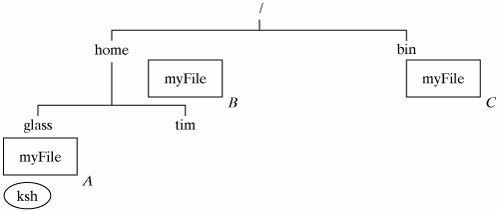
3.12. Absolute and Relative PathnamesBefore I continue with the sample Linux session, it's important to introduce you to the idea of pathnames. Two files in the same directory may not have the same name, although it's perfectly OK for several files in different directories to have the same name. For example, Figure 3-9 shows a small hierarchy that contains a "ksh" process and three files called "myFile." Figure 3-9. Different files may have the same name. Although these files have the same name, they may be unambiguously specified by their pathname relative to "/," the root of the directory hierarchy. A pathname is a sequence of directory names that lead you through the hierarchy from a starting directory to a target file. A pathname relative to the root directory is often termed an absolute or full pathname. Figure 3-10 shows the absolute pathnames of the "A," "B," and "C" instances of "myFile."
A process may also unambiguously specify a file by using a pathname relative to its current working directory. The Linux file system supports special fields that may be used when supplying a relative pathname (Figure 3-11).
For example, Figure 3-12 shows the pathnames of the three instances of "myFile" relative to the "ksh" process located in the "/home/glass" directory.
Note that the pathname "myFile" is equivalent to "./myFile," but the second form is usually not used unless you need to specify a command in your current directory when "." is not in your search path (more on this later). |

EAN: 2147483647
Pages: 339