10.3 Secure Email
| only for RuBoard - do not distribute or recompile |
10.3 Secure Email
Despite the attention that is now being paid to topics such as cookies, advertisements, and anonymous browsing, these are all relative newcomers to a privacy issue that dominated the field of internet security for much of the 1990s the sending of encrypted email.
Today, email carries some of our most confidential information. Yet basic email, as a communications medium, is riddled with poor security. Consider these potential email threats:
-
By sending an email message, you might reveal your name, your address, your location, or other personal information that you would rather keep confidential.
-
Your email message might be monitored by your employer or your ISP without your permission.
-
Your email message could be delivered to the wrong recipient, either because of an error with the mail system, or because you inadvertently selected the wrong recipient from your mail program's address book.
-
Your email message could "bounce" into a postmaster mailbox possibly because a computer between your computer and the recipient's computer was unable to properly relay the message.
-
Once your email message is delivered, it might be seen by someone other than the intended recipient. (For example, somebody could gain unauthorized access to your correspondent's computer, or the message might be turned over to an attorney as part of a discovery process.)
-
The intended recipient might forward the email message to someone against your wishes.
-
You might leave a job where you had been using your old email address for both business and personal email. Your former employer decides not to forward your old email to your new address, but to have it bounce or, worse yet, to have it delivered to the mailbox of somebody else in the organization.
-
Your email might be maliciously edited while it sits on your correspondent's mail server, before it is picked up by the intended recipient.
Some of these threats may seem improbable, but in fact every one of these threats has happened to the authors of this book over the past decade! These are not hypothetical threats they are real risks that we are all living with today.
At the same time, none of these threats are insurmountable; all of them can be solved with the correct application of technology and procedure, as we will explain.
10.3.1 Hotmail, Yahoo Mail, and Other Web-Based Email Services
One of the simplest ways to improve your email privacy is to use a web-based email provider. These systems provide free or low-cost email accounts that you can check from anywhere on the Internet. Because they are not associated with a particular ISP or employer, they make good choices for semi-permanent email addresses.[4] When combined with anonymous browsing services, web-based email can provide private and virtually untraceable email.
[4] Other good choices for semi-permanent email addresses are professional organizations and university alumni organizations, many of which now offer "email forwarding for life." Instead of providing mailboxes, these organizations provide email addresses that you can set up to forward to a specific ISP or web-based email provider that you happen to be using at a particular time.
Web-based email systems are not without their dangers. Some of the problems that you may encounter with these systems include:
-
Using these services gives the email provider complete, unrestricted access to your email. For many people this isn't an issue, but for some it's a serious concern.
-
Few of these services have provisions for encrypting email. As a result, there are no protections against mail that is accidentally delivered to the wrong address. There are also no protections against search warrants, subpoenas, and rogue employees at the email provider itself.
-
As most of the email providers do not support SSL encryption, your mail is susceptible to interception by a network monitoring device located on your local area network or at your ISP.
-
Some of the web-based providers will attach advertisements to the bottom of your outgoing email messages.
Despite these drawbacks, the careful and selective use of web-based email can dramatically improve email privacy for many individuals. And because it takes less than five minutes to set up a free email account, web-based systems make it practical to create an email address for a single purpose, use it, and then discard it.
10.3.2 Hushmail
Hushmail is a web-based email provider with a difference (see Figure 10-10). Unlike Hotmail, Yahoo Mail, and the others, Hushmail encrypts all email messages passing through the system so that the messages cannot be read by anybody, not even by Hushmail's staff. Unlike other web-based mail systems, even if Hushmail is served with a police warrant or sued in a civil court, the company cannot provide unencrypted email messages.
Figure 10-10. Hushmail looks like other web-based mail systems, but it is much more secure because all messages are encrypted and decrypted on the end user machines, rather than the server
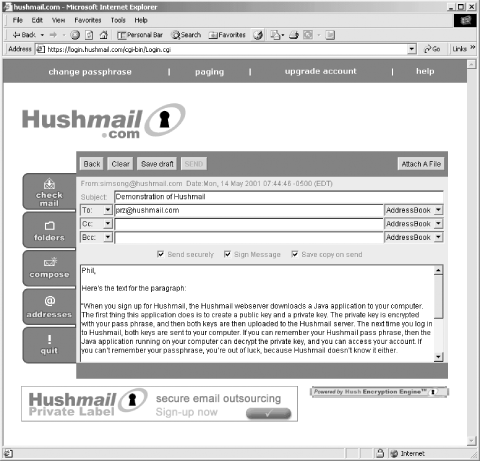
Hushmail can provide this level of security because the unencrypted email messages are never present on the company's servers. That's because Hushmail's encryption doesn't take place on the Hushmail servers it takes place instead on each user's computer (see Figure 10-11).
Figure 10-11. Encryption in the Hushmail system happens inside a browser on the end user's computer
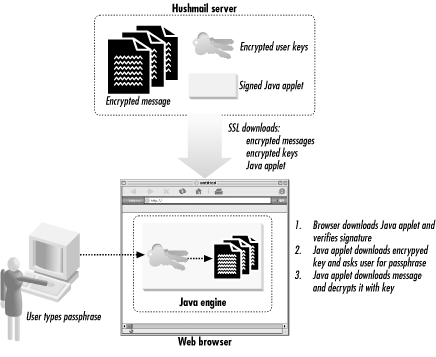
When you sign up for Hushmail, the Hushmail web server downloads a Java application to your computer. The first thing this application does is to create a public key and a private key. The private key is encrypted with your passphrase, and then both keys are uploaded to the Hushmail server. The next time you log in to Hushmail, both keys are sent to your computer. If you can remember your Hushmail passphrase, then the Java application running on your computer can decrypt the private key, and you can access your account. If you can't remember your passphrase, you're out of luck, because Hushmail doesn't know it either.
Hushmail is as easy to use as other web-based mail systems. The encryption is completely automatic. When you send email to another Hushmail user, the system automatically downloads the user's key from the Hushmail server and uses this key to encrypt the message that you are sending them. When you are sent encrypted mail, the system automatically decrypts the message before displaying it.[5]
[5] You can also use Hushmail to exchange email with the wider Internet, but as of May 2001 the system does not encrypt these messages. Hushmail plans to adopt the OpenPGP standard for exchanging email messages with non-Hushmail users.
While Hushmail is easy to use, the fact that the unencrypted messages never appear on Hushmail's servers makes the system very secure. And because the Hushmail messages are decrypted in a Java application and displayed on the screen, the unencrypted messages are likewise never stored in a file on your computer's hard disk (unless you explicitly copy a message and save it).
As of the spring of 2001, Hushmail offers two different kinds of personal accounts: an advertising-subsidized free service, which provides users with full encryption and 5 megabytes of online mail storage, and a "Premium" version that includes 32 megabytes of mail storage and no banner advertisements.
10.3.3 Omniva's Self-Destructing Email
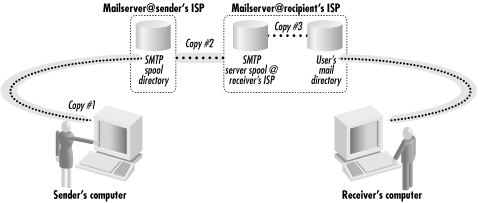
With many modern computer systems, throwing away a piece of email can frequently be more difficult than holding onto it. A typical email message is copied at least four times during the course of its life. There is the original copy that is made for the person who writes the email message, usually kept in the sender's outbox. Then there is a copy that is made by the sender's SMTP server. If the email message moves across the Internet, a copy is made at the receiver's SMTP server. And then another copy is made when the email is downloaded by the recipient. Each of these four copies, in turn, might be copied onto a backup device, such as a tape or a second hard disk. And if either the sender or the recipient reads the mail on multiple computers, such as a desktop and a laptop, still more copies can be created. The majority of these copies are typically beyond the control of both the sender and the recipient of the email message (see Figure 10-12).
Figure 10-12. The typical email message is copied at least four times and sometimes many more
These multiple copies of email messages on different computer systems can be a boon to investigators, attorneys in litigation, and nosy coworkers. In the 1980s, copies of Oliver North's email messages that were discovered by government investigators on backup tapes proved essential in unraveling the Iran-Contra affair, the Reagan Administration's "arms-for-hostages" scandal. Email messages again proved invaluable to government investigators during the anti-trust investigation of Microsoft in the 1990s. And when Northwest Airlines and its workers were engaged in a labor dispute in February 1999, the airlines accused its workers of staging an illegal "sick-out." The airline got a court order to seize the home computers of more than 20 workers who were suspected of coordinating the job action.
Because of their candor, detail, and voluminousness, email messages are now routinely sought in divorce proceedings, civil litigation, and criminal trials. It's illegal to destroy email and other evidence after a lawsuit or court action has been initiated, but it's completely legal to proactively destroy documents if such destruction is part of routine business practices. For this reason, many companies and government offices have instituted mandatory document retention or document destruction policies. These policies specify what kinds of documents should be retained, how long they should be kept, and when documents should be destroyed. But many of these policies are openly ignored because they are, in practice, so difficult to implement.
In a free and open society, it feels somewhat odd to be advocating that documents should be routinely destroyed indeed, the examples of Oliver North and Microsoft point out the dangers of a well-heeded document destruction policy. But the systematic destruction of documents may be one of the few ways to assure long-term privacy for routine communications. Email presents a particular challenge to document destruction policies because it is copied in so many places. Once an email message is copied onto a magnetic tape and that tape is put into a safe deposit box, there is no practical way to recover the message for routine deletion.
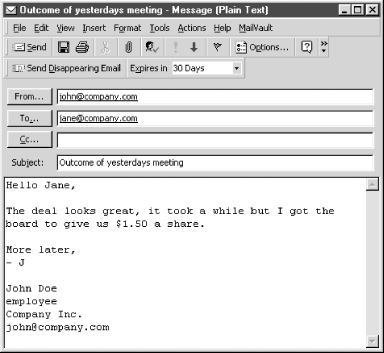
Omniva Policy Systems is an email destruction system that overcomes this seemingly impossible challenge with a seemingly counterintuitive solution. When a user creates a message using the Omniva system, the user chooses an expiration date for the email. The Omniva email system then creates a unique encryption key for the message, encrypts the message, and sends both the encryption key and the expiration date to Omniva's servers. The encrypted message is then sent to the recipients (see Figure 10-13). By relying on cryptography, the Omniva system doesn't try to destroy all of the copies of an email message that have been made. Instead, the system grants conditional access to email messages only for a limited time (see Figure 10-14).
Figure 10-13. The Omniva email system relies on encryption and a central key server to assure that email messages will be unintelligible after their expiration date.
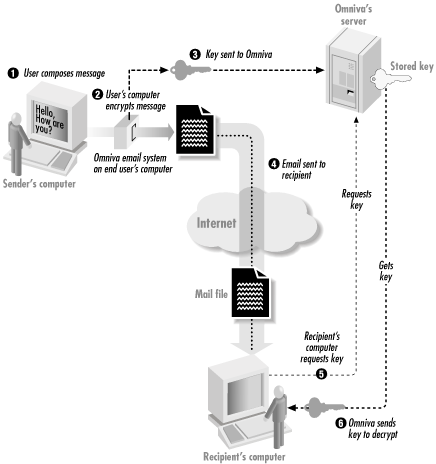
Figure 10-14. A message composed with the Omniva system message is given an expiration date
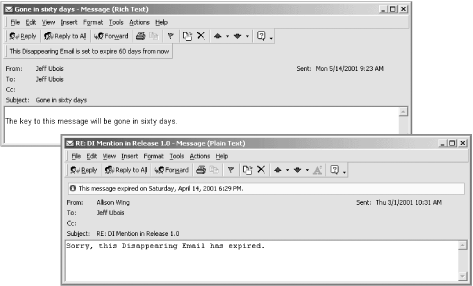
When the recipient of the message tries to read the message, his mail client contacts the Omniva server and downloads the key. The mail client decrypts the encrypted message and displays it. But the client doesn't save the decrypted message on the disk. If the recipient wants to read the message again in a few days, he needs to download another copy of the decryption key (see Figure 10-15). This whole process happens automatically whenever the mail message is viewed. Once a message has gone past an expiration time, the key is deleted so that the message can no longer be read.
Figure 10-15. Viewing a message on Omniva Email depends on whether the message has expired. This example shows a message that hasn't expired (left) and another message that has (right).
Omniva email is not perfect. Forwarded email messages retain the self-destruction capability, but if you manually copy a message out of a window and paste it into a second, the new message will not automatically self-destruct. You can always print an email message, and unless you then shred the paper, the printed copy will be around for a long time. But the Omniva email system does make it possible for mutually consenting parties to implement email destruction policies, with different expiration times, on a message-by-message basis.
Furthermore, the Omniva email system does significantly increase the privacy that is afforded to email users, because email messages that are accidentally bounced into postmaster's mail boxes or saved on magnetic backup tapes are unintelligible without the decryption key.
| only for RuBoard - do not distribute or recompile |

EAN: 2147483647
Pages: 194