Creating Administrator Accounts
The final desktop setup task that Tom wants to tackle is the automated creation of two user accounts. One of these accounts will be used as an emergency account that will provide Tom with the ability to locally log on to a user's computer in the event that a problem occurs. The other account will be used to configure scheduled tasks, such as the execution of the defrag script, that require administrative level privileges in order to execute.
Creating a Local Administrator Account
Tom's final scripting assignment is to develop a script that will create the following user accounts:
- ADMA01. A local desktop management account that is a member of the local administrators group. Tom will use this account only in the event that he needs to locally log on to the computer to resolve a problem or perform emergency maintenance.
- ASAT01. A local scheduling account that is a member of the local administrators group, giving the account sufficient security privileges to run any script set up as a scheduled task.
Tom plans to write down the passwords associated with these two accounts (on a computer-by-computer basis) and to store them in sealed envelopes that he will lock up in the corporate safe, where they can be retrieved in an emergency.
| Note |
In order to administer user accounts, Tom must have administrative privileges within the context of the environment in which he is working. In other words, Tom must be a member of the local administrators group on the computer on which he is creating the new accounts. Likewise, to administer domain user accounts, Tom would have to be a member of the domain administrators group. Since these are new computers that are right out of the box, Tom will use the built-in administrators account to set everything up and run his desktop management configuration scripts. |
Options for Manually Creating New User Accounts
Windows XP Professional provides Tom with two different utilities that can be used to create local user accounts. These utilities are listed below.
- The User Accounts folder
- The Local Users and Groups snap-in
The User Accounts folder is found on the Windows XP Control Panel. It provides only limited control over the creation of a new account. It can be used to create, modify, and delete user accounts but has only limited control over account features such as the assignment of group membership. The Local Users and Groups snap-in can be found in the Computer Management console. The Computer Management console is a built-in MMC (Microsoft management console) that can be used to perform a number of computer administration tasks, including user account creation and management.
Using the Local User and Groups Snap In
Ordinarily, Tom would create the desktop management and schedule administrative accounts by hand using the Local Users and Groups snap-in. The following procedure outlines the steps that Tom goes through when manually creating the local ADMA01 desktop management account using this snap-in. This same procedure can also be used to create the local ASAT01 scheduling account.
- Click on Start, right-click on My Computer, and select Manage. The Computer Management console opens, as shown in Figure 15.1.
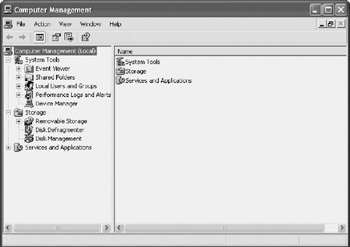
Figure 15.1: Using the Computer Management console to manually administer user accounts - If necessary, expand the System Tools node in the console tree.
- Expand the Local Users and Groups node.
- Select the Users node. A list of user accounts defined in the computer's local security database is displayed in the right-hand pane of the Computer Management console, demonstrated in Figure 15.2.
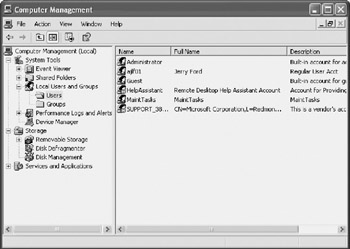
Figure 15.2: Examining currently defined user accounts on the Windows XP computer - Right-click on Users and select New User. The New User dialog box opens, as shown in Figure 15.3.
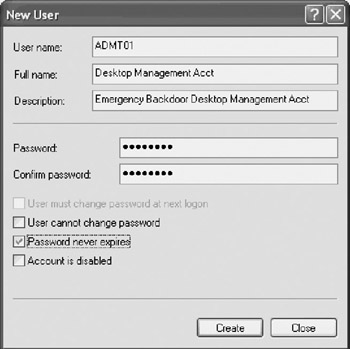
Figure 15.3: Assign a username and password to the new user account - Type ADMT01 in the User name field. Type Desktop Management Acct in the Full name field, Emergency Backdoor Desktop Management Acct in the Description field, and a password in the Password and Confirm password fields.
Note Tom assigns different passwords to each account and never uses the same passwords again on other computers. To ensure that he is creating a strong password, he always makes them 10 characters long, never uses words or phrases, and always includes a combination of numbers, special characters, and uppercase and lowercase letters.
- Select Password never expires to prevent the account's password from expiring and locking the account until its password is changed.
- Click on Create and then Close.
- The new account will appear in the right-hand pane of the Computer Management console. Right-click on it and then select Properties. The account's properties dialog box appears.
- Select the Member of property sheet, as shown in Figure 15.4. By default the new account is made a member of the local Users group.
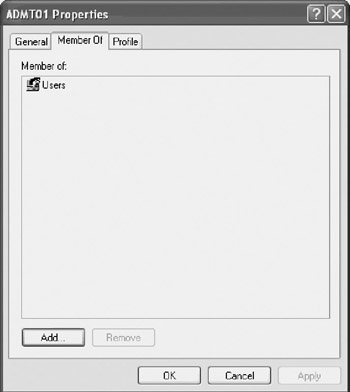
Figure 15.4: Examining the new account's group memberships - Click on Add. The Select Groups dialog box appears.
- Click on Advanced. The Select Groups dialog box expands to show additional options.
- Click on Find Now. A list of local group accounts will be displayed, as shown in Figure 15.5. Table 15.1 lists and describes the built-in local groups listed in Figure 15.5.
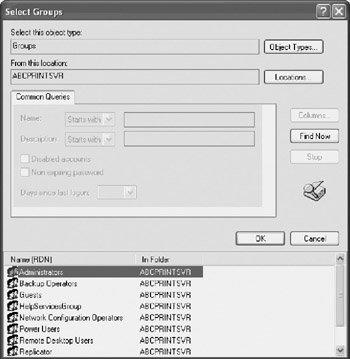
Figure 15.5: Locating local group accounts to which the user account may be addedTable 15.1: Windows XP Professional's Built-in Local Group Accounts Local Group Account
Description
Administrators
Provides its members with control over all computer resources as well as the ability to perform any Windows administration task.
Backup Operators
Provides its members with the ability to back up and restore all files stored on the computer.
Guests
Contains the Guest account which provides very limited access to computer resources.
Network Configuration Operators
Provides members with the ability to configure TCP/IP and other network-related configuration settings.
Power Users
Provides members of this group with all the capabilities of the Users group, plus the ability to modify certain system settings and install applications.
Remote Desktop Users
Provides members of this group with the ability to remotely connect to the computer using the Remote Assistance utility.
Replicator
This group is not used to administer user accounts. Instead, it is used by the operation system to support domain replication.
Users
Provides members of this group with the ability to run applications, work with files, submit print jobs, turn off the computer, and perform an assortment of nonadministrative tasks.
HelpServicesGroup
This group is not used to administer user accounts. Instead it is used by the operating system to support the Help and Support Center service.
- Select the Administrators group and click on OK twice.
- The local Administrators group is now displayed as one of the groups to which the account has been added. Click on OK.
- Close the Computer Management console.
Table 15.1 provides a complete list of Windows XP Professional's built-in collection of local group accounts.
Net Commands
In researching his options for scripting the creation of local user accounts on computers running Windows XP Professional, Tom determined that he wanted to use either the Windows XP Net User command or the Windows XP Resource Kit's Addusers command-line utility.
The Addusers command-line utility provides the ability to create new accounts and configure account passwords as nonexpiring. Unfortunately, when Tom requested the funds to purchase the Windows XP Resource Kit, he was told that given the capital outlay the company has already committed to upgrading its desktop infrastructure, there were not additional funds available at this time.
Net User
Tom's plan is to use the WshShell object's Run() method to execute the Windows XP Net User command and automate the creation of the two new user accounts. The Net User command can be used in several different ways. The syntax for each of the forms of the Net User command is outlined below.
net user [username [password | *] [options]] [/domain]
net user [username {password | *} /add [options] [/domain]
net user [username [/delete] [/domain]
When Net User is executed without arguments, it displays a list of user accounts on the local computer. Username specifies the account name to be added, deleted, modified, or viewed. Password is used to assign a password to a new account or change the password of an existing account. The asterisk symbol * prompts for the password. The /domain parameter causes the account to be created on the domain that is currently logged on. The /add parameter defines an add operation and the /delete parameter defines a delete operation. Finally, the options parameter specifies a list of one or more optional subparameters that sets specific account attributes. Table 15.2 defines the list of parameters that are available as options for the Net User command.
|
Parameter |
Description |
|---|---|
|
/active:{no | yes} |
Enables or disables the account |
|
/comment:“text” |
Adds comments to an account |
|
/countrycode:nnn |
Specifies the Country/Region codes to be used for help and error messages |
|
/expires:{date | never} |
Specifies the status of account expiration |
|
/fullname:"name" |
Sets a user's full name rather than a username |
|
/homedir:path |
Establishes the user's home directory |
|
/passwordchg:{yes | no} |
Determines whether the user can change a password |
|
/passwordreq:{yes | no} |
Specifies a password requirement |
|
/profilepath:[path] |
Establishes the user's logon profile |
|
/scriptpath:path |
Establishes the path for the user's logon script |
|
/times:{times | all} |
Defines time frames in which the user is permitted to use the computer, for example: W,8AM-5PM; F,8AM-1PM |
|
/usercomment:"text" |
Determines whether an administrator can change or add to the user comment |
|
/workstations: {computername[,…] | *} |
Specifies up to eight workstations where the user is permitted to log on |
The following VBScript statements demonstrate how to use the Net User command to automate the creation of a user account named TestAcct and assign it an initial password of Wql#5?yi.
Set WshShl = WScript.CreateObject("WScript.Shell")
WshShl.Run "net user TestAcct Wql#5?yi /add", 0
Similarly, the same account could have been defined at a Windows domain level by adding the /domain parameter, as demonstrated below.
Set WshShl = WScript.CreateObject("WScript.Shell")
WshShl.Run "net user TestAcct Wql#5?yi /add /domain", 0
Unfortunately, the Net User command has one drawback. You cannot use it to create or configure user accounts with passwords that do not expire. This will cause a problem for Tom because these passwords assigned to the ADMA01 and ASAT01 accounts will eventually expire, in effect disabling the accounts until Tom changes their passwords. Although this will not impact the usefulness of the desktop management account, it affects the scheduler account and can cause the defrag script to fail when it executes. To get around this issue, Tom will have to manually modify the user account to set its password to nonexpiring after the script has created it.
Net Localgroup
In addition to the Net User command, which provides the ability to create, modify, and delete local and domain user accounts, Tom needs a way to automate the addition of user accounts to the local administrators group. After looking around, he has discovered that he can use another Windows command to perform this task. This command is the Net Localgroup command, which provides the ability to add user accounts to local groups on both the local computer and a Windows domain.
| Note |
Group accounts provide a way to easily manage large numbers of user accounts. When an account is made a member of a group account it inherits all the security permissions and rights assigned to that group. |
The Net Localgroup command can be used in several different ways. The syntax for each of these forms of the Net Localgroup command is outlined below.
net localgroup [groupname [/comment:"text"]] [/domain]
net localgroup groupname {/add [/comment:"text"] | /delete} [/domain]
net localgroup groupname name [...] {/add | /delete} [/domain]
When Net Localgroup is executed without arguments, it displays the name of the computer and the local groups defined on that computer. Groupname specifies the name of the local group to be administered. The /comment:"text" parameter adds or modifies a comment to a new or existing group. Specifying /domain causes the operation to occur on the domain level instead of the local computer. The name [ …] parameter is used to list one or more usernames or group names to be added or removed from a local group. The /add parameter specifies an add operation and /delete specifies a delete operation.
| Note |
Another Windows XP command that can be used to configure group membership is the Net Group command. This command provides the ability to add, display, and modify user accounts in global groups located on the local computer or on the domain to which the computer is connected. The various forms of syntax supported by this command are outlined below.
 net group [groupname [/comment:"text"]] [/domain]
 net group groupname {/add [/comment:"text"] | /delete} [/domain]
 net group groupname username[ ...] {/add | /delete} [/domain]
When executed without any parameters, the Net Group command displays a list of groups on the server. The groupname parameter specifies the group name to be added, expanded, or deleted. The /comment:"text" parameter is used to add a comment to a new or existing group. When specified, the /domain parameter performs the operation at the domain level instead of on the local computer. The username[ …] parameter is used to specify a list of one or more usernames to be added or removed from the specified group. The /all parameter specifies an add operation and the /delete parameter specifies a delete operation. |
Creating a Login Script
At this point, Tom has reviewed the manual account creation process and has identified the Windows commands that he will need to use when developing the VBScript that will automate account creation. He is now ready to write the script. As with the previous scripts, Tom will develop it in a modular fashion. First he will define the statements that make up the Initialization Section and Main Processing Section and then he will develop each of the script's functions and subroutines.
The Initialization Section
As with all his other scripts, Tom begins by specifying the Option Explicit and the On Error Resume Next statements, as shown below.
'Initialization Section

Option Explicit

On Error Resume Next
The reason for adding the On Error Resume Next statement is to prevent the scripts from terminating in the event of an error and to provide the ability to interrogate the return status of each command after it executes. This way, if for some reason the script should run into an error when trying to create the first user account, it can continue to run and try and create the second account.
Next, a constant is defined that will be used to display a title bar message in all pop-up dialog boxes generated by the script. This will provide for a consistent and professional-looking presentation.
Const cTitlebarMsg = "Administrative Account Creator"
The next four statements, shown below, define a number of variables used by the script. The first variable represents the WshShell object and the rest of the defined variables used in the script's Main Processing Section.
| Note |
A number of other variables are used by the script. These variables are defined in the functions and subroutines that use them. Moving variable declaration to the procedure level whenever possible helps to tighten variable scope and ensure that variables are not accidentally reused or modified inappropriately in other parts of the script. |
Dim WshShl
Dim intRunStatus
Dim strDskMgtAcct
Dim strSchedAcct
Next, an instance of the WshShell object is set up, as shown below, in order to later facilitate the use of the Net User and Net Localgroup commands using this object's Run() method.
'Instantiate the WshShell object
Set WshShl = WScript.CreateObject("WScript.Shell")
The last two statements in the Initialization Section assign values to the strDskMgtAcct and strSchedAcct variables. These values represent the names of the desktop management and scheduling accounts that are to be created by the script.
strDskMgtAcct = "ADMA01"
strSchedAcct = "ASAT01"
The Main Processing Section
The Script's Main Processing section begins by calling the CallRunVerification() function, as shown below.
'Get permission to proceed
intRunStatus = CallRunVerification()
This function displays a pop-up dialog box asking for permission to continue executing the script. It returns a value of 6 if permission is granted. The value returned by the function is assigned to the intRunStatus variable, allowing it to be interrogated, as shown below.
If intRunStatus = 6 Then

 'Call the procedure that creates new accounts
 CreateAdminAcct(strDskMgtAcct)
 CreateAdminAcct(strSchedAcct)

End If
If a value of 6 is returned by the function, then two new procedure calls are executed. In both instances the same procedure is called. This procedure is named CreateAdminAcct(). It is written as a subroutine because it does not need to return any information back to its calling statement. It is designed to accept and process one argument. This argument is the name of the account that it is to create. The first statement that calls this subroutine passes it the strDskMgtAcct variable, representing the name of the desktop management account. The second statement that calls this subroutine passes it the strSchedAcct variable, which represents the name of the scheduling management account.
The script's Main Processing Section ends like all earlier scripts by executing the WScript object's Quit() method, as shown below.
'Terminate script execution
WScript.Quit()
The CallRunVerification() Function
The CallRunVerification() function is designed to display the pop-up dialog box shown in Figure 15.6 in order to confirm its execution.
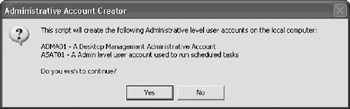
Figure 15.6: Using VBScript's built-in MsgBox() function to create a confirmation prompt
The CallRunVerification() function, shown below, begins by defining a localized variable called strMsgText. It then assigns a text string to this variable. In order to make the text string more readable, the VBScript vbTab and vbCrLf string formatting constants are used to restructure the string's presentation within the pop-up dialog box. The MsgBox() function is then executed and passed three arguments. The first argument is the value assigned to the strMsgText variable.
Function CallRunVerification()

 Dim strMsgText

 'Display the splash screen and ask the user if he or she wants to play
 strMsgText = "This script will create the following Administrative level" & _
 " user accounts on the local computer:" & vbTab & vbCrLf & vbCrLf & _
 strDskMgtAcct & " - A Desktop Management Administrative Account" & vbCrLf & _
 strSchedAcct & " - A Admin level user account used to run scheduled tasks" & _
 vbCrLf & vbCrLf & "Do you wish to continue?"

 CallRunVerification = MsgBox(strMsgText, 36, cTitlebarMsg)

End Function
The second argument passed to the MsgBox() function is 36. This number represents the accumulation of the numeric values assigned to the vbYesNo (that is, 4) and vbQuestion (that is, 32) constants. The net effect of this argument is to display a pop-up dialog box that displays the Yes and No buttons along with a graphic question mark icon.
| Note |
Refer to Table 6.5, "VBScript MsgBox() Function Buttons," in Chapter 6, "Data Collection, Notification, and Error Reporting," for a list of possible buttons that can be displayed by the MsgBox() function. In addition, refer to Table 6.6, "VBScript MsgBox() Function Icons," in Chapter 6 to review the list of icons that can be displayed. |
The third and final argument passed to the MsgBox() function is cTitlebarMsg. This argument represents the constant defined in the script's Initialization Section that specifies a standard title bar message to be used in all pop-up dialog boxes displayed by the script.
The CreateAdminAcct() Subroutine
The CreateAdminAcct() subroutine, shown below, is responsible for the actual creation of user accounts as well as for their addition to the local administrators group. It accepts and processes one argument, called strNewAcctName, that is passed to it as input. This variable will contain the name of the user account that the subroutine is to create. It begins by defining two localized variables. The first variable is strPasswd and it will be used to store the password for the account. The second variable is intCmdResult. It will be used to store the return code generated by the Net User and Net Localgroup commands. The strCmdResult value is then assigned a initial default value of 0.
The subroutine then calls the GetValidPassword() function, which prompts for the specification of a valid password. The value returned by this function call is then assigned to the strPasswd variable.
Sub CreateAdminAcct(strNewAcctName)

 Dim strPasswd
 Dim intCmdResult

 intCmdResult = 0

 strPasswd = GetValidPasswd()

 'Create the new account

 intCmdResult = WshShl.Run("net user " & strNewAcctName & " " & _
 strPasswd & " /add", 0)

 'Add the account to the local administrators group
 If intCmdResult = 0 then
 intCmdResult= WshShl.Run("net localgroup Administrators /add " & _
 strNewAcctName, 0)
 If intCmdResult <> 0 then
 MsgBox "Error Code 2: Account creation failed for " & _
 strNewAcctName, , cTitlebarMsg
 Else
 MsgBox "Account creation successful for " & strNewAcctName, , cTitlebarMsg
 End If
 Else
 If intCmdResult <> 0 then
 MsgBox "Error Code 1: Account creation failed for " & _
 strNewAcctName, , cTitlebarMsg
 End If
 End If

End Sub
Next, the subroutine executes the WshShell object's Run() method, passing it the Net User command, the strNewAcctName variable, the strPasswd variable, the /add option, and a 0 (which causes the command to run hidden in the background). The result of this command is stored in the intCmdResult variable, which is then checked to ensure that an error has not occurred. If the return code generated by the command was not zero (that is, an error occurred), then an error message is displayed. Otherwise the WshShell object's Run() method is executed again, this time to process the Net Localgroup command. The result of this command's execution is then checked. If all goes well, a pop-up dialog box like the one shown in Figure 15.7 will be displayed.
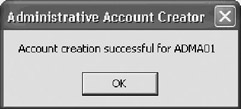
Figure 15.7: A message is displayed for each account that is successfully created
The GetValidPasswd() Function
The script's final procedure, shown below, is a function named GetValidPassword(). Its job is to display the pop-up dialog box shown in Figure 15.8. The script begins by defining two localized variables. The strPasswd variable is used to store the password that Tom will type in and the strValidPassword variable will be used to store a variable that the function will use to test whether a valid password has been supplied.
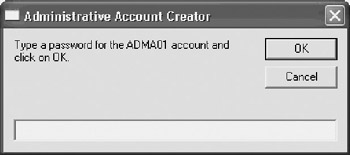
Figure 15.8: Rather than embed passwords into the script, the script is designed to manually collect them
Function GetValidPasswd()

 Dim strPasswd
 Dim strValidPassword

 strValidPassword = "NO"

 Do Until strValidPassword = "YES"

 'Prompt for a password to assign to the account
 strPasswd = InputBox("Type a password for the " & strDskMgtAcct & _
 " account and click on OK." , cTitleBarMsg)

 If strPasswd = "" Then
 MsgBox "Password Missing: You must enter a valid 8 character " & _
 "Password to continue.", , cTitlebarMsg
 Else
 If Len(strPasswd) < 8 Then
 MsgBox "Incorrect password length. Password must be at least " & _
 "8 characters long", , cTitlebarMsg
 Else
 GetValidPasswd = strPasswd
 strValidPassword = "YES"
 End If
 End If

 Loop

End Function
A Do…Until loop is set up, which iterates until a valid password is supplied. It begins by displaying a pop-up dialog box using the built-in VBScript InputBox() function. The password that is entered is then interrogated to ensure that it is not blank (that is, either the Cancel button was clicked or the OK button was clicked without a password being typed).
The length of the password is then checked to ensure that it is at least eight characters long. If the value assigned to strPasswd is blank or is less than eight characters long, an error message is displayed and a new pop-up dialog box is displayed to once again try and collect a valid password. Once a valid password is entered, its value is assigned to GetValidPassword (a variable with the same name as the function) in order to return it to the statement that called in the function the first place. Then, to break out of the Do…Until loop, the value of strValidPassword is set equal to YES.
The Fully Assembled Script
The entire administrative account creation script is assembled below. When executed, it will create both administrative level management accounts. It will then be up to Tom to remember to set the password for the ASAT01 account to non-expiring in order to prevent the account from getting locked out, which would prevent the execution of the defrag script. Tom will also have to modify the scheduled task that runs the defrag script to run using this account.
'*************************************************************************
'Script Name: Script 15.1.vbs
'Author: Jerry Ford
'Created: 03/15/03
'Description: This script creates 2 administrative level user accounts.
'One provides the Desktop Support Team with a backdoor into the computer.
'The other provides sufficient access to run scheduled administrative
'scripts.
'*************************************************************************


'Initialization Section

Option Explicit

On Error Resume Next

Const cTitlebarMsg = "Administrative Account Creator"

Dim WshShl
Dim intRunStatus
Dim strDskMgtAcct
Dim strSchedAcct

'Instantiate the WshShell object
Set WshShl = WScript.CreateObject("WScript.Shell")

strDskMgtAcct = "ADMA01"
strSchedAcct = "ASAT01"


'Main Processing Section

'Get permission to proceed
intRunStatus = CallRunVerification()

If intRunStatus = 6 Then

 'Call the procedure that creates new accounts
 CreateAdminAcct(strDskMgtAcct)
 CreateAdminAcct(strSchedAcct)
End If

'Terminate script execution
WScript.Quit()


'Procedure Section

Function CallRunVerification()

 Dim strMsgText

 'Display the splash screen and ask the user if he or she wants to play
 strMsgText = "This script will create the following Administrative level" & _
 " user accounts on the local computer:" & vbTab & vbCrLf & vbCrLf & _
 strDskMgtAcct & " - A Desktop Management Administrative Account" & vbCrLf & _
 strSchedAcct & " - A Admin level user account used to run scheduled tasks" & _
 vbCrLf & vbCrLf & "Do you wish to continue?"

 CallRunVerification = MsgBox(strMsgText, 36, cTitlebarMsg)

End Function

Sub CreateAdminAcct(strNewAcctName)

 Dim strPasswd
 Dim intCmdResult

 intCmdResult = 0

 strPasswd = GetValidPasswd()

 'Create the new account
 intCmdResult = WshShl.Run("net user " & strNewAcctName & " " & _
 strPasswd & " /add", 0)

 'Add the account to the local administrators group
 If intCmdResult = 0 then
 intCmdResult= WshShl.Run("net localgroup Administrators /add " & _
 strNewAcctName, 0)
 If intCmdResult <> 0 then
 MsgBox "Error Code 2: Account creation failed for " & _
 strNewAcctName, , cTitlebarMsg
 Else
 MsgBox "Account creation successful for " & strNewAcctName, , cTitlebarMsg
 End If
 Else
 If intCmdResult <> 0 then
 MsgBox "Error Code 1: Account creation failed for " & _
 strNewAcctName, , cTitlebarMsg
 End If
 End If

End Sub

'This procedure creates a backdoor account for the desktop management team
Function GetValidPasswd()

 Dim strPasswd
 Dim strValidPassword

 strValidPassword = "NO"

 Do Until strValidPassword = "YES"

 'Prompt for a password to assign to the account
 strPasswd = InputBox("Type a password for the " & strDskMgtAcct & _
 " account and click on OK." , cTitleBarMsg)

 If strPasswd = "" Then
 MsgBox "Password Missing: You must enter a valid 8 character " & _
 "password to continue.", , cTitlebarMsg
 Else
 If Len(strPasswd) < 8 Then
 MsgBox "Incorrect password length. Password must be at " & _
 "least 8 characters long", , cTitlebarMsg
 Else
 GetValidPasswd = strPasswd
 strValidPassword = "YES"
 End If
 End If

 Loop

End Function
Summary
In this chapter, you reviewed the steps that are required to manually create new user accounts and add them to groups. You also learned how to script the creation of new user accounts, as well as how to add those accounts to groups. Using the techniques presented here, you can begin developing an assortment of account management scripts that can be used to create or modify user accounts on both the local computer and a Windows domain.
Part I - Introducing Microsoft VBScriptBasics
- What Is VBScript?
- Errors, Constants, and Variables
- Conditional Logic and Iterative Structures
- Procedures
- Arrays
- Data Collection, Notification, and Error Reporting
- VBScript Objects
- VBScript and Internet Explorer
- VBScript and the WSH
Part II - Professional Project 1 Desktop Administration Using VBScript and the WSH
- Project Case Study Desktop Customization and Deployment
- Customizing the Desktop
- Customizing the Start Menu and Quick Launch Toolbar
- Scheduling Disk Maintenance
- Mapping Network Printers and Disks
- Creating Administrator Accounts
Part III - Professional Project 2 Analyzing Application Logs
- Project Case Study Analyzing Application Logs
- Using Configuration Files to Control Script Execution
- Developing Script Log Analyzers
- Scheduling Script Execution
- Maintaining a 30-Day Summary Log Archive
Part IV - Professional Project 3 Creating a Centralized Report Management Station
- Project Case Study Creating a Centralized Report Management Station
- Developing a Setup Script
- Collecting Remote Summary Reports
- Processing and Consolidating Report Data
- Archive Management
Part V - Professional Project 4 Reporting Application Summary Data via the Web
- Reporting Application Summary Data via the Web
- Designing the Web Site
- Building the Web Sites Main Page
- Building the Registration and Configuration Settings Page
- Converting Reports to HTML Pages
- Building the Report Archive Page
- Report Distribution and Remote Archive Management
Part VI - Introducing Microsoft VBScriptBasics

EAN: 2147483647
Pages: 366
