Mapping Network Printers and Disks
It is now time for Tom to begin working on automating the setup of desktop connections to the corporate print server and file server. This requires Tom to learn how to work with the properties and methods associated with the WshNetwork object. In addition, Tom will have to determine the best means for deploying and executing his VBScript.
A Change of Plans
Tom's original plan was to develop two separate scripts and to execute them using local Group Policy on each computer as part of the user login process. When implemented locally, Group Policy is administered using GPEDIT.MSC. GPEDIT.MSC is a preconfigured MMC (Microsoft Management Console) that contains the Group Policy snap-in.
To implement these scripts in this manner, Tom would open GPEDIT.MSC by clicking on Start, Run, typing GPEDIT.MSC, and then clicking on OK. This opens the Group Policy folder, as shown in Figure 14.1.
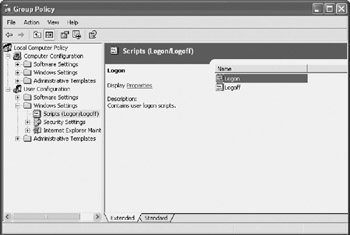
Figure 14.1: Setting Group Policy locally using GPEDIT.MSC
Script policies are a component of Group Policy. Windows 2000 and XP support the automatic execution of scripts based on four different events, as listed below.
- Startup. The script executes using the authority of the Local System account during system startup and before the user is permitted to log in.
- Logon. The script executes when the user logs on to the computer using the access rights and permissions assigned to the user.
- Logoff. The script executes using the access rights and permissions assigned to the user during the logoff process.
- Shutdown. The script executes using the authority of the Local System account as part of the computer's shutdown process.
Group Policy can be configured for both users and computers. Startup and Shutdown scripts apply to computers. Logon and Logoff scripts apply to users. Disk and printer network connections are associated with individual users. By expanding User ConfigurationWindows SettingsScript, you can display the Logon and Logoff policies. To add a script to the Logon policy, double-click on Logon. This opens the Logon Properties dialog box, as shown in Figure 14.2. Then click on Add, type the name of the logon script, and click on OK.
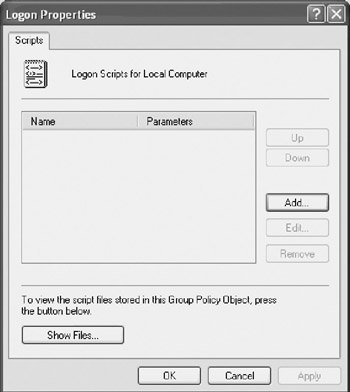
Figure 14.2: Adding a new logon script to Group Policy
After sharing this plan with Rick and Sue, ABC, Inc.'s two IT analysts, Tom changed his mind. Rick and Sue explained that they could easily take Tom's scripts and use AD (Active Directory) Group Policy to implement its execution. This would eliminate the need to configure the scripts to execute on each individual server and allow the scripts to be administered from a single location. In addition, Tom has decided to combine the logic of both scripts into a single script in order to simplify its turnover when he hands it off to Rick and Sue for implementation within AD Group Policy.
| Note |
AD Group Policy provides the ability to implement policy at any of the following levels:
At the AD level, Group Policy is set from either of two locations:
|
Working with the WshNetwork Object
The key to using VBScript and the WSH to interrogate and administer network resources is the WshNetwork object. The properties provided by the WshNetwork object enable VBScripts to access information about the network to which a computer is connected. The WshNetwork object's properties are listed below.
- UserName. Returns a string containing the name of the currently logged on user
- ComputerName. Returns a string containing the name assigned to the computer on which the script is executing
- UserDomain. Returns a string containing the name of the Windows domain to which the user has logged on
The WshNetwork object also provides methods that enable VBScripts to enumerate printers and network drives, establish printer and drive connections, and disconnect existing printer and drive connections. The WshNetwork object's methods are listed below.
- EnumNetworkDrives(). Retrieves information about all currently established mapped network drive connections
- MapNetworkDrive(). Provides the ability to map connections to network drives using local drive letters
- RemoveNetworkDrive(). Disconnects or deletes the specified mapped drive connection
- EnumPrinterConnections(). Retrieves information about all currently established printer connections
- AddPrinterConnection(). Provides the ability to establish an MS-DOS printer connection
- AddWindowsPrinterConnection(). Provides the ability to establish a Windows printer connection
- RemovePrinterConnection(). Disconnects or deletes the specified network printer connection
- SetDefaultPrinter(). Specifies the printer to which all print jobs are sent by default
Accessing WshNetwork Properties
The properties of the WshNetwork object are read-only, meaning that they cannot be changed by a VBScript. These properties are easily accessible once an instance of the WshNetwork object has been set up. The WshNetwork object is instantiated using the WScript object's CreateObject() method, as shown below.
Set WshNet = WScript.CreateObject("WScript.Network")
The following example demonstrates how to reference each of the WshNetwork object's properties and to display then in a pop-up dialog box.
Set WshNet = WScript.CreateObject("WScript.Network")
MsgBox "UserName:" & vbTab & WshNet.UserName & vbCrLf & _
 "UserDomain:" & vbTab & WshNet.UserDomain & vbCrLf & _
 "ComputerName:" & vbTab & WshNet.ComputerName, ,"Examining WshNetwork Properties"
Figure 14.3 demonstrates the output produced by this example when run on a computer named Desktop10.
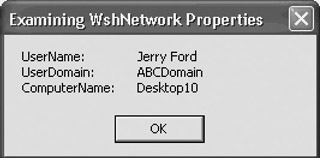
Figure 14.3: Examining WshNetwork properties
Working with Network Drives
The WshNetwork object provides several methods that allow you to enumerate information about currently mapped network drives and to create and disconnect network connections to network drives. Each of these methods is demonstrated in the sections that follow.
Enumerating Network Drives
The WshNetwork object's EnumNetworkDrives method can be used to retrieve information about all currently established mapped network drive connections. The syntax of the EnumNetworkDrives method is shown below.
objDriveList = WshNetwork.EnumNetworkDrives
ObjDriveList is a variable that will store the information returned by the EnumNetworkDrives method.
The following example demonstrates how to use the EnumNetworkDrives method to display a list of currently mapped network drives in a pop-up dialog box.
Set WshNet = WScript.CreateObject("WScript.Network")
Set objMappedDrives = WshNet.EnumNetworkDrives

strDisplayString = "Currently mapped network drives:" & vbCrLf & vbCrLf
strDisplayString = strDisplayString + "Drive Letter:" & vbTab & "Address" & _
 vbCrLf

For i = 0 to objMappedDrives.Count - 1 Step 2
 strDisplayString = strDisplayString & "Drive " & objMappedDrives.Item(i) & _
 vbTab & vbTab & objMappedDrives.Item(i+1) & vbCrLf
Next

MsgBox strDisplayString
The EnumNetworkDrives method returns a collection, which the script assigns to objMappedDrives. This collection is simply an indexed array that has a zero index. Elements of the array are added in pairs. The first element in each pair stores the drive letter associated with a drive mapping, and the second element stores its network address (in UNC [Universal Naming Convention] format). To process all of the contents of the array, a For…Next loop is set up. It is assigned a Step of 2 in order to facilitate the processing of items, which is done by reference array element in pairs (as i and i + 1).
Figure 14.4 demonstrates the output produced by the execution of this example.
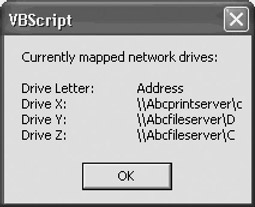
Figure 14.4: Enumerating the list of network drives to which the user is currently mapped
Mapping a Network Drive
A network drive is a special Windows file sharing service that allows a remote computer to access the contents of a hard disk drive or a directory within a drive via the network. A mapped network drive is a network connection to a network drive. By mapping a connection to a network drive, you make the network drive look and act as if it were a local disk drive. Once connected in this manner, your scripts can read and write to the network drive, assuming that you have the appropriate security access permissions.
The WshNetwork object's MapNetworkDrive method provides the ability to map connections to network drives using local drive letters. The syntax of the MapNetworkDrive method is shown below.
WshNetwork.MapNetworkDrive(LocalName, NetworkName, [ChangeProfile],

[UserName], [UserPassword])
LocalName specifies the drive letter to be assigned to the drive connection. NetworkName specifies the drive's network name. ChangeProfile is an optional Boolean parameter. When set equal to True, the mapped drive connection is stored in the user's profile. Its default setting is False. UserName is an optional string that specifies a user account name to be used in setting up a mapped drive connection. UserPassword is also optional and is used in conjunction with the UserName parameter to specify the password associated with a specific user account name.
The following example demonstrates how to use this method to set up a connection to a shared drive located on a server called ABCFileSvr.
Set WshNet = WScript.CreateObject("WScript.Network")
WshNet.MapNetworkDrive "Z:", "\ABCFileServerD"
The name of the shared drive is D, and it is assigned a local drive letter of Z:. Figure 14.5 shows the mapped drive created by this example. As you can see, a mapped drive's icon is represented by showing a network cable connection underneath it.
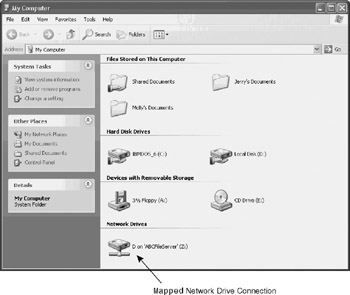
Figure 14.5: Examining the network drive created by the previous example
Disconnecting a Network Drive
The WshNetwork object's RemoveNetworkDrive method is used to disconnect or delete a mapped connection to a network drive. The syntax of the RemoveNetworkDrive method is shown below.
WshNetwork.RemoveNetworkDrive(Name, [Force], [ChangeProfile])
Name identifies the drive letter of the mapped drive to be disconnected. Force is an optional Boolean parameter. When used, Force specifies whether or not the connection is forcefully disconnected (in the event it is currently in use). ChangeProfile is an optional parameter that specifies whether or not the mapped drive should be deleted from the user's profile. The default for this option is False.
The following example demonstrates how to use this method to disconnect the mapped drive set up in the previous example.
Set WshNet = WScript.CreateObject("WScript.Network")
WshNet.RemoveNetworkDrive "Z:"
Working with Network Printers
The WshNetwork object provides several methods that provide the ability to enumerate or discover printers and to create and disconnect printer connections. Each of these methods is demonstrated in the sections that follow.
Enumerating Network Printers
The WshNetwork object's EnumPrinterConnections method can be used to retrieve information about all current printer connections. The syntax of the EnumPrinterConnections method is shown below.
objPrinterList = WshNetwork.EnumPrinterConnections
ObjPrinterList is a variable that will store the information returned by the EnumPrinterConnections method.
Like the EnumNetworkDrives method, the EnumPrinterConnections method returns a collection that the script assigns to objNtwkPrinters. This collection is an indexed array that has a zero index. Elements are added to the array in pairs. The first element in each pair stores the local printer name, and the second element stores its assigned port.
The following example demonstrates how to write a script that enumerates a user's printer connections.
Set WshNet = WScript.CreateObject("WScript.Network")
Set objNtwkPrinters = WshNet.EnumPrinterConnections

strDisplayString = "Currently established network printer connections:" & _
 vbCrLf & vbCrLf

strDisplayString = strDisplayString + "Network printer name" & vbTab & _
 vbTab & "Port:" & vbCrLf

For i = 0 to objNtwkPrinters.Count - 1 Step 2
 strDisplayString = strDisplayString & objNtwkPrinters.Item(i+1) & vbTab & _
 vbTab & objNtwkPrinters.Item(i) & vbCrLf
Next

MsgBox strDisplayString
A For…Next loop is set up to process the contents of the collection. As with the earlier network drive enumeration example, this example uses a Step of 2 to process the contents of the collection (that is, an array) and references each pair of related elements as i and i + 1.
Figure 14.6 demonstrates the output produced by this example.
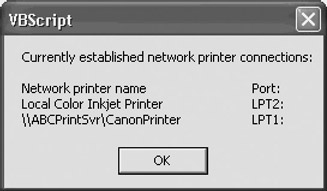
Figure 14.6: Enumerating through the list of printers to which the user is currently connected
Setting Up a Network Printer Connection
The WshNetwork object provides two methods for establishing printer connections. The AddPrinterConnection method should be used to set up connections to non-Windows printer connections. The AddWindowsPrinterConnection method should be used to set up access to Windows printer connections, which is the case at ABC, Inc.
Using the AddPrinterConnection() Method
The WshNetwork object's AddPrinterConnection method provides the ability to establish an MS-DOS printer connection. The syntax of the AddPrinterConnection method is shown below.
WshNetwork.AddPrinterConnection(LocalName, NetworkName [,ChangeProfile] [, UserName]
[,
UserPassword])
LocalName specifies the name to be assigned to the printer connection. NetworkName specifies the printer's network name. ChangeProfile is an optional Boolean parameter. When set equal to True, the printer connection is stored in the user's profile. Its default setting is False. UserName is an optional string that specifies a user account name to be used in setting up a network printer connection. UserPassword is also optional and is used in conjunction with the UserName parameter to specify the password associated with a specific user account name.
| Tip |
The AddPrinterConnection method should only be used to establish a printer connection with a remote non-Windows-based network printer. To set up a printer connection to a Windows-based network printer, use the AddWindowsPrinterConnection method. |
The following example demonstrates how to use the AddPrinterConnection method to set up a network printer connection.
Set WshNet = WScript.CreateObject("WScript.Network")
WshNet.AddPrinterConnection "LPT1", "\ABCPrintServerLaserPrinter"
Using the AddWindowsPrinterConnection() Method
The WshNetwork object's AddWindowsPrinterConnection method provides the ability to establish a Windows printer connection. This method does not require you to specify a specific port to be used in setting up the printer connection. The AddWindowsPrinterConnection method has two different forms of syntax, one of which is applicable to scripts run on Windows 98 and Me, while the second format applies only to Windows 2000 and XP.
The syntax of the AddWindowsPrinterConnection method as applied to scripts running on Windows 98 and Me is shown below.
WshNetwork.AddWindowsPrinterConnection(PrinterPath, DriverName [,Port])
The syntax of the AddWindowsPrinterConnection method as applied to scripts running on Windows 2000 and XP is shown below.
WshNetwork.AddWindowsPrinterConnection(PrinterPath)
PrinterPath specifies the path to the printer. DriverName identifies the name of the printer's software driver. Port is an optional parameter that specifies the port to be used in making the printer connection.
| Note |
In order for the AddWindowsPrinterConnection method to work on a computer running Windows 98 or Me, the printer software driver must be preinstalled on the computer, otherwise an error will occur. |
The following example demonstrates how to use the AddWindowsPrinterConnection method to set up a printer connection on a computer running Windows 98 or Me.
Set WshNet = WScript.CreateObject("WScript.Network")
WshNet.AddWindowsPrinterConnection _

 "\ABCPrintServerLaserPrinter", "HP DeskJet 710C"
The following example demonstrates how to use the AddWindowsPrinterConnection method to set up a printer connection on a computer running Windows 2000 or XP.
Set WshNet = WScript.CreateObject("WScript.Network")
WshNet.AddWindowsPrinterConnection "\ABCPrintServerLaserPrinter"
Removing a Network Printer Connection
The WshNetwork object's RemovePrinterConnection method provides the ability to disconnect an existing network printer connection. The syntax of the RemovePrinterConnection method is shown below.
WshNetwork.RemovePrinterConnection(PrinterName, [Force], [ChangeProfile])
PrinterName is a string specifying the name of the printer connection to be deleted. PrinterName can be specified using either of the following formats.
- UNC name (\ComputerNamePrinterName)
- Port (LPT1, LPT2, and so on)
Force is an optional Boolean value that specifies whether or not the printer connection should be forcefully removed (in the event that the connection is currently in use). The default value is set to False.
ChangeProfile is an optional Boolean value that specifies whether the change should be made to the user's profile (for example, saved across login sessions). The default value is set to False.
The following example demonstrates how to use the RemovePrinterConnection method to disconnect the printer connection set up in the previous example.
Set WshNet = WScript.CreateObject("WScript.Network")
WshNet.RemovePrinterConnection "\ABCPrintServerLaserPrinter"
Establishing a Default Printer
The WshNetwork object's SetDefaultPrinter method can be used to specify the printer to which all print jobs will be submitted by default. The syntax of the SetDefaultPrinter Method is shown below.
WshNetwork.SetDefaultPrinter(PrinterName)
PrinterName is the name of the printer to be made the default printer. Its value is specified using its UNC name.
The following example demonstrates how to modify the previous example in order to make the new network printer the default.
Set WshNet = WScript.CreateObject("WScript.Network")
WshNet.AddWindowsPrinterConnection "\ABCPrintServerLaserPrinter"
WshNet.SetDefaultPrinter "\ABCPrintServerLaserPrinter"
Creating a Login Script
As mentioned at the beginning of this chapter, Tom has decided to combine the tasks of setting up the network drive and printer connections into a single script. Once the script is finished, he will hand it off to Rick and Sue for implementation using AD Group Policy. Rick and Sue will then set Tom's VBScript up as a login script, thus ensuring that it will execute as part of each user's login process.
The Initialization Section
This script begins by defining the variables and objects that the script will require to execute. In addition to using Option Explicit, the On Error Resume Next statement has been added. This allows the script to continue processing in the event that a network resource is temporarily unavailable. The script will be written to create its mapped network drive connection before moving on to create its printer connection. The On Error Resume Next statement will allow the script to continue running in the event that the network drive is unavailable. It will also lessen user confusion by preventing the display of error messages during login.
Option Explicit
On Error Resume Next

Dim WshNet, strDriveLetter, strNetworkDrive, strNetworkPrinter, FsoObject
Dim strUserName

Set WshNet = WScript.CreateObject("WScript.Network")

Set FsoObject = CreateObject("Scripting.FileSystemObject")

strDriveLetter = "Z:"
strNetworkDrive = "\ABCFileSvrD"
strCopyRoomPrinter = "\ABCPrintSvrHPLaserPrinter"
strMgmtPrinter = "\ABCPrintSvrCanonColorPrinter"
In addition to defining an instance of the WshNetwork and FileSystemObject objects, the Initialization Section assigns values to four variables that specify the drive letter, network drive address, and the network addresses of the company's two network printers. The network printer assigned to the str CopyRoomPrinter variable will be set up as the network printer connection on all computers used by nonmanagers, whereas the strMgmtPrinter variable will be used to set up a network printer connection on all computers used by company managers.
The Main Processing Section
The VBScript Main Processing Section consists of a series of subroutine calls, as shown below.
DisplayNetworkData()

MapNetworkDrive strDriveLetter, strNetworkDrive

strUserName = WshNet.UserName

If Left(strUserName, 1) = "A" Then
 SetupPrinterConnection strCopyRoomPrinter
 SetDefaultPrinter strCopyRoomPrinter
 MsgBox "Copy Room Printer connected!"
Else
 SetupPrinterConnection strMgmtPrinter
 SetDefaultPrinter strMgmtPrinter
 MsgBox "Mgmt Printer connected!"
End If

WScript.Quit()
When this script runs, the user will see a command console appear on the desktop. The DisplayNetworkData() subroutine displays information about the user's network connection. Next, the MapNetworkDrive() subroutine is executed. It is responsible for mapping the connection to the company's file server. The UNC address of the network file server is passed to the subroutine for processing.
Then the strUserName variable is assigned the username of the person logging on to the computer. Each user at ABC, Inc. is assigned a username that is created based on the following guidelines:
- The first character of the username is an M for managers or A for other associates.
- The next three letters of the username are the first letters of the user's first, middle, and last names.
- The last two characters of the username are a number used to differentiate between two users with the same initials.
If the first character of the username is an A, then a connection is set up for the printer represented by the strCopyRoomPrinter variable. That printer is then set up as the user's default printer. Otherwise a connection is set up to the printer represented by the strMgmtPrinter variable and this printer is made the default printer.
Once both the network drive and printer connections have been established, the script executes the WScript object's Quit() method to cleanly terminate the script's execution.
The DisplayNetworkData() Subroutine
The DisplayNetworkData() subroutine displays information about the user's network connection, as shown below. This information displayed inside the Windows console will briefly appear on the user's desktop while the login script executes.
Sub DisplayNetworkData()
 WScript.Echo "Now configuring network drive and printer connections for:"
 WScript.Echo "Computer name: " & WshNet.ComputerName
 WScript.Echo "Domain name: " & WshNet.UserDomain
 WScript.Echo "User name: " & WshNet.UserName
End Sub
The MapNetworkDrive() Subroutine
The MapNetworkDrive() subroutine processes two input arguments, the drive letter to use when setting up the drive mapping and the UNC of the network drive. It begins by determining whether or not the network drive is available. If it is not then a message is displayed to that effect. If it is available, then a check is made to determine whether or not the drive letter to be used in setting up the network drive connection is already in use. If it is, then its connection is deleted. The new network connection is established.
Sub MapNetworkDrive(strLetter, strDrive)
 If FsoObject.DriveExists(strDrive) Then
 If FsoObject.DriveExists(strLetter) Then
 WshNet.RemoveNetworkDrive strLetter
 End If
 WScript.Echo "Mapping drive to " & strDrive & " as drive letter " & _
 strLetter
 WshNet.MapNetworkDrive strLetter, strDrive
 Else
 WScript.Echo "Unable to map to network drive " & strDrive & _
 ". Resource not available"
 End If
End Sub
The SetupPrinterConnection() Subroutine
The SetupPrinterConnection() subroutine displays a message documenting its execution and then uses the UNC of the printer passed to it as an argument to establish the connection to the network printer.
Sub SetupPrinterConnection(strPrinter)
 WScript.Echo "Connecting to network printer " & strPrinter
 WshNet.AddWindowsPrinterConnection strPrinter
End Sub
The SetDefaultPrinter() Subroutine
The SetDefaultPrinter() subroutine displays a message documenting its execution and then uses the UNC of the printer passed to it as an argument to set the network printer up as the user's default printer.
Sub SetDefaultPrinter(strPrinter)
 WScript.Echo "Setting connection to network printer " & strPrinter & _
 " as default"
 WshNet.SetDefaultPrinter strPrinter
End Sub
The Fully Assembled Script
The entire VBScript is assembled below. It will run as a script policy under the control of Active Directory when the user logs in. It will establish a standardized collection of network connections, thus ensuring that all users have the same base set of network connections. Figure 14.7 shows the Windows console that will briefly appear on the user's desktop when the script executes.
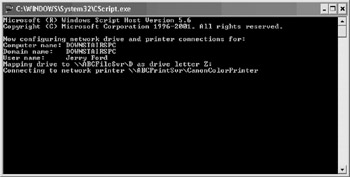
Figure 14.7: The login script displays information about the user's network connection as part of the network connection configuration process
'*************************************************************************
'Script Name: Script 14.1.vbs
'Author: Jerry Ford
'Created: 02/23/03
'Description: This script will be used as a login script at ABC
'Inc to configure network printer and network drive access
'*************************************************************************


'Initialization Section

Option Explicit

On Error Resume Next

Dim WshNet, strDriveLetter, strNetworkDrive, strNetworkPrinter, FsoObject
Dim strUserName

Set WshNet = WScript.CreateObject("WScript.Network")

Set FsoObject = CreateObject("Scripting.FileSystemObject")
strDriveLetter = "Z:"

strNetworkDrive = "\ABCFileSvrD"
strCopyRoomPrinter = "\ABCPrintSvrHPLaserPrinter"
strMgmtPrinter = "\ABCPrintSvrCanonColorPrinter"

'Main Processing Section

DisplayNetworkData()

MapNetworkDrive strDriveLetter, strNetworkDrive

strUserName = WshNet.UserName

If Left(strUserName, 1) = "A" Then
 SetupPrinterConnection strCopyRoomPrinter
 SetDefaultPrinter strCopyRoomPrinter
Else
 SetupPrinterConnection strMgmtPrinter
 SetDefaultPrinter strMgmtPrinter
End If
WScript.Quit()


'Procedure Section

'Display network information
Sub DisplayNetworkData()
 WScript.Echo "Now configuring network drive and printer connections for:"
 WScript.Echo "Computer name: " & WshNet.ComputerName
 WScript.Echo "Domain name: " & WshNet.UserDomain
 WScript.Echo "User name: " & WshNet.UserName
End Sub

'Map a drive to the Corporate network drive
Sub MapNetworkDrive(strLetter, strDrive)
 If FsoObject.DriveExists(strDrive) Then
 If FsoObject.DriveExists(strLetter) Then
 WshNet.RemoveNetworkDrive strLetter
 End If
 WScript.Echo "Mapping drive to " & strDrive & " as drive letter " & _
 strLetter
 WshNet.MapNetworkDrive strLetter, strDrive
 Else
 WScript.Echo "Unable to map to network drive " & strDrive & _
 ". Resource not available"
 End If
End Sub

'Set up a connection to the corporate network printer
Sub SetupPrinterConnection(strPrinter)
 WScript.Echo "Connecting to network printer " & strPrinter
 WshNet.AddWindowsPrinterConnection strPrinter
End Sub

'Set up the network printer connection as the user's default printer
Sub SetDefaultPrinter(strPrinter)
 WScript.Echo "Setting connection to network printer " & strPrinter & _
 " as default"
 WshNet.SetDefaultPrinter strPrinter
End Sub
Summary
In this chapter, you learned how to work with the WshNetwork object. This included learning how to write a login script that sets up connections to network drives and printers. You also learned how to apply Group Policy locally on a computer running Windows XP Professional. In addition, you were presented with a basic overview of AD Group Policy.
Part I - Introducing Microsoft VBScriptBasics
- What Is VBScript?
- Errors, Constants, and Variables
- Conditional Logic and Iterative Structures
- Procedures
- Arrays
- Data Collection, Notification, and Error Reporting
- VBScript Objects
- VBScript and Internet Explorer
- VBScript and the WSH
Part II - Professional Project 1 Desktop Administration Using VBScript and the WSH
- Project Case Study Desktop Customization and Deployment
- Customizing the Desktop
- Customizing the Start Menu and Quick Launch Toolbar
- Scheduling Disk Maintenance
- Mapping Network Printers and Disks
- Creating Administrator Accounts
Part III - Professional Project 2 Analyzing Application Logs
- Project Case Study Analyzing Application Logs
- Using Configuration Files to Control Script Execution
- Developing Script Log Analyzers
- Scheduling Script Execution
- Maintaining a 30-Day Summary Log Archive
Part IV - Professional Project 3 Creating a Centralized Report Management Station
- Project Case Study Creating a Centralized Report Management Station
- Developing a Setup Script
- Collecting Remote Summary Reports
- Processing and Consolidating Report Data
- Archive Management
Part V - Professional Project 4 Reporting Application Summary Data via the Web
- Reporting Application Summary Data via the Web
- Designing the Web Site
- Building the Web Sites Main Page
- Building the Registration and Configuration Settings Page
- Converting Reports to HTML Pages
- Building the Report Archive Page
- Report Distribution and Remote Archive Management
Part VI - Introducing Microsoft VBScriptBasics

EAN: 2147483647
Pages: 366
