VBScript and Internet Explorer
In the previous chapters, you learned the basics of VBScript programming and were introduced to VBScript's built-in and run-time objects. This chapter focuses on the specifics of the two object models provided to VBScript when executing within Internet Explorer. As you'll see, these objects provide you with the ability to develop scripts that can interact with browser objects using browser object methods and properties. This allows you to open and close browser windows, display pop-up messages, validate form input, create visual effects, and control numerous other aspects of the users' experience when they are visiting your Web pages. This chapter will also discuss browser-based events and how to develop code that can react to them in order to make your Web pages more interactive.
Internet Explorer Objects
Browser-based objects represent specific features or components of a Web page or browser. They are programming constructs that supply properties and methods, which VBScript can use to interact with and control features and components. These objects are made available to VBScript by Internet Explorer, which exposes the objects based on the content of each Web page that it loads.
Beginning with Internet Explorer version 3, each new version of the browser has introduced support for additional browser objects. Many of the objects found in the current version of Internet Explorer, version 6.X, are not found in earlier versions. This makes for a challenging programming environment, because you cannot control which version of Internet Explorer your visitors will use to view your Web pages. For example, if you develop a Web page that contains a VBScript that takes advantage of objects available in Internet Explorer version 6, and a visitor attempts to view your Web page using Internet Explorer version 4, your scripts will fail and the results will be less than satisfactory.
Of course, you can always develop your scripts based on the lowest common denominator (the lowest version of Internet Explorer that you intend on supporting), but this means forfeiting many of the features made available in Internet Explorer version 6. Such is the way of the Internet. Fortunately, if you are developing your Web pages to run on a corporate intranet, you'll typically find that all users are running the same version of Internet Explorer. This allows you to develop VBScripts based on the features and functionality supported by that particular browser version. Alternatively, you could develop different versions of your Web pages, add code to test the browser type of each visitor, and redirect the browser to the appropriate set of Web pages.
| Note |
As of the writing of this book, Microsoft has released four different major versions of Internet Explorer that support VBScript (versions 3.X, 4.X, 5.X, and 6.X). All scripts that you see in this book were developed and tested using Internet Explorer 6.0. |
Internet Explorer organizes Web pages into a logical tree-like structure, with parent, child, and sibling relationships between the objects found on the Web page. To demonstrate how Internet Explorer applies this structure to a typical Web page, consider the following example.
Script 8.1 - HTML Page Object Organization Example
Welcome to the home page of
ABC Enterprises Inc.
Figure 8.1 shows how this Web page is logically represented by Internet Explorer. The document object is always at the top of the hierarchy. The document object's child is the
element. The element has two children, the and elements. The element has one child of its own, and the element has two children.
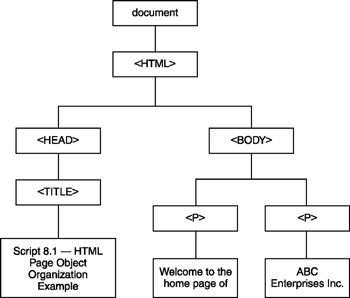
Figure 8.1: Examining the manner in which Internet Explorer logically represents the contents of a Web page
Internet Explorer versions 3 and 4 support a collection of objects called the DHTML object model. Starting with Internet Explorer version 5, the browser began supporting a second object model, the DOM. Internet Explorer versions 5 and 6 support the DOM as their primary object model while providing support for the DHTML object model for purposes of backward compatibility. The DHTML object model provides VBScript with access to most of the elements found on Web pages, whereas the DOM provides access to every element.
| Note |
The DOM was developed by a group called the World Wide Web Consortium and has been incorporated into all major Internet browsers. To learn more about the DOM, check out http://www.w3c.org/DOM. |
Examining the DHTML Object Model
The DHTML object model organizes the elements found on Web pages into a logical hierarchy. The window object resides at the top of the DHTML object model. Every Web page has one window object, except for pages that contain frames, in which case there is a window object for each frame that has been defined in addition to a single parent window object. The window object provides access to a number of child objects, as depicted in Figure 8.2.
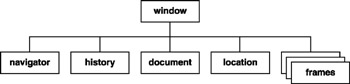
Figure 8.2: The window object provides access to other objects that allow VBScript to interact with and control the elements found on HTML pages
The window object provides properties and methods that you can use to open and close windows, display text on the browser's status bar or in pop-up dialog boxes, and load URLs into Web pages. The following list outlines the capabilities provided by its child objects.
- navigator object. Provides access to information about the browser being used to view an HTML page
- history object. Provides access to the document object's history list (that is, the Web pages visited since the browser window was opened)
- document object. Provides access to elements residing on the current HTML page
- location object. Provides information about the currently loaded HTML page and the ability to load a new URL
- frames collection. Provides access to an indexed list representing each of the frames defined on the HTML page
Of all the window object's children, you'll find that the document object is the one that you work with the most. As depicted in Figure 8.3, the document object provides access to a number of other objects that represent specific types of HTML page elements.
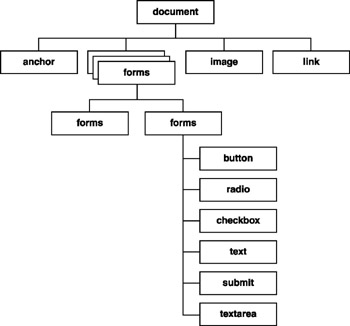
Figure 8.3: The document object provides access to a number of other objects that allow VBScript to interact with specific HTML page elements
To reference any element on an HTML page using the DHTML object model, you must reference the objects that provide access to it according to its location in the logical hierarchy provided by the DHTML object model. For example, look at the following HTML statements.
Last Name:
These statements define an HTML form called ApplicationForm that contains a text field called FirstName. Although you have the option of developing HTML pages that do not assign names to HTML elements, names must be assigned in order for VBScript to be able to reference the page's elements using the DHTML object model. For example, the following VBScript statements could be added to a VBScript inserted in the HTML page to determine whether or not the visitor entered any text into the form's text field.
If Len(document.ApplicationForm.FirstName.value) < 1 Then
 MsgBox "Last name is a required field"
End If
As you can see, to determine whether anything was typed into the text field, you must specify its location, beginning with the top element of the HTML page (document), followed by the name of the form that contains it (Application-Form), the name of the text field (FirstName), and finally the value property.
Examining the DOM
The DOM provides complete control over all elements found on an HTML page and makes them more accessible than the DHTML object model does. In addition to being able to access any element on an HTML page by specifying its location within the HTML page's logical hierarchy, the DOM allows you to navigate up, down, and sideways within the hierarchy without having to reference elements by name. The DOM provides this capability by using the properties outlined in Table 8.1.
|
Property |
Description |
|---|---|
|
firstChild |
The object's first child node |
|
lastChild |
The object's last child node |
|
childNodes |
A collection/array of all an object's child objects |
|
parentNode |
The object's parent object |
|
nextSibling |
The child node that follows next in the DOM tree |
|
prevSibling |
The child node that precedes the current child |
|
nodeName |
The name of the HTML tag |
|
nodeType |
Specifies a value representing the type of HTML element (tag, attribute, or text) |
|
nodeValue |
The value assigned to a text node |
|
data |
The value of the specified text node |
|
specified |
Specifies whether an attribute has been set |
|
attributes |
A collection/array of all an object's attributes |
To demonstrate how this works, consider the following HTML page:
Script 8.2 - A DOM Navigation Example
Welcome to the home page of
ABC Enterprises Inc.
Figure 8.4 depicts how this page is viewed by the DOM. As you can see, the document object is the parent object, and it has just one child, the
tag, which is also referred to as the documentElement.
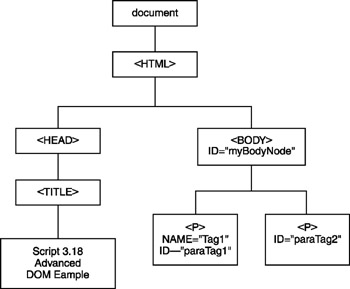
Figure 8.4: Examining an HTML page from the point of view of the DOM
The following statement demonstrates how to use the DOM to navigate the elements located on the HTML page.
window.alert("The ID for the first element is: " & _
 document.documentElement.firstChild.tagName)
This VBScript statement references the
tag on the HTML page by specifying its relationship to the document object. The next statement displays the name of the tag by again referencing the tag's relationship to the document object.
window.alert("The ID for the second element is: " & _
 document.documentElement.firstChild.nextSibling.tagName)
The next VBScript statement shows how to display the value of the first child of the
tag whose ID is BottomParagraph. This VBScript uses the DOM getElementById() method to perform this operation, as shown below.
window.alert("The Value associated with the BottomParagraph tag "& _
 element is: " & _
 document.getElementById("BottomParagraph").firstChild.nodeValue)
Using the DOM, you may also change the value assigned to HTML elements, as demonstrated by the following VBScript statement.
document.getElementById("BottomParagraph").firstChild.nodeValue="ABC Inc."
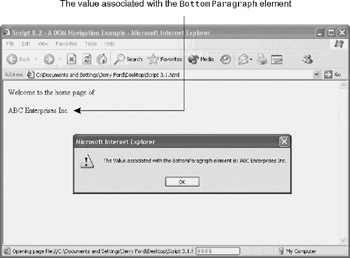
Figure 8.5: Displaying the values assigned to specific HTML elements
This statement begins by using the document object's getElementById() method to reference the second
tag (that is, BottomParagraph). It then references the nodeValue property of the firstChild object of the
tag. The end result is that the contents of the HTML page are dynamically altered, as shown in Figure 8.6.
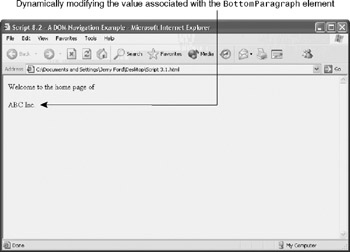
Figure 8.6: Dynamically altering the content of an HTML page
Obviously, the DOM provides a powerful tool for navigating HTML pages and accessing and manipulating their content. The DOM is too complex to fully cover all its objects, properties, and methods in this book. However, you can visit http://www.w3c.org/DOM to learn more.
High Level Browser Objects
A number of high-level browser objects merit specific attention. These objects are listed below.
- window
- document
- location
- history
- navigator
Each of these objects is described in detail in the following sections, along with examples demonstrating how they can be used by VBScripts embedded inside HTML pages.
Working with the window Object
The window object is the topmost object in the object model hierarchy. It is also the parent of the document, location, history, and navigator objects. Only one window object is established for an HTML page, unless that page contains frames, in which case one window object exists for each frame and one parent window object exists as the parent of all the other objects.
| Note |
In Figure 8.2, multiple-frame objects are depicted. In this context, each of the frames depicted represents another instance of the window object and together can be referred to as a collection. |
In addition to its child objects and collections, the window object provides access to a collection of properties and methods, which are demonstrated in this chapter as well as in Part V of this book. For example, the following HTML page contains a VBScript that demonstrates how to use a number of the window object's methods.
Script 8.3 - Working with window object's methodsonLoad="window.status = 'Welcome to the ABC Inc. Home page'">
ABC Inc. Home Page!
The basic premise behind this example is to give visitors a URL to an intermediate Web page, where they are prompted to acknowledge the company's privacy statement before being redirected to the company's real Web site. For starters, the window object's status property is used to display a text message in the browser's status bar. Then its confirm() method is used to prompt the visitor to acknowledge the company's privacy rights before accessing the Web site. Next the document object's prompt method is used to collect the visitor's name, which is then used by the alert() method to greet the visitor by name. Finally, a new browser window is opened using the window object's open() method, and the visitor is redirected to the company's actual Web site (http://www.yahoo.com was used in this example to have someplace for the browser to go). This new window is configured to open without a scroll bar, menu bar, or toolbar. This example ends with the close() method to close the original browser window. Figure 8.7 shows how the second browser window looks when displaying the Web site to which the visitor is redirected.
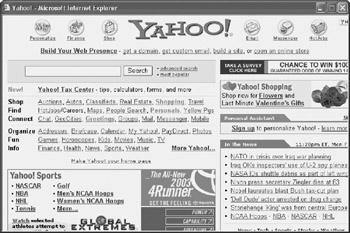
Figure 8.7: Using properties and methods belonging to the document object to control browser activity
Working with the document Object
The document object is the most commonly used object. The properties and methods of the document object provide access to elements located on the currently loaded HTML page. The following example demonstrates how to use these document object properties and methods:
- bgColor. Retrieves or sets the background color of the currently loaded HTML page
- fgColor. Retrieves or sets the foreground color of the currently loaded HTML page
- write(). Displays or writes text strings on the currently loaded HTML page
Script 8.4- Working with the document object
As you can see, the script begins by changing the HTML page's background and foreground colors to black and yellow. Then the document object's write() method is used to display a number of lines of output on the HTML page. Figure 8.8 shows the HTML page generated by the example.
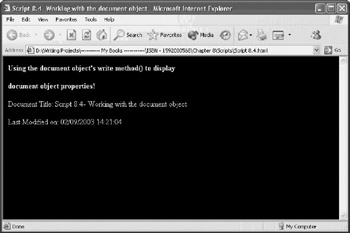
Figure 8.8: Using properties and methods belonging to the document object to control the content and appearance of an HTML page
| Note |
The document object provides access to numerous other properties that you will see used in Part V of this book. One particularly useful property is the cookie property, which provides you with the ability to store small amounts of data on each visitor's computer. For example, using a cookie, you could store and later retrieve a visitor's name and use it to create a personal greeting message the next time a user returns to your Web site. |
Working with the location Object
The location object provides the ability to refresh the currently displayed HTML page or to load a different URL using its replace() and reload() methods. In addition, the location object's href property can be used to set or retrieve the name of the currently loaded URL. For example, you can add the following statement to a VBScript embedded inside a HTML page to load Microsoft's main URL:
location.href="http://www.microsoft.com"
As a working example, the following VBScript shows how to use the location object's href property to load a URL selected by the user by way of an HTML drop-down selection form element.
Script 8.5 - Using the navigator object to load web pages
On-Line Support Sites
MicrosoftCompaqDellIBMGateway
The HTML page and VBScript work by triggering the click event for the OpenButton form element when the visitor selects one of the entries in the form's drop-down list. This in turn executes the OpenButton_onClick function. This function uses the location object's href property to load the URL associated with the visitor's selection, as shown below.
window.location=document.myForm.myList.value
Figure 8.9 shows the HTML page that allows the visitor to make a new URL selection. After selecting a vendor name from the drop-down list, the URL associated with that selection is loaded, replacing the currently loaded URL.
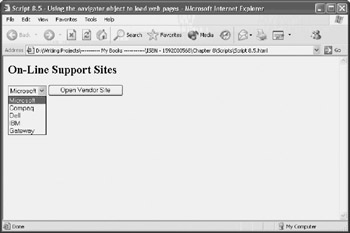
Figure 8.9: Using the location object's href property to develop a custom navigation control
Working with the history Object
The history object provides another way to control browser navigation. By using this object's back() and forward() methods, you can programmatically navigate through the list of URLs stored in the browser's history (the list of URLs that have been recently opened by this browser). In addition, you can use the history object's go() method to load any URL in the list. For example, the following statement instructs Internet Explorer to load the previously viewed URL:
history.back()
Likewise, to go forward one position in the history list, you could use the following statement:
history.forward()
To refresh the currently loaded URL, use the following statement:
history.go(0)
To jump backward or forward a number of positions in the history list, pass the go() method a positive or negative number.
Working with the navigator Object
The navigator object has properties that you can use to collect information about the operating system the visitor is using and the version of Internet Explorer that has been used to load the HTML page. Using these properties, you can develop a script that can adjust its presentation based on the version of Internet Explorer being used. Alternatively, you might use this information so you can redirect visitors to HTML pages specifically designed to support their version of Internet Explorer.
The navigator object provides access to the following collection of properties:
- appCodeName. Returns the code name assigned to the version of the browser that has loaded the HTML page
- appName. Returns the name of the browser that has loaded the HTML page
- appVersion. Returns version information about the browser that has loaded the HTML page
The following example demonstrates one way to use the appName and appVersion properties. The VBScript in this example interrogates the visitor's browser and either redirects the browser to another URL or displays a message stating that a specific version of Internet Explorer is required. This technique might be useful when a company wishes to standardize the features provided by a specific version of Internet Explorer. It displays a message informing its visitors that Internet Explorer version 5 or higher is required to access the company's Web site. This example also works for non-Internet Explorer browsers, displaying the same message.
Script 8.6 - Detecting browser type and versionTo access this web site use Internet Explorer 5 or above.
This example begins by setting a variable called strBrowserName equal to navigator.appName. It then checks to see if the value assigned to this variable is equal to Microsoft Internet Explorer. If it is, then the value of navigator.version is assigned to a variable named strBrowserVersion. The following three statements then parse out the browser's version number.
strFindString = Instr(1, strBrowserVersion, "MSIE")
strFindString = strFindString + 5
intVersionNumber = Mid(strBrowserVersion, strFindString, 1)
For example, the value assigned to strBrowserName will be set equal to the following if Internet Explorer version 6.X has been used to load the HTML page.
4.0 (compatible; MSIE 6.0; Windows NT 5.1; Q312461)
The first statement uses the VBScript Instr() function to set a value indicating the starting position of the letters MSIE in strFindString. The second statement then adds 5 to this number. The third statement then uses the VBScript Mid() function to strip off the browser's major version number (that is, 6).
If the browser's version number is less than 5 (for example, Internet Explorer version 4.X) then a message is displayed on the Web page informing the visitor that Internet Explorer version 5.X or above is required to access the Web site. If the version number is 5 or greater, then the location object's href property is used to load the specified URL.
| Note |
If a visitor is using Netscape Communicator or any other non-Internet Explorer compatible browser, then the browser automatically ignores the embedded VBScript and instead displays the following message located at the bottom of the HTML page: Sorry. To access this web site use Internet Explorer version 5 or above. |
Handling Browser Events
In order to truly interact with the visitors to your Web site, you need to develop VBScripts that react to visitors as they navigate through and interact with your Web site. Anytime something happens to your HTML pages, an event occurs. For example, when an HTML page is loaded into the browser, the load event occurs, and when it is unloaded, the unload event occurs. Events also occur when visitors move the pointer on to and off of links, buttons, and images or when visitors interact with various elements on HTML forms.
You can use VBScript to create event handlers to react to events as they occur. An event handler is a trigger that fires when an event occurs. For example, you could create an event handler that displays a welcome message in a pop-up dialog box when visitors first load your HTML pages or to thank the user for visiting just before the browser unloads your HTML page. In addition, you can use an event handler to create graphic effects by changing the colors of text as visitors move the pointer over links. You might also use event handlers to validate the fields on an HTML form as the user interacts with them.
Event handlers are associated with specific objects. In other words, if you have an HTML page that defines four links, then you can create separate event handlers that manage user interactivity for each individual link.
Table 8.2 provides a list of browser events and their associated event handlers. As you can see, the name of an event handler is determined by appending the word on to the beginning of the event name that it is associated with.
|
Property |
Event |
Description |
|---|---|---|
|
Abort |
onAbort |
Executes when the visitor aborts an image while it is loading |
|
Blur |
onBlur |
Executes when the currently selected object loses focus |
|
Change |
onChange |
Executes when the visitor changes an object |
|
Click |
onClick |
Executes when the visitor clicks an object |
|
DblClick |
onDblClick |
Executes when the visitor double-clicks an object |
|
DragDrop |
onDragDrop |
Executes when the visitor drags and drops an object onto a frame or window |
|
Error |
onError |
Executes when an error occurs on the HTML page |
|
Focus |
onFocus |
Executes when a visitor selects an object |
|
KeyDown |
onKeyDown |
Executes when a visitor presses down on a key |
|
KeyPress |
onKeyPress |
Executes when a visitor presses and releases a key |
|
KeyUp |
onKeyUp |
Executes when a visitor releases a key |
|
Load |
onLoad |
Executes when an HTML page or image finishes loading |
|
MouseDown |
onMouseDown |
Executes when a visitor presses a mouse button |
|
MouseMove |
onMouseMove |
Executes when a visitor moves the pointer |
|
MouseOut |
onMouseOut |
Executes when a visitor moves the pointer off of an object |
|
MouseOver |
onMouseOver |
Executes when a visitor moves the pointer over an object |
|
MouseUp |
onMouseUp |
Executes when a visitor releases a mouse button |
|
MouseWheel |
onMouseWheel |
Executes when a mouse wheel is rotated |
|
Move |
onMove |
Executes when the visitor moves a frame or window |
|
Reset |
onReset |
Executes when a visitor clicks on a reset button |
|
Resize |
onResize |
Executes when the visitor resizes a frame or window |
|
Select |
onSelect |
Executes when a visitor selects the contents of a form text field |
|
Submit |
onSubmit |
Executes when a visitor clicks on a submit button |
|
Unload |
onUnload |
Executes when a visitor closes the browser window or frame or loads a different URL |
There are a number of different ways to set up event handlers within your HTML pages. For example, you can embed them directly into HTML tags, as demonstrated below.
This statement displays a welcome message in the browser's status bar when the HTML page is initially loaded. A second way to set up event handlers is to set them up as procedures. In order to do this, you must name your procedures after the events for which you intend them to react. You do this by providing the name of an HTML page element followed by the underscore character and then the name of the event handler for which the procedure is designed to accommodate. For example, to create an event handler that reacts anytime the user moves the pointer over a link named strCorpLogo, you would need to name your procedure as demonstrated below.
Sub strCorpLogo_onMouseOver
 window.status = "ABC Enterprises, Inc -- Where your problems " & _
 "become our problems!"
End Sub
Yet another way to set up event handlers is to embed them within the HTML
As Table 8.2 shows, there are a number of types of events and event handlers. The next few sections demonstrate how to write VBScripts that interact with various browser events.
Window and Frame Events
You can set up event handlers that respond to many types of window and frame events. These event handlers include:
- onLoad
- onResize
- onUnload
- onMove
To respond to the load, resize, unload, and move events, you must place these event handlers inside the HTML page's opening
tag. For example, the following HTML page demonstrates how to make use of the onLoad() and onUnload() event handlers.
Script 8.7 - Using the onLoad & onUnload event handlers
ABC Enterprises Inc. Home Page
As you can see, the
tag has been modified by adding the following statements:
- onLoad=Greeting()
- onUnload=Goodbye()
These two statements execute two VBScript procedures located in the HEAD section of the HTML page. The first statement executes when the HTML page is initially loaded by the browser or when the visitor refreshes the page. The second statement executes when the visitor loads a different URL or closes the browser. In either case, a pop-up message is displayed that either greets the visitor or says goodbye. Figure 8.10 shows the pop-up dialog box when the script's Goodbye() function executes (that is, when the Unload event is triggered).
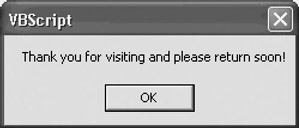
Figure 8.10: Using the onLoad and onUnload event handlers to trigger the display of text messages
Mouse and Keyboard Events
As a final example of how to set up event handlers, the following VBScript uses the onMouseOver and onMouseOut event handlers to create a graphical menu rollover effect for several HTML links. In order to set up rollover effects for the links, the NAME attribute must be added to each link defined on the HTML page. Then a pair of procedures must be defined for each link, one for the onMouseOver event handler and the other for the onMouseOut event handler. Each procedure must then modify the color property assigned to the link's text.
Script 8.8 - Use Mouse events to create rolloversSelect A Vendor Site:
<a href="http://www.gateway.com" name="gateway">Gateway</a>
<a href="http://www.compaq.com" name="compaq">Compaq</a>
<a href="http://www.dell.com" name="dell">Dell</a>
Figure 8.11 shows how the Web page appears when loaded by Internet Explorer. Unfortunately, this figure cannot do the example justice. In order to examine this figure in greater detail, download it from http://www.premierpressbooks.com/download.asp. As you'll see when you run it, the color changes from red to blue as you pass the pointer on to and off of each link.
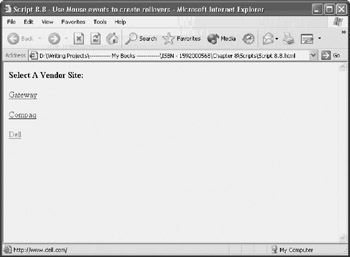
Figure 8.11: Using the onMouseOver and onMouseOut event handlers to create graphical rollover effects
Summary
In this chapter, you learned about the DOM and DHTML object models. You also learned how to develop scripts that interact with the objects provided by these object models in order to enhance your control over your HTML pages. In addition, you learned about browser events and how to set up event handlers in order to develop procedures that allow you to create interactive HTML pages.
Chapter 9 VBScript and the WSH
Part I - Introducing Microsoft VBScriptBasics
- What Is VBScript?
- Errors, Constants, and Variables
- Conditional Logic and Iterative Structures
- Procedures
- Arrays
- Data Collection, Notification, and Error Reporting
- VBScript Objects
- VBScript and Internet Explorer
- VBScript and the WSH
Part II - Professional Project 1 Desktop Administration Using VBScript and the WSH
- Project Case Study Desktop Customization and Deployment
- Customizing the Desktop
- Customizing the Start Menu and Quick Launch Toolbar
- Scheduling Disk Maintenance
- Mapping Network Printers and Disks
- Creating Administrator Accounts
Part III - Professional Project 2 Analyzing Application Logs
- Project Case Study Analyzing Application Logs
- Using Configuration Files to Control Script Execution
- Developing Script Log Analyzers
- Scheduling Script Execution
- Maintaining a 30-Day Summary Log Archive
Part IV - Professional Project 3 Creating a Centralized Report Management Station
- Project Case Study Creating a Centralized Report Management Station
- Developing a Setup Script
- Collecting Remote Summary Reports
- Processing and Consolidating Report Data
- Archive Management
Part V - Professional Project 4 Reporting Application Summary Data via the Web
- Reporting Application Summary Data via the Web
- Designing the Web Site
- Building the Web Sites Main Page
- Building the Registration and Configuration Settings Page
- Converting Reports to HTML Pages
- Building the Report Archive Page
- Report Distribution and Remote Archive Management
Part VI - Introducing Microsoft VBScriptBasics

EAN: 2147483647
Pages: 366
