Maintaining a 30-Day Summary Log Archive
In this chapter, you will learn how to use methods provided by the FileSystem Object and File objects. Using this information, you will develop a VBScript that maintains a 30-day summary log archive. In addition, you will learn detailed information about the WshShell object's LogEvent() method and the built-in VBScript Instr() function.
Managing Files with VBScript
The last script that Molly needs to write is one that will be scheduled to execute on the first day of each month. Its job will be to delete all summary report files stored in the D:Order_InventorySummaryRpts folder on the Windows 2000 server where the order/inventory system is installed, as demonstrated in Figure 20.1.
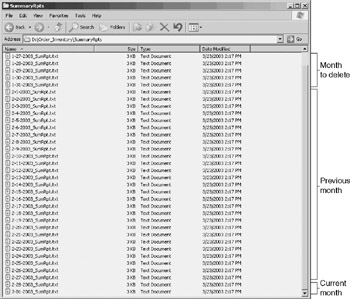
Figure 20.1: The SummaryRpts folder is used to maintain an archived collection of at least one month's worth of summary reports
When executed, the scripts will determine the current month and then delete all summary report files for the month that occurred two months ago. In other words, if the script was run on March 1, it would delete all summary report files for the month of January, leaving all of February's reports in place.
In addition to deleting old archive files, this script will record a message to the Windows application event log each time it is executed. It will also contain logic to prevent its accidental execution by only allowing its execution on the first day of each month.
Using the FileSystemObject
VBScript provides two different objects that have methods that can be used to delete files. The first is the FileSystemObject object's DeleteFile() method. This method provides you with the ability to delete one or more files at a time. The syntax for this method is shown below.
ObjectReference.DeleteFile ( FileName[, Kill])
ObjectReference is the variable representing an instance of the FileSystem Object. FileName is the complete name and path of the file to be deleted. Wildcard characters can be used to specify the deletion of more than one file.
Force is an optional parameter that allows for the deletion of read-only files when set equal to True.
| Note |
The FileSystemObject object also provides the ability to copy and move files using its CopyFile() and DeleteFile() methods. |
The following VBScript statements demonstrate how to use the DeleteFile() method in order to delete a file named TestFile.txt located in D:Temp.
Set FsoObject = CreateObject("Scripting.FileSystemObject")
FsoObject.DeleteFile "d:TempTestFile.txt"
| Note |
An error will occur if the DeleteFile() method does not find at least one file that matches the criteria specified in the DeleteFile() statement. |
If TextFile.txt were a read-only file, then the previous example would fail. However, by modifying the example as shown below, this situation can be handled.
Set FsoObject = CreateObject("Scripting.FileSystemObject")
FsoObject.DeleteFile "d:TempTestFile.txt", True
By adding wildcard characters, you can delete more than one file at a time, as demonstrated below.
Set FsoObject = CreateObject("Scripting.FileSystemObject")
FsoObject.DeleteFile "d:Temp*.txt", True
In this example, all files in the D:Temp folder that have a .txt file extension will be deleted.
Using the File Object
As an alternative to using methods belonging to the FileSystemObject object, you can use methods belonging to the File object. Using File object methods, you can directly administer individual files. These methods provide the ability to copy, move, and delete files, as outlined in Table 20.1.
|
Method |
Description |
|---|---|
|
Copy() |
Copies an individual file or folder to a specified location |
|
Move() |
Moves an individual file or folder to a specified location |
|
Delete() |
Deletes the specified file or folder |
| Note |
The File object's Copy(), Move(), and Delete() methods are capable of acting on both files and folders. As a result, it is important to be careful when working with these methods because it is easy, for example, to accidentally delete a subfolder located in the same folder as a file if both have the same name. |
You can delete individual files using the File object's Delete() method. However, because this method only supports the deletion of one file at a time, you cannot use wildcard characters when specifying the name of the file to be deleted. The syntax of the File object's Delete() method is shown below.
ObjectReference.Delete( Force )
ObjectReference is the variable representing an instance of the FileSystem Object. Force is an option Boolean value that when set equal to True allows a read-only folder to be deleted.
| Note |
An error will occur if the Delete() method is unable to locate a matching file name (for example, if the specified file does not exist). |
To use the File object's Delete() method, you first must instantiate the FileSystemObject, as shown below.
Set FsoObject = CreateObject("Scripting.FileSystemObject")
Next you need to use the FileSystemObject object's GetFile() method to retrieve a reference to the file that you plan to delete.
Set TargetFile = FsoObject.GetFile("d:TempTestFile.txt")
Finally, you can delete the file.
TargetFile.Delete()
| Note |
The FileSystemObject object's GetFile() method has the following syntax: ObjectReference.GetFile(FileName) ObjectReference is the variable representing an instance of the FileSystemObject. FileName is the complete name and path of the file to be administered. If the file passed to the GetFile() method is not found, an error will occur. |
Other VBScript Language Elements Needed to Build the Archive Management Script
While thinking about how to develop the archive management script, Molly decided to use the FileSystemObject object's DeleteFile() method instead of the File object's Delete() method. Using the DeleteFile() method, she'll be able to delete summary reports on a month-by-month basis within a single DeleteFile() operation. Using the Delete() method, Molly would have to create a loop and iterate though a list of files stored in the D:Order_InventorySummaryRpts folder looking for the file to delete.
Molly also wants to record a message in the Windows event log when the script runs so that she will have a record of its execution. She'll need to use the WshShell object's LogEvent() method. Additionally, she'll need to learn how to use the built-in VBScript Instr() function when executing the subroutine that determines which month's worth of files are to be deleted.
The WshShell Object s LogEvent() Method
For a time, Molly thought about creating a custom log file for her applications to which the scripts would continuously append messages as they were executed. She ultimately gave up on this idea as being too much work for too little gain and has instead decided to leverage the availability of the Windows application event log. To do this, she will have to use the WshShell object's LogEvent() method, which has the following syntax.
ObjectReference.LogEvent(intEventType, strMsg [, strComputer])
ObjectReference is the variable representing an instance of the FileSystem Object. IntEventType is a numeric value that specifies the event type. Table 20.2 provides a listing of the available event types. StrMsg represents the message to be recorded in the application event log, and strComputer is an optional parameter that specifies the name or IP address of another computer where the event should be sent. If omitted, the event is recorded locally.
|
Value |
Description |
|---|---|
|
0 |
Specifies a successful event |
|
1 |
Specifies an error event |
|
2 |
Specifies a warning event |
|
4 |
Specifies an informational event |
|
8 |
Specifies a successful audit event |
|
16 |
Specifies a failed audit event |
| Note |
Windows NT, 2000, and XP all maintain application event logs. On Windows 98 and Me, application events are stored in Wsh.log, which resides in the same folder as the Windows system files (typically C:Windows). |
The following example demonstrates how to use the LogEvent() method to write a message to the application event log.
Set WshShl = WScript.CreateObject("WScript.Shell")
WshShl.LogEvent 1, "TestScript.vbs -- Now executing"
The LogEvent() method returns a Boolean value of True when it successfully writes a message to the Windows application event log and a value of False when it fails to write the message, as demonstrated in the following example.
Set WshShl = WScript.CreateObject("WScript.Shell")
intAge = GetUserAge()
If intAge <= 18 Then
 WshShl.LogEvent 1, "Error - User not authorized to execute script"
Else
 WshShl.LogEvent 0, "Script now executing"
End If
Function GetUserAge()
 GetUserAge = InputBox("How old are you?")
End Function
In this example, the number entered by the user is checked to determine whether or not the script should execute. If the user is older than 18, the script is permitted to execute, otherwise it is not. A different message is recorded to the application event log based on the user's reported age.
The Built in VBScript Instr() Function
One of the steps that Molly will need to perform in the archive management scripts is to determine which month's worth of summary reports to delete from the Windows 2000 server where the orderinventory system resides. To perform this task, she will need to leverage a number of different VBScript functions, including the Instr(), Mid(), and Date() functions. The Mid() function was previously introduced in Chapter 17 "Using Configuration Files to Control Script Execution" and the Date() function was introduced in Chapter 19 "Scheduling Script Execution". The Instr() function provides the ability to retrieve a numeric value representing the first occurrence of one string within another. Its syntax is outlined below.
InStr([StartPosition,] String1, String2[, CompType])
StartPosition is an option parameter that is used to specify the starting character position within String1 where the search is to begin. String1 represents the expression to be searched. String2 represents the string to search for. CompType is an optional numeric value that specifies the type of comparison. A value of 0 specifies a binary comparison and a value of 1 specifies a text comparison. The value returned by the Instr() method varies based on multiple criteria, as outlined in Table 20.3.
|
Value |
Condition |
|---|---|
|
⊘ |
String1 is zero length |
|
Null |
String1 is null |
|
Null |
String2 is null |
|
Start |
String2 is zero length |
|
0 |
String2 not found in String1 |
|
0 |
Start is greater than the length of String2 |
|
Position where a match is found |
String2 found within String1 |
Writing the Archive Management Script
Molly is now familiar with everything that she needs to know in order to begin writing the archive management script. As with all her other scripts, she plans to follow a standard design, breaking the script down into three major sections and localizing objects and variable values whenever possible.
The Initialization Section
In the Initialization Section, shown below, Molly defines two string variables. The strVerifyExecutionSchedule variable will be used in the Main Processing Section to store a value indicating whether the script is permitted to run (for example, whether or not today is the first day of the month). The strDeleteMonth variable will be used to store a value representing the month's worth of summary report files to be deleted. This variable is used by multiple procedures in the script.
Option Explicit

Dim strVerifyExecutionSchedule, strDeleteMonth
The Main Processing Section
In the Main Processing Section, shown on the following page, Molly first calls a subroutine called OkToRunToday() to determine whether it's the first day of the month. If it is, the value returned is Yes. Next an If…Then…Else statement is set up that controls the execution of a number of procedures. If strVerifyExecutionSchedule indicates that today is the first day of the month, then the following procedures are called in the order shown below:
- MonthToDelete(). Determines which month's worth of summary report files should be deleted
- WriteToEventLog(). Writes a text string, passed to it as a variable, to the Windows application event log
- RemoveOldSummaryFiles(). Performs the actual deletion of old summary report files
If the script is not being run on the first day of the month, then the WriteToEventLog() subroutine is passed a text message indicating that the script cannot execute and the WScript object's Quit() method is executed to perform a controlled script termination.
strVerifyExecutionSchedule = OkToRunToday()

If strVerifyExecutionSchedule = "Yes" Then
 MonthToDelete()
 WriteToEventLog("Summary Report Archive Manager executing.")
 RemoveOldSummaryFiles()
Else
 WriteToEventLog("Summary Report Archive Manager execution " & _
 "terminated - invalid execution schedule.")
 WScript.Quit()
End If

'Terminate script execution
WScript.Quit()
The OkToRunToday() Subroutine
The OkToRunToday() subroutine, shown below, uses the built-in VBScript Day() and Date() functions (as demonstrated in the previous chapter) to determine whether the script is being executed on the first day of the month.
Function OkToRunToday()
 If Day(Date()) = 1 Then
 OkToRunToday = "Yes"
 End If

End Function
The MonthToDelete() Subroutine
The MonthToDelete() subroutine, shown below, is responsible for determining which month's worth of summary report files are to be deleted. It begins by defining two localized variables. The intGetSlashPosition variable is used to store a value indicating the location of the first backslash (/) character in the current date. The strCurrentMonth variable will be used to store a numeric value indicating the current month.
The value assigned to intGetSlashPosition is determined by using the Instr() function to search for the backslash (/) character in the date as retrieved by the Date() function. The value of strCurrentMonth is then determined using the Mid() function to parse out the month portion of the date (which is in the format of mm/dd/yyyy). The month value is parsed out by taking all the characters from the first character position until the occurrence of the first backslash (/) character (expressed as intGetSlashPosition – 1).
The value of strDeleteMonth is then determined by subtracting 2 from strCurrentMonth. If, for example, the current date is March 1, then the value of strDeleteMonth will be 1 (3 – 2 = 1). Two If…Then statements are then set up to adjust the value of strDeleteMonth in the event that the current month is either February or January. If the current month is February, then 2 – 2 will equal zero. Because the month that should be deleted in this instance is December, the first If statement checks to see if the value assigned to strDeleteMonth is 0 and changes its value to 12 if it is. Likewise, if the current month is January, the value of strDeleteMonth is adjusted to 11 (November).
Sub MonthToDelete()

 Dim intGetSlashPosition, strCurrentMonth

 intGetSlashPosition = Instr(Date(), "/")
 strCurrentMonth = Mid(Date(), 1, intGetSlashPosition - 1)

 strDeleteMonth = strCurrentMonth - 2

 If strDeleteMonth = 0 Then
 strDeleteMonth = "12"
 End If

 If strDeleteMonth = -1 Then
 strDeleteMonth = "11"
 End If

End Sub
The RemoveOldSummaryFiles() Subroutine
The RemoveOldSummaryFiles() subroutine, shown below, is responsible for deleting summary reports that are two months old from the D:Order_InventorySummaryRpts summary report archive folder. It begins by setting up an instance of the FileSystemObject and defining a variable named strSummary RptPath, which is then set to the location of the folder where the summary reports are stored.
The last statement in the subroutine uses the FileSystemObject object's DeleteFile() method to delete summary report files that are two months old. This is accomplished by appending together three pieces of information. The first piece of information is the path of the SummaryRpts folder. Next the numeric value of the current month is added, followed by *_SumRpt.txt. For example, if today was March 1, 2003, then the value passed to the DeleteFile() method would be D:Order_InventorySummaryRpts1_SumRpt.txt.
Sub RemoveOldSummaryFiles()

 Dim FsoObject, strSummaryRptPath
 strSummaryRptPath = "d:Order_InventorySummaryRpts"

 Set FsoObject = WScript.CreateObject("Scripting.FileSystemObject")
 FsoObject.DeleteFile strSummaryRptPath & strDeleteMonth & "*_SumRpt.txt"

End Sub
The WriteToEventLog() Subroutine
The WriteToEventLog() subroutine, shown below, sets up an instance of the WshShell object and then uses its LogEvent() method to write an informational message to the Windows application's event log.
Sub WriteToEventLog(strMessage)

 Dim WshShl

 Set WshShl = WScript.CreateObject("WScript.Shell")

 WshShl.LogEvent 4, strMessage

End Sub
The Fully Assembled Script
Once the archive management script shown below is fully assembled, Molly can place a copy of it in the D:VBScripts folder on the Windows 2000 server where the order/inventory system resides and allow the MstrSched.vbs script developed in the previous chapter to automate its execution on a monthly basis.
'*************************************************************************
'Script Name: Script 20.1.vbs
'Author: Jerry Ford
'Created: 03/22/03
'Description: This script deletes all summary report files except for
'today's summary file and those of the previous month.
'*************************************************************************


'Initialization Section

Option Explicit

Dim strVerifyExecutionSchedule, strDeleteMonth


'Main Processing Section

strVerifyExecutionSchedule = OkToRunToday()

If strVerifyExecutionSchedule = "Yes" Then
 MonthToDelete()
 WriteToEventLog("Summary Report Archive Manager executing.")
 RemoveOldSummaryFiles()
Else
 WriteToEventLog("Summary Report Archive Manager execution " & _
 "terminated - invalid execution schedule.")
 WScript.Quit()
End If

'Terminate script execution
WScript.Quit()


'Procedure Section

Function OkToRunToday()

 If Day(Date()) = 1 Then
 OkToRunToday = "Yes"
 End If

End Function

Sub MonthToDelete()

 Dim intGetSlashPosition, strCurrentMonth

 intGetSlashPosition = Instr(Date(), "/")

 strCurrentMonth = Mid(Date(), 1, intGetSlashPosition - 1)

 strDeleteMonth = strCurrentMonth - 2

 If strDeleteMonth = 0 Then
 strDeleteMonth = "12"
 End If

 If strDeleteMonth = -1 Then
 strDeleteMonth = "11"
 End If

End Sub

Sub RemoveOldSummaryFiles()

 Dim FsoObject, strSummaryRptPath
 strSummaryRptPath = "d:Order_InventorySummaryRpts"

 Set FsoObject = WScript.CreateObject("Scripting.FileSystemObject")

 FsoObject.DeleteFile strSummaryRptPath & strDeleteMonth & "*_SumRpt.txt"

End Sub

Sub WriteToEventLog(strMessage)

 Dim WshShl

 Set WshShl = WScript.CreateObject("WScript.Shell")

 WshShl.LogEvent 4, strMessage

End Sub
Summary
In this chapter, you learned to use the VBScript Instr() function to search text strings for matching patterns. By combining this function with the Mid() and Date() functions, you can determine which group of files to delete when creating the archive management script. You also learned the ins and outs of file management, including how to delete one or more files. Finally, you learned about the WshShell object's LogEvent() method and how to use it to record messages in the Windows application event log.
Part I - Introducing Microsoft VBScriptBasics
- What Is VBScript?
- Errors, Constants, and Variables
- Conditional Logic and Iterative Structures
- Procedures
- Arrays
- Data Collection, Notification, and Error Reporting
- VBScript Objects
- VBScript and Internet Explorer
- VBScript and the WSH
Part II - Professional Project 1 Desktop Administration Using VBScript and the WSH
- Project Case Study Desktop Customization and Deployment
- Customizing the Desktop
- Customizing the Start Menu and Quick Launch Toolbar
- Scheduling Disk Maintenance
- Mapping Network Printers and Disks
- Creating Administrator Accounts
Part III - Professional Project 2 Analyzing Application Logs
- Project Case Study Analyzing Application Logs
- Using Configuration Files to Control Script Execution
- Developing Script Log Analyzers
- Scheduling Script Execution
- Maintaining a 30-Day Summary Log Archive
Part IV - Professional Project 3 Creating a Centralized Report Management Station
- Project Case Study Creating a Centralized Report Management Station
- Developing a Setup Script
- Collecting Remote Summary Reports
- Processing and Consolidating Report Data
- Archive Management
Part V - Professional Project 4 Reporting Application Summary Data via the Web
- Reporting Application Summary Data via the Web
- Designing the Web Site
- Building the Web Sites Main Page
- Building the Registration and Configuration Settings Page
- Converting Reports to HTML Pages
- Building the Report Archive Page
- Report Distribution and Remote Archive Management
Part VI - Introducing Microsoft VBScriptBasics

EAN: 2147483647
Pages: 366
