Flylib.com

Books Software


What you ll Create


What you'll Create


How this Book Works


The Web Site


The Next Step

While this Visual QuickProject Guide will walk you through all of the steps required to edit a movie and burn it to a DVD, there's more to learn about iMovie and iDVD. After you complete your QuickProject, consider picking up my book iMovie HD & iDVD 5 for Mac OS X: Visual QuickStart Guide as an in-depth , handy reference.

The book includes information on using expert settings when exporting QuickTime movies, using GarageBand to score background music, shortcuts for working in the Timeline, and more. It also features a whole section on the basics of video editing, including using camcorders, composing shots, moving the camera, lighting scenes, and capturing audio.


Chapter 1. Project Overview

You can shoot and edit all kinds of movies: wedding videos , fictional stories, scripted documentaries, sporting events, or just in-the-moment scenes of babies, pets, landscapes , clouds...your only true limits are the amount of tape and the camcorder's battery life. For this Visual QuickProject Guide, I'm creating a vacation video from a recent trip to Arizona. Nearly every task I show in this book applies to other types of movies, so don't worry if the movie you're editing isn't a vacation video. Then again, if you've been itching to go on a vacation anyway, maybe this is a good excuse to get out there and capture your own footage!


Project Overview

Here's what you'll be able to do by the end of the book:

1.

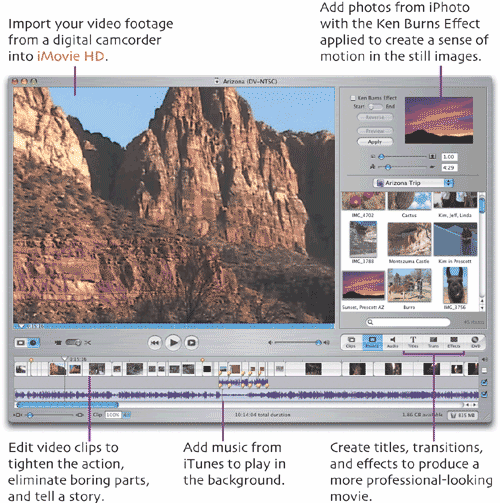
Import the video footage from a digital camcorder into iMovie (see Chapter 3).

2.

Assemble the movie by choosing the order of the video clips, adding audio, and importing some digital still photos (see Chapters 4-5).

3.

Edit the clips to remove footage you don't need and improve the movie's timing and flow (see Chapter 6).

4.

Add titles, transitions, and effects to the movie (see Chapters 7-9).

5.

Share the movie with others by creating a QuickTime version that can be burned to a CD-ROM or uploaded to a Web site, such as an Apple .Mac Home-Page (see Chapter 10).

6.

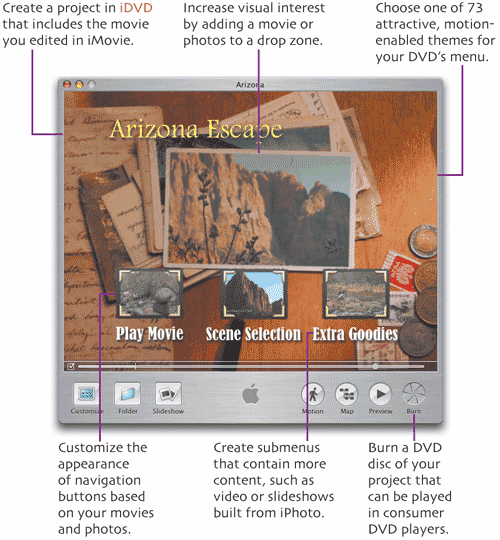
Create an iDVD project that contains your movie (also in Chapter 10).

7.

Edit the project in iDVD by choosing a new menu theme and personalizing its appearance (see Chapters 11-12).

8.

Add more media to the DVD, such as other QuickTime movies and a slide-show of some of your digital still photos, which can be viewed separately from your main movie (see Chapter 13).

9.

Burn the project to a DVD disc that can be played back in most consumer DVD players and DVD-equipped computers (see Chapter 14).

Editing video in iMovie, and creating DVDs in iDVD, is fun, easy, and even slightly addictive . With this initial project under your belt, you'll be ready to tackle others on your own.


Project Materials

A Macintosh computer (desktop or laptop) with a PowerPC G3, G4, or G5 processor running at 400 MHz or faster. iDVD 5 requires a G4 processor at 733 MHz or faster.

A 1 GHz or faster G4 processor is needed to take advantage of HD editing in iMovie HD. Both applications require Mac OS X Panther version 10.3.4 or later.

A digital camcorder and MiniDV tapes for shooting video footage.

4-pin to 6-pin Fire Wire cable to connect the camcorder to the Mac.

Blank DVD discs (DVD-R, DVD-RW, DVD+R, or DVD+RW), if your Mac contains a SuperDrive and you want to burn DVD projects.

iMovie HD 5.0.1 or later, and iDVD 5 or later (part of the iLife '05 package).