Working with Forms
Overview
If you've read the previous chapters, you should now be able to use Delphi's visual components to create the user interface for your applications. Now let's turn our attention to another central element of development in Delphi: forms. You have used forms since the initial chapters, but I've never described in detail what you can do with a form, which properties you can use, or which methods of the TForm class are particularly interesting.
This chapter looks at some of the properties and styles of forms and at sizing and positioning them, as well as form scaling and scrolling. I'll also introduce applications with multiple forms, the use of dialog boxes (custom and predefined ones), frames, and visual form inheritance. Finally, I'll devote some time to input on a form, from both the keyboard and the mouse.
The TForm Class
Forms in Delphi are defined by the TForm class, which is included in the Forms unit of VCL. Of course, there is now a second definition of forms in VisualCLX. Although I'll mainly refer to the VCL class in this chapter, I'll also highlight differences with the cross-platform version provided in CLX.
The TForm class is part of the windowed-controls hierarchy, which starts with the TWinControl (or TWidgetControl) class. TForm inherits from the almost complete TCustomForm, which in turn inherits from TScrollingWinControl (or TScrollingWidget). Having all the features of their many base classes, forms have a long series of methods, properties, and events. For this reason, I won't try to list them here—I'd rather present some interesting techniques related to forms throughout this chapter. I'll begin by presenting a technique for not defining the form of a program at design time, using the TForm class directly, and then explore a few interesting properties of the form class.
Throughout the chapter, I'll point out a few differences between VCL forms and CLX forms. I've built a CLX version for most of the examples, so you can immediately begin experimenting with forms and dialog boxes in CLX, as well as VCL. As in past chapters, the CLX version of each example is prefixed by the letter Q.
Using Plain Forms
Delphi developers tend to create forms at design time, which implies deriving a new class from the base class, and build the content of the form visually. This is certainly a reasonable standard practice, but it is not compulsory to create a descendant of the TForm class to show a form, particularly if it is a simple one.
Consider this case: Suppose you have to show a rather long message (based on a string) to a user, and you don't want to use the simple predefined message box because it will look too large and won't provide scroll bars. You can create a form with a memo component in it, and display the string inside the memo. Nothing prevents you from creating this form in the standard visual way, but you might consider doing this in code, particularly if you need a large degree of flexibility.
The DynaForm and QDynaForm examples (available among the book source code), which are somewhat extreme, have no form defined at design time but include a unit with this function:
procedure ShowStringForm (str: string);
var
 form: TForm;
begin
 Application.CreateForm (TForm, form);
 form.caption := 'DynaForm';
 form.Position := poScreenCenter;
 with TMemo.Create (form) do
 begin
 Parent := form;
 Align := alClient;
 Scrollbars := ssVertical;
 ReadOnly := True;
 Color := form.Color;
 BorderStyle := bsNone;
 WordWrap := True;
 Text := str;
 end;
 form.Show;
end;
I had to create the form by calling the Application global object's CreateForm method (a feature required by Delphi applications and discussed in Chapter 8, "The Architecture of Delphi Applications"); other than that, this code does dynamically what you generally do with the Form Designer. Writing this code is undoubtedly more tedious, but it allows also a greater deal of flexibility, because any parameter can depend on external settings.
The previous ShowStringForm function is not executed by an event of another form, because there are no traditional forms in this program. Instead, I've modified the project's source code as follows:
program DynaForm;

uses
 Forms,
 DynaMemo in 'DynaMemo.pas';

{$R *.RES}

var
 str: string;

begin
 str := '';
 Randomize;
 while Length (str) < 2000 do
 str := str + Char (32 + Random (74));
 ShowStringForm (str);
 Application.Run;
end.
The effect of running the DynaForm program is a strange-looking form filled with random characters (as you can see in Figure 7.1)—it isn't terribly useful in itself, but it underscores the idea.
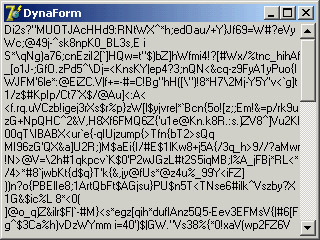
Figure 7.1: The dynamic form generated by the DynaForm example is completely created at run time, with no design-time support.
| Tip |
An indirect advantage of this approach, compared to the use of DFM files for design-time forms, is that it would be much more difficult for an external programmer to grab information about the structure of the application. In Chapter 5, "Visual Controls," you saw that you can extract the DFM from the current Delphi executable file, but the same can be easily accomplished for any executable file compiled with Delphi for which you don't have the source code. If it is important for you to keep to yourself a specific set of components you are using (maybe those in a specific form), along with the default values of their properties, writing the extra code may be worth the effort. |
The Form Style
The FormStyle property allows you to choose between a normal form (fsNormal) and the windows that make up a Multiple Document Interface (MDI) application. In this case, you'll use the fsMDIForm style for the MDI parent window—that is, the frame window of the MDI application—and the fsMDIChild style for the MDI child window. To learn more about the development of an MDI application, look at Chapter 8, "The Architecture of Delphi Applications."
A fourth option is the fsStayOnTop style, which determines whether the form must always remain on top of all other windows, except for any that also happen to be "stay-on-top" windows.
To create a top-most form (a form whose window is always on top), you need only set the FormStyle property, as indicated earlier. This property has two different effects, depending on the kind of form you apply it to:
- The main form of an application will remain in front of every other application (unless other applications have the same top-most style). At times, this behavior generates a rather ugly visual effect, so it makes sense only for special-purpose alert programs.
- A secondary form will remain in front of any other form in the application it belongs to. The windows of other applications are not affected. This approach is often used for floating toolbars and other forms that should stay in front of the main window.
| Warning |
In the VCL, when this property is applied to a secondary form, the form only remains in front of the other forms in the same application. In CLX, even a secondary form will be kept in front of any other form of the windowing system—something you'd generally rather avoid. |
The Border Style
Another important property of a form is its BorderStyle. This property refers to a visual element of the form, but it has a much more profound influence on the behavior of the window, as you can see in Figure 7.2.
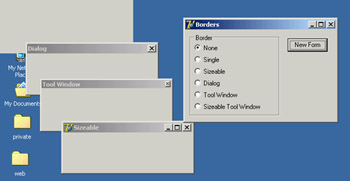
Figure 7.2: Sample forms with the various border styles, created by the Borders example
At design time, the form is always shown using the default value of the BorderStyle property, bsSizeable. This value corresponds to a Windows style known as thick frame. When a main window has a thick frame around it, a user can resize it by dragging its border. This state is made clear by the special resize cursors (with the shape of a double-pointer arrow) displayed when the user moves the mouse onto this thick window border.
A second important choice for this property is bsDialog. If you select it, the form uses as its border the typical dialog-box frame—a thick frame that doesn't allow resizing. In addition to this graphical element, note that if you select the bsDialog value, the form becomes a dialog box. This involves several changes: For example, the items on its system menu are different, and the form will ignore some of the elements of the BorderIcons set property.
| Warning |
Setting the BorderStyle property at design time produces no visible effect. Several component properties do not take effect at design time, because they would prevent you from working on the component while developing the program. For example, how could you resize the form with the mouse if it were turned into a dialog box? When you run the application, though, the form will have the border you requested. |
You can assign four other values to the BorderStyle property:
- bsSingle creates a main window that's not resizable. Many games and applications based on windows with controls (such as data-entry forms) use this value, simply because resizing these forms makes no sense. Enlarging a form to see an empty area or reducing its size to make some components less visible often doesn't help a program's user (although Delphi's automatic scroll bars partially solve the last problem).
- bsNone is used only in very special situations and inside other forms. You'll never see an application with a main window that has no border or caption (except perhaps as an example in a programming book to show you that it makes no sense).
- bsToolWindow and bsSizeToolWin are related to the specific Win32 extended style ws_ex_ToolWindow. This style turns the window into a floating toolbox with a small title font and close button. You should not use this style for the main window of an application.
| Warning |
In CLX, the enumeration for the BorderStyle property uses slightly different values, prefixed by the letters fbs ( form border style): fbsSingle, fbsDialog, and so on. |
To test the effect and behavior of the different values of the BorderStyle property, I've written a program called Borders, available also as QBorders in the CLX version. You've already seen its output in Figure 7.2. However, I suggest you run this example and experiment with it for a while to understand all the differences in the forms. The main form of this program contains only a radio group and a button. The secondary form has no components, and its Position property is set to poDefaultPosOnly. This value affects the initial position of the secondary form you'll create by clicking the button. (I'll discuss the Position property later in this chapter.)
The program code is simple. When you click the button, a new form is dynamically created, depending on the item selected in the radio group:
procedure TForm1.BtnNewFormClick(Sender: TObject);
var
 NewForm: TForm2;
begin
 NewForm := TForm2.Create (Application);
 NewForm.BorderStyle := TFormBorderStyle (BorderRadioGroup.ItemIndex);
 NewForm.Caption := BorderRadioGroup.Items[BorderRadioGroup.ItemIndex];
 NewForm.Show;
end;
This code uses a trick: It casts the number of the selected item into the TFormBorderStyle enumeration. This technique works because I've given the radio buttons the same order as the values of the TFormBorderStyle enumeration. The BtnNewFormClick method then copies the text of the radio button to the caption of the secondary form. This program refers to TForm2, the secondary form defined in a secondary unit of the program, which is saved as Second.pas. For this reason, to compile the example, you must add the following lines to the implementation section of the unit of the main form:
uses
 Second;
| Tip |
Whenever you need to refer to another unit of a program, place the corresponding uses statement in the implementation portion instead of the interface portion if possible. Doing so speeds up the compilation process, results in cleaner code (because the units you include are separate from those included by Delphi), and prevents circular unit compilation errors. To refer to other files within the current project, you can also use the File ® Use Unit menu command. |
The Border Icons
Another important element of a form is the presence of icons on its border. By default, a window has a small icon connected to the system menu, a Minimize button, a Maximize button, and a Close button on the far right. You can set different options using the BorderIcons property, which has four possible values: biSystemMenu, biMinimize, biMaximize, and biHelp.
| Note |
The biHelp border icon enables the "What's this?" Help. When this style is included and the biMinimize and biMaximize styles are excluded, a question mark appears in the form's title bar. If you click this question mark and then click a component inside the form (but not the form itself!), Delphi activates the help for that object (in a pop-up window in Windows 9x, or in a regular WinHelp window in Windows 2000/XP). This behavior is demonstrated by the BIcons example, which has a simple Help file with a page connected to the HelpContext property of the button in the middle of the form. |
The BIcons example demonstrates the behavior of a form with different border icons and shows how to change this property at run time. The example's form is very simple: It has only a menu, with a pull-down containing four menu items, one for each of the possible elements of the set of border icons. I've written a single method, connected with the four commands, that reads the check marks on the menu items to determine the value of the BorderIcons property. This code is therefore also a good exercise in working with sets:
procedure TForm1.SetIcons(Sender: TObject);
var
 BorIco: TBorderIcons;
begin
 (Sender as TMenuItem).Checked := not (Sender as TMenuItem).Checked;
 if SystemMenu1.Checked then
 BorIco := [biSystemMenu]
 else
 BorIco := [];
 if MaximizeBox1.Checked then
 Include (BorIco, biMaximize);
 if MinimizeBox1.Checked then
 Include (BorIco, biMinimize);
 if Help1.Checked then
 Include (BorIco, biHelp);
 BorderIcons := BorIco;
end;
While running the BIcons example, you can easily set and remove the various visual elements of the form's border. You'll immediately see that some of these elements are closely related: If you remove the system menu, all the border icons disappear; if you remove either the Minimize or Maximize button, it becomes grayed; if you remove both of these buttons, they disappear. Notice also that in these last two cases, the corresponding items of the system menu are automatically disabled. This is the standard behavior for any Windows application. When the Maximize and Minimize buttons have been disabled, you can activate the Help button. Actually on Windows 2000 if only one of the Maximize and Minimize buttons has been disabled, the Help button will appear but not work. As a shortcut to obtain this effect, you can click the button inside the form. Also, you can click the button after clicking the Help Menu icon to see a help message, as shown in Figure 7.3. As an extra feature, the program also displays in the caption the time the help was invoked, by handling the OnHelp event of the form. This effect is visible in the figure.
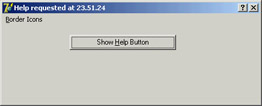
Figure 7.3: The BIcons example. By selecting the Help border icon and clicking the button, you get the help displayed in the figure.
| Warning |
If you look at the QBIcons version, built with CLX, you will notice that a bug in the library prevents you from changing the border icons at run time. The different design-time settings work fully, so you'll need to modify the program before running it to see any effect at all. At runtime, the program does nothing! |
Setting More Window Styles
The border style and border icons are indicated by two different Delphi properties, which you can use to set the initial value of the corresponding user interface elements. You have seen that besides changing the user interface, these properties affect the behavior of a window. It is important to know that in VCL (and obviously not in CLX), these border-related properties and the FormStyle property primarily correspond to different settings in the style and extended style of a window. These two terms reflect two parameters of the CreateWindowEx API function Delphi uses to create forms.
It is important to acknowledge this fact, because Delphi allows you to modify these two parameters freely by overriding the CreateParams virtual method:
public
 procedure CreateParams (var Params: TCreateParams); override;
This is the only way to use some of the peculiar window styles that are not directly available through form properties. For a list of window styles and extended styles, see the API help under the topics "CreateWindow" and "CreateWindowEx." You'll notice that the Win32 API has styles for these functions, including those related to tool windows.
To show you how to use this approach, I've written the NoTitle example, which lets you create a program with a custom caption. First you must remove the standard caption but keep the resizing frame by setting the corresponding styles:
procedure TForm1.CreateParams (var Params: TCreateParams);
begin
 inherited CreateParams (Params);
 Params.Style := (Params.Style or ws_Popup) and not ws_Caption;
end;
To remove the caption, you need to change the overlapped style to a pop-up style; otherwise, the caption will simply stick. To add a custom caption, I've placed a label aligned to the upper border of the form and a small button on the far end. You can see this effect at run time in Figure 7.4.
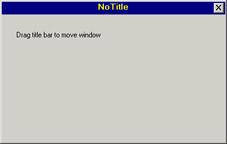
Figure 7.4: The NoTitle example has no real caption but a fake one made with a label.
To make the fake caption work, you have to tell the system that a mouse operation on this area corresponds to a mouse operation on the caption. You can do so by intercepting the wm_ NCHitTest Windows message, which is frequently sent to Windows to determine where the mouse is. When the hit is in the client area and on the label, you can pretend the mouse is on the caption by setting the proper result:
procedure TForm1.WMNCHitTest (var Msg: TWMNCHitTest);
 // message wm_NcHitTest
begin
 inherited;
 if (Msg.Result = htClient) and
 (Msg.YPos < Label1.Height + Top + GetSystemMetrics (sm_cyFrame)) then
 Msg.Result := htCaption;
end;
The GetSystemMetrics API function used in this listing queries the operating system about the vertical thickness (cy) in pixels of the border around a window with a caption but not sizeable. It is important to make this request every time (and not cache the result), because users can customize most of these elements by using the Appearance page of the Desktop options (in Control Panel) and other Windows settings. The small button has a call to the Close method in its OnClick event handler. The button is kept in its position even when the window is resized by using the [akTop,akRight] value for the Anchors property. The form also has size constraints, so that a user cannot make it too small, as described in the "Form Constraints" section later in this chapter.
Direct Form Input
Having discussed some special capabilities of forms, I'll now move to a very important topic: user input in a form. If you decide to make limited use of components, you might write complex programs as well, receiving input from the mouse and the keyboard. In this chapter, I'll only introduce this topic.
Supervising Keyboard Input
Generally, forms don't handle keyboard input directly. If a user has to type something, your form should include an edit component or one of the other input components. If you want to handle keyboard shortcuts, you can use those connected with menus (possibly using a hidden pop-up menu).
At other times, however, you might want to handle keyboard input in particular ways for a specific purpose. In these cases, you can turn on the form's KeyPreview property. Then, even if you have some input controls, the form's OnKeyPress event will always be activated for any character-input operation (system and shortcut keys excluded). The keyboard input will then reach the destination component, unless you stop it in the form by setting the character value to zero (not the character 0, but the value 0 of the character set, a control character indicated as #0).
The example I've built to demonstrate this approach, KPreview, has a form with no special properties (not even KeyPreview), a radio group with four options, and some edit boxes, as you can see in Figure 7.5. By default the program does nothing special, except when the various radio buttons are used to enable the key preview:
procedure TForm1.RadioPreviewClick(Sender: TObject);
begin
 KeyPreview := RadioPreview.ItemIndex <> 0;
end;
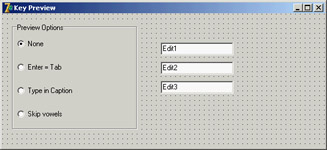
Figure 7.5: The KPreview program at design time
Now you'll begin receiving the OnKeyPress events, and you can do one of the three actions requested by the three special buttons in the radio group. The action depends on the value of the ItemIndex property of the radio group component. This is the reason the event handler is based on a case statement:
procedure TForm1.FormKeyPress(Sender: TObject; var Key: Char);
begin
 case RadioPreview.ItemIndex of
 ...
In the first case, if the value of the Key parameter is #13, which corresponds to the Enter key, you disable the operation (setting Key to zero) and then mimic the activation of the Tab key. You can do this many ways, but the technique I've chosen is quite particular. I send the CM_DialogKey message to the form, passing the code for the Tab key (VK_TAB):
1: // Enter = Tab
  if Key = #13 then
  begin
 Key := #0;
 Perform (CM_DialogKey, VK_TAB, 0);
  end;
| Note |
The CM_DialogKey message is an internal, undocumented Delphi message. There are a few of them, and it's quite interesting to build advanced components for them and to use them for special coding, but Borland never described them. For more information on this topic, refer to the section "Component Messages and Notifications" in Chapter 9. Notice also that this exact message-based coding style is not available under CLX. |
To type in the form's caption, the program adds the character to the current Caption. There are two special cases. When the Backspace key is pressed, the last character of the string is removed (by copying to the Caption all the characters of the current Caption but the last one). When the Enter key is pressed, the program stops the operation by resetting the ItemIndex property of the radio group control. Here is the code:
2: // type in caption
begin
 if Key = #8 then // backspace: remove last char
 Caption := Copy (Caption, 1, Length (Caption) - 1)
 else if Key = #13 then // enter: stop operation
 RadioPreview.ItemIndex := 0
 else // anything else: add character
 Caption := Caption + Key;
 Key := #0;
end;
Finally, if the last radio item is selected, the code checks whether the character is a vowel (by testing for its inclusion in a constant "vowel set"). In this case, the character is skipped altogether:
3: // skip vowels
if UpCase(Key) in ['A', 'E', 'I', 'O', 'U'] then
 Key := #0;
Getting Mouse Input
When a user clicks one of the mouse buttons over a form (or over a component), Windows sends the application messages. Delphi defines events you can use to write code that responds to these messages. The two basic events are OnMouseDown, received when a mouse button is clicked, and OnMouseUp, received when the button is released. Another fundamental system message is related to mouse movement: OnMouseMove. Although it should be easy to understand the meaning of the three messages—down, up, and move—you may wonder how they relate to the OnClick event you have often used up to now.
You have used the OnClick event for components, but it is also available for the form. Its general meaning is that the left mouse button has been clicked and released on the same window or component. However, between these two actions, the cursor might have been moved outside the area of the window or component while the left mouse button was held down.
Another difference between the OnMouseXX and OnClick events is that the latter relates only to the left mouse button. Most of the mouse types connected to a Windows PC have two mouse buttons, and some even have three. Usually you refer to these buttons as the left mouse button (generally used for selection), the right mouse button (for accessing shortcut menus), and the middle mouse button (seldom used).
Nowadays most new mouse devices have a button wheel instead of the middle button; users typically use the wheel for scrolling (causing an OnMouseWheel event), but they can also press it (generating the OnMouseWheelDown and OnMouseWheelUp events). Mouse wheel events are automatically converted into scrolling events.
Using Windows without a Mouse
A user should always be able to use any Windows application without the mouse. This is not an option; it is a Windows programming rule. Of course, an application might be easier to use with a mouse, but that should never be mandatory. Some users may not have a mouse connected, such as travelers with a small laptop and no space, workers in industrial environments, and bank clerks with other peripherals around.
There is another reason to support the keyboard: Using the mouse is nice, but it tends to be slower. If you are a skilled touch typist, you won't use the mouse to drag a word of text; you'll use shortcut keys to copy and paste it without moving your hands from the keyboard.
For these reasons, you should always set up a proper tab order for a form's components. Remember to add keys for buttons and menu items for keyboard selection, use shortcut keys on menu commands, and so on.
The Parameters of the Mouse Events
All the lower-level mouse events have the same parameters: the usual Sender parameter, a Button parameter indicating which of the three mouse buttons has been clicked (mbRight, mbLeft, or mbCenter), the Shift parameter indicating which of the mouse-related virtual keys (the shift-state modifiers Alt, Ctrl, and Shift, plus the three mouse buttons) was pressed when the event occurred; and the x and y coordinates of the position of the mouse in client area coordinates of the current window.
Using this information, it is simple to draw a small circle in the position of a left mouse button–down event:
procedure TForm1.FormMouseDown(Sender: TObject;
 Button: TMouseButton; Shift: TShiftState; X, Y: Integer);
begin
 if Button = mbLeft then
 Canvas.Ellipse (X-10, Y-10, X+10, Y+10);
end;
| Note |
To draw on the form, you use a special property: Canvas. A TCanvas object has two distinctive features: It holds a collection of drawing tools (such as a pen, a brush, and a font) and it has some drawing methods, which use the current tools. The kind of direct drawing code in this example is not correct, because the on-screen image is not persistent; moving another window over the current one will clear its output. The next example demonstrates the Windows "store-and-draw" approach. |
Dragging and Drawing with the Mouse
To demonstrate a few of the mouse techniques discussed so far, I've built an example based on a form without any components. The program is called MouseOne in the VCL version and QMouseOne in the CLX version. It displays the current position of the mouse in the form's Caption:
procedure TMouseForm.FormMouseMove(Sender: TObject; Shift: TShiftState;
 X, Y: Integer);
begin
 // display the position of the mouse in the caption
 Caption := Format ('Mouse in x=%d, y=%d', [X, Y]);
end;
You can use this feature of the program to better understand how the mouse works. Make this test: Run the program (this simple version or the complete one) and resize the windows on the desktop so that the form of the MouseOne or QMouseOne program is behind another window and inactive but with the title visible. Now move the mouse over the form, and you'll see that the coordinates change. This behavior means the OnMouseMove event is sent to the application even if its window is not active, and it proves what I have mentioned: Mouse messages are always directed to the window under the mouse. The only exception is the mouse capture operation I'll discuss in this same example.
Besides showing the position in the title of the window, the MouseOne/QMouseOne example can track mouse movements by painting small pixels on the form if the user keeps the Shift key pressed (again, this direct painting code produces non-persistent output):
procedure TMouseForm.FormMouseMove(Sender: TObject; Shift: TShiftState;
 X, Y: Integer);
begin
 // display the position of the mouse in the caption
 Caption := Format ('Mouse in x=%d, y=%d', [X, Y]);
 if ssShift in Shift then
 // mark points in yellow
 Canvas.Pixels [X, Y] := clYellow;
end;
| Tip |
The TCanvas class of the CLX library for Kylix 1 and Delphi 6 didn't include the Pixels array. Instead, you could call the DrawPoint method after setting a proper color for the pen, as I've done in the QMouseOne example. Kylix 2 and Delphi 7 re-introduce the Pixels array property. |
The most interesting feature of this example is its direct mouse-dragging support. Contrary to what you might think, Windows has no system support for dragging, which is implemented in VCL by means of lower-level mouse events and operations. (I discussed an example of dragging from one control to another in Chapter 6.) In VCL, forms cannot originate dragging operations, so in this case you are obliged to use the low-level approach. The aim of this example is to draw a rectangle from the initial position of the dragging operation to the final one, giving users visual clues about the operation they are doing.
The idea behind dragging is quite simple. The program receives a sequence of button-down, mouse-move, and button-up messages. When the button is pressed, dragging begins, although the real actions take place only when the user moves the mouse (without releasing the mouse button) and when dragging terminates (when the button-up message arrives). The problem with this basic approach is that it is not reliable. A window usually receives mouse events only when the mouse is over its client area; so if the user presses the mouse button, moves the mouse onto another window, and then releases the button, the second window will receive the button-up message.
There are two solutions to this problem. One (seldom used) is mouse clipping. Using a Windows API function (ClipCursor), you can force the mouse not to leave a certain area of the screen. When you try to move it outside the specified area, it stumbles against an invisible barrier. The second and more common solution is to capture the mouse. When a window captures the mouse, all the subsequent mouse input is sent to that window. This is the approach I've used for the MouseOne/QMouseOne example.
The example's code is built around three methods: FormMouseDown, FormMouseMove, and FormMouseUp. Clicking the left mouse button over the form starts the process, setting the fDragging Boolean field of the form (which indicates that dragging is in action in the other two methods). The method also uses a TRect variable that keeps track of the initial and current position of the dragging. Here is the code:
procedure TMouseForm.FormMouseDown(Sender: TObject; Button: TMouseButton;
 Shift: TShiftState; X, Y: Integer);
begin
 if Button = mbLeft then
 begin
 fDragging := True;
 Mouse.Capture := Handle;
 fRect.Left := X;
 fRect.Top := Y;
 fRect.BottomRight := fRect.TopLeft;
 dragStart := fRect.TopLeft;
 Canvas.DrawFocusRect (fRect);
 end;
end;
An important action of this method is the call to the SetCapture API function, obtained by setting the Capture property of the global object Mouse. Now, even if a user moves the mouse outside the client area, the form still receives all mouse-related messages. You can see that behavior by moving the mouse toward the upper-left corner of the screen; the program shows negative coordinates in the caption.
| Tip |
The global Mouse object allows you to get global information about the mouse, such as its presence, type, and current position, as well as set some of its global features. This global object hides a few API functions, making your code simpler and more portable. In the VCL the Capture property has a Handle type, whereas in CLX it has a TControl type (the object of the component that captures the mouse). So, the code included in this section will become Mouse.Capture := self, as you can see in the QMouseOne example. |
When dragging is active and the user moves the mouse, the program draws a dotted rectangle corresponding to the mouse's position. The program calls the DrawFocusRect method twice. The first time this method is called, it deletes the current image, thanks to the fact that two consecutive calls to DrawFocusRect reset the original situation. After updating the position of the rectangle, the program calls the method a second time:
procedure TMouseForm.FormMouseMove(Sender: TObject; Shift: TShiftState;
 X, Y: Integer);
begin
 // display the position of the mouse in the caption
 Caption := Format ('Mouse in x=%d, y=%d', [X, Y]);
 if fDragging then
 begin
 // remove and redraw the dragging rectangle
 Canvas.DrawFocusRect (fRect);
    if X > dragStart.X then
 fRect.Right := X
 else
 fRect.Left := X;
 if Y > dragStart.Y then
 fRect.Bottom := Y
 else
 fRect.Top := Y;
 Canvas.DrawFocusRect (fRect);
 end
 else
 if ssShift in Shift then
 // mark points in yellow
 Canvas.Pixels [X, Y] := clYellow;
end;
On Windows 2000 (and other versions) the DrawFocusRect function doesn't draw rectangles with a negative size, so the code of the program has been fixed (as you can see above) by comparing the current position with the initial position of the dragging, saved in the dragStart point. When the mouse button is released, the program terminates the dragging operation by resetting the Capture property of the Mouse object (which internally calls the ReleaseCapture API function) and by setting the value of the fDragging field to False:
procedure TMouseForm.FormMouseUp(Sender: TObject; Button: TMouseButton;
 Shift: TShiftState; X, Y: Integer);
begin
 if fDragging then
 begin
 Mouse.Capture := 0; // calls ReleaseCapture
 fDragging := False;
 Invalidate;
 end;
end;
The final call, Invalidate, triggers a painting operation and executes the following OnPaint event handler:
procedure TMouseForm.FormPaint(Sender: TObject);
begin
 Canvas.Rectangle (fRect.Left, fRect.Top, fRect.Right, fRect.Bottom);
end;
This makes the output of the form persistent, even if you hide it behind another form. Figure 7.6 shows a previous version of the rectangle and a dragging operation in action.
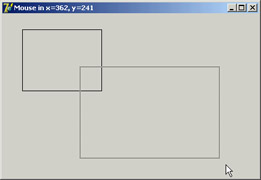
Figure 7.6: During a dragging operation, the MouseOne example uses a dotted line to indicate the final area of a rectangle.
Painting on Forms
Why do you need to handle the OnPaint event to produce proper output, and why can't you paint directly over the form canvas? It depends on Windows' default behavior. As you draw on a window, Windows does not store the resulting image. When the window is covered, its contents are usually lost.
The reason for this behavior is simple: to save memory. Windows assumes it's "cheaper" in the long run to redraw the screen using code than to dedicate system memory to preserving the display state of a window. It's a classic memory-versus-CPU-cycles trade-off. A color bitmap for a 600×800 image at 256 colors requires about 480 KB. By increasing the color count or the number of pixels, you can easily reach 4 MB of memory for a 1280×1024 resolution at 16 million colors.
In the event that you want to have consistent output for your applications, you can use two techniques. The general solution is to store enough data about the output to be able to reproduce it when the system sends a painting requested. An alternative approach is to save the output of the form in a bitmap while you produce it, by placing an Image component over the form and drawing on the canvas of this image component.
The first technique, painting, is the common approach to handling output in most windowing systems, aside from particular graphics-oriented programs that store the form's whole image in a bitmap. The approach used to implement painting has a very descriptive name: store and paint. When the user clicks a mouse button or performs any other operation, you need to store the position and other elements; then, in the painting method, you use this information to paint the corresponding image.
This approach lets the application repaint its whole surface under any of the possible conditions. If you provide a method to redraw the contents of the form, and if this method is automatically called when a portion of the form has been hidden and needs repainting, you will be able to re-create the output properly.
Because this approach takes two steps, you must be able to execute these two operations in a row, asking the system to repaint the window—without waiting for the system to ask for a repaint operation. You can use several methods to invoke repainting: Invalidate, Update, Repaint, and Refresh. The first two correspond to the Windows API functions, and the latter two have been introduced by Delphi:
- The Invalidate method informs Windows that the entire surface of the form should be repainted. The most important point is that Invalidate does not enforce a painting operation immediately. Windows stores the request and responds to it only after the current procedure has been completely executed (unless you call Application.ProcessMessages or Update) and as soon as no other events are pending in the system. Windows deliberately delays the painting operation because it is one of the most time-consuming operations. At times, with this delay, it is possible to paint the form only after multiple changes have taken place, avoiding multiple consecutive calls to the (slow) paint method.
- The Update method asks Windows to update the contents of the form, repainting it immediately. However, this operation will take place only if there is an invalid area. This happens if the Invalidate method has just been called or as the result of an operation by the user. If there is no invalid area, a call to Update has no effect. For this reason, it is common to see a call to Update just after a call to Invalidate, as is done by the two Delphi methods Repaint and Refresh.
- The Repaint method calls Invalidate and Update in sequence. As a result, it activates the OnPaint event immediately. A slightly different version of this method, called Refresh, by default calls Repaint. The fact that there are two methods for the same operation dates back to Delphi 1 days, when the two were subtly different.
When you need to ask the form for a repaint operation, you should generally call Invalidate, following the standard Windows approach. Doing so is particularly important when you need to request this operation frequently, because if Windows takes too much time to update the screen, the requests for repainting can be accumulated into a simple repaint action. The wm_Paint message in Windows is a low-priority message; if a request for repainting is pending but other messages are waiting, the other messages are handled before the system performs the paint action.
On the other hand, if you call Repaint several times, the screen must be repainted each time before Windows can process other messages; because paint operations are computationally intensive, this behavior can make your application less responsive. Sometimes, however, you want the application to repaint a surface as quickly as possible. In these less-frequent cases, calling Repaint is the way to go.
| Note |
Another important consideration is that during a paint operation Windows redraws only the so-called update region, to speed up the operation. For this reason, if you invalidate a portion of a window, only that area will be repainted. To accomplish this, you can use the InvalidateRect and InvalidateRegion functions. This feature is a double-edged sword: It is a powerful technique that can improve speed and reduce the flickering caused by frequent repaint operations, but, it can also produce incorrect output. A typical problem occurs when only some of the areas affected by the user operations are modified, while others remain as they were even if the system executes the source code that is supposed to update them. If a painting operation falls outside the update region, the system ignores it, as if it were outside the visible area of a window. |
Unusual Techniques Alpha Blending, Color Key,and the Animate API
One of the recent Delphi features related to forms is support for new Windows APIs that affect the way forms are displayed (in Windows 2000/XP, but not available under Qt/CLX). Alpha blending allows you to merge the content of a form with what's behind it on the screen—functionality you'll rarely need, at least in a business application. The technique is more interesting when applied to bitmap (with the new AlphaBlend and AlphaDIBBlend API functions) than to a form. In any case, by setting the AlphaBlend property of a form to True and giving to the AlphaBlendValue property a value lower than 255, you'll be able to see in transparency what's behind the form. The lower the AlphaBlendValue, the more the form will fade. You can see an example of alpha blending in Figure 7.7, taken from the ColorKeyHole example.
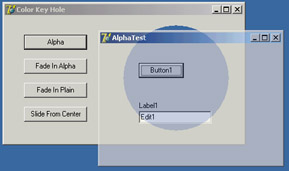
Figure 7.7: The output of the ColorKeyHole, showing the effect of the new TransparentColor and AlphaBlend properties and the Animate-Window API
Another unusual Delphi feature is the TransparentColor boolean property, which allows you to indicate a transparent color that will be replaced by the background, creating a sort of hole in a form. The actual transparent color is indicated by the TransparentColorValue property. Again, you can see an example of this effect in Figure 7.7.
Finally, you can use a native Windows technique, animated display, which is not directly supported by Delphi (beyond the display of hints). For example, instead of calling the Show method of a form, you can write
Form3.Hide;
AnimateWindow (Form3.Handle, 2000, AW_BLEND);
Form3.Show;
Notice you have to call the Show method at the end for the form to behave properly. You can also obtain a similar animation effect by changing the AlphaBlendValue property in a loop. The AnimateWindow API can also be used to control how the form is brought into view, starting from the center (with the AW_CENTER flag) or from one of its sides (AW_HOR_POSITIVE, AW_HOR_NEGATIVE, AW_VER_POSITIVE, or AW_VER_NEGATIVE), as is common for slide shows.
You can apply this same function to windowed controls, obtaining a fade-in effect instead of the usual direct appearance. I have serious doubts about the waste of CPU cycles these animations cause, but I must say that if they are applied properly and in the right program, they can improve the user interface.
Position, Size, Scrolling, and Scaling
Once you have designed a form in Delphi, you run the program, and you expect the form to show up exactly as you prepared it. However, a user of your application might have a different screen resolution or might want to resize the form (if this is possible, depending on the border style), eventually affecting the user interface. I've already discussed (mainly in Chapter 7) some techniques related to controls, such as alignment and anchors. Here I'll specifically address elements related to the form as a whole.
Besides differences in the user system, there are many reasons to change Delphi defaults in this area. For example, you might want to run two copies of the program and avoid having all the forms show up in exactly the same place. I've collected many other related elements, including form scrolling, in this portion of the chapter.
The Form Position
You can use a few properties to set the position of a form. The Position property indicates how Delphi determines the initial position of the form. The default poDesigned value indicates that the form will appear where you designed it and where you use the positional (Left and Top) and size (Width and Height) properties of the form.
Some of the other choices (poDefault, poDefaultPosOnly, and poDefaultSizeOnly) depend on an operating system feature: Using a specific flag, Windows can position and/ or size new windows using a cascade layout. In this way, the positional and size properties you set at design time will be ignored, but if the user runs the application twice the windows won't overlap. The default positions are ignored when the form has a dialog border style. The poScreenCenter value displays the form in the center of the screen, with the size you set at design time. This is a common setting for dialog boxes and other secondary forms.
Another property that affects the initial size and position of a window is its state. You can use the WindowState property at design time to display a maximized or minimized window at startup. This property has only three possible values: wsNormal, wsMinimized, and wsMaximized. If you set a minimized window state, at startup the form will be displayed in the Windows Taskbar. For the main form of an application, this property can be automatically set by specifying the corresponding attributes in a shortcut referring to the application.
Of course, you can maximize or minimize a window at run time, too: Changing the value of the WindowState property to wsMaximized or wsNormal produces the expected effect. Setting the property to wsMinimized, however, creates a minimized window that is placed over the Taskbar, not within it. This is not the expected action for a main form, but for a secondary form! The simple solution to this problem is to call the Minimize method of the Application object. There is also a Restore method in the TApplication class that you can use when you need to restore a form, although most often the user will do this operation using the system menu's Restore command.
Snapping to the Screen (in Delphi 7)
Forms in Delphi 7 have two new properties:
- The Boolean ScreenSnap determines whether the form should be snapped to the display area of the screen when it is close to one of its borders.
- The integer SnapBuffer determines the distance from the borders considered close. Although not a particularly astonishing feature, it's handy to let users snap forms to a side of the screen and take advantage of the entire screen surface; it's particularly handy for applications with multiple forms visible at the same time. Do not set too high a value for the SnapBuffer property (something as large as your screen), or the system will become confused!
The Size of a Form and Its Client Area
At design time, there are two ways to set the size of a form: by setting the value of the Width and Height properties or by dragging its borders. At run time, if the form has a resizable border, the user can resize it (producing the OnResize event, where you can perform custom actions to adapt the user interface to the new size of the form).
However, if you look at a form's properties in source code or in the online help, you can see that two properties refer to its width and two refer to its height. Height and Width refer to the size of the form, including the borders; ClientHeight and ClientWidth refer to the size of the internal area of the form, excluding the borders, caption, scroll bars (if any), and menu bar. The client area of the form is the surface you can use to place components on the form, to create output, and to receive user input. Notice that in CLX, even Height and Width refer to the size of the internal area of the form.
Because you may be interested in having a certain available area for your components, it often makes more sense to set the client size of a form instead of its global size. Doing so is straightforward, because as you set one of the two client properties, the corresponding form property changes accordingly.
| Tip |
In Windows, you can also create output and receive input from the nonclient area of the form—that is, its border. Painting on the border and getting input when you click it are complex issues. If you are interested, look in the Help file at the description of such Windows messages as wm_NCPaint, wm_NCCalcSize, and wm_NCHitTest, and the series of nonclient messages related to the mouse input, such as wm_NCLButtonDown. The difficulty of this approach is in combining your code with the default Windows behavior. |
Form Constraints
When you choose a resizable border for a form, users can generally resize the form as they like and also maximize it to full screen. Windows informs you that the form's size has changed with the wm_Size message, which generates the OnResize event. OnResize takes place after the size of the form has already been changed. Modifying the size again in this event (if the user has reduced or enlarged the form too much) would be silly. A preventive approach is better suited to this problem.
Delphi provides a specific property for forms and also for all controls: the Constraints property. Setting the subproperties of the Constraints property to the proper maximum and minimum values creates a form that cannot be resized beyond those limits. Here is an example:
object Form1: TForm1
 Constraints.MaxHeight = 300
 Constraints.MaxWidth = 300
 Constraints.MinHeight = 150
 Constraints.MinWidth = 150
end
Notice that as you set up the Constraints property, it has an immediate effect even at design time, changing the size of the form if it is outside the permitted area.
Delphi also uses the maximum constraints for maximized windows, producing an awkward effect. For this reason, you should generally disable the Maximize button of a window that has a maximum size. In some cases maximized windows with a limited size make sense—this is the behavior of Delphi's main window. If you need to change constraints at run time, you can also consider using two specific events, OnCanResize and OnConstrainedResize. The first of the two can also be used to disable resizing a form or control in given circumstances.
Scrolling a Form
When you build a simple application, a single form might hold all the components you need. As the application grows, however, you may need to squeeze in the components, increase the size of the form, or add new forms. If you reduce the space occupied by the components, you might add the capability to resize them at run time, possibly splitting the form into different areas. If you choose to increase the size of the form, you might use scroll bars to let the user move around in a form that is bigger than the screen (or at least bigger than its visible portion on the screen).
Adding a scroll bar to a form is simple. In fact, you don't need to do anything—if you place several components in a big form and then reduce its size, a scroll bar will be added to the form automatically, as long as you haven't changed the value of the AutoScroll property from its default of True.
Along with AutoScroll, forms have two properties, HorzScrollBar and VertScrollBar, which you can use to set several properties of the two TFormScrollBar objects associated with the form. The Visible property indicates whether the scroll bar is present, the Position property determines the initial status of the scroll thumb, and the Increment property determines the effect of clicking one of the arrows at the ends of the scroll bar. The most important property, however, is Range.
The Range property of a scroll bar determines the virtual size of the form, not the range of values of the scroll bar. Suppose you need a form that will host several components and will therefore need to be 1000 pixels wide. You can use this value to set the "virtual range" of the form, changing the Range of the horizontal scroll bar.
The Position property of the scroll bar will range from 0 to 1000 minus the current size of the client area. For example, if the client area of the form is 300 pixels wide, you can scroll 700 pixels to see the far end of the form (the thousandth pixel).
A Scroll Testing Example
To demonstrate the specific case I've just discussed, I've built the Scroll1 example, which has a virtual form 1000 pixels wide. I've set the range of the horizontal scroll bar to 1000:
object Form1: TForm1
 HorzScrollBar.Range = 1000
 VertScrollBar.Range = 305
 AutoScroll = False
 OnResize = FormResize
 ...
The example's form is filled with meaningless list boxes, and I could have obtained the same scroll-bar range by placing the right-most list box so that its position (Left) plus its size (Width) equaled 1000.
The interesting part of the example is the presence of a toolbox window displaying the status of the form and of its horizontal scroll bar. This second form has four labels: two with fixed text and two with the output. In addition, the secondary form (called Status) has a bsToolWindow border style and is a top-most window. You should also set its Visible property to True, so its window is automatically displayed at startup:
object Status: TStatus
 BorderIcons = [biSystemMenu]
 BorderStyle = bsToolWindow
 FormStyle = fsStayOnTop
 Visible = True
 object Label1: TLabel...
 ...
There isn't much code in this program. Its aim is to update the values in the toolbox each time the form is resized or scrolled (as you can see in Figure 7.8). The first part is extremely simple. You can handle the OnResize event of the form and copy a couple of values to the two labels. The labels are part of another form, so you need to prefix them with the name of the form instance, Status:
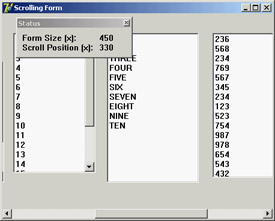
Figure 7.8: The output of the Scroll1 example
procedure TForm1.FormResize(Sender: TObject);
begin
 Status.Label3.Caption := IntToStr(ClientWidth);
 Status.Label4.Caption := IntToStr(HorzScrollBar.Position);
end;
If you wanted to change the output each time the user scrolls the contents of the form, you could not use a Delphi event handler, because forms don't have an OnScroll event (although stand-alone ScrollBar components have one). Omitting this event makes sense, because Delphi forms handle scroll bars automatically in a powerful way. In Windows, by contrast, scroll bars are extremely low-level elements, requiring a lot of coding. Handling the scroll event makes sense only in special cases, such as when you want to keep track precisely of the scrolling operations made by a user.
Here is the code you need to write. First, add a method declaration to the class and associate it with the Windows horizontal scroll message (wm_HScroll); then write the code for this procedure, which is almost the same as the code of the FormResize method you've seen before:
public
 procedure WMHScroll (var ScrollData: TWMScroll); message wm_HScroll;

procedure TForm1.WMHScroll (var ScrollData: TWMScroll);
begin
 inherited;
 Status.Label3.Caption := IntToStr(ClientWidth);
 Status.Label4.Caption := IntToStr(HorzScrollBar.Position);
end;
It's important to add the call to inherited, which activates the method related to the same message in the base class form. The inherited keyword in Windows message handlers calls the method of the base class you are overriding, which is associated with the corresponding Windows message (even if the procedure name is different). Without this call, the form won't have its default scrolling behavior; that is, it won't scroll at all.
| Note |
Because in CLX you cannot handle the low-level scroll messages, there seems to be no easy way to create a program similar to Scroll1. This isn't terribly important in real-world applications, because the scrolling system is automatic, and you can probably hook in the CLX library at a lower level. |
Automatic Scrolling
The scroll bar's Range property can seem strange until you begin to use it consistently. When you think about it, you'll start to understand the advantages of the "virtual range" approach. The scroll bar is automatically removed from the form when the client area of the form is big enough to accommodate the virtual size; and when you reduce the size of the form, the scroll bar is added again.
This feature becomes particularly interesting when the AutoScroll property of the form is set to True. In this case, the extreme positions of the rightmost and lower controls are automatically copied into the Range properties of the form's two scroll bars. Automatic scrolling works well in Delphi. In the previous example, the virtual size of the form would be set to the right border of the last list box. This was defined with the following attributes:
object ListBox6: TListBox
 Left = 832
 Width = 145
end
Therefore, the horizontal virtual size of the form would be 977 (the sum of the two preceding values). This number is automatically copied into the Range field of the HorzScrollBar property of the form, unless you change it manually to have a bigger form (as I've done for the Scroll1 example, setting it to 1000 to leave some space between the last list box and the border of the form). You can see this value in the Object Inspector, or make the following test: Run the program, size the form as you like, and move the scroll thumb to the rightmost position. When you add the size of the form and the position of the thumb, you'll always get 1000, the virtual coordinate of the right-most pixel of the form, whatever the size.
Scrolling and Form Coordinates
You have just seen that forms can automatically scroll their components. But what happens if you paint directly on the surface of the form? Some problems arise, but their solution is at hand. Suppose you want to draw lines on the virtual surface of a form, as shown in Figure 7.9. Because you probably do not own a monitor capable of displaying 2000 pixels on each axis, you can create a smaller form, add two scroll bars, and set their Range property, as I've done in the Scroll2 example.
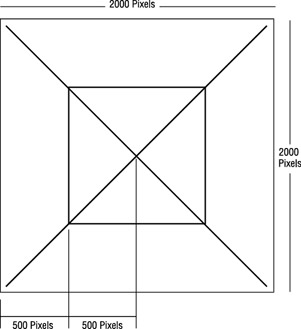
Figure 7.9: The lines to draw on the virtual surface of the form
If you draw the lines using the virtual coordinates of the form, the image won't display properly. In the OnPaint response method, you need to compute the virtual coordinates yourself. Fortunately, doing so is easy, because you know that the virtual X1 and Y1 coordinates of the upper-left corner of the client area correspond to the current positions of the two scroll bars:
procedure TForm1.FormPaint(Sender: TObject);
var
 X1, Y1: Integer;
begin
 X1 := HorzScrollBar.Position;
 Y1 := VertScrollBar.Position;

  // draw a yellow line
 Canvas.Pen.Width := 30;
 Canvas.Pen.Color := clYellow;
 Canvas.MoveTo (30-X1, 30-Y1);
 Canvas.LineTo (1970-X1, 1970-Y1);

 // and so on ...
As a better alternative, instead of computing the proper coordinate for each output operation, you can call the SetWindowOrgEx API to move the origin of the coordinates of the Canvas. This way, your drawing code will directly refer to virtual coordinates but will be displayed properly:
procedure TForm2.FormPaint(Sender: TObject);
begin
 SetWindowOrgEx (Canvas.Handle, HorzScrollbar.Position,
 VertScrollbar.Position, nil);

 // draw a yellow line
 Canvas.Pen.Width := 30;
 Canvas.Pen.Color := clYellow;
 Canvas.MoveTo (30, 30);
 Canvas.LineTo (1970, 1970);

 // and so on ...
This is the version of the program you'll find in the source code of the book. Try using the program and commenting out the SetWindowOrgEx call to see what happens if you don't use virtual coordinates: You'll find that the output of the program is not correct—it won't scroll, and the same image will always remain in the same position, regardless of scrolling operations. Notice also that the Qt/CLX version of the program, called QScroll2, doesn't use virtual coordinates but simply subtracts the scroll positions from each of the hard-coded coordinates.
Scaling Forms
When you create a form with multiple components, you can select a fixed-size border or let the user resize the form and automatically add scroll bars to reach the components falling outside the visible portion of the form, as you've just seen. This might also happen because a user of your application has a display driver with a much smaller number of pixels than yours.
Instead of reducing the form size and scrolling the content, you might want to reduce the size of each of the components at the same time. This automatically happens if the user has a system font with a different pixel-per-inch ratio than the one you used for development. To address these problems, Delphi has some nice scaling features, but they aren't fully intuitive.
The form's ScaleBy method allows you to scale the form and each of its components. The PixelsPerInch and Scaled properties let Delphi resize an application automatically when the application is run with a different system font size, often because of a different screen resolution. In both cases, to make the form scale its window, be sure to also set the AutoScroll property to False. Otherwise, the contents of the form will be scaled, but the form border itself will not. These two approaches are discussed in the next two sections.
| Note |
Form scaling is calculated based on the difference between the font height at run time and the font height at design time. Scaling ensures that edit and other controls are large enough to display their text using the user's font preferences without clipping the text. The form scales as well, as you will see later, but the main point is to make edit and other controls readable. |
Manual Form Scaling
Any time you want to scale a form, including its components, you can use the ScaleBy method, which has two integer parameters, a multiplier and a divisor—it's a fraction. For example, this statement reduces the size of the current form to three-quarters of its original size:
ScaleBy (3, 4);
The same effect can be obtained by using
ScaleBy (75, 100);
When you scale a form, all the proportions are maintained, but if you go below or above certain limits, the text strings can alter their proportions slightly. The problem is that in Windows, components can be placed and sized only in whole pixels, whereas scaling almost always involves multiplying by fractional numbers. So, any fractional portion of a component's origin or size will be truncated.
I've built a simple example, Scale (or QScale), to show how you can scale a form manually, responding to a request by the user. The application form has two buttons, a label, an edit box, and an UpDown control connected to it (via its Associate property). With this setting, a user can type numbers in the edit box or click the two small arrows to increase or decrease the value (by the amount indicated by the Increment property). To extract the input value, you can use the Text property of the edit box or the Position of the UpDown control. When you click the Do Scale button, the current input value is used to determine the scaling percentage of the form:
procedure TForm1.ScaleButtonClick(Sender: TObject);
begin
 AmountScaled := UpDown1.Position;
 ScaleBy (AmountScaled, 100);
 UpDown1.Height := Edit1.Height;
 ScaleButton.Enabled := False;
 RestoreButton.Enabled := True;
end;
This method stores the current input value in the form's AmountScaled private field and enables the Restore button, disabling the button that was clicked. Later, when the user clicks the Restore button, the opposite scaling takes place. By having to restore the form before another scaling operation takes place, I avoid an accumulation of round-off errors. I've also added a line to set the Height of the UpDown component to the same Height as the edit box it is attached to. This prevents small differences between the two, due to scaling problems of the UpDown control.
| Note |
If you want to scale the text of the form properly, including the captions of components, the items in list boxes, and so on, you should use TrueType fonts exclusively. The system font (MS Sans Serif) doesn't scale well. The font issue is important because the size of many components depends on the text height of their captions, and if the caption does not scale well, the component might not work properly. For this reason, in the Scale example I've used an Arial font. |
The same scaling technique also works in CLX, as you can see by running the QScale example. The only real difference is that I replaced the UpDown component (and the related edit box) with a SpinEdit control, because the former is not available in Qt.
Automatic Form Scaling
Instead of playing with the ScaleBy method, you can have Delphi do the work for you. When Delphi starts, it asks the system for the display configuration and stores the value in the PixelsPerInch property of the Screen object, a special global object of VCL that's available in any application.
PixelsPerInch sounds like it has something to do with the pixel resolution of the screen (actually available in Screen.Height and Screen.Width), but unfortunately, it doesn't. If you change your screen resolution from 640×480 to 800×600 to 1024×768 or even 1600×1280, you will find that Windows reports the same PixelsPerInch value in all cases, unless you change the system font. PixelsPerInch really refers to the screen pixel resolution for which the currently installed system font was designed. When a user changes the system font scale, usually to make menus and other text easier to read, the user will expect all applications to honor those settings. An application that does not reflect user desktop preferences will look out of place and, in extreme cases, may be unusable to visually impaired users who rely on very large fonts and high-contrast color schemes.
The most common PixelsPerInch values are 96 (small fonts) and 120 (large fonts), but other values are possible. Newer versions of Windows let the user set the system font size to an arbitrary scale. At design time, the PixelsPerInch value of the screen, which is a read-only property, is copied to every form of the application. Delphi then uses the value of PixelsPerInch, if the Scaled property is set to True, to resize the form when the application starts.
As I've mentioned, both automatic scaling and the scaling performed by the ScaleBy method operate on components by changing the size of the font. The size of each control depends on the font it uses. With automatic scaling, the value of the form's PixelsPerInch property (the design-time value) is compared to the current system value (indicated by the corresponding property of the Screen object), and the result is used to change the font of the components on the form. To improve the accuracy of this code, the final height of the text is compared to the design-time height of the text, and its size is adjusted if the heights do not match.
Thanks to Delphi automatic support, the same application running on a system with a different system font size automatically scales itself, without any specific code. The application's edit controls will be the correct size to display their text in the user's preferred font size, and the form will be the correct size to contain those controls. Although automatic scaling has problems in some special cases, if you comply with the following rules, you should get good results:
- Set the Scaled property of forms to True (the default value).
- Use only TrueType fonts.
- Use Windows small fonts (96 dpi) on the computer you use to develop the forms.
- Set the AutoScroll property to False if you want to scale the form and not just the controls inside it. (AutoScroll defaults to True, so don't forget this step.)
- Set the form position either near the upper-left corner or in the center of the screen (with the poScreenCenter value) to avoid having an out-of-screen form.
Creating and Closing Forms
Up to now I have ignored the issue of form creation. You know that when the form is created, you receive the OnCreate event and can change or test some of the initial form's properties or fields. The statement responsible for creating the form is in the project's source file:
begin
 Application.Initialize;
 Application.CreateForm(TForm1, Form1);
 Application.Run;
end.
To skip the automatic form creation, you can either modify this code or use the Forms page of the Project Options dialog box (see Figure 7.10). In this dialog box, you can decide whether the form should be automatically created. If you disable automatic creation, the project's initialization code becomes the following:
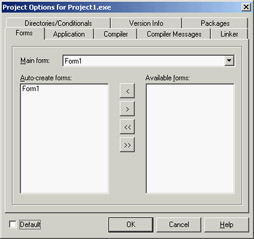
Figure 7.10: The Forms page of the Delphi Project Options dialog box
begin
 Applications.Initialize;
 Application.Run;
end.
If you now run this program, nothing happens. It terminates immediately because no main window is created. The call to the application's CreateForm method creates a new instance of the form class passed as the first parameter and assigns it to the variable passed as the second parameter.
Something else happens behind the scenes. When CreateForm is called, if there is currently no main form, the current form is assigned to the application's MainForm property. For this reason, the form indicated as Main Form in the dialog box shown in Figure 7.10 corresponds to the first call to the application's CreateForm method (that is, when several forms are created at startup).
The same holds for closing the application. Closing the main form terminates the application, regardless of the other forms. If you want to perform this operation from the program's code, call the Close method of the main form, as you've done several times in past examples.
Form Creation Events
Regardless of the manual or automatic creation of forms, when a form is created, you can intercept many events. Form-creation events are fired in the following order:
- OnCreate indicates that the form is being created.
- OnShow indicates that the form is being displayed. Besides main forms, this event happens after you set the Visible property of the form to True or call the Show or ShowModal method. This event is fired again if the form is hidden and then displayed again.
- OnActivate indicates that the form becomes the active form within the application. This event is fired every time you move from another form of the application to the current one.
- Other events, including OnResize and OnPaint, indicate operations always done at startup but then repeated many times.
| Note |
In Qt, the OnResize event won't fire as it does in Windows when the form is created. To make the code more portable from Delphi to Kylix, CLX simulates this event, although it would make more sense to tweak the VCL to avoid this odd behavior (a comment in the CLX source code describes this situation). |
As you can see in the previous list, every event has a specific role apart from form initialization, except OnCreate, which is guaranteed to be called only once as the form is created.
However, there is an alternative approach to adding initialization code to a form: overriding the constructor. This is usually done as follows:
constructor TForm1.Create(AOwner: TComponent);
begin
 inherited Create (AOwner);
  // extra initialization code
end;
Before the call to the Create method of the base class, the properties of the form are still not loaded and the internal components are not available. For this reason the standard approach is to call the base class constructor first and then do the custom operations.
| Note |
Up to version 3, Delphi used a different creation order, which has led to the OldCreateOrder compatibility property of the VCL. When this property is set to the default value of False, all the code in a form constructor is executed before the code in the OnCreate event handler (which is fired by the special AfterConstruction method). If you enable the old creation order, instead, the constructor's inherited call leads to the call of the OnCreate event handler. You can examine the behavior of the CreateOrd example using the two values of the OldCreateOrder property. |
Closing a Form
When you close the form using the Close method or by the usual means (Alt+F4, the system menu, or the Close button), the OnCloseQuery event is called. In this event, you can ask the user to confirm the action, particularly if there is unsaved data in the form. Here is an example of the code you can write:
procedure TForm1.FormCloseQuery(Sender: TObject; var CanClose: Boolean);
begin
 if MessageDlg ('Are you sure you want to exit?', mtConfirmation,
 [mbYes, mbNo], 0) = mrNo then
 CanClose := False;
end;
If OnCloseQuery indicates that the form should still be closed, the OnClose event is called. The third step is to call the OnDestroy event, which is the opposite of the OnCreate event and is generally used to de-allocate objects related to the form and free the corresponding memory.
| Note |
To be more precise, the BeforeDestruction method generates an OnDestroy event before the Destroy destructor is called. That is, unless you have set the OldCreateOrder property to True, in which case Delphi uses a different closing sequence. |
So, what is the use of the intermediate OnClose event? In this method, you have another chance to avoid closing the application, or you can specify alternative "close actions." The method has an Action parameter passed by reference. You can assign the following values to this parameter:
caNone The form is not allowed to close. This corresponds to setting the CanClose parameter of the OnCloseQuery method to False.
caHide The form is not closed, just hidden. This makes sense if there are other forms in the application; otherwise, the program terminates. This is the default for secondary forms, and it's the reason I had to handle the OnClose event in the previous example to close the secondary forms.
caFree The form is closed, freeing its memory, and the application eventually terminates if this was the main form. This is the default action for the main form and the action you should use when you create multiple forms dynamically (if you want to remove the windows and destroy the corresponding Delphi object as the form closes).
caMinimize The form is not closed but only minimized. This is the default action for MDI child forms.
| Note |
When a user shuts down Windows, the OnCloseQuery event is activated, and a program can use it to stop the shutdown process. In this case, the OnClose event is not called even if OnCloseQuery sets the CanClose parameter to True. |
Dialog Boxes and Other Secondary Forms
When you write a program, there is no significant difference between a dialog box and another secondary form, aside from the border, the border icons, and similar user-interface elements you can customize.
What users associate with a dialog box is the concept of a modal window—a window that takes the focus and must be closed before the user can move back to the main window. This is true for message boxes and usually for dialog boxes, as well. However, you can also have nonmodal—or modeless—dialog boxes.
So, if you think dialog boxes are just modal forms, you are on the right track, but your description is not precise. In Delphi (as in Windows), you can have modeless dialog boxes and modal forms. You must consider two different elements: The form's border and its user interface determine whether it looks like a dialog box; the use of two different methods (Show and ShowModal) to display the secondary form determines its behavior (modeless or modal).
Adding a Second Form to a Program
To add a second form to an application, you click the New Form button on the Delphi toolbar or use the File ® New ® Form menu command. As an alternative, you can select File ® New ® Other, move to the Forms or Dialogs page, and choose one of the available form templates or form wizards.
If you have two forms in a project, you can use the View Form or View Unit button on the Delphi toolbar to navigate through them at design time. You can also choose which form is the main one and which forms should be automatically created at startup using the Forms page of the Project Options dialog box. This information is reflected in the source code of the project file.
| Tip |
Secondary forms are automatically created in the project source-code file depending on the status of the Auto Create Forms check box on the Designer page of the Environment Options dialog box. Although automatic creation is the simplest and most reliable approach for novice developers and quick-and-dirty projects, I suggest that you disable this check box for any serious development. When your application contains hundreds of forms, they shouldn't all be created at application startup. Create instances of secondary forms when and where you need them, and free them when you're done. |
Once you have prepared the secondary form, you can set its Visible property to True, and both forms will show up as the program starts. In general, the secondary forms of an application are left "invisible" and are then displayed by calling the Show method (or setting the Visible property at run time). If you use the Show function, the second form will be displayed as modeless, so you can move back to the first form while the second is still visible. To close the second form, you might use its system menu or click a button or menu item that calls the Close method. As you've just seen, the default close action (see the OnClose event) for a secondary form is simply to hide it, so the secondary form is not destroyed when it is closed. It is kept in memory (again, not always the best approach) and is available if you want to show it again.
Creating Secondary Forms at Run Time
Unless you create all the forms when the program starts, you'll need to check whether a form exists and create it if necessary. The simplest case occurs when you want to create multiple copies of the same form at run time. In the MultiWin/QMultiWin example, I've done this by writing the following code:
with TForm3.Create (Application) do
 Show;
Every time you click the button, a new copy of the form is created. Notice that I don't use the Form3 global variable, because it doesn't make much sense to assign this variable a new value every time you create a new form object. The important thing, however, is not to refer to the global Form3 object in the code of the form or in other portions of the application. The Form3 variable will invariably be a pointer to nil. My suggestion, in such a case, is to remove it from the unit to avoid any confusion.
| Tip |
In the code of a form that can have multiple instances, you should never explicitly refer to the form by using the global variable Delphi sets up for it. For example, suppose that in the code for TForm3 you refer to Form3.Caption. If you create a second object of the same type (the class TForm3), the expression Form3.Caption will refer to the caption of the form object referenced by the Form3 variable, which might not be the current object executing the code. To avoid this problem, refer to the Caption property in the form's method to indicate the caption of the current form object, and use the Self keyword when you need a specific reference to the object of the current form. To avoid any problem when creating multiple copies of a form, I suggest removing the global form object from the interface portion of the unit declaring the form. This global variable is required only for the automatic form creation. |
When you create multiple copies of a form dynamically, remember to destroy each form object as is it closed, by handling the corresponding event:
procedure TForm3.FormClose(Sender: TObject; var Action: TCloseAction);
begin
 Action := caFree;
end;
Failing to do so will result in a lot of memory consumption, because all the forms you create (both the windows and the Delphi objects) will be kept in memory and hidden from view.
Creating Single-Instance Secondary Forms
Now let's focus on the dynamic creation of a form, in a program that accounts for only one copy of the form at a time. Creating a modal form is quite simple, because the dialog box can be destroyed when it is closed, with code like this:
var
 Modal: TForm4;
begin
 Modal := TForm4.Create (Application);
 try
 Modal.ShowModal;
 finally
 Modal.Free;
 end;
Because the ShowModal call can raise an exception, you should write it in a try block followed by a finally block to make sure the object will be de-allocated. Usually this block also includes code that initializes the dialog box before displaying it and code that extracts the values set by the user before destroying the form. The final values are read-only if the result of the ShowModal function is mrOK, as you'll see in the next example.
The situation is a little more complex when you want to display only one copy of a modeless form. You have to create the form, if it is not already available, and then show it:
if not Assigned (Form2) then
 Form2 := TForm2.Create (Application);
Form2.Show;
With this code, the form is created the first time it is required and then is kept in memory, visible on the screen or hidden from view. To avoid using up memory and system resources unnecessarily, you'll want to destroy the secondary form when it is closed. You can do that by writing a handler for the OnClose event:
procedure TForm2.FormClose(Sender: TObject; var Action: TCloseAction);
begin
 Action := caFree;
  // important: set pointer to nil!
 Form2 := nil;
end;
Notice that after you destroy the form, the global Form2 variable is set to nil, which contradicts the rule set earlier for forms with multiple instances, but as this is a single-instance we are in the exact opposite case. Without this code, closing the form would destroy its object, but the Form2 variable would still refer to the original memory location. At this point, if you try to show the form once more with the btnSingleClick method shown earlier, the if not Assigned() test will succeed, because it checks whether the Form2 variable is nil. The code fails to create a new object, and the Show method (invoked on a nonexistent object) will result in a system memory error.
As an experiment, you can generate this error by removing the last line of the previous listing. As you have seen, the solution is to set the Form2 object to nil when the object is destroyed, so that properly written code will "see" that a new form must be created before using it. Again, experimenting with the MultiWin/QMultiWin example can prove useful to test various conditions. (I haven't shown any screens from this example because the forms it displays are totally empty, except for the main form, which has three buttons.)
| Note |
Setting the form variable to nil makes sense—and works—if there is to be only one instance of the form present at any given instant. If you want to create multiple copies of a form, you'll have to use other techniques to keep track of them. Also keep in mind that in this case you cannot use the FreeAndNil procedure, because you cannot call Free on Form2—you cannot destroy the form before its event handlers have finished executing. |
Creating a Dialog Box
I stated earlier in this chapter that a dialog box is not very different from other forms. To build a dialog box instead of a form, you just select the bsDialog value for the BorderStyle property. With this simple change, the interface of the form becomes like that of a dialog box, with no system icon and no Minimize and Maximize boxes. Of course, such a form has the typical thick dialog box border, which is non-resizable.
Once you have built a dialog box form, you can display it as a modal or modeless window using the two usual show methods (Show and ShowModal). Modal dialog boxes, however, are more common than modeless ones. This is the reverse of forms; modal forms should generally be avoided, because a user won't expect them.
The Dialog Box of the RefList Example
In Chapter 5, "Visual Controls," we explored the RefList/QRefList program, which used a ListView control to display references to books, magazines, websites, and more. In the RefList2 version (and its QRefList2 CLX counterpart), I added to the basic version a dialog box that's used in two different circumstances: adding new items to the list and editing existing items.
| Warning |
The CLX ListView component has a problem. In case you activate the check boxes and then disable them, the images will disappear. This is the behavior of the QRefList example of Chapter 5. In the QRefList2 version I've added code to reassign the ImageIndex property of each item as a workaround to this bug. |
The only particularly interesting feature of this form in the VCL example is the use of the ComboBoxEx component, which is attached to the same ImageList used by the ListView control of the main form. The drop-down items of the list, used to select a type of reference, include both a textual description and the corresponding image.
As I mentioned, this dialog box is used in two different cases. The first takes place as the user selects File ® Add Items from the menu:
procedure TForm1.AddItems1Click(Sender: TObject);
var
 NewItem: TListItem;
begin
 FormItem.Caption := 'New Item';
 FormItem.Clear;
 if FormItem.ShowModal = mrOK then
 begin
 NewItem := ListView1.Items.Add;
 NewItem.Caption := FormItem.EditReference.Text;
 NewItem.ImageIndex := FormItem.ComboType.ItemIndex;
 NewItem.SubItems.Add (FormItem.EditAuthor.Text);
 NewItem.SubItems.Add (FormItem.EditCountry.Text);
 end;
end;
Besides setting the proper caption for the form, this procedure initializes the dialog box, because you are entering a new value. If the user clicks OK, however, the program adds a new item to the list view and sets all its values. To empty the dialog's edit boxes, the program calls the custom Clear method, which resets the text of each edit box control:
procedure TFormItem.Clear;
var
 I: Integer;
begin
  // clear each edit box
 for I := 0 to ControlCount - 1 do
    if Controls [I] is TEdit then
 TEdit (Controls[I]).Text := '';
end;
Editing an existing item requires a slightly different approach. First, the current values are moved to the dialog box before it is displayed. Second, if the user clicks OK, the program modifies the current list item instead of creating a new one. Here is the code:
procedure TForm1.ListView1DblClick(Sender: TObject);
begin
 if ListView1.Selected <> nil then
 begin
    // dialog initialization
 FormItem.Caption := 'Edit Item';
 FormItem.EditReference.Text := ListView1.Selected.Caption;
 FormItem.ComboType.ItemIndex := ListView1.Selected.ImageIndex;
 FormItem.EditAuthor.Text := ListView1.Selected.SubItems [0];
 FormItem.EditCountry.Text := ListView1.Selected.SubItems [1];

 // show it
 if FormItem.ShowModal = mrOK then
 begin
      // read the new values
 ListView1.Selected.Caption := FormItem.EditReference.Text;
 ListView1.Selected.ImageIndex := FormItem.ComboType.ItemIndex;
 ListView1.Selected.SubItems [0] := FormItem.EditAuthor.Text;
 ListView1.Selected.SubItems [1] := FormItem.EditCountry.Text;
 end;
 end;
end;
You can see the effect of this code in Figure 7.11. Notice that the code used to read the value of a new item or modified item is similar. In general, you should try to avoid this type of duplicated code and perhaps place the shared code statements in a method added to the dialog box. In this case, the method could receive as parameter a TListItem object and copy the proper values into it.
Figure 7.11: The dialog box of the RefList2 example used in edit mode. Notice the ComboBoxEx graphical component in use.
| Note |
What happens internally when the user clicks the OK or Cancel button in the dialog box? A modal dialog box is closed by setting its ModalResult property, and it returns the value of this property. You can indicate the return value by setting the ModalResult property of the button. When the user clicks the button, its ModalResult value is copied to the form, which closes the form and returns the value as the result of the ShowModal function. |
A Modeless Dialog Box
The second example of dialog boxes shows a more complex modal dialog box that uses the standard approach as well as a modeless dialog box. The main form of the DlgApply example (and of the identical CLX-based QDlgApply demo) has five labels with names, as you can see in Figure 7.12 and by viewing the source code of the example.
Figure 7.12: The three forms (a main form and two dialog boxes) of the DlgApply example at run time
If the user clicks a name, its color changes to red; if the user double-clicks it, the program displays a modal dialog box with a list of names to choose from. If the user clicks the Style button, a modeless dialog box appears, allowing the user to change the font style of the main form's labels. The five labels on the main form are connected to two methods, one for the OnClick event and the second for the OnDoubleClick event. The first method turns the last label a user clicked red, resetting all the others to black (they have the Tag property set to 1, as a sort of group index). Notice that the same method is associated with all the labels:
procedure TForm1.LabelClick(Sender: TObject);
var
 I: Integer;
begin
 for I := 0 to ComponentCount - 1 do
 if (Components[I] is TLabel) and (Components[I].Tag = 1) then
 TLabel (Components[I]).Font.Color := clBlack;
  // set the color of the clicked label to red
 (Sender as TLabel).Font.Color := clRed;
end;
The second method common to all the labels is the OnDoubleClick event handler. The LabelDoubleClick method selects the Caption of the current label (indicated by the Sender parameter) in the list box of the dialog and then shows the modal dialog box. If the user closes the dialog box by clicking OK and a list item is selected, the selection is copied back to the label's caption:
procedure TForm1.LabelDoubleClick(Sender: TObject);
begin
 with ListDial.Listbox1 do
 begin
    // select the current name in the list box
 ItemIndex := Items.IndexOf (Sender as TLabel).Caption);
    // show the modal dialog box, checking the return value
 if (ListDial.ShowModal = mrOk) and (ItemIndex >= 0) then
      // copy the selected item to the label
 (Sender as TLabel).Caption := Items [ItemIndex];
  end;
end;
| Tip |
Notice that all the code used to customize the modal dialog box is in the LabelDoubleClick method of the main form. The form of this dialog box has no added code. |
The modeless dialog box, by contrast, has a lot of coding behind it. The main form displays the dialog box when the Style button is clicked (notice that the button caption ends with three dots to indicate that it leads to a dialog box), by calling its Show method. You can see the dialog box running in Figure 7.12.
Two buttons, Apply and Close, replace the OK and Cancel buttons in a modeless dialog box. (The fastest way to obtain these buttons is to select the bkOK or bkCancel value for the Kind property and then edit the Caption.) At times, you may see a Cancel button that works as a Close button, but the OK button in a modeless dialog box usually has no meaning. Instead, one or more buttons might perform specific actions on the main window, such as Apply, Change Style, Replace, Delete, and so on.
If the user clicks one of the check boxes in this modeless dialog box, the style of the sample label's text at the bottom changes accordingly. You accomplish this by adding or removing the specific flag that indicates the style, as in the following OnClick event handler:
procedure TStyleDial.ItalicCheckBoxClick(Sender: TObject);
begin
 if ItalicCheckBox.Checked then
 LabelSample.Font.Style := LabelSample.Font.Style + [fsItalic]
 else
 LabelSample.Font.Style := LabelSample.Font.Style - [fsItalic];
end;
When the user clicks the Apply button, the program copies the style of the sample label to each of the form's labels, rather than consider the values of the check boxes:
procedure TStyleDial.ApplyBitBtnClick(Sender: TObject);
begin
 Form1.Label1.Font.Style := LabelSample.Font.Style;
 Form1.Label2.Font.Style := LabelSample.Font.Style;
 ...
As an alternative, instead of referring to each label directly, you can look for it by calling the FindComponent method of the form, passing the label name as a parameter, and then casting the result to the TLabel type. The advantage of this approach is that you can create the names of the various labels with a for loop:
procedure TStyleDial.ApplyBitBtnClick(Sender: TObject);
var
 I: Integer;
begin
 for I := 1 to 5 do
 (Form1.FindComponent ('Label' + IntToStr (I)) as TLabel).Font.Style :=
 LabelSample.Font.Style;
end;
| Tip |
The ApplyBitBtnClick method could also be written by scanning the Controls array in a loop, as I've done in other examples. I decided to use the FindComponent method here to demonstrate a different technique. |
This second version of the code is certainly slower, because it has more operations to do, but you won't notice the difference because it is still very fast. Of course, this approach is also more flexible; if you add a new label, you only need to fix the higher limit of the for loop, provided all the labels have consecutive numbers.
Notice that when the user clicks the Apply button, the dialog box does not close—only the Close button has this effect. Consider also that this dialog box needs no initialization code because the form is not destroyed, and its components maintain their status each time the dialog box is displayed. Notice, however, that in the CLX version of the program, QDlgApply, the dialog is modal, even if it is called with the Show method.
Predefined Dialog Boxes
Besides building your own dialog boxes, Delphi allows you to use some default dialog boxes of various kinds. Some are predefined by Windows; others are simple dialog boxes (such as message boxes) displayed by a Delphi routine. The Delphi Component Palette contains a page of dialog box components. Each of these dialog boxes—known as Windows common dialogs—is defined in the system library ComDlg32.DLL.
Windows Common Dialogs
I have already used some of these dialog boxes in several examples in the previous chapters, so you are probably familiar with them. Basically, you need to put the corresponding component on a form, set some of its properties, run the dialog box (with the Execute method, returning a Boolean value), and retrieve the properties that have been set while running it. To help you experiment with these dialog boxes, I've built the CommDlgTest program.
I'll highlight some key and nonobvious features of the common dialog boxes, and let you study the source code of the example for the details:
- The Open Dialog Component can be customized by setting different file extension filters using the Filter property, which has a handy editor and can be assigned a value directly with a string like Text File (*.txt)|*.txt. Another useful feature lets the dialog check whether the extension of the selected file matches the default extension, by checking the ofExtensionDifferent flag of the Options property after executing the dialog. Finally, this dialog allows multiple selections by setting its ofAllowMultiSelect option. In this case you can get the list of selected files by looking at the Files string list property.
- The SaveDialog component is used in similar ways and has similar properties, although of course you cannot select multiple files.
- The OpenPictureDialog and SavePictureDialog components provide similar features but have a customized form that shows a preview of an image. It only makes sense to use these components for opening or saving graphical files.
- The FontDialog component can be used to show and select from all types of fonts, fonts useable on both the screen and a selected printer (WYSIWYG), or only TrueType fonts. You can show or hide the portion related to the special effects, and obtain other different versions by setting its Options property. You can also activate an Apply button by providing an event handler for its OnApply event and using the fdApplyButton option. A Font dialog box with an Apply button (see Figure 7.13) behaves almost like a modeless dialog box (but isn't one).
Figure 7.13: The Font selection dialog box with an Apply button - The ColorDialog component is used with different options to show the dialog fully open at first or to prevent it from opening fully. These settings are the cdFullOpen or cdPreventFullOpen values of the Options property.
- The Find and Replace dialog boxes are truly modeless dialogs, but you have to implement the find and replace functionality yourself, as I've partially done in the CommDlgTest example. The custom code is connected to the buttons of the two dialog boxes by providing the OnFind and OnReplace events.
| Note |
Qt offers a similar set of predefined dialog boxes, but the set of options is often more limited. I've created the QCommDlg version of the example you can use to experiment with these settings. The CLX program has fewer menu items, because some of the options are not available; there are other minimal changes in the source code. |
A Parade of Message Boxes
The Delphi message boxes and input boxes are another set of predefined dialog boxes. You can use many Delphi procedures and functions to display simple dialog boxes:
- The MessageDlg function shows a customizable message box with one or more buttons and usually a bitmap. The MessageDlgPos function is similar to the MessageDlg function, but the message box is displayed in a given position, not in the center of the screen (unless you use the –1, –1 position to make it appear in the screen center).
- The ShowMessage procedure displays a simpler message box with the application name as the caption and an OK button. The ShowMessagePos procedure does the same, but you also indicate the position of the message box. The ShowMessageFmt procedure is a variation of ShowMessage, which has the same parameters as the Format function. It corresponds to calling Format inside a call to ShowMessage.
- The MessageBox method of the Application object allows you to specify both the message and the caption; you can also provide various buttons and features. This is a simple and direct encapsulation of the MessageBox function of the Windows API, which passes as a main window parameter the handle of the Application object. This handle is required to make the message box behave like a modal window.
- The InputBox function asks the user to input a string. You provide the caption, the query, and a default string. The InputQuery function asks the user to input a string, too. The only difference between this and the InputBox function is in the syntax. The InputQuery function has a Boolean return value that indicates whether the user has clicked OK or Cancel.
To demonstrate some of the message boxes available in Delphi, I've written another sample program, with a similar approach to the preceding CommDlgTest example. In the MBParade example, you have a high number of choices (radio buttons, check boxes, edit boxes, and spin edit controls) to set before you click one of the buttons that displays a message box. The similar QMbParade example is missing only the Help button, which is not available in the CLX message boxes.
About Boxes and Splash Screens
Applications usually have an About box in which you can display information such as the version of the product, a copyright notice, and so on. The simplest way to build an About box is to use the MessageDlg function. With this method, you can show only a limited amount of text and no special graphics.
Therefore, the usual method for creating an About box is to use a dialog box, such as the one generated with one of the Delphi default templates. In this About box, you might want to add some code to display system information, such as the version of Windows or the amount of free memory, or some user information, such as the registered user name.
Building a Splash Screen
Another typical technique displays an initial screen before the application's main form is shown. Doing so makes the application seem more responsive, because you show something to the user while the program is loading, and it also makes a nice visual effect. Sometimes this same window is displayed as the application's About box. For an example in which a splash screen is particularly useful, I've built a program displaying a list box filled with prime numbers.
The prime numbers are computed on program startup, with a for loop running from 1 to 30,000; the numbers are displayed as soon as the form becomes visible. Because I've used (on purpose) a slow function to compute prime numbers, this initialization code takes quite some time. The numbers are added to a list box that covers the full client area of the form and allows multiple columns to be displayed, as you can see in Figure 7.14.
Figure 7.14: The main form of the Splash example, with the splash screen (this is the Splash2 version)
There are three versions of the Splash program (plus the three corresponding CLX versions). As you can see by running the Splash0 example, the problem with this program is that the initial operation, which takes place in the FormCreate method, takes a lot of time. When you start the program, it takes several seconds to display the main form. If your computer is very fast or very slow, you can change the upper limit of the for loop in the FormCreate method to make the program faster or slower.
This program has a simple dialog box with an image component, a caption, and a bitmap button, all placed inside a panel taking up the whole surface of the About box. This form is displayed when you select the Help ® About menu item. But you really want to display this About box while the program starts. You can see this effect by running the Splash1 and Splash2 examples, which show a splash screen using two different techniques.
First, I've added a method to the TAboutBox class. This method, called MakeSplash, changes some properties of the form to make it suitable for a splash form. Basically, it removes the border and caption, hides the OK button, makes the border of the panel thick (to replace the border of the form), and then shows the form, repainting it immediately:
procedure TAboutBox.MakeSplash;
begin
 BorderStyle := bsNone;
 BitBtn1.Visible := False;
 Panel1.BorderWidth := 3;
 Show;
 Update;
end;
This method is called after creating the form in the project file of the Splash1 example. This code is executed before creating the other forms (in this case only the main form), and the splash screen is then removed before running the application. These operations take place within a try/finally block. Here is the source code of the main block of the project file for the Splash2 example:
var
 SplashAbout: TAboutBox;

begin
 Application.Initialize;

  // create and show the splash form
 SplashAbout := TAboutBox.Create (Application);
 try
 SplashAbout.MakeSplash;
    // standard code...
 Application.CreateForm(TForm1, Form1);
    // get rid of the splash form
 SplashAbout.Close;
 finally
 SplashAbout.Free;
 end;

 Application.Run;
end.
This approach makes sense only if your application's main form takes a while to create, to execute its startup code (as in this case), or to open database tables. Notice that the splash screen is the first form created, but because the program doesn't use the Application object's CreateForm method, it doesn't become the main form of the application. In this case, closing the splash screen would terminate the program!
An alternative approach is to keep the splash form on the screen a little longer and use a timer to get rid of it. I've implemented this technique in the Splash2 example. This example also uses a different approach for creating the splash form: Instead of creating the splash form in the project source code, it creates the form at the very beginning of the FormCreate method of the main form.
procedure TForm1.FormCreate(Sender: TObject);
var
 I: Integer;
 SplashAbout: TAboutBox;
begin
  // create and show the splash form
 SplashAbout := TAboutBox.Create (Application);
 SplashAbout.MakeSplash;
  // slow code (omitted)...
  // get rid of the splash form, after a while
 SplashAbout.Timer1.Enabled := True;
end;
The timer is enabled just before terminating the method. After its interval has elapsed (in the example, 3 seconds) the OnTimer event is activated, and the splash form handles it by closing and destroying itself, calling Close and then Release.
| Note |
The Release method of a form is similar to the Free method of objects, but the destruction of the form is delayed until all event handlers have completed execution. Using Free inside a form might cause an access violation, because the internal code that fired the event handler might refer again to the form object. |
There is one more thing to fix. The main form will be displayed later and in front of the splash form, unless you make it a top-most form. For this reason, I've added one line to the MakeSplash method of the About box in the Splash2 example:
FormStyle := fsStayOnTop;
What s Next?
In this chapter, we've explored some important form properties. Now you know how to handle the size and position of a form, how to resize it, and how to get mouse input and paint over it. You know more about dialog boxes, modal forms, predefined dialogs, splash screens, and many other techniques, including the funny effect of alpha blending. Understanding the details of working with forms is critical to proper use of Delphi, particularly for building complex applications (unless, of course, you're building services or web applications with no user interface).
In Chapter 8, we'll continue by exploring the overall structure of a Delphi application, with coverage of the role of two global objects: Application and Screen. I'll also discuss MDI development as you learn about more advanced features of forms, such as visual form inheritance. In addition, I'll discuss frames, which are visual component containers similar to forms.
In this chapter, I've also provided a short introduction to direct painting and to the use of the TCanvas class. More about graphics in Delphi forms can also be found in the bonus chapter "Graphics in Delphi", discussed in Appendix C.
Part I - Foundations
- Delphi 7 and Its IDE
- The Delphi Programming Language
- The Run-Time Library
- Core Library Classes
- Visual Controls
- Building the User Interface
- Working with Forms
Part II - Delphi Object-Oriented Architectures
- The Architecture of Delphi Applications
- Writing Delphi Components
- Libraries and Packages
- Modeling and OOP Programming (with ModelMaker)
- From COM to COM+
Part III - Delphi Database-Oriented Architectures
- Delphis Database Architecture
- Client/Server with dbExpress
- Working with ADO
- Multitier DataSnap Applications
- Writing Database Components
- Reporting with Rave
Part IV - Delphi, the Internet, and a .NET Preview
- Internet Programming: Sockets and Indy
- Web Programming with WebBroker and WebSnap
- Web Programming with IntraWeb
- Using XML Technologies
- Web Services and SOAP
- The Microsoft .NET Architecture from the Delphi Perspective
- Delphi for .NET Preview: The Language and the RTL
- Appendix A Extra Delphi Tools by the Author
- Appendix B Extra Delphi Tools from Other Sources
- Appendix C Free Companion Books on Delphi

EAN: 2147483647
Pages: 279
