Web Programming with IntraWeb
Overview
Since Delphi 2 days, Chad Z. Hower has been building a Delphi architecture for simplifying the development of web applications, with the idea of making web programming as simple and as visual as standard Delphi form programming. Some programmers are fully acquainted with dynamic HTML, JavaScript, Cascading Style Sheets, and the latest Internet technologies. Other programmers just want to build web applications in Delphi the way they build VCL or CLX applications.
IntraWeb is intended for this second category of developers, although it is so powerful that even expert web programmers can benefit from its use. In Chad's words, IntraWeb is for building web applications, not websites. Moreover, IntraWeb components can be used in a specific application, or they can be used in a WebBroker or WebSnap program.
In this chapter I cannot cover every detail of IntraWeb—with 50 components installed on Delphi's palette and several module designers, it's a very large library. My plan is to cover its foundations, so that you can choose whether to use it for your forthcoming projects or for portions of those projects, as it fits best.
| Tip |
For documentation on IntraWeb, refer to the PDF manuals on the Delphi 7 Companion CD. If you cannot find them, these manuals are also available on Atozed Software's website for download. For support on IntraWeb, refer to the Borland newsgroups. |
| Note |
This chapter has had a special review by Chad Z. Hower, a.k.a. "Kudzu," the original author and project coordinator for Internet Direct (Indy; see Chapter 19, "Internet Programming: Sockets and Indy") and author of IntraWeb. Chad's areas of specialty include TCP/IP networking and programming, interprocess communication, distributed computing, Internet protocols, and object-oriented programming. When not programming, he likes to cycle, kayak, hike, downhill ski, drive, and do just about anything outdoors. Chad also posts free articles, programs, utilities, and other oddities at Kudzu World at http://www.Hower.org/Kudzu/. Chad is an American expatriate who currently spends his summers in St. Petersburg, Russia, and his winters in Limassol, Cyprus. Chad can be reached at cpub@Hower.org. |
Introducing IntraWeb
IntraWeb is a component library currently produced by Atozed Software (www.atozedsoftware.com). In Delphi 7 Professional and Enterprise, you can find the corresponding version of IntraWeb. The professional version can be used only in Page mode, as you'll see later in this chapter. Although Delphi 7 is the first version of the Borland IDE to include this set of components, IntraWeb has been around for several years; it has received appraisal and support, including the availability of several third-party components.
| Tip |
IntraWeb third-party components include IWChart by Steema (the makers of TeeChart), IWBold by Centillex (for integration with Bold), IWOpenSource, IWTranslator, IWDialogs, IWDataModulePool by Arcana, IW Component Pack by TMS, and IWGranPrimo by GranPrimo. You'll find an updated list of third parties on www.atozedsoftware.com. |
Although you don't have the source code for the core library (available on request and upon a specific payment), the IntraWeb architecture is fairly open, and the full source code of the components is readily available. IntraWeb is part of the Delphi standard installation now, but it is also available for Kylix. Written with care, IntraWeb applications can be fully cross-platform.
| Note |
In addition to the Delphi and Linux versions, C++ Builder and Java versions of IntraWeb are available. A .NET version is in the works and will probably become available along with a future Delphi for .NET version. |
As an owner of Delphi 7, you're entitled to receive the first significant update release (version 5.1) and can upgrade your license to a full IntraWeb Enterprise edition including upgrades and support from Atozed Software (see their website for details). More serious documentation (help and PDF files) will be available in this 5.1 upgrade.
From Websites to Web Applications
As I mentioned earlier, the idea behind IntraWeb is to build web applications rather than websites. When you work with WebBroker or WebSnap (covered in Chapter 20, "Web Programming with WebBroker and WebSnap"), you think in terms of web pages and page producers, and work closely at the HTML generation level. When you work with IntraWeb, you think in terms of components, their properties, and their event handlers, as you do in Delphi visual development.
For example, create a new IntraWeb application by selecting File ® New ® Other, moving to the IntraWeb page of the New Items dialog box, and choosing Stand Alone Application. In the following dialog box (which is part of Delphi, not of the IntraWeb wizard) you can choose an existing folder or enter a new one that will be created for you (I'm mentioning this because it is far from clear in the dialog). The resulting program has a project file and two different units (I'll cover this structure later).
For the moment, let's create an example (called IWSimpleApp in the book's source code). To build it, follow these steps:
- Move to the main form of the program and add to it a button, an edit box, and a list box from the IW Standard page of the Components palette. That is, don't add the VCL components from the Standard page of the palette—instead, use the corresponding IntraWeb components: IWButton, IWEdit, and IWListbox.
- Slightly modify their properties as follows:
object IWButton1: TIWButton
 Caption = 'Add Item'
end
object IWEdit1: TIWEdit
 Text = 'four'
end
object IWListbox1: TIWListbox
 Items.Strings = (
    'one'
    'two'
    'three')
end
- Handle the OnClick event of the button by double-clicking on the component at design time as usual and writing this familiar code:
procedure TformMain.IWButton1Click(Sender: TObject);
begin
 IWListBox1.Items.Add (IWEdit1.Text);
end;
That's all it takes to create a web-based application capable of adding text to a list box, as you can see in Figure 21.1 (which shows the final version of the program, with a couple more buttons). The important thing to notice when you run this program is that every time you click the button, the browser sends a new request to the application, which runs the Delphi event handler and produces a new HTML page based on the new status of the components on the form.
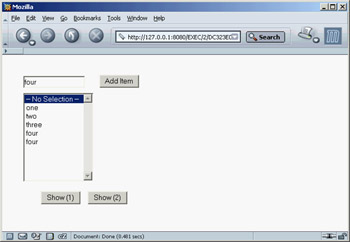
Figure 21.1: The IWSimpleApp program in a browser
As you execute the application, you won't see the program output in the browser, but rather IntraWeb's controller form, shown in Figure 21.2. A stand-alone IntraWeb application, is a full-blown HTTP server, as you'll see in more detail in the next section. The form you see is managed by the IWRun call in the project file created by default in each stand-alone IntraWeb application. The debug form allows you to select a browser and run the application through it or copy the URL of the application to the Clipboard, so you can paste it within your browser. It's important to know that the application will by default use a random port number, which is different for each execution; so, you'll have to use a different URL every time. You can modify this behavior by selecting the server controller's designer (similar to a data module) and setting the port property. In the example I've used 8080 (one of the common HTTP ports), but any other value will do.
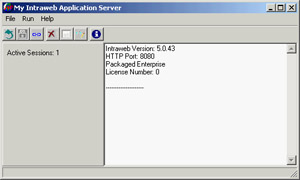
Figure 21.2: The controller form of a stand-alone IntraWeb application
IntraWeb code is mainly server side, but IntraWeb also generates JavaScript to control some application features; you can also execute extra code on the client side. You do so by using specific client-side IntraWeb components or by writing your own custom JavaScript code. As a comparison, the two buttons at the bottom of the form in the IWSimpleApp example show a message box using two different approaches.
The first of these two buttons (IWButton2) shows a message using a server-side event, with this Delphi code:
procedure TformMain.IWButton2Click(Sender: TObject);
var
 nItem: Integer;
begin
 nItem := IWListbox1.ItemIndex;
 if nItem >= 0 then
 WebApplication.ShowMessage (IWListBox1.Items [nItem])
 else
 WebApplication.ShowMessage ('No item selected');
end;
The second of these two buttons (IWButton3) uses JavaScript, which is inserted in the Delphi program by setting the proper JavaScript event handler in the special property editor for the ScriptEvents property:

A First Look Behind the Scenes
You have seen that creating an IntraWeb application is as simple as creating a Delphi form-based program: You place components on a form and handle their events. Of course, the effect is rather different, because the application runs in a browser. To give you a feel for what's going on, let's briefly look behind the scenes of this simple program. Doing so should help you understand the effect of setting the component properties and of working with them in general.
This is a browser-based program, so there is no better way to understand it than by looking at the HTML it sends to the browser. Open the source of the IWSimpleApp program's page (not listed here, because it would waste too much book space), and you'll notice it is divided into three main sections. The first is a list of styles (based on the HTTP style tag) with lines like the following:
.IWEDIT1CSS {position:absolute;left:40;top:40;z-index:100;
 font-style:normal;font-size:10pt;text-decoration:none;}
IntraWeb uses styles to determine not only the visual appearance of each component, such as its font and color, but also the component's position, using default absolute positioning. Each style is affected by a number of the IntraWeb component's properties, so you can easily experiment if you have some knowledge of style sheets. If you aren't familiar with style sheets, just use the properties and trust that IntraWeb will do its best to render the components in the web page.
The second block consists of JavaScript scripting. The main script block contains initialization code and the code of client-side event handlers for the components, like the following:
function IWBUTTON1_OnClick(ASender) {
 return SubmitClickConfirm('IWBUTTON1','', true, '');
}
This handler invokes the corresponding server-side code. If you've provided the JavaScript code directly in the IntraWeb application, as discussed earlier, you'll see this code:
function IWBUTTON3_onClick(ASender) {
 window.alert(ASender.value);
}
The scripting section of the page has also references to other files required by the browser and made available by IntraWeb. Some of these files are generic; others are tied to the specific browser: IntraWeb detects the browser being used and returns different JavaScript code and base JavaScript files.
| Note |
Because JavaScript is not identical on all browsers, IntraWeb supports only some of them, including all recent versions of Microsoft Internet Explorer, Netscape Navigator, and the open-source Mozilla (which I've used while writing this chapter). Opera has more limited JavaScript support, so by default if it is recognized IntraWeb will issue an error (depending on the SupportedBrowsers property of the controller). Opera can be used with the free Arcana components and will officially be supported in IW 5.1. Keep in mind that a browser can fake its identity: For example, Opera is often set to identify itself as Internet Explorer, preventing a proper identification to make it possible to use sites restricted to other browsers, but possibly leading to run time errors or inconsistencies. |
The third part of the generated HTML is the definition of the page structure. Inside the body tag is a form tag (on the same line) with the next action to be executed:
<form onsubmit="return FormDefaultSubmit();" name="SubmitForm"
 action="/EXEC/3/DC323E01B09C83224E57E240" method="POST">
The form tag hosts the specific user interface components, such as buttons and edit boxes:
<input type="TEXT" name="IWEDIT1" size="17" value="four"
 id="IWEDIT1" class="IWEDIT1CSS">
<input value="Add Item" name="IWBUTTON1" type="button"
 onclick="return IWBUTTON1_OnClick(this);"
 id="IWBUTTON1" class="IWBUTTON1CSS">
The form has also a few hidden components that IntraWeb uses to pass information back and forth. However, the URL is the most important way to pass information in IntraWeb; in the program it looks like this:
http://127.0.0.1:8080/EXEC/2/DC323E01B09C83224E57E240
The first part is the IP address and port used by the stand-alone IntraWeb application (it changes when you use a different architecture to deploy the program), followed by the EXEC command, a progressive request number, and a session ID. We'll get back to session later on, but suffice to say that IntraWeb uses a URL token instead of cookies to make its applications available regardless of browser settings. If you prefer, you can use cookies instead of URLs by changing the TrackMode property in the server controller.
| Warning |
The version of IntraWeb that shipped with Delphi 7 had a bug involving cookies and some time zone settings. It has been fixed, and the patch is available as a free update on the Atozed software website. |
IntraWeb Architectures
Before I write more examples to demonstrate the use of other IntraWeb components available in Delphi 7, let's discuss another key element of IntraWeb: the different architectures you can use to create and deploy applications based on this library. You can create IntraWeb projects in Application mode (which accounts for all of the features of IntraWeb) or Page mode (which is a simplified version you can plug into existing Delphi WebBroker or WebSnap applications). Application mode applications can be deployed as ISAPI libraries, Apache modules, or by using IntraWeb Standalone mode (a variation of the Application mode architecture). Page mode programs can be deployed as any other WebBroker application (ISAPI, Apache module, CGI, etc.). IntraWeb features three different but partially overlapping architectures:
Standalone Mode Provides you with a custom web server, as in the first example you built. This is handy for debugging the application (because you can run it from the Delphi IDE and place breakpoints anywhere in the code). You can also use Standalone mode to deploy applications on internal networks (intranets) and to let users work in offline mode on their own computers, with a web interface. If you run a stand-alone IntraWeb program with the –install flag, it will run as a service, and the dialog box won't appear. Standalone mode gives you a way to deploy an Application mode IntraWeb program using IntraWeb itself as web server.
Application Mode Allows you to deploy an IntraWeb application on a commercial server, building an Apache module or an IIS library. Application mode includes session management and all the IntraWeb features and is the preferred way to deploy a scalable application for use on the Web. To be precise, Application mode IntraWeb programs can be deployed as stand-alone programs, ISAPI libraries, or Apache modules.
Page Mode Opens a way to integrate IntraWeb pages in WebBroker and WebSnap applications. You can add features to existing programs or rely on other technologies for portions of a dynamic site based on HTML pages, while providing the interactive portions with IntraWeb. Page mode is the only choice for using IntraWeb in CGI applications, but it lacks session-management features. Stand-alone IntraWeb servers do not support Page mode.
In the examples in the rest of the chapter, I'll use Standalone mode for simplicity and easier debugging, but I'll also cover Page mode support.
Building IntraWeb Applications
When you build an IntraWeb application, a number of components are available. For example, if you look at the IW Standard page of Delphi's Component Palette, you'll see an impressive list of core components, from the obvious button, check box, radio button, edit box, list box, memo, and so on to the intriguing tree view, menu, timer, grid, and link components. I won't list each component and describe its use with an example—I'd rather use some of the components in a few demos and underline the architecture of IntraWeb rather than specific details.
I've built an example (called IWTree) showcasing the menu and tree view components of IntraWeb but also featuring the creation of a component at run time. This handy component makes available in a dynamic menu the content of a standard Delphi menu, by referring its AttachedMenu property to a TMenu component:
object MainMenu1: TMainMenu
 object Tree1: TMenuItem
 object ExpandAll1: TMenuItem
 object CollapseAll1: TMenuItem
 object N1: TMenuItem
 object EnlargeFont1: TMenuItem
 object ReduceFont1: TMenuItem
 end
 object About1: TMenuItem
 object Application1: TMenuItem
 object TreeContents1: TMenuItem
 end
end
object IWMenu1: TIWMenu
 AttachedMenu = MainMenu1
 Orientation = iwOHorizontal
end
If the menu items handle the OnClick event in the code, they become links at run time. You can see an example of a menu in a browser in Figure 21.3. The example's second component is a tree view with a set of predefined nodes. This component has a lot of JavaScript code to let you expand and collapse nodes directly in the browser (with no need to call back the server). At the same time, the menu items allow the program to operate on the menu by expanding or collapsing nodes and changing the font. Here is the code for a couple of event handlers:
procedure TformTree.ExpandAll1Click(Sender: TObject);
var
 i: Integer;
begin
 for i := 0 to IWTreeView1.Items.Count - 1 do
 IWTreeView1.Items [i].Expanded := True;
end;

procedure TformTree.EnlargeFont1Click(Sender: TObject);
begin
 IWTreeView1.Font.Size := IWTreeView1.Font.Size + 2;
end;
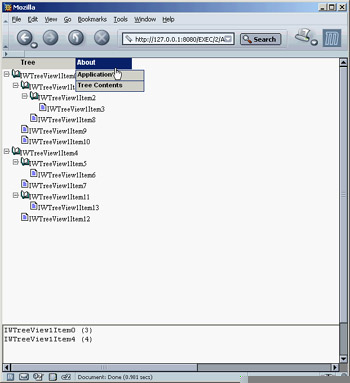
Figure 21.3: The IWTree example features a menu, a tree view, and the dynamic creation of a memo component.
Thanks to the similarity of IntraWeb components to standard Delphi VCL components, the code is easy to read and understand.
The menu has two submenus, which are slightly more complex. The first displays the application ID, which is an application execution/session ID. This identifier is available in the AppID property of the WebApplication global object. The second submenu, Tree Contents, shows a list of the first tree nodes of the main level along with the number of direct subnodes. What's interesting, though, is that the information is displayed in a memo component created at run time (see again Figure 21.3), exactly as you'll do in a VCL application:
procedure TformTree.TreeContents1Click(Sender: TObject);
var
 i: Integer;
begin
 with TIWMemo.Create(Self) do
  begin
 Parent := Self;
 Align := alBottom;
 for i := 0 to IWTreeView1.Items.Count - 1 do
 Lines.Add (IWTreeView1.Items [i].Caption + ' (' +
 IntToStr (IWTreeView1.Items [i].SubItems.Count) + ')');
 end;
end;
| Tip |
Notice that alignment in IntraWeb works similarly to its VCL counterpart. For example, this program's menu with alTop alignment, the tree view has alClient alignment, and the dynamic memo is created with alBottom alignment. As an alternative, you can use anchors (again working as in the VCL): You can create bottom-right buttons, or components in the middle of the page, with all four anchors set. See the following demos for examples of this technique. |
Writing Multipage Applications
All the programs you have built so far have had a single page. Now let's create an IntraWeb application with a second page. As you'll see, even in this case, IntraWeb development resembles standard Delphi (or Kylix) development, and is different than most other Internet development libraries. This example will also serve as an excuse to delve into some of the source code automatically generated by the IntraWeb application wizard.
Let's start from the beginning. The main form of the IWTwoForms example features an IntraWeb grid. This powerful component allows you to place within an HTML grid both text and other components. In the example, the grid content is determined at startup (in the OnCreate event handler of the main form):
procedure TformMain.IWAppFormCreate(Sender: TObject);
var
 i: Integer;
 link: TIWURL;
begin
  // set grid titles
 IWGrid1.Cell[0, 0].Text := 'Row';
 IWGrid1.Cell[0, 1].Text := 'Owner';
 IWGrid1.Cell[0, 2].Text := 'Web Site';
  // set grid contents
 for i := 1 to IWGrid1.RowCount - 1 do
  begin
 IWGrid1.Cell [i,0].Text := 'Row ' + IntToStr (i+1);
 IWGrid1.Cell [i,1].Text := 'IWTwoForms by Marco Cantù';
 link := TIWURL.Create(Self);
 link.Text := 'Click here';
 link.URL := 'http://www.marcocantu.com';
 IWGrid1.Cell [i,2].Control := link;
  end;
end;
The effect of this code is shown in Figure 21.4. In addition to the output, there are a few interesting things to notice. First, the grid component uses Delphi anchors (all set to False) to generate code that keeps it centered in the page, even if a user resizes the browser window. Second, I've added an IWURL component to the third column, but you could add any other component (including buttons and edit boxes) to the grid.
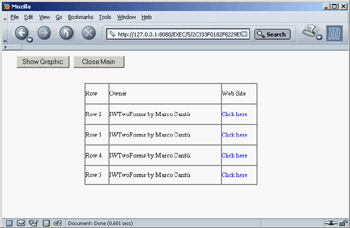
Figure 21.4: The IWTwoForms example uses an IWGrid component, embedded text, and IWURL components.
The third and most important consideration is that an IWGrid is translated into an HTML gird, with or without a frame around it. Here is a snippet of the HTML generated for one of the grid rows:
<tr>
 <td valign="middle" align="left" NOWRAP>
 <font style="font-size:10pt;">Row 2font>
 td>
 <td valign="middle" align="left" NOWRAP>
 <font style="font-size:10pt;">IWTwoForms by Marco Cantùfont>
 td>
 <td valign="middle" align="left" NOWRAP>
 <font style="font-size:10pt;">font>
 <a href="#" onclick="parent.LoadURL('http://www.marcocantu.com')"
 id="TIWURL1" name="TIWURL1"
 style="z-index:100;font-style:normal;font-size:10pt;text-decoration:none;">
 Click herea>
 td>
tr>
| Tip |
In the previous listing, notice that the linked URL is activated via JavaScript, not with a direct link. This happens because all actions in IntraWeb allow for extra client-side operations, such as validations, checks, and submits. For example, if you set the Required property for a component, if the field is empty the data won't be submitted, and you'll see a JavaScript error message (customizable by setting the descriptive FriendlyName property). |
The core feature of the program is its ability to show a second page. To accomplish this, you first need to add a new IntraWeb page to the application, using the Application Form option on the IntraWeb page of Delphi's New Items dialog box (File ® New ® Other). Add to this page a few IntraWeb components, as usual, and then add to the main form a button or other control you'll use to show the secondary form (with the reference anotherform stored in a field of the main form):
procedure TformMain.btnShowGraphicClick(Sender: TObject);
begin
 anotherform := TAnotherForm.Create(WebApplication);
 anotherform.Show;
end;
Even if the program calls the Show method, it can be considered like a ShowModal call, because IntraWeb considers visible pages as a stack. The last page displayed is on the top of the stack and is displayed in the browser. By closing this page (hiding or destroying it), you re-display the previous page. In the program, the secondary pages closes itself by calling the Release method, which as in the VCL is the proper way to dispose of a currently executing form. You can also hide the secondary form and then display it again, to avoid re-creating it each time (particularly if doing so implies losing the user's editing operations).
| Warning |
In the program I added a Close button to the main form. It should not call Release, but rather should invoke the WebApplication object's Terminate method, passing the output message, as in WebApplication .Terminate('Goodbye!'). The demo uses an alternative call: TerminateAndRedirect. |
Now that you have seen how to create an IntraWeb application with two forms, let's briefly examine how IntraWeb creates the main form. The relevant code, generated by the IntraWeb wizard as you create a new program, is in the project file:
begin
 IWRun(TFormMain, TIWServerController);
This is different from Delphi's standard project file, because it calls a global function instead of applying a method to a global object representing the application. The effect, though, is quite similar. The two parameters are the classes of the main form and of the IntraWeb controller, which handle sessions and other features as you'll see in a while.
The secondary form of the IWTwoForms example shows another interesting feature of IntraWeb: its extensive graphics support. The form has a graphical component with the classic Delphi Athena image. This is accomplished by loading a bitmap into the an IWImage component: IntraWeb converts the bitmap into a JPEG, stores it in a cache folder created under the application folder, and returns a reference to it, with the following HTML:
<img src="/cache/JPG1.tmp" name="IWIMAGE1" border="0" width="153" height="139">
The extra feature provided by IntraWeb and exploited by the program is that a user can click on the image with the mouse to modify the image by launching server-side code. In this program, the effect is to draw small green circles.

This effect is obtained with the following code:
procedure Tanotherform.IWImage1MouseDown(ASender: TObject;
 const AX, AY: Integer);
var
 aCanvas: TCanvas;
begin
 aCanvas := IWImage1.Picture.Bitmap.Canvas;
 aCanvas.Pen.Width := 8;
 aCanvas.Pen.Color := clGreen;
 aCanvas.Ellipse(Ax - 10, Ay - 10, Ax + 10, Ay + 10);
end;
| Warning |
The painting operation takes place on the bitmap canvas. Do not try to use the Image canvas (as you can do with the VCL's TImage component), and do not try to use a JPEG in the first place, or you'll see either no effect or a run-time error. |
Sessions Management
If you've done any web programming, you know that session management is a complex issue. IntraWeb provides predefined session management and simplifies the way you work with sessions. If you need session data for a specific form, all you have to do is add a field to that form. The IntraWeb forms and their components have an instance for each user session. For example, in the IWSession example, I've added to the form a field called FormCount. As a contrast, I've also declared a global unit variable called GlobalCount, which is shared by all the instances (or sessions) of the application.
To increase your control over session data and let multiple forms share it, you can customize the TUserSession class that the IntraWeb Application Wizard places in the ServerController unit. In the IWSession example, I've customized the class as follows:
type
 TUserSession = class
 public
 UserCount: Integer;
 end;
IntraWeb creates an instance of this object for each new session, as you can see in the IWServerControllerBaseNewSession method of the TIWServerController class in the default ServerController unit:
procedure TIWServerController.IWServerControllerBaseNewSession(
 ASession: TIWApplication; var VMainForm: TIWAppForm);
begin
 ASession.Data := TUserSession.Create;
end;
In an application's code, the session object can be referenced by accessing the Data field of the RWebApplication global variable, used to access the current user's session.
| Note |
RWebApplication is a threadvar variable, defined in the IWInit unit. It gives you access to the session data in a thread-safe way: you need to take special care to access it even in a multi-threading environment. This variable can be used outside of a form or control (which are natively session-based), which is why it is primarily used inside data modules, global routines, and non-IntraWeb classes. |
Again, the default ServerController unit provides a helper function you can use:
function UserSession: TUserSession;
begin
 Result := TUserSession(RWebApplication.Data);
end;
Because most of this code is generated for you, after adding data to the TUserSession class you simply use it through the UserSession function, as in the following code extracted from the IWSession example. When you click a button, the program increases several counters (one global and two session-specific) and shows their values in labels:
procedure TformMain.IWButton1Click(Sender: TObject);
begin
 InterlockedIncrement (GlobalCount);
 Inc (FormCount);

 Inc (UserSession.UserCount);

 IWLabel1.Text := 'Global: ' + IntToStr (GlobalCount);
 IWLabel2.Text := 'Form: ' + IntToStr (FormCount);
 IWLabel3.Text := 'User: ' + IntToStr (UserSession.UserCount);
end;
Notice that the program uses Windows' InterlockedIncrement call to avoid concurrent access to the global shared variable by multiple threads. Alternative approaches include using a critical section or Indy's TidThreadSafeInteger (found in the IdThreadsafe unit).
Figure 21.5 shows the output of the program (with two sessions running in two different browsers). The program has also a check box that activates a timer. Odd as it sounds, in an IntraWeb application, timers work almost the same as in Windows. When the timer interval expires, code is executed. Over the Web, this means refreshing the page by triggering a refresh in the JavaScript code:
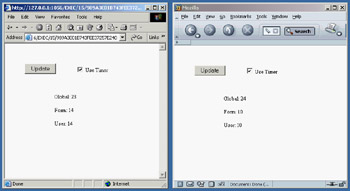
Figure 21.5: The IWSession application has both session-specific and global counters, as you can see by running two sessions in two different browsers (or even in the same browser).
IWTIMER1=setTimeout('SubmitClick("IWTIMER1","", false)',5000);
Integrating with WebBroker (and WebSnap)
Up to now, you have built stand-alone IntraWeb applications. When you create an IntraWeb application in a library to be deployed on IIS or Apache, you are basically in the same situation. Things change considerably, however, if you want to use IntraWeb Page mode, which is integrated in an IntraWeb page in a WebBroker (or WebSnap) Delphi application.
The bridge between the two worlds is the IWPageProducer component. This component hooks to a WebBroker action like any other page producer component and has a special event you can use to create and return an IntraWeb form:
procedure TWebModule1.IWPageProducer1GetForm(ASender: TIWPageProducer;
 AWebApplication: TIWApplication; var VForm: TIWPageForm);
begin
 VForm := TformMain.Create(AWebApplication);
end;
With this single line of code (plus the addition of an IWModuleController component in the web module), the WebBroker application can embed an IntraWeb page, as the CgiIntra program does. The IWModuleController component provides core services for IntraWeb support. A component of this type must exist in every project for IntraWeb to work properly.
| Warning |
The release that comes with Delphi 7 has a problem with Delphi's Web App Debugger and the IWModuleController component. This issue has been fixed and is a free update. |
Here is a summary of the DFM of the example program's web module:
object WebModule1: TWebModule1
 Actions = <
 item
 Default = True
 Name = 'WebActionItem1'
 PathInfo = '/show'
 OnAction = WebModule1WebActionItem1Action
    end
    item
 Name = 'WebActionItem2'
 PathInfo = '/iwdemo'
 Producer = IWPageProducer1
 end>
 object IWModuleController1: TIWModuleController
 object IWPageProducer1: TIWPageProducer
 OnGetForm = IWPageProducer1GetForm
  end
end
Because this is a Page mode CGI application, it has no session management. Moreover, the status of the components in a page is not automatically updated by writing event handlers, as in a standard IntraWeb program. To accomplish the same effect you need to write specific code to handle further parameters of the HTTP request. It should be clear even from this simple example that Page mode does less for you than Application mode, but it's more flexible. In particular, IntraWeb Page mode allows you to add visual RAD design capabilities to your WebBroker and WebSnap applications.
Controlling the Layout
The CgiIntra program features another interesting technology available in IntraWeb: the definition of a custom layout based on HTML. (That topic isn't really related, because HTML layouts work also in Application mode—but I've happened to use these two techniques in a single example.) In the programs built so far, the resulting page is the mapping of a series of components placed at design time on a form, in which you can use properties to modify the resulting HTML. But what if you want to embed a data-entry form within a complex HTML page? Building the entire page contents with IntraWeb components is awkward, even if you can use the IWText component to embed a custom piece of HTML within an IntraWeb page.
The alternative approach is represented by the use of IntraWeb's layout managers. In IntraWeb you invariably use a layout manager; the default is the IWLayoutMgrForm component. The other two alternatives are IWTemplateProcessorHTML for working with an external HTML template file and IWLayoutMgrHTML for working with internal HTML.
This second component includes a powerful HTML editor you can use to prepare the generic HTML as well as embed the required IntraWeb components (something you'll have to do manually with an external HTML editor). Moreover, as you select an IntraWeb component from this editor (which is activated by double-clicking on an IWLayoutMgrHTML component), you'll be able to use Delphi's Object Inspector to customize the component's properties. As you can see in Figure 21.6, the HTML Layout Editor available in IntraWeb is a powerful visual HTML editor; the HTML text it generates is available in a separate page. (The HTML editor will be improved in a coming upgrade, and a few quirks will be fixed.)
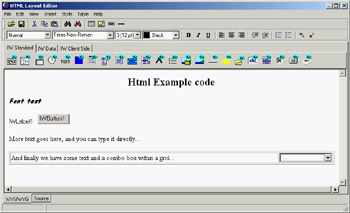
Figure 21.6: IntraWeb's HTML Layout Editor is a full-blown visual HTML editor.
In the generated HTML, the HTML defines the structure of the page. The components are marked only with a special tag based on curly braces, as in the following of the example:
<P> {%IWLabel1%} {%IWButton1%}P>
| Tip |
Notice that when you're using HTML the components don't use absolute positioning but flow along with the HTML. Thus the form becomes only a component holder, because the size and position of the form's components are ignored. |
Needless to say, the HTML you see in the visual designer of the HTML Layout Editor corresponds almost perfectly to the HTML you'll see when running the program in a browser.
Web Database Applications
As in Delphi's libraries, a significant portion of IntraWeb's available controls relates to the development of database applications. The IntraWeb Application Wizard has a version that allows you to create an application with a data module—a good starting point for the development of a database application. In such a case, the application's predefined code creates an instance of the data module for each session, saving it in the session's data.
Here is the predefined TUserSession class (and its constructor) for an IntraWeb application with a data module:
type
 TUserSession = class(TComponent)
 public
 DataModule1: TDataModule1;
 constructor Create(AOwner: TComponent); override;
 end;

constructor TUserSession.Create(AOwner: TComponent);
begin
 inherited;
 Datamodule1 := TDatamodule1.Create(AOwner);
end;
The unit of the data module doesn't have a global variable for it; if it did, all the data would be shared among all sessions, with severe risks of trouble in case of concurrent requests in multiple threads. However, the data module already exposes a global function having the same name as the global variable Delphi would use, accessing the current session's data module:
function DataModule1: TDataModule1;
begin
 Result := TUserSession(RWebApplication.Data).Datamodule1;
end;
This means you can write code like the following:
DataModule1.SimpleDataSet1
But instead of accessing a global data module, you are using the current session's data module.
In the first sample program featuring database data, called IWScrollData, I've added to the data module a SimpleDataSet component and to the main form an IWDBGrid component with the following configuration:
object IWDBGrid1: TIWDBGrid
 Anchors = [akLeft, akTop, akRight, akBottom]
 BorderSize = 1
 CellPadding = 0
 CellSpacing = 0
 Lines = tlRows
 UseFrame = False
 DataSource = DataSource1
 FromStart = False
 Options = [dgShowTitles]
 RowAlternateColor = clSilver
 RowLimit = 10
 RowCurrentColor = clTeal
end
The most important settings are the removal of a frame hosting the control with its own scroll bars (the UseFrame property), the fact that the data is displayed form the current data set position (the FromStart property), and the number of rows to be displayed in the browser (the RowLimit property). In the user interface, I've removed vertical lines and colored alternate rows. I also had to set up a color for the current row (the RowCurrentColor property); otherwise the alternate colors won't appear to work properly, since the current row is the same color as the background rows, regardless of its position (set the RowCurrentColor property to clNone to see what I mean). These settings produce the effect you can see in Figure 21.7 or by running the IWScrollData example.
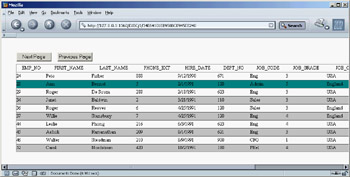
Figure 21.7: The data-aware grid of the IWScrollData example
The program opens the data set when the form is created, using the data set hooked to the current data source:
procedure TformMain.IWAppFormCreate(Sender: TObject);
begin
 DataSource1.DataSet.Open;
end;
The example's relevant code is in the button code, which can be used to move through the data showing the following page or returning to the previous one. Here is the code for one of the two methods (the other is omitted, because it's very similar):
procedure TformMain.btnNextClick(Sender: TObject);
var
 i: Integer;
begin
 nPos := nPos + 10;
 if nPos > DataSource1.DataSet.RecordCount - 10 then
 nPos := DataSource1.DataSet.RecordCount - 10;
 DataSource1.DataSet.First;
 for i := 0 to nPos do
 DataSource1.DataSet.Next;
end;
Linking to Details
The grid of the IWScrollData example shows a single page of a table's data; buttons let you scroll up and down the pages. An alternative grid style in IntraWeb is offered by framed grids, which can move larger amounts of data to the web browser within a screen area of a fixed size using a frame and an internal scroll bar, as a Delphi ScrollBox control does. This is demonstrated by the IWGridDemo example.
The example customizes the grid in a second powerful way: It sets the Columns collection property of the grid. This setting allows you to fine-tune the output and behavior of specific columns, for example by showing hyperlinks or handling clicks on items or title cells. In the IWGridDemo example, one of the columns (the last name) is turned into a hyperlink; the employee number is passed as a parameter to the follow-up command, as you can see in Figure 21.8.
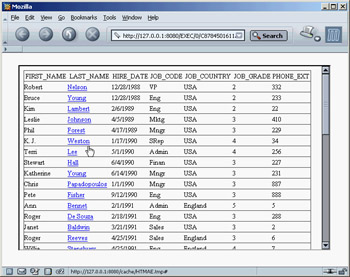
Figure 21.8: The main form of the IWGridDemo example uses a framed grid with hyperlinks to the secondary form.
Listing 21.1 shows a summary of the grid's key properties. Notice in particular the last name column, which as mentioned has a linked field (which turns the cell's text into a hyperlink) and an event handler responding to its selection. In this method, the program creates a secondary form in which a user can edit the data:
procedure TGridForm.IWDBGrid1Columns1Click(ASender: TObject;
 const AValue: String);
begin
 with TRecordForm.Create (WebApplication) do
 begin
 StartID := AValue;
 Show;
 end;
end;
Listing 21.1: Properties of the IWDBGrid in the IWGridDemo Example
object IWDBGrid1: TIWDBGrid
 Anchors = [akLeft, akTop, akRight, akBottom]
 UseFrame = True
 UseWidth = True
 Columns = <
 item
 Alignment = taLeftJustify
 BGColor = clNone
 DoSubmitValidation = True
 Font.Color = clNone
 Font.Enabled = True
 Font.Size = 10
 Font.Style = []
 Header = False
 Height = '0'
 VAlign = vaMiddle
 Visible = True
 Width = '0'
 Wrap = False
 BlobCharLimit = 0
 CompareHighlight = hcNone
 DataField = 'FIRST_NAME'
 Title.Alignment = taCenter
 Title.BGColor = clNone
 Title.DoSubmitValidation = True
 Title.Font.Color = clNone
 Title.Font.Enabled = True
 Title.Font.Size = 10
 Title.Font.Style = []
 Title.Header = False
 Title.Height = '0'
 Title.Text = 'FIRST_NAME'
 Title.VAlign = vaMiddle
 Title.Visible = True
 Title.Width = '0'
 Title.Wrap = False
    end
    item
 DataField = 'LAST_NAME'
 LinkField = 'EMP_NO'
 OnClick = IWDBGrid1Columns1Click
    end
    item
 DataField = 'HIRE_DATE'
    end
    item
 DataField = 'JOB_CODE'
    end
    item
 DataField = 'JOB_COUNTRY'
    end
    item
 DataField = 'JOB_GRADE'
    end
    item
 DataField = 'PHONE_EXT'
 end>
 DataSource = DataSource1
 Options = [dgShowTitles]
end
By setting the second form's StartID property, you can locate the proper record:
procedure TRecordForm.SetStartID(const Value: string);
begin
 FStartID := Value;
 DataSource1.DataSet.Locate('EMP_NO', Value, []);
end;
| Tip |
The IWDBGrid columns have also an OnTitleClick event you can handle to sort the data or perform other operations on the column. |
The secondary form is hooked to the same data module as the main form. So, after the database data is updated, you can see it in the grid (but the updates are kept only in memory, because the program doesn't have an ApplyUpdates call). The secondary form uses a few edit controls and a navigator, provided by IntraWeb. You can see this form at run time in Figure 21.9.
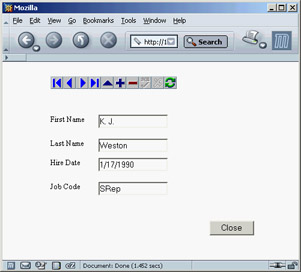
Figure 21.9: The secondary form of the IWGridDemo example allows a user to edit the data and navigate through records.
Moving Data to the Client Side
Regardless of how you use it, the IWDBGrid component produces HTML with the database data embedded in the cells, but it cannot work on the data on the client side. A different component (or a set of IntraWeb components) allows you to follow a different model. The data is sent to the browser in a custom format, and the JavaScript code on the browser populates a grid and operates on the data, moving from record to record without asking more data to the server.
| Note |
This architecture is similar to Delphi's native Internet Express architecture, which I'll cover in Chapter 22 ("Using XML Technologies"). |
You can use several IntraWeb components for a client-side application, but these are the most important ones:
IWClientSideDataSet An in-memory dataset you define by setting the ColumnNames and Data properties within your program's code. In future updates, you will be able to edit client-side data, sort it, filter it, define master-detail structures, and more.
IWClientSideDataSetDBLink A data provider you can connect to any Delphi dataset, connecting it with the DataSource property.
IWDynGrid A dynamic grid component connected to one of the two previous components using the Data property. This component moves all the data to the browser and can operate on it on the client via JavaScript.
There are other client-side components in IntraWeb, such as IWCSLabel, IWCSNavigator, and IWDynamicChart (which works only with Internet Explorer). As an example of using this approach, I've built the IWClientGrid example. The program has little code, because there is a lot available in the components being used. Here are the core elements of its main form:
object formMain: TformMain
 SupportedBrowsers = [brIE, brNetscape6]
 OnCreate = IWAppFormCreate
 object IWDynGrid1: TIWDynGrid
 Align = alClient
 Data = IWClientSideDatasetDBLink1
 end
 object DataSource1: TDataSource
 Left = 72
 Top = 88
 end
 object IWClientSideDatasetDBLink1: TIWClientSideDatasetDBLink
 DataSource = DataSource1
 end
end
The dataset from the data module is hooked to the DataSource when the form is created. The resulting grid, shown in Figure 21.10, allows you to sort the data on any cell (using the small arrow after the column title) and filter the data displayed on one of the field's possible values. In the figure, for example, you can sort the employee data by last name and filter it by country and job grade.
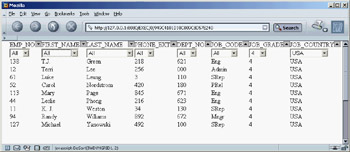
Figure 21.10: The grid of the IWClientGrid example supports custom sorting and filtering without re-fetching the data on the web server.
This functionality is possible because the data is moved to the browser within the JavaScript code. Here is a snippet of one of the scripts embedded in the page's HTML:
<script language="Javascript1.2">
var IWDYNGRID1_TitleCaptions =
 ["EMP_NO","FIRST_NAME","LAST_NAME","PHONE_EXT",
  "DEPT_NO","JOB_CODE","JOB_GRADE","JOB_COUNTRY"];
var IWDYNGRID1_CellValues = new Array();
IWDYNGRID1_CellValues[0] = [2,'Robert','Nelson','332','600','VP',2,'USA'];
IWDYNGRID1_CellValues[1] = [4,'Bruce','Young','233','621','Eng',2,'USA'];
IWDYNGRID1_CellValues[2] = [5,'Kim','Lambert','22','130','Eng',2,'USA'];
IWDYNGRID1_CellValues[3] = [8,'Leslie','Johnson','410','180','Mktg',3,'USA'];
IWDYNGRID1_CellValues[4] = [9,'Phil','Forest','229','622','Mngr',3,'USA'];
| Note |
The reason to use this JavaScript-based approach, instead of an XML-based approach featured by other similar technologies, is that only Internet Explorer has support for XML data islands. Mozilla and Netscape lack this feature and have limited XML support in general. Mimicking it in JavaScript, as Internet Explorer does, is very expensive at run time. |
What s Next?
This chapter's description of IntraWeb's features has been far from complete, but my aim was mainly to let you evaluate this technology so you can choose whether to use it in your forthcoming Delphi projects. IntraWeb is so powerful that you now have a good reason to build web applications in Delphi, instead of resorting to other development tools.
You can read much more about IntraWeb in the documentation, found on the Delphi Companion CD (not on the main CD). Delphi's default installation includes the IntraWeb demos, including the extensive Features example that shows at once most of the features of this component library. Also refer to the IntraWeb website (www.atozedsoftware.com) for updates and further documentation and examples.
In this book, we have another alternative web development approach to cover, based on XML and XSLT. Chapter 22 is devoted to a complete roundup of XML-related technologies from the Delphi perspective. So, we'll have another chance to cover web development in Delphi, using one of the techniques I like best—but that's also one of the most complex.
Part I - Foundations
- Delphi 7 and Its IDE
- The Delphi Programming Language
- The Run-Time Library
- Core Library Classes
- Visual Controls
- Building the User Interface
- Working with Forms
Part II - Delphi Object-Oriented Architectures
- The Architecture of Delphi Applications
- Writing Delphi Components
- Libraries and Packages
- Modeling and OOP Programming (with ModelMaker)
- From COM to COM+
Part III - Delphi Database-Oriented Architectures
- Delphis Database Architecture
- Client/Server with dbExpress
- Working with ADO
- Multitier DataSnap Applications
- Writing Database Components
- Reporting with Rave
Part IV - Delphi, the Internet, and a .NET Preview
- Internet Programming: Sockets and Indy
- Web Programming with WebBroker and WebSnap
- Web Programming with IntraWeb
- Using XML Technologies
- Web Services and SOAP
- The Microsoft .NET Architecture from the Delphi Perspective
- Delphi for .NET Preview: The Language and the RTL
- Appendix A Extra Delphi Tools by the Author
- Appendix B Extra Delphi Tools from Other Sources
- Appendix C Free Companion Books on Delphi

EAN: 2147483647
Pages: 279
