Linear Gradient Shading and Cubic Bezier Curves
|
|
|
Double Cubic Bezier Curves
Consider the double cubic Bezier curves rendered in Figure 5.6.
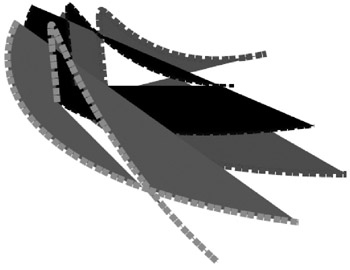
Figure 5.6: A double cubic Bezier curve.
The SVG document doubleCubicBezier1.svg in Listing 5.6 demonstrates how to render a double cubic Bezier curve.
Listing 5.6 doubleCubicBezier1.svg
 |
<?xml version="1.0" encoding="iso-8859-1"?> <!DOCTYPE svg PUBLIC "-//W3C//DTD SVG 20001102//EN" "http://www.w3.org/TR/2000/CR-SVG-20001102/DTD/svg-20001102.dtd"> <svg width="100%" height="100%"> <g transform="translate(60,-10)"> <path d="M50,50 C20,100 20,250 400,250 M100,150 C80,-80 80,150 300,100" stroke-dasharray="8 1 8 4" fill="blue" style="stroke:#880000;stroke-width:8;"/> </g> <g transform="translate(20,-20)"> <path d="M50,50 C20,100 20,250 400,200 M100,150 C80,-80 80,150 300,150" stroke-dasharray="8 1 8 4" fill="444444" style="stroke:#000044;stroke-width:4;"/> </g> <g transform="translate(0,0)"> <path d="M50,50 C20,100 20,250 400,300 M100,150 C80,-80 80,150 300,350" stroke-dasharray="8 1 8 4" fill="#880088" style="stroke:red;stroke-width:8;"/> </g> </svg>
|
Remarks
The code in Listing 5.6 contains three SVG path elements, each of which specifies two cubic Bezier curves, as illustrated below:
d="m50,50 C20,100 20,250 400,300 M100,150 C80,-80 80,150 400,400"
Although you've already seen examples that combine multiple Bezier curves, the interesting feature of this particular example is the color pattern of the graphics image. You probably expected to see two overlapping cubic Bezier curves; instead, the overlapping portion of the Bezier curves is white! This counter-intuitive color pattern creates the impression of two quasi orthogonal cubic Bezier curves.
|
|
|

EAN: 2147483647
Pages: 362