Digital Search Trees
It's been a while since we've had a game. The rules of Ghost are given in Figure 14-21.
|
Ghost |
|---|
|
Players: 2 or more |
|
Object: To avoid completing a word. |
|
Play: Each player in turn names a letter. There must exist a word which starts with the sequence of letters named so far. If a player completes a word (at least three letters long), he loses. |
|
For simplicity, we play only a single game and omit the scoring system. |
A sample game is shown in Figure 14-22.
Figure 14-22. A sample game of Ghost.
1 Welcome to Ghost. 2 3 The word so far: 4 Your letter? a 5 I choose d. 6 The word so far: ad 7 Your letter? v 8 I choose a. 9 The word so far: adva 10 Your letter? n 11 I choose t. 12 The word so far: advant 13 Your letter? a 14 I choose g. 15 The word so far: advantag 16 Your letter? e 17 That completes the word 'advantage'. You lose. |
The key problem for the program is to find a word that starts with a given prefix. This could be done by searching a general-purpose Set, but there is a better way. The entire word set can be represented as a digital search tree (Figure 14-23). Words are represented as paths through the tree. Each child of a node is associated with a letter. If a path corresponds to a word, the node at the end is marked.
Figure 14-23. A digital search tree containing the words "gar," "garden," "ghost," "ghoul," and "grab." Shaded nodes indicate the ends of words.
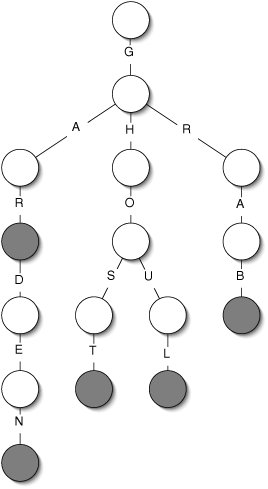
As we play Ghost, we keep track of the current node. Whenever the user enters a letter, we descend to the appropriate child. If there is no such child, the user loses. When we need to pick a letter, we randomly choose a child and the corresponding letter. (Better strategy is explored in Project 14.24.)
The digital search tree is implemented in a straightforward linked way (Figure 14-24). A Map is used to associate letters (Characters) with child nodes.
Figure 14-24. UML class diagram of our Ghost program. An instance of the Ghost class contains a DigitalNode, which contains a Map associating Characters with child DigitalNodes.
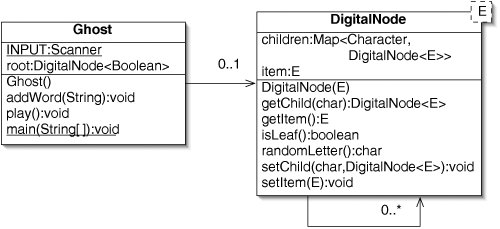
The code for the DigitalNode class is given in Figure 14-25. General-purpose interfaces like Map and Set pay off handsomely here. On line 37, we give the full name of java.util.Set to distinguish it from our own Set interface, which is likely to be in the same directory. The DigitalNode class is generic, because we will use it in a different way in Section 17.2.
Figure 14-25. The DigitalNode class.
| 1 import java.util.*; 2 3 /** Node in a digital search tree. */ 4 public class DigitalNode { 5 6 /** Map associating Characters with child nodes. */ 7 private Map> children; 8 9 /** True if this node is the end of a word. */ 10 private E item; 11 12 /** A new node has no children. */ 13 public DigitalNode(E item) { 14 children = new HashMap>(1); 15 this.item = item; 16 } 17 18 /** Return the child associated with c. */ 19 public DigitalNode getChild(char c) { 20 return children.get(c); 21 } 22 23 /** Return the item stored at this node. */ 24 public E getItem() { 25 return item; 26 } 27 28 /** Return true if this node is a leaf. */ 29 public boolean isLeaf() { 30 return children.isEmpty(); 31 } 32 33 /** 34 * Choose the letter of a random child. 35 */ 36 public char randomLetter() { 37 java.util.Set letters = children.keySet(); 38 int i = (int)(Math.random() * letters.size()); 39 for (char letter : letters) { 40 if (i == 0) { 41 return letter; 42 } 43 i--; 44 } 45 return '?'; // This should never happen 46 } 47 48 /** Associate c with child. */ 49 public void setChild(char c, DigitalNode child) { 50 children.put(c, child); 51 } 52 53 /** Set the item associated with this node. */ 54 public void setItem(E item) { 55 this.item = item; 56 } 57 58 } |
The easy parts of the Ghost class are listed in Figure 14-26.
Figure 14-26. Easy parts of the Ghost class.
 1 import java.util.*;
 2
 3 /** The game of Ghost. */
 4 public class Ghost {
 5
6 /** For reading from the console. */ 7 public static final Scanner INPUT = new Scanner(System.in); 8 9 /** Root of the digital search tree holding the word list. */ 10 private DigitalNode root; 11 12 /** Read in the words from the file "words.txt". */ 13 public Ghost() { 14 root = new DigitalNode(false); 15 try { 16 Scanner input = new Scanner(new java.io.File("words.txt")); 17 while (input.hasNextLine()) { 18 addWord(input.nextLine()); 19 } 20 } catch (java.io.IOException e) { 21 e.printStackTrace(); 22 System.exit(1); 23 } 24 } 25 26 /** Create and play the game. */ 27 public static void main(String[] args) { 28 Ghost game = new Ghost(); 29 System.out.println("Welcome to Ghost.
"); 30 game.play(); 31 } 32 33 } |
Of greater interest is the addWord() method (Figure 14-27). As we go through word character by character (lines 411), we descend to the appropriate child for each letter. When there is no such child, we create one (lines 69). Finally, at the end of the word, we mark the node (line 12).
Figure 14-27. Adding a word to a digital search tree.
 1 /** Add word to the digital search tree. */
 2 public void addWord(String word) {
 3 DigitalNode node = root;
 4 for (char c : word.toCharArray()) {
 5 DigitalNode child = node.getChild(c);
 6 if (child == null) {
 7 child = new DigitalNode(false);
 8 node.setChild(c, child);
 9 }
10 node = child;
11 }
12 node.setItem(true);
13 }
|
The last method is play() (Figure 14-28).
Figure 14-28. The play() method. Use of DigitalNodes is emphasized.
 1 /** Play one game. */
 2 public void play() {
 3 String word = "";
 4 DigitalNode node = root;
 5 boolean userTurn = true;
 6 char letter;
 7 while ((word.length() < 3) || !(node.getItem())) {
 8 if (userTurn) {
 9 System.out.println("The word so far: " + word);
10 System.out.print("Your letter? ");
11 letter = INPUT.nextLine().charAt(0);
12 word += letter;
13 if (node.getChild(letter) == null) {
14 System.out.println("Sorry, there is no word that starts"
15 + "with" + word + ".");
16 System.out.println("You lose.");
17 return;
18 }
19 } else {
20 if (node.isLeaf()) {
21 System.out.println("I can't think of anything"
22 + "-- you win!");
23 return;
24 }
25 letter = node.randomLetter();
26 System.out.println("I choose " + letter + ".");
27 word += letter;
28 }
29 node = node.getChild(letter);
30 userTurn = !userTurn;
31 }
32 System.out.print("That completes the word '" + word + "'. ");
33 if (userTurn) { // userTurn has been flipped
34 System.out.println("You win!");
35 } else {
36 System.out.println("You lose.");
37 }
38 }
|
Since it is nothing more than a hash table lookup, getChild() takes constant average time. This makes a digital search tree an excellent choice when searching for Strings containing a prefix that grows one character at a time.
Exercises
| 14.9 |
What is the maximum number of children a DigitalNode can have in the context of the Ghost game? Speculate on whether nodes with many children are more common near the root or near the leaves. |
| 14.10 |
Does a digital search tree have more nodes if the words it contains share many prefixes or if they do not? Explain. |
| 14.11 |
What would it mean if, in a digital search tree, the root were marked as the end of a word? |
| 14.12 |
Why, on line 14 of Figure 14-25, do we specify that the new HashMap has a capacity of 1? |
| 14.13 |
Why would direct addressing be a poor choice for associating characters with children in a digital search tree? |
| 14.14 |
On line 7 of Figure 14-28, the program checks to make sure that any completed word is at least three letters long. Modify addWord() (Figure 14-27) to make this check unnecessary. |
| 14.15 |
Add a method containsWord() to the Ghost class that returns true if a specified String is present in the digital search tree. What is the average running time of this method? Does it depend on the length of the word, the number of words in the tree, neither, or both? |
| 14.16 |
In the game of Ghost, once we hit the end of a word, the game ends. Consequently, words that contain other words as prefixes are irrelevant. Modify the Ghost program to save memory by taking advantage of this fact. |
Red Black Trees |
Part I: Object-Oriented Programming
Encapsulation
Polymorphism
Inheritance
- Inheritance
- Extending a Class
- The Object Class
- Packages and Access Levels
- Summary
- Vocabulary
- Problems
- Projects
Part II: Linear Structures
Stacks and Queues
- Stacks and Queues
- The Stack Interface
- The Call Stack
- Exceptions
- The Queue Interface
- Summary
- Vocabulary
- Problems
- Projects
Array-Based Structures
- Array-Based Structures
- Shrinking and Stretching Arrays
- Implementing Stacks and Queues
- The List Interface
- Iterators
- The Java Collections Framework: A First Look
- Summary
- Vocabulary
- Problems
- Projects
Linked Structures
- Linked Structures
- List Nodes
- Stacks and Queues
- The LinkedList Class
- The Java Collections Framework Revisited
- Summary
- Vocabulary
- Problems
- Projects
Part III: Algorithms
Analysis of Algorithms
- Analysis of Algorithms
- Timing
- Asymptotic Notation
- Counting Steps
- Best, Worst, and Average Case
- Amortized Analysis
- Summary
- Vocabulary
- Problems
- Projects
Searching and Sorting
- Searching and Sorting
- Linear Search
- Binary Search
- Insertion Sort
- The Comparable Interface
- Sorting Linked Lists
- Summary
- Vocabulary
- Problems
- Projects
Recursion
- Recursion
- Thinking Recursively
- Analyzing Recursive Algorithms
- Merge Sort
- Quicksort
- Avoiding Recursion
- Summary
- Vocabulary
- Problems
- Projects
Part IV: Trees and Sets
Trees
Sets
- Sets
- The Set Interface
- Ordered Lists
- Binary Search Trees
- Hash Tables
- The Java Collections Framework Again
- Summary
- Vocabulary
- Problems
- Projects
Part V: Advanced Topics
Advanced Linear Structures
- Advanced Linear Structures
- Bit Vectors
- Sparse Arrays
- Contiguous Representation of Multidimensional Arrays
- Advanced Searching and Sorting
- Summary
- Vocabulary
- Problems
- Projects
Strings
Advanced Trees
- Advanced Trees
- Heaps
- Disjoint Set Clusters
- Digital Search Trees
- Red-Black Trees
- Summary
- Vocabulary
- Problems
- Projects
Graphs
- Graphs
- Terminology
- Representation
- Graph Traversal
- Topological Sorting
- Shortest Paths
- Minimum Spanning Trees
- Summary
- Vocabulary
- Problems
- Projects
Memory Management
Out to the Disk
- Out to the Disk
- Interacting with Files
- Compression
- External Sorting
- B-Trees
- Summary
- Vocabulary
- Problems
- Projects
Part VI: Appendices
A. Review of Java
- A. Review of Java
- A.1. The First Program
- A.2. Variables and Types
- A.3. Loops
- A.4. Interacting with the User
- A.5. Branching
- A.6. Methods and Breaking Out
- A.7. Constants
- A.8. Operators
- A.9. Debugging
- A.10. Coding Conventions
B. Unified Modeling Language
C. Summation Formulae
- C. Summation Formulae
- C.1. Sum Notation
- C.2. Sum of Constants
- C.3. Sum of First n Integers
- C.4. Sums of Halves and Doubles
- C.5. Upper Limit on Sum of a Function
- C.6. Constant Factors
D. Further Reading
Index

EAN: 2147483647
Pages: 216
