Indexes
Indexes are used to significantly boost the performance of queries by reducing the amount of time needed to retrieve rows from a table. However, too many indexes on a table can be just as bad as not enough indexes.
Once you decide to create an index, you need to choose which type of index will work best. After you’ve created an index, you may need to change or drop it. Before dropping an index, you may want to monitor it to see how often it is used over a given time span. Finally, you can use data dictionary views to see the structure of the indexes in the database.
When to Create Indexes
In an environment where there are frequent insert, update, and delete operations on a table, it’s wise to minimize the number of indexes on that table. For each row that is inserted, updated, or deleted, all indexes on that table must be updated also, which can increase the response time for the user and raise the load on the Oracle server.
An index on a table column makes sense when the column is frequently referenced in a WHERE clause of a SELECT statement or in a join condition. If the table is large and the query is expected to return a small percentage of the rows, an index makes sense there, too. Although there is some overhead when traversing an index looking for a column value, the overhead is far less than the time it would take to search the table itself for the value in question. Oracle’s general guideline is that an index on a column makes sense if most queries on the table are expected to retrieve less than about 4% of the rows.
NULL values are not included in an index, so an index is recommended if the table is large and a column contains a lot of NULL values. Any queries on non-NULL column values will likely use the index, while queries on NULL values in the column will not.
Index Types
Indexes can be divided into two general categories: b-tree and bitmap. They both serve the same purpose: to reduce the amount of time a query takes to retrieve rows from a table. However, they are constructed completely differently and are chosen based on the expected type and distribution of the data in the column to be indexed.
B-tree Indexes
A b-tree index looks like an inverted tree with branch blocks and leaf blocks. B-tree stands for balanced-tree, because the search of the tree for a given table column’s key value always traverses the same number of levels in the tree to find the leaf block containing the address of the desired row. B-tree indexes are the most common type of index, and are created by default. The following illustrates how a b-tree index works.
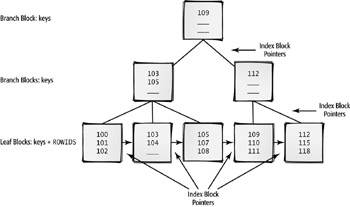
b-tree index
A type of index structure that resembles an inverted tree. The branches of a b-tree index are balanced. Traversing the tree for any index value reads the same number of blocks.
branch blocks
Index blocks in the traversal path of a b-tree index that either point to branch blocks at the next level or point to leaf blocks.
leaf blocks
Index blocks at the bottom of a b-tree index that contain ROWIDs to the rows in the table containing the desired index value.
In this example, the EMPLOYEE_ID column of the EMPLOYEES table is indexed. The b-tree has a depth of three, and each block has up to three entries. Each of the branch blocks at levels one and two contains entries that further subdivide the search and point to successive branch blocks, until the search reaches a leaf block. If the value is in a leaf block, the entry in that leaf block contains the address of the row in the table; this is called a ROWID and is unique across the entire database.
ROWID
A unique identifier for a row in a table, maintained automatically in the table by the Oracle server. ROWIDs are unique throughout the database.
 |
The pseudo-column ROWID exists for every row of every table in the database, and is unique across the entire database. It is represented externally by an 18-character string of uppercase and lowercase letters and numbers.
select dummy, rowid from dual; D ROWID - ------------------ X AAAADeAABAAAAZSAAA 1 row selected.
|
Notice that the leaf blocks are also linked horizontally. Sometimes, examining only the leaf blocks for a match, rather than starting at the root of the tree, is a more efficient way to conduct the index search.
B-tree indexes are good for columns with high cardinality, which are columns that have many distinct values. For example, a column containing last names and a column containing zip codes have high cardinality; a column containing a gender code has low cardinality.
cardinality
The number of distinct values in a column of a table.
A b-tree index can be created with a few different options:
Unique or nonunique In a unique index, there are no duplicate values. An error is returned if you try to insert two rows into a table with the same index column values. By default, an index is nonunique.
unique index
A b-tree index whose keys are not duplicated.
Keys stored in reverse order A reverse key index stores the key values in reverse order. For example, if an indexed column contains the value 40589, the value would be stored as 98504 in a reverse key index. In applications that insert rows in the ascending order of the indexed column, a reverse key index may improve the performance of applications by reducing the contention (concurrent access by several users) on a particular leaf block.
reverse key index
A b-tree index whose keys have their byte-order reversed to improve the performance of an application by spreading out the key values for adjacent index values to different leaf blocks.
Function-based An index created on some kind of transformation of one or more columns in the table is known as a function-based index. This type of index is created on an expression, instead of on a column of the database. For example, if the database users frequently search on the fourth and successive characters of the JOB_ID column, an index based solely on the JOB_ID column would not be useful to locate a row in the table. However, a function-based index on the expression substr(job_id,4) would help speed queries searching on the fourth and successive characters of the JOB_ID column.
function-based index
A b-tree index that is created based on an expression involving the columns of a table, instead of on a single column or columns in the table.
Index-organized table An index-organized table (IOT) is a specialized form of a b-tree index that stores both the data and the index in the same database segment. An IOT has advantages for tables that are primarily lookup tables. For example, a state code table, where the access of the table is primarily via the primary key, would be a good IOT candidate. When a state code lookup occurs (for example, WI), the state name (Wisconsin) resides in the index block itself, saving an extra disk I/O of a block in a standard table.
index-organized table (IOT)
A b-tree index that stores both the data and the index in the same segment.
Bitmap Indexes
Bitmap indexes are the other major type of index. As the name implies, a bitmap index uses a string of binary ones and zeros to represent the existence or nonexistence of a particular column value. For each distinct value of a column, a string of binary digits with a length equal to the number of rows in the table is stored. Therefore, bitmap indexes are recommended for indexing low-cardinality columns. Using bitmap indexes makes multiple AND and OR operations against several table columns very efficient in a query. The following illustrates how a bitmap index works.
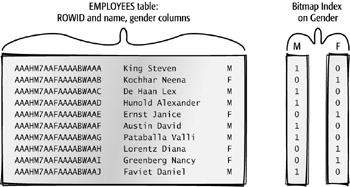
bitmap index
An index that maintains a binary string of ones and zeros for each distinct value of a column within the index.
In the example, the GENDER column has a cardinality of two, and therefore it is a good candidate for a bitmap index. Two bitmaps are maintained in the bitmap index, each with a length equal to the number of rows in the table.
Creating bitmap indexes on high-cardinality columns makes the index significantly more expensive to maintain during row insertions and deletions. Bitmap indexes for high-cardinality columns are not recommended.
| Tip | There are exceptions to every rule. If you suspect a bitmap index might work better than a b-tree index, even on a high-cardinality column, create both types of indexes on the column in question (but not at the same time!). Using the tools discussed later in this chapter, measure the resource consumption for a typical query using the indexed column in the WHERE clause, and see which type of index provides the lowest resource usage and response time. |
Bitmap indexes are common in data warehouse environments, where many low-cardinality columns exist, DML is done in bulk, and query conditions against combinations of these columns are used frequently.
Creating, Dropping, and Maintaining Indexes
The CREATE INDEX command is used to create a b-tree or bitmap index. The basic syntax for CREATE INDEX is as follows:
CREATE [BITMAP | UNIQUE] INDEX indexname ON tablename (column1, column2, ...) [REVERSE];
If BITMAP is not specified, a b-tree index is assumed. The UNIQUE keyword ensures that the indexed column or columns are unique within the table; the REVERSE keyword creates a reverse key index. The name of the index must be unique within the schema that owns the index. Indexes can be dropped with the DROP INDEX command:
DROP INDEX indexname;
At Scott’s widget company, Janice, the DBA and senior developer, has been asked to add a GENDER column to the EMPLOYEES table. She modifies the table and adds the new column using the following ALTER TABLE statement:
alter table employees add (gender char(1)); Table altered.
Over the next week or two, the HR department populates the new GENDER column with either an M or an F. As other departments start running queries against the EMPLOYEES table using the new GENDER column, they start complaining that the queries are running slower than when they run queries against an indexed column, such as EMPLOYEE_ID or DEPARTMENT_ID. Janice also knows that a copy of the EMPLOYEES table will be used in a data warehouse environment, so she decides that a bitmap index might be appropriate in this situation. She uses the BITMAP option of the CREATE INDEX statement, as follows:
create bitmap index bm_employees_gender on employees(gender); Index created.
The users also tell Janice that they don’t use the index on the employee’s name, so she drops the index on the last and first name columns:
drop index emp_name_ix; Index dropped.
Two days later, she gets a call from the HR department, requesting that the employee name index be re-created:
create index emp_name_ix on employees(last_name, first_name); Index created.
In the next section, you’ll learn how to monitor the usage of an index to get an indication of how often an index is actually being used.
As her last task for the day, Janice thinks that the primary key of the EMPLOYEES table might work better as a reverse key index, so she rebuilds the index to re-create it:
alter index emp_emp_id_pk rebuild reverse; Index altered.
| Note | In addition to converting the index type, the ALTER INDEX statement can also allow the table to remain available during the rebuild operation by using the ONLINE option. Note that more space is required in the database’s temporary tablespace for this operation. |
Monitoring Indexes
As Janice just discovered, she can’t always rely on the user community to portray an accurate picture of what indexes are actually being used. Oracle9i has a new feature that can monitor an index and set a flag in the dynamic performance view V$OBJECT_USAGE. To turn on the monitoring process, you use the MONITORING USAGE clause of the ALTER INDEX statement.
Janice wants to see if the EMP_NAME_IX index is going to be used in the next eight hours. At 9 a.m., she turns on the monitoring process with this statement:
alter index hr.emp_name_ix monitoring usage; Index altered.
She immediately checks V$OBJECT_USAGE to make sure the index is being monitored:
select index_name, table_name, monitoring, used, start_monitoring from v$object_usage where index_name = ‘EMP_NAME_IX’; INDEX_NAME TABLE_NAME MON USE START_MONITORING ------------- ---------------- --- --- ------------------- EMP_NAME_IX EMPLOYEES YES NO 11/02/2002 08:57:44 1 row selected.
During the day, one of the HR employees runs this query:
select employee_id from employees where last_name = ‘King’; EMPLOYEE_ID ----------- 100 156 2 rows selected.
At around 5 p.m., Janice checks V$OBJECT_USAGE again to see if the index was used:
select index_name, table_name, monitoring, used, start_monitoring from v$object_usage where index_name = ‘EMP_NAME_IX’; INDEX_NAME TABLE_NAME MON USE START_MONITORING ------------- ---------------- --- --- ------------------- EMP_NAME_IX EMPLOYEES YES YES 11/02/2002 08:57:44 1 row selected.
Janice has decided that the index should stay, since it was used at least once during the day. She turns off monitoring with the NOMONITORING USAGE clause and checks the V$OBJECT_USAGE view one more time to verify this.
alter index hr.emp_name_ix nomonitoring usage; Index altered. select index_name, table_name, monitoring, used, end_monitoring from v$object_usage where index_name = ‘EMP_NAME_IX’; INDEX_NAME TABLE_NAME MON USE END_MONITORING ------------ ----------------- --- --- ------------------- EMP_NAME_IX EMPLOYEES NO YES 11/02/2002 17:00:40 1 row selected.
| Note | Because V$OBJECT_USAGE is a dynamic performance view, the contents will not be retained in the view once the database is shut down and restarted. |
Data Dictionary Index Information
As you’ve learned, data dictionary views can provide you with information about all database objects. The two key data dictionary views relating to indexes that every DBA should know about are DBA_INDEXES and DBA_ IND_COLUMNS, which contain the names of the indexes and the names of the indexed columns, respectively.
DBA_INDEXES
To find out the owners, tablespace names, and index type for all indexes on the EMPLOYEES table, Janice constructs a query against the DBA_INDEXES data dictionary view, as follows:
select owner, index_name, index_type, tablespace_name from dba_indexes where table_name = ‘EMPLOYEES’; OWNER INDEX_NAME INDEX_TYPE TABLESPACE_NAME ------- -------------------- ------------- --------------- HR EMP_EMAIL_UK NORMAL EXAMPLE HR EMP_EMP_ID_PK NORMAL/REV EXAMPLE HR EMP_DEPARTMENT_IX NORMAL EXAMPLE HR EMP_JOB_IX NORMAL EXAMPLE HR EMP_MANAGER_IX NORMAL EXAMPLE HR UK1_EMPLOYEES NORMAL EXAMPLE HR BM_EMPLOYEES_GENDER BITMAP EXAMPLE HR EMP_NAME_IX NORMAL EXAMPLE 8 rows selected.
All of the indexes on the EMPLOYEES table are normal b-tree indexes, except that the primary key index EMP_EMP_ID_PK is a reverse key b-tree index, and the new BM_EMPLOYEES_GENDER index is a bitmap index.
DBA_IND_COLUMNS
To further drill down into the details of the indexes on the EMPLOYEES table, Janice queries the DBA_IND_COLUMNS table to find out which columns are in the EMP_NAME_IX index:
select index_name, table_name, column_name, column_position from dba_ind_columns where index_name = ‘EMP_NAME_IX’; INDEX_NAME TABLE_NAME COLUMN_NAME COLUMN_POSITION ------------- ------------ ------------- --------------- EMP_NAME_IX EMPLOYEES LAST_NAME 1 EMP_NAME_IX EMPLOYEES FIRST_NAME 2 2 rows selected.
From this output, Janice can determine that EMP_NAME_IX is a composite index consisting of two columns: LAST_NAME and FIRST_NAME.
