Flylib.com

Books Software


Reset Kerning and Tracking


Reset Kerning and Tracking

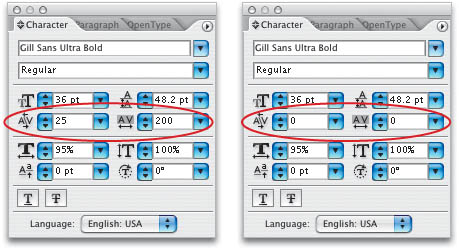
We showed you in an earlier tip how to reset all the settings in the Character and Paragraph palettes (choosing Reset Palette from the respective palette's flyout menu). If you want to keep everything else as-is but reset just the kerning and tracking to zero, here's how: To reset the tracking, highlight your text with the Type tool (T) and press Command-Option-Q (PC: Control-Alt-Q). To reset the kerning, click the Type tool where you've adjusted the kerning and use the same shortcut. Needless to say, make sure you've got the Option (PC: Alt) key held down, or you'll get a very different result!


Open and Start Editing

Here's a cool way to jump right into formatting your text if the Character palette isn't visible—or even open. Press Command-Option-Shift-M (PC: Control-Alt-Shift-M) to highlight the font field in the Character palette, which will also open the palette if necessary (whether you're using the Type tool or not).


Edit Imported Text

Chances are the text that someone typed for you may not be ideal—perhaps they used two spaces after a period, or typed in inches symbols rather than quotation marks. After placing the text file (File>Place), get Illustrator to automatically strip out all errors using Smart Punctuation. Select the text with either the Selection (V) or Type (T) tool, choose Smart Punctuation from the Type menu, then check the items you want to replace in the resulting dialog.


Reset Horizontal Scaling

To reset just the Horizontal Scale field to its default setting of 100%, without affecting all the other text settings in the Character palette (Window>Type>Character), press Command-Shift-X (PC: Control-Shift-X). You can use this tip to reset the horizontal scaling of an entire selected text block or to simply change the setting in the Character palette before you create another text object.


Set Leading to the Font Size

Here's a quick way to set the leading (the space between lines of type) to the same size as the current font size: Highlight your text with the Type tool (T), double-click on the Leading icon in the Character palette (just to the left of the Leading field). Just in case you're interested, equal font and leading sizes is known as solid leading, and it works best when your text is in all caps, so there are no descenders to bump into the type below.


Increase or Decrease Leading

To quickly increase or decrease the leading, select text with either the Selection (V) or Type (T) tool and press Option-Up or Down Arrow (PC: Alt-Up or Down Arrow). At first it might seem a little counter-intuitive because the Down Arrow key increases leading (in most palette fields, the Down Arrow makes values smaller). But when you think about it, it makes perfect sense—increased leading makes the second line of type move down, therefore we use the Down Arrow key to increase leading. Here's where it gets a little weird: If you click in the Leading field in the Character palette, the Up and Down Arrow keys work like all the other fields, so you would press the Up Arrow key to increase leading! It's all very logical—really it is!


Convert Paragraph Text

Unfortunately, there is no command to convert paragraph text (that is, text you've created using a text box) into regular point type (meaning type that is not confined to a text box). You'll have to do this conversion yourself by highlighting all the text in the text frame with the Type tool (T) and cutting it using the Command-X (PC: Control-X) keyboard shortcut. Then, deselecting the text box (Command-Shift-A [PC: Control-Shift-A]) and clicking with the Type tool on the artboard . This creates a new, single text insertion point and you can press Command-V (PC: Control-V) to paste the text. (You can tell the difference by clicking on the text with the Direct Selection tool (A), which will show a text bounding-box or a path , as seen here.)