4.5 NTLM-based authentication
NTLM is a challenge-response-based authentication protocol. It is the default authentication protocol of NT 4.0 and is—for backward compatibility—still supported in Windows 2000 and Windows Server 2003.
4.5.1 The protocol
Let’s look at the basic operation of the NTLM authentication protocol using the example of a user running Outlook XP who wants to access his or her mailbox on an Exchange server. The Exchange server is running Exchange 2000 and is installed on a Windows 2000 member server—it is a member of a Windows Server 2003 domain. The reason why we take an Outlook XP–Exchange 2000 scenario is because in Outlook 2003, Exchange 2003 Microsoft embedded support for the Kerberos authentication protocol.
In this example, the client, the Exchange server, and the domain controller will run through the following six authentication steps (as illustrated in Figure 4.9):
-
Step 1: The client tells the Exchange server the user wants to access his mailbox.
-
Step 2: The Exchange server sends an NTLM challenge (i.e., a random string) to the client.
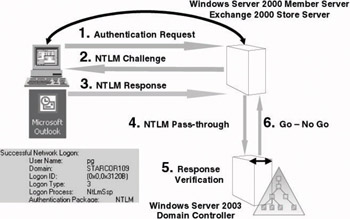
Figure 4.9: Basic NTLM authentication flow. -
Step 3: The NTLM response that the client sends back to the Exchange server consists of the server’s challenge, encrypted using the hashed version of the user password.
-
Step 4: Because the Exchange server is not a domain controller and does not have access to a secured copy of the user’s credentials (the hashed password), it will forward the NTLM response (together with the NTLM challenge) to a domain controller. The latter process is known as NTLM pass-through authentication.
-
Step 5: The domain controller validates the response it received from the domain controller by encrypting the original NTLM challenge with its local copy of the hashed user password. It then compares the result to the NTLM response that the Exchange receiver received from the client.
-
Step 6: If the two values are identical, the domain controller will inform the Exchange server that the user is authenticated. If they are not, the domain controller informs the Exchange server that the credentials the user provided are not valid to authenticate the user.
The NTLM authentication protocol consists of two subprotocols: the NT and LM protocols. This basically means that in response to the server’s NTLM challenge, the client replies with two messages: an NTLM and an LM response.
Windows 9x, Windows 3.x, DOS, and OS/2 only support LM authentication. For backward compatibility, NT 4.0, Windows 2000, Windows XP, and Windows Server 2003 support both authentication flavors. This means they can authenticate requests coming from Win9x, Windows 3.x, DOS, and OS/2 clients. By default, every NT and Windows client responds to an NTLM challenge by sending back both an NT and an LM response. In doing so, they can also authenticate against Win9x, Windows3.x, DOS, and OS/2 machines.
In addition to the two NTLM authentication protocols (the NT and LM protocols), Microsoft also offers an enhanced version of NTLM— called NTLMv2—from NT4 SP4 on. One of the advanced security features that NTLMv2 provides is sealing a user’s authorization data in an NTLM pass-through message. It also better protects against man-in-the- middle attacks.
NTLMv2 is available on any NT machine running SP4 or later. Microsoft provides NTLMv2 support for Win9x with the Directory Services Client (dsclient.exe) that is available from the Windows 2000 CD (at the moment of the writing of this book, dsclient was not included on the Windows Server 2003 CD). How to enforce the use of the more secure NTLMv2 authentication protocol is explained in Section 4.5.2.
4.5.2 Controlling the NTLM subprotocols
Before NT4 SP4, no easy way existed to disable the LM portion of the NTLM authentication protocol. In all later Windows versions, administrators can control the NTLM subprotocols that Windows clients use, and Windows server administrators can set the NTLM subprotocols that they will accept.
To control the NTLM subprotocols, you can use a GPO setting or the LMCompatibilityLevel (REG_DWORD) registry entry. The registry entry is located in the HKEY_LOCAL_MACHINE\SYSTEM\CurrentControlSet\ Control\Lsa registry subkey. The GPO setting is called “Network Security: LAN Manager Authentication Level” and is located in Computer Configuration\Windows Settings\Security Settings\Local Policies\Security Options. Table 4.4 shows the LMCompatibilityLevel and the GPO settings and their meanings. The default LMCompatibilityLevel value for Windows Server 2003 is “Send NTLM Response Only.”
| LM Compatibility Level Setting | GPO Setting | Meaning |
|---|---|---|
| 0 | Send LM and NTLM responses. | Clients use LM and NTLM authentication, and never use NTLMv2 session security. |
| 1 | Send LM and NTLM responses—use NTLMv2 session security if negotiated. | Clients use LM and NTLM authentication, and use NTLMv2 session security if the server supports it. |
| 2 | Send NTLM response only. | Clients use only NTLM authentication, and use NTLMv2 session security if the server supports it. |
| 3 | Send NTLMv2 response only. | Clients use NTLMv2 authentication, and use NTLMv2 session security if the server supports it. |
| 4 | Send NTLMv2 response only/refuse LM. | Clients use NTLM authentication, and use NTLMv2 session security if the server supports it. DCs refuse LM authentication. |
| 5 | Send NTLMv2 response only/refuse LM and NTLM. | Clients use NTLMv2 authentication, use NTLMv2 session security if the server supports it. DCs refuse LM and NTLM authentication, and accept only NTLMv2. |
4.5.3 Removing the LM hashes from the credential database
The two NTLM authentication protocols NT and LM also use different hashing methods to securely store the user’s password in the Windows security database (SAM or AD). As a consequence, the Windows security database contains an LM hash and an NT hash (also known as the Unicode hash) for every user account’s password.
The LM hash is weak compared to the NT hash (see the following side note) and can easily be cracked using brute-force attacks (using, for example, LC4—as explained in Chapter 2). Because of the way LM hashing works, the effective password length is limited to seven characters (even if the user uses a longer password), and all characters are stored in uppercase (even if the user uses a combination of uppercase and lowercase characters). The LM hash weaknesses do not mean that the NT portion is unbreakable; it simply takes much more time to break it. For more details about the weaknesses of the LM hash, visit http://www.atstake.com/research/lc.
The only protocol using the LM hash is the LM authentication protocol (in both NTLM and NTLMv2). The NT authentication protocol (in both NTLM and NTLMv2) and the Kerberos authentication protocol both use the NT hash during their authentication sequence.
From Windows 2000 Service Pack 2 (SP2) on, Microsoft offers the capability to remove the LM hashes from the credential database. To do this you can use the NoLMHash registry hack or the “Network security: Do not store LAN Manager hash value on next password change” GPO setting. The NoLMHash (REG_DWORD) registry hack is located in the HKEY_LOCAL_MACHINE\SYSTEM\CurrentControlSet\Control\Lsa registry key and should be set to 1 to disable LM hash storage. The GPO setting is located in Computer Configuration\Windows Settings\Security Settings\Local Policies\Security Options. Two other lesser known methods to disable LM hash storage are the following:
-
Using a password that is longer than 15 characters
-
Using ALT characters in your password
When you use one of these options, no more LM hashes will be stored in the credential database at the next user password change. In Windows 2000 the LM hash history entries in the security database will not be cleared when enabling the NoLMHash setting. They will be cleared in Windows XP and Windows Server 2003. If you enable the NoLMHash setting in a domain environment, you must enable it on all domain controllers of the domain.
Because the LM protocol is still used for authenticating Windows 9x (or older) Windows clients, you cannot use these settings when you have these client platforms in your Windows 2000 or Windows Server 2003 environment.
The LM Hash Versus the NT Hash Windows computes the LM hash as follows:
Convert all lowercase characters in the password to uppercase.
Pad the password with NULL characters until it is exactly 14 characters long.
Split the password into two 7-character chunks.
Use each chunk separately as a DES key to encrypt a specific string.
Concatenate the two cipher texts into a 128-bit string and store the result.
As a result of the way the LM hash is generated, it is very easy to crack. Most password cracking tools (such as LC4) will start by cracking the LM hashes.
In AD the LM hash is stored in the DbcsPwd account property; the LM hash history is stored in the LmPwdHistory account property.
The NT Hash is calculated by taking the plaintext password and generating an MD4 hash of it. The NT hash is much more resistant to brute-force attacks than the LM hash.
In AD the NT hash is stored in the UnicodePwd account property; the LM hash history is stored in the NtPwdHistory account property.

EAN: 2147483647
Pages: 137