ANSI/IEEE-1471-2000
ANSI IEEE 1471 2000
ANSI/IEEE-1471-2000, or simply 1471, is the IEEE Recommended Practice for Architectural Description of Software-Intensive Systems. This standard (IEEE 2000a) was developed by an IEEE working group and draws on experience from industry, academia, and other standards bodies. The recommendations of 1471 center on two key ideas: a conceptual framework for architectural description and a statement of what information must be found in any 1471-compliant architectural description.
The conceptual framework described in the standard ties together such concepts as system, architectural description, and view. Figure 11.2 summarizes a portion of this framework in UML.
Figure 11.2. Conceptual framework of ANSI/IEEE-1471-2000. Each box represents a concept, and each line represents an association between two concepts. Each association has two rolesone in each directionalthough both are not always depicted. The role from A to B is depicted closest to B. Multiplicity is optional in this diagram; where identified, it follows the UML convention, whereby 1 means one and 1..* means one or more. Stakeholders play a key role; views conform to viewpoints, which cover stakeholder concerns.
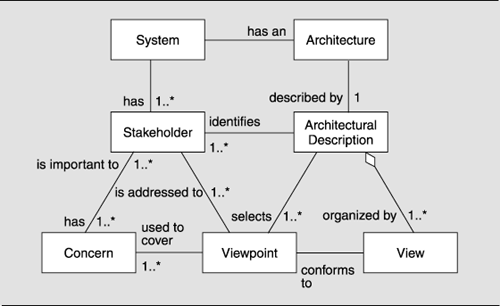
In 1471, as in our work, views have a central role in documenting software architecture. In the standard, each view is "a representation of a whole system from the perspective of a related set of concerns." The architectural description of a system includes one or more views.
In this framework, a view conforms to a viewpoint. A viewpoint is "a pattern or template from which to develop individual views by establishing the purposes and audience for a view and the techniques for its creation and analysis." This is very nearly the same as our idea of how a view corresponds to a viewtype.
In 1471, the emphasis is on what drives the perspective of a view or a viewpoint. Viewpoints are defined with specific stakeholder concerns in mind, and the definition of a viewpoint includes a description of any associated analysis techniques. These techniques are meant to produce results that help address the specified stakeholder concerns. We certainly agree with 1471 on this point. A fundamental principle about documentation appearing in the Prologue is that what one should document about a system depends entirely on to what uses one expects the documentation to be put. The documentation roadmap prescribed in Chapter 10 is written precisely to facilitate stakeholder navigation and use.
However, our focus has been to document those viewtypes that we've found in common use and that can be used to address a large number of concerns. We've documented a number of specific viewtypes and provided examples of their use in producing views. Although 1471 does include a few example viewpoints, each is described only briefly, and no example views are provided. This simply reflects a difference in the scope and goals of the two works. However, both works do recognize, if not encourage, the definition of new viewtypes, or viewpoints, to meet specific needs.
Beyond its conceptual framework, 1471 defines what information should be found in any architectural description. Table 11.12 summarizes the information required by the 1471 standard and how we address each in this book.
| General Requirement | How We Address This Requirement |
|---|---|
| Identification and overview information, including summary, context, glossary, references, and change history. | Several items in this category amount to good bookkeeping. Context is addressed in the context diagrams; the other items are prescribed in the standard organizations of Chapter 10. |
|
Stakeholders and concerns. The standard lists minimum examples that must be addressed for both stakeholders and concerns. |
The documentation roadmap called for in Section 10.3.1 captures information about stakeholders and their concernsspecifically, how they will use the documentation package. |
|
Viewpoints. For each viewpoint, the following must be specified:
|
We define several commonly used viewtypes and styles of those viewtypes. Each defines the conceptselements, relations, and propertiesthat should be used in documenting a system in accordance with the viewtype. Each also contains a section noting what it's for and not for, which should help users in deciding what concerns will be addressed by the viewtype. Chapter 9 provides additional guidance on how to decide which viewtypes to use, including information about stakeholders and concerns. |
|
Views. Each view includes a representation of the system in accordance with the requirements of its viewpoint. |
Chapter 10 discusses the information that should be documented for a view. |
| A record of all inconsistencies among views, preferably accompanied by an analysis of consistency among all views. | In Chapter 6, we discuss techniques for documenting relationships among views, which is then recorded in the "documentation beyond views" part of the package as detailed in Chapter 10. |
| Rationale for the architectural concepts selected, preferably accompanied by evidence of alternatives considered and rationale for the choices made. | Reserved spots for rationale are provided in each view, in the documentation beyond views, and in interface specifications. |
Software Architectures and Documentation
- P.1. The Role of Architecture
- P.2. Uses of Architecture Documentation
- P.3. Interfaces
- P.4. Views
- P.5. Viewtypes and Styles
- P.6. Seven Rules for Sound Documentation
- P.7. Summary Checklist
- P.8. Discussion Questions
- P.9. For Further Reading
Part I. Software Architecture Viewtypes and Styles
The Module Viewtype
- Overview
- Elements, Relations, and Properties of the Module Viewtype
- What the Module Viewtype Is For and What Its Not For
- Notations for the Module Viewtype
- Relation to Other Viewtypes
- Summary Checklist
- Discussion Questions
- For Further Reading
Styles of the Module Viewtype
- Styles of the Module Viewtype
- Decomposition Style
- Uses Style
- Generalization Style
- Layered Style
- Summary Checklist
- Discussion Questions
- For Further Reading
The Component-and-Connector Viewtype
- Overview
- Elements, Relations, and Properties of the C&C Viewtype
- What the C&C Viewtype Is For and What Its Not For
- Relation to Other Viewtypes
- Summary Checklist
- Discussion Questions
- For Further Reading
Styles of the Component-and-Connector Viewtype
- Styles of the Component-and-Connector Viewtype
- The Pipe-and-Filter Style
- Shared-Data Style
- Publish-Subscribe Style
- Client-Server Style
- Peer-to-Peer Style
- Communicating-Processes Style
- Notations for C&C Styles
- Summary Checklist
- Discussion Questions
- For Further Reading
The Allocation Viewtype and Styles
- Overview
- Elements, Relations, and Properties of the Allocation Viewtype
- Deployment Style
- Implementation Style
- Work Assignment Style
- Summary Checklist
- Discussion Questions
- For Further Reading
Part II. Software Architecture Documentation in Practice
- Part II. Software Architecture Documentation in Practice
- ECS Architecture Documentation Roadmap
- ECS System Overview
- ECS Software Architecture View Template
- Mapping Between Views
- Directory
- Architecture Glossary and Acronym List
- Module Decomposition View
- Module Uses View
- Module Generalization View
- Module Layered View
- C&C Pipe-and-Filter View
- C&C Shared-Data View
- C&C Communicating-Processes View
- Allocation Deployment View
- Allocation Implementation View
- Allocation Work Assignment View
Advanced Concepts
- Advanced Concepts
- Chunking Information: View Packets, Refinement, and Descriptive Completeness
- Using Context Diagrams
- Combined Views
- Documenting Variability and Dynamism
- Creating and Documenting a New Style
- Summary Checklist
- Discussion Questions
- For Further Reading
Documenting Software Interfaces
- Overview
- Interface Specifications
- A Standard Organization for Interface Documentation
- Stakeholders of Interface Documentation
- Notation for Interface Documentation
- Examples of Interface Documentation
- Summary Checklist
- Discussion Questions
- For Further Reading
Documenting Behavior
- Beyond Structure
- Where to Document Behavior
- Why to Document Behavior
- What to Document
- How to Document Behavior: Notations and Languages
- Summary Checklist
- Discussion Questions
- For Further Reading
Choosing the Views
- Choosing the Views
- Stakeholders and Their Documentation Needs
- Making the Choice
- Two Examples
- Summary Checklist
- Discussion Questions
- For Further Reading
Building the Documentation Package
- Building the Documentation Package
- One Document or Several?
- Documenting a View
- Documentation Beyond Views
- Validating Software Architecture Documentation
- Summary Checklist
- Discussion Questions
- For Further Reading
Other Views and Beyond
- Other Views and Beyond
- Overview
- Rational Unified Process/Kruchten 4+1
- UML
- Siemens Four Views
- C4ISR Architecture Framework
- ANSI/IEEE-1471-2000
- Data Flow and Control Flow
- RM-ODP
- Where Architecture Documentation Ends
- A Final Word
- For Further Reading
- Appendix A. Excerpts from a Software Architecture Documentation Package
- Volume I ECS Software Architecture Documentation Beyond Views
Rationale, Background, and Design Constraints
References

EAN: 2147483647
Pages: 152
