Section 9.3. DNS
9.3. DNSDNS is used in the IPv4 world to do name-to-address mappings and vice versa. This is not changing in the IPv6 world. The need for DNS is actually much greater because of the length of IPv6 addresses. Mixed IPv4/IPv6 environments need multiple host entries in DNS. A host communicating with both versions of TCP/IP needs at least two entries in DNSone with its IPv4 address and the other with its IPv6 address. A new DNS record type has been defined for IPv6 hosts. RFC 3596 defines the AAAA type record (called "quad-A"). RFC 2874 defines the A6 type record, which was designed to make renumbering of networks and prefix changes easier to administer. A6 has been moved to experimental status and is not used. The other DNS record types (NS and PTR records) remain unchanged, adjusting only to the IPv6 address format. 9.3.1. AAAA Records (RFC 3596)RFC 3596 describes DNS extensions for IPv6 implementations based on AAAA records. This record type can store a 128-bit IPv6 address, and the DNS value for this type of record is 28 (decimal notation). A host that has more than one IPv6 address has an AAAA record for each address. The corresponding reverse lookup domain is IP6.ARPA. The reverse lookup records are PTR records of type 12. An AAAA type record can look like this: moon.universe.com IN AAAA 4321:0:1:2:3:4:567:89ab For reverse lookups, each subdomain level under IP6.ARPA represents 4 bits of the 128-bit address. The least significant bit appears at the far left of the domain name. Omitting leading zeros is not allowed in this case, so the PTR record for the previous example looks like this: b.a.9.8.7.6.5.0.4.0.0.0.3.0.0.0.2.0.0.0.1.0.0.0.0.0.0.0.1.2.3.4.IP6.ARPA.IN PTR moon.universe.com Note that there are several ways to represent reverse IPv6 addresses in DNS. It depends on the implementation, so refer to your vendor's documentation to find out which format is expected.
9.3.2. DNS ServersBIND implements IPv6 DNS in versions of BIND 8.4 and higher and in BIND Version 9. For BIND 8.2.3, a patch that adds some IPv6 support is available. DNS implementations based on these versions of BIND support IPv6. A good reference site for BIND is the Internet Systems Consortium homepage at http://www.isc.org/products/BIND. The same site has a list of vendor implementations based on BIND. There are also links to versions of BIND that run on different versions of the Microsoft operating system. The most important file for configuring a name server on Unix is /etc/named.conf. The file itself contains detailed information on how to configure it. To make name resolution work over IPv6, you need to add one important entry: listen on ipv6 { any }. This entry tells the name server to listen for IPv6 queries. Then update /var/named with the entries for all IPv6 hosts. The entries in our zone record file are shown in Figure 9-5. Figure 9-5. The zone record file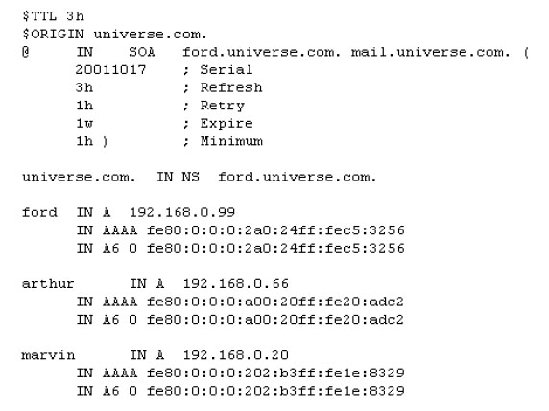 Obviously, you would not usually put link-local addresses into your DNS. I did it in my lab just to show how DNS replies to my queries.
9.3.3. DNS ResolversResolvers are the client part in DNS communication. The resolver sends out DNS requests for IP addresses to DNS servers. It can be part of an operating system or an application. DNS servers also have a resolver implemented to send out DNS requests to other DNS servers. Resolvers in an IPv4/IPv6 network must be able to handle all record types: the A record type for IPv4 and the AAAA record type for IPv6. In the future, resolvers also need a mechanism for choosing the protocol on a dual-stack host. When the DNS server replies with a set of different addresses, resolvers need to implement a feature for a default choice of address, and this should be configurable. If the DNS reply contains an IPv4 and an IPv6 address, the resolver can either forward both addresses to the requesting application and let the application make the choice or make a choice on behalf of the application. If the resolver forwards the IPv4 address, the application will communicate over IPv4; if it forwards the IPv6 address, the application will communicate over IPv6. Applications written for dual-stack hosts should be able to determine whether they communicate with IPv6 or IPv4 peers. When people talk about IPv6 support in DNS, they are usually referring to two different aspects that are sometimes not pointed out clearly. One aspect is whether your DNS server supports IPv6 address records (AAAA). A DNS server supporting AAAA records does not necessarily have to be queried over IPv6. It can reply to such requests using IPv4. The other aspect is whether the resolver and the DNS server can use IPv6 as a transport for DNS queries and replies. For instance, if you have Windows XP with the IPv6 stack running, it does lookups for IPv6 records but uses IPv4 as the transport for the query. The support for resolving DNS names over IPv6 in the case of Windows XP is planned for the next major release. The DNS service in the Windows 2003 server family supports IPv6 transport. 9.3.4. DNS LookupFor the DNS lookup of IPv6 records, your client needs a resolver that supports the new record type. In my case, I used SuSE Linux host Ford with BIND 9 utilities and my Windows XP host Marvin with the IPv6 stack. I used nslookup to play with my new DNS server. You can also use dig and host for DNS lookups; they are installed with BIND 9. nslookup has many configuration options. It can be run in interactive mode, and you can specify the types of records you want to query. You can set the query mode to either A type records for IPv4 or AAAA type records for IPv6, or set it to "any," in which case nslookup will request all records. The nslookup version I used did not support the A6 type. The DNS server still sends the information back, which is why you see the "unrecognized record" type in the answer.
Figure 9-6 shows the output of nslookup on Marvin. Figure 9-6. Output of nslookup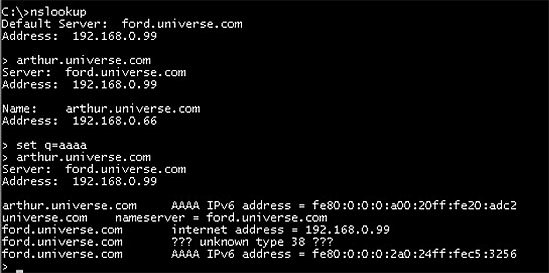 We first used nslookup in interactive mode with the default options. nslookup defaults to query type A. Looking up arthur.universe.com with the default returned the IPv4 address of arthur (192.168.0.66). Next, we changed the query type to AAAA. The reply returned the IPv6 address of arthur plus additional information about our name server, Ford: its IPv4 address, AAAA type IPv6 address, and A6 type entry. Because this version of nslookup did not support A6 type records, the answer was shown as "unknown type 38." Being curious by nature, I traced the whole communication with Sniffer. Figure 9-7 shows how the same query looks in the trace file. Figure 9-7. DNS lookup in the trace file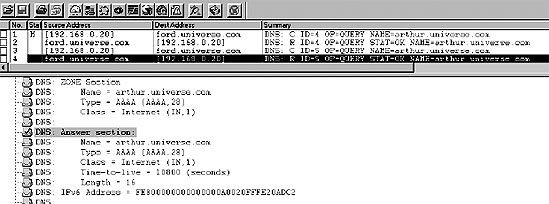 The first pair of request-replies is the standard query for the A type record returning the IPv4 address 192.168.0.66. Frame number 3 is the query for which we set the query type to AAAA. Figure 9-7 shows the part of the DNS reply that refers to Arthur's IPv6 address. In the zone section, you can see what we requested. We did nslookup for arthur.universe.com with the query type set to AAAA. The answer section provides the IPv6 address of Arthur. You may be wondering about the "unknown type" message and the question marks in the nslookup output in Figure 9-6. Let's see what's actually in the reply coming from the server. Figure 9-8 shows the authority and additional record section in the same frame. Figure 9-8. Authority and additional record section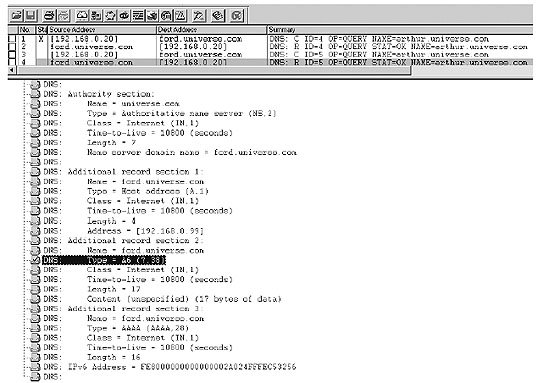 The authority section states that the name server for the domain universe.com is ford.universe.com. The content in the authority section can be seen in the nslookup screenshot (Figure 9-6), on the line just after the IPv6 address for the AAAA record of Arthur (near the bottom of the screenshot). Next, in the trace file, we see the additional record section 1. It contains the IPv4 address (A record) for the name server ford.universe.com. This refers to the third line in the nslookup output in Figure 9-6. The fourth line in the nslookup output is the one beginning with the three question marks and the "unknown type 38" comment. This can also be seen in the trace file. Look at the additional record section 2. Sniffer doesn't decode type 38, but we know that type 38 is the A6 record type. I checked the hexadecimal part of the reply packet in the trace, and following the A6 type value, the IPv6 address for ford.universe.com can be seen. The additional record section 3 contains the AAAA record (type 28 decimal, 1C in hex) for ford.universe.com, containing the IPv6 address for Ford. This corresponds to the last line in the nslookup output. 9.3.5. Issues with DNS LookupsIn practice, there are some issues with DNS lookups where DNS servers do not react as expected when queried for AAAA records. This can lead to unexpected behavior on the client: for instance, a web browser that cannot connect to a web server although connectivity is available because it queries DNS for an AAAA record and, if there is no entry, fails to fall back to IPv4 even though the web server would have an A record with an IPv4 address. There are different causes and cases and, accordingly, different troubleshooting scenarios. If you want to explore this issue further, refer to RFC 4074, "Common Misbehavior Against DNS Queries for IPv6 Addresses." |


- Step 1.2 Install SSH Windows Clients to Access Remote Machines Securely
- Step 2.1 Use the OpenSSH Tool Suite to Replace Clear-Text Programs
- Step 3.2 Use PuTTY / plink as a Command Line Replacement for telnet / rlogin
- Step 3.4 Use PuTTYs Tools to Transfer Files from the Windows Command Line
- Step 5.1 General Troubleshooting