To test the Encoder/Decoder application:
Set the
set path=%path%;D:\j2sdk1.4.0_02\bin;
Set the classpath of the lib directory of J2SDK by executing the following command at the command prompt:
set classpath = %classpath%;d:\j2sdk1.4.0_02\lib;
Copy the EncoderDecoder.java and EncodingSchemes.java files to a
folder on your computer. On the command prompt, use the cd command
to move to the folder where you have
javac *.java
To run the Encoder/Decoder application, specify the following command at the command prompt:
java EncoderDecoder
The above code opens the main window of the Encoder/Decoder application, as shown in Figure 8-2.
Click the Browse button and select the test.txt file from the C drive of the computer.
Figure 8-4 shows the contents of the test.txt file:
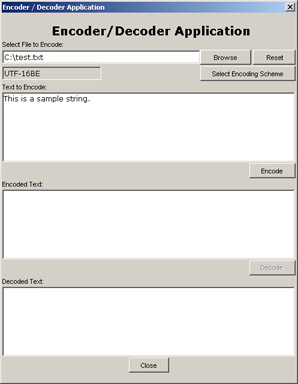
Figure 8-4:
Displaying test.txt File in the
Encoder/Decoder Application
Click the Select Encoding Scheme button to
Click the OK button of the Encoding Schemes dialog box.
Click the Encode button to encode the test.txt file using the UTF-16BE encoding scheme, as shown in Figure 8-5:
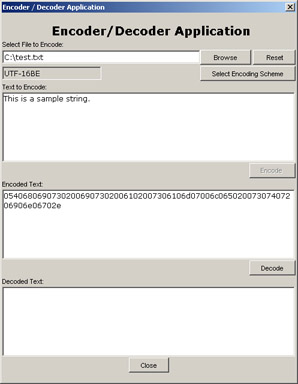
Figure 8-5:
Displaying Encoded File in the
Encoder/Decoder Application
Click the Decode button to decode the encoded file, as shown in Figure 8-6:
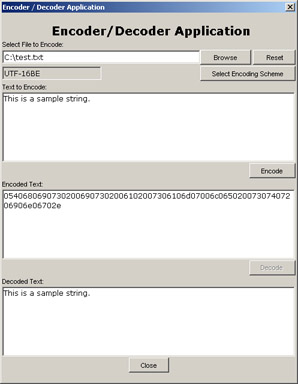
Figure 8-6:
Displaying Decoded File in the
Encoder/Decoder Application
Click the Reset button to reset the Encoder/Decoder application.
Specify the text you want to encode in the Text to Encode text area, as shown in Figure 8-7:
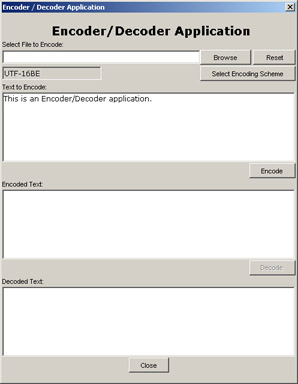
Figure 8-7:
Displaying Text to Encode in the
Encoder/Decoder Application
Repeat steps 6 through 9 to encode and decode the text specified in the Text to Encode text area. The results are displayed in Figure 8-8:
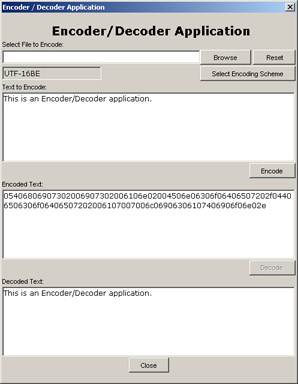
Figure 8-8:
Displaying Encoded and Decoded
Text

API, Chapter 1: Introduction to New Input/Output API, Chapter 2: Creating a Chat Application, Chapter 3: Creating a File Download Application, Chapter 4: Creating a File Search Application, Chapter 5: Creating a Printer Management Application, Chapter 6: Creating a Text Editor Application, Chapter 7: Creating a Network Information Application, Chapter 8: Creating an Encoder/Decoder Application
ByteBuffer, Chapter 2: Creating a Chat Application, Chapter 3: Creating a File Download Application, Chapter 5: Creating a Printer Management Application, Chapter 7: Creating a Network Information Application, Chapter 8: Creating an Encoder/Decoder Application
CharBuffer, Chapter 4: Creating a File Search Application, Chapter 5: Creating a Printer Management Application, Chapter 7: Creating a Network Information Application, Chapter 8: Creating an Encoder/Decoder Application
CLI, Creating the ChatServer.java File
Command Line Interface, Creating the ChatServer.java File
Encoder/Decoder application, Architecture of the Encoder/Decoder Application
Java New Input/Output, Chapter 5: Creating a Printer Management Application
Java SpecificationRequest, Chapter 1: Introduction to New Input/Output API
Java Virtual Machine, ByteBuffer, Chapter 3: Creating a File Download Application
java.awt.print, Chapter 5: Creating a Printer Management Application
java.nio, Chapter 2: Creating a Chat Application, Chapter 3: Creating a File Download Application, Chapter 4: Creating a File Search Application, Chapter 5: Creating a Printer Management Application, Chapter 6: Creating a Text Editor Application, Chapter 7: Creating a Network Information Application, Chapter 8: Creating an Encoder/Decoder Application
java.nio package, The java.nio Package
java.nio.channels, Chapter 5: Creating a Printer Management Application, Chapter 6: Creating a Text Editor Application, Chapter 7: Creating a Network Information Application, Chapter 8: Creating an Encoder/Decoder Application
java.nio.charset, Chapter 7: Creating a Network Information Application, Chapter 8: Creating an Encoder/Decoder Application
Java2 Platform, Standard Edition, Chapter 1: Introduction to New Input/Output API
JComponent class, Implementing the Print Functionality
JSR, Chapter 1: Introduction to New Input/Output API
JVM, ByteBuffer, Chapter 3: Creating a File Download Application
J2SE, Chapter 1: Introduction to New Input/Output API