6-4. VLAN Trunking Protocol VTP sends messages between trunked switches to maintain VLANs on these switches in order to properly trunk. VTP is a Cisco proprietary method of managing VLANs between switches and runs across any type of trunking mechanism. VTP messages are exchanged between switches within a common VTP domain. VTP domains must be defined or VTP disabled before a VLAN can be created. Exchanges of VTP information can be controlled by passwords. VTP manages only VLANs 2 through 1002. VTP allows switches to synchronize their VLANs based on a configuration revision number. Switches can operate in one of three VTP modes: server, transparent, or client. VTP can prune unneeded VLANs from trunk links.
Enabling VTP for Operation VTP exists to ensure that VLANs exist on the local VLAN database of switches in a trunked path. In addition to making sure the VLANs exist, VTP can further synchronize name settings and can be used to prune VLANs from trunk links that are destined for switches that do not have any ports active in that particular VLAN. To manage and configure VTP, use the following steps. 1. | Activate VTP on a switch.
- a. Specify a VTP domain name:
COS | set vtp domain name
| IOS | (privileged) vlan database (vlan_database) vtp domain name
-OR- (global) vtp domain name
|
By default VTP is in server mode, which is an operational mode that enables you to manage VLANs on the local switch's database and use the information in the database to synchronize with other switches. To configure VTP for operation, you must specify a name. After you enable trunking, this name propagates to switches that have not been configured with a name. If you choose to configure names on your switches, however, remember that VTP names are case-sensitive and must match exactly. Switches that have different VTP names will not exchange VLAN information.
NOTE The global configuration command vtp domain is not supported on all switches that run the IOS. NOTE VTP names are used only in the context of synchronizing VTP databases. VTP domain names do not separate broadcast domains. If VLAN 20 exists on two switches trunked together with different VTP domain names, VLAN 20 is still the same broadcast domain! - b. Enable the trunk:
COS | [View full width] set trunk mod/port [auto | desirable | on |  nonegotiate | off] nonegotiate | off]
| IOS | (global) interface type mod/port (interface) switchport mode dynamic [auto | desirable] (interface) switchport mode trunk (interface) switchport nonegotiate
|
VTP information is passed only across trunk links. If you do not enable a trunk, VLAN information is not exchanged between the switches. See section "6-3: Trunking" for more details on trunking.
|
NOTE Some IOS switches do not support DTP. For these switches, the only command that you can use to configure trunking is switchport mode trunk, which essentially turns trunking on.
Setting VTP Passwords By default, there are no passwords in VTP informational updates, and any switch that has no VTP domain name will join the VTP domain when trunking is enabled. Also any switch that has the same VTP domain name configured will join and exchange VTP information. This could enable an unwanted switch in your network to manage the VLAN database on each of the switches. To prevent this from occurring, set a VTP password on the switches you want to exchange information. 1. | (Optional) Set the VTP password:
COS | set vtp passwd password
| IOS | (privileged) vlan database (vlan_database) vtp password password
-OR- (global)vtp password password
|
The password is entered on each switch that will be participating in the VTP domain. The passwords are case-sensitive and must match exactly. If you want to remove the passwords, use the command set vtp passwd 0 on a COS device or no vtp password in the VLAN database mode for the IOS device.
|
NOTE If you choose to set a password for VTP, it must be between 8 and 32 characters in length.
NOTE The global configuration command vtp password is not supported on all switches that run the IOS.
Changing VTP Modes VTP operates in one of three modes: server, client, and transparent. The modes determine how VTP passes information, how VLAN databases are synchronized, and whether VLANs can be managed for a given switch. 1. | (Optional) Set the VTP mode:
COS | set vtp mode [server | client | transparent]
| IOS | (privileged) vlan database (vlan_database) vtp [server | client | transparent]
-OR- (global)vtp mode [server | client | transparent]
|
By default Cisco switches are in VTP server mode. For a VTP server, you can create, delete, or modify a VLAN in the local VLAN database. After you make this change, the VLAN database changes are propagated out to all other switches in server or client mode in the VTP domain. A server will also accept changes to the VLAN database from other switches in the domain. You can also run the VTP in client mode. Switches in client mode cannot create, modify, or delete VLANs in the local VLAN database. Instead, they rely on other switches in the domain to update them about new VLANs. Clients will synchronize their databases, but they will not save the VLAN information and will loose this information if they are powered off. Clients will also advertise information about their database and forward VTP information to other switches. VTP transparent mode works much like server mode in that you can create, delete, or modify VLANs in the local VLAN database. The difference is that these changes are not propagated to other switches. In addition, the local VLAN database does not accept modifications from other switches. VTP transparent mode switches forward or relay information between other server or client switches. A VTP transparent mode switch does not require a VTP domain name.
|
NOTE The global configuration command vtp mode is not supported on all switches that run the IOS.
NOTE As of COS 7.1(1), Cisco introduced a VTP off mode (set vtp mode off). This mode is similar to transparent mode; but in VTP off mode, the switch does not relay VTP information between switches. This command is useful when you do not want to send or forward VTP updatesfor example, if you are trunking with all non-Cisco switches or if you are using Generic VLAN Registration Protocol (GVRP) dynamic VLAN creation to manage your VLAN database.
Enabling VTP Pruning By default all the VLANs that exist on a switch are active on a trunk link. As noted in section "6-3: Trunking", you can manually remove VLANs from a trunk link and then add them later. VTP pruning allows the switch to not forward user traffic for VLANs that are not active on a remote switch. This feature dynamically prunes unneeded traffic across trunk links. If the VLAN traffic is needed at a later date, VTP will dynamically add the VLAN back to the trunk. NOTE Dynamic pruning removes only unneeded user traffic from the link. It does not prevent any management frames such as STP from crossing the link.
1. | (Optional) Enable VTP pruning.
- a. Enable pruning:
COS | set vtp pruning enable
| IOS | (privileged) vlan database (vlan_database) vtp pruning
|
After VTP pruning is enabled on one VTP server in the domain, all other switches in that domain will also enable VTP pruning. VTP pruning can only be enabled on switches that are VTP version 2-capable, so all switches in the domain must be version 2-capable before you enable pruning.
NOTE The switch must be VTP version 2-capable, but does not have to have version 2 enabled, to turn on pruning. - b. (Optional) Specify VLANs that are eligible for pruning:
COS | clear vtp pruneeligible vlanlist
| IOS | [View full width] (global) interface type mod/port (interface) switchport trunk pruning vlan remove vlanlist
|
By default all the VLANs on the trunk are eligible for pruning. You can remove VLANs from the list of eligible VLANs using these commands. After a VLAN has been removed from the eligible list, it cannot be pruned by VTP. To add the VLANs back, use the command set vtp pruneeligible vlanlist for COS switches or switchport trunk pruning vlan add vlanlist for IOS.
|
Changing VTP Versions VTP supports two versions. By default all switches are in VTP version 1 mode, but most switches can support version 2 mode. 1. | (Optional) Enable VTP version 2:
COS | set vtp v2 enable
| IOS | (privileged) vlan database (vlan_database)vtp v2-mode
-OR- (global)vtp version 2
|
VTP version 2 is disabled by default. After you have enabled version 2 on one switch, all other switches in the domain also begin to operate in version 2 mode.
NOTE The global configuration command vtp version 2 is not supported on all switches that run the IOS. VTP version 2 offers the following support options not available with version 1:
- - Unrecognized type-length-value (TLV) support A VTP server or client propagates configuration changes to its other trunks, even for TLVs it is not able to parse. The unrecognized TLV is saved in NVRAM.
- - Version-dependent transparent mode In VTP version 1, a VTP transparent switch inspects VTP messages for the domain name and version and forwards a message only if the version and domain name match. Because only one domain is supported in the Supervisor engine software, VTP version 2 forwards VTP messages in transparent mode, without checking the version.
- - Consistency checks In VTP version 2, VLAN consistency checks (such as VLAN names and values) are performed only when you enter new information through the command-line interface (CLI) or Simple Network Management Protocol (SNMP). Consistency checks are not performed when new information is obtained from a VTP message or when information is read from NVRAM. If the digest on a received VTP message is correct, its information is accepted without consistency checks.
|
Verifying VTP Operation After configuring VTP, use one of the following commands to verify the VLAN port assignments: COS | show vtp domain
| IOS | (privileged) show vtp status
|
Feature Example In this example, Access_1, Distribution_1, and Distribution_2 will be assigned to a VTP domain named GO-CATS. Figure 6-3 shows that Access_1 will be in VTP client mode with an 802.1Q trunk connecting to Distribution_1. Distribution_1 will be configured in VTP server mode with an ISL trunk connecting it to Core_1, which is in VTP transparent mode. Core_1 has an ISL trunk to Distribution_2, which is also in VTP server mode. VTP pruning has also been enabled for the domain, and all switches are configured so that VLAN 10 is not prune-eligible on the trunk links. Because VTP runs across trunk links, it is not necessary to configure the VTP domain name on the Distribution_2 switch or the Access_1 switch. It is also not necessary to configure the pruning on each switch; this is also propagated by VTP. Figure 6-3. Network Diagram for VTP Configuration on Access_1, Distribution_1, Distribution_2, and Core_1. 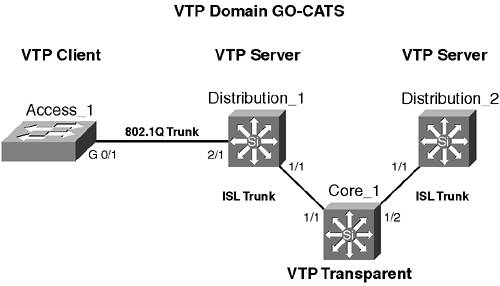
An example of the Catalyst OS configuration for Core_1 follows: Core_1 (enable)>set vtp mode transparent Core_1 (enable)>set trunk 1/1 on isl Core_1 (enable)>set trunk 1/2 on isl Core_1 (enable)>
An example of the Catalyst OS configuration for Distribution_1 follows: Distribution_1 (enable)>set vtp domain GO-CATS Distribution_1 (enable)>set trunk 1/1 on isl Distribution_1 (enable)>set trunk 2/1 on dot1Q Distribution_1 (enable)>set vtp pruning enable Distribution_1 (enable)>clear vtp pruneeligible 10
An example of the Catalyst OS configuration for Distribution_2 follows: Distribution_2 (enable)>set trunk 1/1 on isl Distribution_2 (enable)>clear vtp pruneeligible 10
An example of the Layer 2 IOS configuration for Access_1 follows: Access_1#vlan database Access_1 (vlan)#vtp client Access_1 (vlan)#exit Access_1 #config t Access_1 (config)#interface gigabitethernet 0/1 Access_1 (config-if)#switchport mode trunk Access_1 (config-if)#switchport trunk encapsulation dot1Q Access_1 (config-if)#switchport trunk pruning vlan remove 10 Access_1 (config-if)#end Access_1#copy running-config startup-config
|
