| To make our example programs more interesting, we want to accept input and properly format the program output. Of course, modern programs use a GUI for collecting user input. However, programming such an interface requires more tools and techniques than we have at our disposal at this time. Because the first order of business is to become more familiar with the Java programming language, we make do with the humble console for input and output for now. GUI programming is covered in Chapters 7 through 9. Reading Input You saw that it is easy to print output to the "standard output stream" (that is, the console window) just by calling System.out.println. Oddly enough, before JDK 5.0, there was no convenient way to read input from the console window. Fortunately, that situation has finally been rectified. To read console input, you first construct a Scanner that is attached to the "standard input stream" System.in. Scanner in = new Scanner(System.in);
Now you use the various methods of the Scanner class to read input. For example, the nextLine method reads a line of input. System.out.print("What is your name? "); String name = in.nextLine();
Here, we use the nextLine method because the input might contain spaces. To read a single word (delimited by whitespace), call String firstName = in.next();
To read an integer, use the nextInt method. System.out.print("How old are you? "); int age = in.nextInt();
Similarly, the nextdouble method reads the next floating-point number. The program in Example 3-2 asks for the user's name and age and then prints a message like Hello, Cay. Next year, you'll be 46
Finally, add the line import java.util.*;
at the beginning of the program. The Scanner class is defined in the java.util package. Whenever you use a class that is not defined in the basic java.lang package, you need to use an import directive. We look at packages and import directives in more detail in Chapter 4. Example 3-2. InputTest.java 1. import java.util.*; 2. 3. public class InputTest 4. { 5. public static void main(String[] args) 6. { 7. Scanner in = new Scanner(System.in); 8. 9. // get first input 10. System.out.print("What is your name? "); 11. String name = in.nextLine(); 12. 13. // get second input 14. System.out.print("How old are you? "); 15. int age = in.nextInt(); 16. 17. // display output on console 18. System.out.println("Hello, " + name + ". Next year, you'll be " + (age + 1)); 19. } 20. }
NOTE  | If you do not have JDK 5.0 or above, you have to work harder to read user input. The simplest method is to use an input dialog (see Figure 3-6). String input = JOptionPane.showInputDialog(promptString)
Figure 3-6. An input dialog 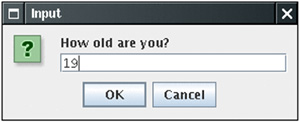
The return value is the string that the user typed. For example, here is how you can query the name of the user of your program: String name = JOptionPane.showInputDialog("What is your name?");
Reading numbers requires an additional step. The JOptionPane.showInputDialog method returns a string, not a number. You use the Integer.parseInt or Double.parseDouble method to convert the string to its numeric value. For example, String input = JOptionPane.showInputDialog("How old are you?"); int age = Integer.parseInt  (input); (input);
If the user types 45, then the string variable input is set to the string "45". The Integer.parseInt method converts the string to its numeric value, the number 45. The JOptionPane class is defined in the javax.swing package, so you need to add the statement import javax.swing.*;
Finally, whenever your program calls JOptionPane.showInputDialog, you need to end it with a call to System.exit(0). The reason is a bit technical. Showing a dialog box starts a new thread of control. When the main method exits, the new thread does not automatically terminate. To end all threads, you call the System.exit method. (For more information on threads, see Chapter 1 of Volume 2.) The following program is the equivalent to Example 3-2 prior to JDK 5.0. import javax.swing.*; public class InputTest { public static void main(String[] args) { String name = JOptionPane.showInputDialog("What is your name?"); String input = JOptionPane.showInputDialog("How old are you?"); int age = Integer.parseInt(input); System.out.println("Hello, " + name + ". Next year, you'll be " + (age + 1)); System.exit(0); } }
|

java.util.Scanner 5.0
Scanner(InputStream in) constructs a Scanner object from the given input stream. String nextLine() reads the next line of input. String next() reads the next word of input (delimited by whitespace). int nextInt() double nextDouble() read and convert the next character sequence that represents an integer or floating-point number. boolean hasNext() tests whether there is another word in the input. boolean hasNextInt() boolean hasNextDouble() test whether the next character sequence represents an integer or floating-point number.
javax.swing.JOptionPane 1.2
static String showInputDialog(Object message) displays a dialog box with a message prompt, an input field, and "OK" and "Cancel" buttons. The method returns the string that the user typed.
java.lang.System 1.0
static void exit(int status) terminates the virtual machine and passes the status code to the operating system. By convention, a non-zero status code indicates an error.
Formatting Output You can print a number x to the console with the statement System.out.print(x). That command will print x with the maximum number of non-zero digits for that type. For example, double x = 10000.0 / 3.0; System.out.print(x);
prints 3333.3333333333335
That is a problem if you want to display, for example, dollars and cents. Before JDK 5.0, formatting numbers was a bit of a hassle. Fortunately, JDK 5.0 brought back the venerable printf method from the C library. For example, the call System.out.printf("%8.2f", x);
prints x with a field width of 8 characters and a precision of 2 characters. That is, the printout contains a leading space and the seven characters 3333.33
You can supply multiple parameters to printf, for example: System.out.printf("Hello, %s. Next year, you'll be %d", name, age);
Each of the format specifiers that start with a % character is replaced with the corresponding argument. The conversion character that ends a format specifier indicates the type of the value to be formatted: f is a floating-point number, s a string, and d a decimal integer. Table 3-5 shows all conversion characters. Table 3-5. Conversions for printfConversion Character | Type | Example |
|---|
d | Decimal integer | 159 | x | Hexadecimal integer | 9f | o | Octal integer | 237 | f | Fixed-point floating-point | 15.9 | e | Exponential floating-point | 1.59e+01 | g | General floating-point (the shorter of e and f) | | a | Hexadecimal floating point | 0x1.fccdp3 | s | String | Hello | c | Character | H | b | Boolean | TRue | h | Hash code | 42628b2 | tx | Date and time | See Table 3-7 | % | The percent symbol | % | n | The platform-dependent line separator | |
Table 3-7. Date and Time Conversion CharactersConversion Character | Type | Example |
|---|
C | Complete date and time | Mon Feb 09 18:05:19 PST 2004 | F | ISO 8601 date | 2004-02-09 | D | U.S. formatted date (month/day/year) | 02/09/2004 | T | 24-hour time | 18:05:19 | r | 12-hour time | 06:05:19 pm | R | 24-hour time, no seconds | 18:05 | Y | Four-digit year (with leading zeroes) | 2004 | y | Last two digits of the year (with leading zeroes) | 04 | C | First two digits of the year (with leading zeroes) | 20 | B | Full month name | February | b or h | Abbreviated month name | Feb | m | Two-digit month (with leading zeroes) | 02 | d | Two-digit day (with leading zeroes) | 09 | e | Two-digit day (without leading zeroes) | 9 | A | Full weekday name | Monday | a | Abbreviated weekday name | Mon | j | Three-digit day of year (with leading zeroes), between 001 and 366 | 069 | H | Two-digit hour (with leading zeroes), between 00 and 23 | 18 | k | Two-digit hour (without leading zeroes), between 0 and 23 | 18 | I | Two-digit hour (with leading zeroes), between 01 and 12 | 06 | l | Two-digit hour (without leading zeroes), between 1 and 12 | 6 | M | Two-digit minutes (with leading zeroes) | 05 | S | Two-digit seconds (with leading zeroes) | 19 | L | Three-digit milliseconds (with leading zeroes) | 047 | N | Nine-digit nanoseconds (with leading zeroes) | 047000000 | P | Uppercase morning or afternoon marker | PM | p | Lowercase morning or afternoon marker | pm | z | RFC 822 numeric offset from GMT | -0800 | Z | Time zone | PST | s | Seconds since 1970-01-01 00:00:00 GMT | 1078884319 | E | Milliseconds since 1970-01-01 00:00:00 GMT | 1078884319047 |
In addition, you can specify flags that control the appearance of the formatted output. Table 3-6 shows all flags. For example, the comma flag adds group separators. That is, System.out.printf("%,.2f", 10000.0 / 3.0);
Table 3-6. Flags for printfFlag | Purpose | Example |
|---|
+ | Prints sign for positive and negative numbers | +3333.33 | space | Adds a space before positive numbers | | 3333.33| | 0 | Adds leading zeroes | 003333.33 | - | Left-justifies field | |3333.33 | | ( | Encloses negative number in parentheses | (3333.33) | , | Adds group separators | 3,333.33 | # (for f format) | Always includes a decimal point | 3,333. | # (for x or o format) | Adds 0x or 0 prefix | 0xcafe | ^ | Converts to upper case | 0XCAFE | $ | Specifies the index of the argument to be formatted; for example, %1$d %1$x prints the first argument in decimal and hexadecimal | 159 9F | < | Formats the same value as the previous specification; for example, %d %<x prints the same number in decimal and hexadecimal | 159 9F |
prints 3,333.33
You can use multiple flags, for example, "%,(.2f", to use group separators and enclose negative numbers in parentheses. NOTE | You can use the s conversion to format arbitrary objects. If an arbitrary object implements the Formattable interface, the object's formatTo method is invoked. Otherwise, the toString method is invoked to turn the object into a string. We discuss the toString method in Chapter 5 and interfaces in Chapter 6. |
You can use the static String.format method to create a formatted string without printing it: String message = String.format("Hello, %s. Next year, you'll be %d", name, age);
Although we do not describe the Date type in detail until Chapter 4, we do, in the interest of completeness, briefly discuss the date and time formatting options of the printf method. You use two a two-letter format, starting with t and ending in one of the letters of Table 3-7. For example, System.out.printf("%tc", new Date());
prints the current date and time in the format Mon Feb 09 18:05:19 PST 2004
As you can see in Table 3-7, some of the formats yield only a part of a given date, for example, just the day or just the month. It would be a bit silly if you had to supply the date multiple times to format each part. For that reason, a format string can indicate the index of the argument to be formatted. The index must immediately follow the %, and it must be terminated by a $. For example, System.out.printf("%1$s %2$tB %2$te, %2$tY", "Due date:", new Date());
prints Due date: February 9, 2004
Alternatively, you can use the < flag. It indicates that the same argument as in the preceding format specification should be used again. That is, the statement System.out.printf("%s %tB %<te, %<tY", "Due date:", new Date());
yields the same output as the preceding statement. CAUTION  | Argument index values start with 1, not with 0: %1$... formats the first argument. This avoids confusion with the 0 flag. |
You have now seen all features of the printf method. Figure 3-7 shows a syntax diagram for format specifiers. Figure 3-7. Format specifier syntax 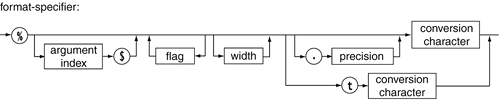
NOTE | A number of the formatting rules are locale specific. For example, in Germany, the decimal separator is a period, not a comma, and Monday is formatted as Montag. You will see in Volume 2 how to control the international behavior of your applications. |
TIP  | If you use a version of Java prior to JDK 5.0, use the NumberFormat and DateFormat classes instead of printf. |
|

