Welcome to DarkBASIC
DarkBASIC is a fantastic programming tool for creating games of all types. Anyone who has at least minimal experience with a computer can use DarkBASIC to create quality presentations, demonstrations, simulations, and even games. This chapter provides an overview of DarkBASIC, with a tour of the development environment and a demonstration of some sample programs that come with DarkBASIC. It also explores the DarkMATTER add-on and update for DarkBASIC and contains an introduction to DarkBASIC Professional, the new and improved version of DarkBASIC that features a completely rewritten graphics engine based on DirectX 8.1. There are so many things to talk about that I want to jump in and explain all of them right away, but this chapter should give you a solid introduction that will prepare you for the chapters to come. At the end of this chapter is a tutorial on installing DarkBASIC.
Introduction to DarkBASIC
DarkBASIC is a language that makes programming fun and intuitive, and allows you to write intense graphics programs quickly and easily, without any formal knowledge or training. It is the perfect choice for prototyping software and creating presentations, product demonstrations, and yes—games! DarkBASIC completely hides the details and takes care of all the difficult work behind the scenes, allowing you to focus on what the program needs to do rather than how to do it.
It is a professional-grade compiler with an integrated development environment that lets you write, load, and save the source code that makes up programs, and then compile it into standalone executable programs that run in Windows and use DirectX.
This book focuses on teaching you how to be a programmer, first and foremost. I make no assumptions about whether you know how a command works. The subjects in this book are organized so that basic topics are covered first, with each chapter covering a more challenging aspect of programming with the DarkBASIC language. If you have never written a computer program before, you will have no trouble working your way through this chapter and those that follow.
Let me show you a few examples of what you can do with DarkBASIC. By the time you have finished this book, you will be able to write games and demos just like these. Figure 1.1 shows a first-person shooter (FPS) demo called FPSEngine, which is on the CD-ROM if you want to load and run the program.
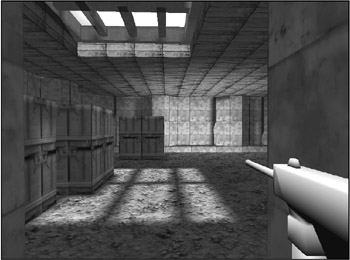
Figure 1.1: DarkBASIC is a multi-purpose programming language for any type of game, such as this first-person shooter demo.
Figure 1.2 shows a complete game called Mr. Putts Mini Golf, written by Rogers Yarrow. The game is included on the CD-ROM; you can visit Roger’ Web site at http://www.krunchopia.com.
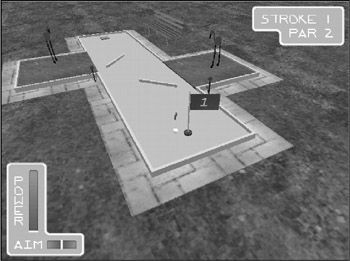
Figure 1.2: Mr. Putts Mini Golf is just one of the hundreds of games written with DarkBASIC. Image courtesy of Roger Yarrow
What Is DarkBASIC?
DarkBASIC is essentially a scripting language sitting on top of a powerful 3D game engine. You might think of the language as a "wrapper" for the game engine. The low-level functions in DarkBASIC interface with DirectX 8.1 below the scripting language. You use this language to tell the game engine what to do, and the result is a running game.
Because DarkBASIC was designed for writing games, it contains none of the complexity of languages such as Microsoft Visual C++ (the language most commonly used for commercial games). DarkBASIC is a scripted game engine somewhat at the level of commercial game engines. Think of DarkBASIC as one step above DirectX, which is the case with the Quake III Arena, Unreal Warfare, and Half-Life engines, and so on. DarkBASIC is not optimized like these other engines for a specific purpose (such as first-person shooters); rather, it provides a general-purpose game engine for multiple genres. As you will find later in this chapter, DarkBASIC Professional takes DarkBASIC to a whole new level (see Figure 1.3).

Figure 1.3: The DarkBASIC Professional logo image
Indeed, you can write any game that you can imagine using DarkBASIC. But just as DarkBASIC is not as fast as the Quake III Arena engine, you would be hard pressed to write a 2D platform scroller or a planetarium simulation as a Quake III mod!
There are comparisons that go both ways. For example, take a look at Figure 1.4, which shows a solar system simulation written by Roger Yarrow. As you see, you can use DarkBASIC for just about anything imaginable, and it is a terrific tool for simulations, scientific visualizations, and even business presentations.
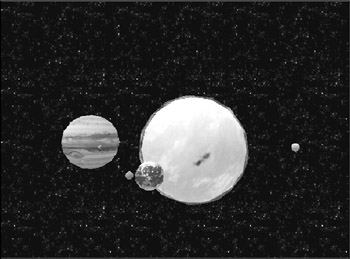
Figure 1.4: This solar system demo simulates the motion of planets around the sun. Image courtesy of Roger Yarrow
DarkBASIC features a programming language with simple commands to invoke the awesome gaming power of DirectX 8.1, which includes extensions for advanced transform and lighting effects and the new pixel and vertex shader technologies (which involve loading tiny programs into the video card for manipulating each pixel on the screen individually). You don’ need to know anything about DirectX to write a complete, professional DirectX game with DarkBASIC! The programming language resembles Microsoft QuickBasic, a descendant of the original BASIC (Beginner’ All-Purpose Symbolic Instruction Code) language. DarkBASIC is a structured language with simple English-like commands. By combining the power of DirectX with the easy-to-use BASIC language, you can write a complete 3D game with only a few lines of source code! Compared to the several thousand lines of code you need to get even a rudimentary DirectX program up and running with C++, the power of DarkBASIC is obvious.
Who Created DarkBASIC?
DarkBASIC was created by Dark Basic Software Ltd and distributed by FastTrak Software Publishing Ltd. The main Web site for DarkBASIC is at http://www.darkbasic.com, where you can purchase DarkBASIC, keep up to date on the latest news, view screenshots of featured demos and games, and chat on the message boards (see Figure 1.5).
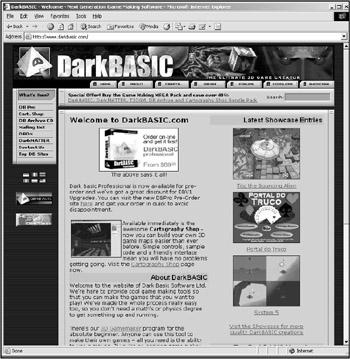
Figure 1.5: You will find the main Web site for DarkBASIC at http://www.darkbasic.com.
Dark Basic Software also maintains a separate Web site for DarkBASIC Professional, as shown in Figure 1.6. You can visit the Web site at http://www.darkbasicpro.com for the latest information about programming and product updates.
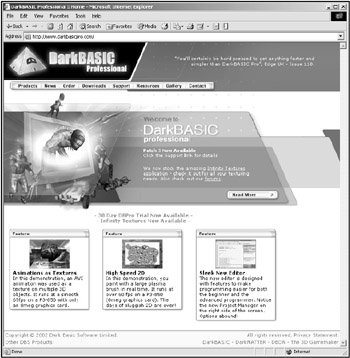
Figure 1.6: The Web site for DarkBASIC Professional is located at http://www.darkbasicpro.com.
Rapid Game Development
What makes DarkBASIC so popular is that it provides users with the ability to quickly and easily write graphically intense programs that utilize the latest 3D graphics cards. It only takes a few simple commands to load a 3D model with full texturing and lighting enabled, and to move that model around on the screen.
To help you get a feel for what DarkBASIC is all about, let me show you some additional examples that demonstrate its capabilities. Although there’ a lot of source code involved, these programs demonstrate that anyone can write a game with little effort using DarkBASIC. At the same time, a DarkBASIC program listing is significantly shorter than similar source code written in most languages.
- Iced Demo. Figure 1.7 shows a DarkBASIC program called Iced Demo, a simple first-person shooter game written by Lee Bamber, one of the lead programmers who created DarkBASIC. (He's more than just an expert, he's the man!)
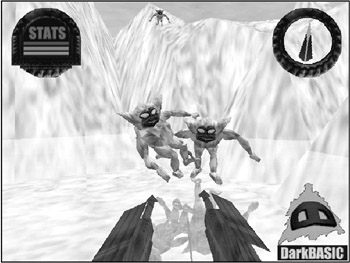
Figure 1.7: Iced Demo is a simple first-person shooter created with DarkBASIC. - Jet Ski Demo. Jet Ski Demo is another nice example of the capabilities of Dark-BASIC (see Figure 1.8). This program, also written by Lee Bamber, reminds me of WaveRace on the Nintendo 64, featuring some awesome wave effects.
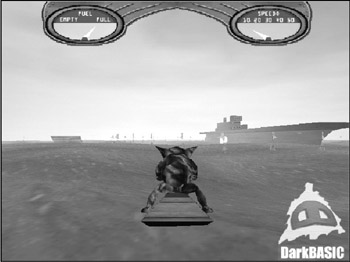
Figure 1.8: Jet Ski Demo simulates riding on waves with realistic water movement. - Room Demo. Room Demo, also included with DarkBASIC and written by Lee Bamber, demonstrates special water effects, 3D character animation, ball-bouncing physics, rain effects, translucent water, and triggers that open and close doors (see Figure 1.9).
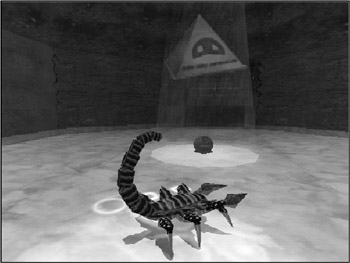
Figure 1.9: Room Demo demonstrates 3D character animation and special effects. - DarkSWARM Demo. DarkSWARM demonstrates 2D graphics. It is also included with DarkBASIC and was written by Lee Bamber. DarkSWARM resembles a classic vertically oriented arcade game, but it is actually a full 3D game (see Figure 1.10). The player's ship, aliens, projectiles, and even the score are rendered in 3D, while the camera angle represents the game in a 2D setting. This is a great way to enhance a game that would otherwise be limited to 2D.
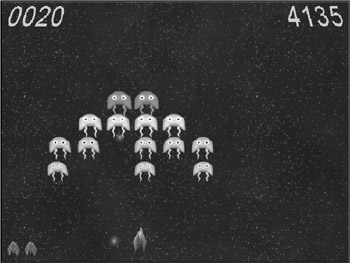
Figure 1.10: DarkSWARM resembles a classic 2D arcade game. - Tank Demo. Tank Demo is an extraordinary demonstration of the capabilities of DarkBASIC! This program, also provided with DarkBASIC and written by Lee Bamber, includes multi-level terrain over which you can drive in a tank, as shown in Figure 1.11. The tank moves realistically over the terrain, angling up, down, left, and right depending on the angle of the ground. Tank Demo also employs recoil physics, smoke, fog on the horizon, moving clouds, fire, transparent surfaces, and realistic terrain damage when a projectile explodes on the ground. By changing the camera angle to an overhead view, this game could be turned into a real-time strategy (RTS) game. It could also be a fantastic tank battle game for multiple players by adding multiplayer connectivity, destructible buildings, base camps, and power-ups!
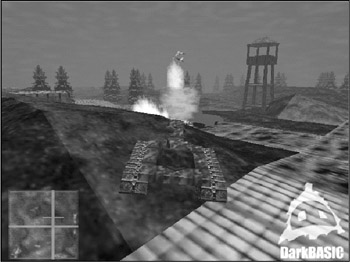
Figure 1.11: Tank Demo shows off the awesome capabilities of DarkBASIC in a war game setting.
What about Windows and DirectX?
Now you've seen some examples of the capabilities built into DarkBASIC. What makes it all possible? Most games today are developed in C or C++ using development tools such as Microsoft Visual C++ or Metrowerks CodeWarrior, and they are extraordinarily complex, requiring extensive game libraries and "engines" that power the graphics system, usually implemented in 3D. Suppose you want to write your own game in C++ using DirectX—the leading game development library for Windows PCs today. The amount of work involved in writing a simple game using C++ is phenomenal. Not only must you interface with Windows, but you must also learn how to program the DirectX SDK, all before you are even able to start on your game. In contrast, DarkBASIC handles those details in the background and lets you start working on your goal right away, without any extra work.
| Note |
Microsoft's DirectX game development library is comprised of components that abstract the computer system, providing a common set of interfaces regardless of the underlying hardware (such as the video card and sound card). Hardware manufacturers, such as Nvidia (makers of the GeForce4 Graphics Processing Unit) and Creative Labs (makers of the Sound Blaster Audigy sound card) include DirectX drivers with their products so that all games developed in current or earlier versions of DirectX will run without incident. DarkBASIC supports DirectX 7.0, which is comprised of seven main components—DirectDraw, DirectSound (for sound effects), DirectSound3D (for positional 3D sound), DirectMusic (for music playback), DirectInput (for mouse, joystick, and keyboard support), DirectPlay (for multiplayer networking), and Direct3D (for 3D graphics). DarkBASIC Professional supports and uses the advanced features of DirectX 8.1. |
Suppose you have a great idea for a game that you want to develop. First you need to write your own DirectX library suited for the type of game you are planning. This library should include the 2D or 3D graphics engine that powers your game, as well as support for sound effects, background music, user input devices (including force-feedback joysticks, if applicable), and multiplayer networking (if your game will support more than one player). It is a rare game today that is released with no built-in multiplayer capabilities. (One exception that comes to mind is Sid Meier's Civilization III—a deep and engaging turn-based strategy game that is perhaps not practical in a multiplayer setting, but is extraordinarily fun and challenging nonetheless. But even this game has an add-on product that provides network play capability!)
By the time you have finished creating the core library and engine code needed to power your game, you probably will have given up on the game entirely and moved on to a new subject or game type—assuming you had the capabilities to develop a cutting-edge game engine in the first place. An alternative is to use a game engine such as Quake III and then write a modification (mod) for that engine. However, even that involves a great amount of C++ code and creation of your own 3D models.
What you need is a way to quickly, easily, and spontaneously crank out the prototype version of your game idea before you lose interest and before the complexities of game programming overwhelm you and stifle the creative enthusiasm that you felt upon coming up with the new game idea. That's where DarkBASIC comes in. Not only is DarkBASIC a fantastic prototyping language that lets you get a minimal demonstration of your game up and running very quickly, it is also full-featured and loaded with awesome tools that will let you follow through and take the game to completion. Although you can (and will) write awesome games with DarkBASIC, you could also use it to quickly prototype a game that you plan to eventually write in a more difficult language.
System Requirements
Okay now, what does it take to actually run DarkBASIC? I'll assume that you have a computer already because that's sort of a given, right? If you don't have a computer, I'll at least assume that you are using one at school, work, or a friend's house. You will need a Windows PC with DirectX 7.0a installed to run DarkBASIC or any program compiled with it. Here are the minimum recommended specifications for any PC running DarkBASIC:
- Windows 95, 98, 2000, Me, or XP
- 300 MHz Pentium II
- 64 MB of memory
- 500 MB of free hard drive space
- 4x CD-ROM drive
- 3D video card with 8 MB of video memory
- DirectX-compatible sound card
From my own personal experience, you will want a much more powerful system than the minimum specs listed above; otherwise, your games will not be able to run very fast. When it comes to writing games and graphics programs, you want a more powerful computer than the norm. I recommend at least a 2 GHz processor, 512 MB of RAM, and a GeForce4 or later video card. Most PCs today exceed even these specs; I am being conservative with the numbers.
DarkBASIC Professional supports the advanced features of DirectX 8.0+, so you will want a high-end video card to write programs that use those features. For example, I have a GeForce4 Ti4200 card with 64 MB of DDR video memory, and it is fully capable of handling the new features in DarkBASIC Pro.
| Tip |
If you are not familiar with terms such as T&L, pixel shading, and vertex shading, you might want to pick up one of the excellent books by Premier Press that deals with Direct3D. You can find detailed information about these books at http://www.premierpressbooks.com and in Appendix B, "Recommended Books and Web Sites." |
Features of the DarkBASIC Language
DarkBASIC includes a rich development environment and language, runs in fullscreen mode, and is fully compatible with Windows. It runs in full-screen mode because it is more than just a programming tool—it is a complete game development environment. The Windows user interface takes away from the mystique—or rather, immersion—that DarkBASIC provides.
Now, this is an important point. When you are running DarkBASIC and working on a game, the rest of your computer is irrelevant; you are fully engaged in what you are doing, with no distractions. This is a very important aspect that I believe makes DarkBASIC a great tool for beginners. Too often, the Windows user interface is a distraction! Although DarkBASIC helps you to focus on the game, you can still freely switch between DarkBASIC and other programs because it's Windows friendly.
| Note |
Despite the immersion of DarkBASIC, which is great for beginners, experienced programmers often prefer a windowed interface, such as that provided by DarkEDIT. DarkBASIC Professional features a windowed IDE (Integrated Development Environment). |
DarkBASIC features automatic double buffering, which results in super smooth animation at the highest possible frame rate using hardware 3D acceleration (if your video card supports it). Other general features include commands to play back audio-video interleave (AVI) movie files, create 3D sound effects, and use TrueType fonts. Probably one of the most interesting features of DarkBASIC is the compiler, and how it creates standalone executable files that can be run on any PC. (I'll explain this capability in the following section.) Possibly the best feature of DarkBASIC is how it compiles programs.
No Run Time Required
What happens when you have created a killer new game and you want to share it with your friends or send it to game companies to see whether they might publish it? Probably the most impressive and amazing feature of DarkBASIC is that it can create standalone executable files that require absolutely no run-time library! What is a run-time library, you might ask? It is a collection of functions that are built into a programming language and must be packaged with a program for it to run. Some languages (such as Visual Basic) store the run-time in one or more dynamic link library (DLL) files that must be installed before the program will run. DarkBASIC programs, on the other hand, store the DarkBASIC run-time library inside the executable, requiring no dependencies.
| Note |
Compiled DarkBASIC programs are standalone executables that do not require any run-time library because they are self-contained. The only requirement is that DirectX 7.0 is installed. |
But DarkBASIC doesn't stop there! DarkBASIC executables can be compiled as standalone programs and distributed with all of the graphics and sounds needed by the game. Alternatively, these files can all be packaged together inside the executable file. Yes, you can compile an entire game—executable file, 3D model files, texture bitmap files, sound files, and music files—into the executable. DarkBASIC handles the situation automatically! You don't need to modify anything to load files from a disk or from inside the executable because it is done behind the scenes. This is a great feature, especially when you don't want others to steal your game files and use them in their own games without your permission.
BASIC Graphics
DarkBASIC includes all the commands you need to create 2D and 3D games, but it doesn't stop there! It also includes a plethora of 3D models, textures, bitmaps, sound effects, and music that you can use freely and distribute in your own games.
DarkBASIC includes all of the following 2D graphics features.
- Support for the bitmap graphics format
- Super-fast software and hardware blitting
- Mirror, stretch, blur, and fade bitmaps
- Huge animated sprites
- Transparency
- Fast collision detection
It also includes all of the following 3D graphics features.
- XOF and 3DS model files
- Landscape transformation
- Built-in 3D objects
- 3D object collision detection
- Full model manipulation and animation
- Ambient and directional lighting
- Texture filtering
- Alpha blending
- Translucent textures and fog
BASIC Commands
DarkBASIC includes a rich assortment of commands used to write programs. What is a command? It is what other languages (such as C++) call an intrinsic function—something built into the language. Fortunately, DarkBASIC has no concept of project files, include files, library files, and so on. Although you can break up large programs into multiple source code files (which is particularly useful when you want to share your custom code between programs), there is far less confusion when compiling and running programs developed with DarkBASIC because the interface is so incredibly simple to use!
In a nutshell, DarkBASIC uses a structured version of the classic BASIC language. By structured, I mean that it resembles QuickBasic more than old-school BASIC because it allows you to create your own subroutines and functions that return values. Old-school BASIC had a GoSub command that referred to line numbers—not to worry, DarkBASIC doesn't use line numbers. Although DarkBASIC borrowed features of QuickBasic to make it easy to write programs, it utterly leaves QuickBasic in the dust beyond the core language.
The DarkBASIC Development Environment
With all this talk about hardware features, capabilities of DarkBASIC, and so on, you are probably eager to get started writing real DarkBASIC programs. Don't worry, my friend, the next chapter jumps right in and includes a sample program—your first DarkBASIC program, in fact. For now, you should take a brief tour of the DarkBASIC development environment so you feel comfortable with it.
The Integrated Game Development Environment
Most modern programming languages include a complete integrated development environment. DarkBASIC takes that concept a step further with respect to games, featuring what I like to call an integrated game development environment, due to the awesome built-in game features. Let's get started with that tour, okay?
First you need to run DarkBASIC. Assuming you have installed it already, you will be able to run it from the Windows Start menu. Click Start, Programs, Dark Basic Software, Dark Basic. The DarkBASIC development environment will appear, as shown in Figure 1.12. Note that there are six menus across the top of the screen: File, Edit, View, Help, Run, and Media.
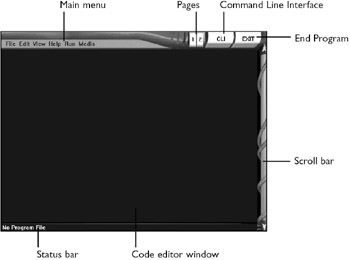
Figure 1.12: The DarkBASIC development enviroment
File Menu
Figure 1.13 shows the File menu, which includes several common system functions for loading and saving projects and building executables.
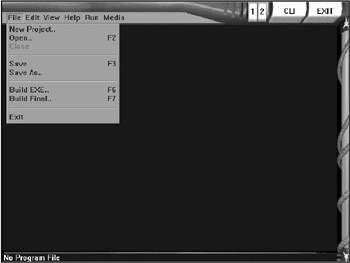
Figure 1.13: The File menu is used to load and save projects in DarkBASIC.
The commands on the File menu include
- New Project. The New Project menu item brings up the New Project Folder dialog box (see Figure 1.14). The Project field contains the name of the folder that DarkBASIC creates to hold the project files. Since DarkBASIC looks in the current folder for files that a game needs, you should store all of the graphics, sound, and other files inside the project folder.
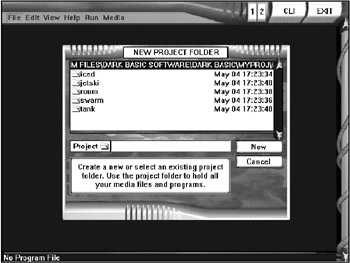
Figure 1.14: The New Project Folder dialog box contains the name of the folder that holds the project files. - Open. The Open menu item brings up the Load a Program dialog box (shown in Figure 1.15), which allows you to load a DarkBASIC program by browsing through the folders on your computer. When you select a DarkBASIC program file (with a .dba extension), you can examine the Title, Author, and Date fields.
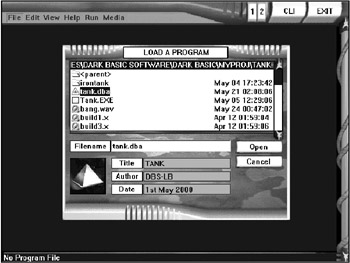
Figure 1.15: The Load a Program dialog box lets you browse for a DarkBASIC project. - Close. The Close menu item closes the current project file and clears the code editor window so you can start typing in a new program.
- Save. The Save menu item saves the current project. Note that this applies only to the page that is in view. (There are two pages available in the code editor, as noted by the 1 and 2 buttons next to the CLI button at the topright corner of the DarkBASIC screen; refer to Figure 1.16.)
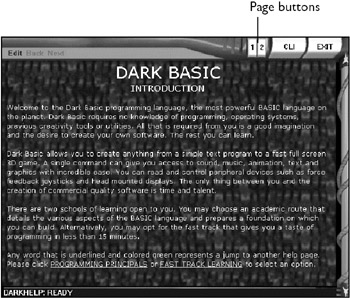
Figure 1.16: The page-swapping buttons let you switch between one of the two source code windows available in the DarkBASIC editor. - Save As. The Save As menu item brings up the Save a Program dialog box, as shown in Figure 1.17. You can type the program's title, author, and date in the appropriate fields. Then select the destination folder where you would like to save the .dba file.
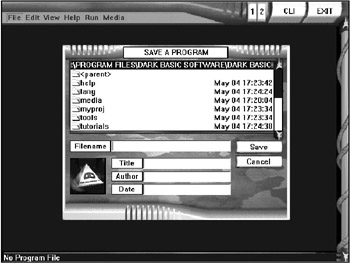
Figure 1.17: The Save a Program dialog box lets you save the program currently in memory. - Build EXE. The Build EXE menu item brings up the Build Executable dialog box, shown in Figure 1.18. You can use this dialog box to create a standalone executable after you have finished writing a program. Note that this does not link all of the data files into the executable; that is accomplished using the Build Final menu item.
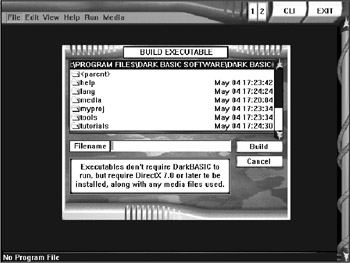
Figure 1.18: The Build Executable dialog box lets you create an executable file that can be run outside of DarkBASIC. - Build Final. The Build Final menu item brings up the Build Final dialog box, as shown in Figure 1.19. Type in the name of the executable file, and DarkBASIC will build a standalone program with all of the graphics, sounds, and data files built into the executable and ready for distribution.
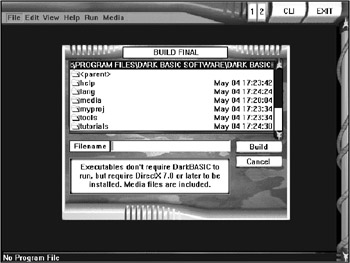
Figure 1.19: The Build Final dialog box lets you create a standalone executable program with all of the graphics and sound files built in and with no run time library required! - Exit. The Exit menu item is used to end the program. Before DarkBASIC closes, it asks you to confirm that you want to exit (see Figure 1.20). If you have a program currently in the editor, DarkBASIC will offer you an opportunity to save the file before quitting. You can also tell DarkBASIC to close by clicking the EXIT button at the top-right corner of the screen.
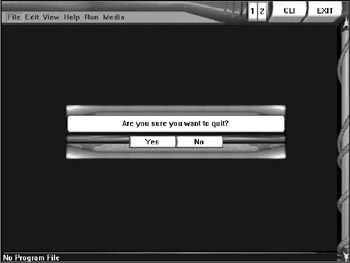
Figure 1.20: After you choose to exit the program, DarkBASIC confirms the action before closing.
Edit Menu
The Edit menu, shown in Figure 1.21, contains the following commands. You might find these commands familiar, since they are standard in most Windows programs.
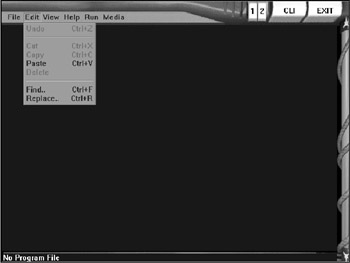
Figure 1.21: The Edit menu includes copy/cut/paste and text search features.
- Undo. The Undo menu item undoes the last edit action you performed in the code editor window. You can also invoke the Undo command by pressing Ctrl+Z.
- Cut. The Cut menu item removes the text from the code editor window and places it on the Windows Clipboard. You can also invoke the Cut command by pressing Ctrl+X.
- Copy. The Copy menu item copies the currently selected text to the Windows Clipboard. You can invoke the Copy command by pressing Ctrl+C.
- Paste. The Paste menu item pastes text from the Windows Clipboard into the code editor window. You can invoke the Paste command by pressing Ctrl+V.
- Delete. The Delete menu item deletes the selected text in the code editor window.
- Find. The Find menu item brings up the Search Text dialog box, shown in Figure 1.22.
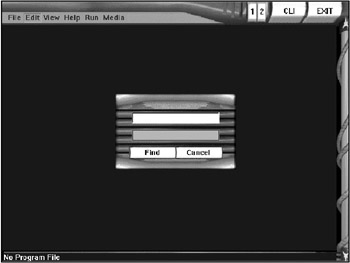
Figure 1.22: The Search Text dialog box allows you to enter the text for the search process. - Replace. The Replace menu item brings up the Replace Text dialog box, shown in Figure 1.23, which allows you to replace one word or phrase with another throughout the source code in the code editor.
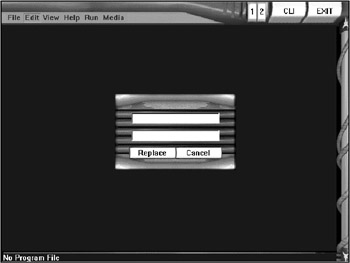
Figure 1.23: The Replace Text dialog box allows you to replace one word or phrase with another.
View Menu
The View menu, shown in Figure 1.24, includes the following commands.
- Top. The Top menu item moves the cursor to the top of the source code listing.
- Bottom. The Bottom menu item moves the cursor to the bottom of the source code listing.
- Next Page. The Next Page menu item moves the code listing down one page. You can also use the Page Down key to accomplish this.
- Previous Page. The Previous Page menu item moves the code listing up one page. You can also use the Page Up key to accomplish this.
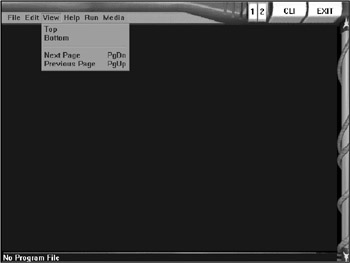
Figure 1.24: The View menu allows you to quickly jump through the source code.
Help Menu
The Help menu, shown in Figure 1.25, includes a long list of help commands that will bring up various screens in the DarkBASIC environment.
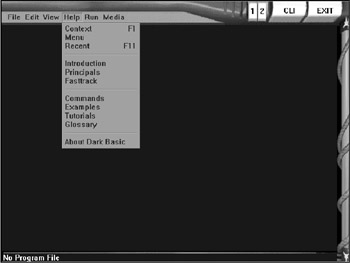
Figure 1.25: The Help menu includes numerous help features.
- Context. The Context menu item brings up a help screen related to a word currently highlighted in the code editor. For example, type the PRINT command in the code editor and then select Help, Context (or press F1) to get help for that command (see Figure 1.26).
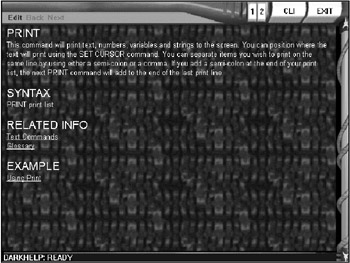
Figure 1.26: Context-sensitive help retrieves information about the currently highlighted text in the code editor. - Menu. The Menu item brings up a menu of help screens (including complete tutorials) available within DarkBASIC that you can use while learning the language (see Figure 1.27). By clicking one of the help items, you will bring up additional help screens.
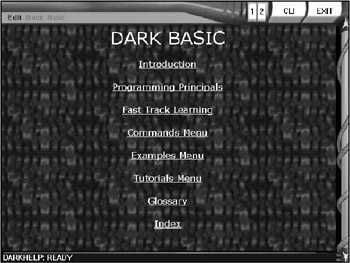
Figure 1.27: The Menu help screen displays a list of common help items. - Recent. The Recent menu item brings up the last help screen that you viewed.
- Introduction. The Introduction menu item brings up the Introduction help screen, which provides an overview of DarkBASIC with Web-style links to additional help screens (see Figure 1.28).
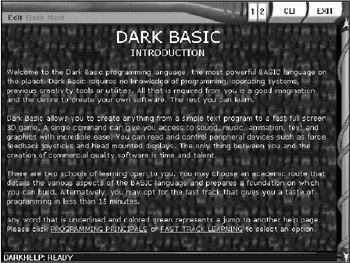
Figure 1.28: The Introduction help screen explains some of the features of DarkBASIC. - Principals. The Principals menu item brings up the Programming Principals screen (shown in Figure 1.29), which provides an overview of the basic data types and commands built into DarkBASIC.
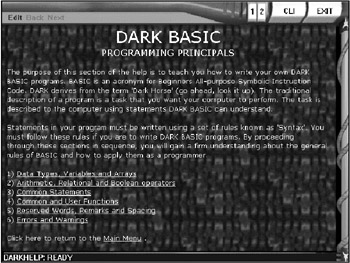
Figure 1.29: The Programming Principals help screen displays a list of commands built into DarkBASIC. - Fasttrack. The Fasttrack menu item brings up the Fast Track Learning help screen (shown in Figure 1.30), which contains a series of tutorials geared to help you quickly get started writing programs with DarkBASIC.
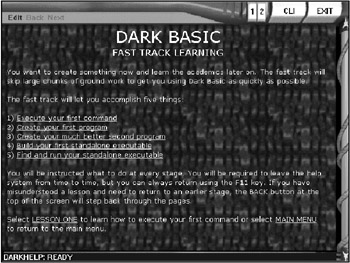
Figure 1.30: The Fast Track Learning help screen includes numerous tutorials built into DarkBASIC that will help you start writing programs immediately. - Commands. The Commands menu item brings up the Main Commands Menu help screen (shown in Figure 1.31), probably the most useful part of the DarkBASIC help system. This screen includes links to the main programming commands, grouped by function.
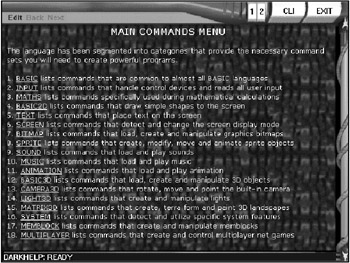
Figure 1.31: The Main Commands Menu help screen displays a list of hyperlinked commands available in DarkBASIC. - Examples. The Examples menu item brings up the Main Examples Menu help screen (as shown in Figure 1.32), which is a huge list of samples that you can examine or run to see how various commands in DarkBASIC work.
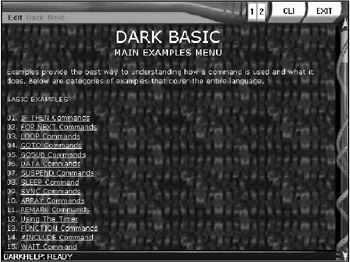
Figure 1.32: The Main Examples Menu help screen displays a list of example programs you can run. - Tutorials. The Tutorials menu item brings up the Main Tutorials Menu help screen (shown in Figure 1.33), which explains how to solve specific types of programming problems with DarkBASIC.
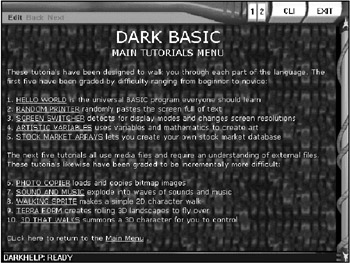
Figure 1.33: The Main Tutorials Menu help screen includes some tutorials on programming with DarkBASIC. - Glossary. The Glossary menu item brings up the Glossary help screen (shown in Figure 1.34), a comprehensive list of terms and definitions for concepts related to game and graphics programming.
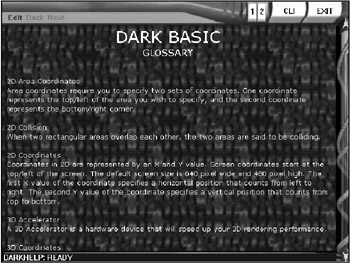
Figure 1.34: The Glossary help screen displays a list of related terms and definitions. - About Dark Basic. The About Dark Basic menu item brings up the Dark Basic Credits screen, showing the members of the team who created and contributed to DarkBASIC (see Figure 1.35).
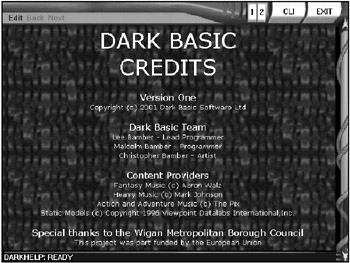
Figure 1.35: The Dark Basic Credits screen displays the names of the individuals responsible for developing DarkBASIC.
Run Menu
The Run menu, shown in Figure 1.36, includes two commands.
- Compile. The Compile menu item compiles the program internally using the scripting engine, and is basically used to verify that there are no errors in the source code. This command does not create an executable file.
- Execute. The Execute menu item causes the program to start running with the built-in double buffering and the Command Line Interface (CLI) available. When the program is running, hit the Esc key to bring up the CLI. You can then type in commands directly, and DarkBASIC will run them from the CLI. (I'll cover this in more detail in Chapter 2, "Introduction to Computer Programming.")
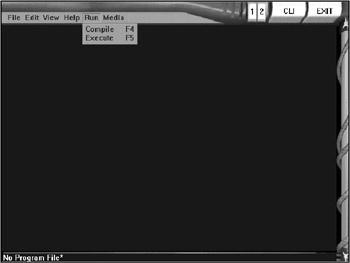
Figure 1.36: The Run menu includes options to compile and execute your programs.
Media Menu
The Media menu, shown in Figure 1.37, includes commands to browse and edit media files, such as 3D models, bitmaps, waves, MIDIs, and AVIs. There are three commands in the Media menu.
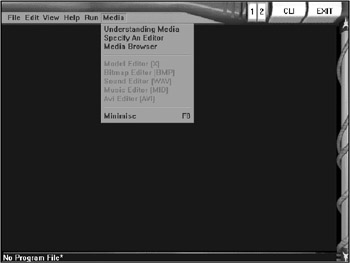
Figure 1.37: The Media menu contains commands for browsing and editing media files.
- Understanding Media. The Understanding Media menu item brings up a help screen with the same name, as shown in Figure 1.38.
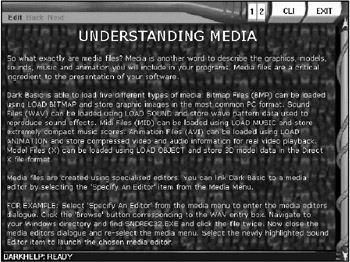
Figure 1.38: The Understanding Media help screen - Specify an Editor. The Specify an Editor menu item assigns external programs to the editor entries in the Media menu.
- Media Browser. The Media Browser menu item runs an external program called Media Browser, which comes with DarkBASIC (see Figure 1.39).
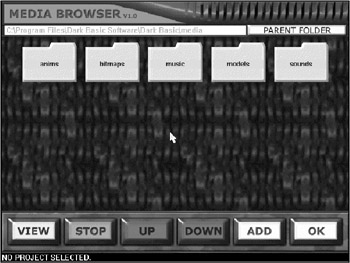
Figure 1.39: The Media Browser program included with DarkBASIC
DarkEDIT The Official External Editor
You might be saying to yourself, "What a neat integrated environment, but it lacks a few of the Windows features I need, such as the mouse wheel. Can I develop DarkBASIC programs outside of the DarkBASIC environment?" The answer to that question is yes! There is a program called DarkEDIT that allows you to develop DarkBASIC programs outside of the environment. For those of you who are more familiar with Visual C++, Delphi, and Visual Basic, where the IDE runs in a window, DarkEDIT is the tool for you.
DarkEDIT tracks labels, functions, and other essentials, just like the DarkBASIC environment. It has the same keyboard layout as DarkBASIC but is more of a Windows-style program. If you are not looking for total immersion in the BASIC environment but you would still like to write DarkBASIC games, DarkEDIT is the right tool (see Figure 1.40).
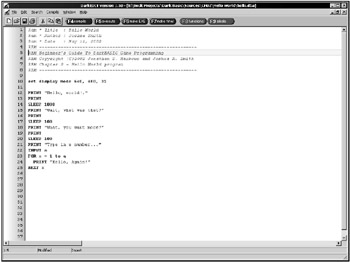
Figure 1.40: DarkEDIT is a text editor that runs outside of DarkBASIC and includes many features that are common in other source code editors.
As a matter of fact, DarkEDIT was adapted, revised, rewritten, and generally recycled for use in DarkBASIC Professional! The new editor in DarkBASIC Pro is more feature-rich than DarkEDIT, but the same DarkEDIT author worked on the editor for DarkBASIC Pro—Guy Savoie of Real Game Tools.
DarkMATTER and the DarkBASIC Update
DarkMATTER is an add-on product for DarkBASIC that includes hundreds of high-quality, professional 3D models, textures, and sound effects that you can use royalty-free in your own programs. In addition, DarkMATTER includes the DarkBASIC Enhancement Pack, which updates the DarkBASIC language with new commands and features such as those used for creating multiplayer games.
DarkMATTER Features
I highly recommend that you purchase DarkMATTER if you intend to do any serious work with DarkBASIC, because it is invaluable. Some of the sample programs in this book use DarkMATTER 3D models and textures (courtesy of Dark Basic Software). Figure 1.41 shows the logo for DarkMATTER.
Figure 1.41: The DarkMATTER add-on logo
DarkBASIC Update
DarkMATTER not only gives you a ton of 3D models, it also includes a complete updated version of DarkBASIC (version 1.13), which provides numerous new enhancements. One such enhancement is multiplayer commands that allow you to support multiple players in your DarkBASIC games!
Introduction to DarkBASIC Professional
DarkBASIC Professional is a totally new program with a new language, compiler, editor, and debugger. This version has been written from scratch using DirectX 8.1 and supports the latest features of DirectX. For this reason, DarkBASIC Professional operates differently than standard DarkBASIC. Figure 1.42 shows the new IDE for DarkBASIC Professional.
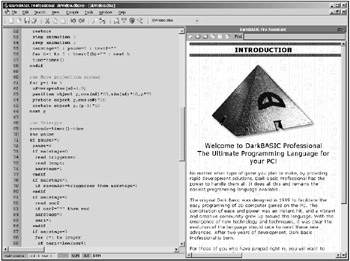
Figure 1.42: DarkBASIC Professional features a completely new IDE.
As Figure 1.42 shows, DarkBASIC Professional has a new feature called the DarkBASIC Pro Assistant. This is a new integrated help system that provides a quick reference for commands. There is another display mode in DarkBASIC Pro that looks more like a traditional programming language, with a project window showing project files, resources, and so on. Figure 1.43 shows the project view mode in DarkBASIC Pro.
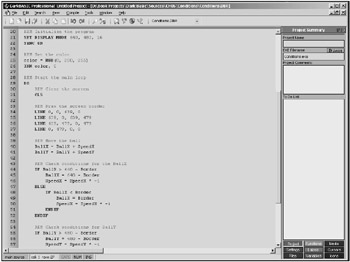
Figure 1.43: The project window in DarkBASIC Professional displays information about the current program.
New Features in DarkBASIC Professional
DarkBASIC Pro is a completely new product; it is not based on the source code from DarkBASIC. It features a completely rewritten graphics core engine based on DirectX 8.1. In contrast, DarkBASIC 1.0 was based on DirectX 7.0. Take a look at Figure 1.44 to see FaceDemo, one of the sample programs that comes with DarkBASIC Pro.
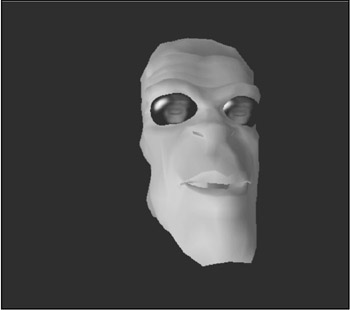
Figure 1.44: DarkBASIC Pro features a new graphics engine based on DirectX 8.1, demonstrated by the FaceDemo program.
Although it's premature (in the extreme!) at this point to talk about the details, I will at least give you a glimpse of what to expect in later chapters. DarkBASIC Pro is packed with a lot of functionality that is based entirely on the good will and charitable nature of the authors. For instance, DarkBASIC Pro can load and render Half Life maps, Quake III Arena maps, and generic binary space partition (BSP) maps, as well as 3D characters stored in .MD2 and .MD3 files. Of course, DarkBASIC Pro also supports 3D Studio MAX (.3DS) files, as well as Direct3D .X files, as the LTypeDemo program shows in Figure 1.45.
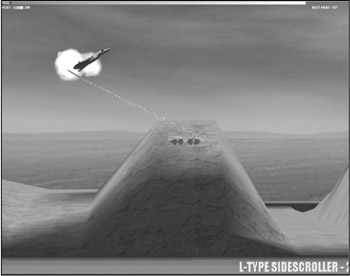
Figure 1.45: 2D scrolling shooter games are even more exciting when they are rendered in 3D using DarkBASIC Pro!
Which Version Should You Focus On?
DarkBASIC programs will still run in the DarkBASIC Professional environment, but they require a few small changes, which I will point out when necessary. If you are an experienced DarkBASIC programmer who has invested time in standard DarkBASIC, you will learn all of the tricks and techniques that you might have missed before in the following chapters. At the same time, you will gain the knowledge and experience you need to delve into DarkBASIC Professional. In effect, this book gives you the option to choose which version you would like to use. If you already own DarkBASIC, you can install the DarkBASIC Professional Premier Trial Edition located on the CD-ROM to take advantage of the new features in DarkBASIC Pro. During the trial period, you can decide whether the new version is compelling enough to warrant an upgrade. Rest assured, by the time you have read this book you will definitely want to buy the full version, because it is awesome!
The last thing I want you to be concerned with is which version of DarkBASIC you need while reading this book. The book supports both versions. Although DarkBASIC Professional is a powerful new programming language that is mostly compatible with standard DarkBASIC projects, I'm going to focus primarily on standard DarkBASIC. The code and topics of discussion in this book are geared primarily for standard DarkBASIC, but in most cases I have included a DarkBASIC Professional version of the sample programs on the CD-ROM.
Installing DarkBASIC
In this section I will walk you through an installation of both DarkBASIC and DarkBASIC Professional, since you are likely to install the demo or retail versions of both to explore the features and benefits of each product.
Installing Standard DarkBASIC
The standard version of DarkBASIC is included on the CD-ROM for this book. Whether you are installing the retail version, the demo version from the DarkBASIC Web site, or the Premier Trial Edition from the CD-ROM, the following instructions should be applicable. When you insert the retail CD-ROM, you will see the menu shown in Figure 1.46.
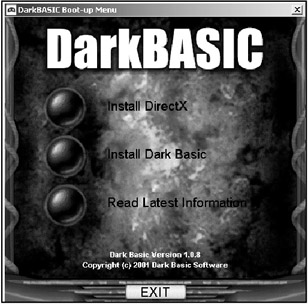
Figure 1.46: The CD-ROM menu for DarkBASIC
Click the Install Dark Basic option to run the setup program. The Welcome screen will appear, as shown in Figure 1.47. If you have not yet installed DirectX, you will want to do so prior to installing DarkBASIC because DarkBASIC requires DirectX in order to work. Click the Next button to continue.
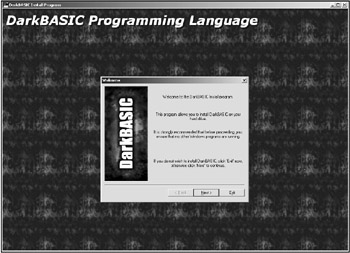
Figure 1.47: The DarkBASIC Welcome screen
Next comes the end-user license agreement (also called the EULA) screen (shown in Figure 1.48). Click the Next button to continue.
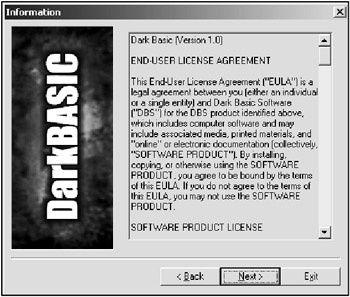
Figure 1.48: The end-user license agreement screen
The Choose the Version to Install screen (shown in Figure 1.49) contains two options—Full Installation and Minimum Installation. Leave the default of Full Installation selected, and then click the Next button to continue.
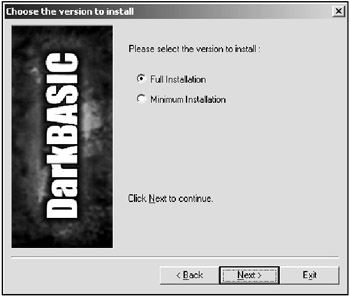
Figure 1.49: The Choose the Version to Install screen
The next screen that appears is the Directory screen that allows you to choose the location to install DarkBASIC files (see Figure 1.50). Most of the time you will simply leave the default directory of C:Program FilesDark Basic SoftwareDark Basic, but you can type in or browse for an alternative location if you want. Click the Next button to continue.
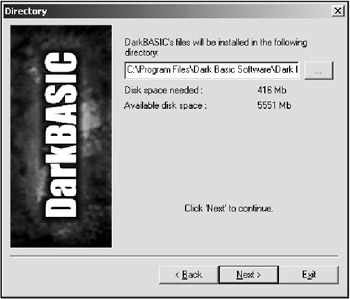
Figure 1.50: The Directory screen
Depending on whether you have installed DarkBASIC before, you may or may not see a message box that asks you whether you want to create the new directory (see Figure 1.51). Click Yes to continue.
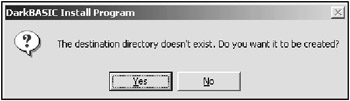
Figure 1.51: The directory creation message box
Finally, you will see the Confirmation screen (shown in Figure 1.52). Click the Start button to begin the actual install process of copying files to your hard drive.
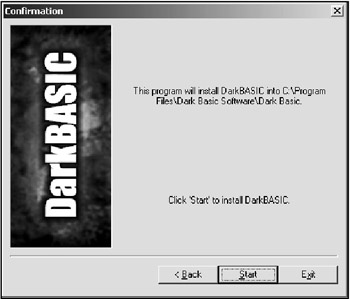
Figure 1.52: The Confirmation screen
As files are being copied to your hard drive, the Installing screen displays the progress of the install (see Figure 1.53).
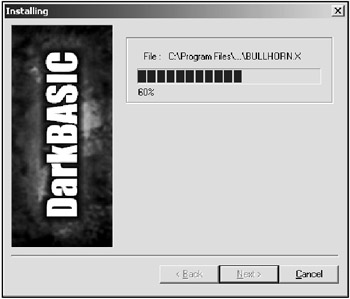
Figure 1.53: The Installing screen, which tracks the installation progress
When the files have been copied and settings have been applied to your PC, the End screen will be displayed, as shown in Figure 1.54. You can now click Exit to exit the installer.
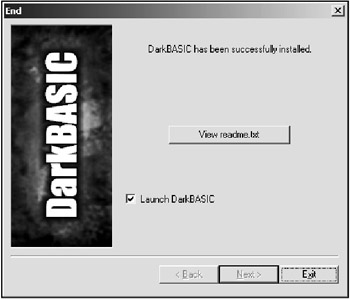
Figure 1.54: The End screen, which signifies that the installation has been completed
Installing DarkBASIC Professional
The installer for DarkBASIC Professional is similar to the DarkBASIC installer and just as easy to use. When you insert the retail CD-ROM or start the demo setup program, the menu shown in Figure 1.55 appears. If you have not already installed DirectX, you should install it now. If you have Windows 2000 or XP, select the first option (NT), but if you are running Windows 98 or Me, select the second option (98/ME). After you have installed DirectX, return to the DarkBASIC Professional installer.
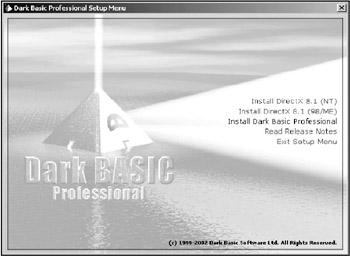
Figure 1.55: The CD-ROM menu interface for DarkBASIC Professional
Now proceed with the installation by clicking the Install Dark Basic Professional CD-ROM menu item. If you are installing the trial version from this book's CD-ROM, you might need to install DirectX from the main CD-ROM menu for the book, rather than from the DarkBASIC Professional install menu.
The InstallShield Wizard screen (shown in Figure 1.56) will appear when the installer starts. Click the Next button to continue.
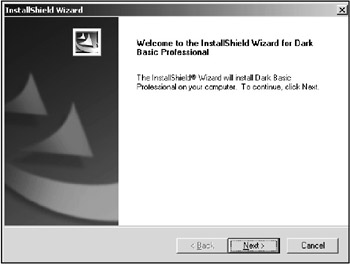
Figure 1.56: The InstallShield Wizard welcome screen
The end-user license agreement will be displayed, as shown in Figure 1.57. Click Yes to continue.
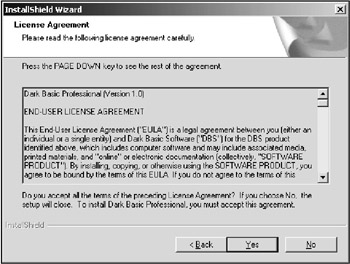
Figure 1.57: The EULA screen
Figure 1.58 shows the Setup Type screen. In most cases you will want to select Full Installation, but you might want to select Minimum Installation if your hard drive is short on space. Click the Next button to continue.
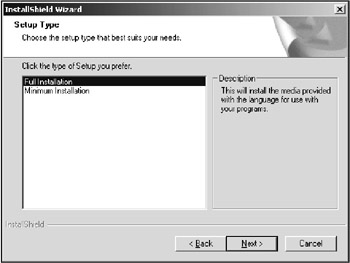
Figure 1.58: The Setup Type screen, which allows you to set your installation options
Now select the destination folder where the DarkBASIC Professional files will be copied, using the Choose Destination Location screen (see Figure 1.59). You can type in a new folder name or use the Browse button. Click Next to continue.
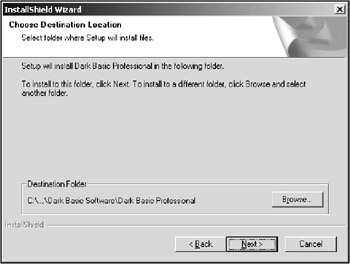
Figure 1.59: The Choose Destination Location screen
The installer will copy the files to your hard drive. As files are being copied, the Setup Status dialog box will show the progress of the install (see Figure 1.60).
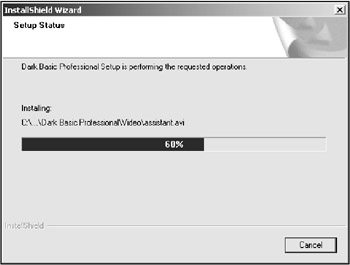
Figure 1.60: The Setup Status screen, which displays the installation progress
After the files have been copied and settings have been configured on your PC for running DarkBASIC Professional, the InstallShield Wizard Complete screen will appear (see Figure 1.61). Click the Finish button to exit. Your PC is now ready to run DarkBASIC Professional.
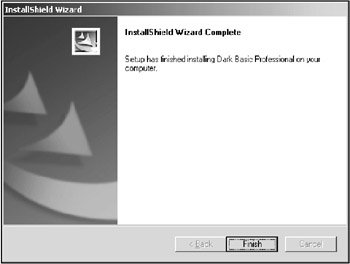
Figure 1.61: The InstallShield Wizard Complete screen
Summary
Well, there goes the first chapter. Are you feeling enthused about the capabilities of DarkBASIC yet? As you learned in this chapter, DarkBASIC is a complete, selfcontained game creation tool capable of compiling standalone DirectX games. DarkBASIC handles all of the difficult work for you behind the scenes, allowing you to focus on quickly developing the program rather than spending most of your time learning how to program for Windows and DirectX. DarkBASIC-compiled programs are standalone executable files that have no dependency on a run-time file because the DarkBASIC run-time is built into the .exe file.
Quiz
Each chapter in this book will end with a quiz to help reinforce what you learned in the chapter. Each chapter quiz includes ten multiple-choice, true-false, or yes-no questions. You will find the answers for all of the chapter quizzes in Appendix A, "Answers to the Chapter Quizzes."
|
1. |
What company developed DarkBASIC?
|
|
|
2. |
DarkBASIC takes advantage of what Windows-based technology?
|
|
|
3. |
Which of the following commands is not listed on the File menu?
|
|
|
4. |
DarkEDIT is an alternative for the DarkBASIC editor.
|
|
|
5. |
DarkBASIC was based on which of the following programming languages?
|
|
|
6. |
Which of the following is not a menu in DarkBASIC?
|
|
|
7. |
What is the main Web site for DarkBASIC?
|
|
|
8. |
BASIC stands for:
|
|
|
9. |
What is the name of the DarkBASIC add-on product?
|
|
|
10. |
Is there a run-time file required for DarkBASIC?
|
|

Answers
|
1. |
B |
|
2. |
C |
|
3. |
D |
|
4. |
A |
|
5. |
A |
|
6. |
D |
|
7. |
A |
|
8. |
C |
|
9. |
D |
|
10. |
B |
Part I - The Basics of Computer Programming
- Welcome to DarkBASIC
- Introduction to Computer Programming
- Basic Commands, Variables, and Data Types
- Characters, Strings, and Text Output
- Looping Commands
- Making Programs Think Branching Statements and Subroutines
- More Power to the Numbers Data Sequences and Arrays
- Number Crunching Mathematical and Relational Operators and Commands
Part II - Game Fundamentals Graphics, Sound, Input Devices, and File Access
- Basic Graphics Commands
- Game Graphics Learning to Use Bitmaps
- The Art of Using Animated Sprites for 2D Games
- Programming the Keyboard, Mouse, and Joystick
- Adding Sound Effects to Your Game
- Playing Some Tunes CD Audio, MIDI and MP3 Music
- Loading and Saving Information Using Files
- Playing Intro Movies and Cut-Scenes
Part III - Advanced Topics 3D Graphics and Multiplayer Programming
Epilogue
Part IV - Appendixes

EAN: 2147483647
Pages: 203
