| only for RuBoard - do not distribute or recompile |
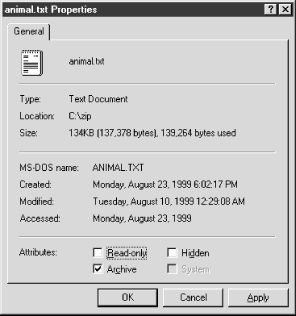
A standard set of properties is available for every file
object via the Properties context menu or by selecting File
Properties from
Explorer's main menu. These properties include things like file
attributes,
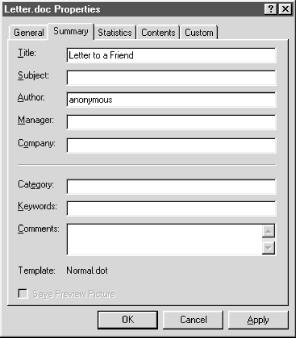
Microsoft Word is a good example of this functionality in action, as it adds four additional property pages to the standard dialog for its .doc file type. These additional property pages allow users to modify .doc file attributes like title, author, and subject of a document without having to start Microsoft Word. Figure 6.2, for instance, shows the Summary property sheet of a Microsoft Word .doc file, an interface element added by Word's property sheet handler.
| only for RuBoard - do not distribute or recompile |
| only for RuBoard - do not distribute or recompile |
Property sheet handlers are required to implement two
interfaces:
IShellExtInit
and
IShellPropSheetExt
.
You are already familiar with
IShellExtInit
(see Chapter
4).
IShellPropSheetExt
contains only two
When the Properties menu item is selected for a file
object, Explorer initializes the handler by calling
IShellExtInit::Initialize
. The selected file is passed to
the handler via an
IDataObject
interface. Typically, the
property sheet handler would save the
Then the shell calls IShellPropSheetExt::AddPages . The implementor of AddPages is required to fill out a PROPSHEETPAGE structure that contains information about the new property page. The structure is then passed to the CreatePropertySheetPage API, and a handle to the newly created property page is returned if the call was successful.
One of the parameters passed in by the shell to
AddPages
is a function address. The function specified by
this address must then be called with the handle to the newly
created page as its only parameter. If you are
| only for RuBoard - do not distribute or recompile |
| only for RuBoard - do not distribute or recompile |
Now that you know how a property sheet handler works, let's discuss the interfaces involved in a little more detail.
The implementation of IShellExtInit is exactly the same as it was in Chapter 4. (For the details of the IShellExtInit interface, see Section 4.4 in Chapter 4.) Well, almost. The functionality provided by IShellExtInit which is used to determine which files are selected in the Exploreris generic enough to be wrapped in a class. All future extensions that must implement IShellExtInit in this book will use this class. The class is called clsDropFiles, and the complete class listing is shown in Example 6.1.
Option Explicit
Private m_nFiles As Long
Private m_sDropFiles( ) As String
Public Sub GetDropFiles(pDataObj As IDataObject, _
ByVal sExtension As String)
Dim FmtEtc As FORMATETC
Dim pMedium As STGMEDIUM
Dim i As Long
Dim lresult As Long
Dim sTemp As String
Dim lIndex As Long
With FmtEtc
.cfFormat = CF_HDROP
.ptd = 0
.dwAspect = DVASPECT_CONTENT
.lIndex = -1
.TYMED = TYMED_HGLOBAL
End With
pDataObj.GetData FmtEtc, pMedium
m_nFiles = DragQueryFile(pMedium.pData, &HFFFFFFFF, _
vbNullString, 0)
lIndex = 0
For i = 0 To m_nFiles - 1
sTemp = Space(255)
lresult = DragQueryFile(pMedium.pData, i, sTemp, Len(sTemp))
If (lresult > 0) Then
sTemp = Left$(sTemp, lresult)
If LCase(Right(sTemp, 4)) = sExtension Then
ReDim Preserve m_sDropFiles(lIndex + 1)
m_sDropFiles(lIndex) = sTemp
lIndex = lIndex + 1
End If
End If
Next i
m_nFiles = lIndex
ReleaseStgMedium pMedium
End Sub
Public Property Get Count( ) As Integer
Count = m_nFiles
End Property
Public Property Get Files(nIndex As Integer) As String
Files = ""
If (m_nFiles) Then
If (nIndex >= 0) And (nIndex < m_nFiles) Then
Files = m_sDropFiles(nIndex)
End If
End If
End Property
Public Property Get SelectedFile( ) As String
SelectedFile = ""
If (m_nFiles) Then
SelectedFile = m_sDropFiles(0)
End If
End Property
Now that we have a class that handles the extraction of filenames from IDataObject , implementing IShellExtInit becomes a little easier. The complete listing for IShellExtInit::Initialize is shown in Example 6.2.
Private m_clsDropFiles As clsDropFiles
Private Sub IShellExtInit_Initialize( _
ByVal pidlFolder As VBShellLib.LPCITEMIDLIST, _
ByVal pDataObj As VBShellLib.IDataObject, _
ByVal hKeyProgID As VBShellLib.HKEY)
Set m_clsDropFiles = New clsDropFiles
m_clsDropFiles.GetDropFiles pDataObj, ".rad"
End Sub
All IShellExtInit::Initialize needs to do is declare an instance of clsDropFiles and call the member function, GetDropFiles . GetDropFiles takes as parameters an IDataObject reference and a file filter and creates an internal array holding all of the filenames contained within the data object that have the extension .rad .
IShellPropSheetExt
contains two
|
Method |
Description |
|---|---|
|
AddPages |
Adds a page(s) to a property sheet for a file object. |
|
ReplacePage |
Replaces a page in a property sheet for a Control Panel applet. Not used for shell property sheet extensions. |
AddPages
is the method responsible for adding a property sheet to an existing property page dialog. When a property sheet is about to be displayed, the shell calls
AddPages
for each handler registered to the selected file type. Its syntax is as
HRESULT STDMETHODCALLTYPE AddPages(
LPFNADDPROPSHEETPAGE
lpfnAddPage,
LPARAM
lParam
);
The parameters are as follows:
[in] The address of a function that the property sheet extension must call to display a property page.
[in] Parameter to pass to the function specified by lpfnAddPage .
ReplacePage is used to replace property sheet pages for a Control Panel object. It is not used for property sheet handlers. Its syntax is as follows:
HRESULT STDMETHODCALLTYPE ReplacePage(UINT
uPageID
,
LPFNADDPROPSHEETPAGE
lpfnReplacePage
,
LPARAM lParam );
The parameters to ReplacePage are the same as AddPages , with the exception of one parameter:
This is the identifier of the page to replace. Since ReplacePage is used exclusively with Control Panel applets, the valid values for this parameter can be found in the Cplext.h header file in the Platform SDK.
The IDL listing for IShellPropSheetExt is shown in Example 6.3.
typedef struct {
long x;
long y;
} POINT;
typedef struct MSG {
HWND hwnd;
UINT message;
WPARAM wParam;
LPARAM lParam;
DWORD time;
POINT pt;
} MSG;
typedef struct {
HWND hwndFrom;
UINT idFrom;
UINT code;
} NMHDR;
typedef enum {
PSPCB_RELEASE = 1,
PSPCB_CREATE = 2
} PROPSHEETCALLBACKMSG;
typedef enum {
PSP_DEFAULT = 0x00000000,
PSP_DLGINDIRECT = 0x00000001,
PSP_USEHICON = 0x00000002,
PSP_USEICONID = 0x00000004,
PSP_USETITLE = 0x00000008,
PSP_RTLREADING = 0x00000010,
PSP_HASHELP = 0x00000020,
PSP_USEREFPARENT = 0x00000040,
PSP_USECALLBACK = 0x00000080,
PSP_PREMATURE = 0x00000400,
PSP_HIDEHEADER = 0x00000800,
PSP_USEHEADERTITLE = 0x00001000,
PSP_USEHEADERSUBTITLE = 0x00002000
} PROPERTYSHEETFLAG;
typedef enum {
PSN_SETACTIVE = -200,
PSN_KILLACTIVE = -201,
PSN_APPLY = -202,
PSN_RESET = -203,
PSN_QUERYCANCEL = -209
} PROPSHEETNOTIFYMSG;
typedef struct {
DWORD dwSize;
DWORD dwFlags;
HINSTANCE hInstance;
LPCSTRVB pszTemplate;
HICON hIcon;
LPCSTRVB pszTitle;
DLGPROC pfnDlgProc;
LPARAM lParam;
LPFNPSPCALLBACK pfnCallback;
long pcRefParent;
LPCTSTRVB pszHeaderTitle;
LPCTSTRVB pszHeaderSubTitle;
} PROPSHEETPAGE;
[
uuid(000214e9-0000-0000-c000-000000000046),
helpstring("IShellPropSheetExt Interface"),
odl
]
interface IShellPropSheetExt : IUnknown
{
HRESULT AddPages([in] LPFNADDPROPSHEETPAGE lpfnAddPage,
[in] LPARAM lParam);
HRESULT ReplacePage([in] UINT uPageID,
[in] LPFNADDPROPSHEETPAGE lpfnReplaceWith,
[in] LPARAM lParam);
}
| only for RuBoard - do not distribute or recompile |