Flylib.com

Books Software


3.4 xUnit Architecture Summary


3.4 xUnit Architecture Summary

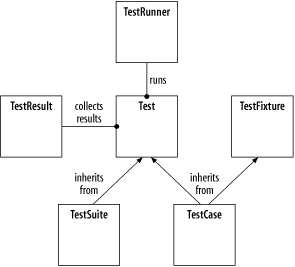
The classes TestCase , TestRunner , TestFixture , TestSuite , and TestResult represent the core of the xUnit architecture. To understand what they do is to understand how xUnit works. Figure 3-6 shows how they all fit together.

Figure 3-6. Core classes of the xUnit test framework architecture
figs/utf_0306.gif

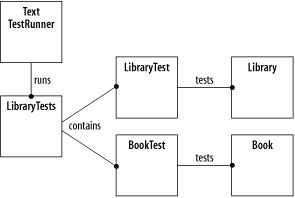
The test classes created in this chapter and the classes they interact with are shown in Figure 3-7.

Figure 3-7. The test classes LibraryTests, LibraryTest, and BookTest
figs/utf_0307.gif

LibraryTests is a TestSuite containing BookTest and LibraryTest . LibraryTest is a TestFixture , and BookTest is a TestCase . Conceptually, TextTestRunner runs LibraryTests , which runs BookTest and LibraryTest , which in turn run their test methods .

This concludes the discussion of the generic xUnit architecture. Chapter 6 through Chapter 10 describe the specific architectural details of some popular versions of xUnit, with usage examples for each one.


Chapter 4. Writing Unit Tests

The previous chapters present a simple unit test framework and the fundamentals of xUnit. The unit test framework's architecture is important to understand, but not something you have to think about often. Most of your time should be spent writing unit tests, implementing production code to make the tests pass, or refactoring. This chapter includes examples of common patterns used when writing unit tests, as well as related tips on unit test development.

The code examples in this chapter are unit tests of additional virtual library functionality, including looking up books by author and title, looking up multiple books by one author, and removing books from the library. The Library and Book code to implement the new features is given at the end of the chapter.


4.1 Types of Asserts

The code examples shown so far use plain asserts . These are the most generic type of test assertion, which take a Boolean condition that must evaluate to TRUE for the test to succeed. A plain assert, the unit test for the Library method removeBook( ) , is shown in Example 4-1.

Example 4-1. Test method testRemoveBook( ) using a plain assert
LibraryTest.java

   public void

testRemoveBook

( ) {

      library.removeBook( "Dune" );

      Book book = library.getBook( "Dune" );

      assertTrue( book == null );

   }

If the method removeBook( ) is stubbed out, the test fails. The following test results report the failure:

> java junit.textui.TestRunner LibraryTests

.....F.

Time: 0.06

There was 1 failure:

1) testRemoveBook(LibraryTest)junit.framework.AssertionFailedError

     at LibraryTest.testRemoveBook(LibraryTest.java:32)

     at sun.reflect.NativeMethodAccessorImpl.invoke0(Native Method)

     at sun.reflect.NativeMethodAccessorImpl.invoke(Unknown Source)

     at sun.reflect.DelegatingMethodAccessorImpl.invoke(Unknown Source)


FAILURES!!!

Tests run: 6,  Failures: 1,  Errors: 0

Although the line of code where the failure occurred is shown, the output does not describe the specific cause of the failure. It often is helpful to add an informative message to the assertion. The xUnits generally have two versions of every assert method, one of which takes a message parameter describing the assert. Example 4-2 shows the test method using an assert with a message.

Example 4-2. Test method using an assert with a message
LibraryTest.java

   public void

testRemoveBook

( ) {

      library.removeBook( "Dune" );

      Book book = library.getBook( "Dune" );

      assertTrue( "

book is not removed"

, book == null );

   }

With the additional message, the rest results provide better information about the cause of the test failure:

1) testRemoveBook(LibraryTest)junit.framework.AssertionFailedError: 

book is not removed

Although all assert conditions ultimately must evaluate to a Boolean result of TRUE or FALSE , it can be tedious to constantly reduce every expression to this form. The xUnits offer a variety of assert functions to help. Examples of several of the assert methods from JUnit are as follows :

assertFalse( book == null );

assertFalse( "book is null", book == null );

assertNull( book );

assertNull( "book is not null", book );

assertNotNull( book );

assertNotNull( "book is null", book );

assertEquals( "Solaris", book.title );

assertEquals( "unexpected book title", "Solaris", book.title );

These assert methods all have variants that take a message parameter to describe the failure, as shown above. The assertEquals() method has variants that take different data types as arguments.